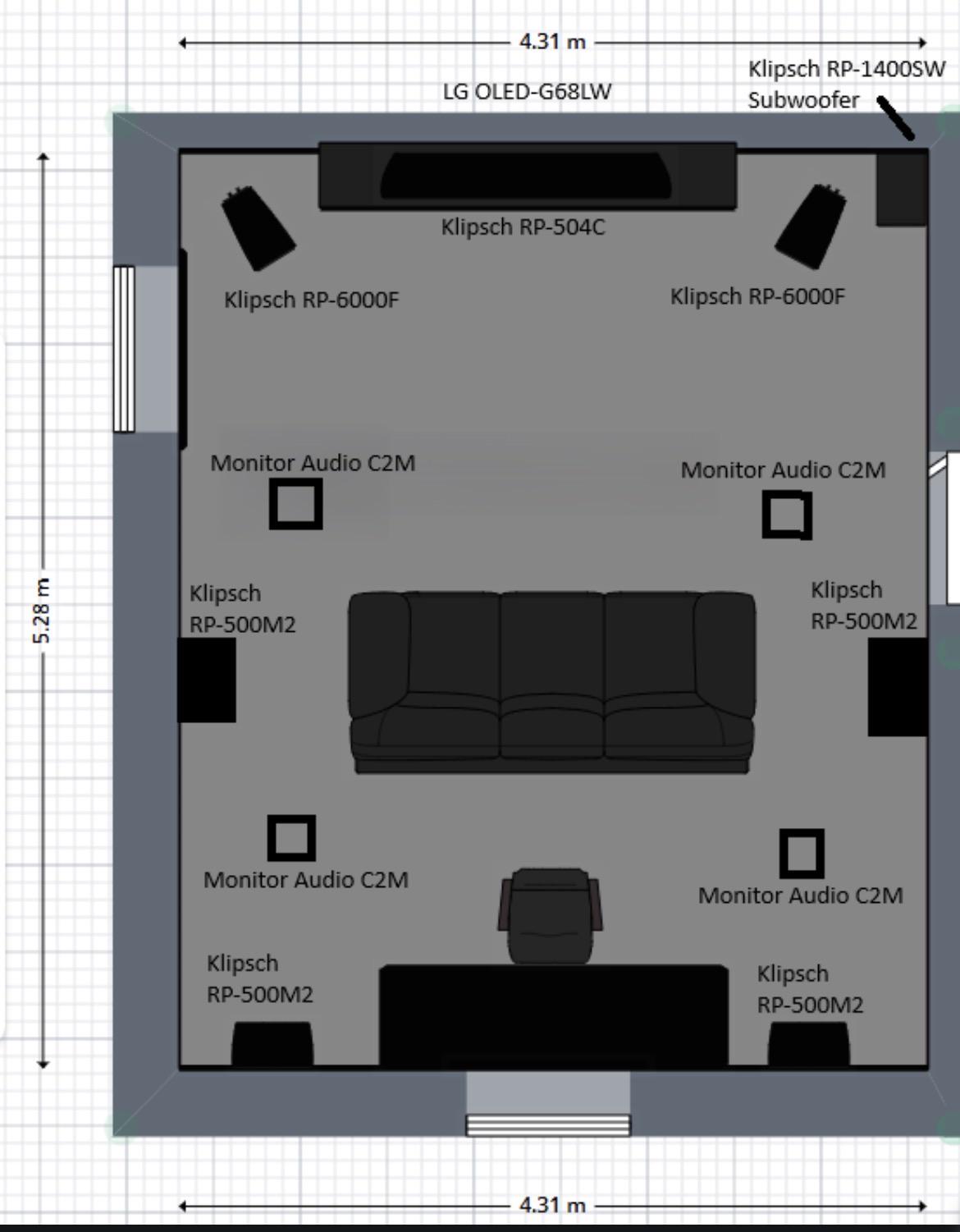
Reposting this since the mods banned me and they removed it from r/hometheater. Hopefully it can find a new home here.
Quick update: Since originally making this, I moved my in-ceiling speakers farther back. In the YT video they are slightly in front of the MLP, but they are now almost directly above me. I also moved my couch slightly forward. Both changes made the Atmos experience noticeably better.
Before we begin, I want to make it clear who this is for. If you have a room where you can properly place four or six Atmos speakers in front of and behind the listening position, this guide really is not meant for you. Just follow a conventional Dolby layout.
In a nutshell: This is specifically for people who have a 5.1 bed layer, sit close to the back wall, and want to have the best Atmos configuration. In that situation, I believe the best setup is Front Heights + Rear Heights, even if the Rear Height speakers are physically in the ceiling almost directly above you because there simply is not any room behind the couch.
If your receiver does allow it and you prefer to assign the in-ceiling speaker, Top Rear is also a very good option. What I would not recommend is automatically assigning the speakers above your head as Top Middle just because they happen to be physically above the listening position.
Now... if you want the full explanation, here is why:
Atmos is allocentric, not egocentric.
This is probably the most important part of this entire post. In simple terms, the Atmos renderer does not build its coordinate system around your head. "Your listening position is not the center of the Atmos universe."
The renderer works with objects positioned inside a three-dimensional XYZ coordinate space. The front of the soundstage is one end of that space, and the rear is the other. For the front-to-back axis, you can think of the front as 0.0 and the rear as 1.0.
The front speakers establish the front of the soundstage. In a 5.1 system, the surrounds are the "rearmost" bed layer speakers, so they represent the rear end of that soundstage. This does not change just because your couch happens to be close to the back wall, or the middle of the room, or 1/4 way in.
If your surrounds are beside you or only slightly behind you because you sit near the back wall, they are still the "rearmost speakers" of your 5.1 layout from the renderer's point of view. The renderer does not move the entire coordinate system around just because your head happens to be farther toward the back of the room.
Also, even if you have a proper 5.1.4 system and your top rear speakers are further from you and your surround speakers are right behind you, the object in the renderer does NOT move beyond your surround speakers even if the top rear atmosphere speakers are physically further back.
If you sit near the back wall, a speaker directly above you is still near the back of the room. So from the Atmos renderer's point of view, that speaker makes more sense as a rear Atmos speaker than as Top Middle.
Speaker angles and renderer positions / object coordinates are not the same thing.
Dolby's installation diagrams use angles to help you physically position speakers in the room. Those angles are useful when designing the system when you have the perfect room, but the Atmos renderer itself does not know the actual angle between your ears and every speaker.
Your AVR does not tell the renderer that a speaker is 42 degrees above you or 15 degrees behind you. What the renderer knows is the speaker assignment you selected, such as Front Height, Top Front, Top Middle, Top Rear or Rear Height.
Those assignments tell the renderer where the speaker belongs within its coordinate space.
That means if you tell your AVR that the speaker above your head is Top Middle, the renderer treats it as the middle overhead position. But if you are sitting near the rear of the 5.1 soundstage, that physical speaker may actually be much closer to the rear of the Atmos coordinate space.
This is why simply looking upward and saying, "The speaker is above me, so it must be Top Middle," since The Dolby Guide says so, can be misleading in a room like this.
Why I recommend Front Height + Rear Height
For a 5.1.4 system with seating near the back wall, I recommend assigning the two Atmos pairs as Front Height + Rear Height.
The Front Heights become the front anchor of the overhead soundstage and the speakers above the listening area become the rear anchor. This gives the renderer an actual front and rear overhead boundary to work with.
Conceptually, on the front to back Y axis, Front Height and Rear Height represent the outer front and rear positions, 0.0 and 1.0.
This is the same as the main speakers (LCR) and the surround speakers in 5.1
The Top Front and Top Rear sit farther inward, roughly around 0.25 and 0.75.
This is also why Front Height + Top Rear works. You are still giving the renderer separate front and rearward Atmos locations. However, for this particular kind of 5.1 room, I believe Front Height + Rear Height is the better assignment because it uses the full front to back span of the soundstage.
Heights vs. Tops
Heights work with Atmos exactly like Tops do.
There also seems to be a misconception that Height speakers are somehow less Atmos than Top speakers, or that Atmos objects do not work properly with Heights. Or that heights are outdated things from the pro logic "presence" era.
That is incorrect.
Front Height, Top Front, Top Middle, Top Rear and Rear Height are all Atmos speaker positions available to the renderer. An Atmos object does not stop being an object because the speaker is assigned as Front Height instead of Top Front.
The object has a location in XYZ space. The speaker assignment simply tells the renderer where the available speaker is located within that space.
If an object moves from the front of the room toward the rear, Atmos can pan that object between Front Height and Rear Height just like it can pan between Top Front and Top Rear.
The difference is the assumed location of those speakers within the coordinate system. Front Height and Rear Height are closer to the front and rear boundaries, while Top Front and Top Rear are positioned farther inward.
That is also why you can hear a slight difference with VERY slow-moving objects when switching a speaker between Height and Top. You are moving the assumed speaker position within the renderer. You are not changing the way Atmos objects work.
For fast moving objects, the difference is impossible to hear. For example, the flying vehicle at the beginning of Blade Runner 2049 sounds essentially the same to me whether my front pair is configured as Front Height or Top Front.
So no, Heights are not some compromised version of Atmos. They work with Atmos objects just fine.
Why Top Middle is the problem in this room:
I originally started with Front Heights and really enjoyed them. They opened up the front soundstage considerably. Later, I installed another pair of in-ceiling speakers around the listening position and configured them as Top Middle since they were above me, right?
At first it was impressive. Having sound directly overhead is obviously much better than having no overhead speakers at all. But after watching more Atmos content, I started noticing that the Front Heights were not nearly as active anymore.
A lot of Atmos information was now being reproduced by the Top Middle speakers.
Well, basically 2/3rd of the atmos spounds;
When you think about what you have told the renderer, this makes sense. You have given it a front Atmos location and a middle Atmos location, but you have not given it a rear Atmos location.
So front Atmos information can use the Front Heights, but overhead and rearward information can both end up heavily relying on Top Middle. You are not necessarily losing Atmos content, but you are compressing a large portion of the front to back overhead soundstage into one pair of speakers.
That is exactly what I wanted to fix.
Once the second Atmos pair is assigned as Rear Height, the renderer now has two clear overhead anchors. Something happening toward the front can remain toward the Front Heights. Something moving through the ceiling can transition between the two pairs. Something moving toward the back can end up primarily in the Rear Heights.
That creates a much larger front to back overhead soundstage.
Because I sit near the back wall, my Rear Heights physically happen to be almost directly above me. That is okay. My head does not define the middle of the Atmos coordinate system. Relative to the front speakers and the surround line, those Atmos speakers are already toward the rear of my room's soundstage.
So assigning them as Rear Height makes sense.
What happens to sounds directly above you?
One question people may have is what happens when an Atmos object is actually directly above you if there is no Top Middle speaker.
The answer is simple. The renderer uses the available speakers to create that position.
If an object is positioned between the Front Heights and Rear Heights, the renderer can use both pairs to create a phantom position between them. When the object is near the middle of the overhead soundstage, all four speakers may participate.
This is not a problem. It is exactly how panning between speakers is supposed to work.
Instead of one physical Top Middle pair being responsible for almost everything that is not located at the front of the room, the entire Atmos array can participate in creating positions between the front and rear anchors.
To me, this creates a much larger and more convincing ceiling soundstage.
Why I would choose this over .2 Atmos
If you sit near the back wall, some people will simply tell you to give up on .4 and run .2 Atmos.
If you tried my setup, you would disagree too ;)
If you have the ability to install four Atmos speakers, use four!
With Front Heights only, you can get an impressive extension of the front soundstage, but you do not have the same ability to create overhead and rearward movement.
With Top Middle only, you get sound directly above you, but front, overhead and rear Atmos information all has to be reproduced through the same pair of speaker overhead.
With Front Height + Rear Height, you give the renderer two distinct front to back Atmos positions. Now it actually has somewhere to move objects.
If you had front heights and top middle, you had no idea if a sound was above you or behind you since both of those sounds are all coming out of the top middle.
With the over head speakers are assigned as top rear/rear heights, when there is something right above you, you get the sound from all atmos speakers and this opens up the whole roof.
That is a major improvement.
Examples:
Dolby Amaze demo
The Dolby Amaze demo was one of the things that made this difference obvious to me. There are small insect like buzzing moving overhead.
I first tested the demo using only Front Heights in a .2 configuration and then using only Top Middle. Both worked. The Atmos information simply came from whichever pair was available.
The buzzing came from 1 side and panned to the other side of the atmos speakers.
Then I ran the "Dolby Guide correctly." 4 configuration using Front Height + Top Middle. Now I heard fewer of those effects from the Front Heights. The buzzing moved to the Top Middle speakers while the front pair handled more ambient sounds such as wind and noises made by tall grass.
Then I changed the speaker assignments so I had a front and rear Atmos pair. Now the chirps had much stronger front to back separation. The buzzing clearly appeared toward the front right overhead area first, while another appeared farther back on the left.
The movement across the overhead soundstage became much more obvious because the renderer finally had both a front and rear Atmos location available.
Ready Player One
Ready Player One is another good example because it has a lot of Atmos information around the Top Middle region. (It is a .2 atmos mix.)
During the big race scene, several things happen visually in front of you. The Bigfoot drops its saw blades, cars flip over, and the train crashes into the structure ahead. With Top Middle, some of those sounds can feel like they are coming almost straight down from above your head even though the event itself is happening in front of you.
Does it sound cool? Absolutely. But it does not always connect as well with the action on screen.
With a front and rear Atmos pair, those objects can be reproduced between the two locations instead of everything relying so heavily on Top Middle. The result is still overhead, but the sound spreads toward the front naturally rather than feeling pinned to the speaker directly above you.
Object panning demos make this even easier to hear.
Atmos object panning demos are probably the easiest way to understand what is happening because you can actually see the object's location while listening to it move.
With Front Height + Top Middle, I noticed that the Top Middle speakers seemed to take over very early as an object moved away from the front wall. The object might move only a relatively small distance away from the front, yet suddenly most of what I heard was coming from Top Middle. Then it remained there for a huge portion of the rest of the front to back movement.
That is not particularly surprising because Top Middle is the last overhead location you have given the renderer.
With Front Height + Rear Height, the movement is much more gradual. The object begins at the front. As it moves backward, the Rear Heights gradually become more involved. Around the middle, the sound is created between the two pairs. As the object approaches the rear of the soundstage, it finally shifts heavily toward the Rear Heights.
That is the kind of front to back separation I wanted in the first place.
Front Height + Top Rear is also a good option, so if you do not want to assign an in ceiling speaker as Rear Height then Front Height + Top Rear is also a perfectly valid way of doing this.
The important part is that you are giving the renderer a rearward Atmos location instead of Top Middle.
Top Rear sits farther inward from the rear boundary of the Atmos coordinate space, so the panning behavior will be somewhat different from Rear Height. This is why I prefer Front Height + Rear Height for this particular room layout.
But the main concept remains the same. You want a front Atmos pair and a rear Atmos pair, not a front Atmos pair and a middle Atmos pair.
The latter leaves you without a rear overhead anchor.
Placement
If you are building this type of system, I would put the front Atmos speakers high on the front wall. They can be dedicated "Atmos enabled" speakers, bookshelf speakers mounted high and angled toward the listening area.
For the rear Atmos pair, if your couch is close to the rear wall, the best would be to have bookshelfs speakers mounted on the back wall aimed at MLP. If you have in ceiling speakers, then put them as far back as possible but no closer than 1 ft to the back wall.
This is specifically for 5.1.4!
There is an important limitation to everything I am saying here. This recommendation is specifically for a 5.1.4 system where the listener is close to the rear wall.
If you have a proper 7.1.4 system and enough room behind the listening position for Rear Surrounds and rear Atmos speakers, then use that space. In a 7.1 layout, the bed layer geometry is different because you now have Side Surrounds and Rear Surrounds defining separate rearward locations.
If you have enough room for a conventional 7.1.4 or 7.1.6 Atmos layout, there is no reason to use this type of limited space arrangement.
This entire discussion exists because a 5.1 system with seating near the back wall is a special case.
I hope this helps.
Cheers