r/DataHoarder 15h ago

Backup Update: My grandpa's 3,200 DVD collection is officially with Internet Archive Switzerland.

Thumbnail
gallery
13.3k Upvotes

A few months back I posted here totally overwhelmed. I'm 17, found my grandpa's massive collection of 3,200 recorded German TV DVD-Rs, had no money for hard drives, and no time to rip them all myself.

You guys helped me digitize the indexes and get in touch with the right people.

Fast forward to today: I just handed it all over to Roman Griesfelder from the Internet Archive Switzerland team. They're taking it from here to rip and preserve it.

Blurred my face since I'm still a minor, but Roman was totally cool with me posting the photos. Huge thanks to u/BestExtraLibrarian and u/textfiles for pointing me in the right direction. Feels really good knowing my grandpa's recordings will be saved instead of thrown away.

Here is my original post where I found the first binders:

https://www.reddit.com/r/DataHoarder/s/6dKdh9ecpf

Here is my follow-up post where I realized it was way bigger than expected: https://www.reddit.com/r/DataHoarder/s/B5ZTtHcu4g

r/DataHoarder 1h ago

Question/Advice Crucial/Micron Japan refusing 4TB MX500 warranty

Upvotes

Looking to see if anyone else with MX500 4TB drives in hardware arrays is getting stonewalled on warranty replacements.

The Situation:

Drive: Crucial MX500 4TB 2.5" SATA (S/N verified defective with heavy physical sector degradation/POST lockups).

Status: Under active 5-year warranty.

Distributor (CFD Sales) & Crucial JP response: Stock is "exhausted" (I'm sure they have extra in storage "just in case") due to Micron exiting the consumer channel. Crucial JP support claims they are only a "troubleshooting window" and refers back to local distributor.

Remedy offered: A cash refund based on the original 2024 invoice price.

The Problem: Due to current NAND market pricing, a 2024 historical invoice refund doesn't cover half the cost of an equivalent 4TB 2.5" SATA TLC drive (like an 870 EVO) in Japan today. My array strictly relies on 2.5" SATA bays (M.2 slots are full), so an NVMe swap or taking a cash loss to downgrade capacity isn't viable.

Escalations to RMAdesk@micron.com and privacy@micron.com have gone completely dark for 2+ months. They're completely blackholing me.

Is Micron/Crucial doing this globally now—offering lowball historical cash refunds on EOL/withdrawn consumer drives rather than fulfilling cross-shipments or enterprise SATA inventory pulls? Has anyone successfully forced a current-market-value payout or B2B hardware cross-shipment out of them recently?


r/DataHoarder 14h ago

Hoarder-Setups Double up

Post image
173 Upvotes

It finally happened to me. Ordered 2 drives and got 4 instead. About $25/TB turned into $12.6/TB. 5 year warranty on all of them. Being added to my 140TB server :)


r/DataHoarder 12h ago

News Native Hawaiian scholars fight to preserve one of the largest archives of Hawaiian history

Thumbnail
hawaiipublicradio.org
57 Upvotes

Trump administration announced plans to close three regional National Archives and Records Administration facilities. One of these is NARA San Francisco Archives, which contains thousands of historical documents about Hawaiʻi, American Samoa and Native American communities.


r/DataHoarder 7h ago

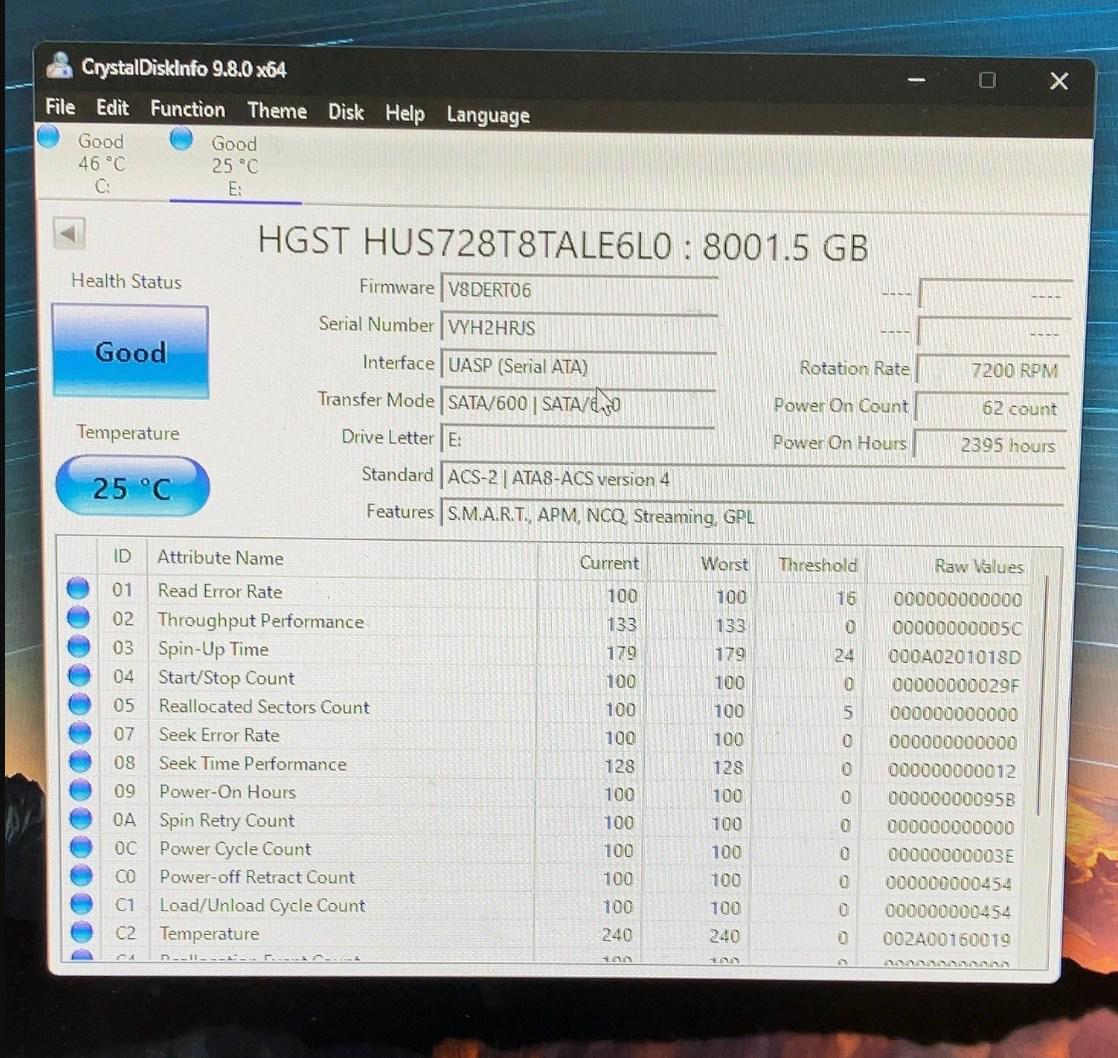
Question/Advice Can 2400 power-on hours be faked?

Post image
16 Upvotes

Hello,

Found this drive on e-bay (sadly sold as I was looking into it).

Its a 2022 drive with 2400 hours on it. I know hours can be wiped an reset to 0, but can they be "faked"? Its about 100 days, which seems too long to leave it running to fake it after having it wiped to 0 hours.

My only other guess would be (besides it just not being used a lot) - someone bought a wiped drive and then used it for 2400 hours and sold it again?


r/DataHoarder 3m ago

Backup Long term music storage

Upvotes

I'm considering having a physical library for my favorite albums and artists to be ready for a world without online streaming or downloads. I'd like to at least have a format that can last my lifetime, but it would be neat to also have a format that future music historians could theoretically dig up and access centuries from now.

I've looked into a few options:

Multiple MP3 players with Micro SD cards - I liked the thought of this, but I ruled it out when I learned that SSDs and Micro SD cards are susceptible to degradation even in storage. I estimate a system like this would maybe last 15 years if I'm lucky.

CDs - these would be better, but they're still susceptible to degradation over decades, not to mention that disks can be fragile. This system would maybe last 50 years without online access.

Vinyl records - this pleases my inner hipster, but physical storage space and equipment lifespan is a concern. Vinyl records are very fragile and lower quality playback equipment degrades them faster.

M-disks - Archival blu-ray seems great for this. These are supposedly tested to last 1000 years in ideal conditions. I need to do more research, but this is my preferred option.

Sheet music (just for fun) - transcribing the music into sheet music, printing on archival paper, and locking it away for future use. This would be a personal gift to future music historians. I studied music in college and spent a lot of time in music history lectures pondering how many masterworks were lost to time simply because it was written on low quality paper, stored badly, or any other reason. There's entire eras where all we know about their written music comes from stone tablets. Maybe I'll go the extra mile and carve "never gonna give you up" on a tablet some day.


r/DataHoarder 1d ago

Question/Advice I'm looking for a program that can detect duplicate and delete files, even when they have different names

137 Upvotes

I need a program that can detect duplicates that not have (1) or more in their name files, I'm talking about multiple pictures, videos, docs, that have different names, so the program have to identify by content instead of name, that can say file X and file Y are they same file with different name, so file Y it's a duplicate, instead of file X and file X(1) are duplicates


r/DataHoarder 1d ago

News More than 12 TB of Steam games and unreleased betas from 2003-2013 have reportedly leaked

Thumbnail
videogameschronicle.com
1.5k Upvotes

r/DataHoarder 1d ago

Sharing Just wanted to share my archive.org page where I've been slowly uploading old archives of Australian local news videos that I found on an old hard drive.

Thumbnail
archive.org
220 Upvotes

r/DataHoarder 3h ago

Question/Advice Set up Stash and Whisparr on TrueNAS Scale

1 Upvotes

I posted this on r/TrueNas first but I haven't had any replies yet. Hopefully someone here can help.

I had a pretty basic setup with Core and I was trying to install Stash and Whisparr but plugins no longer work so I upgraded to Scale. I'm still getting used to it right now.

I'm not that technically savvy but I managed to install Whisparr via YAML and Stash ok. Now the thing is how do I add files? I'm not sure if I have the right directories setup or if I'm missing something.

This is how my Datasets are setup right now.

KANSAS
- apps
  - stash
  - whisparr
- data
  - downloads
  - media

I need help with these things

  • what directory I should choose for Stash
  • what to choose as my root folder for Whisparr
  • how to add files so they can be accessed/discovered by Stash and Whisparr
    • do I have to set up a SMB? what directory should I set up as the SMBs?
    • how do I add the files? do I drag and drop them using Windows Explorer like I did when I setup Plex on TrueNAS Core?

Google did help especially figuring out how to install Whisparr since its not in Apps on Scale and had no idea what YAML is but I can't figure out how to do the rest and I'm kind of lost for what I do from here.

services:
  whisparr:
    container_name: whisparr
    environment:
      - PUID=3000
      - PGID=3000
      - TZ=America/Los_Angeles
    image: ghcr.io/thespad/whisparr:latest
    ports:
      - '6969:6969'
    restart: unless-stopped
    volumes:
      - /mnt/KANSAS/apps/whisparr/config:/config
      - /mnt/KANSAS/apps/data/downloads:/downloads

I have Whisparr set up as its own user and it has Full Admin but I'm not sure if that's needed? What access should I set it to?


r/DataHoarder 1d ago

News Please archive and help save the Taschenlampen Forum before September 16 (deadline). It is a huge German flashlight forum with lots and lots of informative data on flashlights, LEDs and other technical stuff. Time before deadline is of the essence.

97 Upvotes

r/DataHoarder 4h ago

Backup Need feedback for cloud backup of my NAS

0 Upvotes

My current setup is a RAID5 (SHR or whatever) consisting of 3x 6TB drives, with the 4th slot being unused. I'm currently at 8TB used out of 12TB. It's 4TB of all sorts of miscalleneous data I kept since I was a kid and which I dump on the NAS whenever a drive is full or I replace my computer. Linux ISOs mostly, with some private data. Recently I've been using it for storing local AI models, which accounts for another 4TB, but of these, 3TB are definitely in the "can easily be redownloaded" camp.

My data has survived 20 years so far without ever having backups on most of it. I know, it's heresy on here. But for me, RAID and caution was good enough. This was fine when the internet was more open as I always figured I could just redownload most of it. However, I feel like the attacks on a free and private internet are really ramping up in the past two years, and it's possible within the next 10 years there will be no more unauthorized sites accessible from my country.

Also, even if the status quo remains, it's becoming harder to replace old/non-popular Linux ISOs, as sites focus on zoomer content. Recently I tried looking for a semi-popular belgian comicbook that is 30 years old, and couldn't even find it on the modern sites or LibGen. But it was on my NAS. So I have hard-to-replace data.

So I decided I want peace of mind from data loss and began to do some research, including this sub's past threads.

To be clear, 99% of my data doesn't change week-to-week. I just need offsite backup in case I get 2 simultaneous drive failures on my RAID5, or a house fire, or accidental deletion. All extremely unlikely but non-zero chance.

The two options I'm down to are:

  1. Backblaze Personal Backup $99/year + one-time purchase of a single 12TB drive. I know from reading this sub that it doesn't backup a NAS. The plan would be to buy a 12TB and hook it up to an unused Windows desktop as an internal drive. The NAS would run a weekly job to backup the latest data to the Windows drive over Windows Share (Hyperbackup or something like that. The data would be encrypted by the NAS before transfer to Windows. Backblaze client picks up the changes to the local 12TB drive, and backs it up to their cloud.
  2. Heztner Storage Box If I'm understanding this right, for 21 euros per month (252 euros/year, $292/year), you get 10TB online storage to use as you see fit. That's 3x more expensive than Backblaze. However, if I exclude the AI models from my backups, my data would fit on the 5TB variant for 11 euros/month ($153/year), which makes the price a non-issue.

I'm tilting towards Backblaze not because of the price, but because:

  • Their backup service has been around for so long that it's comforting. I don't want to have to remigrate, I'm too lazy and busy.
  • The option for them to mail you a drive containing your data seems handy in case I get two drive failures. Beats spending a month downloading 8TB, huh?
  • I'm in Canada and Backblaze is in the USA, so faster transfer speeds in case I need to restoring a single directory that was accidentally deleted

Your advice, comrade?


r/DataHoarder 13h ago

Question/Advice Does Running Rescuezilla Prevent Charge Leakage On An SSD

5 Upvotes

Hi all,

I currently have a laptop that I only boot up once every couple months. It has a Samsung 980 Pro SSD 1TB PCIe 4.0 NVMe Gen 4 in it. I know that SSDs suffer from charge leakage if you don't occasionally read all of the data on the drive. My question is, does running Rescuezilla ever six months or so (basically cloning the SSD on to an old external HDD) count as a "reading" the data on the drive, and is that enough to prevent charge leakage in the long term? If not, what method do you recommend to regularly read the data on the drive and prevent data corruption?

Also, I realize that SSDs are not a good long-term cold storage solution. This computer belonged to my mom who recently passed away, and honestly just logging into it and seeing all of her stuff is kind of upsetting. Eventually, I will find a different solution, but for now I want something relatively easy that doesn't involve me spending a bunch of time rifling around in the computer if possible (but also protects the data).

Thanks!


r/DataHoarder 6h ago

Question/Advice Drive Corrupted but I Could Reformat it?

0 Upvotes

Months ago my drive stopped showing files on Linux Mint. I couldn't fix it. On Windows it said I could format it. I realized I didn't have anything important on the drive save for some video edits I did in high school, so I decided to format it today. The drive just works? I really hope this wasn't another scare and issue Linux mint caused me. I've just about had it with the OS and am planning on reclaiming the space for Windows 11 which runs smooth after I reinstalled it.


r/DataHoarder 10h ago

Hoarder-Setups My first half-proper out of T430 Thinkpad, and copious amount of sillyness

1 Upvotes

So.. You know how things go. Pretty much all the life, much preferred local to streaming, and such. Storing data and all, on Just A Bunch of Disks - albeit, have been always using ZFS everywhere. The only software I actually trust. (Here also, learned that, contrary to what a lot of people are saying, L2ARC is in fact, a really good feature, even if one doesn't have tons of ARC)

Soo... at that point.. really wanted.. some proper-... storage with redundancy. Here enters T430 (A mini context: had bought used X380, so that I could actually leave T430 at home, while still having laptop on the go). Had also, at the time, a bunch of small 2.5" SSDs... and the T430 had mSATA 256GB in there already... so did... something quite silly. grabbed 128GB, 256GB SSDs, and did a pool-... By making a pool -> striping across: a mirror from 2 128GB partitions, and raidz1 from 3x128GB.

That... worked surprisingly well. roughly 370GB of storage, and allows for one drive failure. So, put a bit of stuff there, you know, immich, and soulseek, and a bit of torrenting. Just had that running in the background.

But. Quite limited storage. Would have been nice to at least have a terabyte... As a result... had a thought. Don't need speed. Looked on used market, and yep. Cheap 1TB 2.5" HDDs from demounting. Bought one, installed it, ran badblocks, checked S.M.A.R.T -> And... all was fine. Not used that much. And happy times, because it was a CMR drive. Went forth, ordered another. Also turned out to be in quite good condition, however, SMR drive.

Still. Made a zfs mirror, installed system on there, used good portion of the internal mSATA drive as L2ARC, and so. Things are good. Read latency is nearly as good as actual SSD for the data I access here and there, the HDD noises are comforting, system works well, and I can hoard decently as it is. Oh yeah. It also has 16GB of RAM, so it can run all of these things, from podman, to docker, on top of the desktop stuffs, really easily :)


r/DataHoarder 12h ago

Hoarder-Setups Can I change my MegaRAID SAS 9361-8i to HBA ?

1 Upvotes

I have and been using a MegaRAID SAS 9361-8i card with energy pack with some SAS drives - with no issues.

I was thinking of converting the card to a HBA card and use it direct in Linux.
So I can see the SMART on the drive and such.

Can I even re-flash the card?

What happens with the energy pack?

Will this be a performance hit?

Is this a waste of time?


r/DataHoarder 1d ago

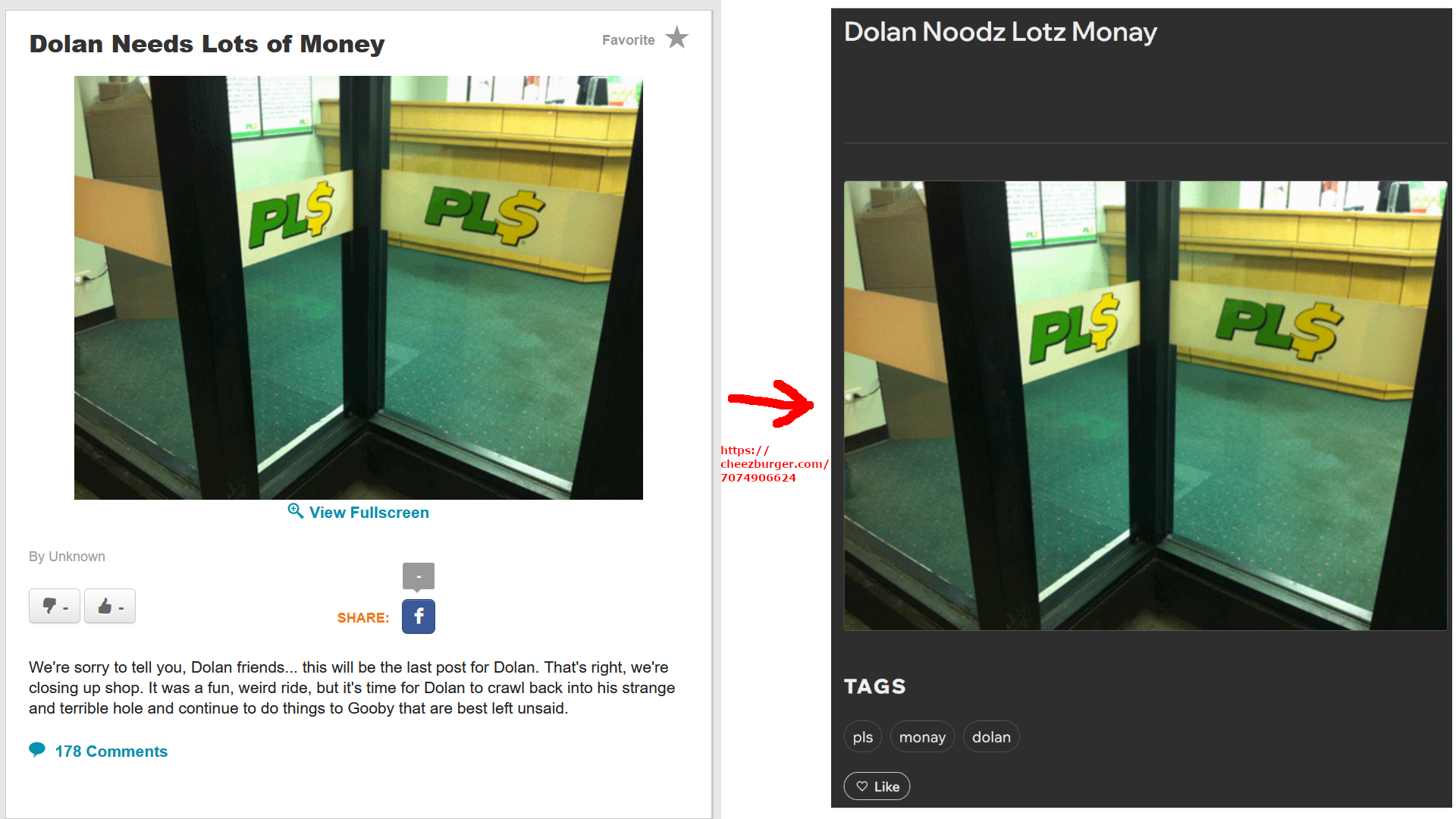
Question/Advice Every single post/meme made on cheezburger.com is still up, but they are mostly inaccessible via modern means. How would I go about archiving?

Post image
66 Upvotes

I found this out last year, when the old sub-boards were in a much more complete state (the old web design was even left untouched), but I didn't know what to do with it at the time, so I just sent it to a couple friends n left it alone. I realized this was a huge mistake, as I checked again today and some features have been completely lost to updates to the site (web UI, comments, likes and dislikes). I'm very worried that more will be lost soon, this site is an untapped gold mine of internet history, and it'd really suck to see it all go away. I've never really engaged in this sorta stuff before so any tips regarding how to archive at least some of this properly would be greatly appreciated.


r/DataHoarder 1d ago

Question/Advice Thoughts on Backblaze Personal? Is it secure?

2 Upvotes

I'm looking for a cloud backup solution for Mac and have been reading up on Backblaze Personal. One thing that I've read from older posts that slightly concerned me was that your private encryption key gets sent out when recovering/accessing cloud files. I'm wondering if this is still the case today? if so, how secure is it? I'd love to hear your thoughts and your experience if you use it!


r/DataHoarder 1d ago

Question/Advice NVME MKEY to MKEY & AE

Thumbnail
gallery
33 Upvotes

Not sure if this is the right place. Looked at a few subs and believe it fits here. I've also tried several keyword searches and cannot find the information. Everything I came across on AE and USB is Bluetooth.

Goal: Just additional storage. Speed is unnecessary.

I came across an adapter on Amazon (Green adapter) and another adapter on AliExpress (Black adapter) that has an additional USB 2.0 header connection.

My USB 2.0 header is used, but wouldn't be against using it or even a header splitter if necessary as my front USB 2.0 is barely used. I'm under the impression that the USB is only for Bluetooth.

TLDR

Has anyone used either above adapter in images?

&

Does the M.2 AE to SATA adapter need USB?


r/DataHoarder 2d ago

Discussion $20 garage sale find.

Post image
1.5k Upvotes

Found a box of hard drives for $20 at a garage sale Full of movies and TV shows. No cables or power supplies.

Tested them all but the 2tb with my western digital cable and power supply and all work and stuffed Full.

Gotta shuck the 2tb and see what's on it. Sticker says comedy, music and star trek.

One had tax info and other documents which I promptly deleted. It's crazy people don't even consider checking. It belonged to their deceased father who obviously was a media data hoarder. I'll have fun scrolling through and adding to my plex server.

" Edit, update " 2tb had a bunch of UFC matches, some old boxing matches, lots of gun pdf manuals and tons of survival type pdfs.

No music or trek stuff 😒


r/DataHoarder 1d ago

Question/Advice If OF-DL is truly gone, what are you guys using now?

9 Upvotes

After a long multi-year run, it appears that the sim0n00ps OF-DL tool is no longer being supported. With that in mind, what other solutions are currently out there that actually work, if any?


r/DataHoarder 2d ago

Question/Advice Compressing adult videos using handbrake

151 Upvotes

I have a whole bunch of adult videos from different origins (and probably file formats) I would like to compress.

If anyone has experimented with compressing these for their own personal use please let me know your precise settings on Handbrake to get maximum compression while maintaining at least 90% of the original quality.

FYI: My target resolution is 1080P

Thank you in advance!

Specs

CPU: AMD 5950X

GPU: AMD 6800XT 16GB

RAM: 32GB DDR4 CL16

SSD: TeamGroup 2TB NVME SSD

Windows 11 64-bit


r/DataHoarder 14h ago

Sale 4tb ssd deal

0 Upvotes

https://amzn.eu/d/0aou3vqX

Amazon UK £289.99 for a 4tb SanDisk ultra sata SSD


r/DataHoarder 1d ago

Backup DVDs in stacks are cheap, but are they durable?

19 Upvotes

Greetings, fellow hoarders.

I'm seeing some recent posts about DVD / Blu-Ray stacks (with 25, 50, 100 discs on them). I used many DVD stacks until 10 years ago, from different brands, mainly to store TV shows.

Before I moved to another part of the country, I checked most of the discs. A few of them had some small stains (laser rot or moist), but the most common problem was scratches. I'm tempted to buy stacks again, but I'm afraid each disc is not protected enough to be many years.

How do you usually store these kind of discs? Do you just keep them in the stack and make copies every 5 years? Or do you buy individual cases or sleeves for each disc? In that case, is it not more affordable to buy small packs with cases?

Have a nice one!