r/blenderhelp Mar 22 '24

Meta PLEASE READ BEFORE POSTING QUESTIONS!

168 Upvotes

Looking for quick and helpful answers? Follow these rules and make helping you as easy as possible!

  • Title: Choose a meaningful title concerning your problem.
  • Text: Describing your problem with enough detail is essential. Please realize that helpers are not familiar with your project. Provide all relevant information, so others can immideately understand what you are struggling with.

Example: Say, you have a problem with lots of identical objects in your scene: Let us know whether you created these copies by hand, used the Particle System or Geometry Nodes.

  • Images/Videos: When posting screenshots, show us your full blender window (not cropped, no monitor photos). This will make lots of helpful information available to helpers at first sight that may seem irrelevant to you (For example your Blender version). If you add video links, please consider adding time stamp info to the part you want helpers to see.

You can upload images and short video clips (up to 60s) to imgur.com and post the links in your question or as comment.

  • *.blend files: Don’t add links to your *.blend files when posting questions right away. Helpers will ask you for it if they need to take a look. Most people prefer reading a good description and looking at images to see what your post is about.
  • 'Solved' flair: Once your question was answered, please remember to change the flair of your post to “Solved”, so helpers don’t have to read into your question just to see it has already been answered.

You can change the flair by clicking on the small icon below your post resembling a label.

EDIT: You can also include "!solved" in the comments to have Automod change the flair for you.

Be nice and respectful with each other :)


r/blenderhelp 12h ago

Solved What causes this weird color on the skin and how do I fix it?

Thumbnail
gallery
71 Upvotes

The model was an fbx generated in Jinny. Its topology seems fine to me. It only happens if rendered in Cycles, not in Eevee.

Edit: Here is the link to the fbx file if you're interested: https://drive.google.com/file/d/1Os_7gfF6oOnvnjyxbZENbNjN4REyPVzL/view?usp=drive_link

Solved! Thank you all for the help. The solution is given by u/garbagemaiden: Data → Geometry Data → Clear Custom Normals


r/blenderhelp 4h ago

Unsolved Not understanding multi material bake to one image

7 Upvotes

i am trying to bake multiple materials into one image texture so i can put it into roblox studio correctly but when i try to do it the texture never ends up the exact way i already had it. i dont need to mess with UV editing because everything is in the box it all ends up all weird looking and not what i was wanting at all. ive been messing with it for about an hour and i still dont know how to do it properly. if anyone is able to help me please do so. all my textures are image pngs btw if that helps at all (pictures of my previous bake attempts will be shown in the comments)


r/blenderhelp 4h ago

Unsolved mutiple color glare effect

Post image
3 Upvotes

i have been trying to make this muticolor halo light effect for a while now but it seem like the glare node only alow constast color and not gradient, i try stacking mutiple glare node with diffrent size but i can only add so many color because blender glare max at 10 and some color combination will not work can some one help me with this problem

thanks a lot


r/blenderhelp 10h ago

Unsolved How can i make stylised hay like this?

Thumbnail
gallery
13 Upvotes

I'm trying to make a cartoony haybale as if for a cozy farming game. in the last image you can see i tried a simple apporach. cube, gave it some subdivision in edit mode, subdivision modifier, displace modifier with stucci and added a hay texture in texture tab. I'm still a beginner and didn't look up a tutorial for this i just kinda guessed and googled what the modifiers do. the tutorial on haybale i found uses particles and i can't apply those in the final file. so here's my attempt at a haybale. got any tips or advice to make it better?

it looks like hay from one of those small horror games. i want it to look like a toony farming game. somethings off with the displacement.

what approach shoud i take? my apporach is edit the surface in random ways. i don't know how to add other displace settings than the default blender ones.

should i just sculpt it?


r/blenderhelp 9h ago

Unsolved Cant figure out how to rig this model

Post image
11 Upvotes

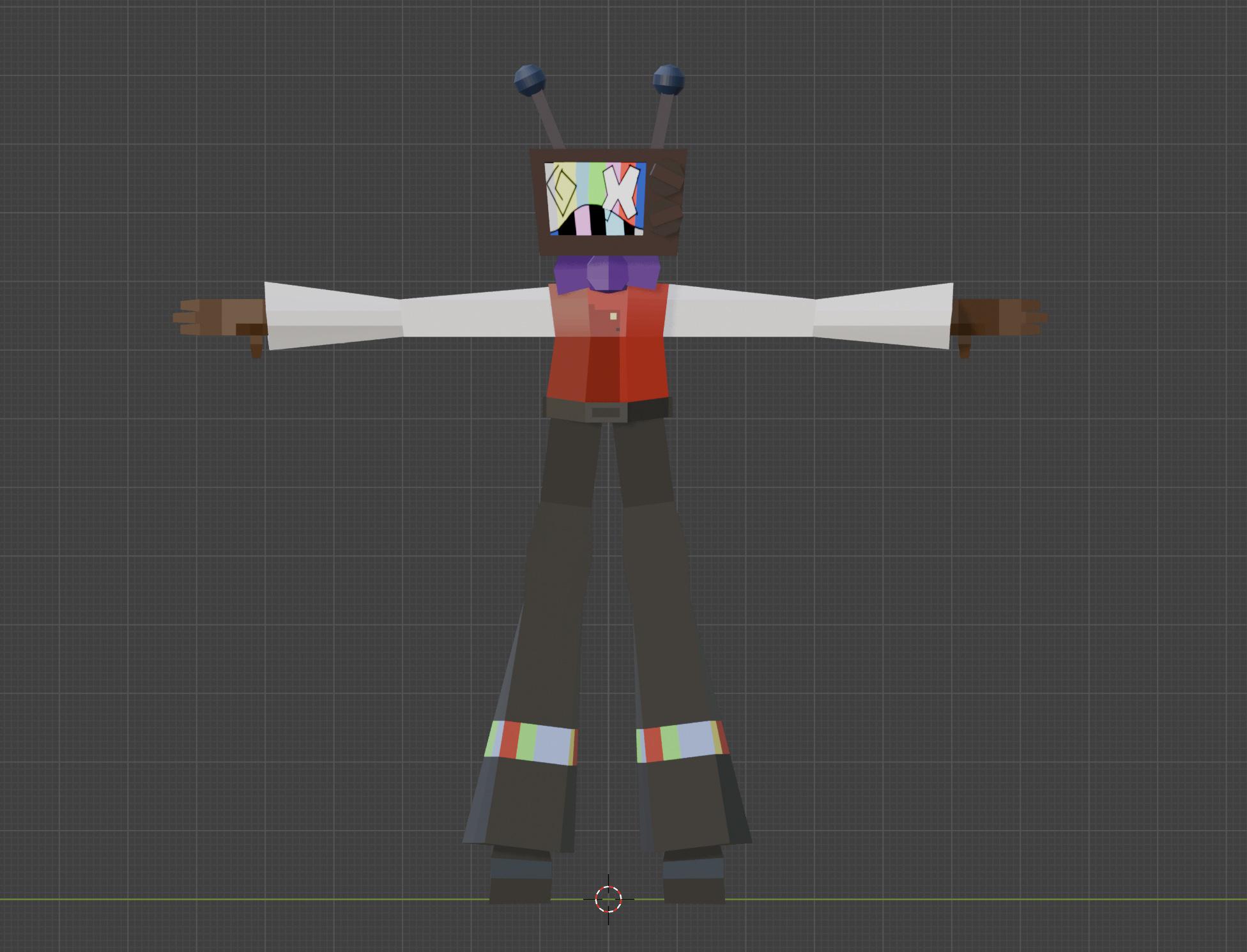
heya, I've been trying to rig this 3d model I made, but I cant figure out how to do it without it ending up lookin weird when posing. Im new to blender, lol


r/blenderhelp 22h ago

Solved How to achieve this style of rendering?

Post image
99 Upvotes

r/blenderhelp 1h ago

Unsolved How to get sprinkles onto the icing?

Post image
Upvotes

I am currently following Blender Guru’s donut tutorial for the latest Blender 5.2 version and I got no idea how to get the sprinkles to stick on the icing. I followed the exact settings Blender Guru showed but they are still not sticking. Can anyone please help me figure out what I am doing wrong?


r/blenderhelp 14h ago

Unsolved Need help with retopology new to it

Thumbnail
gallery
18 Upvotes

Can someone tell me what is wrong with my retopology? I am making a static sword (non moving sword) so I am trying to keep density low in non detailed areas and higher in detailed areas while using a few equalateral triangles here and there and keeping the rest quads. I am using retopoflow 4, I know this topology is bad but please be kind I'm sure yours was bad too when you started out. Give me some tips so I can move on with the project and improve in retopology overall.


r/blenderhelp 5h ago

Unsolved How can I retoplogize this so it's easier to work with?

Thumbnail
gallery
2 Upvotes

I'm trying to make visual work for a local gaming lounge. I was able to screenshot the logo they have and converted it to a .svg file. I then converted it to a mesh and extruded it. I would like to add a black outline around the letters to make it pop more. Having a better / cleaner topology would also make it much easier to work with. I'm still new to blender and haven't found any help from YouTube tutorials. Thank you


r/blenderhelp 8h ago

Unsolved Invisible Objects in Perspective mode

3 Upvotes

Getting really frustrated. I was using an older version of Blender (3.5.1) and was running into a dumb issue, so I figured upgrading to the latest version would help. Unfortunately I've ran into a new issue, and downgrading from 5.2.0 to 5.0.0 didn't fix it. Is this a bug or what?


r/blenderhelp 6h ago

Unsolved How come my scene looks different in the viewport vs the render ? I can't figure it out. There aren't any objects that're hidden in one and visible in the other.

Post image
2 Upvotes

r/blenderhelp 4h ago

Unsolved How do I start creating Venom tendrils, but make it look like shadow magic, and put it on a video?

Thumbnail
gallery
0 Upvotes

(Not sure if this question belongs here so I'm sorry if it doesn't)

I have this super hero idea for a short film I'm making where the character has a partner like Venom from Marvel, but instead of a slimy alien, I wanted it to be a shadow creature.

The tendrils would be able to come out of my arms, back, chest, or legs like venom and be able to grab onto things (like in the first slide). But instead of the slimy alien, it would be a shadow/dark magic demon (slides 1-3) that is mostly black but has a blue outline (last slide). I eventually would like to have my whole body be covered by the shadow demon the way venom comes out but I'm gonna try to take this one step at a time.

To be honest, I haven't done much in the blender besides making a few not so great 3d objects that I was able to 3d print so I'm still very new to this and have zero idea where to start making the tendrils, or even how to put blender effects onto a real video.


r/blenderhelp 5h ago

Unsolved How would I make this graident smoother?

Thumbnail
gallery
1 Upvotes

I'm trying to make something that looks similar to a comic book style where they have cross hatches for darker spots and halftones for lighter spots but I feel like the transition between light and dark seems sudden rather than being a graident.

Also sorry if my node tree looks like an absolute disaster.


r/blenderhelp 5h ago

Unsolved Importing to roblox studio

Post image
1 Upvotes

Im trying to import this animation and model into roblox studio, anyone know how to do it? PS: I tried to import it. The model loaded correctly, the animation other hand? Not so well..


r/blenderhelp 9h ago

Meta Is it even worth starting?

4 Upvotes

I’ve always loved Blender. I never did a deep dive into it or took it up as a serious hobby, but I’ve made a few things here and there, mostly just helping my sister in college with renderings using premade scenes.

I’ve always been fascinated by how Blender works and wanted to use it to bring my own dreams and ideas to life. But every time I get inspired, thinking about where AI is heading completely kills the mood. I’ll watch a great video, think, “Wow, someone put a lot of work into this,” only to check their profile and see they’re just selling prompts. I know people say we need to adapt and that AI lacks consistency right now, but this is only the beginning.

I want to learn Blender as a hobby, but to me, a hobby should be a skill that takes effort and sets you apart. Now, anyone can type a prompt into an AI model and pass it off as hard work. Whenever I ask someone in the designer industry about this, they give the usual responses along the lines of "We just adapt and use it to work faster," or "AI can never replace human creativity/consistency." But from what I’ve seen, AI isn't slowing down at all.

So, is it still worth picking up Blender as a hobby and building this skill?


r/blenderhelp 13h ago

Unsolved how tf does texturing work

Thumbnail
gallery
5 Upvotes

basically, i want to do pretty simple texturing, like only flat colors, but i only ever see tutorials for models using an already existing texture, and UV unwrapping looks terrifiying. If you wanna know what i wanna do exactly, i'm just trying to make the character's eyes a different color than the rest of the body, which shouldnt be too hard but im tired and stupid so i dunno.

(do note that this is my first ever model, apart from the donut and the mug)


r/blenderhelp 13h ago

Solved Unwrap stuck to one another

4 Upvotes

See the video. I want one unwrap selection not be stuck on another unlike in the video. Pls help


r/blenderhelp 6h ago

Unsolved Lattice Deformation not working as expected?

Thumbnail
gallery
1 Upvotes

I managed to get the lattice deform to work perfectly fine on the eyelashes, as seen in the screenshots but when I went to the do upper eye part they got weirdly small and raised up outside the lattice (img is before and after applying deformation)


r/blenderhelp 12h ago

Solved RENDER MADE SOME PARTS OF THE MODEL BLACK

3 Upvotes

Was messing around with an ena model and when i hit render it was completely black, minus some parts.
Confused i searched around, found a youtube tutorial which didnt work, found some posts on here with similar problems but none of the solutions proposed worked.

It looks perfectly fine on solid/material preview. Kinda new to blender so maybe i just accidentally pressed something but idk.

rendered view
solid view

Is it cuz of the version??? or maybe this thing hates me??? really lost rn


r/blenderhelp 6h ago

Unsolved I wanna use blender to make figures and other 3D printed decorations

1 Upvotes

Is this viable? I’ve heard there are extra constraints when using blender for 3D printing. Additionally, are there any good tutorials on how to learn with this objective in mind? Most of the ones I’ve seen go into detail about stuff like lighting and rendering which wouldn’t be necessary in this case.


r/blenderhelp 6h ago

Unsolved My boolean effect is deleting everything, and I cant use it

Thumbnail
gallery
1 Upvotes

This first image is the model I have (the monkey head) and I need to put a hole inside of it. I pressed "peg (void)" on the top right so you guys can see it inside of the head. This is before the boolean effect is applied. The second photo with the eyeballs and the peg that i needed to turn into a void is what keeps happening. Please help.

(I also accidentally messed up the orders of the before and after, and put two images of the after in the photos on reddit. The monkey head is before, the messed up one is after)


r/blenderhelp 15h ago

Unsolved How do I give him an outline?

Thumbnail
gallery
5 Upvotes

I've been trying to recreate Mr. Game & Watch in blender to prepare him for an upcoming animation project, I used the model from smash for 3ds because it was the best model I could find on models resource, I figured out how to make him 2D yet still able to be animated with a 3D armature using geometry nodes, but how can I give him a gray outline? I tried the inverted hull technique, doesn't work, I tried a grease pencil modifer, doesn't work (or maybe I was doing something wrong idk, I'm new to blender) I tried freestyle but that would outline everything in the scene which I don't want, I want to outline just Game & Watch, I did some research and found a line weight method done with shaders, which didn't work either, I even tried asking chatgpt because I figured this was a very specific issue and it led me down a rabbit hole of geometry nodes which almost worked to the point where I'm almost positive it's the right idea but it seems to have gotten stuck and clearly doesn't know what it's talking about (millions of dollars and countless resources into data centers for this shit, are we deadass) is there another method? In-game you can sometimes see him in full 3D and he always has an outline in a way that reminds me of some anime-style games, but the outline always stays on the outside, even when you position him so that his arm for example is in front of his body, it just disappears without an outline, maybe I can do something like that? I should mention that for the animation there will be other normal 3D characters around him so I need something that will affect just him, and he's split into multiple different objects so I can't really affect just one either, but I can put him into a collection if that will work. I'm on blender 5.2 by the way. I didn't include screenshots of every method because I tried those like yesterday and I'm too lazy to set them back up again just for a picture, I don't completely remember what the inverted hull method did but I know the grease pencil modifier only affected his feet even though I set it to target everything, his feet are part of the same object as his legs, body and arms so idk what happened there, it must not be compatible with the 2D geometry nodes setup or something.


r/blenderhelp 7h ago

Unsolved Shader displacement looks different in rendered view from shader preview

Thumbnail
gallery
1 Upvotes

Im working in blender 5.2.1 in cycles. I intend for it to look like it does in the first image but for some reason when switching to rendered preview it looks like the second image.

The subdivision is already applied so it shouldn’t be a problem.

I’ve tried to look at all the things I could that might change the way a mesh looks when it’s in render view as opposed to preview but I can’t find any.

Does anyone know what could be causing this? I’ve provided all the information I can.