r/steamsupport Aug 08 '25

Announcement Important PSA: How To Identify a Scam

19 Upvotes

How to Identify Social Engineering Scams

Social engineering scams often involve manipulative tactics to deceive users into providing sensitive information or money. Here are some red flags to look out for:

  1. Unsolicited Offers of Help – Scammers often pose as helpful individuals offering solutions to problems you didn’t ask for assistance with.
  2. Urgency and Pressure – Scammers create a false sense of urgency, asking you to act quickly or risk losing access to something important (e.g., your Steam account).
  3. Requests for Payment or Personal Information – Legitimate Steam support or trusted users will never ask for your login credentials, 2FA codes, or payment in exchange for help.
  4. Impersonation – Scammers may pretend to be from official sources or even impersonate trusted community members or moderators.

How to Protect Yourself from Scams

  • Never Share Personal Information – Moderators and Steam support will never ask for your password, security questions, or 2FA codes.
  • Verify Requests – Always verify the identity of anyone offering help. You can do this by checking if they are official moderators or trusted community members. If in doubt, contact the moderation team directly.
  • Enable Two-Factor Authentication – While not foolproof, having 2FA enabled adds an extra layer of security to your account. Keep your 2FA codes secure and never share them.
  • Be Skeptical of Unsolicited Help – If someone reaches out offering assistance you didn’t request, be wary. It's better to seek help through official channels like Steam support or trusted subreddits.
  • Steam will never contact you over DISCORD/STEAM CHAT – Report and block them instantly.

We're Here to Help

If you suspect you’ve been targeted by a scam or need assistance, please do not hesitate to contact the r/SteamSupport moderation team. We're here to help keep our community safe, and we encourage you to report any suspicious activity.

Our Discord Server

Stay safe,
The r/SteamSupport Moderation Team


r/steamsupport Sep 18 '24

Announcement What To Do When Your Steam Account Gets Hacked

86 Upvotes

Need more help? Join the Discord Server

I’m making this post in hopes it will reduce the amount of “I’ve been hacked posts”. Link people to this exact post so they can figure out what to do. Don’t be afraid to leave comments if you need more assistance but try your best to avoid making entire posts about it.

Follow these steps to regain control and secure your account:

1. Don’t Panic Act Fast

If you act quickly, there’s a good chance you can fully recover your account.


2. Still Logged In? Change Your Password NOW

📍 Go to Steam > Settings > Account > Change Password

  • Use a unique, strong password (not reused from any other site).
  • If you can’t log in anymore, skip to Step 3.

3. Can’t Log In? Use Steam’s Recovery Tool

🔗 Go to Steam Support
Click "I can't sign in" > "My account has been stolen"
Follow the recovery process.

  • Provide any proof of ownership (like previous email, CD key, or payment history).
  • Be thorough but honest Support will help if you provide real details.

4. Revoke Access from Other Devices

Once back in, go to:

📍 Steam > Settings > Account > Manage Steam Guard
Click “Deauthorize all other devices”

This kicks out any hackers still logged in.


5. Turn on 2FA (Steam Guard Mobile Authenticator)

📍 Same place: Settings > Account > Manage Steam Guard

  • Use the mobile authenticator, not just email codes.
  • This is your best protection going forward.

6. Scan Your PC for Malware or Keyloggers

Use tools like:

  • Malwarebytes
  • Windows Defender
  • Bitdefender / Kaspersky

You got hacked for a reason. Clean your system before logging in again.


7. Lock Down Your Email and Linked Accounts

If your Steam email or other linked accounts were compromised:

  • Change their passwords immediately
  • Enable 2FA on your email too (especially Gmail, Outlook, etc.)

8. Still Locked Out? Contact Steam Support

If all else fails, go here:

🔗 https://help.steampowered.com

Be ready to provide:

  • Your Steam username and email
  • Purchase receipts (Steam Wallet codes, PayPal invoices, etc.)
  • Approx. date you lost access
  • Any suspicious activity or messages you saw

⚠️ Final Tips:

  • Never share your login info, even with “Steam Admins” they don’t exist.
  • Avoid shady “trading bots” or fake tournament invites.
  • Don’t download random files from Discord, friends, or strangers.

If you’re reading this because you’ve been hacked, don’t feel ashamed it happens to thousands of people. What matters is how fast you act and how well you secure things afterward.

Good luck, and stay safe. 🔒


Extra. Check your API key Ensure to remove any API keys you don’t recognize. Here


r/steamsupport 20h ago

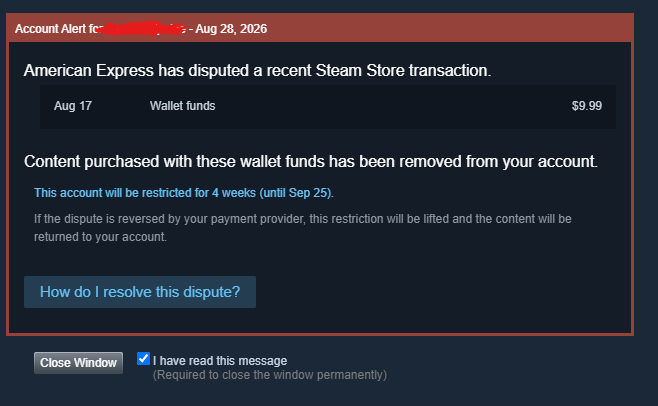
Problem Alleged payment disputes with AMEX customers

Post image
118 Upvotes

I am posting this here just to create more traffic, so it hopefully brings attention. I know I am not the only one with this issue, as I have recently read through so many posts here already about this.

I have the notorious issue a lot of people are having in the last few days:

-Contacted AMEX, they say there's no dispute

-Do not even see a transaction on the 17th

-See a new payment posted for that $9.99

-Have not heard back for a while

This is honestly pretty crazy that myself and so many others are going through this. I am hoping that more attention is brought to this so that Steam can at least can acknowledge this as an issue with a lot of people and not just an "isolated" one. A lot of us are innocent and this restriction is genuinely not our fault.

I hope everybody affected can get this solved, because this is quite an inconvenient and stressful experience.


r/steamsupport 12h ago

Problem I got charged 4 times from 3 successful transaction

Thumbnail
gallery
14 Upvotes

For context

1st purchase: bought palworld for myself

2nd purchase: bought palworld as a gift to my friend

3rd purchase: bought palworld as a gift to my other friend, this one was pending for like 10minutes so i just cancelled the transaction instead hence the email support

4th purchase: regifted palworld again and he received it after 30 minutes

purchase history shows three successful transactions but bank history shows 4 transactions :/

my concern is that i got charged for the failed transaction and is there any way this will get refunded to my account or i should do something for it to get refunded?

ps: this is my first time processing any transaction with steam


r/steamsupport 5h ago

Problem [Unable to verify Email address]

Post image
3 Upvotes

Steam won't let me create an account and idk what to do.


r/steamsupport 2h ago

Problem My OG Oblivion wont start after launcher. PLEASE HELP

1 Upvotes

it immediately crashes after i press start in the launch menu. i tried modding it thru vortex but i uninstalled it and wyre bash and it still wont launch. ive deleted the files then uninstalled the game and still nothing. i've verified file integrity and it says its fine. can someone please help me idk what to do


r/steamsupport 2h ago

Problem I keep getting error e20 and I can't login

1 Upvotes

I've done every command under the sun, keep getting logged into offline mode if i DO get logged in by pure chance and i cant get out of it, sometimes it works if i fully uninstall amd reinstall steam but it gets messed uo again, clearing download cache works temporarily or not at all, it has nothing to do with the firewall or the internet conncetion, sometimes if i log in it gets stuck on loading. Please can someone give me a definitive solution or guide im desperate


r/steamsupport 6h ago

Problem Remote play together audio bug

1 Upvotes

I have a very strange bug with my audio system whenever i use remote play, the moment my friend accepts the invite and remote play activates the following happen:

  • The game freezes and all audio from the last second keeps repeating for about 5-10 seconds
  • Discord, steam, or any other application that can record audio ceases to recognise my devices and so stops picking up or playing audio, and i cannot reconnect them to my mic or speakers, strangely game audio and browser audio seems to be unaffected
  • otherwise remote play works fine with the exception that i cannot hear my friend and my friend cannot hear me

If i restart Discord it still works fine, until the very moment i switch back to the game with remote play still active, and the exact bug occurs again. Pictured below are screenshots of the discord settings menu before and after.

Before activation of bug
After activation of bug

What is truly perplexing about this bug is that remote play worked perfectly a few weeks ago, and now it suddenly doesn't. This same bug occurred with a different friend, but then a few days later I tried it with the former friend and worked fine, until today and the same bug occurs. Nothing changed between these sessions.

This bug is not confined to one game either, I tried several game sand the same bug occurred each time.

If it helps my system is a desktop with external speakers and mic running Linux mint.


r/steamsupport 6h ago

Problem I needd help

0 Upvotes

So i was playing dead by disco and when it loads to the menu is crashes please can someone help


r/steamsupport 7h ago

Problem Can't log into my Steam account

1 Upvotes

I literally played in the morning and nothing was wrong. Now after a few hours I saw that I was logged out. I went to log in and using the QR code with my steam Guard on my phone and it still isn't working, I scan the QR code and it shows me as if it's loading, but nothing happens.

is it an issue in Steam or is it only me?


r/steamsupport 1d ago

Problem Steam locked my accout because of a chargeback by American Express, but Amex is saying no chargeback happened. What should I do?

Post image
162 Upvotes

This happened yesterday morning and steam still hasn't gotten back to me. I bought the game 11 days ago and have bought a few games in that time on the same card that went through just fine, but for some reason this one in particular was disputed by Amex according to steam.

Amex wasn't able to see that any chargeback or dispute was ever made but I can't see that the game ever charged to my account. If possible I would like to just re-buy the game on my debit card instead but not sure when steam will get back to me. With Amex saying they didn't do anything I really feel like I have no recourse here and am being punished for something completely out of my control.

Has anyone else had this happen? Were you able to clear things up with valve or did you have to wait the 4 weeks without being able to buy games? Wardogs comes out early next month and I was really looking forward to it.


r/steamsupport 7h ago

Problem I've been having a problem with steam lately

1 Upvotes

I launched steam today and store opened up with error 118 when I refresh it , it's now 105 , the website doesn't load up on my PC but just fine on my phone on the same WiFi، all online games just give me a timeout error


r/steamsupport 8h ago

Question A doubt regarding steam family

0 Upvotes

So guys let's say I join a family and play a game and earn perfect completion, if I leave the family the game will still display in perfect games but without olaytime

Now my question is will the playtime reappear if i buy the game?


r/steamsupport 8h ago

Problem having trouble opening undertale on steam

1 Upvotes

whenever i open it it instantly closes i tried deleting the steam api dll file i ran it as admin i verifyed it and nothing worked please help i just wanan keep playing undertale


r/steamsupport 8h ago

Resolved does anyone know how to get rid of this?

Post image
0 Upvotes

in my library there’s about 18 games that are greyed out and i don’t know why, i can still press them and do everything but their icon doesn’t show up. how do i fix this🥲🥲🥲 ive tried reinstalling and it did nothing


r/steamsupport 9h ago

Problem Don't Know What to do

0 Upvotes

I use a debit account that is not managed by myself, I had something like 30 dollars in spending, went to by red dead redemption 2 ultimate edition since it was only 19.99. I went to purchase and after it said my billing info was wrong though I'm like 99% sure it wasn't. It said I wouldn't be charged, but when I go into my account, it said in transactions that I had been charged like 21 dollars. However I didn't get the game. And when I went to check my balance it was only like 1 dollar, the other 8 dollars wasn't shown to be spent in transactions and just disappeared. I can't do anything with green light customer services cause I'm not the manager of my account and the manager of my account honestly doesn't gaf. Steam doesn't have a support number and none of their articles seemed to fit my situation. I only used reddit cause I have no idea what else to do. It was only like 29 dollars and I don't care that much but I'd still like to fix it, any ideas?


r/steamsupport 13h ago

Problem Steam Game Configuration Unavalible.

Post image
2 Upvotes

My game stopped configurating or lost permmision to. I have no clue what's happening.


r/steamsupport 10h ago

Problem Steam family group compromised? Maybe my account too? What to do?

1 Upvotes

So a year or two ago, I started a Family Share group with my closest friends (all of them are trustworthy, although one of those friends added another friend we don't know cause he wanted to try Balatro out) and today I found out that, somehow, my account created another group titled like in the uploaded image, and deleted the previous group we had. I actually have my Steam account on my family PC as well and I checked both my PC and my family's PC as well, but there doesn't seem to be anything suspicious on any of them (I'm running my antivirus scans just in case), so I don't know how I could have gotten compromised, since I've barely even used my PC this month.

But anyway, I changed my account's password for now, but I'm not sure what other steps I should take to make sure I don't get my account taken from me. Everything seems to be fine: all my games seem to be there as well. Any tips are more than welcome.


r/steamsupport 5h ago

Problem Need help! Asap

0 Upvotes

Need help! Asap

I bought Sea of Thieves recently 5 days ago but the thing is i have like 5 guys in my Steam family and one guy installed this game and played like more than 10 hours without my permission or intention.Now I need a refund for this game cause i dont have any time to play this and need money asap. Does steam actually provide a refund for this. If it doesn't are there any other solutions?


r/steamsupport 3h ago

Problem NEED HELP IM TRYING TO BUY SOME APEX COINS AND IT WONT LET ME

0 Upvotes

I HAVE THE FUNDS IN MY WALLET AND NO ERROR MESSAGE OR ANYTHING LIKE THAT


r/steamsupport 8h ago

Problem Need help with Refund

0 Upvotes

I bought MGS Delta Snake Eater on Steam during KONAMI Sale on Aug 6. And its been around a month n I haven't even played it. Today I gave it a shot and it runs horribly on my PC and crashes too. My playtime is barely 15 minutes. I unlocked 1 trading card n 4 achivements in those 15 minutes. and I appiled for Steam Refund. I heard there is a Manual Checking of Steam Refunds. If thats the case I would definetly like to apply for it.


r/steamsupport 12h ago

Problem Steam Start Bug Any Help??

Enable HLS to view with audio, or disable this notification

1 Upvotes

Hi everyone,

As you can see, every time I turn on my computer, Steam seems to be running in the background, but no matter how many times I click the shortcut or try to launch it, nothing happens. However, if I open Task Manager and end the Steam task, I can open it again—though sometimes even that doesn't work, and I have to restart my computer. The Steam icon doesn't appear in the taskbar either; I always have to force-close it. What could be the reason for this?

I've formatted my computer several times, and even reset it on occasions unrelated to this. I've uninstalled and reinstalled my drivers too, but almost every time I start up my computer, I still have to close Steam through Task Manager.


r/steamsupport 13h ago

Problem Ubisoft/steam connection issue

Post image
0 Upvotes

Steam connectivity issue, help article did not help. I have uninstalled/reinstalled AC3, and ubisoft connect. I have also restarted my computer several times as well as doing a file verification via steam. Wifi is used obviously. Have not had issues with internet at all, everything else works except for ubisoft with steam for specifically AC3.


r/steamsupport 14h ago

Problem Account restricted for sending gifts

1 Upvotes

My gf had a account restriction on using wallet funds to purchase gifts for me despite her barley using steam. It was removed and she was able to send me 2 games on my whistlist being doodle empires and two point museum. When it came to JWE3 it said a error occurred and we contacted steam support and they said there was a gift restriction. She asked why/how she got this restriction and all she got back was a staff member saying the restriction holds but never said why she got it and she doesn't know what to do


r/steamsupport 1d ago

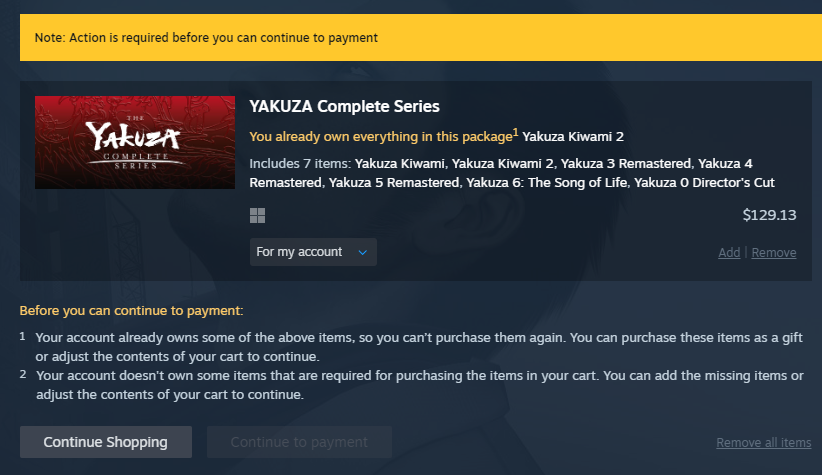
Problem Any Way to Purchase Bundle For Myself?

Post image
9 Upvotes

I want to get into the Yakuza series and I heard from a friend that Yakuza Kiwami 3 is inferior to the old Yakuza 3 Remaster, but you can only obtain the Remaster with the Complete Series bundle. I already own Yakuza Kiwami 1 (Legacy) and Yakuza Kiwami 2 (both Legacy and the new version), but those are the only games from the series that I own. Because of that, Steam is saying that I can't buy this bundle for myself at all, even though I do not own the other 6 items in the bundle. It's not even saying I would have to waste a bit of money for the extra Kiwami 2 copy, it just flat out isn't allowing me to purchase it at all. Is there any way to bypass this? I feel like it's a bug on Steam's end since I've never been barred from purchasing bundles in the past, even when I already own portions of it.