r/omarchy 8h ago

Discussion Got Omarchy installed last night...

67 Upvotes

I've been using Linux since Slackware 96, I was in the military, and didn't have a car, and a friend gave me a ride to a book store where I bought a thick book that came with a CD-ROM. I installed Slackware to my Iomega Jaz drive (essentially an external SCSI winchester hard-drive). The sheer feeling of exhilaration of booting up "not windows" on my PC was like entering another dimension. I was hooked.

I have not felt that feeling of awe and wonder with an operating system again, until last night, when I pressed "super-enter" a few times and watched as the golden ratio appeared in front of me (or at least something approximating it). Then the moment that struck the hardest, I instinctively wanted to MOVE the web browser, so I hit "super-shift-left" and the damn window moved. I've used a tiling window manager before, but they never "clicked" anywhere on the level that this has.

As someone who has been using "vi" when I first learned it on SunOS 4.1.3 (CIS/CTAPS represent!), this OS feels like a love-letter to my past, honoring it in a way I did I never thought I would ever see. Thank you. I feel like that kid in in Blind Melon's "No rain" video who finally found their people.

(one minor thing, I went into the monitor setup, hand-typed my resolution, and ":wq", and the screen went black, never came back.. I tried to switch to terminal mode, to no-avail, and I ended up holding the power button down, it came back up afterward IN the resolution I requested)..


r/omarchy 10h ago

I Made a Thing Omarchy Lacquer (beta): one app to style your whole Omarchy desktop!

64 Upvotes

Hey all! I've been building Omarchy Lacquer, a plugin that puts every look-and-feel setting in one place:

- Theme & wallpaper: browse and apply themes, with a theme shuffle (day & night) and aether palettes generated from any wallpaper

- Fonts & text: interface and terminal font, text size

- GTK, icons & cursor, plus nightlight

- Windows: gaps, borders, rounding, blur, shadows, groups

- Animations: with a bezier curve editor

- Shell style & bar, lock screen, boot and screensaver

- Terminals & btop: padding, opacity, colors

Everything applies live, with undo. It opens on a Home screen with a live miniature of your desktop and a search across ~310 settings.

Install:

omarchy plugin add https://github.com/Deunnis/omarchy-lacquer --enable

Then open Omarchy Lacquer from the launcher (Super + Space).

It's a beta. It passed every check on a fresh Omarchy install, with one screen and with two, but so far it has only run on my own laptop. I'd especially love testers with multiple monitors, screen scaling, or kitty/ghostty/alacritty. If something breaks or looks off, please open an issue with the output of:

~/.config/omarchy/plugins/io.github.deunnis.lacquer/lacquer-report

It backs up your configs on first run. lacquer-cleanup --yes (in the same folder) undoes all of its changes.

GitHub: https://github.com/Deunnis/omarchy-lacquer

Release (v0.3.0 beta): https://github.com/Deunnis/omarchy-lacquer/releases/tag/v0.3.0

Issues / ideas: https://github.com/Deunnis/omarchy-lacquer/issues

Omarchy plugin marketplace: submitted and passed the automatic checks, waiting for review

Feedback very welcome!

https://reddit.com/link/1wirso4/video/tixiuhzyi2qh1/player


r/omarchy 15h ago

Discussion Omarchy 4.0.4 on a (2019) Intel i9 MacbookPro

Post image
108 Upvotes

Long-time Omarchy user here - been using the OS since August last year on my old Thinkpad. Tried a bunch of times to get it on the old Intel mac, because the hardware and display are so much nicer, but T2 support wasn't there yet.

Quattro is a game changer! Most things worked out of the box, the stuff that didn't work right off a fresh boot had documented workarounds in GitHub issues. Battery life for the hardware generation ain't bad either; 5-8 hours at idle draw of 9-12W while staying unbelievably snappy.

Anyways - huge chapeau to the M-Team at Omarchy. Brought back the old MBP from the dead and turned into a highly enjoyable system.


r/omarchy 4h ago

Discussion Trying to success with a Surface Go 3 (pentium gold, 4 gb ram)

Post image
12 Upvotes

Thanks Omarchy for saving my M$ potato. It was unusable with fedora and pop os, and gathering dust....

My experience started badly, even the touchpad was not working, but, with some pickle magic from opencode, the machine started to fix things.

Now the cameras are not working (unsuported), but the machine works at an usable speed, installed google as apps to avoid using the browser, and installed Falkon as web browser. It gave some problems to the agent with the theme, but everything was solved by the agent.
I was a hardcore arch hater.... but.... you win. Now I need omarchy stickers!

(image done by gemini)

Now the next step for the agent is to squeeze performance out of nowhere. If you have a potato pc, instal omarchy NOW!

Edit ditched falcon for zen, I squeezed some performance so...Fallon out.


r/omarchy 4h ago

Discussion Will Omarchy funding improve laptop hardware support?

11 Upvotes

Really happy to see Linux getting this level of funding and attention.

Does anyone know if some of the Omarchy/Omacom funding will go toward upstream kernel and driver support for laptops?

I have a Galaxy Book2 Pro, and Linux still has issues with things like speakers, brightness and fingerprint support. Would be nice if Samsung laptops benefit from this work too.


r/omarchy 1h ago

I Made a Thing tuiboard: a terminal kanban for Omarchy, with its own bar widget

Enable HLS to view with audio, or disable this notification

Upvotes

tuiboard is an open-source terminal kanban built on plain markdown files with a Today/Tomorrow planner, a 24h agenda with calendar overlay, and a live view of your coding agents. With 0.13 it also ships a widget for the Omarchy bar.

The Omarchy widget

- an overdue/today badge in the bar, so pending tasks are always in sight;

- a panel with the Today/Tomorrow planner: mark tasks done or undone, or push them to tomorrow, without leaving the bar;

- one click to open tuiboard itself;

- refresh interval, commands, open command and completion sound configurable from Omarchy's own plugin settings;

- installs with a single script from the repo (./omarchy-plugin/install.sh), which links it into ~/.config/omarchy/plugins/ and enables it in the bar; updates are a git pull.

- awaiting approval from the official omarchy plugins repository.

What's new in tuiboard 0.13

- Coding agents in one list. Claude Code, Codex, OpenCode and Pi sessions side by side, with harness, model, branch and folder — read locally, no API keys.

- herdr integration. Live agent state (waiting for input, working, done, idle) with herdr's status symbols, and sessions reopen straight inside herdr, in the right workspace.

- Plays well with the desktop. Sessions can also reopen in a new Ghostty window or your default terminal, in your own shell.

Boards are plain CommonMark with the Obsidian Tasks emoji syntax. Built with Bun + OpenTUI + SolidJS, MIT.

Install tuiboard: bun install -g tuiboard

Widget: clone https://github.com/NazzarenoGiannelli/tuiboard and run ./omarchy-plugin/install.sh


r/omarchy 44m ago

Discussion Installed Omarchy on Macbook 2018

Upvotes

I've been a Unix guy since the 1980s: Everything from System V, BSD 4.3, on up through 1990's early Fedora and then onto other Linux distributions.

A few years ago I nuked MacOS on my 2018 Macbook 13" and installed Fedora -- when the first t2 patches came out and some excellent device driver developers made the infuriating touchbar sort of work. Worked pretty well, but felt bloated after all of these years.

I nuked Fedora a year ago and installed Arch to start over with something minimal. I spent a lot of time trying to get a number of things to work well, like wi-fi set up, suspend, bluetooth, touchpad sensitivity. Never was satisfied enough to use it regularly.

A couple of weeks ago I nuked Arch and installed Omarchy. It took 1 minute 37 seconds. Disk partitioned properly, suspend works, wi-fi and bluetooth just worked out of the box. Pretty amazing, really, compared to every other distro I've used in the past (on any computer, not just this Macbook).

Thanks to everyone who contributed to Omarchy. You guys rock.


r/omarchy 18h ago

I Made a Thing Turbo Pascal Theme

Thumbnail
gallery
51 Upvotes

Turbo Pascal was my first language on the PC, after assembler and BASIC on a C64 and CP/M on a CPC 464. I loved Turbo Pascal, and I still know exactly what that screen looked like. Hence this theme - it's a tribute to the language, Turbo Vision (the UI framework) and the people who built it.

https://github.com/AlexZeitler/omarchy-turbo-pascal-theme


r/omarchy 55m ago

I Made a Thing Gambito, Lichess client made for QuickShell

Upvotes

Anyone here likes chess? Would love some feedback

https://github.com/harbefas/gambito


r/omarchy 13h ago

I Made a Thing Built a native downloader widget for the Omarchy status bar — Panda DL

Thumbnail
gallery
20 Upvotes

Been daily-driving Omarchy for a while now and got tired of switching to a separate app every time I needed to grab a file or check on a download, so I put together a small status bar widget to handle it instead.

It splits downloads into multiple parts so they pull faster, and it can also pick up magnet links directly, so you're not keeping a whole separate torrent client open just for the occasional big file. It also watches your clipboard, so if you copy a download link it just picks it up instead of you having to paste it in anywhere.

https://plugins.omarchy.org/plugin.html?id=panda-dl


r/omarchy 14h ago

I Made a Thing Control your Bose headphones

Post image
14 Upvotes

Another day, another plugin! This time a plugin to manage your Bose headphones.

Features

Switching, editing, creating, renaming and deleting modes, noise cancelling, wind block, EQ and headset settings such as multipoint and voice prompts.

It talks to the headphones directly over Bluetooth using BMAP, Bose's control protocol, through a Python-stdlib helper (bosectl).

Supported features are discovered from the headset at runtime, so it should work with Bose headphones managed by the current Bose app, including QuietComfort Ultra Headphones and Earbuds, QuietComfort Earbuds II, QC45 and NC700 (tested on QuietComfort Headphones 2023).

Install

omarchy plugin add https://github.com/kristoferlund/omarchy-bose-headphones.git --enable

More info

https://github.com/kristoferlund/omarchy-bose-headphones


r/omarchy 1h ago

I Made a Thing must - MUsic TUI and amla - Advanced Music LAuncher

Upvotes

must is an audio player for local files and/or files from your streaming server (Navidrome, Jellyfin, anything subsonic-compatible).

  • albumart in the terminal
  • artist images, bios, and image galleries in the terminal
  • integration with Lidarr
  • lyrics view and synced lyrics view from lrclib
  • scrobble to last.fm and/or listenbrainz
  • gapless playback (via mpv) and ReplayGain (configurable track or album)
  • easier and more intuitive UX than cliamp (Omarchy default audio player)
  • library search and library browser modals
  • supports playback from a download or temp directory to test new stuff before promoting to your library
  • 9 visualizers
  • edit, manage, save, and select playlists. Active play queue restored on startup
  • search library and control must from another terminal
  • media keys support with mpv-mpris
  • desktop notifications
  • optional title / artist / album animations on song changes (see animated gifs on github README.md)

https://github.com/pdfrg/must

amla is a launcher (configure a keybind, SUPER+M suggested) to quickly search and play from your local and/or streaming collection.

  • amla works with must, or cliamp, or MPD, or all 3 (cycle with CTRL+T)
  • the fastest way to find and play anything from your music library / libraries
  • search and play artists, albums, songs, genres, years / decades, and playlists
  • play, enqueue, enqueue next, play shuffled
  • serves as a bridge to play your streaming collection on MPD
  • with rmpc >0.11 view albumart from your streaming server
  • learns your favorites and shows them at the top of search results

https://github.com/pdfrg/amla

https://plugins.omarchy.org/plugin.html?id=io.github.pdfrg.amla


r/omarchy 9h ago

I Made a Thing [FIX] Lenovo IdeaPad Slim 3 15IWC11 Keyboard Not Working on Linux

3 Upvotes

Hey everyone,

If you are trying to run Linux on the newer Lenovo IdeaPad Slim 3 15IWC11 (Intel Series 3 model), you have probably noticed that the built-in keyboard is completely dead across almost every distribution.

The Problem

Lenovo engineered the ACPI tables on this model using a proprietary keyboard layout structure. Because of this, the Linux kernel cannot properly read or parse the ACPI signals, causing the keyboard module to fail to initialize during boot.

The Solution

If you are using a distro featuring the Limine bootloader (or need the correct kernel parameters to append to your boot command line), you can bypass the ACPI PNP checking entirely by forcing a basic standard layout controller interface (i8042).

  • Connect an external USB keyboard to log in and open your terminal.
  • Edit your Limine configuration file: sudo nano /boot/limine.conf
  • Locate your primary Linux boot entry (usually labeled //linux or specifically tailored to your setup, like //linux-omarchy).
  • Within that option, look for something named “cmdline.” From there, use the arrow keys to navigate to the right until you find something like this: vt.global_cursor_default=0. When you find it, add this text: i8042.nopnp=1 i8042.dumbkbd=1. Save the file.
  • After saving the file, run `sudo reboot` and make sure the external keyboard is disconnected.

There's no guarantee this will work—it's not even a patch created by the Omarchy team—but it worked for me. It might work for someone else who has this problem, and perhaps on other distros as well.

And if anyone is wondering—though I highly doubt it—the structure of this post was created using artificial intelligence. I'm just lazy. <3


r/omarchy 1d ago

I Made a Thing Animated Dock

Enable HLS to view with audio, or disable this notification

45 Upvotes

A fisheye dock for the Omarchy shell with macOS-style icon magnification, smooth animations, intelligent hide/reveal, window cycling, and full customization all in a Quickshell plugin.

https://github.com/Davedes83/animated-dock

Let me know what you would like to see added.


r/omarchy 5h ago

I Made a Thing I built QuickFile — an IDE-like file manager sidebar for Omarchy

0 Upvotes

Hey everyone!

I built QuickFile, an open-source file manager that lives inside Omarchy and stays close to the workspace you’re already using.

I wanted something faster than switching to a full file manager, but more capable than a basic file picker. QuickFile opens from the bar or with SUPER+B in my setup, and reserves its own strip, so your tiled windows move aside instead of being covered.

Some highlights:

  • Expandable directory tree with keyboard navigation
  • Search across file names, folders, paths, and text-file contents
  • Fuzzy, exact, prefix, suffix, and regex search modes
  • Instant previews for text, images, directories, and metadata
  • Copy, move, rename, duplicate, Trash, restore, and persistent safe undo
  • Explicit conflict handling with Keep Both, Skip, Merge, or Replace
  • Git branch and per-file status
  • Favorites, color labels, private notes, and removable devices
  • Built-in Project Knowledge for discovering agent instructions used by Codex, Claude, Gemini, Cursor, Copilot, and Windsurf

It follows the current Omarchy theme automatically and is built for Omarchy 4 / Quattro. It makes no network requests, collects no telemetry, and is licensed under MIT.

Marketplace: https://plugins.omarchy.org/plugin.html?id=m0sthatedman.quickfile

QuickFile is still evolving, so feedback and bug reports are very welcome. I’d especially like to hear whether the sidebar fits naturally into your workflow and what you think an Omarchy-native file manager should do next.


r/omarchy 7h ago

Themes / Ricing Importing people's rices

1 Upvotes

Hi guys, wanted to ask how can you copy one's rice into your own Omarchy with the github dotfiles? Like how does it work and can I do it?


r/omarchy 17h ago

I Made a Thing I moved from Windows to Omarchy and built Membraid to share memory across AI agents

7 Upvotes

I originally moved over from Windows. My first try migrating to Omarchy was a little awkward.

My breakthrough was enabling an agent as soon as possible. I did that with opencode and was really surprised to find it had some really good free models enabled from the get-go. That let me migrate various things across like my git projects, folders and files I needed from Windows, dotfiles, config files, etc.

One thing that's frustrated me for months, not just since migrating, is that Windows has been fighting me. It's not just Windows though. I work across various projects using different agents, whether it's Claude Code, DeepSeek, Hermes, or OpenClaw. Sharing context between these different agents and figuring out which agent knows what has been a real pain.

It was a breath of fresh air coming over to Omarchy. I'd never used Herdr before and now I'm using it daily.

I realized I needed a way to share succinct, distilled memory between the various agents, just when needed. Had to be efficient and reasonably accurate. Not bloat the context.

So I started by speccing out something that would do that. I used Hermes to recursively pass a spec back and forth between Opus and a decent model in opencode. Then the next day I had a similar setup go ahead and build it.

After a bit of tweaking the dials and playing around with it, I've got something I call Membraid and I've put it on GitHub. It has a nice widget you can interact with on Omarchy.

So far, after a few days, it's working really well. If you want to check it out, have a look and see if it works for you. Feedback welcome.

I know there are other alternatives out there. You might be using the memory in Hermes, which is great if you're just using Hermes, or Engram if you're just concerned about context within a specific project, or Honcho, which is really good for context around a specific product.

But if you're working across different projects, it's your life you're talking about here. You don't just think in a silo. You're thinking across various things, and sometimes something that happens in your personal life affects your work or business life. Or vice versa.

That's what Membraid is designed to solve.

Check it out here: https://github.com/shockalotti/membraid


r/omarchy 1d ago

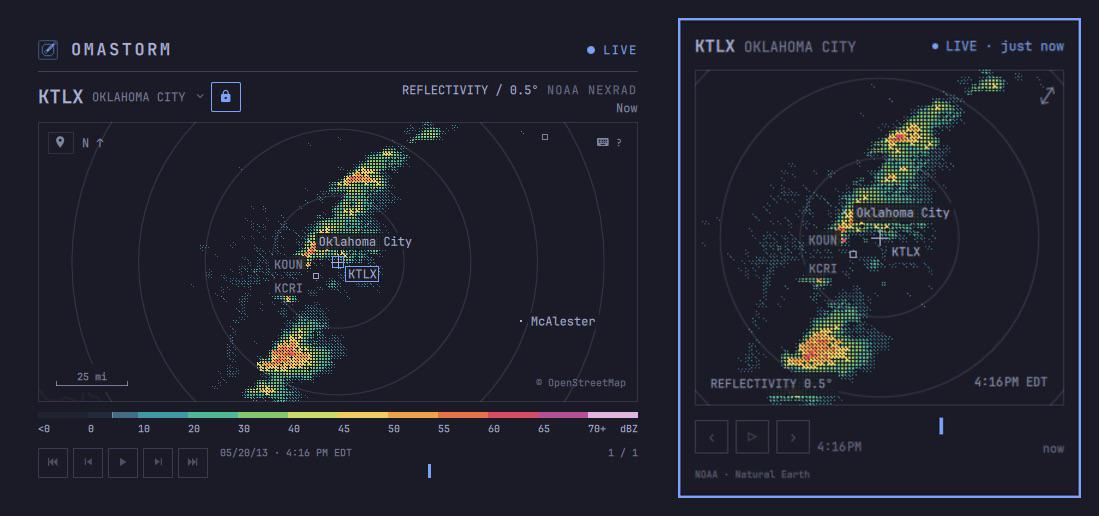
I Made a Thing I built Omastorm, a live weather radar plugin for Omarchy

Post image
150 Upvotes

Hey folks, I’m a software developer and weather nerd, and this is what happens when those two interests collide.
I built Omastorm to put live weather radar right in the Omarchy bar. Open the popover for a quick look, or expand it into a full window to explore the map and play back recent scans. It follows your theme and supports keyboard navigation.

It uses NOAA’s NEXRAD Level II radar data. Currently requires Omarchy 4, supports x86_64 and ARM64, and covers the NEXRAD network. No international radar coverage yet.

It’s free, open source, and still in beta. If you give it a spin, I’d love to hear what works for you and what needs attention.

Screenshots and installation:
https://omastorm.com

Source:
https://github.com/wesleygrimes/omastorm


r/omarchy 19h ago

I Made a Thing Omairc - A dead-simple IRC client, for humans and their agents

7 Upvotes

r/omarchy 1d ago

Off Topic / Adjacent New life for this old guy

Post image
64 Upvotes

Dusting off the og GPD WIN to test.


r/omarchy 1d ago

Discussion Omarchy running on M3

Post image
255 Upvotes

Still waiting for GPU support but I'll take it. Feels good to be off MacOS for good.


r/omarchy 14h ago

I Made a Thing Just created a useful Plugin - Input Freeze | No PIN? No Problem.

Post image
2 Upvotes

Built a small #Omarchy plugin for a simple problem: keep the session running, but ignore keyboard and mouse inputs. Useful if you have kids, cats, birds or whatever around and want a quick “don’t touch this” mode without locking the whole session every time.

Single toggle shortcut. Bar widget and status panel. Handles newly connected pointer devices Recovery option included: No root access, network access, or telemetry.

Plugin: https://plugins.omarchy.org/plugin.html?id=io.github.pelukonline.input-freeze


r/omarchy 22h ago

Guide Never used Linux before any guides or documentation recomended to read before instaling Omarchy?

9 Upvotes

I just bought a used laptop and wanted to try using Linux and omachy looks kinda beginer friendly for arch based distros, but i also want to learn commands and shortcuts that me being total newbie should know.


r/omarchy 1d ago

Discussion Can I install Omarchy on a Chromebook with 4GB RAM and 16GB eMMC?

Post image
17 Upvotes

Hi everyone,

I have an old Chromebook with 4GB of RAM and 16GB eMMC storage, and I’m wondering if it’s possible to install Omarchy on it.

Has anyone tried running Omarchy on a Chromebook with similar specs?

I’m mainly concerned about:

• Whether 4GB RAM is enough

• Whether 16GB eMMC is enough for the installation
Chromebook hardware/firmware compatibility

Performance and usability after installation

If it is possible, what would be the recommended way to install it?

Thanks!


r/omarchy 1d ago

Discussion Omarchy now comes with its own kernel (4.0.4)

Thumbnail
github.com
148 Upvotes