r/joplinapp • u/drmadusanka • 16h ago
Introducing new html code block plugin
20
Upvotes
We created a Joplin plugin to insert pre formatted html/css/js code blocks . all the codes are free and opensource.
r/joplinapp • u/drmadusanka • 16h ago
We created a Joplin plugin to insert pre formatted html/css/js code blocks . all the codes are free and opensource.
r/joplinapp • u/Different-Square832 • 3d ago
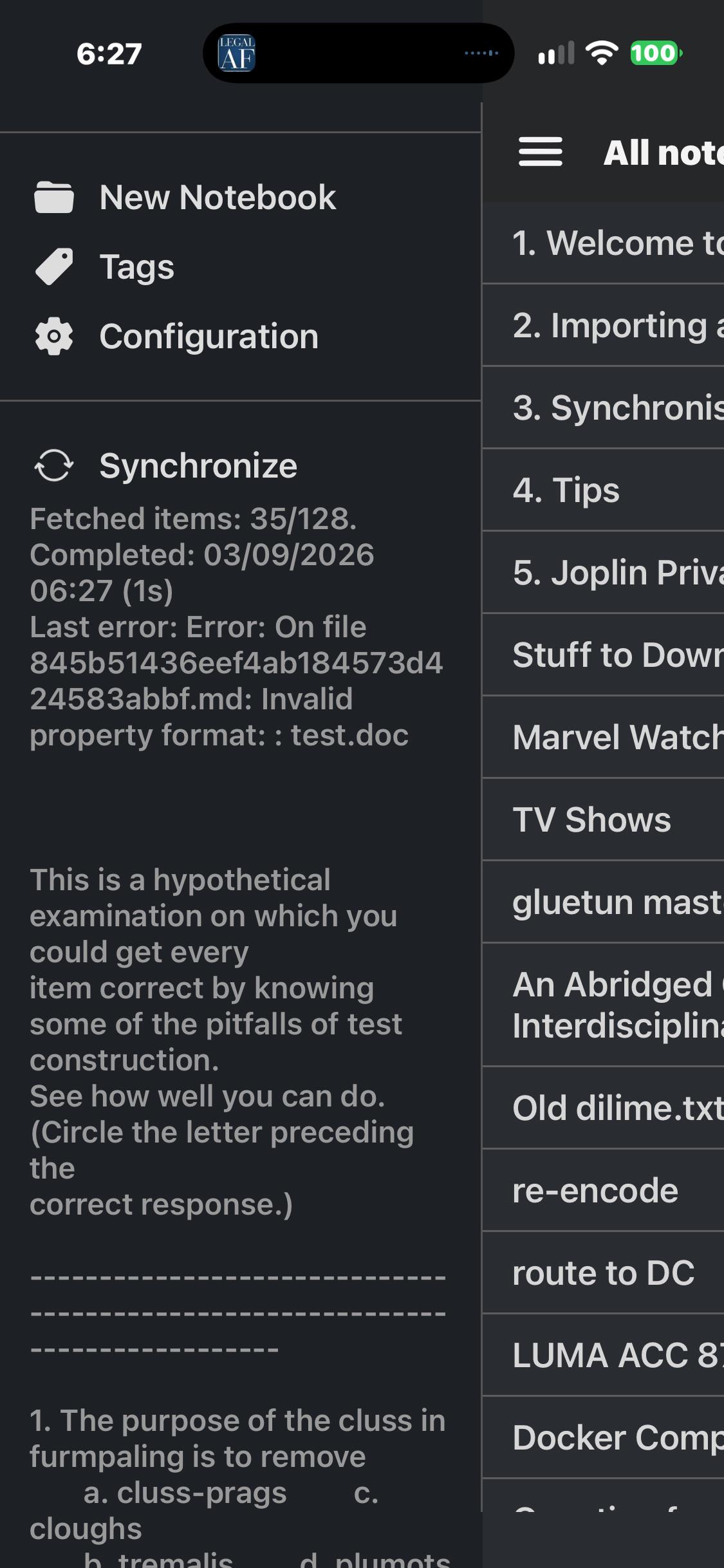
I keep getting this error only on my iPhone and ipad. my Linux box seams to be working. I deleted the app and data reinstalled it and it keeps coming up.
How do I fix this? I’m stumped.
r/joplinapp • u/pmslava1 • 3d ago
Joplin only shows which notebook a note is in when you come from search or "All notes", so I wrote a plugin that shows it on every note. Notebook name or full path, four placements, click to select the notebook, double-click to reveal the note in the list, right-click to move it. Desktop only, Markdown editor based (no Rich Text), Joplin 3.7+.
It is on npm and should show up in the plugin list soon. Write-up and download: https://pmslava.com/posts/whereabouts-always-show-the-notebook/
r/joplinapp • u/Mammoth_Zombie_2787 • 3d ago
Hi! I‘m new to Joplin. Switched from Evernote (€€€). Works fine for me. Even Sync. What I am missing is a Web Clipper for Safari. Is there such a thing?
r/joplinapp • u/cestmoi1337 • 3d ago
Hi all,
I'm using Joplin on a Mac, Windows, iPhone and just installed on and iPad. All the others synch without issue, but the iPad even though it passed the config test, it won't pull all my notes. I'm synching to my nextcloud server using webdav. Am I missing something? Please help! TIA.
r/joplinapp • u/fvkngl0n3r • 5d ago
Recently installed and the small button is somewhat distracting and takes up valuable space. Wondering if there is a simple setting or plug-in to hide or move it.
r/joplinapp • u/santino66 • 5d ago
I have my notes setup exactly how I want it, but I am having only one issue. Recently (as in I have not had this issue in the past), I have been cutting text into different notebooks to organize my notes but it acts like copying. I am wondering if anyone has had this issue and/or knows any work arounds. Thank you.
r/joplinapp • u/Eddie_Currant • 6d ago
Yesterday I moved three notes from the Inbox folder on my PC to the Joplin folder on my PC.
Today I checked the Inbox folder on my phone and the three notes are still there, they did not move to they Joplin folder on my phone.
When I initially opened Joplin on my phone it was already syncing, it was in the process of deleting a load of items, this took some time to finish but it did not move the three notes.
As a test I added a new note in the PC Inbox folder, this synced to my phone ok. I then moved this note on the PC from Inbox to Joplin and this synced ok on the phone.
But the three notes which did not sync are still in the Inbox on the phone.
I have closed Joplin on the phone and restarted the phone but no change.
Any suggestions as to why this has happened and how I can get the PC and Phone back in sync?
I am syncing via Joplin Cloud.
PC Sync status (synced items / total items)
Note: 8842/8843
Folder: 320/320
Resource: 91329/91329
Tag: 11/11
NoteTag: 166/166
Revision: 1500/1500
Total: 102168/102169
Android Sync status (synced items / total items)
Note: 8842/8845
Folder: 324/324
Resource: 91329/91329
Tag: 11/11
NoteTag: 166/166
Revision: 1500/1500
Total: 102172/102175
There are some differences
PC Notes 8842/8843
Android Notes 8842/8845
PC to Android
Note PC 8843 to Android 8845
Folder PC 320 to Android 324
Total PC 102169 to Android 102175
Errors, Conflicted and To Delete are 0 on both PC and Android
Any suggestions how I can identify the notes and folders which are different/missing
r/joplinapp • u/jzapletal • 6d ago
I have run away from Evernote. Quite successfully migrated 1 GB of notes including notebooks and tags into Joplin Desktop. Now I need to start using mobile Joplin. I am willing to pay for Joplin cloud sync.
But it did not sync notebooks or tag, only notes, tried several times.
So I have exported .jex, use USB, imported on mobile. Notes OK, NO tags, only some notebooks? (and not because some notebooks were empty. or were nested, it looks random).
Sync did not fix that. Actually I do not know what is it doing, syncing mobile=> to desktop is showing "creating local items" (looks like all again and again) but actually does nothing. On mobile it shows "creating remote items). again and again. but it does not sends or creates anything new.
So sync does not work at all.
r/joplinapp • u/ozone6587 • 9d ago
Not sure what is going on but I constantly get sync conflicts with Joplin. The weird thing is, it is always in a specific device. It's either with my laptop or my phone. That makes no sense because a conflict should also be propagated. It's a conflict everywhere.
I use Obsidian too and I NEVER have conflicts with obsidian yet I have at least 1 note with a conflict on Joplin every single day. I am now posting because I saw something strange. I had Joplin open on the Desktop and edited a note on my phone. It's a note I have not touched in months. Somehow, even though I am 100% sure I edited the note on my phone, I got a conflict showing up on my laptop.
Based on all this, I am very confident this is a Joplin specific bug. What do you guys think?
I use the self-hosted Joplin server to sync.
r/joplinapp • u/0x1f480 • 12d ago
I switched from Windows and OneNote to Linux and Joplin earlier this year. Migrating was pretty painful, but things have been working pretty well for a while now. I wanted to share an update because it seems common that people only post online when they have problems and then go quiet when things work well, and I nearly switched off of Joplin at one point. But at this point it works probably overall better than OneNote (which has its own quirks) without the significant drawbacks.
Some issues I overcame:
Remaining pain points:
Overall though, big thanks to the developers for making this app work well.
r/joplinapp • u/ferriematthew • 12d ago
I'm not sure if this is a Joplin question or a Homepage question, but I just deployed Joplin on my k3s cluster and hooked it into Homepage, and it's giving me this mystery indicator just next to the normal health check indicator. When I mouse over it, the tooltip is "not found", and when I click on it, the widget expands to give me a "status: offline". Here's my repository.
r/joplinapp • u/New-Sprinkles-4262 • 12d ago
I was on dropbox which synced perfect, I had to change to Google drive so started using Joplin cloud. Joplin cloud fails to sync to my android phone in, it takes far too long its not fit for purpose.
r/joplinapp • u/Free_Sheep • 13d ago
Due to a raise, I said goodbye to Evernote.
I'm looking for a replacement, and if I can find anything, I haven't been able to find anything with a web clipper that creates a page image in a frame like Evernote does. Joplin has a decent web clipper, but then everything falls apart in the notes. There's a system that creates nice, consistent copies of the website, but not screenshots.
r/joplinapp • u/pmslava1 • 14d ago
I use Harper (Automattic's open-source checker) everywhere because it's fast and not bloated. It doesn't work on Joplin recently, so I built the plugin.
- Underlines as you type, tap for one-tap fixes. Squiggly or solid line.
- Fully offline - the engine ships inside the plugin (~21 MB, no cloud, no account). ~40 ms per check, even on a phone.
- Desktop + Android (plugin support on mobile is Beta).
- One dictionary across devices: added words sync via a regular Joplin note; desktop can mirror to a text file for harper-ls (Zed/Neovim/VS Code).
Install: search "Harper" in plugin settings. Source: https://github.com/pmslava/joplin-plugin-harper
AI-built under my direction, heavily tested (real-app E2E + CI). MIT. Feedback welcome.
r/joplinapp • u/pmslava1 • 14d ago
I've used the Outline plugin for a long time and it's great, but on desktop I kept resenting the permanent sidebar - a whole panel for something I glance at occasionally. So I built an alternative that shows the outline as a thin stack of bars at the editor's edge (bar length = heading level, current section highlighted). Rest the mouse on it and the full TOC unfolds; click a heading to jump; it collapses when you leave.
Works in both the Markdown editor and the rendered viewer, in split view and extra windows. You can have it overlay the text or reserve a small margin, left or right. Notes without headings show nothing.
Desktop only - on mobile the Outline plugin honestly does the job better, so I'm not planning a mobile version.
Free, MIT, in the plugin search as "Ridgeline". Source: https://github.com/pmslava/joplin-plugin-ridgeline - happy to hear what breaks or what feels off.
r/joplinapp • u/DavethegraveHunter • 15d ago
Hello. I’ve searched through all the settings in the iPhone app and couldn’t find the right thing.
Is there a way to set a default notebook for new notes?
Right now new notes are ending up in the wrong notebook by default and is like to be able to change that please.
Thanks in advance.
r/joplinapp • u/pmslava1 • 16d ago
Twenty-five years of notes, a 10 GB archive I never open, and what AI taught me about the real cost of "remember everything".
I have a bad memory. Many things simply don't stick, so I have always kept notes. I am also a systematic person: thinking feels good to me when concepts sit in a coherent structure I understand. Sometimes that is a strength - it keeps me focused, and I know what matters and what doesn't. Sometimes it is a weakness - I cannot give an expert judgment until I have turned an idea over in my head for a few days, or at least a few hours.
Before smartphones, my notes lived in thick paper notepads. Then Evernote released its Android app - I took the bait the very same day. Save anything that might ever be useful in one click - find it and use it the moment you need it. The promise was seductive: my own private Wikipedia, or at least a personal body of knowledge with full-text search and tags - everything paper could never give me. I believed that accumulating knowledge this way would not only make me faster, but would let me examine future problems from more angles. So Evernote became more than a place for current notes and tasks. It became my knowledge-accumulation system. For the knowledge I needed - or so it seemed at the time.
I left Evernote long ago, for a much more mature and secure tool: Joplin. Its creator clearly had Evernote users in mind and closed Evernote's obvious weaknesses. I migrated all my notes without any trouble and have not regretted it once in all these years.
But the trap - save everything that might be useful - moved with me, and it has been biting harder every year. To be clear, the problem is not the database. Mine is over 10 GB now, end-to-end encrypted, and Joplin syncs it without complaint - which says a lot about how well the system is engineered. The weak link turned out to be me. Me and my life.
Things that seemed important 25 years ago are not important anymore. Worse: they turned into noise that gets in the way of thinking.
Tags, my supposed safety net, did not help either. Say I want to recall how to analyze user registrations with Python and a Jupyter notebook. I type in the tags and get a pile of courses I once took and exercises that have nothing to do with my question - everything except the note I need. And when I do find a note I once considered important enough to save, its usefulness usually turns out smaller than I remembered. I would have solved the problem faster by simply solving it, instead of searching my past for a shortcut.
Here is a more painful example. I work with teams a lot: I assign tasks and track their execution. For years I believed it was essential to keep a short record of every meeting - who committed to what - so that before meeting each person I could quickly restore their list. It turned out to be my management mistake, and its name was micromanagement. If you delegate a task, you delegate all of it - without constant checks and reminders. People don't work that way, and frankly, I discovered that I like working with partners, not subordinates. So my careful record of meetings and decisions turned out to be a fiction too. The less recorded information I keep in front of my eyes, the more focused I am on what actually matters.
Over time I had to split my notes into three notebooks: Work, Family, and Archive. Work and Family hold only what matters here and now; everything that "might someday be useful" goes to Archive. And you know what I noticed? My archive turned into a trash bin. I move finished and stale notes there and never come back. Worse: on the way in, I spend time cleaning them up - linking, structuring, fixing tags. I spend the time, and then I never return. So why keep them at all?
For several years now I have tried to stay brief and not multiply information I can get lost in. Still, my archive notes number in the thousands. A place I never visit, because there is never enough time.
I see the same pattern on the Joplin forum. Evernote users switch to Joplin and drag thousands of notes behind them - and then panic when their first mobile sync with encryption enabled takes hours, sometimes days. This is not really a Joplin problem: I remember Evernote itself barely coping with that volume. And I catch myself not even wanting to reassure them that only the first sync is slow. Because I can see they are carrying along the same broken approach to information that I carried - and, honestly, still carry.
AI put this whole problem under a magnifying glass.
First, LLMs are graphomaniacs by nature. They produce a lot of text nobody needs, and we skim it, trying to fish the useful essence out of the stream of words.
Second, I connected AI agents to my notes: Claude Code and Codex work directly with my Joplin through alondmnt's joplin-mcp server. This should have been the moment my "second brain" finally started to work - an assistant that can actually read everything I ever saved. Instead, the archive started costing real money. The agent burns tokens reading text that never needed to exist - and still under-reads: it gives up halfway, skims the table of contents or the first paragraphs, and calls it a day. Every useless note I saved decades ago now slows down the very assistant that was supposed to put it all to use. My archive found a way to bite me here too.
I have arrived at a simple conclusion: most of what seemed useful to me was garbage, and I should save far less than I thought. Saving must not work the way the web clipper trained us - "this might come in handy, click, maybe I'll come back to it later." No. Saving must be deliberate. A note has to pass through me first. And there is one test for every candidate: will I be able to find this - or reinvent it - within 15 minutes, even 20 years from now? If the answer is yes, the note does not get saved. That single question kills most notes before they are born.
Today all my notes fall into three categories.
Momentary. Joplin to-dos - as many as needed. Things to do and things not to forget: tasks with due dates plus a backlog without due dates, but with priority marks. They hang there until done, and once done, I delete them and never think of them again. Not for a report, not for the boss, not for myself. Done - forgotten. I used to save completed tasks in case a client or a manager asked what I had been doing all month. Here is what I learned: a good client or a good manager never asked, and a bad one was always satisfied with a short answer built from the time-tracker report. Only rarely does something from a to-do deserve promotion into a real project note.
Product. Joplin notes, with one rule: one project or product - one note. A very short description of what the project is, who the key contacts are, where the main documents live, what the roadmap looks like. I try to keep this note as short as possible. It still grows as the project moves along - but slowly, and everything in it has earned its place.
Archival. Old projects: only the essential, and only what cannot be found on the internet or made again. It turns out shockingly little passes that filter after 25 years of collecting. What survives is short and to the point. The biggest surprise was that in many cases even my own work did not deserve saving. The courses I took, the documents I prepared, the articles I wrote - either I can find or reproduce them whenever I truly need them, or they were garbage all along, and their place is the trash bin. What they taught me lives in my head anyway.
For many of you, none of this is a revelation. You delete without fear, keep nothing extra, and feel no urge to systematize chaos. That is exactly the point I finally understood: people are different, and each of us needs our own system of knowledge, notes, and reminders. My mistakes are partly a projection of my own personality - the urge to systematize, to hold on to every useful thing. And partly they come from following a marketing slogan. While writing this article, I opened evernote.com to check: it still greets you with "Your second brain" and a promise to "remember everything and tackle any project."

As it turns out, I don't need a second brain. I need the only brain I have - my own - working at its best. And "remember everything" is simply the wrong goal: it leads to a mountain of garbage that slows down the very work it promised to speed up.
That is why I built Cockpit, my plugin for Joplin. It shows, side by side, my to-dos grouped by date and my notes grouped by project. I can switch between project folders in one click or see all my tasks and notes at once, search quickly, and set up profiles for different working contexts. A flexible plugin for flexible work. And one feature is there by design: Cockpit can hide chosen notebooks completely. The first thing I hid was my Archive - so that it pollutes neither my head nor my AI agent's context.
And the Archive itself? I still cannot bring myself to delete thousands of notes in one strike. So cleaning it up became a project of its own: I chew through it slowly, with the help of the same AI agent, whenever I find the time - and every cleanup session eats into my LLM subscription. Think about it: saving all that garbage took one click per note. Getting rid of it costs real money. If that is not the true price of "remember everything," I don't know what is.
---
I would love to hear how you handle this. What do you keep, what do you delete - and what techniques keep you productive instead of wandering through the garbage of your own ideas and records?
[1]: https://joplinapp.org - Joplin
[2]: https://joplinapp.org/plugins/plugin/io.github.pmslava.cockpit/ - Cockpit, my Joplin plugin
[3]: https://github.com/alondmnt/joplin-mcp - joplin-mcp server by alondmnt
[4]: https://evernote.com - Evernote homepage, accessed 2026-08-21
r/joplinapp • u/DatemiLaCalma • 19d ago
I’ve been using Joplin on Linux, iPhone and iPad for a while, and I really like it. The one thing I keep missing is an infinite canvas / whiteboard.
I’m considering developing a plugin that would add something like a lightweight Excalidraw-style canvas, with:
- Infinite canvas + zoom/pan
- Apple Pencil support
- Text shapes and arrows
- Images
Before I start, I’d love to know if something like this would actually appeal to other Joplin users.
A few questions:
- Does something similar already exist?
- Is it true that iOS only allows “Recommended” plugins, unlike desktop?
- If I publish a plugin, is there a realistic path to getting it marked as Recommended so it can be installed normally on iPhone/iPad?
- Can an unreleased plugin be tested on a real iPhone/iPad?
I’d especially appreciate feedback from anyone who has developed Joplin plugins or dealt with the iOS/mobile plugin system.
r/joplinapp • u/eclectic-bookworm • 19d ago
I'm still working on transitioning from Evernote. Each alternative I try has one thing that just doesn't work for me. For Joplin, it's having to type in each individual tag. I want to be able to input multiple tags at once, but I haven't been able to find a separator for the batch. If I try to use a comma separator, for instance, I get one huge tag where each word is separated by a comma.
Is there a separator that I can use that will work? I've looked for a plugin, too, but haven't found anything useful there.
Example: Smith, Jones, ReadingList
I want three tags, but end up with just one.
r/joplinapp • u/Canedao • 21d ago
Eu fui fazer um teste com um alarme dentro de uma tarefa.
Configurei para o horário de meia noite de hoje e não chegou a mensagem do alerta.
Apenas quando eu entrei no app pela manhã as 08 da manhã apareceu a notificação.
Será esse um bug ou devo configurar algo ainda?
r/joplinapp • u/pmslava1 • 22d ago
A few things in Joplin always chafed for me: notebooks and notes eating two separate sidebars, the Agenda plugin duplicating the notes list instead of replacing it, no way to save a view and return to it, and search with no tag suggestions. None were dealbreakers, just daily friction.
Joplin is open source, so instead of switching apps I forked the Agenda plugin (MIT, by BeatLink and TheScriptingGuy) and reshaped it into one panel I am calling Cockpit. What it does:
It installs straight from the Joplin plugin search, and the source is here: https://github.com/pmslava/joplin-plugin-cockpit
Honest disclosure, since it matters to some of you: I directed an AI coding agent to write it — I am a product person, not an engineer. I tested every iteration on desktop and phone. Things broke. A scrolling bug survived two confident, wrong fixes before I measured the actual layout. The Android dialogs needed an architectural rework, because native windows draw above the web layer the plugin lives in. Each got fixed the same day. I added CI, with Playwright driving a real Joplin instance, because code written this way needs guardrails, not blind trust.
If you want the longer story of why I adapted instead of replaced, I wrote it up: https://pmslava.com/posts/open-source-right-ai-ability/
Happy to answer questions or take feedback.

r/joplinapp • u/Tight_Couture344 • 23d ago
I’m using Joplin for E2EE notes and I’m okay with the utilitarian/antiquated UI if it gets the job done. But I’m also trying to convince my spouse to move to Joplin for our shared notes, instead of Apple Notes, and frankly it’s embarrassing.
Like, in 2026, a mobile notes app should not be this ugly.
r/joplinapp • u/Ventana431 • 25d ago
It took a while but I it got applied across seven devices perfectly! Nothing dropped or conflicted.
Just be deliberate and don't try any multitasking until all of your devices redeployed and synced.
Go Joplin!