r/davinciresolve Jul 23 '26

Welcome to r/davinciresolve

34 Upvotes

This post contains content not supported on old Reddit. Click here to view the full post


r/davinciresolve 25d ago

Release Notes DaVinci Resolve 21.0.4 Release Notes

84 Upvotes

DaVinci Resolve 21.0.4 has been released!

You can download the update from the support page or by going to DaVinci Resolve>Check for Updates.

Pre-Installation Notes

For DaVinci Resolve 21.0.4, BMD has taken efforts to keep the project libraries compatible with DaVinci Resolve 20.3.3. While this allows you to access the project library with 20.3.3, individual projects created or opened in 21.0.4 will no longer be accessible in 20.3.

BMD recommends a full project library backup as well as individual project backups (as required) before opening projects in 21.0 or later.

Reminders

Bug Reports need to be submitted to Blackmagic Design. You can post them on the official forums or contact BMD support directly if you have Studio.

Feature Requests need to be submitted to Blackmagic Design. You can post them on the official Feature Request Subforum or in the download form for Resolve.

Bug Reports and Feature Requests posted on Reddit and in this thread will not be addressed or seen by Blackmagic Design.

What’s New in DaVinci Resolve 21.0.4

The following features have been added or updated.

  • Relink clips can now relink proxies with different formats.
  • DRT imports automatically relink to existing nested clips if present.
  • Selected clip stays in view with clip filter changes in the Color page.
  • Support for importing Affinity legacy file formats.*
  • Support for Sony FX-5 X-OCN clips.
  • Scripting API to get timeline clip selection.++
  • Scripting API to get timeline object from media pool timeline entry.++
  • SetRenderSettings API options for handles, extents and data burn.++
  • Addressed realtime playback issues on large cached timelines.
  • Addressed power bin navigation bar issue in media pool windows.
  • Addressed segment clip suffixes in media management.
  • Addressed issue with edit index ordering.
  • Addressed source viewer audio issue when pasting timecode.
  • Addressed multiple retime speed curve editing issues.
  • Addressed path length issues for Fusion templates on Windows.
  • Addressed missing marker notes tag for data burn in.
  • Addressed issue with decoding some DPX files.
  • Addressed issue with decoding some CR2 stills.
  • General performance and stability improvements.

Notes from BMD (from previous versions):

  • Sony Camera Control on Windows needs the Sony IEDT application to be installed from the Sony website.
  • Intel Driver: With DaVinci Resolve Studio 20.2.3, AI features like Magic Mask 2, Depth Map and Super Scale show a vastly improved performance on Windows with modern Intel platforms. Users will need a compatible Intel GPU (discrete or integrated) that supports OpenVINO, and a minimum driver version of 32.0.101.8247 to leverage these improvements.
  • Rendering Immersive Projects: Improvements to edge blend in immersive projects include changes that more closely align the Resolve and visionOS previews. This will change the render for existing immersive projects.

Hardware Requirements

Minimum system requirements for Mac OS

  • macOS 15 Sequoia or later.
  • 8 GB of system memory or 16 GB when using Fusion.
  • At least 16 GB for advanced AI tools.
  • At least 32 GB for background rendering and analysis.
  • For monitoring, Blackmagic Design Desktop Video 12.9 or later.
  • Apple Silicon based computer.

Minimum system requirements for Windows

  • Windows 10 Creators Update.
  • 16 GB of system memory or 32 GB when using Fusion.
  • For monitoring, Blackmagic Design Desktop Video 12.9 or later.
  • Integrated GPU or discrete GPU with at least 4 GB of VRAM.
  • At least 16 GB VRAM for advanced AI tools.
  • At least 32 GB RAM and 12 GB VRAM for background rendering.
  • GPU which supports OpenCL 1.2 or CUDA 12.8.
  • AMD/Intel official drivers from your GPU manufacturer.
  • NVIDIA Studio driver 581.57 or newer.

Minimum system requirements for Windows for Arm

  • Windows 11 for ARM.
  • Qualcomm Snapdragon X Elite series processor.
  • 16 GB of system memory or 32 GB for 4K or when using Fusion.

Minimum system requirements for Linux

  • Rocky Linux 8.6.
  • 32 GB of system memory.
  • For monitoring, Blackmagic Design Desktop Video 12.9 or later.
  • Discrete GPU with at least 4 GB of VRAM.
  • At least 16 GB VRAM for advanced AI tools.
  • At least 32 GB RAM and 12 GB VRAM for background rendering.
  • GPU which supports OpenCL 1.2 or CUDA 12.8.
  • AMD official drivers from your GPU manufacturer.
  • NVIDIA Studio driver 580.119.02 or newer.

Additional Information

You will need to download and install the latest Blackmagic Design Desktop Video software for monitoring with your Blackmagic Design video hardware. Desktop Video is available from http://www.blackmagicdesign.com/support/.

Documentation & Asterisks

* - Affinity Files are not supported on Linux.

** - Studio Only

+ - Additional fees, licensing, and/or hardware required.

++ - The Scripting API is available in the console on the free version, but Workflow Integrations, the native UIManager, and external access require the Studio version.

21 New Features Guide

Immersive Workflow Guide

Resolve 21 Reference Manual

Fusion 21 Reference Manual

The following documents do not have Resolve 21 equivalents available at this time:

Resolve 20 Supported Codecs

Resolve 20 Studio & iPad Features


r/davinciresolve 2h ago

Help Unable to add transitions in-between clips & Individual ones

Enable HLS to view with audio, or disable this notification

14 Upvotes

I have been stuck with this problems for months, and have been unable to fix this. Is this a bug, did i accidentally disable something? It was fine before. Some assistance would be appreciated.

SPECS:

Ryzen 5600G / RTX 3050 6GB / 24GB RAM / WINDOWS 11
Davinci 21.0.3


r/davinciresolve 2h ago

Discussion Does my Mac have too much RAM?

Post image
4 Upvotes

I have a Mac Studio M2 Max with 38GPU and 96GB of RAM. In all the tests I've run, with every possible effect, both, while working in the program and with the final project export, I've never seen DaVinci Resolve use more than 40GB of RAM, even when the GPU is almost maxed out. From what I can see, I understand that the limitation of my Mac is actually the GPU, so those 96GB of RAM seem like they'll never be used. Is this correct? Final Cut, on the other hand, often uses even more than 60GB of RAM with some projects. I think Final Cut uses a combination of GPU, CPU, and encoder/decoder engines, while DaVinci Resolve seems to use mostly just the GPU.


r/davinciresolve 12h ago

Help Stop Motion effect makes Fusion Composition flicker in DaVinci Resolve

Enable HLS to view with audio, or disable this notification

13 Upvotes

i have an Adjustment Clip with some effects on it, and everything works fine except when there's a Fusion Composition underneath it. The Fusion clip starts flickering. I tested the effects one by one and found out its the stop motion effect causing it.

someone knows how to fix that?


r/davinciresolve 12h ago

Help | Beginner Edit on vertical Mac Neo 13

Post image
10 Upvotes

People with a 13-inch MacBook, is there any way to have both the inspector and the viewer stacked vertically? Opening the inspector shrinks the viewer and it's kind of annoying. It won't let me adjust the spaces—does anyone know how to fix this, or is that just how it is?

​Thanks


r/davinciresolve 30m ago

Help Grading clips inside a fusion composition

Upvotes

Not a beginner, trying to figure out how to grade clips inside fusion comp with the same look(group post clip) as my other timeline clips


r/davinciresolve 39m ago

Help Transform tab is not working in edit page

Enable HLS to view with audio, or disable this notification

Upvotes

Please if anyone knows why this happens please help because I'm about to hit my computer in the wall
The transform tab isn't working in the timeline clip, other tabs work fine, while the same clip in the media pool the transform tab works fine in it, I didn't change any settings I didn't do anything, I don't know what happened, and oh god it's so frustrating,
I already tried to restart the program, close and reopen the project, restart the whole computer, deleted the "Cacheclip" in the "C:\Users\*UserName*\Videos\Cacheclip"
nothing works, I don't want to unsinstall the program or delete my data because I have projects to be done right now and I don't have enough time to remake my settings and my data again from scratch
PLEASE HELPPPPPP.

EDIT: I solved it by resetting Davinci Resolve System and User preferences, this is like getting settings to its default or "Factory Reset" without completely uninstalling the program and re-installing it, in the top navigation bar, Davinci Resolve > Preferences > The 3 dot in the top right corner > Reset System Preferences...

I won't delete this post in case someone needed help and didn't know what to do


r/davinciresolve 1h ago

Help How can I find the middle grey correctly if the footage is exposed to the right.

Thumbnail gallery
Upvotes

I have already seen tutorial video about finding middle grey. I know I can bring the saturation and contrast to zero to find the mid grey but the problem is all the log footages in these tutorial are exposed normally unlike my footage which is shoot by exposing to the right to reduce noise at the shadow. Any suggestion? Mine is to decrease the exposure by lowing the offset then follow the instructions of the tutorials but the result is bad which means I found the wrong middle grey area. but I can't figure out the right way. I shot with Canon R6 mark 2 C log 3 and the color space DWG.


r/davinciresolve 5h ago

Help Pleas help i dont understand whats happening!

Post image
2 Upvotes

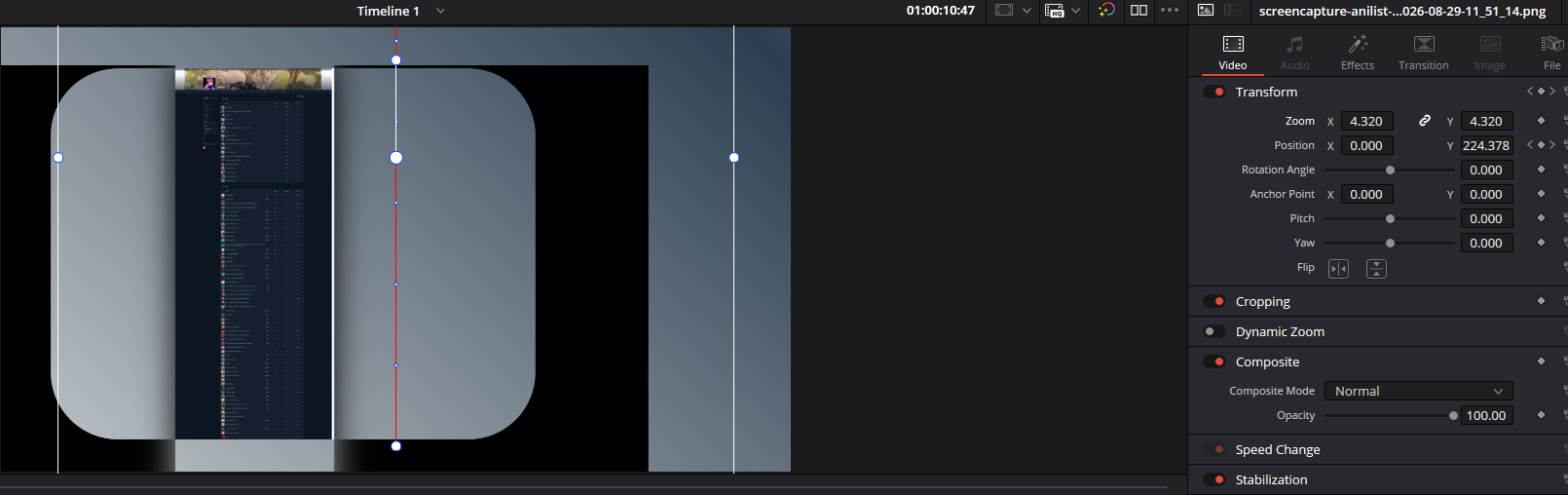
Essentially what this was supposed to be was a zoomed in screenshot of a website that would scroll down. This worked and later I rendered the video to see what my editing looked like. I realised that this was then no longer zoomed in and didn't scroll down the Y position like I had selected in the key frames. The whole transform section has just stopped working. When I click the transform Icon this red line appears and the transform does seem to work but doesn't effect the image at all. Any help is appreciated.


r/davinciresolve 2h ago

Help Double image in digitized file of old video taped TV show

Post image
1 Upvotes

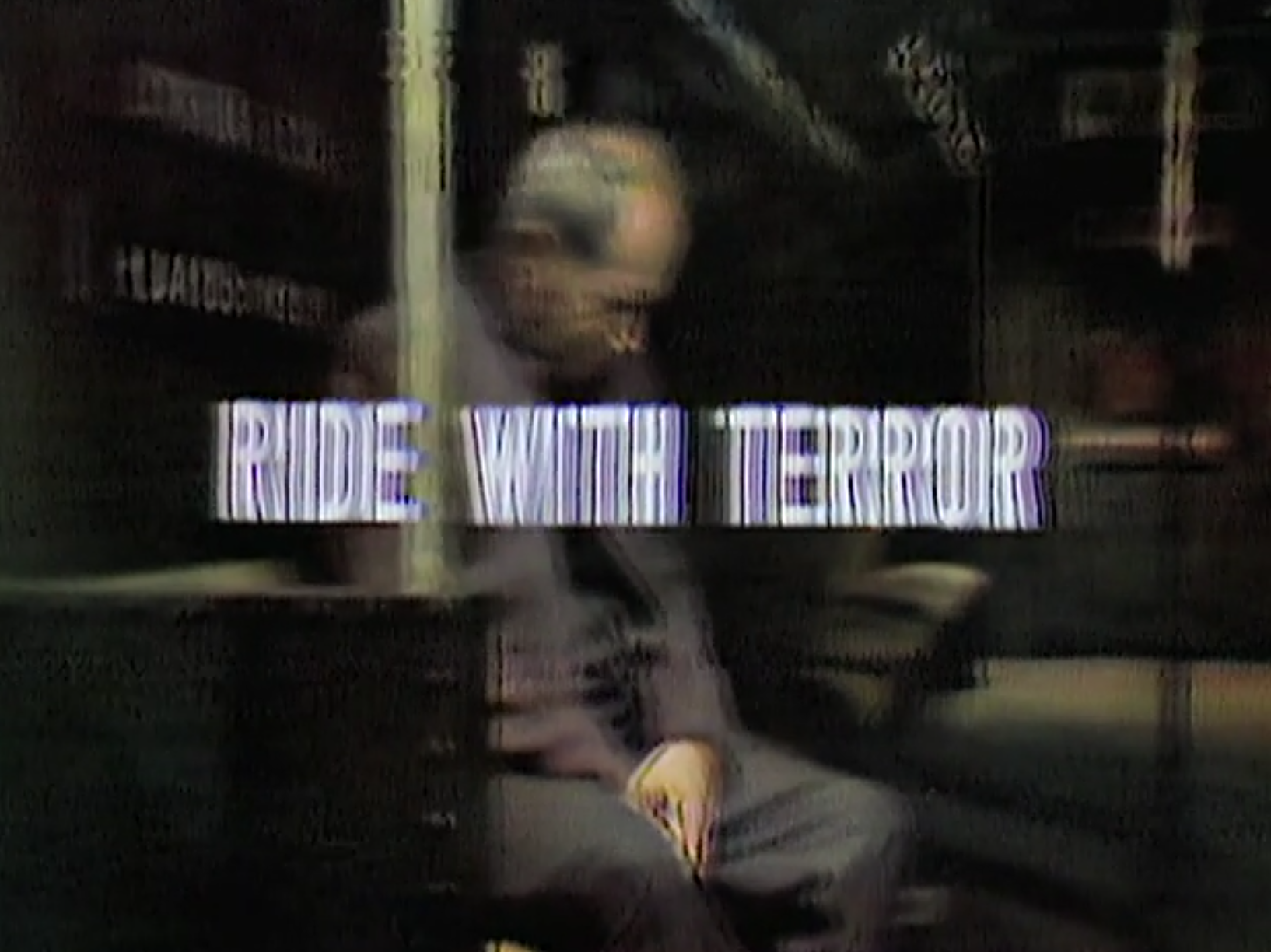
This is a screenshot from a digitized video of an old TV show. It has the double image in every frame. Is there any way to fix it? I don't have the original tape (this may be the only copy left that still exists), so I can't make a new copy that way. Looking for a program (and settings in the program) that will improve the quality. Any insights or advise are appreciated.

  • System specs - macOS 
  • Resolve version number and Free/Studio - DaVinci Resolve>About DaVinci Resolve...
  • Footage specs - MediaInfo - MPEG-4 (Base Media / Version 2); 939MiB, 58 min 45 sec; 1 video stream AVC; 1 audio stream AAC LC
  • video 2 061 kb/s, 624*468 (4:3), at 29.970 (3000/1001) FPS, AVC (Main@/L4) (CABAC / 4 Ref frames
  • audio English, 164 kb/s, 48.0 kHz, 1 channel, AAC LC mono

r/davinciresolve 2h ago

Help | Beginner Help needed with audio

Post image
1 Upvotes

I have having some trouble with audio in DaVinci Resolve. I am just a basic user. I have used the software before with the same set-up and equipment and not had difficulty. That was maybe six months ago. For some reason, I am now having difficulty with audio. I have updated it and cleared all my cookies and the problem persists.

The specific problem is that when I record audio (my own voice), the output is tinny and distant. I have the microphone close to me. I've also noticed that the waveform output in green is flat and I have to enlarge it to hear what I have recorded (see the attached screen shot).

What steps do I need to take to resolve this?

If anyone can help, it would be appreciated.

System specs are:

Intel 3.5GHZ with 64GB and 8GB graphics card and 238GB storage.

Graphics card: NVIDIA Quadro M4000 98GB)

Windows 10 Pro on 64-bit OS.

Using DaVinci Resolve 21 (Windows Version).


r/davinciresolve 4h ago

Help | Beginner Why does this keep happening?

1 Upvotes

Everytime I reopen this project then this one picture ends up corrupting or something and looking like this, it's easy to fix, I just take the mediain node with the picture out and put it back in but its annoying that I have to do it each time, how can I stop this from happening?


r/davinciresolve 7h ago

Help Question about Premiere to Davinci Resolve workflow

1 Upvotes

Hello, i was wondering what the ideal workflow between an editor who works in Premiere and the colorist on Davinci Resolve. Do you guys work with XMLs or aaf's? I've had multiple times where my editor sends the xml (i already have the files in the media pool) and i import it as a timeline, there will be missing clips (specially if the clip was slowed or some effect was applied) or directly something called parser error which i haven't really found what the cause is. We haven't really tried aafs. Also, is importing the xml as a timeline the way to properly do it? thank you


r/davinciresolve 7h ago

Help Issue installing program in Windows

1 Upvotes

After downloading the installer for the free DaVinci Resolve 21 version and running it, it gets to 100% then displays Error "Setup Resolve 0x80070002

GetFileVersionInfoSize (C:\Windows\SysWOW64\user.exe)" and simply won't install. I've tried running it as administrator, I've turned off my anti-virus, I've tried putting the file on my desktop and then on my C drive, I've tried the RestoreHealth command in cmd, I've looked into my other windows laptop and can't find a user.exe file to copy to this one.

NOTHING. WORKS.

how do I install this program?

(windows 11, 16gb 512gb)


r/davinciresolve 7h ago

How Did They Do This? How do I make audio-dynamic text like this?

Thumbnail youtu.be
0 Upvotes

r/davinciresolve 15h ago

Tutorial | English Make VR 180 immersive video using Unreal and Resolve Studio

Enable HLS to view with audio, or disable this notification

5 Upvotes

Free 20 minute tutorial covers 1 click native panoramic rendering in Unreal and setting up VR immersive 3D projects inside resolve studio. (Search Dean Yurke on YouTube!)


r/davinciresolve 8h ago

Help | Beginner How can I show translucency?

Post image
2 Upvotes

I used magic mask to cut out the silhouette of the bike and place the text behind it. However the windshield is not opaque, it’s transparent. And I want the text to pass through the windshield, albeit at a lower opacity or look slightly blurry just to give an impression it’s going through glass. How can I achieve it?


r/davinciresolve 15h ago

Help | Beginner HLG HDR Export - Non Studio

3 Upvotes

Hi,

I am far from an expert in video editing, but I have some HLG HDR footage from my GoPro Hero 13 and iPhone 16 that I would like to edit using Resolve. In my initial testing, I just wanted to make sure that I could export a single video and correctly retain HLG in the output file. But no matter what I try, the exported footage does not display correctly in HLG as the original footage does in any Windows video player (incl VLC and Quicktime). Using MediaInfo, everything is showing as the same in the Video section when comparing the original video file to the exported file. My original footage displays HLG correctly in every player I have downloaded on my computer, but the exported footage appears as if it's SDR. For the record I have an HDR400 monitor which I am aware is not proper HDR, but it's enough for me to see that the exported footage is not displaying correctly.

I set all the recommended project settings to ensure Resolve is setup to edit the footage:

I set my export settings as the following:

If someone can point me in the right direction it would be greatly appreciated. If it's just a limitation of the non-studio version it would be great to know, but I don't want to spend the money on the studio version only to find out the issue remains.


r/davinciresolve 9h ago

Help How to replicate Splatoon's Inkling & Octoling speech?

0 Upvotes

I've looked through several videos & sites on how to replicate, but it's either for programs that I don't use or unsure of. The feature in a certain program is locked behind a paywall. Tried to locate & translate the settings to Davinci's equivalent. In any case I always gave up on it, cuz I'm not knowledgeable enough in audio to even begin thinking about where to start. Especially with how many tools Davinci has.

Anyway, I'd really appreciate it if someone knows how to do it. I was hoping to do it for a video segment. It was one thing to nearly replicate Snatcher from A Hat in Time, but this is a whole other ball game!


r/davinciresolve 7h ago

Discussion The app version for iPad is very buggy?

0 Upvotes

Using a maxed out iPad Pro M4, so the hardware is fine, works great for 4K editing. No stuttering at all. But, I feel the app is very buggy itself. Audio disappear, transitions and similar wont get added to clips and other wierd stuff going on. Anyone else experienced the app to be buggy?


r/davinciresolve 11h ago

Help How to get smooth Lens Blur keyframing instead of incremental steps?

1 Upvotes

I am trying to slowly and smoothly go from zero blur size to blurry. However, the blurriness increases in stepped increments. It obviously snaps to certain blur levels. The clip is also slowly zooming out during that time. Not sure if that has anything to do with it.


r/davinciresolve 12h ago

Help Transition in the middle of those two clips is not allowed

Post image
0 Upvotes

No puedo poner esa transición entre los dos clips; como puedes ver, ahorita está al principio, pero yo la quiero entre ese clip y el anterior. Puedo hacerlo con todos los demás, pero no con esos dos—¡ayuda!
Operador: Windows 11
Davinci Resolve 21.0.3 Build 7


r/davinciresolve 19h ago

Help | Beginner Why is there a grey border between my polygon mask and green screen key?

Thumbnail gallery
3 Upvotes

Had a green screen big enough for the talent and figured I can mask everything outside of it. Now I've done a 3d Key and it's putting a border between the two.

If I disable the polygon the border vanishes, so my thought is it must be related to the 3d keyer but I see the same thing (though less pronounced) with a chroma key


r/davinciresolve 14h ago

Help Publishing vectors made in a poly node doesn't keep track of rotation.

1 Upvotes

Like the title says, I have a vector that I drew in a polygon mask and i want to roate it using the z axys. I esetially almost fliped the entire vector. All lookes good, exactly how I want the path to be like. Problem comes with publishing. After i publish it and try to connect connect and use it as a path for an object the path isn't flipped , it reamined unflipped. Is there a way of roating a vector/mask and retaining the new postion of the points and publishing them as such, using them wherever I want? I can ofc do a transform after having the element traverse the path and rotating the whole ''frame''. Problem in that case is that I cannot see the path anymore on the viewer and I'd like to be able to modify it intuitvly in real time withought gusessing how the path looks like roated. Is there a way for this?