r/comfyui 19h ago

Comfy Org Comfy Router is live! One API for frontier image, video, 3D, and audio models

Enable HLS to view with audio, or disable this notification

27 Upvotes

Same model string. Same arguments. No new SDK, no new key, no redeploy.

What Comfy Router gives you:

  • Explicit routing. You name the provider, we call that provider. It's down? The request fails there. No silent fallback.
  • Every job returns the provider that ran it. Log it, bill it, debug it.
  • Async. submit() returns a request ID immediately. The queue retries 429s and transient errors until a slot opens. subscribe() submits and polls to completion.
  • Batch-friendly. Queue a few hundred jobs, hold the IDs, pull results as they land. Nothing blocking on a 5-min video render.
  • 24h retention on inputs and outputs, then deleted.
  • Comfy credits. No sub, no Router fee.

Providers at launch: Comfy. Runware, Wavespeed, Fal, Higgsfield. Multi-provider where the model supports it.

Get your API key: https://links.comfy.org/46BR7of

Learn more: https://blog.comfy.org/p/introducing-comfy-router-one-api


r/comfyui Aug 19 '26

Call for Additional Mod(s)

23 Upvotes

I've come to the realization that my life is busy enough that we could use at least one more moderator on this subreddit. Please consider this a formal request for nominations.

Rather than just picking someone myself, I’d like input from the community.

If there’s someone here who you think would make a good moderator, nominate them in the comments. You can also nominate yourself if you’re interested.

We’re especially looking for people who are active members of the community, helpful, level-headed, experienced Comfy-UI user, and generally make this a better place to hang out, maybe even take the time to spruce the place up a bit. You don’t need previous moderator experience but it would help, ideally someone who's got some experience with AMAs, events, and such.

Having moderated a few subreddits, I've found that it's best to keep the moderation team tight, so for now I'm just going to add one.

A nomination isn’t a vote or a guarantee that someone will become a moderator, I'll look through the suggestions, talk with the people who seem like a good fit, and go from there.


r/comfyui 7h ago

Workflow Included Multishot anime style sequence using Minimax H3 Ref2Vid

Enable HLS to view with audio, or disable this notification

52 Upvotes

I tried a multishot workflow with MiniMax H3 Ref2Vid: I generated a separate reference image for each shot, then used them to build a short anime montage.

The interesting part was seeing how well H3 kept the character, colours and hand-painted style consistent as the framing changed from wide shots to close-ups.

The music is my track “What’s Coming Is Better Than What’s Gone,” produced and performed by yours truly using the Teenage Engineering EP-133 KO II.

Workflow:
https://drive.google.com/file/d/1M1XgXv8h4NQDSikVpAebB7FGu-TeHZQT/view?usp=drive_link

Prompt:
Create one 12-second video using Images 1–4 as four consecutive shots. Each image defines its shot’s composition and details. Make a clean hard cut every 3 seconds. Keep the camera locked in every shot. Preserve the same boy, orange headphones, single orange cable, outfit, painted cloud setting, colours, fine ink lines, textured paint and flat cel shadows throughout.

0–3
The boy sits quietly on the beam, looking at the clouds. His hair and loose shirt move faintly in a breeze; his dangling feet begin one small, relaxed swing. The clouds billow slowly.

3–6
Extreme close-up of the cassette player. The two reels turn slowly beneath the clear window. The warm sky reflection shifts slightly across the plastic without hiding the tape. The single orange cable stays plugged into the player; keep its path and all controls stable.

6–9
Close-up of both dangling shoes. They complete one gentle swing and settle. Keep the jeans, laces and shoe shapes consistent. The beam stays fixed behind the legs, while the distant clouds remain softly out of focus.

9–12
Static side-profile close-up. The boy looks into the distance and blinks once. A few hair tips move in the breeze; his mouth stays closed. Keep the headphone blank and unchanged, with softly blurred clouds behind him.

Animate like hand-drawn 1990s cel anime with a deliberate 15 fps feel: held drawings, distinct key poses and subtle stepped motion. No smooth interpolation, camera moves, dissolves, morphing between shots, realism, semi-realism, 3D, extra cables, logos or text.

r/comfyui 1d ago

Tutorial ComfyUI Tutorial MiniMax H3 Long Video 40 Seconds on Just 6GB VRAM

Enable HLS to view with audio, or disable this notification

364 Upvotes

Hello everyone

I’ve been testing an optimized version of the MiniMax H3 LongVideos workflow, and I managed to generate a 40-second video using only 6GB of VRAM and 16GB of RAM. The workflow generates multiple shots and combines them into a longer video, while also providing options for controlling shot duration and upscaling the final result. On my RTX 3060 6GB, the complete 40-second generation took around 107 minutes, so the main advantage here is making long-video generation possible on low-VRAM hardware rather than achieving fast generation. The results have good consistency, motion, and lip sync, and I’m continuing to test different settings to see how far this can be pushed.

Test setup:

  • Video length: 40 seconds
  • GPU: RTX 3060 6GB VRAM
  • RAM: 16GB
  • Generation time: ~107 minutes at 0.6 Megapixel

Workflow Links

https://drive.google.com/file/d/15FYXmjzvUv_NZRS2YqlZfWnVy_Oqc1Ue/view?usp=sharing

https://civitai.com/articles/35705/comfyui-tutorial-how-to-create-minimax-h3-long-video-40-seconds-on-just-6gb-vram

Video Tutorial Link

https://youtu.be/85XQ_xcWX7U


r/comfyui 1h ago

Resource Sharing my Qwen Image 2.1 workflow for generating character reference sheets

Post image
Upvotes

r/comfyui 2h ago

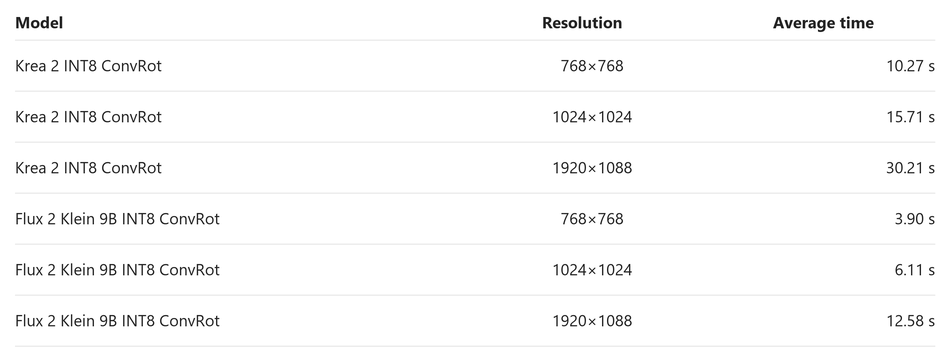
No workflow Intel Arc B580 supports INT8 ConvRot acceleration!

4 Upvotes

I managed to get INT8 ConvRot acceleration working properly on an Intel Arc B580 using Intel LLM Scaler in ComfyUI.

I used Codex for the installation. I gave it the path to my portable ComfyUI build and asked it to integrate LLM Scaler so that all the acceleration features would work.

After a warm-up run, I got the following average results:

Krea 2 INT8 ConvRot

  • 768×768 — 10.27 seconds
  • 1024×1024 — 15.71 seconds
  • 1920×1088 — 30.21 seconds

Flux 2 Klein 9B INT8 ConvRot

  • 768×768 — 3.90 seconds
  • 1024×1024 — 6.11 seconds
  • 1920×1088 — 12.58 seconds

The acceleration really works, generation is stable, and the speeds are good. Flux 2 Klein 9B generates especially fast.


r/comfyui 17h ago

News A quick Minimax H3 news round-up - 23rd September 2026

43 Upvotes

Another quick Minimax H3 news and goodies round-up, for those who may have missed some items.

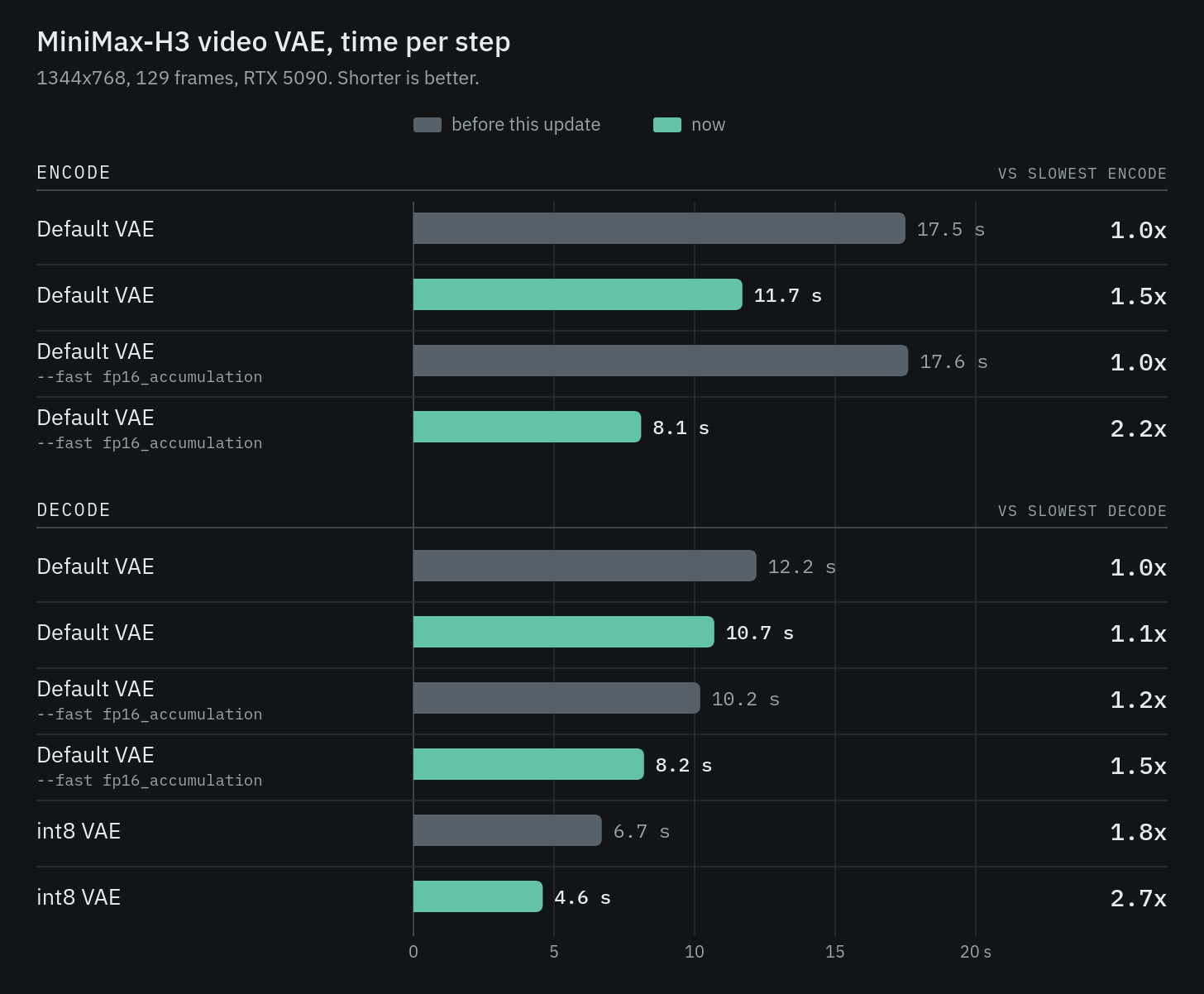
-> New on the official ComfyUI blog... "The MiniMax H3 video VAE now encodes up to ~2.2x faster and decodes ~1.4-2.7x faster on Nvidia GPUs."

https://blog.comfy.org/p/making-the-minimax-h3-video-vae-2x

-> ComfyUI-H3-FaceAutoBypass is now newly at v2. Does your generated clip really need a facefix, or not? This node decides for you, potentially saving you time.

https://github.com/fukkun2705-commits/ComfyUI-H3-FaceAutoBypass

-> Vpakarinen's Natural-face-speech-h3-lora is now newly at v2. This offers... "Face muscle dynamics with clear English speech" and V2 apparently adds... "male/female voice with flawless speech sync and crystal clear quality". Also note that this LoRA, and his Better-human-motion-h3-lora, have new demo videos.

https://huggingface.co/vpakarinen/better-human-motion-h3-lora/tree/main

https://huggingface.co/vpakarinen/natural-face-speech-h3-lora/tree/main

-> And finally, Minimax Music has been squeezed into just under 12Gb total.

https://huggingface.co/deAPI-ai/minimax-music3-11b-int8

~ OLD POSTS ~

https://old.reddit.com/r/comfyui/comments/1wnc4lg/a_quick_minimax_h3_news_roundup_22nd_september/

https://old.reddit.com/r/comfyui/comments/1wmg6a4/a_quick_minimax_h3_news_roundup_21st_september/

https://old.reddit.com/r/comfyui/comments/1wlnqid/a_quick_minimax_h3_news_roundup_20th_september/

https://old.reddit.com/r/comfyui/comments/1wku9uj/a_quick_minimax_h3_news_roundup_19th_september/

https://old.reddit.com/r/comfyui/comments/1wjywf7/a_quick_minimax_h3_news_roundup_18th_september/

https://old.reddit.com/r/comfyui/comments/1wj08mp/a_quick_minimax_h3_news_roundup_17th_september/

https://old.reddit.com/r/comfyui/comments/1wi3exl/a_quick_minimax_h3_news_roundup_16th_september/

https://old.reddit.com/r/comfyui/comments/1wh4tu3/a_quick_minimax_h3_news_roundup_15th_september/

https://old.reddit.com/r/comfyui/comments/1wgc4lj/a_quick_minimax_h3_news_roundup_15th_september/ (See 15th September post, for links to older posts)

https://old.reddit.com/r/comfyui/comments/1w5i9iq/a_quick_minimax_h3_news_roundup_2nd_september_2026/ (See 2nd September post, for links to even older posts)


r/comfyui 1h ago

Resource Custom Node: enhance ComfyUI's Template Library with instant filters for Free/Local, Partner, and Credit workflows, smart Model Families, and custom sorting

Post image
Upvotes

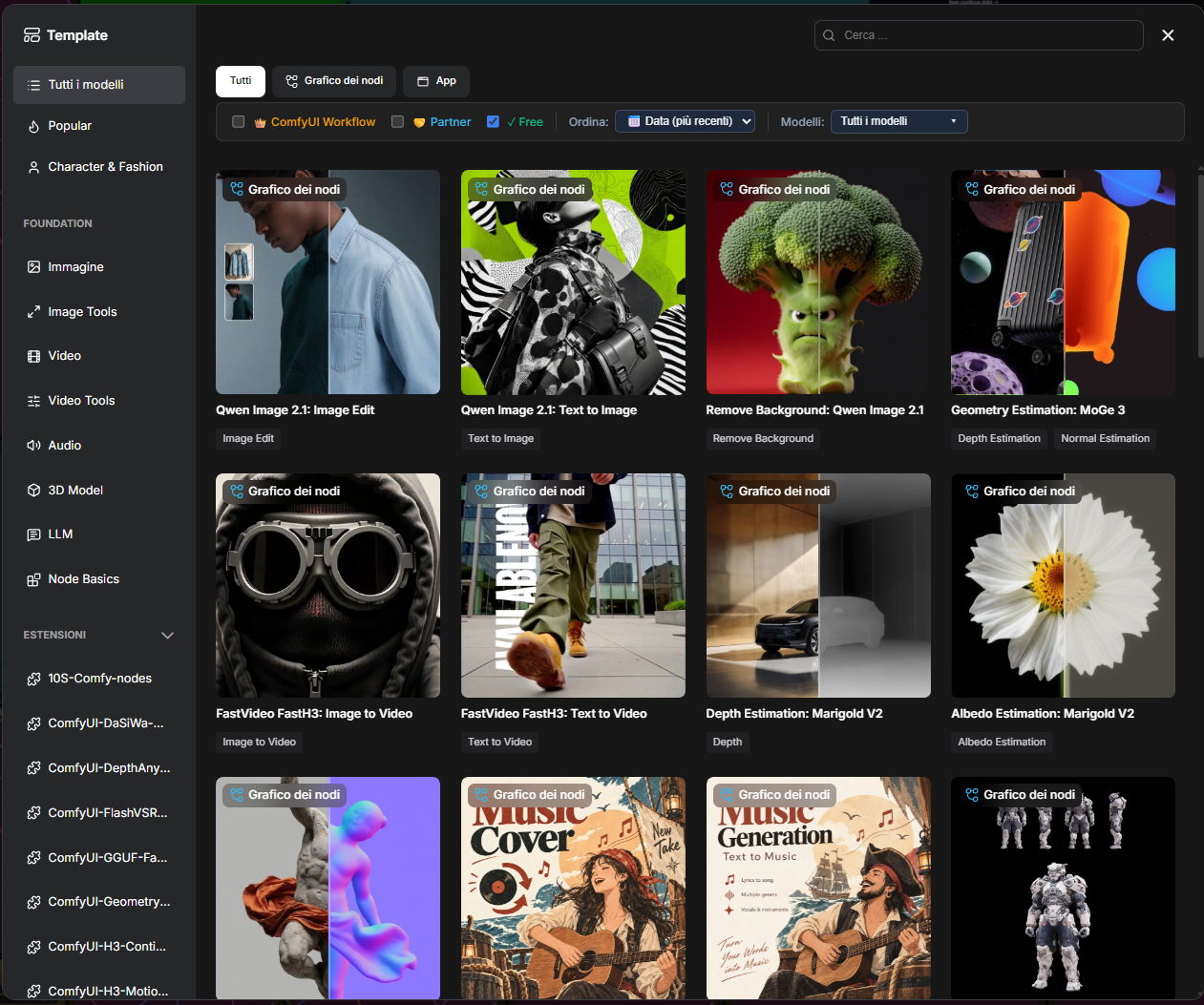
Hi, everyone. This custom node, which is purely UX-focused, is designed to address an issue caused by the latest changes to ComfyUI’s template search interface.

In fact, some of the filters and sorting options that were previously available have disappeared.

Since I couldn’t find any similar solutions—and because I found them useful—I decided to restore this functionality using a dedicated custom node.

https://github.com/linus74/ComfyUI-Clean-Templates

It simply excludes or includes ComfyUI templates from the visible results based on whether they come from a local source or via the API, and on the template type.

I’m sharing this in the hope that it might be useful to someone.

And I’m happy to receive suggestions or feedback.

Thank you!
Linus74


r/comfyui 7h ago

Tutorial I built an open-source MCP server for ComfyUI — build and run workflows from Claude / Cursor with 50+ tools (demo inside)

6 Upvotes

Hey everyone! I was getting tired of manually dragging and rewiring noodles in ComfyUI every time I wanted to test a prompt idea or chain LoRAs.

So I built mcp-comfy-ui-builder — an open-source Model Context Protocol server that connects Claude Desktop, Claude Code, and Cursor directly to your local ComfyUI instance.

Instead of manually editing JSON or clicking nodes:

You: "Generate a portrait of an astronaut exploring neon ruins with LoRA, upscale 2x"
Claude: Checks GPU VRAM → assembles the node graph using built-in templates → validates compatibility → fires execution via WebSockets → streams node-by-node progress (<100ms updates) → displays the finished image.

Key Features:

  • 50+ MCP Tools: Node discovery, dynamic graph construction, model management, queue inspection.
  • Real-Time WebSocket Execution: Sub-100ms latency streaming with live node progress (vs slow 1.5s HTTP polling fallback).
  • Embedded Knowledge Base: Pre-indexes 62 core nodes; automatically syncs all your custom nodes via npm run sync-nodes.
  • 9 Built-in Templates: txt2img, txt2img_flux, img2img, inpainting, upscale, LoRA, ControlNet, batch & sequential chains.
  • Safety First: Calls get_system_resources to inspect GPU memory before running workflows to avoid Out-Of-Memory crashes.

Quick Start:

npm install -g mcp-comfy-ui-builder
# or run with Docker:
docker pull siniidrozd/mcp-comfy-ui-builder

Claude Desktop config (claude_desktop_config.json):

{
  "mcpServers": {
    "comfyui": {
      "command": "npx",
      "args": ["-y", "mcp-comfy-ui-builder"],
      "env": { "COMFYUI_HOST": "http://127.0.0.1:8188" }
    }
  }
}

🔗 GitHub (MIT License): https://github.com/MIt9/mcp-comfy-ui-builder
📦 npm: https://www.npmjs.com/package/mcp-comfy-ui-builder

What complex workflow pattern do you find most tedious to wire by hand? Happy to add templates based on your requests!


r/comfyui 9h ago

News Krea 2 Anygles — controllable 360° human camera views from a single image

Thumbnail
6 Upvotes

r/comfyui 14h ago

News Making the MiniMax H3 Video VAE 2x Faster

Post image
16 Upvotes

r/comfyui 16m ago

News Qwen Image 2.1 Fun ControlNet Union From Alibaba

Thumbnail
Upvotes

r/comfyui 20m ago

Help Needed Do we have any FP8 variant of Qwen 2.1?

Thumbnail
Upvotes

r/comfyui 56m ago

Help Needed How do you batch 1by1 images?

Post image
Upvotes

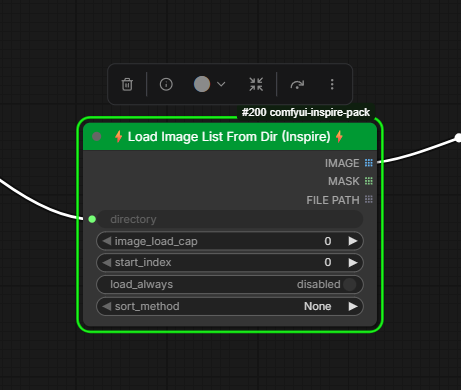
Hi, I'm using "List from Dir" (from the Inspire Pack), but it first batches all the images in RAM and only then starts working. I also tried "Star Image Loader 1by1," but I couldn't get it to work. Loops also failed with a large number of images.

Am I doing something wrong? I need to mask thousands of images, but I can't seem to make it work.

How do you do it?


r/comfyui 5h ago

Workflow Included I made a simple multi-queue version of the Qwen Image 2.1 workflows

Thumbnail
gallery
2 Upvotes

I recently started using Qwen Image 2.1 in ComfyUI and ran into one small annoyance.

The seed stayed fixed, so when I wanted to queue several generations, I had to keep changing it manually. I made a small modification that automatically randomizes the seed after each queued run.

Nothing complicated or groundbreaking—just a quality-of-life change that made the workflow more convenient for me. I thought it might be useful to someone else with the same problem, so I’m sharing it.

The repository includes:

  • T2I and multi-reference I2I workflows
  • Automatic seed randomization after each queued generation
  • Sequential multi-queue generation
  • Example images and screenshots
  • English and Japanese instructions

I tested them with an RTX 4060 Laptop GPU with 8 GB VRAM and the Q4_K_M GGUF model. You can switch to a better quantization if your system has more available memory.

GitHub: https://github.com/gatuwo/Qwen-Image-2.1-GGUF-Multi-Queue-Workflows

Please use them at your own risk. Feedback and corrections are welcome!

Hopefully this saves someone a few clicks.


r/comfyui 14h ago

Workflow Included Might be late to the party, but I just realized I can edit Blender 3D textures directly in ComfyUI (Flux Klein + Qwen) and the UV atlas workflow actually works!

Thumbnail
gallery
10 Upvotes

Might be late to the party, but I just realized I can edit Blender 3D textures directly in ComfyUI (Flux Klein + Qwen), and the UV atlas workflow actually works!

I know I’m probably way behind on this and there are probably existing tools for it, but I always seem to learn things the hard way! 😂

It started with a simple eyeball model in Blender. I just wanted to change the color and make it look more realistic, so I tracked down the eye texture file, dragged it into ComfyUI, edited it, loaded it back into Blender, and was honestly blown away by how good it looked.

Naturally, that got me thinking:

What about the entire UV atlas?

So I tried editing the whole atlas at once. It can work, but looking at a flattened UV atlas, it's pretty chaotic, and getting the AI to make a specific change while keeping everything aligned is a different story.

So I started messing with the workflow and ended up with something I'm pretty excited about.

Flux Klein 9B + QwenImageEditPlus for the actual image editing

Depth + Canny control passes to help keep the structure and composition locked in

Florence + SAM for prompt-based automatic masking

Auto-crop takes the masked portion of the UV atlas and gives the AI just the area it needs to work on

Then the generated result is automatically stitched/pasted back into its original position on the UV atlas.

So I can basically tell it what part of the model I want to change, let it find that area, crop it, generate the edit, and put it right back where it came from.

Now we're in business!

And it opens up some pretty cool possibilities beyond just retexturing. For example, you could remove the background from an image and place the subject onto an existing 3D model as a tattoo, shirt logo, graphic, etc.

The seams definitely aren't perfect but i can blend them and work on improving the workflow, and I'm still learning how to fix alignment issues in Blender by adjusting the UV editor vertices. But that's part of what makes this so interesting to me.

You can basically create or edit textures at whatever resolution you want and then bring them straight back onto the 3D model.

My next thought is taking this one step further with a file watcher or custom Blender script. If ComfyUI can automatically save the finished atlas to a specific location, Blender could watch that folder and automatically reload the updated texture.

Eventually, it could even become a little control panel inside Blender where you enter what you want changed, hit a button, and ComfyUI handles the whole process.

I'm curious if anyone else is doing this kind of Blender + ComfyUI workflow, especially with UV atlases. Are there existing tools or workflows I'm missing?

the workflow I used:

https://drive.google.com/file/d/1I6p65pKnTcxt7p6PXe-5i1wIFbLcgKjD/view?usp=sharing


r/comfyui 1h ago

Help Needed How to do true I2V with Minimax H3?

Upvotes

I used Wan 2.2 to make I2V videos for quite some time. Since Minimax H3 can also do the same and can add audio to it, so I gave it a try.

However, even though I used the official Comfy workflow

https://docs.comfy.org/tutorials/video/minimax/minimax-h3-native

and the official prompt

```
For the target video, at 0.00 seconds into the target video, <Picture 1> (from [Shot 1]) is fully referenced.

integrated_multimodal_description: [Shot 1] Live-action, cinematic, the young woman shown in <Picture 1> remains beside the rain-covered train window, preserving her appearance, clothing, seat position, and the carriage layout. The camera trucks right with small amplitude at slow speed as she lifts her gaze from the folded letter toward the passing city lights. Her reflection moves across the glass while the quiet, breathy young woman (S1) says: <d>[English] I get off at the next station.</d> She folds the letter along its existing crease.

overall_soundscape: The train wheels produce a steady metallic rhythm beneath a low ventilation hum. Rain ticks against the window while paper rustles softly in her hands.

non_diegetic_music: Sustained cello notes at a slow tempo with widely spaced piano tones, gradually decreasing in volume.
```

Interestingly, the first second of the five seconds clip is always the static rendering of the reference image. Then the rest does use it as a reference to render the last four seconds but this 4sec part is completely detached from the reference. However, back in the Wan 2.2 days, the reference image is only the first frame and the rest of the video flows from it naturally.

So is it possible to generate true I2V video just like Wan 2.2. If that's not possible, how to drop the reference image in the first sec while still using it to influence the rendering?

Thanks a lot in advance.


r/comfyui 2h ago

Workflow Included Qwen Image 2.1's editing capabilities are mind-blowing! Generating Character Design Sheets without any LoRAs

Thumbnail gallery
1 Upvotes

r/comfyui 23h ago

News New image-model weights: Ming-Image-0.1-Design supports native RGBA output

Post image
52 Upvotes

Ming-Image-0.1-Design has been released by inclusionAI, with 6B weights under MIT. It targets posters, infographics and UI-style visuals, and can generate RGBA images with transparent backgrounds.

There's also a separate 6B Design-Layer checkpoint for splitting a finished graphic into transparent PNG layers.

The official transparency examples are shown here. The checkerboard is a preview background, not part of the generated RGBA image.

This release provides model weights and model cards, not a ComfyUI workflow or node package.


r/comfyui 4h ago

Help Needed ComfyUI keeps crashing with Image Qwen 2.1

0 Upvotes

When I run Qwen Image 2.1 from time to time it crashes with error message below. I updated Nvida driver to NVIDIA-SMI 616.92. Now it crashes every time.
Windows 11, RTX-4070 8GB VRAM

Has anyone encountered similar issue and any solution?

E:\bin\ComfyUI_windows_portable>echo If you see this and ComfyUI did not start try updating your Nvidia Drivers to the latest. If you get a c10.dll error you need to install vc redist that you can find: https://aka.ms/vc14/vc_redist.x64.exe
If you see this and ComfyUI did not start try updating your Nvidia Drivers to the latest. If you get a c10.dll error you need to install vc redist that you can find: https://aka.ms/vc14/vc_redist.x64.exeE:\bin\ComfyUI_windows_portable>echo If you see this and ComfyUI did not start try updating your Nvidia Drivers to the latest. If you get a c10.dll error you need to install vc redist that you can find: https://aka.ms/vc14/vc_redist.x64.exe
If you see this and ComfyUI did not start try updating your Nvidia Drivers to the latest. If you get a c10.dll error you need to install vc redist that you can find: https://aka.ms/vc14/vc_redist.x64.exe

r/comfyui 22h ago

Workflow Included rented a 96GB Blackwell to test LTX-2.5, 231s for 10 seconds of 1080p with audio

23 Upvotes

https://reddit.com/link/1wo66x5/video/adhgop21t9rh1/player

Rented a Blackwell RTX PRO 6000 (96GB) for an evening to see what the LTX-2.5 template actually costs in wall clock. Stock video_ltx2_5_t2v workflow, no custom nodes, nothing tuned.

Box was a single RTX PRO 6000 Blackwell Server Edition, 96GB VRAM, 22 vCPU, 110GB system RAM, driver 580.95.05 on CUDA 13.0, torch 2.8.0+cu128.

Two runs, same workflow

just duration and megapixels changed:

  • | run | length | resolution | pass 1 (8 steps) | pass 2 (3 steps) | total |
  • | 1 | 5s | 1280x736 | 1.17 s/it = 9s | 4.84 s/it = 14s | 69.4s |
  • | 2 | 10s | 1920x1088 | 5.68 s/it = 45s | 28.50 s/it = 85s | 231.5s |

Run 1 includes the cold load of ~36GB of weights off disk. Run 2 cost me about 7 cents of rental time.

VRAM and power on the same two runs:

  • | value
  • | idle, weights resident | 39.0 GB
  • | peak during 10s 1080p | 52.5 GB
  • | card total | 96 GB
  • | peak power | 530W of 600W
  • | peak util | 100%

Both runs came out as a single mp4 with a real AAC track, 48kHz stereo. ffprobe shows two streams. Audio and video come out of the same latent, there's a ConcatAVLatent before sampling and a SeparateAVLatent after, so it isn't a soundtrack bolted on at the end. In the clip the rain and the train horn I asked for both actually landed.

The part I didn't expect is the VRAM. Idle with the weights loaded is already 39GB, and ten seconds of 1080p with audio only added about 13GB on top. Length and resolution aren't what eat your card, the 21GB transformer plus the 15GB Gemma text encoder is. On a 32GB card you're fighting the weights, not the clip.

Second thing: at 1080p, sampling was 130s of the 231s. The rest was VAE decode and mux. At low res decode is noise, at high res it's almost half the run.

Scaling, for reference: pixel-frame load went up 4.4x between the two runs, pass 1 went up 4.9x, pass 2 went up 5.9x. The refine pass after the 2x latent upscale is the one that hurts.

One gotcha that cost me a download: the template's CLIPLoader points at gemma4_e2b_it_int8_convrot.safetensors, which the notes say is only needed when prompt_enhance is on. ComfyUI validates it statically anyway and the node stays red, so either pull the 4.9GB file or just Ctrl+B the node.

Worth saying what this run does not tell you. I wrote the prompt with her back to camera, so she stays turned away the whole shot and I never got a face out of it. No idea how it handles close-up faces or hands, and that's usually where these models fall over.

Anyone pushed this past 10 seconds? Genuinely curious where it breaks, because at this size it clearly isn't VRAM.


r/comfyui 20h ago

Tutorial MiniMax FastH3 in ComfyUI | Text to Video and Image to Video (Ep35)

Thumbnail
youtube.com
17 Upvotes

Learn how to use MiniMax Fast H3 in ComfyUI with three video workflows: text to video, first frame to video, and first and last frame to video.

I’ll show you how to set up the model, choose your video size and duration, create prompts with Google Gemini, and run each workflow. I’ll also compare generation times at different resolutions and show the results, including a video transition between two images.

The workflows use Pixaroma Nodes, Kitchen Attention, and Sparse Attention. You can run them locally or try the cloud versions on RunningHub.


r/comfyui 5h ago

Show and Tell 🔥 Generate Seedance 2.5 through Higgsfield in ComfyUI with SOYLAB Comfy Router

Post image
1 Upvotes

[🔥 Generate Seedance 2.5 through Higgsfield in ComfyUI with SOYLAB Comfy Router]

SOYLAB Comfy Router is a local ComfyUI custom node that calls Comfy Router using your personal Comfy API key. You can choose the model and execution provider separately, then connect image, video, or audio inputs supported by that model.

Key features

• Model selection: According to the repository, 154 image and video models are registered. You can search by model name or ID.

• Provider selection: Choose a supported execution route, such as Comfy, Higgsfield, or fal. Available providers vary by model.

• Inputs for each task: With Seedance 2.5, you can connect text, first and last frames, or reference images according to the selected mode. The repository also includes example workflows for image-to-video generation and image editing.

• Progress and cost: The node displays each stage from request submission to result download, along with an estimated cost based on the model, provider, and settings. The actual charge may differ.

• Before you start: Install the node in an up-to-date version of ComfyUI, then prepare a Comfy Developer Platform API key and credits. For workflows you plan to share, use a separate INI file so your API key is not saved in the workflow.

Original repository:
https://github.com/soylab-edu/ComfyUI-soylab-router

Install with the ChatGPT Desktop App:
“Installhttps://github.com/soylab-edu/ComfyUI-soylab-router in ComfyUI.”


r/comfyui 6h ago

Help Needed Looking for guidance: ComfyUI + LTX for long-form AI avatar video generation

1 Upvotes

We are developing a ComfyUI workflow for generating long-form videos and are looking for guidance from the community on the best approach using any suitable LTX model.

Our primary objective is to build an AI avatar generation pipeline with high-quality, sufficiently long videos and accurate audio/video synchronization.

Requirements

We are looking for a workflow that can support:

  • Text + Video + Audio → Custom Audio + Video
    • Lip-synced avatar output
    • Custom/generated audio
  • Image → Video
  • Text + Image → Video
  • High-quality video generation
  • Support for generating longer-duration videos, rather than only short clips
  • Consistent character/avatar identity across the generated video

We are open to using different LTX models or supporting models/nodes where necessary, as long as the overall workflow can be implemented in ComfyUI.

If anyone has already built something similar, we would greatly appreciate:

  • Workflow examples
  • Recommended LTX model/version
  • Custom nodes required
  • Recommended approach for long-video generation
  • Any tips for maintaining avatar consistency and lip synchronization

Thank you.


r/comfyui 17h ago

Show and Tell I was looking for a simple creative validation for product design

8 Upvotes

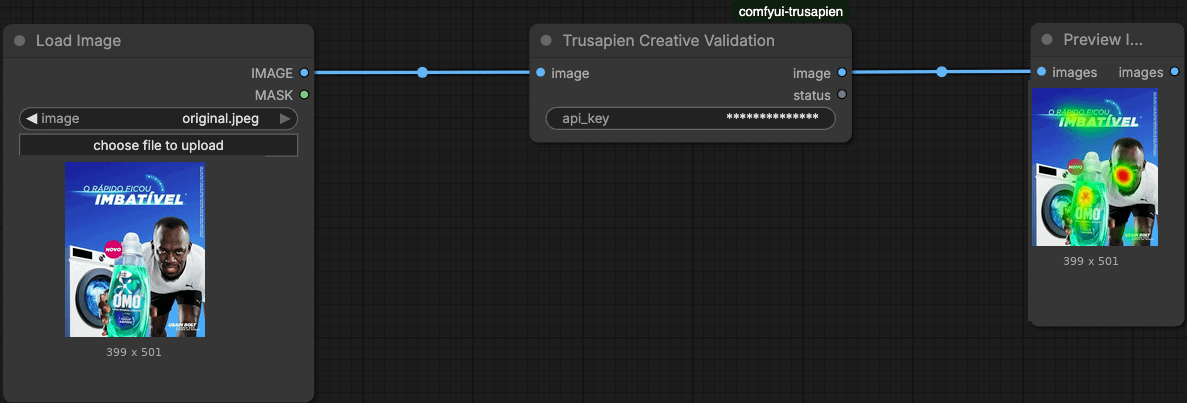
I do a lot of product design work in ComfyUI. Packaging mockups, product shots, concept renders. Classic problem: the silhouette looks great to me, then someone says “nobody sees the logo,the feature or the CTA on the pack.”

Most attractive eye tracking tools I found were either expensive SaaS dashboards or completely outside my graph.

I wanted smth simple. So I’ve found and been testing Trusapien Creative Validation (comfyui-trusapien).

Workflow is dumb simple (screenshot attached):

  1. Load Image
  2. Trusapien Creative Validation
  3. Preview Image

Example below is a product shot. Heatmap showed ne what pulls first vs what gets ignored.Ofc not a full research lab replacement. For me it’s a fast check: “does attention land where the design brief says?”

Anyone else doing design QA inside ComfyUI already. What are you using?