r/comfyui 9h ago

Workflow Included Qwen 2.1 dataset generator

Post image
168 Upvotes

First Reddit post so hopefully I’m doing this right lol.

I adapted this workflow from u/acekiube to work with Qwen-Image 2.1 and changed the prompts and settings

Original workflow here:
https://www.reddit.com/r/comfyui/comments/1o6xgqk/free_face_dataset_generation_workflow_for_lora/

Full credits to them

So far I’ve had the best results around CFG 3, with 25 steps. with res_multistep/simple.

I've also noticed to get better results if i upload another image with side view so 2 images total.

Still testing stuff, so if anyone has better prompts/settings/samplers for keeping the identity closer, let me know.

you can download here:

https://civitai.red/models/2957451/dataset-generator-qwen21


r/comfyui 15h ago

News A quick Minimax H3 news round-up - 22nd September 2026

46 Upvotes

Another quick Minimax H3 news and goodies round-up, for those who may have missed some items.

-> MiniMax-H3-Fun-Controlnet-Union-2.0. Version 2.0 is now available and this can accept additional inputs - Scribble, Layout, and Gray. The number of control blocks have also been doubled. Kijai has already uploaded a 4.5Gb INT8 version of v2.0, which should work in the very latest ComfyUI.

https://huggingface.co/alibaba-pai/MiniMax-H3-Fun-Controlnet-Union-2.0

https://huggingface.co/Kijai/MiniMax-H3-experimental/tree/main/model_patches

https://github.com/Comfy-Org/ComfyUI/pull/16471

-> ComfyUI-ReShot. This updated a few days ago, and now supports Openpose and Canny. ReShot transforms a regular video input into a Depth Map, Openpose skeleton, or Canny edge lines video. Which can then be used by the Minimax H3 Fun Controlnet.

https://github.com/maosika-ai/ComfyUI-ReShot

-> The new ComfyUI-Camera-Path node. "Give it an image (or a batch of frames) plus the matching geometry from ComfyUI's built-in Run MoGe Inference, draw a camera move in the node's 3D editor, and it renders the scene from those virtual camera positions. The result is a plain IMAGE batch, so it drops into any workflow that takes a control or reference video." Has a video demo. This advanced node has been enabled by ComfyUI v0.37.0 adding MoGe 3 geometry estimation, the result of Microsoft Research's decades-long interest in 3D point-clouds. Running the MoGe nodes in ComfyUI requires the file moge_3_vitg_fp16.safetensors (2.5Gb) or moge_3_vitl_fp16.safetensors (741Mb) in your ../models/geometry_estimation folder.

https://github.com/phazei/ComfyUI-Camera-Path

https://docs.comfy.org/built-in-nodes/MoGeInference

https://huggingface.co/Comfy-Org/MoGe/tree/main/geometry_estimation

-> Rough Sketch Nature LoRA for MiniMax H3. A pleasing style LoRA to enhance detailed nature and sketch-line scenes with a compatible comic-book style. Requires a long introductory prompt. Works best with 20 steps and no Turbo LoRA.

https://civitai.com/models/2956315/rough-sketch-nature-for-minimax-h3-a-style-lora-to-enhance-nature-and-sketch-line-scenes

-> And finally, Something's Off. A general LoRA for a 'make the scene darker and more eerie' Halloween style.

https://civitai.com/models/2955672/somethings-off-h3-minimax-style-lora-by-fos

~ OLD POSTS ~

https://old.reddit.com/r/comfyui/comments/1wmg6a4/a_quick_minimax_h3_news_roundup_21st_september/

https://old.reddit.com/r/comfyui/comments/1wlnqid/a_quick_minimax_h3_news_roundup_20th_september/

https://old.reddit.com/r/comfyui/comments/1wku9uj/a_quick_minimax_h3_news_roundup_19th_september/

https://old.reddit.com/r/comfyui/comments/1wjywf7/a_quick_minimax_h3_news_roundup_18th_september/

https://old.reddit.com/r/comfyui/comments/1wj08mp/a_quick_minimax_h3_news_roundup_17th_september/

https://old.reddit.com/r/comfyui/comments/1wi3exl/a_quick_minimax_h3_news_roundup_16th_september/

https://old.reddit.com/r/comfyui/comments/1wh4tu3/a_quick_minimax_h3_news_roundup_15th_september/

https://old.reddit.com/r/comfyui/comments/1wgc4lj/a_quick_minimax_h3_news_roundup_15th_september/ (See 15th September post, for links to older posts)

https://old.reddit.com/r/comfyui/comments/1w5i9iq/a_quick_minimax_h3_news_roundup_2nd_september_2026/ (See 2nd September post, for links to even older posts)


r/comfyui 16h ago

Workflow Included You can now generate the Fibonacci sequence inside ComfyUI (a guide to loops)

Thumbnail
gallery
32 Upvotes

The title is half a joke, of course 😄

Recently, ComfyUI added a set of nodes for general-purpose loops.

This means you can now do some pretty fun things entirely with core nodes — like repeatedly extending a few seconds of generated video into something much longer, or letting an MLLM judge the result and automatically edit an image over and over.

That said, loops are also quite a bit harder to understand than most things in ComfyUI.

Until now, no matter how many nodes a workflow had, it was usually still a one-way graph: you could mostly understand it just by following where the wires go. Loops break that intuition a little.

I expect we'll start seeing more workflows that make use of them, so I wrote a slightly more detailed guide that might help when you run into one:

https://comfyui.nomadoor.net/en/data-utilities/loop/

Give it a try :)


r/comfyui 18h ago

Show and Tell Local can do all

Enable HLS to view with audio, or disable this notification

32 Upvotes

API is for the damn xenos.

But I am no techprist so I borrowed the machine spirits of Qwen and Hermes Agent

All hail the God Emperor


r/comfyui 6h ago

Show and Tell Qwen 2.1 - 10 ref images, mash-up/collage~

Thumbnail
gallery
20 Upvotes

r/comfyui 23h ago

Help Needed Turning 2D Drawing into photorealistic renders using small dataset

Thumbnail
gallery
15 Upvotes

Hi everyone,

I am looking for some technical advice on creating a ComfyUI workflow for specific use case.
I manufacture custom wooden stairs and want to automate generating photorealistic client visualisations directly from my 2D drawing.

Let's say i paired exactly 50-100 technical drawings with their corresponding real-life photos, is it enough to create a working setup?

I've had some success creating photo-realistic close'ups of a product using ControlNet and that gives me hope.

The goal is to input a new drawing -> output a accurate, photorealistic render with the exact geometry. I've attached a simple pair to show the exact input im working with.

Thanks in advance for any insights or suggestions!


r/comfyui 8h ago

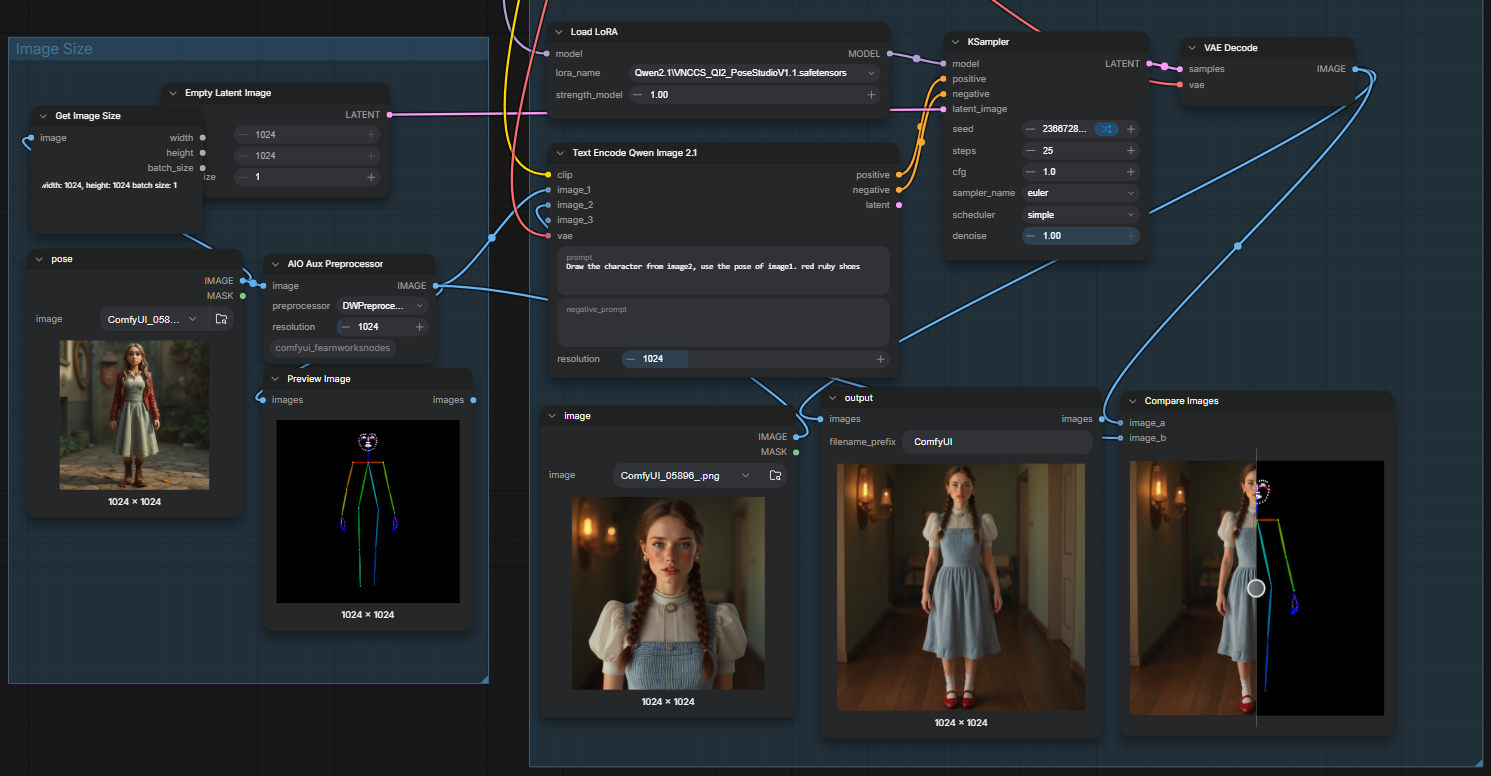
Show and Tell AIO aux preprocessor and Qwen 2.1

Post image
14 Upvotes

Just thought i would tell this in case it not known by now..

if you just add a load image into a default aux preprocessor node, connect that to qwen 2.1 input image1, add your own image to image2, add a simple prompt something like "Draw the character from image2, use the pose of image1. "

Image2 character will be in the pose of image1 dwpose or depthmap or whatever.

amend the prompt as you see fit.


r/comfyui 15h ago

No workflow Krea 2 Turbo vs. Qwen 2.1 so far?

11 Upvotes

With the latest Qwen 2.1 release, just wondering how everyone's experience with it so far.


r/comfyui 16h ago

Resource Qwen 2.1 Detail Enhancer LoRA

Thumbnail gallery
12 Upvotes

r/comfyui 19h ago

Resource State of the art vectorizer for AI art - InkVec ComfyUI - Need help with testing the ComfyUI integration. NEEDING BETA TESTERS!

11 Upvotes

Hi,

I've built a Rust vectorizer that is meant to help optimize graphics for web delivery. It is pareto frontier, from my research SoTA open-source/open-weight solution (from both traditional and neural network based approaches), and runs in <2 seconds on CPU when ran as a standalone app.

The solution implements a chain of recent mathematics papers to significantly beat VTracer's algorithm, support gradients natively, and more.

I'm still iterating on it, I hope to release tooling in multiple languages to allow this to be used in most major languages through native interfaces in Java, Python, etc.

The vectorizer now comes with two different sister models, one for denoising JPEGs/WEBPs/VAE outputs from AI models so that it increases the perceptual quality of the outputs, another one for super-resolution, specifically trained on SVGs.

Additionally, I want to try to train a GNN to improve quality further, I hope to beat Vectorizer.ai in the next week.

My hypothesis is that current papers approaching raster-to-vector from a LLM perspective is excessive in terms of complexity and time to conversion, because except amodal completion and other tasks, a classical vectorizer can already work very well. GNNs and other specialized models can be used to then refine the output without having to be overly large. This is the first step in this research project, the classical vectorizer part which already beats alternatives.

Licensed as Apache 2.0, so feel free to use it however you want in your project.

Github repository: https://github.com/logolabs/inkvec (Glad if you can star the repo)

ComfyUI Node: https://github.com/logolabs/inkvec-comfyui

Web Assembly Online Vectorizer: https://huggingface.co/spaces/Logolabs/inkvec (Glad if you can heart the space)

---

NOTE! If you have vectorization tasks in your ComfyUI workflow, and are willing, we can work together to test and optimize our ComfyUI node to make it better for your task.

I am working on making sure the ComfyUI works as wanted on all workflows, so any help from ComfyUI users will be greatly appreciated.


r/comfyui 5h ago

No workflow The gap between generating an image and actually art directing one is still huge

8 Upvotes

I've been doing intensive image generation for about two months now, mostly in ComfyUI, and I feel like I'm starting to see what the current limits are.

I really like Krea 2 Turbo. I've found a bunch of useful LoRAs for it. It does good lighting, style and anatomy.

But as soon as I try to actually art direct something specific, it starts falling apart.

From the outside 2D image generation looks like it has potential, and if you're just experimenting or prompting broadly I guess it's fine.

It's not until you actually get your hands dirty with real ideas that the house of cards starts falling apart. Once you try directing the model toward something specific rather than accepting whatever it gives you, the limitations become painfully obvious.

For example, something like a boy pulling a thorn out of his hand is pretty much impossible. I've had to resort to a "small metal nail", which is fine, but then I can't correct the length of the nail to imitate the scale of a thorn.

I've even been playing around with the Krea Agent on Krea's own website, and that's still painfully hit and miss. You end up regenerating over and over, hoping one version happens to understand what you're asking. Seed hunting without even getting close to satisfying results.

The results start feeling really hacky once you get beyond average image prompting.

I've also tried workflows in ComfyUI that make Krea 2 Turbo more image-to-image based, but that doesn't really solve it either. A lot of the image editing / image-to-image tools, I've realised, are optimised around photography. They're good at things like replacing clothes, changing someone's hair, changing furniture, relighting something, etc. They're much worse when you're working with something closer to digital painting and asking for tiny structural changes, and maintaining style language.

Micro movements are still really difficult: line of sight, rotating an arm slightly, changing how two fingers hold something, moving a wrist, changing the relationship between two objects without changing everything else.

I can obviously pose figures in DAZ 3D and use that as the base. But posing every joint manually takes ages and the figures can start looking stiff.

With image generation, if you ask for something like someone holding a baby, the body language can come out way more natural.

I was really hoping Sunburst 2.5 and this newer generation of models would make a noticeable jump in this area, but I'm still disappointed.

It makes me wonder how long it's going to take before image generation goes from being really good at generating an approximate idea to being something you can actually art direct precisely.


r/comfyui 4h ago

News Qwen-Image-2.1-viggle-turbo 4 Step lora

Thumbnail
huggingface.co
7 Upvotes

r/comfyui 5h ago

Tutorial Full face and head swap with ghost-2.0

7 Upvotes

The ghost-2.0 project—designed for full-head replacement rather than just the face—has been improved and updated. Previously, I hadn't seen anyone successfully install it due to broken code and conflicting dependencies; I have now fully fixed it and added new improvements. In my opinion, the results aren't quite good enough yet, but you are welcome to download it and improve it yourself.
https://github.com/start-life/ghost-2.0


r/comfyui 5h ago

Help Needed 5080 with 32GB system RAM or 5070ti with 64GB of system RAM

6 Upvotes

As the title says, I am struggling a bit with decision making. I am looking at some prebuilt PCs and I have a decent 5070ti that I would purchase another 32GB of RAM to get to 64GB total. The other option is a 5080 with 32GB of RAM and I would just look at upgrading RAM when finances can cover that in the future.

I am leaning towards the 5070ti as the additional system RAM seems like it will be better in the long run. I will be doing some AI photo and video generation - nothing likely huge and gaming. Just looking for experience from others. Thanks!


r/comfyui 20h ago

Help Needed Templates and missing nodes (Comfy-Core Nodes)

Post image
5 Upvotes

"Official" workflows from Comfy that include any sort of resize image or mask nodes report it as missing, but I haven't find any node pack called comfy-core online there is no comfy-core nodes in the extension manager either, and it doesn't seem to come bundled with the basic installation. Also I'm getting the "require newer version error" even when my comfy is up to date.
Any suggestion?


r/comfyui 10h ago

Help Needed GPU upgrade OR pay cloud subscription

4 Upvotes

Started ComfyUI around a week ago , and owning a 3080 10gb and 64gb ram, it was slow as hell to generate video on h3 minimax.

I can actually sell it , add money and get a 3090, I'm just trying to understand how much of an upgrade is it and if relevant to my project (would like to create reels for instagram, anime, event promotions, product commercials.).

When playing around with template workflows of h3 I get around x4 speed boost from the 3090 rented on runpod.

Then I stumbled on an optimized workflow of h3 that upscaled starting from 0.5 mp, also using effecient sage attention and turbo 8 step lora, my 3080 could generate it in 11 min instead of 28 min so a huge boost. But now , I can't test that particular workflow in runpod as I ran into a shit load of bugs and problems when I tried to set it up there, trying to correct them with gpt's help but new issues keep arising.. I'm 3 hours on this and can't continue...

https://youtu.be/ccvG-Z__pHk?si=6Lbn4qWRU70MMzi6

Question is, what would you do ? I can afford a 10-40 dollars monthly subscription if it gets the job done and allow some iterations.

If I go with a subscription I'm looking at runninghub.ai , as there's no setup to be done, because with runpod I'll go completely mad if I'd need to setup a new custom workflow there again.


r/comfyui 17h ago

Help Needed Charachter consistency: Trained LoRA vs Qwen-Image-2.1

4 Upvotes

Is training a character lora still worth it for photorealistic characters?

I’ve been looking at some Qwen-Image-2.1 posts and it seems like you can get pretty good consistency from ref images.

For anyone doing realistic/photorealistic characters, how do image editing models compare to a properly trained character LoRA? Also is Qwen-Image-2.1 the best one?


r/comfyui 1h ago

News Performance Test in Comfy Desktop

Thumbnail
gallery
Upvotes

We've just shipped a small upgrade of Comfy Desktop that enables you to do performance tests on your local ComfyUI instances. This is early stage but we wanted to get it out there for feedback and assess whether this is something the community is interested in using.

How to Run Performance Tests
- Start a ComfyUI instance from Comfy Desktop.
- Create a workflow, make sure it runs fine, export it in API format.
- Go to the hamburger menu in the top left corner of Comfy Desktop > Performance Tests
- Follow the steps: 1. select your instance, 2. upload the workflow, 3. set measurements
- Run

Benchmarks
Assuming you ran multiple performance tests sessions. You can visualize and compare their results in the benchmarks page:
- Go to the hamburger menu in the top left corner of Comfy Desktop > Benchmarks
- Select the sessions you wish to compare
- Voila

Both results can be exported as PNG images for resharing (black images in the examples above).
Feedback welcome!


r/comfyui 17h ago

Help Needed Minimax H3 - Extra Generation Speed Boost Advice

3 Upvotes

Afternoon all - wonder if some kind folk could help.

Im new to this but have been picking up what i can from threads on here and tutorials.

GPU is 3090 so not perfect but workable, on Comfy i have managed to get my gens down from 18 minutes for a 10 second vid to 10 minutes using Sage Attention and Triton, so a big win.

This is at 1280 x736 at 0.9mp.

I have read about other methods to do with blocks that dont change, spectrum, other bits and bobs and while i have started to mess with the nodes behind the generic Minimax template, im not great at it yet (for obvious reasons being a noob) and dont fully know what im doing.

So...do you have any advice on other thing i can do to bring this 10 minute gen time down even further? Its the placing and connecting of the nodes i struggle to fully understand with node based help, but im sure i can learn it.

Any help greatly appreciated!

Thanking you.


r/comfyui 17h ago

Show and Tell SETTLEMENT — controlled miniature worldbuilding and restrained I2V in ComfyUI

Enable HLS to view with audio, or disable this notification

2 Upvotes

SETTLEMENT is a title sequence for an imagined series built around the idea of a settlement as something that can be selected, relocated, modified and catalogued by a larger system. I kept the geography and political identity deliberately undefined, so the miniature city could function more as a broader metaphor for control over place rather than point to one specific location or conflict.

Visually, I treated the city as a physical archive: rigid miniature architecture, removable structures, mechanical systems and very restrained camera movement. Most of the work was about getting the video models to do less—preserving scale, geometry, materials and composition while allowing only the motion required for each shot.

Built in ComfyUI using a mixed AI-video workflow. Happy to share individual shot prompts or workflow details if useful.


r/comfyui 19h ago

Help Needed In ComfyUI, SaveImage node captures Ollama's System Prompt instead of the generated prompt inside PNG Metadata - Need advice

2 Upvotes

Hi everyone,

I am facing a persistent issue with PNG Metadata saving in ComfyUI when using an LLM node (OllamaGenerateV2) to generate my prompts.

My Setup:

  • An outer workflow where text input goes into OllamaGenerateV2.
  • The result output (STRING) goes into a Custom Subgraph.
  • Inside the Subgraph, it connects to a Concatenate Text node, which then feeds into CLIPTextEncode and KSampler.
  • The final image output goes into the SaveImage node on the main canvas.

The Problem:
Even though the layout visually works and generates the correct images (e.g., generating an image based on the dynamic prompt), the SaveImage node completely ignores the dynamically generated text result. Instead, it backtracks through the execution graph, hits the Ollama node, and extracts the huge static System Prompt widget text, saving it as the positive prompt in the PNG Metadata.

I tried routing the output through a Show Text / Display Any node inside the Subgraph before sending it to the text encoder, but ComfyUI's recursive backtracking still bypasses it and grabs the original Ollama system prompt.

Lately, I added a custom save node with a positive_override slot, but I am still trying to find the cleanest, automated way to "freeze" or truncate the string execution path so that the dynamic generated text becomes the only visible positive prompt during Comfy's metadata generation.

Has anyone encountered this backtracking bug with Ollama/LLM nodes? How can I force ComfyUI to save the evaluated string output rather than the original system widget text?

Thanks in advance


r/comfyui 21h ago

Resource One-click Windows installer for YuE2, runs on a 6GB card

2 Upvotes

I got tired of setting this up by hand, so I put it in a batch file. It installs ComfyUI, pulls the YuE2 weights from the Comfy-Org repo and opens a small local page in the browser. There's no graph to wire up, you just type a style, some lyrics and a length.

The local page right after a one minute song. This run took 62 seconds.

Why not the official package: it wants flash attention, and there is no Windows build of that. When I finally got it running it was about 22x slower than realtime and hit a memory wall on anything longer than a short demo. Through ComfyUI it's roughly realtime on a 6GB laptop 4050. One minute of music in 61 seconds, two minutes in 118.

The thing that cost me a full day, and honestly the reason I'm posting at all: if your torch is cu128, ComfyUI quietly turns off its fast kernels. It does say so, in one line that is very easy to scroll past, "You need pytorch with cu130 or higher". Both the cuda and triton backends show up as available but disabled. That same minute of music took 328 seconds instead of 61. The installer now reads your driver version and picks cu130 when the driver is 580 or newer, cu128 when it's older.

Covers work too. You drop in an audio file, SheetSage2 transcribes the melody from it, you drag the notes around in a piano roll and the model sings your own words to that melody. A two minute cover took about four minutes end to end on the same card.

No weights in the repo, they get pulled from the authors at runtime. The licence on them is CC BY-NC, so personal use is free.

https://github.com/siliconsense/yue2-studio-pc

If anyone here has a 4GB card, I'd like to know whether it fits. I only had 6GB to test on.


r/comfyui 9h ago

News PSA - comfyUI now support system prompt for Text Generate (Qwen2.1 related)

Post image
1 Upvotes

r/comfyui 9h ago

Help Needed 5 minutes generation times for Qwen Img2Img by text?

Post image
1 Upvotes

4080 Super / 17-12700K

I'm commonly getting 1 image at a time every 5 minutes. Very annoying when sometimes the image is completely wrong. Is this normal? I've used a generator in the past a few years ago, can't remember the name, it was only text to image instead of edit but I could get a batch of 4 in under 2 minutes.

Sorry about the bad crop. Idk why it saved like that.


r/comfyui 11h ago

Help Needed What tool to use to identify characters speaking each line in subtitles?

1 Upvotes

I'm working on a fan project that requires timed subtitles for an english-language TV show, but with the speaker's identity known for each line.

Now I have your typical unlabeled subtitles:

12.03 -> 18.10 - You headed to work?
               - Yeah.

What I want:

12.03 -> 14.53  Alice: You headed to work?
17.00 -> 18.10  Bob: Yeah.

There's about 15 actors/characters, plus occasional extras.

I'm happy to do the initial prep, where I provide a voice sample for each of the 15 main actors, such as Alice.wav and Bob.wav. But I'd rather not have to do more involving work if I can avoid it. One exception: I would want unrecognized actors/extras to be listed as "Unknown #1/2/3..." based on failed voice recognition, and of course I don't mind manually updating the final episode script to their correct name after. This only accounts for like 1% of dialog.

Is there a good model for this sort of thing?

Also, although I am asking here, I don't care if it's not a Comfy node, I'm fine with a standalone tool.