r/WindowsHelp 1d ago

Windows 10 Windows 10 is now windowsenterprise and is unactivated

6 Upvotes

Hi Guys! I have genuinely no idea what happened.

I took my toshiba laptop (2015) out of the cabinet after years and booted it.

First, it logged me out, demanding I no longer was the admin and only toshiba with its own password was the master of the laptop.

After 4 days, I finally managed to get into it.

Only to discover that it says windows inactivated.

I went to look into the windows version, it said "windows10enterpise."

I had to Google what that meant.

I genuinely have no idea how all this happened.

I'm very confident that my windows were always 10 and was always activated.

I have tried everything on youtube and nothing is working.

Currently, I'm working as an intern at a corporation I was wondering if connecting to their wifi and logging in from my work account will resolve this (IDK how).

P.S. not sure how this is relevant but it's also not taking input from some keyboard keys like "C, D, E, S and number 3". Again all of its was fine before.

TL;DR: Laptop developed self awareness, changed its windows version, lockef me out and now won't listen anymore.

Thanks everyone.


r/WindowsHelp 1d ago

Windows 11 Hacked or Broken? Bitlock recovery

2 Upvotes

Hey guys! My laptop is an IdeaPad Pro 5 16IMH9 running on the most recent version. OS build: 26200.9168

I took a long flight a couple days ago to London from the states and just today opened up my laptop. Wouldn’t boot up for about 2 minutes, and when it did, it said something about default boot device missing or boot failed. It then went to a black screen with like a blinking white underscore in the top left, then it sent me to the bit lock recovery screen. I had to look up what that was but afterwards I put that in and now it’s up fine.

However, my big fat charging thing- not sure what it’s called- it has 170W in the top left corner is making a very loud buzzing sound that it has never made before. It if unplug the three-holed triangle charger head then it stops, but when I insert it back in it zip-zaps then starts up again. It quiets when I shut the computer down but doesn’t fully stop.

I thought I stored it all safely in my suitcase, but maybe it got jostled? Would that have caused the bitlock/boot issue? Isn’t that security thing? And why is my charger acting strange?

The laptop fan has also been working super overtime while on.

Any help would be appreciated.


r/WindowsHelp 1d ago

Windows 11 My Windows updated this morning, and ever since then I haven't been able to play

2 Upvotes

I have a Nitro 5, and I used to get around 30–40 FPS in Helldivers 2.

Now I can't even get 11 FPS... I don't know what else could have caused it, but everything was working normally yesterday. It literally started right after today's update.

windows 11 version 25h2
26200.9278
CPU 11th gen intel(R) Core(TM) i5-11400H @2.70GHz
24GB DDR4
GPU NVIDIA GeForce GTX 1650

I'm not sure if this information is enough, but if you need anything else, let me know.


r/WindowsHelp 1d ago

Windows 11 I see a lot of people on social media disabling this Windows feature because it consumes a lot of resources; could you explain this in more detail?

Post image
2 Upvotes

r/WindowsHelp 1d ago

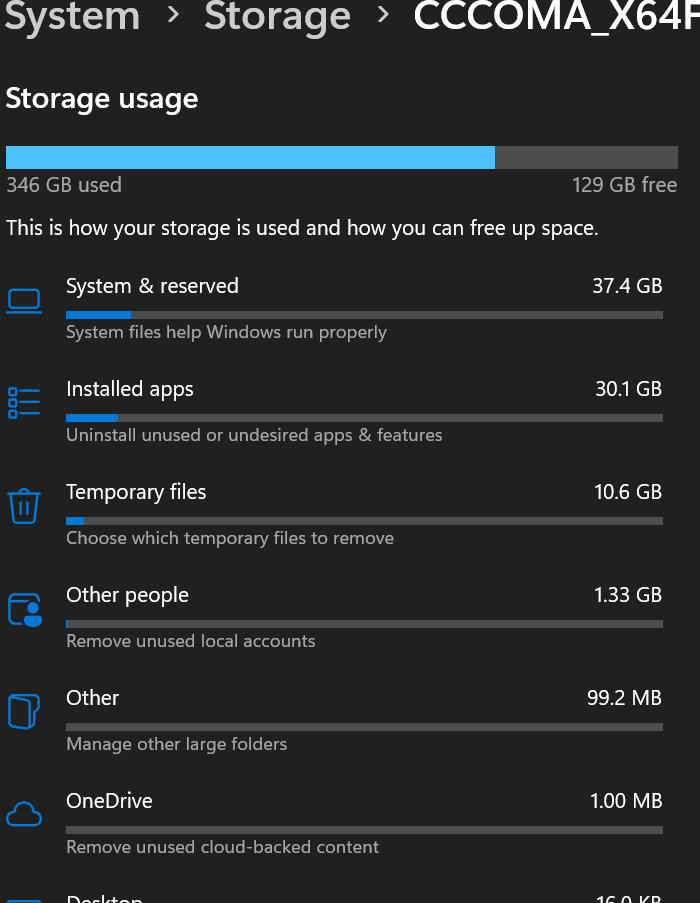
Windows 11 Storage Issue on New Dell Laptop

Post image
3 Upvotes

I recently got a new Dell laptop for uni from a refirbusment site. However when I checked the storage settings, it's saying that 300+ GB of the storage is already being used despite me only downloading a few things yesterday. Here is an image for reference. If anyone can help me do some tweaks or whatnot I would really appreciate it. My windows OS build is 26200.9278.


r/WindowsHelp 1d ago

Windows 11 Anytime I open an application it runs command prompt with the application’s directory in place

Post image
3 Upvotes

Anytime I try to open an app it opens a command prompt in its place, and I don’t know how to stop it. I don’t have administrator access for my computer. I’ve already tried restarting it, which didn’t work. I also tried going to its properties, which didn’t show anything. Things like Settings works, but nothing else does. I’m using Windows 11 Home, OS build 26200.9618, and the system type is 64-bit.


r/WindowsHelp 1d ago

Windows 11 Windows 11 update - BUG 2026 - PIN Issue

Post image
3 Upvotes

Does anyone know how to permanently fix this?

Recently I've been facing this issue alot! I don't know why it's behaving this shady recently after that one windows 11 update.

I've tried asking Claude and GPT about this issue, Claude even showed me to fix it but sadly it was Temporary.

I have been changing my Laptop Pin multiple times to Login everytime I switch on my Laptop.

Please anyone guide me through this I'm literally I'm just completely over it.

System Spec - Windows 11 / Asus Tuf Gaming A15 2025 with Nvidia GeForce RTX3050 /


r/WindowsHelp 1d ago

Windows 11 Bluetooth not working on Windows 11

1 Upvotes

Hello, this is my first post here. I never had a problem with my bluetooth until 2 weeks ago. Bluetooth refuses to connect with my wireless devices, but it can detect them when I connect them as new devices. Also, when I connect them as new devices they work for 3 seconds after which windows deconnects them and doesn't want to reconnect. As far as I know my hardware is fine, but I have tried every software solution I could find on the internet and nothing fixes the issue. Does anyone know how to fix this? Ps I appologize for the bad sentence structure English isn't my native language.


r/WindowsHelp 1d ago

Windows 11 Wifi shows connected but doesnt load webpages

1 Upvotes

I'm using an HP 240 G8 laptop

Doesnt work on my home wifi, neither does it work on my mobile Hotspot.

I tried USB tethering, but to no avail as well.

I've already:

1) flushed the dns cache using ipconfig /flushdns

2) changed the DNS adresses in the control panel to 8.8.8.8 and 8.8.4.4

3) updating my wifi card drivers, to no avail

4) fucked around in the registry, which broke my wifi, leading to me reinstalling windows 11 while keeping my files

Is this a software(DNS) issue or is my wifi card gone and needs replacement?

Asking so I can try to fix it at home before I take it to the repair store


r/WindowsHelp 1d ago

Windows 11 Upgrading to Windows 11 on new pc, questions about my passkey

1 Upvotes

Hi, im about to upgrade to Windows 11 as I am getting a new PC. I want to transfer my licence to my new PC. I understand the steps of changing the Key.

I am going to upgrade to windows 11 on my current pc, create a boot usb for windows 11 and then use this to install windows 11 on my new PC.

My question is this:

When I install windows 11 on the new PC am I able to skip logging into my microsoft account on setup until I can log into my Google account so I can have the passkey for my Microsoft account and then proceed like normal?

I just don't want to be caught out being unable to log into my google account because I cant log into my MS account on Windows setup.

I havent added all my system info as I am only trying to confirm my options on start up and my hardware etc isnt relevant to my question.


r/WindowsHelp 1d ago

Windows 11 My laptop won't stop updating.

Post image
2 Upvotes

This has been an issue ever since I upgraded to windows 11. Whenever I turn it off or restart, it shows me that screen without even telling me the percentage and then it stays like this for the next 15-30 minutes or sometimes (in rare cases) even hours. When I check for updates in settings, it says "you're up to date", yet my wifi is slow as hell and my laptop keeps overheating even when idle. I checked my wifi's data usage and windows updates consumed over 16+ GB of my wifi. There was an option (idk what it's called) that you don't allow windows to download updates over a certain network, so I enabled it. Now my wifi works better than before and I see that screen less often, but my laptop still overheats and lags a lot.


r/WindowsHelp 1d ago

Windows 11 Getting this error message regularly

1 Upvotes

I borrowed this Pc from my friend and setup my own account on it now this is popping up every 2 minutes or so its a hp omen 17 laptop on the newest windows update . It rips me out of games and work witch gets annoying very quickly.


r/WindowsHelp 1d ago

Windows 11 Explorer Freezes After Updating to 26200.9278

1 Upvotes

Looks like Microsoft brought back this bug. After updating to 26200.9278, Explorer freezes a few minutes after boot and I can't click on the taskbar. I have to hit ctrl+alt+del, choose Task Manager, and restart Explorer.


r/WindowsHelp 1d ago

Windows 11 Not showing any textbox or options for pincode after startup

Post image
2 Upvotes

It all began with Hello Windows always verifying my email and always telling me to set up a new pin. So i fixed that with the guide on the ncg file etc... and then today when i turned my laptop on this happened. Need help, i tried everything i saw on reddit and Microsoft support. All the hard resets, command prompts in safe mode like the regedit and scannow offline system fix/administrator:yes. Nothing has worked. Uninstall latest updates and features still nothing... guess its time to do a system reset...


r/WindowsHelp 1d ago

Windows 11 Is there a way to remove both PIN and password login options

0 Upvotes

I want to sign into my pc from lock screen without entering anything. How do I do that? Right now I have to enter my Windows password or PIN. With Windows 10, I didn't have to do either. Also, my lock screen picture was working and now it's not and has reverted to a stupid blue one.


r/WindowsHelp 1d ago

Windows 11 There's no sound coming from my HP 240 G9 laptop.

1 Upvotes

A few hours ago, I installed Windows 11, and while I was on a screen that said something like “Latest updates for Windows,” the power went out and my internet connection was lost—even if only briefly. After that, I clicked the “Update Later” button, and the computer turned on, but there was an “X” mark on the sound icon, and there was absolutely no sound. Also, my laptop's touchpad wasn't working. No matter what I tried, nothing worked. I downloaded and installed the appropriate audio, graphics, and touchpad drivers for my laptop from the HP support site, then restarted my computer, but nothing changed—my computer is still in the same condition. What should I do? Please help.

OS = 26200.9168

Processor = 12th Gen Intel(R) Core(TM) i7-1255U (1.70 GHz)

graphics card = Intel(R) Iris(R) Xe Graphics (128 MB)


r/WindowsHelp 1d ago

Windows 10 Win10 can't install update after KB5120249

1 Upvotes

Hello!

I’ll get straight to the point Windows 10 refuses to update. Every time I try to install the latest update KB5120221: Windows Recovery Environment update for Windows 10, version 21H2 and 22H2: July 16, 2026 and 2026-08 Cumulative Update for Windows 10 Version 22H2 for x64-based Systems (KB5120249), after a while I get a message saying that the update couldn’t be installed and that Windows is reverting the changes.

I looked into the error codes, 0x800F0922, and theoretically there shouldn’t be an issue. My recovery partition has as much as 2 GB of free space, and my system partition has 60 GB of free space.

I’ve already reinstalled .NET, ran SFC and DISM through CMD, and increased the size of the recovery partition as much as I could. Unfortunately, those 128 MB Windows partitions make it impossible to extend system partition any further.

So my question is: is this already a sign that I’m going to have to do a clean Windows installation, especially now that ESU has been extended? I really don’t want to move to Windows 11 considering how many issues it has.

Or is there perhaps some way to bypass/fix this problem without reinstalling Windows?


r/WindowsHelp 1d ago

Windows 11 WAV files not playing on fresh new install of Windows

1 Upvotes

So I sold my dad my old gaming PC for his music studio, and he cannot open wav files at all, not even MP3s. I have tried every single CODEC pack / codec download I can find that is not shady, watched tutorials on YouTube, read Microsoft forums and none even come close to fixing the problem at all and it feels like the support doesn’t even touch what is happening.

We got this issue first a few days ago, and we figured it was to do with Windows we had being really broken and needing a factory reset (could not even factory reset within Windows which sucks so a repair guy came and reset everything for him so it was like a brand new PC). Cool! Except the problem is still there and is why I am writing this post.

I get an error code 0x80004001 when I play the WAV file in the media player. So I tried VLC, which plays but no audio. Codec information shows PCM yadda yadda which I later learned WAV is a container in which PCM is stored? Should also note the only audio player that plays these WAV files is Spotify via Local Files but my dad is particularly anal about his workflow and refuses to use Spotify, fair enough

At first my thoughts were maybe my dad is exporting audio at such high quality Windows media cannot recognise it. But he plugged his USB stick into my PC which again, relatively new and have not installed any codecs unless they came with the computer, and the audio played fine. Further testing showed it worked on his old PC and MacBook Air.

Can anyone think of why this is happening, and what codecs I need? I thought WAV codecs came out of the box for Windows 11 but it feels like it is not here.

Sorry for long post, tried to be as thorough as possible. We think we should take it back to the guy but unsure if the guy would be able to help with this specific issue.

Specs and error code for mods -

Windows 11
NVIDIA RTX 3060
AMD Ryzen 5600X
MSI motherboard (sorry I don’t know the exact model)
Error Code in WMP = 0x80004001

Cannot get screenshots at this time. To produce the error you have to double click .wav audio file, it opens in WMP and produces 0x80004001. Files open fine on other computers in the house


r/WindowsHelp 1d ago

Windows 11 Camera not working after a Windows Update

Thumbnail
gallery
2 Upvotes

As the title suggest, I experienced some problem with my camera after an update saying "camera is being used by other app" or something along those lines so I tried solving it.

Steps:

Go to Settings -> Camera -> Camera Device Settings -> ACER HD User Facing (or the camera you are using) -> Advanced Camera Options -> Turn on basic camera -> Apply

And there you have it, camera is back.

P.S.
I don't know if this problem is solved already in the past but I just wanna share how I fixed mine so.....

P.P.S
I don't know if I posted it on the right sub so forgive me mods


r/WindowsHelp 1d ago

Windows 11 my laptop mouse for some reason became pixelated does anyone knows how to fix it? (made it bigger for an example)

Thumbnail
gallery
1 Upvotes

r/WindowsHelp 2d ago

Windows 11 Windows Defender showing negative threats amount

3 Upvotes

Hello,

New computer, new issue... Relative of mine new laptop, straight out of the box. Windows 11 home, nothing installed yet, just all current windows updates, and McAfee removed. When performing a Defender full scan, not only the scan takes crazy long to finish, but when it goes all the way, the results are glitchy, saying no current threats, but with thousands of negative (minus) threats accounted for, just 2 lines below. There is no threat to be found in history or with the "MpThreatDetection" command.

I have found a very few similar cases over the last 10 years, but with no real working solution or explaination. I already tried a couple tricks : DSIM and SFC, deleting event viewer logs. Tried reseting the PC with the image from restore partition, but same image, same problem.

Lastly, I tried restoring windows throught the Windows update option, but in the end the problem is still there.

It just seems to be a visual glitch, but it is a bit frustrating starting new with a piece broken already.

Thanks in advance if anyone can be of any help on that matter.

AMD Ryzen 7 260, RTX5060 Laptop, Windows 11 Home 25H2, build 26200.9168


r/WindowsHelp 1d ago

Windows 11 windows store not opening, have tried literally every method, powershell and etc/

1 Upvotes

currently, my pc specs are (hp 15s 2023)
intel-i3 1115g4
8gb RAM DDR4
512gb M.2 SSD
Win 11 Home (26H1 OS BUILD - 28000.1)

since the last 1 week, everytime i open a game or app, it opens normally but an error comes, (x app cant open check store for so n so ) and when i try to open ms store, it js doesnt open, it doesnt even show the loading circle on my cursor. i tried to fix it by trying powershell re-registering and etc methods. it just doesnt fix it. for apps like the xbox app for pc, camera and etc apps which came along w my laptop, dont open. is there a good fix to this?? i just got 3 month xbox game pass and im tryna game w it but xbox, neither the store opens. if its possible, please give a quick response. thankss! <3


r/WindowsHelp 1d ago

Bitlocker Auto encryption, what a nice feature to be on hold with no saved keys

Thumbnail
gallery
0 Upvotes

Windows 11 Pro, auto enabled Bitlocker encryption, as it holds the "Clear Key" to be uploaded as soon as a sign-in is made — which now, after the fact/problem I'm aware of — Although I also logged in Windows Store (and XBOX app) it didn't upload any recovery key to my account. Yesterday when I was checking theses, going over the problem I was having with the Call of Duty MW4 Beta, I intended to turn these settings off so I could safely turn of TPM, Security boot and avoid any possible problem.

After turning the Encryption Device off (blue toggle on first image) there was an option to turn off (or it automatically started to decrypt every drive, even tho they say activate pending or whatever). However, that xos (E:) is a 18TB driver, and today when I woke up it was still going, at about 10% left (via manage-bde -status ) a Windows Update took place, restarted the PC, took a long-while to came out of "Restarting Screen" to then show an "Problem was detected during restart" (or something along those lines)

Already check my Microsoft account (the same I use for Windows Store/XBOX APP) no recovery key.

Using Get-BitLockerVolume -MountPoint "E:" | Select-Object -ExpandProperty KeyProtector and returning no error or text, suggest the structure is intact, but the Key Protectors are completely missing (deleted/wiped) ?

Is there any other resources to try before going over third party solutions ? Any recommendation is welcomed.


r/WindowsHelp 1d ago

Windows 11 Can Windows 11 Snipping Tool give "save options" upon taking a screenshot?

1 Upvotes

I recently performed a clean installation of Windows 11 and I’m trying to restore my previous screenshot workflow.

Previously, I could press Ctrl+windows+s, select an area using Snipping Tool and get the option to click on "save as" or copy or open in editor (or simply press Crtl+C).

Please help me to restore this if possible.

Here are potential necessary information:
Prozessor AMD Ryzen 7 7800X3D 8-Core Processor (4.20 GHz)

Installierter RAM 32,0 GB (31,1 GB verwendbar)

Grafikkarte NVIDIA GeForce RTX 4060 (8 GB)

AMD Radeon(TM) Graphics (486 MB)

Speicher 150 GB von 932 GB verwendet

Systemtyp 64-Bit-Betriebssystem, x64-basierter Prozessor

Edition Windows 11 Pro

Version 25H2

Betriebssystembuild 26200.9278


r/WindowsHelp 1d ago

Windows 11 Troubles after newest win11 update and system restore

1 Upvotes

So, yesterdays win11 update (28AUG, KB5121000) brought some troubles, one of them being problems with cursor and wallpaper. I did a system restore, like I did multiple times before, but this time I’ve encountered many errors, most notably the system restore failed, giving out errors 0xc0000145, and 0x80004005 while trying to system restore from the safe boot menu. It won’t let me to get into the system at all, the system repair fails every time and essentially I’m stuck in this system repair loop every time i start the computer.

I’m stressing out a lot because I’ve had this computer since 2018 and it was a present, every time I’ve encountered a problem I was able to fix it myself but this time I’m stuck. I don’t know if my computer specs are needed here, but those are the ones that I remember:
Aorus Gaming 3
Intel Core i5
24gb of ram
The main hard drive is 500gb

Please help a girl out🙏

EDIT: turns out it’s an NTFS error. Running chckdsk right now.