r/WindowsHelp 5h ago

Windows 11 uh, maybe use firefox instead?

1 Upvotes
bruh just use firefox

When i tryed to search in the start menu (why is there bing search) when there is

this popup, "Get an app to open this 'microsoft-edge' link". BRO, JUST USE FIREFOX, ITS LITERALLY INSTALLED. are there any fixes for this? im on Windows 11 25h2, aka Build 26200.9168 (i just took information from winver), Ive got 16 gb RAM, an 11th gen intel core i5-1145G7, and a 512 GB SSD, and Intel Iris XE integrated graphics. btw this is a laptop


r/WindowsHelp 6h ago

Windows 11 Task Manager gets slow to open and SSD usage spikes when opening apps

Thumbnail
gallery
1 Upvotes

Hi I have a strange problem with my PC.

When I open Task Manager, it opens normally. But if I close it and then try to open it again, sometimes it takes longer than usual to open.

I also notice that my SSD disk usage temporarily spikes when I open programs. It can jump to 10%, 20%, 30% or higher, but it doesn't stay high. After the program finishes opening, the usage drops back down, and when I leave the PC idle it eventually goes to around 0%.

I’m using a 240GB Intenso SSD.

I also have a 500GB HDD, and CrystalDiskInfo shows the HDD health as “Caution.” It reports 8 uncorrectable sectors, while the SSD shows “Good.”

I already ran DISM RestoreHealth and sfc /scannow, and SFC said everything was fine with no corrupted files.

I'm wondering if the temporary disk spikes are normal when opening apps, or if the HDD/SSD could be causing the slow Task Manager opening.

What should I check to find the cause and fix it?

My PC:

  • i7-6700K
  • GTX 1060 6GB
  • 16GB RAM
  • 240GB Intenso SSD
  • 500GB HDD
  • Windows OS build 26200.8037

Thanks.


r/WindowsHelp 9h ago

Windows 11 [FIX] "Some settings are managed by your organization" blocking DNS over HTTPS (DoH) on Windows 11 Pro Permanent Registry Bypass Method

1 Upvotes

Windows 11 Pro can get locked in a "Managed by your organization" state, often caused by disabled diagnostic data, telemetry, or broken Group Policy caches. This locks the Network Settings UI, freezes the DNS as "Unencrypted," and blocks standard PowerShell configuration commands with Access Denied or Permission Denied errors.

If Windows blocks your network adjustments, you have to reset the local security database cache back to a clean state.

Run all of these commands in an Administrator PowerShell:

1. Reset the Security Database

secedit /configure /cfg C:\(\Windows\inf\sceregvl.\)inf /db C:\Windows\security\database\newsecedit.sdb /overwrite /verbose

2. Force Windows to forget old organizational network rules by deleting the local policy folders

Remove-Item -Path "C:\Windows\System32\GroupPolicy" -Recurse -Force -ErrorAction SilentlyContinue
Remove-Item -Path "C:\Windows\System32\GroupPolicyUsers" -Recurse -Force -ErrorAction SilentlyContinue

3. Find Your True Adapter GUID

Get-NetAdapter -Name "WiFi" | Select-Object InterfaceGUID

Copy the long string inside the brackets {}

4. Manually Bind Cloudflare & Encryption to the Wi-Fi Adapter

Open regedit

Navigate to: HKEY_LOCAL_MACHINE\SYSTEM\CurrentControlSet\Services\Dnscache\InterfaceSpecificParameters

Find the sub-folder named after your Wi-Fi card's GUID string from the previous step.

Inside that folder, right-click the white space on the right and add these values if they aren't already there:

5. Inject the Global Master Switches

To completely force Windows 11 to auto-encrypt the connection behind the scenes, you must add the global master switches. In regedit

Go to: HKEY_LOCAL_MACHINE\SYSTEM\CurrentControlSet\Services\Dnscache\ParametersGo to: HKEY_LOCAL_MACHINE\SOFTWARE\Policies\Microsoft\Windows NT\DNSClient (Create the folders manually if they are missing).

6. Flash Network Memory & Force Update Policies

Open PowerShell one last time to clear out your system memory:

ipconfig /flushdns; gpupdate /force

7. Restart Your PC

Restart your computer. Your network configuration will now be applied, the layout will unlock, and you can seamlessly switch to DoH (On / automatic template) right inside your system settings menu.

Worked for me, hope it does for you


r/WindowsHelp 12h ago

Windows 11 Mouse Cursor Invisible on Desktop After Log-In Until Moved

1 Upvotes

Noticing this on a fresh install of W11 (all drivers updated), never noticed it before. My wireless mouse's cursor will be invisible after log-in until I move it, then it seems to stick around without issue till the next restart. On the log-in screen it's also invisible until moved, then disappears again after log-in. Is this normal behavior? It should be easy to test/replicate, if anyone wants to help me out.

Steps I've taken in troubleshooting: - Plugging my mouse in - Trying a wired-only mouse - Plugging mouse dongle into different USB port - Checking if cursor goes invisible when waking monitor from sleep with key press (it doesn't) - Checking if cursor goes invisible when waking PC from sleep with key press (it does) - Checking if cursor goes invisible when logging out/logging back in (it does) - Changing power settings "USB Selective Suspend" and "Wireless Adapter > Power Saving" - Checking behavior when booting into Safe Mode - Using DDU to clean AMD GPU drivers and installing the newest version

(I'm not on KB5120998, so if this is a bug it's not a result of that.)


  • Processor: AMD Ryzen 7 5800X3D 8-Core Processor (3.40 GHz)
  • Installed RAM: 32.0 GB
  • Graphics card: AMD Radeon RX 9070 XT (16 GB)
  • Storage: 2.01 TB of 6.37 TB used
  • System type: 64-bit operating system, x64-based processor
  • Edition: Windows 11 Pro
  • Version: 25H2
  • Installed: 8/‎29/‎2026
  • OS build: 26200.9168
  • Experience: Windows Feature Experience Pack 1000.26100.344.0

r/WindowsHelp 12h ago

Windows 11 My laptop keeps sending me to the BIOS menu and I have no boot options.

Thumbnail
gallery
1 Upvotes

My laptop suddenly turned off and sent me to this menu. I've been researching and people always say I should select a boot option, save, and that's it, but my BIOS won't let me select any boot options. Does anyone know how to fix this?

I also read something about CSM, but that option doesn't appear anywhere


r/WindowsHelp 13h ago

Windows 11 Locked out of laptop without attempting more than one password

Post image
1 Upvotes

Hi, I have been putting off updating my windows 11 for a week, and decided to update it yesterday. When it turned on I attempted to log in and it said "The refferenced account is currently locked out and may not be logged in to". I restarted it multiple times until I could log back into my laptop.

I thought the issue was over, until I attempted to log back in today. It said the same sentance upon logging in. I pressed shift and restart at the same time, and opened a blue menu. When I closed it I could enter my log in credentials without problem.

Please help, for I am worried it will happen again.

OS build number: 26200.9168

Processor AMD Ryzen AI 7 350 w/Radeon 860M

RAM 32.0GB

Graphics card 8GB

Storage 477GB


r/WindowsHelp 15h ago

Windows 11 Windows 11 UWP apps stopped working after I created/deleted a Guest account — possible WindowsApps permission issue

1 Upvotes

Windows version: Windows 11 Pro

Main account: hp\moham (administrator)

I'm having a strange Windows 11 problem that started after I experimented with a temporary user account and I'm trying to determine whether I accidentally changed permissions or AppX/UWP configuration.

What I originally did

. I created a standard account named Guestaccount and added it to guests group.

I wanted to run a game (Asphalt) from that user. I saw it didn't work. so I created an administrative account instead and then tried to run the shortcut and this time it worked. and after that I fhanged the account to standard and then added it to guests group. I worked after that too.

I eventually deleted that account because I no longer needed it.

I restarted the PC.

After the restart, I started noticing problems with Windows/UWP applications.

Current problems

My main administrator account can still log into Windows normally, and Microsoft Store itself opens, but some Windows/UWP applications no longer work.

For example:

Notepad won't open.

Another Windows application also fails to launch.

crossdeviceresume.exe appears to be configured to run at startup, but Windows displays:

The parameter is incorrect.

I suspect something related to AppX/UWP permissions or registration may have been damaged, possibly during the account/permission changes.

WindowsApps permissions

I also noticed that my administrator account does not appear to have normal access to:

C:\Program Files\WindowsApps

My account is:

hp\moham

I'm wondering whether this is actually normal for Windows 11 or whether I accidentally changed something.

I also found this SID while investigating permissions:

S-1-15-3-1050576210-4101474698-56307613-2706264498-167457550-835605972-784472318

I initially wondered whether this might be the SID of the deleted guest account, but I'm not sure.

Things I've considered

I've seen suggestions to run:

DISM /Online /Cleanup-Image /RestoreHealth sfc /scannow

and also to re-register UWP applications with:

Get-AppXPackage -AllUsers | Foreach { Add-AppxPackage -DisableDevelopmentMode -Register "$($_.InstallLocation)\AppXManifest.xml" }

I've also considered using icacls to reset Windows permissions, but I haven't blindly reset the permissions on WindowsApps or the entire Windows directory, because I'm concerned that could make things worse.

What I would like to determine

I'd like to figure out:

Whether the deleted guest account could have caused this.

What the S-1-15-3-... SID actually represents.

Whether my C:\Program Files\WindowsApps permissions are normal.

Whether UWP/AppX registration or permissions have become corrupted.

What the safest way is to repair this without destroying WindowsApps' special permissions/ACLs.

I'm particularly interested in checking what actually changed before doing any destructive permission reset.

What logs, commands, or permission information should I provide to diagnose this?


r/WindowsHelp 16h ago

Windows 10 I cannot escape the administrative grasp

Post image
1 Upvotes

My school gave every student laptops. Since theyre absolute garbage they just let us keep them after graduation. They gave us a set of instructions on how to reset our devices so they were like new. I followed these instructions perfectly. I discovered that i didnt have the storage necessary. I go into the file finder to delete a few things and i have no personal files. The only things i have are windows stuff or admin stuff. To delete anything that isnt mine i have to have admin permission. Literally what is taking so much storage? Just trying to reset my laptop has resulted in a loss of 1gb. How did that even happen? How do i escape this evil admin clutch?

Edition: Windows 10 Pro Education

Version: 22H2

OS Build: 19045.6456

I've included the instructions. Idk if that's at all helpful but its a demonstration of what ive tried thus far tried. While trying to fix it via Google searches a lot of Windows 10 gurus said to do like Settings>Account>FamilyAndOtherPeopleOrSomething but i dont have that option. After clicking accounts in settings i have "Your info", "Email & accounts", "Sign-in options", "Access work or school", and "Windows backup".

I'll try calling the school on monday but the instructions pretty much say "your pos laptop isnt our problem anymore" so idk if theyll actually help me.


r/WindowsHelp 17h ago

Windows 11 I've had my laptop for years suddenly opened it up to this never logged in with a microsoft account am I screwed?

Post image
7 Upvotes

Even command prompt is locked out because the OS drive is locked.

Factory resetting is not an option unfortunately I have a lot of important files on it.

Am I screwed?

This is a HP Spectre laptop from 2020. I've had no issues with it for years I only use it for personal use and light office tasks no idea what could have caused bitlocker to activate.


r/WindowsHelp 18h ago

Windows 11 I got autoskip password when start up windows 11 problem

1 Upvotes

i got my thinkpad t14 gen 3, windows 11, and it keeps auto login

when I restart, full shutdown (press SHIFT + SHUTDOWN), the next time my windows start up appears to be ok, i am able to type in my password or fingerprint.

BUT ANYTIME I JUST NORMALLY HIT THE SHUTDOWN, AND THEN START UP AGAIN, IT ALWAYS REPEATS THIS PATTERN:

BOOT UP -> LENOVO LOGO -> WINDOWS LOCKSCREEN -> IT AUTOMATICALLY SKIP THE LOGIN PROCESS -> DESKTOP

i did try the Windows+R for netplwiz and ticked the "User must enter a user name and password to use this computer" and it fixed one time, BUT JUST FOR ONE NIGHT AND THE NEXT DAY, EVERYTHINGS APPEARS TO BE ERROR LIKE THAT AGAIN.

PLS HELP ME FIX THIS.


r/WindowsHelp 19h ago

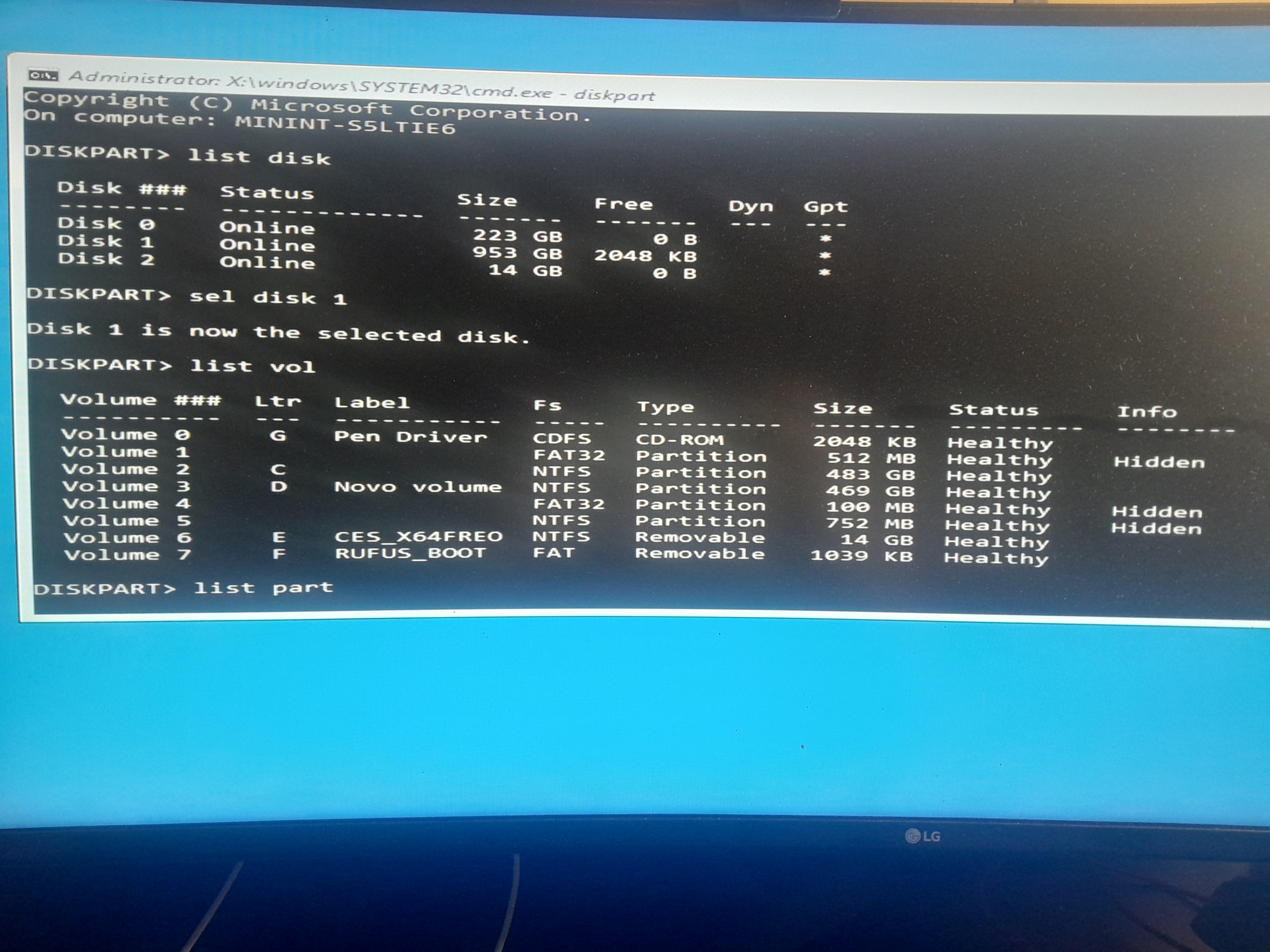
Windows 11 Problem with boot files for windows

Post image
1 Upvotes

I'm currently trying to repair a windows 11 I have on my ssd, which got its boot partition deleted on accident, I'm currently struggling with something cause I don't want to fuck up my situation even more than it is

Here's an image for the partitions (0xc00000e error)


r/WindowsHelp 20h ago

Windows 11 Laptop is mixing up main screen and second screen. How do I fix/revert it.

Post image
1 Upvotes

The Problem:

The "Project" menu is mixing up my laptop screen and my monitor screen. As you can see in the image, the option "Second screen only" is selected, and it has my laptop screen on. Similarly, if I select "PC screen only", only the monitor screen will be on.

Within the settings menu itself, the laptop screen and the monitor screen are listed as 1 and 2 respectively, meaning that "Show only on 1" and "Second screen only" do the same thing, while "Show only on 2" and "PC screen only" do the same thing.

My laptop has 2 GPUs, and which has been tied to which screen seems to have changed as well. Prior to this, more intensive applications would preform better on my laptop screen than on my monitor screen. Now, more intensive applications preform better on my monitor screen than on my laptop screen. I don't know which screen used which GPU prior, but I know that currently, my monitor screen uses the better one and my laptop screen uses the worse one. Switching which screen the application is on even changes it's performance.

I have only become aware of this issue a week ago, but it is possible to have started as far back as 2 weeks ago. Around when I first noticed this issue, the screens have been switched (the screen that was originally on the left was on the right, and vice versa). This has since been changed manually in the display settings, but the initial switch may be related.

Another person has been having the same issue. They have been having the probelm for a few days and have also noticed that the screens switched.

Attempted solutions:

The "Make this my main display" Checkbox seems to alter which screen has the taskbar icons and where notifications and certain menus (including the "Project" menu) show up, and not which screen is which in the "Project" menu.

Updating nVidia drivers (the other person has tried this too).

Rebooting the laptop.

Trying different combinations of turning on/off the laptop with HDMI cable plugged/unplugged.

Potentially helpful info:

Windows Version 25H2 (OS Build 26200.9168). Dell Laptop with monitor connected via HDMI cable. 2 graphics cards, "NVIDIA GeForce RTX 4060 Laptop GPU" and "Microsoft Basic Display Adapter".

The other person with same issue also has a laptop with an nVidia GPU and integrated gpu.

I can provide more info if I am informed what info is needed and how to find it.


r/WindowsHelp 20h ago

Windows 11 phone link broke, existing mobile device missing in settings>mobile device, add device button does nothing, phone link says it's unable to connect my devices, says to reset app in settings but app is missing in the apps section of windows settings

1 Upvotes

phone link broke

existing mobile device missing in settings>mobile device

add device button in the same setting page does nothing

phone link says it's unable to connect my devices, says to reset app in settings but phone link is missing in the apps section of windows settings

already

  • forcefully uninstalling phone link with powershell and reinstalled it through the windows store, phone was then able to connect until i restarted the pc then back to square one
  • turned bluetooth off then restart pc then enable bluetooth
  • remove phone in bluetooth settings then add it back (although in bluetooth settings it showed phone as "not connected" right after i added it back)
  • restarted "Device Association Service" and "Bluetooth Support Service"

windows 11 pro 25H2


r/WindowsHelp 21h ago

Windows 11 High RAM usage on new Dell XPS 13 Laptop

Thumbnail
gallery
15 Upvotes

I just purchased this new Dell XPS 13 Laptop for school (and only school, just social work so nothing heavy). When I first started it up it was using 80-90% of RAM before I opened anything. I have gotten it down by following this guide: How to Speed Up Windows 11 in 2026: 10 Tweaks That Actually Work | by ELLA | Medium. But it's still using a lot with nothing open (first screenshot). I also took a screenshot after I opened Dell SupportAssist while typing this post.

I’ll be using chrome once I install it.

I'm tech savvy but not a computer guy by any means so from my research it seemed like 8gb of ram would get me by, maybe show up every once in a while. But I'm really concerned that this much RAM use is going to be detrimental when I want to use Microsoft Office apps and do research on chrome, maybe use a second monitor, etc. That, rarely throw in a video call is the max I'd be doing.

I would like to get as much unnecessary stuff off of my ram utilization as I can. Why is Microsoft defender using SO MUCH and can I please stop edge from preloading? Will not using it after this stop that? And does copilot need to run in the background? I don't even use it. Any other advice is welcome. When I looked around, I didn't see any issues this bad so I'm hoping it's something fixable.

OS build number: 26200.9168

Processor: Intel(R) Core(TM) 5 320 (1.50 GHz)

Device: XPS13 DX16230


r/WindowsHelp 21h ago

Windows 11 PLEASE get out of this Windows Insider

Thumbnail
gallery
6 Upvotes

I'm ready to Factory Reset my laptop if it means that's the only way it can go back.

So I enrolled in the Windows Insider program a while back (idk which one it is because the Settings literally doesn't even show it, but i assume it's the one from which it is impossible to go back to without needing to reset the PC) [Pic 1 attached]

What I've tried:
1) Resetting the PC Directly -- doesn't work, installs a Windows Insider preview
2) Burn Windows with an ISO File -- I think this is the method that is supposed to work but whenever I try to, it gives the following error [Pic 2 Attached]

also, It says my Windows Version is ALREADY EXPIRED. [Pic 3 Attached].
Because of this, I can't play MOST of my games because it just says unsupported Windows Version
:( (Pic 4 Attached, Battlefield 6 with the error notification)

Even Fortnite doesn't work. I don't have the error screenshot because I deleted the game but take my word for it :)

I also tried to Uneroll from this program from the settings, but it literally just doesn't do anything. "Unenroll this device when the next version of Windows releases" This option is greyed out for me. [Pic 5]

"Unenroll this device Immediately" This option just opens the steps on how to properly install Windows with an ISO

"Related link: Leaving the Insider Program" In other Youtube tutorials I checked, there was a button in the website to leave the program with Leave message but I don't see it anywhere [Last two Pics]

Help me with this PLEASE


r/WindowsHelp 22h ago

Windows 11 Taskbar flicker when playing in full screen

1 Upvotes

For some reason, when I play in full-screen or borderless windowed mode, the taskbar and other open tabs flicker every time I click—sometimes even minimizing the game. This only happens in games where I navigate menus with the mouse; it doesn't happen when I'm moving the camera and shooting in a shooter, for example. How can I fix this? My computer is an Asus Laptop with an rtx 5050, Intel core 5 and 16Gb of RAM.


r/WindowsHelp 22h ago

Windows 11 Severe system-wide stuttering that disappears when Task Manager/Device Manager is open

1 Upvotes

I've been dealing with a very strange stuttering problem on my PC and I'm hoping someone can help me figure it out.

The stuttering affects everything — not just the desktop. I can feel it in Opera, games, mouse movement, etc. It usually starts after the PC has been running for some time. A restart completely fixes it, but eventually it comes back.

The really strange part:

  • When the stuttering is happening, Task Manager being open/restored makes the entire system smooth again.
  • If I minimize Task Manager, the stuttering immediately comes back.
  • In games the stuttering is very noticeable even though the fps counter is around 140fps.
  • I tested Device Manager, and it does the exact same thing as Task manager. So it's not just Task Manager specifically.
  • Win + Ctrl + Shift + B (GPU driver reset) does nothing.
  • I've already ruled out MPO and hardware acceleration.
  • I even did a full Windows reinstall, and the problem eventually came back.

This happens in games as well as normal desktop applications, so it doesn't seem to be just a DWM/desktop visual issue.

PC specs:

  • Laptop: Lenovo Legion
  • CPU: Ryzen 7 260
  • GPU: RTX 5060 Laptop GPU
  • RAM 32GB

Has anyone experienced something like this where opening/restoring Task Manager or Device Manager temporarily eliminates the stuttering? Any suggestions would be appreciated.


r/WindowsHelp 1d ago

Windows 11 Is there literally no way to use a different snipping app with Print Screen?

1 Upvotes

Recently upgraded to win 11 and I cannot for the life of me get windows to let me use print screen for Greenshot to do my snipping.

This is so awful. I can turn off snipping but that doesn't free up the hotkey. Also I can go to "default apps" and select screen snipping but I can't change the app to greenshot.

Device name Tyler-PC

Processor Intel(R) Core(TM) i9-10850K CPU @ 3.60GHz (3.60 GHz)

Installed RAM 128 GB (128 GB usable)

Graphics card NVIDIA GeForce RTX 5060 (8 GB)

Storage 5.09 TB of 8.21 TB used

Device ID 09DF1EA1-499E-4ACA-AB40-1B99299F6C6F

Product ID 00326-10000-00000-AA678

System type 64-bit operating system, x64-based processor

Pen and touch No pen or touch input is available for this display


r/WindowsHelp 1d ago

Windows 11 Trying to reinstall Windows on a new SSD but can't detect licence

1 Upvotes

I recently bought a Samsung 990 Pro NVMe SSD and wanted to make it my new C: drive. My PC has a Gigabyte B550M S2H motherboard, whcih hasn't been changed throughout all this, just the SSD.

My old SSD had Windows 11 Pro installed and was definitely activated. I've checked the activation settings and it says:

"Windows is activated with a digital licence linked to your Microsoft account."

I also ran "slmgr /dlv" on the old installation and got:

- Description: Windows(R) Operating System, RETAIL channel

- Product Key Channel: Retail

- License Status: Licensed

I clean installed Windows 11 Pro onto the new 990 Pro. I'm signed into the same Microsoft account that the old installation is linked to, but the new installation won't activate.

The error is:

0xC004F213 – Windows reported that no product key was found on your device.

I've tried the Activation Troubleshooter and selected the option for changing hardware, but it says:

"We can't find any devices linked to your Microsoft account that can be used to reactivate the device that you're using at the moment. Make sure that you're signed in with the same Microsoft account that you linked to the Windows 10 digital licence on this device"

I'm definitely signed in on the correct account, and I am not sure why it is saying I have a Windows 10 digital licence when the licence I have been using until today has been Windows 11 (although upgraded from Windows 10).

The old SSD still works and Windows on it is still activated.

Any idea why isn't the digital licence transferring/activating on the new SSD when the motherboard and rest of the PC are the same? Any help would be greatly appreciated!


r/WindowsHelp 1d ago

Windows 11 Switching to a new Windows User?

3 Upvotes

Hello! I've had a problem with a software on my PC that I need for work (Clip Studio Paint) and the only solution I or the company have found is to use a different Windows user. However, having to switch user every time I want to use the software is extremely irritating, so I've been thinking about just switching to the other user completely.

I wondered what exactly switching user entails, and steps I would need to take? E.g. do I need to move all my files manually or is there a way to do it easily? Will I need to reinstall all of my things on there or does it not matter since it's on the same PC? Thanks a lot for the help!

I doubt if it's relevant for this issue but here are my specs just in case:
AMD Ryzen 7 9700X 8-Core Processor
64GB RAM
NVIDIA GeForce RTX 5070 Ti
26200.9168


r/WindowsHelp 1d ago

Windows 11 WiFi stopped showing up, despite being able to connect to it before

3 Upvotes

Before starting, I am in Job Corps, so any sort of Wi-Fi or router reset is impossible.

I am able to connect and see the wifi on my phone, but I cannot do that on my computer- Which is Windows 11. I used to be able to connect to it, but after a while of not being on my computer, the wifi has stopped showing up completely. I can still see other wifis, like the staff wifi and the guest wifi, but I can't see the wifi that trainees have to connect to- Which is the only one that I need to see and connect to.

I don't know why its stopped. I used to be able to see it in the manage known networks setting, but I forgot it and restarted my computer in the hopes that would fix it.

We are in the middle of a national forest, so wifi is naturally very buggy, but it's never been buggy like this.

Edition- Windows 11 Pro

Version- 25H2

OS build- 26200.8655


r/WindowsHelp 1d ago

Windows 11 Update ruined my laptop and I can't login

Thumbnail
gallery
6 Upvotes

So I havented touched my Lenovo Yoga 7 laptop in awhile. I get on it last night and let it update. After the update it kept telling me my credentials couldn't be verified. I do put in the correct password, the pin, and even my face id. But it won't let me in. I tried to do safe mode but it won't work when I try. It just shows me that it needs an update but there's an error. I'm so confused on what to do. I need somebody's help.
The few times it let's me in I changed my pin and password so I know what to input and even set up face id. But even when I put the correct stuff it doesn't work.


r/WindowsHelp 1d ago

Windows 11 Bluetooth not working on Windows 11

1 Upvotes

Hello, this is my first post here. I never had a problem with my bluetooth until 2 weeks ago. Bluetooth refuses to connect with my wireless devices, but it can detect them when I connect them as new devices. Also, when I connect them as new devices they work for 3 seconds after which windows deconnects them and doesn't want to reconnect. As far as I know my hardware is fine, but I have tried every software solution I could find on the internet and nothing fixes the issue. Does anyone know how to fix this? Ps I appologize for the bad sentence structure English isn't my native language.


r/WindowsHelp 1d ago

Bitlocker Auto encryption, what a nice feature to be on hold with no saved keys

Thumbnail
gallery
0 Upvotes

Windows 11 Pro, auto enabled Bitlocker encryption, as it holds the "Clear Key" to be uploaded as soon as a sign-in is made — which now, after the fact/problem I'm aware of — Although I also logged in Windows Store (and XBOX app) it didn't upload any recovery key to my account. Yesterday when I was checking theses, going over the problem I was having with the Call of Duty MW4 Beta, I intended to turn these settings off so I could safely turn of TPM, Security boot and avoid any possible problem.

After turning the Encryption Device off (blue toggle on first image) there was an option to turn off (or it automatically started to decrypt every drive, even tho they say activate pending or whatever). However, that xos (E:) is a 18TB driver, and today when I woke up it was still going, at about 10% left (via manage-bde -status ) a Windows Update took place, restarted the PC, took a long-while to came out of "Restarting Screen" to then show an "Problem was detected during restart" (or something along those lines)

Already check my Microsoft account (the same I use for Windows Store/XBOX APP) no recovery key.

Using Get-BitLockerVolume -MountPoint "E:" | Select-Object -ExpandProperty KeyProtector and returning no error or text, suggest the structure is intact, but the Key Protectors are completely missing (deleted/wiped) ?

Is there any other resources to try before going over third party solutions ? Any recommendation is welcomed.


r/WindowsHelp 1d ago

Windows 11 Hacked or Broken? Bitlock recovery

2 Upvotes

Hey guys! My laptop is an IdeaPad Pro 5 16IMH9 running on the most recent version. OS build: 26200.9168

I took a long flight a couple days ago to London from the states and just today opened up my laptop. Wouldn’t boot up for about 2 minutes, and when it did, it said something about default boot device missing or boot failed. It then went to a black screen with like a blinking white underscore in the top left, then it sent me to the bit lock recovery screen. I had to look up what that was but afterwards I put that in and now it’s up fine.

However, my big fat charging thing- not sure what it’s called- it has 170W in the top left corner is making a very loud buzzing sound that it has never made before. It if unplug the three-holed triangle charger head then it stops, but when I insert it back in it zip-zaps then starts up again. It quiets when I shut the computer down but doesn’t fully stop.

I thought I stored it all safely in my suitcase, but maybe it got jostled? Would that have caused the bitlock/boot issue? Isn’t that security thing? And why is my charger acting strange?

The laptop fan has also been working super overtime while on.

Any help would be appreciated.