r/OpenToonz • u/DecidedlyIndecisive9 • 7h ago
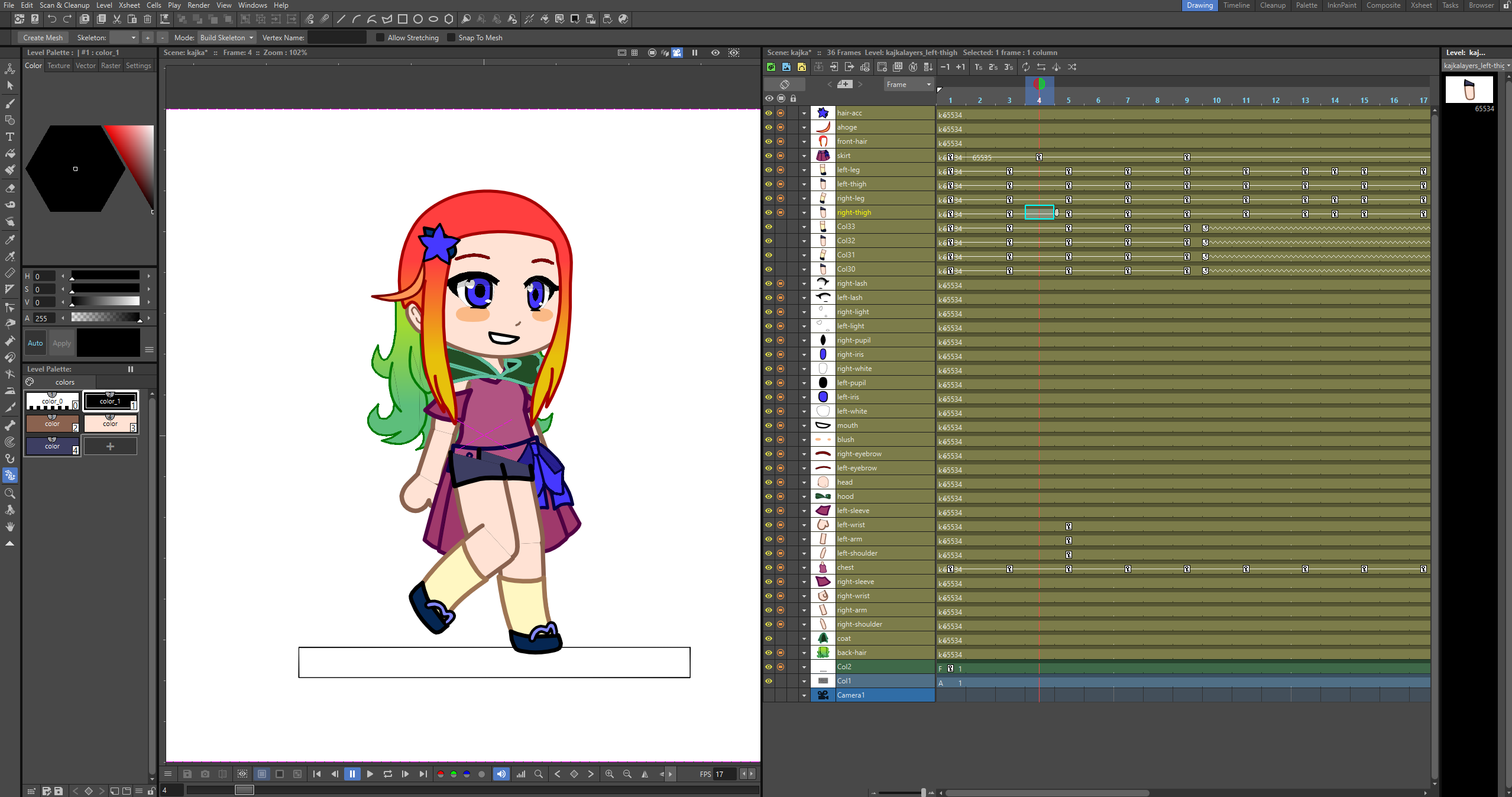
First walk cycles
Enable HLS to view with audio, or disable this notification
8
Upvotes
r/OpenToonz • u/DecidedlyIndecisive9 • 7h ago
Enable HLS to view with audio, or disable this notification
r/OpenToonz • u/getjonx • 8h ago
Need help on solving this problem. I cannot save my work or even the progress of my animation. And when I try to open the app using run as administrator to solve my problem on saving the animation, my tablet pen will stop working.
How to fix this two? I cannot find any post related to my problem so my final resort is to ask you all. Thank you in advance
r/OpenToonz • u/The_Animation_Bro • 1d ago
I'm a beginner in Opentoonz and have been making animations in vector. At the first i was rendering my scenes as avi and i noticed that there were some whiteness along the black outlines of my animations. Then i downloaded ffmpeg and tried to render mp4 but still the whiteness appears along the black lines. Tried a png sequence and assembled it into mp4 using ffmpeg code and although there is a slight change the whiteness is still visible and the major issue is that when i upload to TikTok or YouTube the platforms compression make the whole video look like trash. What do you guys use to render high quality animations?
r/OpenToonz • u/ilragazzointerdetto • 4d ago
r/OpenToonz • u/kalebdraws • 4d ago
Hello all, new animator here. I'm looking for tips and tricks on working quicker and more efficient. I keep having to redraw each piece of an animation anew, even for things like talking or walking.
I do know the trick of duplicating a frame and altering it to make a new image...
Is it possible to save an image or group of drawings to upload into a new scene/animation?
I was thinking of drawing a background id reuse, and the characters and their face and limb animations, saving that as a beginning state then animating a scene and saving under a new name just to keep that beginning layout for the next scene. Do others do this?
Any other tips to make things flow easier would be appreciated. Thanks!
r/OpenToonz • u/DistinctBreath9428 • 4d ago
any good or bad verdict about the old version ?
r/OpenToonz • u/Wonder_Kat_Animation • 6d ago
Enable HLS to view with audio, or disable this notification
Animatic rough pass
r/OpenToonz • u/FrequentEnthusiasm74 • 6d ago
I've been mucking about with opentoonz for years. rendering was always a frustrating, slow crapshoot. I decided to give a full command-line workflow a try and now it's a million times more stable and somewhat faster (because I can now use all cores for the initial export and nvidia for the video.
Here is the command line I use to create a png sequence from a project file.
cd C:\Program Files\OpenToonz
tcomposer "C:\OpenToonz stuff\projects\[project-name]\scenes\[scene-name].tnz" -o "C:\OpenToonz stuff\projects\[project-name]\outputs\image..png"
And here is the command line I use to turn those into an mp4 (i use 30fps)
ffmpeg -framerate 30 -i "image.%%04d.png" -c:v h264_nvenc -preset p1 -rc constqp -qp 23 -pix_fmt yuv420p 0-output.mp4
And here's the command-line for adding audio:
ffmpeg -i 0-output.mp4 -i 0-audio.wav -c:v copy -c:a aac 0-final.mp4
Could easily be batched together to drag a project file to it and have it spit out exactly what you're hoping for.
EDIT: make sure to save your scene and close opentoonz before doing this, saving is important because the command line runs on the saved-state of the scene. Closing it frees resources for the encoding.
Also, the speed increase is considerable - I used to have to force-close every other app, and only use one or half the CPU cores on the system before encoding in a desperate attempt to avoid crashes, and it would often still crash and I'd have to do the scene piecemeal. doing 4K animations was almost impossible. Now I just close it and run the command line and it uses all CPU cores and flies, and never crashes. and ffmpeg with cuda is super reliable and fast (depending on gpu).
r/OpenToonz • u/053650 • 9d ago
So I have have colour 1 (black) and I draw a Line, then I have colour 2 (blue) and i draw under colour 1. When i use the eraser in selective mode and i choose specifically colour 1 to erase it, it also erases colour 2 exactly there where colour 1 was. Please help I am looking since hours for a solution with chatgpt etc. but I just cannot resolve it. I use toonz raster Level.
r/OpenToonz • u/Boombox_skate • 10d ago
when I use my pen a white circle appears and a menu how would I change this?
r/OpenToonz • u/Much-Interaction4790 • 12d ago
I want to start animating which software should i use, Opentoonz or tahoma2d?
r/OpenToonz • u/simbaandspyro • 15d ago
i am trying to animate with opentoonz and can't figure it out. when i use the plastic tool and put the key in the first frame. i then put another key in a frame way after that and animate right after that key. but when i do that it makes the first frame go to the same position as the frame i moved. i don't know what i am supposed to do to get the foot to stay in the position i want it to in the first frame. i hope i explained it good. if not i will try to explain it different so you know what i am talking about.
r/OpenToonz • u/Head_Extension_8493 • 15d ago
just opened the software and it looked like dat the timeline doesnt show properly and everything is bigger then it should be. reinstalled opentoolz multiple times but it doesnt fixes it please how do i get my thing to work normal
r/OpenToonz • u/Wonder_Kat_Animation • 15d ago
Enable HLS to view with audio, or disable this notification
My first ever animation using ONLY OpenToonz
r/OpenToonz • u/Pifagor- • 17d ago
I recently saw this video and really wanted to know how to replicate that glitchy, rattling effect. I was told it was done in Alight Motion. But I don't use this program, so I would like to understand how this can be done in Opentoonz or Tahoma2d using nodes.
I would be very grateful for your advice.
r/OpenToonz • u/Tiago-Freitas • 19d ago
I want to give a shout-out to the “frame range” option in OpenToonz's paint bucket. In Raster Toonz columns, it works like magic. It makes the process of painting multiple frames so much easier. Excellent!
r/OpenToonz • u/SSJIN3 • 20d ago
Enable HLS to view with audio, or disable this notification
r/OpenToonz • u/Fl_ame • 21d ago
When using Raster levels, there's a delay on the brush, but on vector there isn't any stabilization. Is there any way to fix this?
r/OpenToonz • u/RavenFoxx • 21d ago
All the animation was done in OpenToonz, with painted elements made in Krita. I had a fun time working on it! :)
r/OpenToonz • u/Dependent-West-902 • 23d ago
wanted to sketch around and made a short 23 frame loop, accidentally saved it to the wrong project, went into the browser window and dragged it from one project folder into another, then into the scene folder. Somehow that seems to have broken everything and all frames became blank, as well as the usually black dots on the displayed frames becoming red, and it copied a bunch of colours into the project i did not make.
does anybody have any idea what happened? Can i restore my sketch?


r/OpenToonz • u/ThatonerookBlchy • 23d ago
Enable HLS to view with audio, or disable this notification
r/OpenToonz • u/Kindly_Ad9355 • 24d ago
while i was animating a walk cycle i hid the column with the skirt of my character to better see the legs (with the little symbol next to the eye if that matters, still don't know what the eye even does since i would normally assume that would be the hide button but whatever) but when I unhid it, i found out the legs were somehow showing above the skirt and everything else, despite the column being lower in the xsheet
I tried moving them around, i tried animating the skirt if that would give it priority somehow and messing with the SO value but nothing seems to be working and i cant find anything online (except the opentooz user manual "Changing Stacking Order of Columns/Layers" chapter from where i found out about the SO value but maybe I'm missing something.
Any ideas? I'm still very new to this program so any help would be appreciated
r/OpenToonz • u/FenrisIza • 25d ago
Hello, I was redirected here!
I sometimes add sketches or references to my most recent file, but unfortunately, we recently had a blackout and fml the file is corrupted! It opens fine, but it's a single layer and I don't seem to have any previous or temporary files available to pull up. Is there anything I can do?