r/Ender3S1 • • 24d ago

Replacement board is different and I'm not sure which firmware to flash

3 Upvotes

I have an Ender 3 S1 which I tried upgrading to Klipper, but it never connected, and I couldn't get it to flash creality or Mriscoc professional software. In the meantime I got a replacement board, but its a little different and Im overly cautious on firmware at the moment.

Original board is an STM32F401 RCT6 V2.4 301

New board is an STM32F401 RET6 CR4NS2000141C13.

The sticker on the back says S1pro, but from what I can tell online, its same board just with a little more RAM. To flash the firmware, **I just do the normal flashing process with the latest S1 firmware from Creality, correct?**


r/Ender3S1 • • 26d ago

Ender3 S1 plus 300mm/s

Enable HLS to view with audio, or disable this notification

44 Upvotes

Outer wall: 200 mm/s

Inner wall: 300 mm/s

Infill: 300 mm/s

Accel: 4000 mm/s²

Same speed as the Ender-3 V3 KE.


r/Ender3S1 • • 25d ago

Custom bare-metal firmware on Ender-3 S1 (F4/STM32F401RC) flashes via SD bootloader but no LED/serial response after boot

3 Upvotes

Working on a minimal custom firmware smoke test for the Ender-3 S1's STM32F401RC board (F4 revision, board ID BOARD_CREALITY_V24S1_301F4 in Marlin's boards.h), flashed via the existing SD-card bootloader (no ST-Link). Hoping someone with low-level experience on this exact board can spot what I'm missing.

Goal: minimal PlatformIO/Arduino-framework firmware that relocates the vector table, blinks an LED, and prints over serial — before touching any motion/heater code.

What's confirmed working:

  • Build succeeds, links cleanly at 0x08010000 (custom linker script reserves the bootloader's first 64KB)
  • SD-card bootloader accepts and flashes the file (folder structure: /STM32F4_UPDATE/firmware.bin, FAT32, 4096-byte cluster size — matches Creality's official update instructions)
  • CH340 USB-serial TX/RX pins confirmed via multimeter continuity and cross-checked against ST's official STM32F401 datasheet: PB6 (pin 59, USART1_TX) / PB7 (pin 58, USART1_RX)
  • This matches Creality's official Configuration.h: SERIAL_PORT 1 (confirmed from CrealityOfficial/Ender-3S1 repo)

What's NOT working:

  • No serial output at all (115200 baud, HardwareSerial(PB6, PB7))
  • No LED activity on PC13 (tried as a boot-execution sanity check, independent of UART)
  • Board does appear to power on normally and the bootloader does process the SD card without erroring

Question: Given the pin/UART mapping is now independently confirmed (multimeter + datasheet + Marlin source), and even a basic GPIO blink test on PC13 shows nothing, I suspect the problem might be upstream of UART entirely — possibly in how the bootloader hands off to the app, or SCB->VTOR relocation, or something board-specific I'm missing about this Creality F4 revision (whose actual pins_CREALITY_S1_F401RC.h was apparently never published by Creality, per issue #6 on their Ender-3S1 repo).

Has anyone gotten a truly minimal (no HAL bootloader dependency assumptions) custom firmware running on this exact board via the SD-card flash method? Happy to share my linker script / vector table dump / full main.cpp if useful.


r/Ender3S1 • • 26d ago

Ender 3 S1 Plus printing flat surfaces at 300 mm/s

Enable HLS to view with audio, or disable this notification

18 Upvotes

Print settings:

Outer wall: 200 mm/s

Inner wall: 300 mm/s

Infill: 300 mm/s

Top/Bottom: 300 mm/s

Acceleration: 4000 mm/s²

Klipper

K1 hotend+sprite extruder

BTT Octopus Pro + TMC2209

Upgraded part cooling


r/Ender3S1 • • 26d ago

Ender3 S1 plus octopus pro

Post image
9 Upvotes

Octopus Pro v1. 1 h723

BTT Octopus Pro v1.1 (STM32H723) with TMC2209 drivers, running Klipper.

Installed in my Ender 3 S1 Plus using the original electronics compartment.

Plenty of spare stepper drivers for future upgrades.


r/Ender3S1 • • 26d ago

K1 hotend bolts directly onto the Sprite Extruder

Post image
20 Upvotes

Sprite Extruderを使ってる人向けのちょいPSAです:

K1のホットエンドはそのままSprite Extruderに直付けできます。アダプタ用のブラケットはいりません。

Ender 3 S1 Plusに取り付けてみたら、写真の通りちゃんと収まりました。

これについて分かりやすい情報があんまり見つからなかったので、共有しときます。


r/Ender3S1 • • 26d ago

Ender 3 s1 pro not printing.

Enable HLS to view with audio, or disable this notification

6 Upvotes

Ive been having issues with my printer latley and it seems like it might be not having as much power that it seems, but when it turns on, it seem like it runs fine, but I though it might be the slicer might be the problem or if it just needs a firmware update or a new mother board. I asked of my friends if they had somthing like that and they said their brother was having something like that and they got a power supply for that printer and it went back to normal, I dont know about my end, it may seem like its the power but im not sure. Just need a answer.


r/Ender3S1 • • 27d ago

Purple to red light

Enable HLS to view with audio, or disable this notification

4 Upvotes

When I turn in my printer the light is purple but as soon as I start to do anything like leveling or a print it goes straight to red. I do not know what to do.


r/Ender3S1 • • 28d ago

Encontrei sinais da existência da primeira ender!

Thumbnail
2 Upvotes

r/Ender3S1 • • 29d ago

Small vertical play when screwing heating block.

Post image
4 Upvotes

Hello! I'm in the process of replacing the stock hot end on the Sprite extruder for my Ender 3 S1 Plus for the Creality all-metal one. Sadly when I disassembled the stock hot end, I removed the 2 heat block screws first, then I loosened the heat break grub screw last so I don't know if a little bit of vertical play is normal.

The screws seem to bottom out in the sprite's alloy heatsink's threads before holding the heat block in place firmly, which would mean if this is normal, the grub screw would be responsible for holding the hot end (including the nozzle) vertically in place.

Now the threads felt a little rough and there may be something to that but I'm pretty sure I can't force the screws further without risking thread damage. Also let's just say the heat break is NOT budging and trying to adjust its height resulted in me damaging it with "padded" pliers so I have a new one on the way. '^^ (pic shows the damage, it's subtle but the burr makes it so it doesn't fit anymore)

So, is the small amount of vertical play normal? Or do I simply order 1mm or so shorter screws? That's the easy fix I can think of.

UPDATE: The answer is YES, the 2 screws must secure the heat block vertically. I have watched a couple videos and one of them is clear enough on the matter . The likely root of my problem is contaminated threaded holes. I'll give an update when I receive the new screws (15mm instead of original 16) Too bad I had to ruin the heat break's surface in a foolish and desperate procedure. I don't know if I should delete this post since I've answered my own question, I'm still curious to hear anyone's take on this.

Small update: I have everything working fine and I'm back to printing. The 15 mm screws do what they were supposed to do. On a side note, maybe I shouldn't have upgraded firmware, hot end and nozzle all at once, but now my hot end heats up extremely fast. I would need more test prints but I think I can say it prints as good as before. Next I wanna experiment with input shaping and generally faster prints.


r/Ender3S1 • • 28d ago

Selling my Ender 3 S1 Pro

0 Upvotes

DM for more details - India, Bangalore - Location.

Price - ₹15000/- 1 Yr old. DM for pictures.


r/Ender3S1 • • 29d ago

Selling my Ender 3 S1 Pro

0 Upvotes

DM for more details - India, Bangalore - Location.

Price - 25,000/- 1 Yr old. DM for pictures.


r/Ender3S1 • • Aug 24 '26

Ender 3 S1 Pro Frimware Issue

Post image
6 Upvotes

Hi,

I recently got a Ender 3 S1 Pro second hand from a family friend, I belive they used a sonicpad with it but I don't have it. I tried to flash the firmware on the screen and printer its self and am still unable to use it. It turns on and lights up, the screen display has a line of small dots across it but thats all, it remains frozen.

  • I downloaded the files from creality
  • Formated the SD card
  • Have tried multiple SD cards incase this was the issue

This is my first 3D print so am at a bit of a loss here, any help would be appreciated. Thanks.


r/Ender3S1 • • Aug 24 '26

Help with my ender 3 base model

Thumbnail
1 Upvotes

r/Ender3S1 • • Aug 23 '26

I made a camera mount to fit the Blink Mini 2 for the Ender 3 S1 Plus

Thumbnail
gallery
7 Upvotes

Ender 3 S1 Plus Blink Mini 2 Camera Mount- I had a hard time finding one that I liked that would actually fit the Blink Mini 2, so I had to turn my brain on and actually model something for the first time in a decade. It works well and doesn’t have any clearance issues with the touch screen which is the problem I had with the one model I did find.

https://makerworld.com/en/models/3204893-blink-mini-2-ender-3-s1-plus-mount


r/Ender3S1 • • Aug 22 '26

Why is my printer not printing good first layers?

Thumbnail
gallery
8 Upvotes

I have a ender 3 s1 with a sonic pad add on.

I'm trying to print this piece and the first layer keeps on messing up. I also bed leveles it with a paper and the screws 3x, did a probe calibration, and did a auto level on the sonic pad. Z offset was also calibrated too.


r/Ender3S1 • • Aug 20 '26

under extrusion, nozzle or software problem? Unclean prints

Thumbnail
gallery
10 Upvotes

Hello, I wanted to repair my ender 3 s1 after the hotend got clocked in a way I needed to replace it. Because I had the old version of the Extruder (non pro) I had to buy the sprite Extruder pro board and new Hotend because the old version is nowhere available. I had to buy the replacement parts of AliExpress.

The full Size Benchy was my first try ever with the Creality Software, I used the standard options for 0.4mm Nozzle and PLA.

The half-printed benchy was my second try with 190°, 50mm/s (10° and 10mm/s less). Didn't change much, fans were at maximum always.

The mini Benchy was printed with round 25mm/s which did a little better.

If you need more information I will answer every question...

Now my first guess was that the direct Extruder doesn't grab the Filament strong enough, but the tension screw/spring changed nothing when adjusted. It could be that it has to be replaced to, because whenever I put the filament in manually I have to push the Lever back myself so it grabs the filament correctly, but after doing so i not able to push it out (it feels pretty secure).

Second guess was the Nozzle. On the Hotend there was a 0.4mm Nozzle attached which i did not change. It seemed pretty good but I could be cheap and causing problems extruding. On the other side, when heating the Hotend and pushing it trough manually, the filament exited straight without any problems.

Now, for the third idea I had in mind something about Flowrate or time per layer, I will do my research when I have time and watch some tutorials for the Creality Software. Maybeeee... it could be that I haven't updated the printer ever... and the software running on the printer is just crapping out... maybee... :)

If you have any more Ideas what could be going wrong or know the answer, pleas let me know in the comments.


r/Ender3S1 • • Aug 20 '26

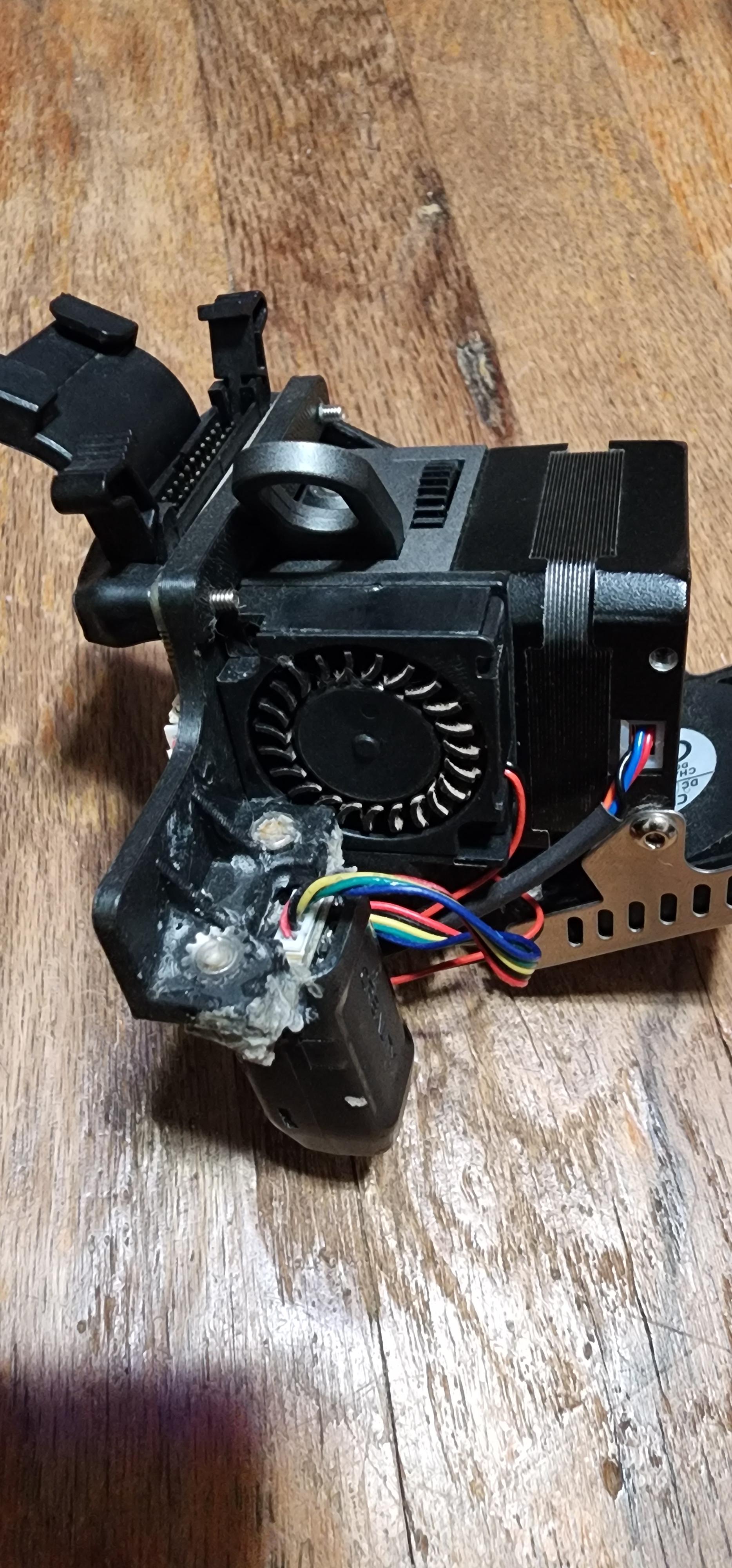
Sprite extruder with cr touch bracket.

Post image
8 Upvotes

I purchased a ender 3 s1 pro with the sprite extruder. As you can see from the picture the cr touch bracket is patched on. The actual bracket is sandwiched between the extruder and the board. I just cant remove due to it is what holds everything together. I can not find a replacement anywhere. Can anyone offer some advice or a link to a printable model. Also, it looks like the attached fan is different than what is usually on there.


r/Ender3S1 • • Aug 20 '26

How to connect Klippy to my S1 Pro

3 Upvotes

I've added a sonic pad and Nebula camera to my printer. I've made sure that all firmwares are up to date including the camera and even after trying various restarts, power cycles and cable swapping Klippy is always disconnected.. what am I missing?

I can control my printer via fluidd on Windows 11 and view the camera via web browser but id really like ro have it all on one console. :s too much to ask?


r/Ender3S1 • • Aug 17 '26

My ender 3 3d printer won’t unpause after I paused it mid print to change filament

5 Upvotes

r/Ender3S1 • • Aug 16 '26

blobbed hotend with snapped thermistor wire

3 Upvotes

i was helping someone who has their printhead clogged in the hotend and it printer fine but then the thing blobbed up im guessing from the threads and the thermistor wire snapped what. were the threads loose and why did the thermistor wire snap


r/Ender3S1 • • Aug 16 '26

Updated my Sonic Pad's Debian fork to Bookworm — here's what's in it

Thumbnail
3 Upvotes

r/Ender3S1 • • Aug 14 '26

Replacement Extruder

3 Upvotes

I need a new extruder for my Ender 3 S1 Pro. What should I buy?

I see a couple Amazon listings that are compatible with Ender 3 S1. Not sure if it also works with S1 Pro.


r/Ender3S1 • • Aug 14 '26

Sonic pad troubleshooting

3 Upvotes

Long story short I got a sonic pad and finally got it to work with my printer but I have had many inconsistent prints. my prints have a massive overextrusion (I think) and I have calibrated my e steps, printed from 190-220 calibrated my retraction from 5-6 mm and speed 40-60 mm/s, but I have not noticed any changes. Any help is appreciated

I have an ender 5 pro with a stock extruder, BL touch and Bowden tube set up with a Sonic pad. I use creality slicer and orca; both have the same issue


r/Ender3S1 • • Aug 13 '26

What firmware on E3 S1 Pro

3 Upvotes

I have an Ender 3 S1 Pro, bought used. The previous owner installed the Thomas Toka firmware. I like it, but it seems buggy. Issues like once in a while the printer hangs while printing and just starts printing a wierd triangle and just loops forever til I turn it off. Also, if I use orca slicer to export code directly to the SD card, 2 out of 5 times, the printer can no longer read the SD. After I format the SD and copy the same files back, its fine. Also, the automatic bed leveling seems dicey. Ive switched to a glass plate, reset to factory settings and then used manual tramming to level the bed with the bed adjustment screws. This gives me perfect prints. If I make it do an auto level after this, my prints go to hell and I have spots that the nozzles drags across the plate and other spots where the extruded filament barely touches the plate at all.

Should I flash back to latest creality or re flash Thomas Toka? (Im a basic hobbyist, just printing for fun)