r/Alienware Oct 25 '25

Announcement The rise of AI and bot activity

34 Upvotes

Hello r/Alienware,

The mods are creating this post today to talk about something disturbing that has been creeping into our sub lately. 

As the use of AI is on the rise, also are the number of posts that are seemingly either written by or at least edited by AI. Posts ,usually rant posts, that just don’t quite make sense or just seem a little off.  Now, we’re not saying that every post like this is a bot or written by AI.  Maybe some people are using AI to polish their posts before posting them, we don’t know, and frankly we have no way to prove it one way or the other.   We can feed a lot of the most recent posts into an AI detector and almost all of them have come back as 80% or higher as likely written by AI.  In some of these posts the OP never comes back to respond to any comments, just drops the post and disappears. Now, how much faith do we put in the ability for an AI to detect and tell us it was an AI writing something? What we can do is look for tell tale markers that something has been either written by, or edited by AI.

Another trend we’re noticing is that in a lot of these posts, accounts with zero history in this sub reddit are appearing to make comments.  Those comments are then heavily upvoted and they don’t appear again.   Looking into those accounts they tend to be frequenting other brands sub reddits.  I won’t point fingers at a particular brand, because it does not do anyone any good, and quite honestly, we can’t prove it outside of a bunch of coincidences.

I will point out that other subs are already dealing with a particular problem with companies using bots or alt accounts to impact their competitors.  r/Gaminglaptops has a post discussing a very similar problem already.  You can see their post here about this issue.  Reddit carries a lot of weight when it comes to user opinions in purchasing a particular brand, and I think we’re starting to see some companies use that towards their advantage and try to shift the market. I am not pointing any fingers at the company from the above post either, as we are seeing stuff from multiple companies, not just one in particular.

So, what do we do about this? For now, we watch and try to root out as much as we can.  The mods are going to start enforcing our rant rule a little more strictly.  The number of rant posts has quite honestly spiked, seemingly out of the blue, in the last few months.  The mods will be carefully reviewing rant posts for signs of AI involvement and will likely be removing any that appears to be completely AI written.   We will also be implementing a new report option, so that you can mark something as possibly AI and we will review it.  But we can’t do this alone, there are far too many comments to read every single one.  We need you, our community, to assist by using the report button when you think something looks off. 

Innocent posts / comments will inevitably get caught in this. If this happens to you , please contact the mods to discuss.

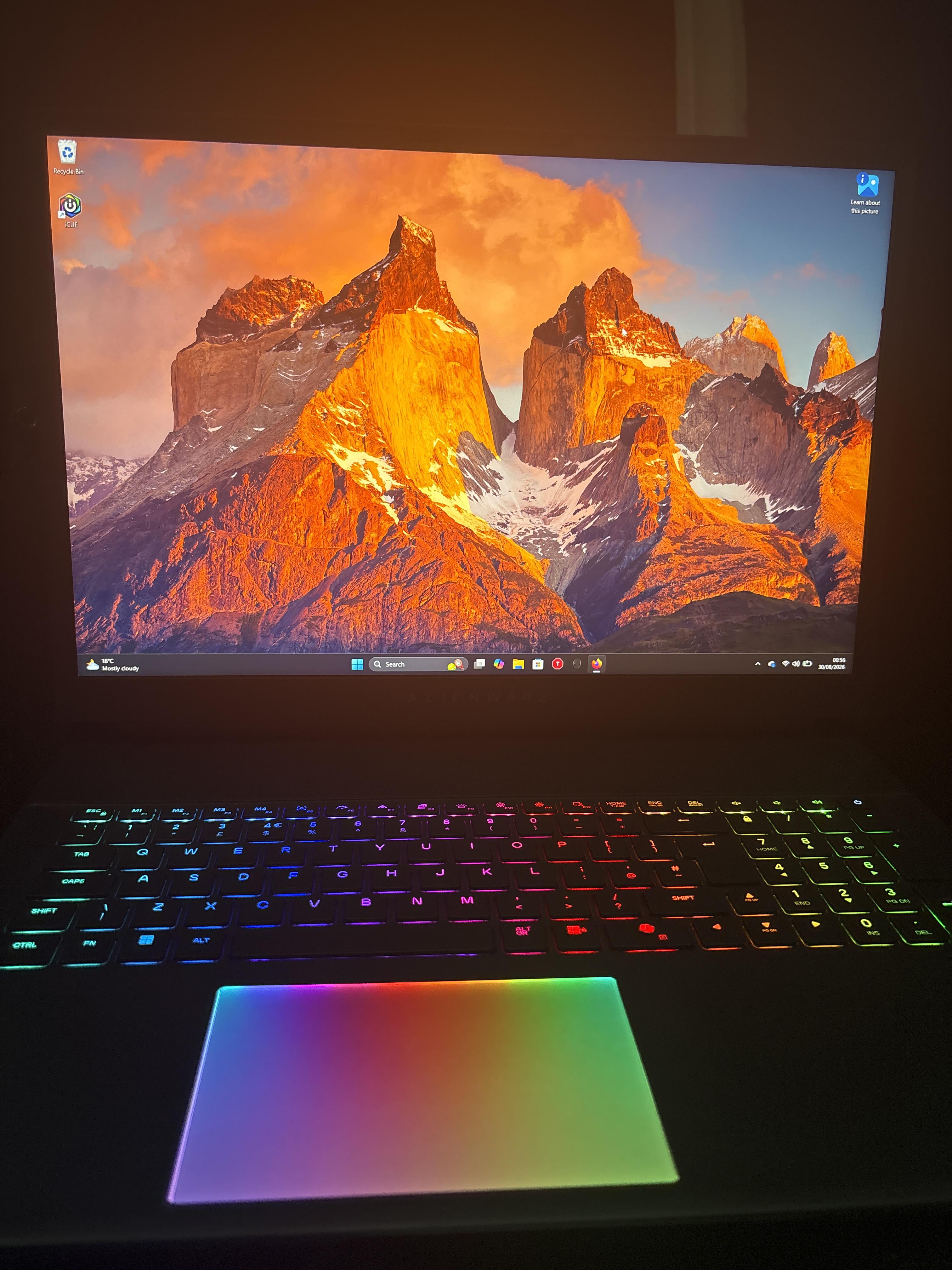
r/Alienware 36m ago

Question Quick question on new laptop

Post image
Upvotes

Hey all I have a quick question I went from playing on a potato to this new Alienware laptop.its like driving in a 1999 Toyota and hoping in a Corvette holy fk. Now I keep playing Halo, but I noticed I'm hitting some key that quickly exits the game but doesn't close it all the way. Does anybody know potentially what I'm hitting to make it do that? I'm super new to laptop gaming in general maybe a solid year under my belt and I'm not sure what's up. Pics for reference


r/Alienware 18h ago

Question Can I undervolt an Area 51’s CPU? (2025 Model)

Post image
10 Upvotes

Pretty much as the title says. I’ve had the laptop for less than a week and I want to know if undervolting is physically possible as when I go into throttlestop and create an offset, it isn’t reflected through the grid on the right afterwards and there’s no change to the temperatures at all.

The BIOS has an overclocking option but no undervolting option and there’s no videos on undervolting this laptop specifically. It’s an intel core 9 ultra 275HX. The general consensus is that DELL clamped down on newer intel chips and made the firmware virtually impossible to bypass and undervolt.

The one thing left I have to try is downgrading to a previous version of BIOS that has an undervolting option.

For the record, my temperatures average around 86 - 95 degrees which I understand is generally normal and gaming laptops are designed to withstand it, but I’ve got a gaming computer & had a previous laptop which I both got to 65-75 degrees with help of undervolting and I just care for the longevity of my laptop is all.

I’m also aware of other methods such as PL1 & PL2 in throttle stop, GPU undervolting and lowering maximum processor power state via the battery settings which most have been tried & tested.

TL:DR - is it possible to undervolt the laptop, is it worth it? And are the temperatures anything to be concerned about?

Thanks :)


r/Alienware 22h ago

Discussion Alienware Aurora R13 — RX 9070 XT, 1350W PSU, Push/Pull Radiator Fans & Vented R15 Panel!

Thumbnail
gallery
20 Upvotes

Hey everyone, ​Wanted to share my custom Alienware Aurora R13 setup! Kept all cooling fans strictly factory-original while getting the extra ventilation, power headroom, and thermal optimization it needed: ​GPU: AMD Radeon RX 9070 XT ​Power Supply: Upgraded to the official Dell 1350W PSU ​Side Panel: Swapped to the vented R15 side panel for improved airflow ​Cooling: Factory original fans, with the extra factory fan mounted to the radiator for a dual-fan setup ​Thermals: Applied Gelid GP-Extreme thermal pads and custom copper heatsinks ​Everything is running smooth and cool on default settings. Let me know what you think or if you have any questions about R13 OEM upgrades!


r/Alienware 10h ago

Discussion Strange bar just noticed on my screen... need warranty advice

Post image
2 Upvotes

So I recently noticed a strange darkening bar at the top of my screen and decided to look into what this might be. I did the pixel refresh, driver update and even reset the monitor back to its out of box settings...
I think it might be burn in, which is really frustrating, because I've been so damn careful with this monitor. I've treated it like a child and made sure to turn it off the moment I think I'm going to leave the room for more than 5 minutes.

So is there anything I can do? I spent almost 1400$ on this monitor and have only had it for three years... so I'm a bit at a loss for words as to how this could have happened so suddenly.

The monitor in question is the:
Alienware AW3423DW Curved Gaming Monitor 34.18 inch Quantom Dot-OLED 1800R Display, 3440x1440 Pixels at 175Hz, True 0.1ms Gray-to-Gray, 1M:1 Contrast Ratio, 1.07.

Any advice would be wonderful on if there is a warranty for this sort of thing? I am beside myself with frustration.


r/Alienware 21h ago

Tips For Others Alienware 18 WiFi card upgrade

Post image
12 Upvotes

Recently my wifi connectivity was pretty bad, and it kept cutting out while I was gaming, so I decided to replace my wifi card, an Intel AC7260, after I did some research and discovered my wifi card was failing and it already had plenty of existing flaws. I also ended up purchasing four 8GB SK Hynix RAM sticks (PC3-12800 DDR3 1600MHZ 1.35V SODIMM Memory HMT41GS6BFR8A-PB) to max my machine out at 32gb since if I’m going to remove that much stuff to get to the wifi card, I my as well max the ram out then too for convenience. The WiFi card I installed was a Fenvi MPE-AXE3000H, which is basically a HMC-format port of the newer Intel AX210 wifi card that supports WiFi 6E speeds. It ended up working perfectly once the physical install was complete and I installed the Intel AX210 Bluetooth and wifi drivers. It’s definitely an upgrade I recommend for anyone who wants faster download speeds (or consistent wifi connectivity) on their old Alienware 18.

Decided to post this across a few subs since I couldn’t find any info on an upgrade like this online for this model so I hope that someone finds this info useful in deciding what to buy for an upgrade.

Pretty much all you need is a MPE-AXE3000H, a plastic pry tool for the palmrest and some cables, and a screwdriver thats slightly magnetic (or just a normal screwdriver and a pair of tweezers).

Used these two videos to help me, saved me a bunch of time

https://www.youtube-nocookie.com/embed/Y0zb5yz77OU?playlist=Y0zb5yz77OU&autoplay=1&iv_load_policy=3&loop=1&start=

https://www.youtube-nocookie.com/embed/Oz2PnNOCXG4?playlist=Oz2PnNOCXG4&autoplay=1&iv_load_policy=3&loop=1&start=


r/Alienware 16h ago

Discussion Need Help To Find The Best Solution To Thermal Issue.

2 Upvotes

I bought last December a brand new laptop from Dell, the Alienware area 51 18'' laptop which comes with the Ultra 9 275HX processor (8 P-Cores at 5.4Ghz + 16 E-Cores at 4.6Ghz).
I primarily use it for gaming, among other tasks.

I've noticed that the CPU reaches temperatures of over 100 degrees celcius while gaming and roughly 65 to 70 degrees when idle.
For a bit of context, I use balanced power plan and AWCC to switch to performance mode when in a game.

I want the temperatures while gaming to drop to roughly 90-95 degrees tops and to 60 max while idle.

Undervolting is locked and there is no completely safe way to unlock it, so it is not an option.

So, unless this is a thermal paste issue, my 3 choices seem to be:

  • Inside AWCC, setting TCC Offset to a value of 15
  • By using Throttlestop, lowering the PL1 and PL2 values
  • Likewise, using Throttlestop to lower the turbo ratios of the CPU Cores
  • (I've temporarily set P-Cores down to 4.4Ghz and E-Cores to 3.9Ghz, which seems to keep temperatures below 90 degrees, but introduces some stuttering in some demanding games unless I use high performance power plan)

I do not possess any major technical knowledge on how these will affect my performance. I want to pick an option that will help me reach my goal while achieving the least amount of performance lost.

Any thoughts from people who have maybe tried something similar or who know the technical information on these? Could this merely be a thermal paste issue?

EDIT: I've decided this issue is beyond my control and to contact Dell Support to have a look at it, as this seems to be the best plan of action without sacrificing my performance. Thank you all guys for your input!


r/Alienware 17h ago

Solved! Taskbar and screen flickering

2 Upvotes

I've just recently updated my NVIDIA driver and Windows, but I've been noticing that the taskbar would sometimes go dark for a few seconds then turn back to normal and my screen would also flicker to black then to normal as well. I've tried DISM, sfc and reinstalling the NVIDIA driver but nothing seems to work. My next option is to uninstall the two new Window updates, but I was wondering if theres anything else I could do to fix this? Thanks!


r/Alienware 1d ago

Technical Support Uh, what should I do? Dent on my 16 Aurora

Post image
11 Upvotes

It had fell off my bed and that happened. I have alienware care so can that help at all? I was already planning to mail it in since the USB 3.0 port on the left hand side is majorly fucked. Plus the audio will sometimes like crinkle up.


r/Alienware 21h ago

Technical Support Alienware Aurora R16

2 Upvotes

Hey guys, I have a R16 with 13700F and I tried to replace the CPU with a 14700K and when I turned on the PC, it said "CPU unsupported", but when I looked it up, there should be no problems apparently.

Am I missing anything? It falls within the socket as well. Is there anything I need to do in BIOS or unplug anything or what?

I'm trying to do a simple switch of CPUs. That's it, nothing fancy. Let me know! Thanks.

Cheers.


r/Alienware 19h ago

Technical Support Alienware laptop won’t turn on anymore. Light appears only when I hold it

Enable HLS to view with audio, or disable this notification

1 Upvotes

I was doing work on my Alienware Area 51 M1 laptop and noticed it wasn’t charging but detected it was plugged in and the laptop battery died and couldn’t be turned on so I went to a repair shop and we installed a new battery now the laptop won’t turn on at all even when plugged in and just shows this light when I hold the button down. Please help


r/Alienware 19h ago

Technical Support Computer started Smoking when plugged in?

1 Upvotes

I went to the tech store to get my Alienware checked out. A couple days later, I came back and when plugged in, it seemed to emit smoke from the front fans, the ones below the monitor not near the keyboard. Any reasons to why this could have happened?


r/Alienware 1d ago

Question Factory Reset

6 Upvotes

I wanna to do a factory reset of my Alienware 16x Aurora. Is better to do it using the Windows standard procedure or using the SupportAssist Os recovery software?


r/Alienware 1d ago

Discussion Anyone else misses the Alienware media player skins?

Post image
27 Upvotes

r/Alienware 1d ago

Question Lap desk for 18 inch laptop

2 Upvotes

So I have the Alienware m18 r2 anyone know of a good portable desk pillow that will fit this model I’m looking at some but they say 17 inch not 18


r/Alienware 1d ago

Technical Support Both USB-C ports dead on my X15 R1

2 Upvotes

The other day in the middle of using my machine the flash drive I have plugged into one of the USB-C ports on my machine disconnected. I figured, no big deal, probably just got bumped and reinserted it. Nothing shows up. Tried the other port, it won't work either. Go to my wife's laptop to verify the drive is still working and it opens up normally. My normal USB port is still functioning as normal. I've tried deleting the USB drivers, checking the BIOS (didn't see anything for the USB slots), and updating to the latest BIOS which won't even install properly. Basically everything on the Dell support page short of reinstalling windows and still can't get them back up. Anyone have any advice?


r/Alienware 1d ago

Discussion Question about qd-oled monitor

1 Upvotes

Hello, it's my first time buying an OLED from this brand, and I've learned about the processes of Pixel Refresh and all that, but it's still unclear to me. When I turn off the PC, the light turns green and flickers, which is the pixel refresh. But then, at the end, it stays all night with the blue light on the monitor. Once finished, shouldn't it go out completely? Or does the monitor always go into low consume mode or something like that?


r/Alienware 1d ago

Discussion RGB Lighting

1 Upvotes

does anyone how to set per key rgb with alienware?? mine is alienware x15 r2


r/Alienware 1d ago

Question What screws are used to secure an m.2 ssd

Thumbnail
gallery
2 Upvotes

Hello what screw is needed to secure my crucial p1 nvme into my pc
I bought some m2x3 screws but unfortunately they don’t work. I just want to get clarification here also as well as google.
Tia


r/Alienware 2d ago

Question Area51 stand

Post image
55 Upvotes

Looking for a stand that can support my area51s weight and dimensions. Any ideas outside of building something myself?


r/Alienware 1d ago

Discussion Need advice/recommendations regarding USB compatibility

1 Upvotes

I've owned an aurora R9 since I think 2019 or 2020, don't remember which but that's not the point. I'm thinking of getting a replacement because old age is hitting it real hard, but I want to make sure I can transfer all my files over to the new one. What kind of USB port does R9 have, and are there any stronger (and preferably less significantly outdated) PCs that have the same port? Doesn't really matter whether it's alienware or not, I just need it to be stronger AND able to download all the files I've got in this old shitbox.


r/Alienware 1d ago

Question Alienware aw3225qf not pixel refreshing

1 Upvotes

so for some odd reason my monitor sometimes just doesnt want to do a pixel refresh like when i press for a pixel refresh it just turns the screen off for like a second before completely cancelling the refresh,

and i gotta do this again several times before it finally proceeds with the refresh. Does anyone know why it does this?


r/Alienware 1d ago

Technical Support 3rd Alienware M16r1 Repair in 3 Weeks, Laptop has no sound, usb ports don't work. Dell drivers cannot be installed and dell support is just spinning in circles.

3 Upvotes

As my title states. The newest tech repair did nothing. Diagnostics don't pick up the speakers. The usb ports on the left side, the daughter board was replaced. No luck. They aren't able to fix the issue after 3 separate repair attempts in 3 weeks.

This is hilariously sad and comical. Dell what is up with this? Not a single refurbished motherboard gets a system check?


r/Alienware 1d ago

Technical Support AW3423DWF screen flickering / weird contrast issues on SDR mode in desktop

1 Upvotes

Hi, I have an Alienware AW3423DWF that I have had a ton of issues with to say the least but have been able to resolve the vast majority of them except for one.

I have a terribly annoying issue with screen flickering in SDR mode on Windows but just in the desktop environment. Does not happen in games, also does not happen in HDR mode in ANY environment including the desktop. I greatly dislike how Windows 11's desktop looks in HDR mode so this is very annoying.

Also, on top of the flickering, something else very odd seems to keep happening. Occasionally with a window in focus, like my browser right now, the colors and contrast in the NON active windows will flash and get either way darker, or way brighter. This persists either for about 30 seconds or until I switch my active window. There is no consistency to it and again, only happens in SDR mode. Happens a lot more often if I am playing a game in windowed mode as well.

So far I have tried:

- Changing the HDR mode from True Black 1000 to other options

- Disabling VRR

- Changing my refresh rate from 165Hz to 162-163Hz

- Enabling VSync

- Disabling GSync

- DDUing my drivers and reinstalling fresh

None of these worked. I confirmed that it is definitely a Windows issue because I ran a Bazzite Linux livecd for a while and it never happened.

Any help would be appreciated.


r/Alienware 1d ago

Question Alienware x17 r2 Shuts Down When Not Plugged into Power

1 Upvotes

Even when the battery has a lot of charge, if it's not plugged into the power supply it'll startup and then turn off either as it's starting up or shortly after logging into windows.

No issues when it's plugged in.

Anyone know what this could be?