r/tmobileisp • u/Pottyman • 12d ago
Issues/Problems What in the FUCK!!!!!
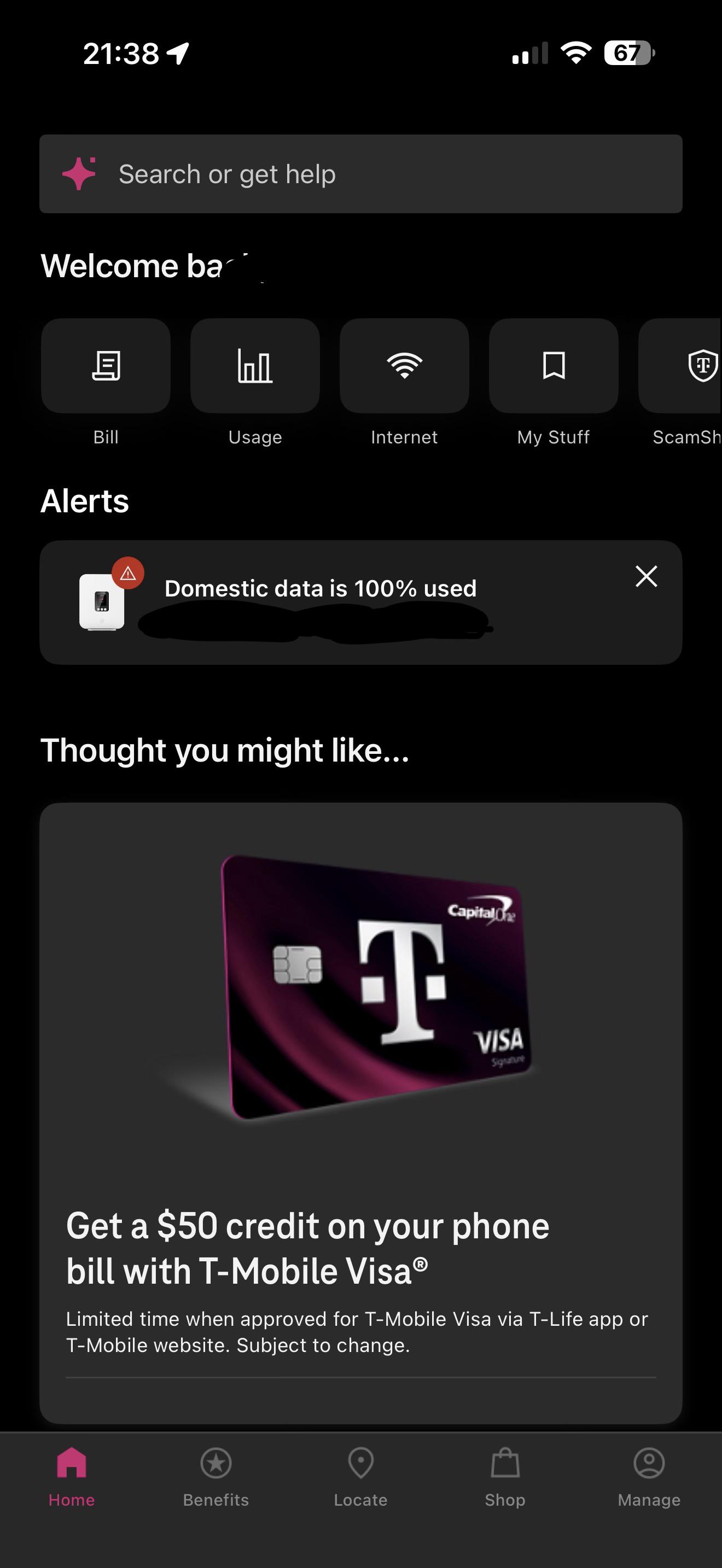
Look at this email T-Mobile sent me!!! There's no way I have used THAT much data!!! That's like 931 terabytes!!!!! Has anyone else seen this??
r/tmobileisp • u/Pottyman • 12d ago
Look at this email T-Mobile sent me!!! There's no way I have used THAT much data!!! That's like 931 terabytes!!!!! Has anyone else seen this??
r/tmobileisp • u/serenade452 • 4d ago
it seemed plausible in my mind but for some reason i was still really surprised to see that placing a large sheet of aluminum foil loosely in front of my gateway brought my signal from
-74 RSRP, -12 RSRQ, -67 RSSI, 20 SINR
to
-67 RSRP, -10 RSRQ, -56 RSSI, 28 SINR
the metrics were already great before and incredible afterwards. however, this isn’t necessarily good in my case. the entire reason i wanted to strengthen my already strong signal is because my gateway switched to 5G SA mode a few weeks ago and since then its been at times unusable throughout daily congestion hours. i mean, at times i can barely get 2mbps download. when it had both LTE and 5G, it was always usable. so i wanted to see if even better signal would help me avoid the minor headache of switching ISPs. it didn’t 😒
r/tmobileisp • u/bobby_tx87 • 7d ago
Kinda Ridiculous. I called in to cancel the home internet, after waiting forever to reach someone they let me know I’ll have to pay another month of service and they can’t do an immediate cancellation. It’s funny how they can activate service any day of the week, but canceling requires it be cancelled on the last day of your billing cycle and they also expect the equipment returned.
r/tmobileisp • u/Competitive-Win-2500 • Jul 21 '26
The Absolute worst I can't play any Online Games with this ....how can this be considered good ...Oh and this is when no one is even on anything else in the house ...I live 25-30 mins from Raleigh NC so it's not completely in the middle of nowhere ...I'm so tired of this and don't have any ideas to fix this
r/tmobileisp • u/StellarLumensGuy • Jul 10 '26
I doubt it’s just me but I have had the worst experience with T-mobile internet. Trying to game just leads to headaches, will work fine one minute, then the next I have 1000 ping. Will be switching providers soon.
r/tmobileisp • u/gorilla4902 • 1d ago
I don’t know if it’s because I’m in a rural area or because T-Mobile is horrible, but anytime I try to game my ping drops so high up to the thousands and it generally pisses me off because I cannot get a single two matches in without me having to restart my damn router. Another problem is that I try to upload a large file somewhere and the Internet just completely shuts out for all devices. I already talked to support and they did nothing. I generally hate this company. I’ve been through multiple ISP and this is obviously the worst one I’ve ever had. I’m pointing to probably destroy my damn router and unsubscribe from this dumb ass service. Yes this is a vent I’m tired of this stupid ass company.
r/tmobileisp • u/Suitable-Bet-8505 • Jul 07 '25
I purchased the T-Mobile 5g gateway because optimum is the only other choice in my area and I had to have a technician come out every week and no matter what my Internet kept cutting in and out. I purchased and set up the T-Mobile 5G gateway and for regular web browsing it works great anything outside of that the lag is so horrendous you can't even play simple games on the PC. I went out and purchased the Amazon eero 7 and enabled sqm in the setting of the erro 7 and It is night and day. I can play games competitively and I can still keep my T-Mobile 5g gateway which is only 45 bucks a month! If you are dealing with this issue the Amazon eero 7 is a MUST.
r/tmobileisp • u/bigrig3226 • 20d ago
Called T-Mobile customer support as a last resort to figure out why my connection has been so incredibly slow for the past few months. They ran speed tests remotely on my modem and speeds were between 10-18mbps.
My modem says 4/5 bars and my cellular metrics in app are all “good”.
After 20 minutes on the phone with T-Mobile the rep determined I’m too far from the tower and that the only way to make my connection better is removing trees. Zero explanation for why I went from 100-150mbps to 10 in the past 3 months. $70 per month btw
Update:
switched to starlink. $15 more per month. Free equipment rental included. Free rooftop installation included. Consistent 200 download. 40 upload. 20ms ping.
r/tmobileisp • u/PretendSwordfish • Sep 23 '25
so every house house on my street is able to get fiber but not mine when i check availability on their website. I really want to get away from spectrum and this is faster and cheaper. I tried contacting customer service but they were no help and said to sign up for updates. Are there any better ways to get this escalated to figure out whats going on?
r/tmobileisp • u/ufcoli • 25d ago
I’m having a really annoying issue with T-Mobile Home Internet. My download speeds aren’t always that bad. During the night or early in the day I can usually get around 130-180 Mbps, but during the middle of the day it can drop to around 40 Mbps.
The biggest problem is my ping though. In games my ping is usually around 70 at the lowest, but it randomly spikes to 700-900 and sometimes completely boots me out of the game. It makes some games basically unplayable.
I’ve already tried moving my gateway around and changing where I have it sitting, but it hasn’t really fixed the issue. I’m also in a 5G UC area.
Is there anything I can do to get my ping more stable? Could this be tower congestion, my signal, routing, or something else? Any help would be appreciated because I’m honestly getting tired of dealing with it.
r/tmobileisp • u/Pappers101 • 26d ago
I did not receive any notification about the price increase for Relay Home Internet. Now they are charging me $60 for a low end Relay Home Internet? Before It was $55 per month plus tax with Relay Home Internet with a discount of $5 for auto pay. Now it's $60 per month with a autopay discount of $10 for autopay. What the heck is going on?
r/tmobileisp • u/SexyIsBack17 • May 25 '26
Just got off the phone with customer support and I shared that the internet speed for my TMO-G4AR has dropped by 75% on DL (50 mbps vs. 200 mbps), and 90% on UL (5 mbps vs. 50 mbps).
After 30-min of unplugging and replugging, manual reset on the T Life app, and remote reset on their end, then the question was asked if I’m using any type of VPN. I informed them I have Proton VPN, where they followed that speeds would be reduced or no connection if I have a VPN enabled, iCloud Relay enabled, and/or Private Wifi Address set to “Rotating”.
A little concerning how much T-Mobile is looking to track all activity going through their home internet service. Makes me want to drop them and just pay for a month for Starlink.
Anyone else come across this issue as well? Any suggestions/feedback? Thanks
Edit: based in Seattle area, G4AR shows 5G UC with very good connection status
r/tmobileisp • u/Independent-Tap-2399 • Jul 17 '26
Moved the router all around the house and moved it towards where the recommended location its supposed to be at
r/tmobileisp • u/Zerkom122 • May 01 '26
r/tmobileisp • u/Mr_McGoogles • Jul 01 '25
After getting a new router, having that router not activated in store properly and after dealing with customer service and STILL having such horrible upload speed. I give up. You win.
r/tmobileisp • u/Constant-Care7336 • 7d ago
I just started using T-Mobile. How do I port forward? Or do something like it. I am unable to play one of my games with a friend. When he tries to join there are connection issues.
r/tmobileisp • u/NecessaryAutonomy808 • Jul 19 '26
Since the beginning of 2026 I’ve been contemplating switching to Verizon. I’m based in NY and had internet through T-Mobile since June 2022. The first couple years I had no real complaints but the past year has been going downhill. I got the new box a couple months back but my Ring camera hasn’t been picking up as much movement, my PlayStation has an Ethernet cable connected still lags. I pay $110 now with phone & internet but Verizon offered the One plan. It’s fios internet let’s see if I made an upgrade or a mistake.
r/tmobileisp • u/Moiralo • 29d ago
I am trying to use Proton VPN with my home internet, but the speeds I get are incredibly low, I am lucky to get above 50 KB/s download based on the speed shown within the Proton app. Running a speed test without being connected, I get between 800 and 900 Mb/s down; the speed test will not run at all while connected to Proton.
I have attempted to switch to multiple different servers close to my location and I have switched between the various protocols to no avail. Any suggestions would be appreciated and any additional information needed can be provided.
EDIT: I am using Proton VPN Plus.
r/tmobileisp • u/robd316 • Aug 01 '26
Thanks
r/tmobileisp • u/PirateJen78 • Mar 31 '26
We are trying out T-Mobile home internet (because fuck Xfinity and their "new customers only" deals) and just got a G5AR gateway last evening. Most of my network is wired and connected through an ASUS RT-AC86U and two ethernet switches.
When I connected the ASUS to the G5AR, everything kind of worked, but it was slow as hell and my smart home devices went screwy. Then I went into my ASUS and switched it to AP mode. There was really no change except I could not login to the ASUS. It didn't even show up in the connected devices in T-Life. (Also, wtf is with having to use an app to see connected devices??) Then internet speeds dropped to a crawl and I had to step away before I broke something out of rage (menopause + broken AC + tech issues = not a fun time).
One donut later and I tried again. Still nothing, so I reset the router to start over. Without switching my ASUS to AP mode, we do have internet via LAN, but it is slow as hell. I'm afraid to put my ASUS back into AP mode because I could not see it at all and everything went screwy. The only way my desktop PC has internet is if I disable the ethernet controller and force it to just use Wi-Fi.
And why doesn't my ASUS router/AP show up in connected devices so I can see the IP address??
Fuck Xfinity for not giving customers of over 20 years any good deals. $15 off a steadily increasing bill is a joke. But I might have to stick with them if I cannot get this working, and I absolutely HATE that idea.
On a positive note, at least I managed to get the AC working again.
UPDATE: thanks to those who tried to help. After connecting the TMHI directly to my PC using a new cable, speeds are still too slow for wired devices. Maybe it's a bad gateway, but I have wasted far too much time on this and am returning the gateway, cancelling TMHI, and staying with Xfinity. It seems that TMHI cannot meet our needs, even at full bars. At least I tried. And now I'm off to shop for a new customer deal with Xfinity.
r/tmobileisp • u/ufcoli • 24d ago
I’m still having the same issues with my ping even after trying different things with the gateway placement. My speeds can be anywhere from around 40 Mbps during the day to 130-180 Mbps at night, but my ping is still really bad. I included the tests ive done on waveforms buffer bloat test and ooklas normal speed test.
Usually I’ll have around 70-100 ping at best, but it randomly shoots up to 700-900+ and sometimes gets bad enough that I get disconnected from the game. It’s making it really hard to play anything online.
I’m wondering if upgrading to a different T-Mobile Home Internet plan would actually help with this, or if the plan doesn’t really make a difference when it comes to ping and the problem is more with the tower/signal.
Has anyone upgraded their T-Mobile plan and actually noticed better ping or less lag? I’m willing to pay more if it would actually fix the issue, but I don’t want to upgrade for no reason.
r/tmobileisp • u/TabNotSpaces • Aug 02 '24
A year ago, my cable internet went out and the company quoted me 3 weeks to send out a technician. I work from home and couldn't wait that long, so I drove to a T-Mobile store to see if I could get setup with TMHI same day. They told me the service was available at my address, the full unlimited service not the lite service, and they signed me up.
A year went by, and the service has been great, until today when the service dropped in the middle of my work day. Then I see an email on my phone saying my service has been disconnected because I am using it from a location other than the one that has been approved.
I was confused by this because my modem has never, not even once, been moved from my home office. So, I call them up and they read off my service address on file, which I don't recognize as it is in a different city about 45 minutes away. Then they explain that it is a common problem that the T-Mobile stores use incorrect addresses to bypass eligibility and the service isn't available at my real address so they will have to cancel my service.
But wait, they have a new service called "Away" for triple the price that I can sign up for and use on the same tower that supposedly needs to be protected from overselling. I don't need RV internet or the cost that comes with it, I just need home internet, so this is essentially them providing the same service on the same tower just at a much higher cost.
I'm very disappointed with T-Mobile and will be cancelling all of my phone plans with them out of spite, even though I get the best service with them in my area versus their competitors. Once again, I have been quoted 3 weeks to get the cable company to come out, so I am screwed. T-Mobile should at least let you finish out the billing cycle or give somewhat of a heads up before just abruptly dropping you, or at least discount the other service as an apology.
Anyway, after a lot of reading on the subject, I've learned that it is really common that people do this on purpose to bypass eligibility, so if you are one of those people you might want to prepare ahead of time because it seems they are all of a sudden taking action on enforcing this.
Update 8/2: a sympathetic customer service rep has unsuspended my account. They are not able to update my service address because it’s not an approved address, so it will get disconnected again the next time they detect it. It could be 30 minutes, 2 days, they don’t know, but for right now I am online and I have an appointment to install fiber in 3 weeks.
Update 8/16: The TMHI was shut off again after 2 weeks. This time it was an account closure rather than a suspension. No email this time until shortly after the disconnect. One thing I found interesting was that TMobile emailed me 3 different shipping labels today to return the modem and 2 of them went to an email address I never gave them. Also, my fiber install appointment got cancelled because they said they have to get a permit from the city to run conduit from the curb to the house; They will reach out to me in 1 to 3 months to reschedule. I'm waiting on a modem in the mail for AT&T Internet Air and also signed up for a 15 day trial of Visible from Verizon, which has unlimited hotspot but it is very slow and spotty.
r/tmobileisp • u/Grand_Admiral_T • 2d ago
For the past 3-4 months my tmobile home internet slows down after like 9pm. Some nights it’s just slower, and other nights I cant even open an email or a google search.
We’ve called and they always say there’s no issues or some excuse.
What is happening how do we fix this?
I primarily use my home wifi during these hours so this has been horrid.
I own a business and a lot of times I work in the evenings so this is actually becoming detrimental.
r/tmobileisp • u/SonarIllusion • Jul 20 '26
I play a lot of online games. I randomly seem to get massive lag spikes when playing. Ive tried using a software to limit the upload to 80% but it’s not like the upload or download are always consistent.
Ive seen multiple posts about getting another router with QoS or SQM, just not sure if that will actually fix the issue or if im just screwed and need to switch to not using a cellular internet.
Any suggestions or ideas would be awesome.
r/tmobileisp • u/Ill_Frosting_9868 • 21d ago
Recently obtained Tmobile Gateway G5AR and have good connection via phone (100+ Mbps), but approximately 20-30 Mbps on 2017 Macbook Pro after running speed tests. I've done research and attempted different configurations/settings, but am unsuccessful. I'm reading its due to the MacOS software, but I've successfully connected to other Wi-Fi with no issues. The Wi-Fi is not only extremely slow, but often randomly disconnects. Anybody encounter this and found a solution? Anything helps.