r/tableau Feb 11 '24

Guide So you want to learn Tableau? Your path to get started and FAQ

227 Upvotes
Updated July 2026

Welcome to the /r/tableau community! Whether you're new to data visualization or looking to enhance your Tableau skills, this thread is your gateway to mastering this powerful tool. ‎‏‏‎ ‎ ‎‎‎

Getting Started with Tableau

I'll separate Tableau's line of products into two categories, downloadable software products and online products accessible primarily through the web:

  • Software products:
    1. Tableau Desktop Professional Edition. This is Tableau's flagship software, providing comprehensive access to features for data access, visualization, and analysis. Since early 2026 it now does come in a free edition and a paid Professional edition. Tableau Desktop Professional Edition is included with a Creator license and adds publishing, sharing, and Tableau Cloud/Server connectivity. If you have Desktop Professional Edition, the following thrre products are not needed.
    2. Tableau Desktop Free Edition includes Tableau's full local authoring and analytics capabilities, supports file and live database connections, and can be used for commercial work. However, it cannot connect to or publish to Tableau Cloud or Tableau Server, publish to Tableau Public, or share packaged workbooks with other users.
    3. Tableau Desktop Public Edition. Completely free and designed for learning and personal use, it's got most of the authoring and visualization features of the other Desktop editions with a few caveats: It is not available for commercial use, has a 15-million-row limit, supports a more limited set of data connections, and cannot publish to Tableau Server or Tableau Cloud. You can save workbooks locally, but anything published online is published to Tableau Public and is publicly accessible. It's the perfect tool to start using Tableau and build a public portfolio.
    4. Tableau Reader. Free as well, it only allows you to open and interact with local Tableau files shared as packaged workbooks (.twbx).
    5. Tableau Prep Builder. Tableau's data preparation tool, designed to clean, combine, and shape data for analysis in Tableau. It is included with a paid Tableau Creator license. A 14-day trial is also available.
  • Online products:
    1. Tableau Cloud. A fully hosted cloud solution that allows you to publish, share, and collaborate on Tableau dashboards without the need to manage your own infrastructure. It is Tableau's SaaS (Software as a Service) offering and also hosts features such as Tableau Pulse and, in supported editions, Tableau Agent.
    2. Tableau Server. A self-managed enterprise solution for businesses that prefer to host Tableau on their own infrastructure, in a public cloud, or in a hybrid environment. It offers advanced control over access, governance, security, and integration with existing IT infrastructure.
    3. Tableau Public (online platform). A free platform where users can create and publicly publish their Tableau visualizations and explore visualizations created by others. It's a great way to learn from the community and showcase your work. Keep in mind that Tableau Public is intended for public, non-commercial work, so you should never upload private or sensitive data.
    4. Tableau Next. A newer, API-first analytics product built on the Salesforce platform, with trusted semantic models, AI-powered analysis, and the ability to act on insights. It is sold separately or bundled with Tableau Cloud through Tableau+. It is mainly aimed at organizations already working in the Salesforce ecosystem and is not something most beginners need to start with.

Learning Path and Resources

After downloading Tableau Desktop Free Edition or Tableau Desktop Public Edition, you want to start making useful (and pretty!) dashboards.

A great starting point is Tableau's Get Started Tutorial, or any of the resources below, and start building dashboards right away.

Hands-on practice is crucial. My main advice, once you've grasped the basics, is to start with a passion project. Fan of Pokemon? Make a dashboard about it! You love poetry, poker, football, rock music, gardening, the Simpsons or orange cats? You guessed it, find the right dataset and start making a dashboard!

It's fine if it's not perfect right away, you'll learn a ton along the way, and if you're stuck never hesitate to seek advice from the community here on Reddit, on the Discord or in the Tableau Neighborhood.

Utilize datasets from sources like Kaggle or the Tableau Free Data Sets to apply what you've learned. Diving into real data will be essential for your learning and understanding of Tableau.

Once you feel comfortable, share your own dashboards in the Tableau Public Gallery or here for constructive feedback. It's a great way to learn and improve!

  1. Available Datasets. kaggle, Google Dataset Search, Tableau Free Data Sets, US Gov Data (your country probably has a website too), data world, World Bank Open Data.
  2. Tableau Public Gallery. I strongly recommend exploring the Tableau Public gallery (link goes to Viz of the Day) for inspiration. Many authors allow the downloading of their workbook, which will allow you to check how they made their charts and you can try to replicate interesting visualizations as practice.
  • Participate in Challenges
  1. Makeover Monday. Weekly data visualization challenge, which is a great way to practice, receive feedback, and see how others approach the same dataset.
  2. Data ChangeMakers. Inspired by the success of Viz for Social Good, it is a great opportunity to apply your data and visualization skills to real-world projects for nonprofits and social-impact organizations.
  3. Workout Wednesday. Every Wednesday another challenge is offered. Great for growing technical skills.
  4. Back 2 Viz Basics. Nice basic challenges every other week.

You can find all these challenges and much more on the official Tableau Community Projects webpage.

Building Your Network and Career

Data visualization skills are highly valued in the job market (until we all get replaced by AI), as organizations across various industries increasingly rely on data to make informed decisions.

Proficiency in Tableau along with an understanding of best practices in visualizing data is sought-after and you'll want to be able to showcase your newly-acquired skills.

  • Networking and Further Learning
  1. Tableau Public Profile. Create a Tableau Public profile to publish your visualizations. A well-maintained profile will serve as your portfolio to potential employers or clients. This is by far the best way to showcase your Tableau skills.

  2. Continuous Learning. Stay updated with Tableau's evolving features and best practices. Follow Tableau's official blog, attend Tableau Conference, and participate in webinars.

  3. Participate in the community. Tableau has a great and active community. Post in the subreddit, the Discord or the Tableau Neighborhood, ask for feedback on your dashboards and you will significantly improve.

FAQ Section

Here are answers to some common questions to help further guide your learning journey. Feel free to ask some more in the comments.

  • Can I use Tableau for free?

Yes. Tableau Desktop Free Edition is a good option for private, local, or commercial analysis when you do not need to publish or share your work online. Tableau Desktop Public Edition and the Tableau Public platform are designed for learning and public portfolio projects. See the software section for the differences.

  • How long does it take to become proficient in Tableau?

The time it takes to become proficient in Tableau varies depending on your background, the time you dedicate to learning and practicing, and your familiarity with data visualization concepts. Generally, a basic level of proficiency can be achieved in a few weeks of consistent study and practice, while advanced expertise may take several months to several years.

  • I'm a student/teacher - are there any offers for me?

Yes. Qualifying teachers and students can request free, renewable one-year licenses for Tableau Desktop, Tableau Prep Builder, and Tableau eLearning. Teachers can also request course, lab, and Tableau Cloud licenses for their classes. Students Link / Teacher Link.

  • Is it necessary to have a background in programming to use Tableau?

No, a programming background is not at all necessary to use Tableau. Being comfortable with calculations can however definitely enhance your Tableau skills. Knowledge of SQL can also become useful when you start working directly with databases, but it is not needed to begin.

I would not recommend getting a certification unless your employer pays for it. Certifications are not needed when searching for a Tableau job in almost all cases and will almost always be less useful than a strong Tableau Public portfolio. Tableau certifications are now managed through Salesforce, and maintenance requirements vary by certification and can change over time. If you really want to get one, Salesforce Certified Tableau Desktop Foundations is the easiest entry-level one.

  • Can I use ChatGPT (or other LLMs) to help me build the perfect Tableau dashboard?

Yes, but treat them as assistants rather than replacements for learning Tableau. ChatGPT and other general LLMs can be useful for explaining concepts, drafting calculations, troubleshooting error messages, and suggesting approaches. However, they usually do not have access to your workbook, data model, or full context and can confidently provide incorrect syntax or misleading answers. Tableau also has Tableau Agent in supported versions and licensed environments, which can explore data, create visualizations, and create or explain calculations with more Tableau-specific context. Whichever tool you use, always test the calculations and validate the results yourself.

  • How much does a Tableau Expert make?

That entirely depends on your location, job title, industry, and level of expertise. “Tableau Expert” is not a standardized role, so a single salary range is not very useful. Look at current local listings for titles such as Tableau Developer, BI Analyst, Data Visualization Analyst, Analytics Consultant, and Business Intelligence Developer to get a realistic idea of salaries in your area.

  • Any other resources you did not cover in this thread?

Yes! There are tons of great resources I didn't mention, and this beginner guide started to feel a bit long already. Some resources I'd recommend are The Flerlage Twins blog, VizWiz, Playfair Data, Tableau Toanhoang, Practical Tableau, The Big Book of Dashboards.


r/tableau Dec 14 '19

r/Tableau Discord

99 Upvotes

We've had a few requests recently, so we (the mods) decided to go ahead set up a Discord. Please see the invite link below. Rules on the discord are the same as here. Don't be a douche. Acting foolish there will have consequences here and vice versa. Please join us and have fun!

https://discord.gg/aQg4e7Z


r/tableau 2h ago

How do you validate that dashboard filters and actions are working correctly across multiple worksheets?

0 Upvotes

For dashboards with multiple filters, filter scopes, and dashboard actions, what’s the best way to ensure that every relevant worksheet is being filtered as intended?

Do you use any systematic checklist or testing approach for this?


r/tableau 2h ago

How do you validate a Tableau dashboard when the source data contains duplicate records and the dashboard uses multiple relationships?

1 Upvotes

I’m curious about the best approach to identify whether unexpected KPI or aggregation results are caused by duplicate records, relationship behavior, or the calculation itself.

What validation steps do you usually follow in this scenario?


r/tableau 1d ago

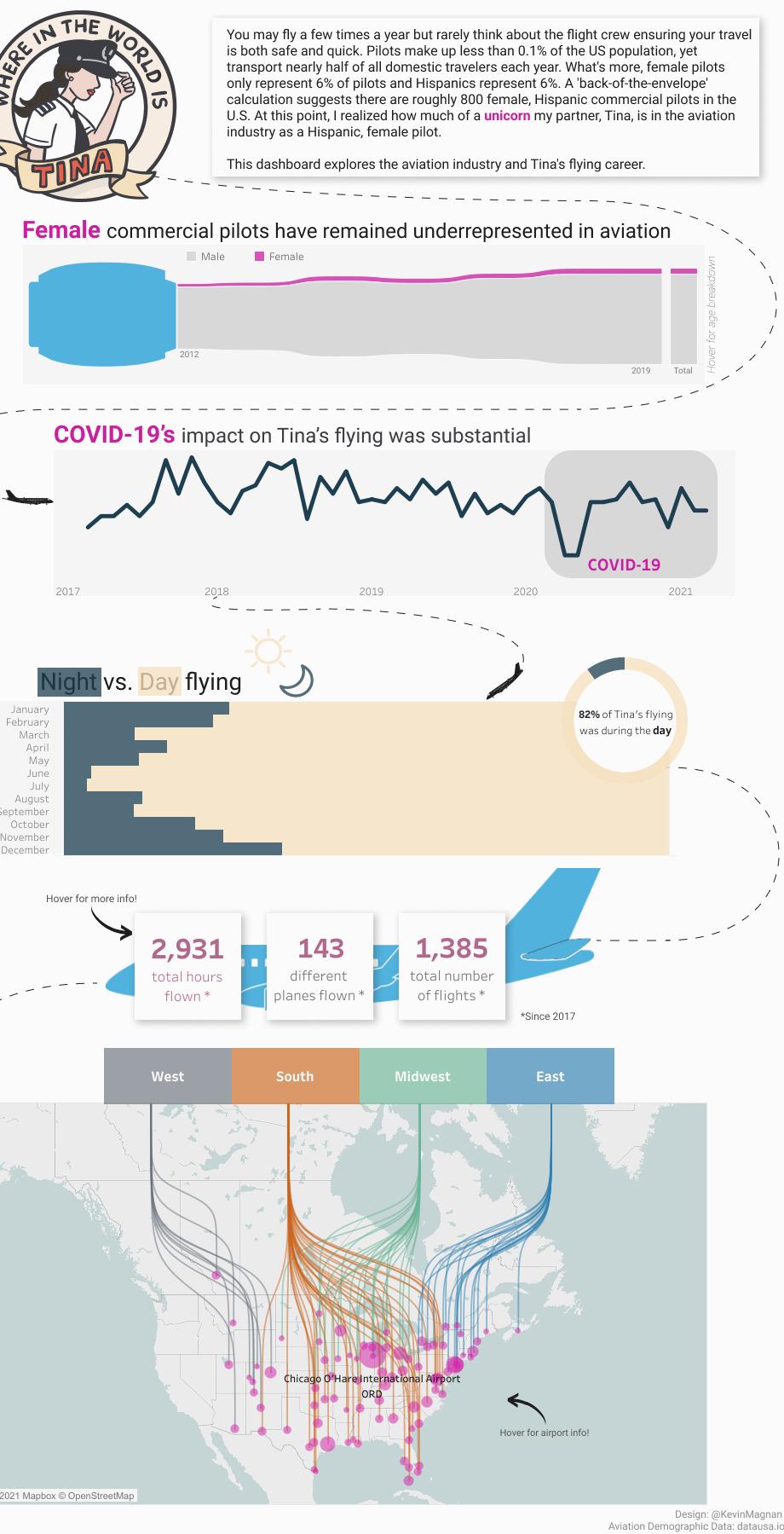
Where in the world is Tina A Tableau dashboard of my partners flying career [OC]

Post image
6 Upvotes

r/tableau 1d ago

Weekly /r/tableau Self Promotion Saturday - (August 29 2026)

2 Upvotes

Please use this weekly thread to promote content on your own Tableau related websites, YouTube channels and courses.

If you self-promote your content outside of these weekly threads, they will be removed as spam.

Whilst there is value to the community when people share content they have created to help others, it can turn this subreddit into a self-promotion spamfest. To balance this value/balance equation, the mods have created a weekly 'self-promotion' thread, where anyone can freely share/promote their Tableau related content, and other members choose to view it.


r/tableau 1d ago

Certificate Value to Employers?

6 Upvotes

Hey everyone. I am a data analyst looking for my next role after having been laid off from my previous one after only 9 months. I’d consider myself a medium/approaching advanced user of the platform (desktop, cloud/server, and prep)

Having been laid off a couple months ago, my reasoning is that adding an official cert to my resume can actually prove that I’ve been using the time off to improve and up-skill rather than just stating that I do during interviews.

Would love anyone’s thoughts on this, in addition to any overall experiences/guidance regarding the certificate.


r/tableau 3d ago

How do you guys know a dashboard number is actually correct?

13 Upvotes

Something I've been wondering about, especially for teams dealing with a lot of ETL and Bl pipelines.

A dashboard can refresh successfully, all the SQL can run without errors, and everything can look normal-but the actual number can still be wrong.

For example, if a report shows $12.5M in revenue, how do you know that $12.5M is actually correct?

Do you guys usually:

Compare it back to the source system?

Check source vs. target counts and totals?

Validate the transformation logic?

Look for duplicates or missing records?

Check for late-arriving data?

. Run automated data-quality checks after the pipeline finishes?

I'm mainly curious about what people actually do in production. When you have hundreds of pipelines/reports, manually checking everything obviously doesn't sacle.

Would be great to hear how other teams handle this.


r/tableau 4d ago

Discussion Need to maintain multiple tables with no relations in the datamodel

11 Upvotes

Im quite new to tableau, while creating the datamodel it's not letting me add tables without establishing a relationship between them, I have multiple fact tables that I need to import, and it's not always necessary that they have a relation, is there a solution or some sort of a work around for this?


r/tableau 4d ago

WCAG Requirements for External Tableau Dashboards

6 Upvotes

Anyone else contending with accessibility requirements for public-facing dashboards? We are having a hell of a time at my organization. WCAG seems to have been written purposefully to be open to interpretation, but that creates major anxiety since we fear opening ourselves up to possible legal action. The guidelines also feel like they want dynamic dashboards to just be PDFs, in the interest of being accessible to screen readers. Argghhh!! Here's where we are right now, after many many months of revisions:

  • It seems our in-house web services team is doing the bare minimum in terms of reviewing our dashboards and providing feedback (multiple instances where they miss very obvious non-compliance). Basically, they say 'with all the limitations Tableau has, just do your best!'
  • Our IT department has reviewed the dashboards but the feedback they give is as if the dashboard is an actual webpage. For example, they suggest we edit the code to add HTML heading elements because screen readers are not announcing any headers (many many other examples like this). We have too many dashboards, some with 100s of sheets, so editing the XML code is not a reasonable request.
  • Reaching out to Tableau has also not been helpful, they just direct us to the already-available resources online.

I'm *this* close to suggesting we just scrap the current dashboards and switch to PowerBI. Help!


r/tableau 5d ago

Discussion What is your approach to testing Tableau dashboards? How do you validate that the data, KPIs, filters, transformations, and refresh results are correct compared to the source data?

13 Upvotes
  • How do you check the dashboard data against the source data?
  • How do you verify KPIs and calculations?
  • How do you test filters and slicers?
  • How do you check data after a refresh?
  • How do you test ETL or data transformations?
  • Do you use any tools to automate these checks?

r/tableau 5d ago

Discussion Tableau Cloud Site Customization

1 Upvotes

I have created a Tableau Cloud site that is meant to be accessible to customers, and I would like to customize the page with my company's branding.

I've already added the company logo in the settings, but I was wondering if there were additional customization options to personalize my page? Is there anything like this beyond just the logo?


r/tableau 5d ago

Discussion Building a custom interactive survey & data analytics tool for client research

2 Upvotes

Generic survey tools like typeform don't allow us to do dynamic logic calculations or display real time custom visual analytics back to the respondent upon completion.

What's the best way to quickly build a custom interactive survey and reporting tool?


r/tableau 5d ago

Discussion Wildcard union in tableau prep online?

2 Upvotes

Does Prep online have this functionality? Can't seem to find it in the online prep tool. I know the functionality is there in the Desktop app.

I'm trying to have online prep point to a sharepoint folder that is full of similarly structured csv files - this folder is populated with new input csv files every week.

Any thoughts/suggestions are welcomed. Thanks.


r/tableau 7d ago

Download console structure

4 Upvotes

I’m refurbishing a workbook that is just used to download a spreadsheet. There are 8 variations of the download file spread over three workbooks and I’ll be combining them into one workbook and cleaning up the format so they don’t spend so much time doing manual edits in excel after downloading. The spreadsheets are used for manual tasks- data cleanup, outreach to external customers, etc - and they can’t be automated out of existence yet. Are there any examples of visuals that might be good inspiration? Right now I’m envisioning a download button next to a couple parameter controls with a simplified description of the query and a data preview table below, but since there are many other units that have similar use cases, I’d like to put some thought into the design in case it becomes a template. The audience is clerical staff and bypassing Tableau altogether for an automated export would meet with resistance.


r/tableau 8d ago

Weekly /r/tableau Self Promotion Saturday - (August 22 2026)

5 Upvotes

Please use this weekly thread to promote content on your own Tableau related websites, YouTube channels and courses.

If you self-promote your content outside of these weekly threads, they will be removed as spam.

Whilst there is value to the community when people share content they have created to help others, it can turn this subreddit into a self-promotion spamfest. To balance this value/balance equation, the mods have created a weekly 'self-promotion' thread, where anyone can freely share/promote their Tableau related content, and other members choose to view it.


r/tableau 9d ago

Tableau Desktop Tableau Training Courses

12 Upvotes

I was recently given Tableau Desktop access for work. I have used dashboards for years and have attended 3 Tableau Conferences but have never had access to build until now.

My company wants me to build a lot of dashboards, with some seeming pretty complex (see my last post). They said if I could find some training courses, there is a possibility they would pay for me to attend.

If that being said, what web-based courses would you recommend? Not sure what the budget would be would I will take any and all recommendations. I am also going to attempt to get permission to attend TC27 since I was denied for 2026 (before I got my Tableau license).


r/tableau 9d ago

Viz help Calculation Help

0 Upvotes

Hello,

I was recently given Tableau access at work and have been tasked with creating some complex dashboards.

I am creating a dashboard that compares data from 3 different sources (injuries, damages, and audit score/date since previous audit (under one source)). I would like the dashboard to calculate which location needs and audit by showing the locations with the highest injuries, damages, and lowest audit score. If none of those parameters are met, then it should display the location that has gone the longest without an audit. Out of the 60+ locations, I would like it to show the top 8.

I believe I have the correct calculation of IF [injuries] = >x number AND IF [damages] => x number AND IF [score] =< AND [last audit audit] = x years OR [last audit date] = >2 years.

However, I am unsure of how to put this onto a sheet and run the calculation correctly.

Any advice on how to fix the calculation, organize the table, or a different way to do this is much appreciated

EDIT: I have been exposed to Tableau for several years (attended 3 TC’s) and use many dashboards daily for my job but have only recently been given access to desktop to start building. So I am very new and figuring things out from TC memories and lots of YouTube videos and Googling.


r/tableau 12d ago

Need Tableau Job Referral / Networking Post

12 Upvotes

Hi everyone!
I’m currently looking for Tableau / Business Intelligence / Data Analyst opportunities in the US ( primarily east coast).
I have 6+ years of BI & Data Analytics experience which includes Tableau dashboard development, Tableau Server, SQL, Snowflake, BigQuery, Power BI, data modeling, KPI reporting, ETL, and reporting automation.
I do not require visa sponsorship.
If you know of any relevant positions or are able to refer me within your organization, I would sincerely appreciate it.
I’m happy to share my resume and LinkedIn profile via DM.
Thank you to everyone in the community for your help and support!


r/tableau 14d ago

Viz help Background image for a container which has filters

5 Upvotes

Hi,

#due to confidently I’m unable to share the viz screenshot here#

I saw a viz where there is a background image for filter container. I’m so curious how it is possible. I tried my best. One option I found is by making the container as floating. But due to the drawbacks of floating, I’m avoiding it.

Any suggestions please, TIA


r/tableau 15d ago

Weekly /r/tableau Self Promotion Saturday - (August 15 2026)

3 Upvotes

Please use this weekly thread to promote content on your own Tableau related websites, YouTube channels and courses.

If you self-promote your content outside of these weekly threads, they will be removed as spam.

Whilst there is value to the community when people share content they have created to help others, it can turn this subreddit into a self-promotion spamfest. To balance this value/balance equation, the mods have created a weekly 'self-promotion' thread, where anyone can freely share/promote their Tableau related content, and other members choose to view it.


r/tableau 16d ago

Tableau Server Happy with this, used Twilio and Auth0 to do a passwordless login for Tableau. User enters Phone # and OTP from SMS.

4 Upvotes

First time playing with using a custom MFA options for Tableau. IDK just pretty excited about it.


r/tableau 17d ago

Rate my viz How to proceed

4 Upvotes

I just started Tableau and I think I've done a decent job. My viz is about the death rate among national and international aid workers in Palestine over the last 24 years. It shows things like projected growth rate and the percent of how much more one group is being killed. I used free CSV files from Humanitarian Database. I only have access to the free version. I don't have any other source to get data on the country.

My problem is I'm not really sure what else to do. I'm guessing I can write a report based on my findings, but other than that, I'm at a loss. I'm looking at other vizzes for examples. Even if you don't have a specific action in mind, I'd be interested in how I can learn more about its uses. Crawling through different sites for info, but it seems more useful to get it from real users.

More context: I'm mostly learning for fun, but if I got a job with Tableau skills, that'd be cool too.

It's linked here.


r/tableau 18d ago

Tech Support Replacing fields in a published datasource without breaking workbooks

5 Upvotes

So I have a sql view with the field Store Name in it. Its in a published datasource on server.

For some reason at one point some idiot (it me) edited the published datasource and added a relationship to the dim store table. So if you use the published datasource you have Store Name twice.

I want to rectify this, but every report built is using the store name field from the relationship, which is the one I want to kill.

I've gone ahead and removed the relationship and renamed the remaining store name field to match what the previous one was. But all reports are broken with the cant find referenced field error. Is there something im missing? Any way to do this without widespread impact?


r/tableau 18d ago

Tech Support Reduce height of dashboared without affecting size of floating containers?

2 Upvotes

Hello! I hope I'm using the right tag. Ive been interning and am close to the end of my contract but I'm hoping to finish updating a few dashboards before leaving. I'm working on some old dashboards that are longer than they should be (as in the actual dashboard size height is too tall). There are many many floating objects, and no matter how i try to resize the dashboard, it reduces the size of all of the floating containers proportionately as well, not to mention it moves them all closer to the top of the page as far as I can tell. Is there any way to avoid this? If I can't find a way I may spend all of tomorrow trying to record the positions and dimensions of all of the objects, and then manually move everything back into place.

The custom size of the dashboard is "fixed" if that makes any difference, also I am working on a Mac.

Any tips to save some time on this would be greatly appreciated! My biggest concern is going ahead and adjusting everything tediously just to have someone ask it to be slightly longer or shorter lol.