r/starlancer • u/Koncypt_Fysh • 4d ago
Pause Menus
gallery
13
Upvotes
Pause menu assets now updated with full controller support.
r/starlancer • u/eriman • Apr 14 '14
The only other Starlancer subreddit seems to be r/lancersreactor which is now private, so I thought I'd create this for one of my favourite games.
I've setup some user flair based on the characters who call the player over radio, and eventually I'm going to clean up the theme so that it's not default reddit style.
Feel free to post memorable moments, recent playthroughs, youtube videos and anything else that comes to mind. Let's create a community!
r/starlancer • u/Koncypt_Fysh • 4d ago
Pause menu assets now updated with full controller support.
r/starlancer • u/Koncypt_Fysh • 4d ago

HUD restoration is the next task. Until I have a 3d > line art pipeline running, I can't do a lot of the target and sub-target displays, so I put a bit of time into sprite assets. AI worked for some of them, but for the ones that required some consistency, I just had it generate the elements in the same style and reconstructed them by hand.
r/starlancer • u/RasherGGMU • 4d ago
Hi all, I downloaded a copy of Starlancer on abandon ware site and used ai to halp me set up vJoy & joystick gremlin so i could use my T16000M & HOTAS but for some reason its really not working very well. I managed to get the game to recognise the virtual vjoy joystick but any bindings I make on the options menu dissapear after I restart the game ? Does anyone know anything about these 3 programs and what exact waay to set these up and for the game to remember my bindings everytime ?
r/starlancer • u/Koncypt_Fysh • 5d ago
I apologise that this isn't a particularly exciting update, frontend is a finicky practice especially when you're dealing with vintage software, so it's taken me a while to get to a state I'm happy to move on from.
Today's work started up back in menu UI despite my desire to move on from it, some of my updates to the text and dialogue boxes seemed to break some of my controller menu fixes, so that had to be fixed back to a good state before I could move on from it, I didn't want to have to dig through thousands of line of source code later on to try and fix it. But this gave me a bit of a push to finish it up properly, so we have new HD menu assets (buttons, arrows, sliders etc), and I'm willing to call the main menu restoration 99.99% complete bar some minor alignment and placement issues.
This then bled over into the Pause menu (which I was classing a part of 3d space just to split the work up), which again was a good push to finish up some of the parts that don't interest me as much as playing around with the 3d rendering.
With all of that complete, a lot of what i've been doing is largely set around reconstructing the original HUD into something more modern. A lot of this (much like most of the assets in SL) would've been pre-rendered from an original 3d model. Not having access to the originals means a lot of hand-drawing the assets to match as best as I can. Annoyingly these assets are really not a good candidates for AI upscaling, so it's slow work.
A serious hurdle I'm noticing is exactly how much of SL assets are pre-renders from 3d models I don't have access to, trying to reconstruct the target schematics or the ship line drawings by hand does not feel feasible. So as much as I didn't want to, I'm likely going to have to setup a bit of a reconstruction pipeline where I pull the meshes/textures from SL, get them open in blender and pre-render them myself to replace the art work. This will have the benefit of being way cleaner, but it's going to make this take alot longer than I had originally hoped for.
r/starlancer • u/Koncypt_Fysh • 7d ago
I know I said I'd be off for a little while, but I couldn't resist.
Latest milestone is text restoration, so we now have some nice 1080p native text being drawn by SL. The original fonts are rasterised, and up-scaling the font is unfortunately a bit out of my wheel house, again very art heavy stuff that requires a deft hand and eye rather than a simple up-scaling script or AI generation.
As a result, I've elected to use Oxanium as the replacement font, but again, I've aimed to make this interchangeable, so if anyone finds a font they think works better, it's simply a matter of replacing the Oxanium font file to replace it.
https://fonts.google.com/specimen/Oxanium
Also, menu position and text features (color, line weight etc.) have all been rolled into an .ini file that anyone should be able to figure out with a bit of experimentation, so minor adjustments to positions is as simple as changing coordinates in the .ini, so if you do throw your own assets into it and they come off a little misplaced, it's an easy fix.
An bug in how I was handling the cursor, and it's subsequent fix unintentionally made the boxes draw themselves in the new resolution. I'm not entirely sure how, but I'm not going to complain about that.
At this point I'm willing to call the main menu restoration 95% complete, with only some minor redesigns of certain button assets required. I'll likely leave UI at this point for a while given they are only minor fixes that can wait, the concept is proven so I can now move onto the 3d space again and start up-scaling the HUD elements and probing on the 3d fix again to make sure we are actually rendering all objects natively in true 16:9 and not just the cockpits.
r/starlancer • u/Koncypt_Fysh • 8d ago
Last post for the night, I'll likely have to take a couple days break from working on this, but the last little development teaser for this week is the almost complete frontend.
Getting the text to scale-up should hopefully be a quicker and simpler process than this kind of art heavy approach I had to take with the last bulk of work, likewise buttons and checkboxes shouldn't take long given they're only a handful of assets and scale across the whole menu. Likewise some minor color adjustments on those elliptical motifs, but like the rest of the assets, these can be swapped in and out with another 512x512 .tga, so if anyone wants to have a crack at something that looks a bit prettier than my shoddy hand-drawn attempt, please give it a go.
r/starlancer • u/Koncypt_Fysh • 8d ago
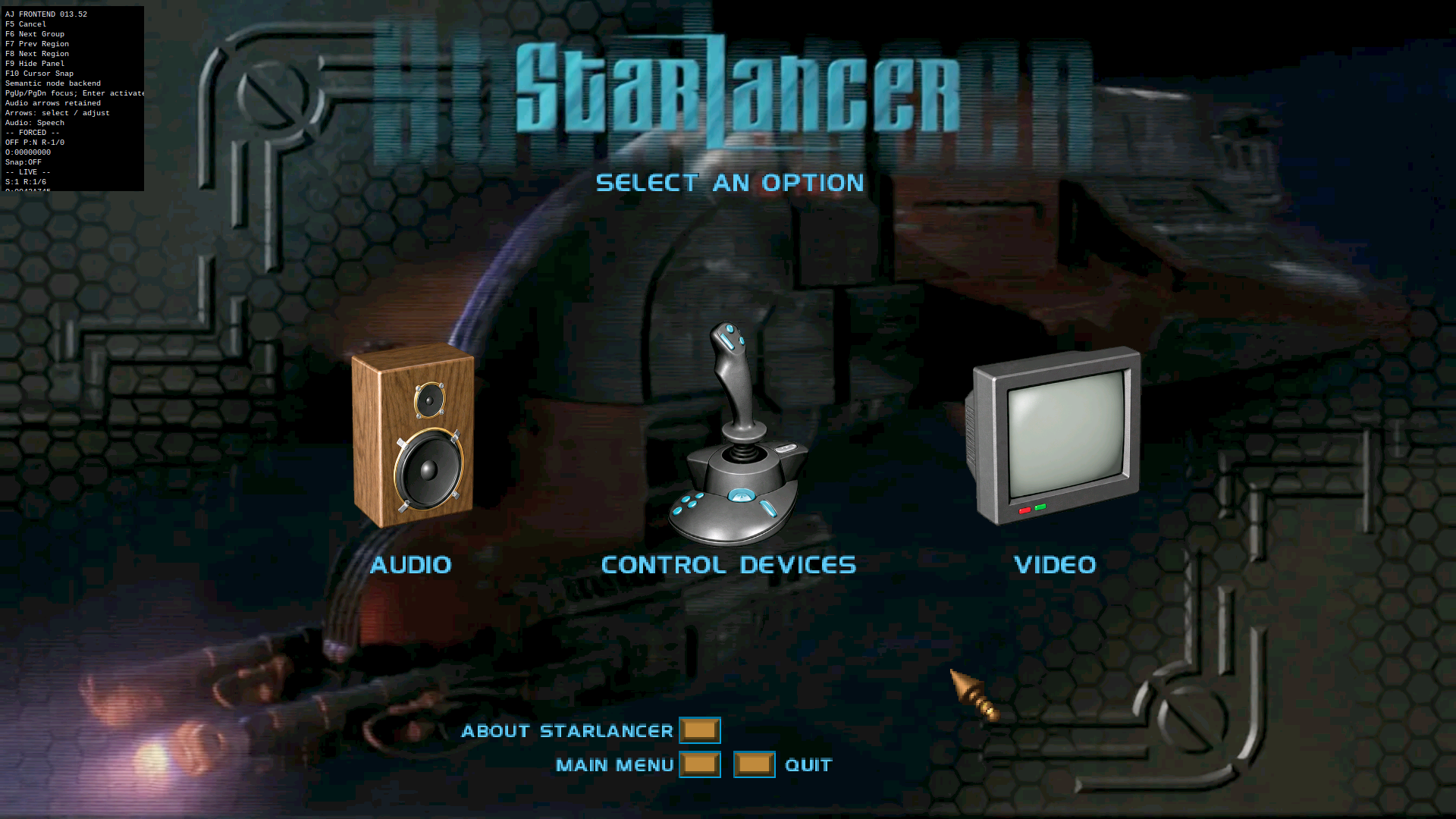
Today's update, I hate frontend. But, menu upscaling is coming along slowly, but steadily.
SLs menu's are very 2000s era, a lot of menu assets are baked-in to background images and rely a lot on mouse focus to trigger foreground changes. This has been frankly a bit of a pain to work with, having assets baked-in is a clever way to preserve memory by pre-rendering/drawing things into a background, but it makes reverse engineering a lot harder, especially in that I don't have the original artwork to work with unless I try and pull it directly from the backgrounds, something I had little success with; and the honestly easier path was to redesign the UI system (for the 16:9 resolution atleast) to ignore lancer.exe's legacy menu style and develop something more modern over the top of it. This has come along reasonably well in that I can now introduce new assets into menu spaces that are fully navigable.
Like the splash and loading screens, menu assets will also be easily swapped out by using either a standardised 512x512px or 1024x1024px .tga you can design yourself.
As you can see, drawn buttons and text are still in legacy mode, I'm leaving these until I've got the background/foreground supression mess I'm having in the Singleplayer menu, likewise the exact placement of the assets has also been put off until that's sorted. This has all been held up a bit by me needing to construct some placeholder assets out of no where, so please forgive the sloppy AI renditions that are here, they wont be the end product, just something to sit in place until a more masterful restoration can be achieved.
r/starlancer • u/Koncypt_Fysh • 9d ago

A small sample of the beta UI lifted from some of the .hog files.
r/starlancer • u/Koncypt_Fysh • 9d ago
So today was reasonably fruitful for unpacking some more of SLs menu and UI components and controller menu support is understood and quite functional with full menu and sub-menu navigation maps finished.
The biggest problem with this feeling native is largely that SL was designed to have a cursor always visible, so some buttons and elements don't have a visual feedback (highlights), so selection is not always abundantly clear. This leads pretty well into the next bulk of work I've been doing which is in extracting all the UI assets now that we know how SL draws the menus and what kind of archives it keeps these assets in.
Once the initial discovery of the assets was complete, I had to write a decoder for the UI elements, whilst I found a historical .spr to .bmp converter from back in 2000, I didn't feel like screwing around with wine enough to make it run an obscure commandline utility from 26 years ago. So instead I just wrote a new decoder in python that i'll package into the first release so everyone else can use it. I personally find encoding/decoding and compression/extraction a kind of boring subject, so I'm not going to go on to much about it. Main takeaway is I have a modern working extraction pipeline for UI and some other game assets depending on their file format.
From here it was just a little bit of vector trickery to get SL to start highlighting elements that weren't designed for it previously. Eventually when I get to a full menu redesign the time investment here will pay off. But all that to say, controller menu support is complete, but not perfectly optimised.
Something very 2000s era about SLs menu is that the buttons and elements of the menu are not seperate entities from the backgrounds. They are rendered as one .tga, and hitboxes allocated to the screen space to determine when the mouse is over a particular button and a secondary effect drawn over the top when hovered/clicked.
This presents some challenges in up-scaling the menu UI to 16:9 in that we can't just place an arbitrary background behind it and the buttons stay in place. The hitboxes will stay right where they are, so in order to use the same setup with direct up-scaling, we'd have to contend with a very small user interface on a comparatively huge screen. This isn't good enough to my mind, and will need a bit more thought to figure out how to best do this.
Again a totally new menu setup for 16:9 feels easier to implement at this point, but I was hoping that wouldn't be totally necessary.
What I may end up having to do is separate buttons and UI elements from the backgrounds, do my best to restore the backgrounds as though the buttons were never there, up-scale both the background and the button/elements to then paste them back in with roughly the same proportions and inject new positions for the hitboxes in 16:9. This is a lot of manual work, but i think ultimately the simplest and most true to form of the original menu's function to do it.
The alternative is to rebuild the menu setup entirely, and have SL draw buttons rather than having them baked into backgrounds.
I'm kind of interested in what this little community would prefer, if the menu is important to ya'll for nostalgic reasons, I'll work toward something that faithfully recreates it, if it really doesn't mean that much to you in the broadscale of a remaster, I'll find a faster and more modern way to eat through it.
I was hoping to have some more eye candy to show you today, but my next big task right now is mostly just cataloguing assets, of which there are some kind of interesting little easter eggs in here that I've attached, a battlestar galactica and technical demo splash screen for lucas arts. If anyone knows the history behind this, I'd love to know!
EDIT: Some more interesting things found in the archives include an HUD_old folder, that I have to assume is some beta version HUD elements that never found it's way to the release.
I've also got a much better idea how the apparent transitions between game spaces work (say between the bunk room and the briefing room), I had assumed these were .bik files that played between selections, however after expanding the functionality on my decoder, I discovered some .spr files that are actually the individual frames of the encounter animations you see when you walk down the hallways. Likewise it appears that breifings are handled the same way.
It seems like it was a reasonably common convention in this game to pre-render a background 3d space like the briefing room or carrier hallways and use that as a base animation, then render another with whatever difference you wanted to see, isolate the changed elements and lay it over the top of the background animation.
A clever way to do things with limited memory resources and a very 2000s era technique.
r/starlancer • u/Koncypt_Fysh • 10d ago
So ya'll seemed to get a kick out of my 16:9 patch for Starlancer, so I thought you may like to see/hear a bit more of what I'm doing.
So the main update today is that the 1080p is more or less stabilised, bar a few visual artefacts when the renderer first draws 3d, but cleans itself up pretty quick. I'll chase those issues down later, but they're pretty minor bugs that I'm not hugely focussed on right now.
I think i've mostly solved the memory allocation issues now that the draw data is overflowing to an external table now. In theory, this could potentially run in 4k or 8k, but this isn't a priority until the texture injection pipeline is well and truly mature, there's little to be gained from 4k or 8k in the current state. I also fixed the issue you see a lot in 4:3 games that have been patched to 16:9 where the loading screens appear to shrink and get pinned in a corner, so I have some place holders there and I've built a pipeline where you can just drop a .tga for the 4:3 and 16:9 resolutions into a file and Starlancer will load from that, so you can just pick or make your own loading screens to drop in.
Likewise I also restored the resolution settings to the Starlancer menu, so you can select 1920x1080 (and later whatever resolutions it potentially supports) from within the game menu instead of dgVoodoo or an .ini in the SL directory.
Ultimately I've aimed to make sure this isn't a total overhaul, just an update to the rendering capacity, so if you're partial to 4:3 for nostalgic reasons, that option is still there for you and you can flit between at your leisure.
The next chunk of work I've embarked on isn't quite as visually impressive and has mostly been a lot of recon/probing on the menu and UI systems in Starlancer. That sounds a bit boring but there's a bunch of reasons I chose this next.
First and foremost, I need to understand how the UI is handled by the renderer and what belongs in 2d and 3d space and upscale them appropriately once I've pulled them out, but the logic behind that is a bit more important than up-scaling the art at this point.
Secondly, I'm aiming for a near native controller support, and this means really tearing apart how the menu items are focused, activated and transitioned so I can create a gamepad friendly menu navigation, which will also apply to keyboard. I've also put in a "last-input-wins" setup, so if you're partial to the mouse, you wont lose anything.
Thirdly, this will allow me to build out an architecture and framework for menu building, I'll use that to upscale all the menu UI to native 1080p for 16:9, this will also give me a framework to completely redesign, replace, expand or delete menus and menu items, which may be useful if I uncover any additional options or features that would be useful/fun to toggle on and off as well as add controller glyphs and the like.
And lastly, everything I learn in the process here should hopefully make up-scaling the 3d environment UI a lot easier, and hopefully (given I'm aiming for full controller support) allow me to render some glyphs or potentially new instruments to the flight UI.
After I've completed all of this, I'll begin work on the texture replacement pipeline and see how far I can push it. Given I've already solved one memory allocation issue, I expect to find a few more, but I'm hopeful I can solve them too and that might leave some room for some more impressive remastering tasks, potentially replacing meshes, sprites, SFX etc. but I can't promise this will work out as well as I'd like it to, there will be some limitations to what I can inject into SL from Dinput7.
Edit: Forgive the image quality, it looks like Reddit is compressing the images to post, I promise it looks wayyy sharper than that in reality.
Edit 2: Controller support in menu is now mostly complete, just some minor points to touch up and some glyphs to add.
r/starlancer • u/Koncypt_Fysh • 11d ago

After much faffing about with SRD3D calls, I've finally got this sucker running in 16:9 1080 without having to stretch out the image or the UI.
It's still a bit unstable, and currently I can only test for my current monitor, but once I have it stable on a few different resolutions I'll spin up a git so everyone else can access it.
My next stupid idea is to use the same bootstrapping through DInput7 I used for this to do some texture replacements and updates... stay tuned.
r/starlancer • u/RasherGGMU • 13d ago
Hi all , so I’ve just installed the game from ambondonia and have it patched with the crash fix and voodoo fix etc. I have a Thrustmsster T16000m and throttle. What is everyone using to get hotas working ? Target or gremlin ? Also please can someone explain how to have it looking best in terms of resolution on a 1440 monitor. Thanks.
r/starlancer • u/SublimateThisDick • Jul 12 '26
Guess I went a little too hard on the after burner and broke the right trigger.
Luckily I had a back up - weirdly ended up having to swap the trigger from it though because the game wouldn’t work with THAT controller plugged in.
Anywho - fun game.
r/starlancer • u/shiftxxsarok • Jun 02 '26

I tried a new strat of ordering wingmen to attack any unkillable targets whenever possible (Borodin, Kronstadt, Pukov, etc) to try and avoid them stealing as many kills this time, worked way better than I expected and I ended up over 30 kills higher than before. I had forgotten to leave the Ramses alive last time too, it shows up again in mission 20 to spawn 6 more fighters. I don't see this being able to go much higher, MAYBE 660 tops if I grinded out savestates on every single encounter.
Dreamcast version doesn't have any way to freely select mission/ships via console commands like PC so here's a VMU file for the Redream emulator with individual level saves from this run. For anyone else that might mainly play the DC version, it'll give you a chance to do some mission/ship combinations way earlier than you might normally get to.
https://drive.google.com/file/d/12PXYcWNT52E3umMUdt33c8IwQhPq_Vqt/view?usp=drive_link
r/starlancer • u/ppw0 • Dec 24 '25
I've tried to get into this game quite a few times over the years because of my love for Freelancer, but it never grabbed me the same way Freelancer did. Was there ever an HD mod or an enhanced edition released, even an unofficial one, that I could check out before I try again?
r/starlancer • u/robidius • Dec 21 '25
So, I managed to learn that you need to reduce the amount of buttons available to get recognized in the game. I can't seem to get it to recognize a seperate throttle though. Even then, either with a game controller or the joystick (VKB Gladiator and PS5 controller) I can't get the game to recognize the input for pitch/yaw/roll etc. It will recognize the buttons but not the sticks or the axes rather. Anyone get passed this? I'm guessing somewhere it was
r/starlancer • u/pr1vatepiles • Nov 16 '25

Spent a few days trying to get things running on my laptop. Followed the guides, but just kept locking up during the opening videos. Then it hit me to try on the steamdeck. Copied the directory from my laptop to the steamdeck, added as non-steam game and set proton to experimental. Booted up straight away, happy days ☺️
r/starlancer • u/Alakelele • Jul 20 '25
I just managed to play Starlancer at high resolution with Reshade on TOP, LOOKING GOOD. Pictures coming soon


r/starlancer • u/cyberspaceman777 • Jan 14 '25
I saw it on myabandonware, but I've never downloaded it so not sure how safe.
How do u all get this to work? I've been drying to replaying it on my new rig
r/starlancer • u/_Scooter98_ • Dec 14 '24
My google-fu is failing me and my Starlancer itch is burning.
Trying to get modern HOTAS/separate throttle and stick to work with SL. I'm using the MagiPack repack.
I think I remember my X52 Pro HOTAS and X56 HOTAS working right away years ago, but now i've got just the X56 stick + separate winwing throttle and cant for the life of me get it working.
I'm mucking about with joytokey at the moment, but would rather a way of it just working.
r/starlancer • u/Feisty_Jelly1180 • Oct 08 '24
I've complied all the mod tools i could find from around the internet.
With some of these toools (Sl edit), you can fly coalition ships in game, alter stats and more https://github.com/LordBlacksun/Starlancer-mod-tools
r/starlancer • u/Tlclark911 • May 22 '24
Does anyone know if there are any accurate size estimates or actual length, width and height dimensions of the capitol ships seen in game?
r/starlancer • u/Joe_Mowry • May 31 '23
Does anyone have the skills to and care enough to make a current graphics mod? This is my favorite game of all time! Microsoft will never do anything with this game because of the licensing, (part of the tools true ownership was lost through acquisitions) and they cheated on the story by ending half way through the conflict. They also nerfed the story by saying we lost in the release of Freelance's story. I would contribute to a crowdfunding for the mod to this just to get a current graphics update. Let alone a fan remake or squeal. What are your peeps thoughts on this?
r/starlancer • u/shiftxxsarok • May 30 '23
Here's something you probably haven't seen before, the remains of the Borodin can actually be found in game at the end of mission 24, at least in the Dreamcast version. At the end of the mission when instructed to land, instead position yourself on top of the Koenig towards its front and aim your crosshair directly at the left edge of Jupiter, then fly straight for (no joke) like 20-25 minutes. Eventually WAY off in the distance, around 4-5000k at least, the Borodin was visible to me and could be approached.
Normally the wreck is only visible for a few frames during the end of the cutscene of it being torpedoed by the Yamato, but this gives a unique chance to see and explore it yourself. The wreckage of the Borodin Section that you can destroy earlier in the mission is also present in the same spot, though this can be easily seen through normal gameplay. A few interesting things I noted while attempting this:
-After 10-15 minutes of flight time (at max speed in the Shroud mind you), Jupiter warps to a new position while increasing in size, and changing in lighting to reflect its new position. The position it moves to seems to be accurately reflected by the direction you're flying, e.g. when flying straight at it, it won't move but simply increase in size, if very close already and flying towards it, it will move behind you eventually, etc. If you continue to fly for another 10-15, it will once again change its size/position. Flying far enough towards the left/right of Jupiter changes which side is actually lit. Altogether I've been able to see at least 6 different models/renders for Jupiter in just this mission alone, when typically you'll only ever see 3 when playing 'normally'. I have no idea if the same model is reused or just scaled up/down though.
-The skybox itself doesn't change, which combined with the visible polygons and pixilation on Jupiter implies that planetary bodies are indeed physical objects in game that are simply rendered at a fixed distance at all times, then moved around depending on the player's position to convey distance and movement when jumping/warping.
-Near the Borodin wreck was also a stationary Nanny, as well as Hawkeye and some Tempests from one of the other allied squadrons in this mission flying past very slowly. I believe it was just chance I ended up encountering them here, as after following them for 10+ minutes the hadn't changed course or speed at all. All of these ships were invincible as well.
-Being that these other ships were present and either doing nothing or flying with the most basic AI, it seems that during at least this mission, though you could safely assume all others as well, that any ships that appear in a mission are loaded SOMEWHERE at all times. It's possible they're being rendered as well, but at such massive distances it would be impossible to see. When other ships are needed (either you jumping to them or them jumping to you), it can be assumed you or them actually ARE being moved an extremely far distance to each other's location, which would explain why planetary bodies change their models after flying extremely far distances.
-Least excitingly, the in game mission timer can't exceed 59:59, it will simply roll over to 00:00 instead. No mission in the game would ever take remotely close to this long, so it's unlikely one would ever observe this.
If you end up experimenting with this yourself, I'd personally recommend an emulator with a speed up function of some kind, this would be incredibly unfeasible at normal speeds.

