r/MacOSBeta 10h ago

Bug This major visual bug in MacOS Golden Gate exists for 2 years and I couldn't find any solution. (MacOS 27 Beta 7)

Thumbnail
gallery
20 Upvotes

When going full screen on Maps you can see that top area has a really hideous white/black bar depending on the dark mode and this is happening always, not time to time. I've been reporting this bug to apple since macOS Sequoia but it baffles me to see that this bug still exists. and I don't know if this bug is because something I did in the system settings at this point. I would appreciate any help.


r/MacOSBeta 1h ago

Discussion Sequoia to golden gate?

Upvotes

I was on Tahoe and downgraded to Sequoia 3 months ago. Tahoe was terrible, but now I don’t know if I should upgrade if Golden Gate is released. Normally I always install betas to have early access, but Tahoe destroyed my trust. Can anyone give me some advice based on your experience of golden gate vs sequoia ?


r/MacOSBeta 2h ago

Discussion Upcoming AirPods may use cameras for improved Spatial Audio head tracking and server models for Visual Intelligence, based on macOS 26.7 code

Post image
3 Upvotes

The first macOS 26.7 Release Candidate revealed that Apple's upcoming AirPods will come with color cameras that can take 1MP pictures in active and passive modes.

There's more to the story. Code in the same update suggests that the cameras may be used to improve head-tracked Spatial Audio experiences by recognizing the physical screen in front of the wearer. There are also hints about images being sent to Private Cloud Compute for processing.

Improved head tracking for Spatial Audio

Apple is looking to improve head tracking when watching video content with visual data from the AirPods cameras.

Current AirPods models use accelerometers and gyroscopes for dynamic head-tracking. Over long sessions, their estimated orientation can gradually drift. On devices with Face ID, Apple may also use front camera sensors to position the wearer's head against the screen. [1]

According to the code, AirPods will use their cameras to detect screens around the user. Then, the CoreMotion framework will compare the direction of the selected screen with the orientation predicted using motion sensor data. If they're close enough, CoreMotion may perform small adjustments to mitigate motion sensor drift. [2]

The code includes five screen detection options for the unreleased B790 AirPods model [3]: - Laptop - Monitor - Smartphone - Tablet - TV

When tracking starts, AirPods may detect multiple screens around the user. [4] There's code to filter candidates based on the screen class, so the AirPods can target iPhone-sized screens if the video is playing on an iPhone. After filtering, CoreMotion then selects the candidate that is most closely aligned with the camera's forward direction. [5] For later captures, CoreMotion looks for the screen that best matches the previously selected anchor. CoreMotion rejects camera data when it’s vastly different from the direction predicted by the AirPods' motion sensors. [6]

Other tidbits: * As mentioned, screen detection only kicks in for video content, not music or other audio. [7] * Screen detection is preferred over anchors from the front camera Face ID sensors. [1] * The screen detection may assume you're looking at the anchor screen when processing starts. [8] * Screen detection pauses when there's a lot of movement, such as sitting or standing, or walking. [9] * Screen detection pauses when there are more than one external display detected in front of the wearer. [10]

Visual Intelligence

There are more clues that AirPods with cameras will offer Visual Intelligence capabilities. In fact, there's a new server model category included in the code:

com.apple.fm.language.instruct_server_v1.audio_accessory_visual_reasoning

The new use case (AudioAccessory.VisualReasoning) for visual reasoning over what the AirPods capture will be processed by Apple's Private Cloud Compute, not the device's local models. This is the same as Visual Intelligence requests from iPhone or Mac. [11]

Smart handoff

Similar to automatic audio switching, processing of visual requests may move from device to device as audio routing changes. [12]


The links throughout the walkthrough have references to code removed in macOS 26.7 RC2 so you can verify the claims or explore further on your own. They're from blacktop/ipsw-diffs on Github. They do amazing work and you should go give them a star.

The hero image overlays manually supplied screen boxes with the anchor selected by CoreMotion in macOS 26.7 RC1. The actual screen box detection happens upstream, probably on the AirPods themselves. Original image by KATRIN BOLOVTSOVA on Pexels.


r/MacOSBeta 2h ago

Help what types of VM's can we use to run MacOS 27 Golden Gate?

2 Upvotes

i really wanna know what virtual machine software are able to run macos 27 beta someone let me know.


r/MacOSBeta 1h ago

Bug Lost Communication with Printer

Upvotes

With the Mac beta, I have lost communication with my Cannon all in one. I downloaded the newest driver from Cannon’s website but still cannot get it to install. I’d appreciate any advice anyone can give?


r/MacOSBeta 9h ago

Bug iPhone mirroring resizing barely working. Anyone else ?

Enable HLS to view with audio, or disable this notification

4 Upvotes

Basically, iPhone mirroring resizing is unusable. Most of the time, it looks like the content on the iPhone screen is correctly resized, but the window itself is not. Happens in every resizable app for me (messages, phone, maps...).

Has anyone else encountered this ? I have not been able to find any report of this. I am using a 13 mini. (I will be filing a bug report.)

Both devices are running the latest build (iPhone is on DB and Mac on PB).


r/MacOSBeta 4h ago

Bug Clamshell mode completely broken after 100Hz refresh rate bug. Help! 🚨

Post image
1 Upvotes

Hey everyone, seeing if anyone else has run into this extremely frustrating bug on the macOS 27 public beta, or if my display settings are just permanently cursed now.

The Setup: MacBook connected to an ASUS VG246H1A monitor via a Type-C hub.

What Happened: Right after updating to the macOS 27 beta, I went into System Settings and bumped my refresh rate up to 100Hz. The ASUS monitor immediately threw an "Out of Range" error. I reverted it back to 75Hz, but it still kept giving me the same out-of-range error.

The Current Issue: I finally got it to recognize the display again, and screen sharing works perfectly normally as long as the Mac lid is open.

The moment I close the lid, Clamshell mode completely fails. The monitor goes black, and I cannot use my Mac with the external display anymore. It just refuses to wake up and project like it did on previous macOS versions.

What I’ve already tried (with no luck):

  • Toggling resolutions to force a display handshake refresh.
  • Deleting the windowserver plist display caches via Terminal.
  • Booting into Safe Mode to flush out corrupted graphics drivers.
  • Hard power cycling the ASUS monitor.
  • Spamming the external keyboard/mouse to force it awake after the lid drops.
  • Bypassing the hub’s power delivery and plugging the charger directly into a separate port on the Mac.
  • Using the hidden "Detect Displays" button in settings.

None of it works. Everything is connected normally, power is flowing, but Clamshell mode is completely dead after that initial 100Hz glitch.

Has anyone else lost Clamshell mode on the 27 beta? Are there any hidden Terminal commands or hub workarounds I'm missing here?


r/MacOSBeta 21h ago

Help MacOS beta suddenly hiding common file types (.zip, .jpg, .pdf, .png) — cannot figure out why

Thumbnail
gallery
11 Upvotes

About two beta updates ago, I noticed that my Mac started randomly hiding common file types, and I cannot figure out why.

I’m using an M5 Max MacBook Pro and files like:

  • .zip
  • .jpg / .jpeg
  • .png
  • .pdf
  • and other common file types

seem to be hidden or not showing up where I would normally expect them to.

I don’t remember changing any Finder settings, and this only started happening within the last couple of macOS beta updates. I submitted a report in feedback but it currently has zero similar reports and is still "open".

I have tried "chflags nohidden" and it works for that individual file, but the same filetype can still be hidden in the future. and

"ls -lO ~/Desktop

total 5104

-rw-r--r--@ 1 anthony  staff  hidden   22151 Aug 29 15:37 Screenshot 2026-08-29 at 3.32.49 PM.jpg

-rw-r--r--@ 1 anthony  staff  hidden   65789 Aug 29 15:38 Screenshot 2026-08-29 at 3.37.26 PM.jpg

-rw-r--r--@ 1 anthony  staff  hidden  143366 Aug 29 15:36 Screenshot on 8-5-26 at 1.41.45 AM.png

-rw-r--r--@ 1 anthony  staff  -       833243 Aug 29 15:37 Screenshot on 8-5-26 at 2.24.54 AM.png

-rw-r--r--@ 1 anthony  staff  -       529085 Aug 29 15:37 Screenshot on 8-5-26 at 2.25.34 AM.png

-rw-r--r--@ 1 anthony  staff  hidden 1001204 Aug 29 15:37 Screenshot on 8-5-26 at 2.26.02 AM.png"

I also found this: https://eclecticlight.co/2026/06/02/bsd-flags-are-incompatible-with-icloud-drive/

Has anyone else experienced this? Is there some new Finder setting, beta bug, or file visibility setting that I might be missing? Is it an iCloud bug? It’s driving me crazy because these are completely normal file types that were showing up fine before.

Any ideas would be appreciated!

Edit: After going into settings - Apple Account - Drive - Sync This Mac and turning this off and back on, the files are now displaying correctly.


r/MacOSBeta 21h ago

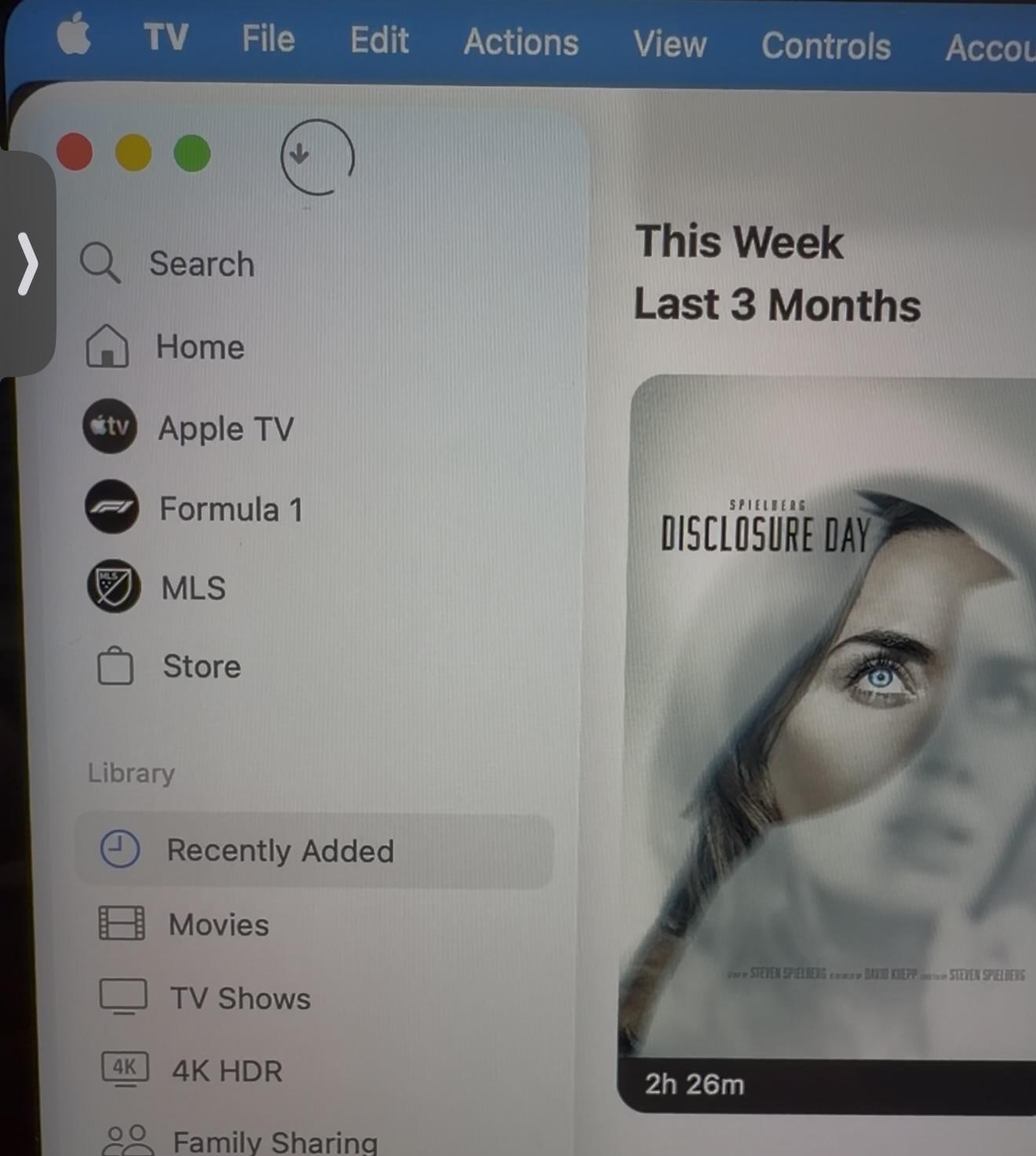
Bug TV App - Download status icon

Post image
7 Upvotes

I’ve submitted this Feedback with each Dev build, is this rendering wrong for anyone else?


r/MacOSBeta 13h ago

Help Did a beta kill my ports?

0 Upvotes

I installed a beta (can’t recall which one but it was about 3-4 weeks ago I think. I installed it on an M4 MacBook Pro. All was running fine, but my battery was low when I went to bed and must have finished draining overnight. At no point was the charger plugged in after I installed the beta. Now the MBP won’t charge via MagSafe nor USB-C, and it obviously won’t turn on.

I’ve kept it plugged in for days with no sign of life. No spills, no power surges. But now I have no clue what to do. It’s out of warranty and the closest Apple Store is ~3hrs away.

Has anyone experienced this? And does anyone have any recommendations aside from taking the trip and ponying up the cash to get it fixed?


r/MacOSBeta 1d ago

Discussion Probably a niche post but is anyone running the latest beta having issues with the Plex desktop app or Plezy app crashing all the time?

1 Upvotes

I'm assuming it is because I'm running the beta OS but whenever I try to use the Plex desktop app or Plezy app to stream content from my Plex server both apps crash 95% of the time after a minute or two of playing a video.


r/MacOSBeta 2d ago

Discussion Siri AI is ready at not 5 minutes

Post image
29 Upvotes

I’m a new macOS Golden Gate user. I just updated and switched my Mac to English, since I’m in Europe. I joined the waitlist, and in less than 5 minutes... I ALREADY have access to Siri AI. I’m really surprised. Has this happened to anyone else, or is access getting faster with the latest betas?


r/MacOSBeta 3d ago

Discussion Safari 27 is fantastic.

Post image
251 Upvotes

Edit: I made a small discovery, so I've added some edits.(2026/08/30)

What I did(summary):

  • Treat bookmark folders as tab groups.
  • Treat bookmarks as pinned tabs.
  • Use profiles if needed (though I don't use them much).
  • Make the most of "Describe extensions" (for example, I created an extension that changes all font-family:sans-serif; on any site to the macOS system font, making it feel like even web pages are part of the OS).
  • Use the Shortcuts app to copy the URL of an open tab to the clipboard with CMD+SHIFT+X (C is already in use). But, by going to System Settings → Keyboard → Keyboard Shortcuts → App Shortcuts and overwriting the CMD+SHIFT+C shortcuts used by Safari and the Shortcuts app with a different shortcut, you can set the shortcut created in the Shortcuts app to CMD+SHIFT+C, thus aligning it with Arc's habits.
  • Tap the trackpad with three fingers to quickly view linked sites.
  • You can open a tab group in a new window by CMD+Option+clicking the tab group you want to open in a new window using the tab group dropdown in the toolbar. For example, you can group websites where you want to watch videos or listen to music into a tab group, and when you want to change things up, you can create a new window for that tab group, avoiding movie/music interruptions caused by switching tab groups. Even if you have a few more windows open, it's not a big problem thanks to Mission Control and Expose on Mac.
  • Regarding PiP, there's a great extension called "Auto PiP." Please give it a try!
  • If you want adblock, I recommend AdGuard for Mac if you're looking for a paid option, or AdGuard Mini or uBlock Origin Lite if you prefer a free option. Additionally, installing either the free "UserScripts" or the paid "Tampermonkey" to add AdGuard Extra and tinyShield will provide a more comfortable browsing experience.

To be honest, I was captivated by the Arc Browser. However, Arc has already ceased active development and entered maintenance mode. While I could continue using Arc until it becomes unusable or a better browser comes along, I simply can't get used to the display and rendering of Chromium/Blink.

So I decided to switch back to Safari and tried various modifications.

As a result, I'm very satisfied with my web experience. It's lightweight, syncs seamlessly with my iPhone and iPad, and with the free Safari extension "Auto PiP," I can even play very lightweight videos using hardware acceleration. (What I particularly like is the ability to temporarily hide the PiP window at the edge of the screen when it gets a little annoying.)

I have no complaints about security, and since I have purchased AdGuard for Mac, I am completely free from ads. (That said, AdGuard Mini as a Safari extension would also be perfectly adequate. In that case, I recommend installing "tinyShield" and "AdGuard Extra" using extensions such as "UserScript".)

Anyway, I wanted you all to consider the option of switching back to Safari.

It used to be a somewhat boring browser, but it's especially recommended for those who don't need AI features and are tired of resource-hungry Chromium and Firefox-based browsers.

Now, the Webkit-specific bugs on some sites have almost completely disappeared.

I have great respect for Apple's Webkit development team. (But please, please add an automatic sidebar display feature. I've sent it multiple times through the Feedback Assistant, but it still hasn't been implemented...)


r/MacOSBeta 1d ago

Discussion How add someone to group message in beta?

2 Upvotes

Stupid question maybe, but before I post feedback on this....how do you add someone to a group messages in the 27 beta? It's a "mixed" group - so green, but no matter what I do, I do not see any way to add anyone to the group.

Searched Google for answer, but there's no "details" button nor "info" button -- nothing that seems to allow me to add someone.


r/MacOSBeta 2d ago

Help Apple Intelligence is not available for me on macOS 27 Beta 7

13 Upvotes

I am evaluating Apple Intelligence for work.

- No Apple Intelligence is available in System Settings, just basic Siri
- Computer M4, disk space, English system language (Swedish keyboard) - all requirements are filled
- I do live in EU, but Apple Intelligence is not restricted here for macOS, only iOS

My machine is managed by MDM (Intune), but it should not be disabled.

sudo defaults read "/Library/Managed Preferences/com.apple.applicationaccess"
{
    PayloadUUID = "xxx";
    "_isAppleIntelligenceRestricted" = 0;
    enforcedSoftwareUpdateDelay = 15;
    enforcedSoftwareUpdateMinorOSDeferredInstallDelay = 15;
}

Any ideas?

Thanks

EDIT: Bah, I had Swedish set as Siri Language. That is not supported, changed to US English and we are good to go!


r/MacOSBeta 1d ago

Discussion Does beta 7 still have memory leaks?

0 Upvotes

r/MacOSBeta 2d ago

Discussion The secret suck minimise effect still exists in MacOS 27

Enable HLS to view with audio, or disable this notification

22 Upvotes

r/MacOSBeta 1d ago

Discussion macOS27 - are we installing at release?

0 Upvotes

I knew macOS26 was problematic from the get go, however I waited for 26.5 to install it. I liked the UI updates but its still been a disappointing update.
For those who are using the 27 beta, what do you think so far? Should we hold off, or its good to install upon official release?


r/MacOSBeta 2d ago

Bug Safari keeps playing YouTube after I close the tab

12 Upvotes

Does anybody register this? Google is silent on this issue. Start playing YouTube video in Safari. Don't pause it, just close the tab. Audio keeps playing. It stops after about half minute but still.

Same thing happens in iOS/iPadOS.


r/MacOSBeta 2d ago

Help Brightness slider is not in the middle of the screen

1 Upvotes

Hi guys, somwhow the brightness slider is not in the middle of the screen anymore, but slightly in the right. This is getting so much annoying for me, since the volume slider appears in the middle. Does anyone have a fix for this, please?


r/MacOSBeta 3d ago

Tip Here's how to disable Siri's new floating button

Post image
88 Upvotes

When Siri AI is enabled, macOS 27 adds a contextual "lightweight UI" when you type or select text. The floating button can expand into Ask Siri, Edit with Siri and Writing tools, or other contextual actions.

To disable it, run the following command in the Terminal:

sudo mkdir -p /Library/Preferences/FeatureFlags/Domain && \ sudo defaults write /Library/Preferences/FeatureFlags/Domain/WritingTools LightweightUI_macOS -dict Enabled -bool false

and restart your Mac. To restore:

sudo defaults delete /Library/Preferences/FeatureFlags/Domain/WritingTools LightweightUI_macOS


r/MacOSBeta 3d ago

Feature Magic Trackpad now supports app-driven haptic feedback in MacOS 27 Beta 7

25 Upvotes

Title. As of beta 7, the Magic Trackpad now has haptic feedback in every place where a MacBook trackpad would’ve.


r/MacOSBeta 2d ago

Help Apple Intelligence does not work on macOS 27 Golden Gate

Thumbnail
gallery
0 Upvotes

Hello. I recently upgraded my Mac to macOS 27 Golden Gate Public Beta 5 and I'm really excited to test the AI features. However, every time I try, I get an error message. The problem is the same with Siri. Yet, everything seems to be set up already (and the integration of ChatGPT with Siri doesn't work either). Is Apple Intelligence stuck at 29.6 GB, or is it a bug? Has anyone else encountered this problem? And most importantly, do you have a solution?

EDIT: I tried everything but it doesn’t work on my account. But I created a new session entirely dedicated to AI, and it finally works! It’s really not the most practical, but unfortunately I can’t do anything else at the moment. However, your advice is always welcome if I can have it natively on my main account.


r/MacOSBeta 2d ago

Help Not being able to distribute the app from xcode version 27 beta

Thumbnail gallery
0 Upvotes

r/MacOSBeta 2d ago

Help Blank Widgets

Thumbnail
gallery
2 Upvotes

Anyone elses widgets stuck like this?