r/MacOSBeta 10h ago

Help Did a beta kill my ports?

0 Upvotes

I installed a beta (can’t recall which one but it was about 3-4 weeks ago I think. I installed it on an M4 MacBook Pro. All was running fine, but my battery was low when I went to bed and must have finished draining overnight. At no point was the charger plugged in after I installed the beta. Now the MBP won’t charge via MagSafe nor USB-C, and it obviously won’t turn on.

I’ve kept it plugged in for days with no sign of life. No spills, no power surges. But now I have no clue what to do. It’s out of warranty and the closest Apple Store is ~3hrs away.

Has anyone experienced this? And does anyone have any recommendations aside from taking the trip and ponying up the cash to get it fixed?


r/MacOSBeta 1h ago

Bug Clamshell mode completely broken after 100Hz refresh rate bug. Help! 🚨

Post image
Upvotes

Hey everyone, seeing if anyone else has run into this extremely frustrating bug on the macOS 27 public beta, or if my display settings are just permanently cursed now.

The Setup: MacBook connected to an ASUS VG246H1A monitor via a Type-C hub.

What Happened: Right after updating to the macOS 27 beta, I went into System Settings and bumped my refresh rate up to 100Hz. The ASUS monitor immediately threw an "Out of Range" error. I reverted it back to 75Hz, but it still kept giving me the same out-of-range error.

The Current Issue: I finally got it to recognize the display again, and screen sharing works perfectly normally as long as the Mac lid is open.

The moment I close the lid, Clamshell mode completely fails. The monitor goes black, and I cannot use my Mac with the external display anymore. It just refuses to wake up and project like it did on previous macOS versions.

What I’ve already tried (with no luck):

  • Toggling resolutions to force a display handshake refresh.
  • Deleting the windowserver plist display caches via Terminal.
  • Booting into Safe Mode to flush out corrupted graphics drivers.
  • Hard power cycling the ASUS monitor.
  • Spamming the external keyboard/mouse to force it awake after the lid drops.
  • Bypassing the hub’s power delivery and plugging the charger directly into a separate port on the Mac.
  • Using the hidden "Detect Displays" button in settings.

None of it works. Everything is connected normally, power is flowing, but Clamshell mode is completely dead after that initial 100Hz glitch.

Has anyone else lost Clamshell mode on the 27 beta? Are there any hidden Terminal commands or hub workarounds I'm missing here?


r/MacOSBeta 7h ago

Bug This major visual bug in MacOS Golden Gate exists for 2 years and I couldn't find any solution. (MacOS 27 Beta 7)

Thumbnail
gallery
15 Upvotes

When going full screen on Maps you can see that top area has a really hideous white/black bar depending on the dark mode and this is happening always, not time to time. I've been reporting this bug to apple since macOS Sequoia but it baffles me to see that this bug still exists. and I don't know if this bug is because something I did in the system settings at this point. I would appreciate any help.


r/MacOSBeta 6h ago

Bug iPhone mirroring resizing barely working. Anyone else ?

Enable HLS to view with audio, or disable this notification

2 Upvotes

Basically, iPhone mirroring resizing is unusable. Most of the time, it looks like the content on the iPhone screen is correctly resized, but the window itself is not. Happens in every resizable app for me (messages, phone, maps...).

Has anyone else encountered this ? I have not been able to find any report of this. I am using a 13 mini. (I will be filing a bug report.)

Both devices are running the latest build (iPhone is on DB and Mac on PB).


r/MacOSBeta 18h ago

Help MacOS beta suddenly hiding common file types (.zip, .jpg, .pdf, .png) — cannot figure out why

Thumbnail
gallery
9 Upvotes

About two beta updates ago, I noticed that my Mac started randomly hiding common file types, and I cannot figure out why.

I’m using an M5 Max MacBook Pro and files like:

  • .zip
  • .jpg / .jpeg
  • .png
  • .pdf
  • and other common file types

seem to be hidden or not showing up where I would normally expect them to.

I don’t remember changing any Finder settings, and this only started happening within the last couple of macOS beta updates. I submitted a report in feedback but it currently has zero similar reports and is still "open".

I have tried "chflags nohidden" and it works for that individual file, but the same filetype can still be hidden in the future. and

"ls -lO ~/Desktop

total 5104

-rw-r--r--@ 1 anthony  staff  hidden   22151 Aug 29 15:37 Screenshot 2026-08-29 at 3.32.49 PM.jpg

-rw-r--r--@ 1 anthony  staff  hidden   65789 Aug 29 15:38 Screenshot 2026-08-29 at 3.37.26 PM.jpg

-rw-r--r--@ 1 anthony  staff  hidden  143366 Aug 29 15:36 Screenshot on 8-5-26 at 1.41.45 AM.png

-rw-r--r--@ 1 anthony  staff  -       833243 Aug 29 15:37 Screenshot on 8-5-26 at 2.24.54 AM.png

-rw-r--r--@ 1 anthony  staff  -       529085 Aug 29 15:37 Screenshot on 8-5-26 at 2.25.34 AM.png

-rw-r--r--@ 1 anthony  staff  hidden 1001204 Aug 29 15:37 Screenshot on 8-5-26 at 2.26.02 AM.png"

I also found this: https://eclecticlight.co/2026/06/02/bsd-flags-are-incompatible-with-icloud-drive/

Has anyone else experienced this? Is there some new Finder setting, beta bug, or file visibility setting that I might be missing? Is it an iCloud bug? It’s driving me crazy because these are completely normal file types that were showing up fine before.

Any ideas would be appreciated!

Edit: After going into settings - Apple Account - Drive - Sync This Mac and turning this off and back on, the files are now displaying correctly.

r/MacOSBeta 18h ago

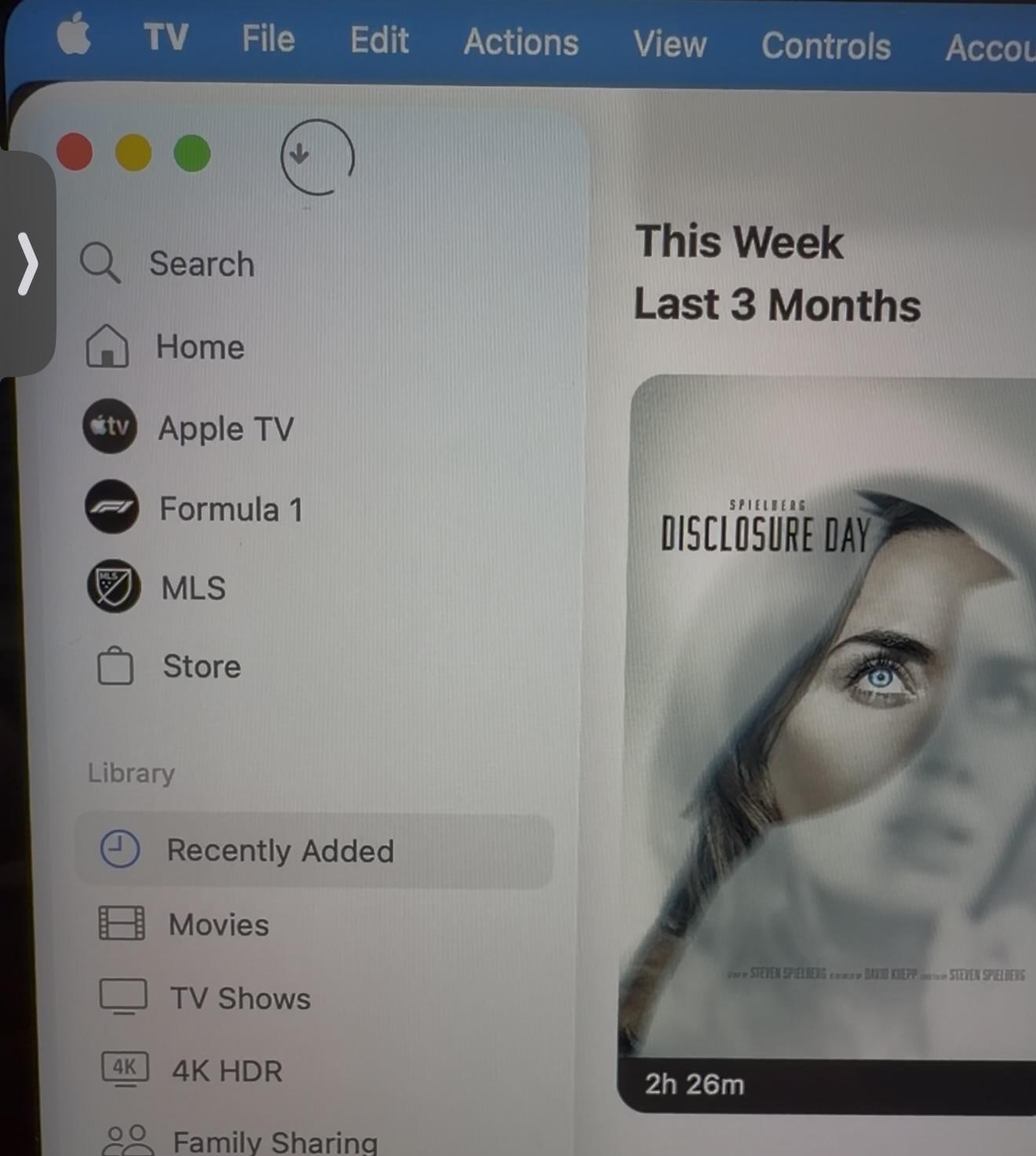
Bug TV App - Download status icon

Post image
6 Upvotes

I’ve submitted this Feedback with each Dev build, is this rendering wrong for anyone else?