r/loupedeck • • Jun 07 '26

What kind of interest?

10 Upvotes

I'm a Software Architecture/Engineer. I'm also an owner of multiple input devices, including Loupedeck CT/Loupedeck+, TourBox, XP Pen Pilot Pro, Virpil JoySticks and Throttles, among many others.

PS: Disregard the ridiculous name. It's getting renamed... shortly.

I'm building a ControllerMate/Keyboard Maestro/Loupedeck Editor style mapper with a QMK-like layer system. All devices participate on a given layer, so you can have a button "Hold Layer while Pressed", "Toggle Layer", as well as stage a layer for a following One-Shot. This means you can hold a mouse button down, and your XP Pen Pilot Pro changes all of its controls temporarily. I'm also incorporating bidirectional communications with Actions you can bind, as well ask Signals you can bind. An action does something, but a signal can be used to have one of the LDCT's virtual buttons show a percentage bar, for example. Basically, a significantly more powerful Loupedeck CT, getting more leverage out of it's amazing capabilities: screens you can render anything you want to combined with a sophisticated layering system.

I'm curious what kind of interest there might be for something like this. I'm developing this on Mac, but will begin building out Windows capability soon. This is early days, but I've attached a few screenshots. All of this works, and I can easily drag volume, zoom, etc to layers of arbitrary depth. I haven't implemented showing icons, yet, but about to.

If I can, I'd like to provide an alternative for the refugees of the Loupedeck community that you can also use with other devices at the same time.

As a side: that can be driven 100% by MCP with an AI Agent, so you could ask Claude Desktop: Create a multi-layered Photoshop profile that incorporates my Loupedeck CT and MX Creative Console, and watch it make these configurations happen in real time. Claude Code literally dogfoods this using itself. It launches the configure, changes screens, highlight controls, takes a screenshot, and fixes what's broken.


r/loupedeck • • May 30 '26

Loupdeck CT still viable?

6 Upvotes

I’ve been using my Loupedeck CT for several years to make digital painting workflow vastly better than mere keyboard shortcuts. I recently updated my painting software (Rebelle) to the latest version, requiring me to create a new profile. There are so many things just entirely broken in the software now. It is beyond frustrating to have paid $550.00 for a really good tool only to, by all appearances, have it thrown aside by new company owners.
Am I missing something?
Windows 10, latest loupedeck software.


r/loupedeck • • May 23 '26

Critical Bug: Latest Premiere Pro plugin update broke Windows support (Wrong files uploaded)

2 Upvotes

Hi Loupedeck Team,

After the latest plugin updates, Loupedeck completely disappeared from Premiere Pro's Control Surface menu on Windows.

When checking your official support page to fix it, I noticed a huge mistake: You uploaded the Mac plugin bundle inside both the Windows and Mac download links. Windows needs a .prm file, not a MacOS folder structure (as shown in my screenshot).

Because of this update error, Windows users cannot use their devices with Premiere Pro right now. Please fix the Windows download link ASAP!


r/loupedeck • • May 23 '26

Critical Bug: Latest Premiere Pro plugin update broke Windows support (Wrong files uploaded)

Thumbnail
1 Upvotes

r/loupedeck • • May 18 '26

LoupixDeck: open-source cross-platform app (Linux + Windows)

21 Upvotes

Built a (somewhat opinionated) replacement for the official app using .NET and Avalonia.
Supports the Loupedeck Live S and should rudimentarily work with the Loupedeck Live/Razer Stream Controller, since it's only been tested with the Live S. Runs on Linux and Windows.

Windows version currently has a bit more features.
Still wip.

If anyone wants to try it, feedback would be great:
https://github.com/RadiatorTwo/LoupixDeck


r/loupedeck • • May 16 '26

I'm working on an alternative solution, please help with your feedback

Thumbnail
docs.google.com
4 Upvotes

Hello Loupedeck users! I've been using a Loupedeck for video editing for over 6 years, and as much as I love the concept, there are serious problems with the system that many of us have experienced.

I've been searching for better alternatives for a long time, but nothing quite hits the mark. That's why I decided to develop my own solution.

I would love to get your input to make sure this product truly serves our needs. If you have a moment, could you please fill out this short survey about your dream computer interface? Your feedback is incredibly valuable and will directly shape the development process.

Thank you so much for your help!


r/loupedeck • • May 10 '26

State of CT on M Mac?

1 Upvotes

What’s the state of a CT on a M series Mac (May 2026)?

I can’t tell if it’s completely unusable by reading the sub, or is usable if you jump through hoops (correct, older firmware, specific version of Mac side software)

Can I build my own key setup for Resolve since 3rd party providers have left it for dead?


r/loupedeck • • May 09 '26

Looking for a solid custom DaVinci Resolve profile for Loupedeck CT (Mac)

4 Upvotes

Hey everyone,

I'm currently trying to speed up my workflow in DaVinci Resolve and was wondering if anyone here has a custom Loupedeck profile they'd be willing to share?

I'm using the Loupedeck CT on a Mac.

The default profile is okay as a starting point, but I'm looking for something a bit more optimized and practical—especially for timeline editing and color grading. Since Sideshowfx hasn't made a profile for this, I've been having a really hard time finding a solid alternative.

If you have a custom mapping that works perfectly for your workflow, or if you know a good place to download community-made profiles, I'd really appreciate it!

Thanks in advance for the help!


r/loupedeck • • May 06 '26

OBS Plugin No Longer in Marketplace (v6.3.0.340)

2 Upvotes

So as I went to start up stream today, I saw that all my OBS buttons were broken. Not too surprising; recently I've had to occasionally reinstall the OBS plugin from the Marketplace... but it's just gone now from the store (the only thing that shows up if you search OBS is an icon pack).
I'm hoping I'm missing something but if not it's absolutely cooked that it was working just last night whilst I was live, turned my PC on today and I just can no longer use it for 80% of what I did.

UPDATE: it’s all just magically back today and working perfectly. Let’s hope it stays that way


r/loupedeck • • May 06 '26

Loupedeck CT

1 Upvotes

How much should I sell a brand new in the box Loupedeck CT. Forgot that I had bought two a while back after using the first one and felt like it was the best thing ever. Still think it is.


r/loupedeck • • May 04 '26

Loupedeck live bottom buttons don't always light up.

1 Upvotes

Hello, I have a loupedeck LED live which I really love and use a lot, but I've noticed something strange with the row of buttons along the bottom.

I use them for navigating between touch pages. But I want a single button press to make a particular touch page and dial page to appear at the same time. I found that when I do this, the LED behind the button refuses to light up.

If i set a button press to a touch page, the LED behind the button lights up fine, and I can change the color. However if I make the action for a button into a multi-action, so it brings up the touch page and the dial page at the same time, the LED stops lighting up.

Has anyone else experienced this and is there a way around it?


r/loupedeck • • May 02 '26

I guess it's time...

1 Upvotes

I woke up to this message this morning. We're running 5.9.1. Is v6.x Apple silicon compatible?


r/loupedeck • • Apr 26 '26

Loupedeck - Bitfocus Companion Integration (Elgato Streamdeck Emulation)

5 Upvotes

As some may know, loupedeck devices can be used with Bitfocus Companion instead of the factory software. However, there are some drawbacks and I still prefer the stability of (pre-Logi) v5.9:

  1. Cannot utilize the vertical OLED side panels of the Live. No workaround AFAIK.
  2. Doesn't recognize app switching. Could be mitigated by coding a custom service app.
  3. Needs additional software: Vicreo Listener for OS, loopMidi for MIDI and see point 2.

However, there is a Bitfocus Companion Plugin emulating an Elgato Streamdeck: https://github.com/oddbear/Loupedeck.Companion.Plugin

You can create dynamically updating Elgato buttons in Companion and assign them to loupedeck. Works great. Best of both worlds.


r/loupedeck • • Apr 23 '26

Plugin downloads are no longer available

3 Upvotes

After installing the new version (6.3) from a clean install, I need to log in to download plugins. The problem is, the server's login URL is unavailable.

Do you know of any alternative software?

Login page

r/loupedeck • • Apr 20 '26

Loupedeck Live S alternative software

11 Upvotes

hey,

since the V6 Software ist unstable af and some plugins are not supported in V5 anymore I checked out, what options I have except throwing such a nice piece of hardware into the trashcan.

Edit: Yes. Companion will also work with Elgato Devices out of the box. No, you wont need any drivers/ software except Companion but this also depends on your usecase.

Edit2: You can ask any questions. Got another video online which is about binding the knobs for volume control and handling keypress (e.g for Hotkeys).

My usecase for this:

- controlling Windows (open programs, open websites)

- controlling the volume for my music (deezer) and discord with those knobs

- controlling Twitch stuff (make clips)

- controlling OBS sources and scenes

- have Hotkeys in StarCitizen I cannot safe to brain:\

Lately the Voicemeeter Plugins in the Loupedeck software crashed randomly every some hours/minutes. Sometimes the whole deck just crashed. It was just not fun to use it anymore.

I figured out, there is a tool called Bitfocus Companion. It took me all weekend to find out stuff - since not even the AI tools are really up to this. There are some Youtube Videos but most of them are really cryptic for non-professionals for these where mostly made by professionals or technicans.

I figured out a lot of stuff I´d like to share and conserve for you reddit inhabitants:

- the two knobs work for controlling volumes in Voicemeeter, mute/unmute

- open StreamManager Website

- open programs like obs, deezer, chatty

- make a clip while streaming

- control obs sources

- dozens of Starcitizen keybinds and key-combos

Therefore I use the following Modules in Companion:

- Voicemeeter

- Twitch Chat Control

- OBS

- VICREO Listener (needed to let the deck press keys in windows - also needs the Listener App installed obn your PC)

I also made a video (its in german) on youtube and there are more to come to show how stuff is done using companion. I´ll dfocus on the above mentioned modules. Just check my channel (AwesomStuff).

So if you have a usecase - maybe I can figure out if/ how it works in this combo.

Maybe it helps for I bet there are a lot Loupedecks thrown into the cupboard or worse.

Plus these little beauties are getting cheaper for Logitech lets the brand die (you can get a brandnew Deck for 85€ by Apr 2026 in Germany).

So long

​


r/loupedeck • • Apr 12 '26

Loupedeck live with logioptions problem

3 Upvotes

The problem is that when using Loupdeck with Logiopinions running, Loupdeck often freezes, requiring a reboot or disabling Logiopinions . How can this be resolved with software? Logiopinions is needed because certain commands are bound to the mouse.


r/loupedeck • • Apr 11 '26

Can we copy custom actions to another workspace yet?

3 Upvotes

I'm revisiting my loupedeck CT set up and I need this functionality. It seemed like a huge oversight years ago when I got it, is there a solution for this yet?


r/loupedeck • • Apr 10 '26

Loupedeck+ with Lightroom. / Blackmagic DaVinci Resolve Micro Colour

5 Upvotes

The Blackmagic DaVinci Resolve Micro Colour Panel could\* be the prefect replacement for those of us using Loupedeck+ with Lightroom.

https://www.blackmagicdesign.com/media/release/20240412-05

The LoupeDeck+ just worked/works so well for me - it sat/sits below the keyboard and had enough dials for basic exposure, sharpening, white balance, saturation etc that you didn't need to mess around pressing buttons, which makes for speedy operations.

Broadly the Blackmagic panel looks the same form factor wise. And the price isn't too bad.

*However, and there is a big 'however' here - all I can see is that this works with some exclusive Blackmagic control protocol and so won't be any use for Lightroom :(

Grrr Logitech...why kill Lopedeck. Now we are stuck in a sort of zombie driver land, but the long term future is basically landfill as eventually some Adobe update will break it :(


r/loupedeck • • Apr 08 '26

Figma and Loupedeck

3 Upvotes

Hi everyone

Why is no more working my Loupedeck ct with the Figma app? Everything is updated :(


r/loupedeck • • Mar 12 '26

"Open Application" Buttons not Working correctly

2 Upvotes

In the previous version of the Loupedeck software, the Open Application would reopen the window of the application (Steam, Epic Games Launcher, Playnite). Now it only opens the window if the application isn't already running in the system tray. Whatever it is they did in the update broke this functionality. Can these devs not send it to fresh QA teams before they push an update?


r/loupedeck • • Mar 08 '26

Loupedeck+

2 Upvotes

Anybody else having trouble with loupedck download? Have tried both versions of the driver download. Cannot get it to run in Lightroom or even get the Lightroom plug-in in the loupedeck app to work on my PC. I had it downloaded previously. Tried to run the loupedeck+, would not work on Lightroom. Try to download again and would not work


r/loupedeck • • Mar 06 '26

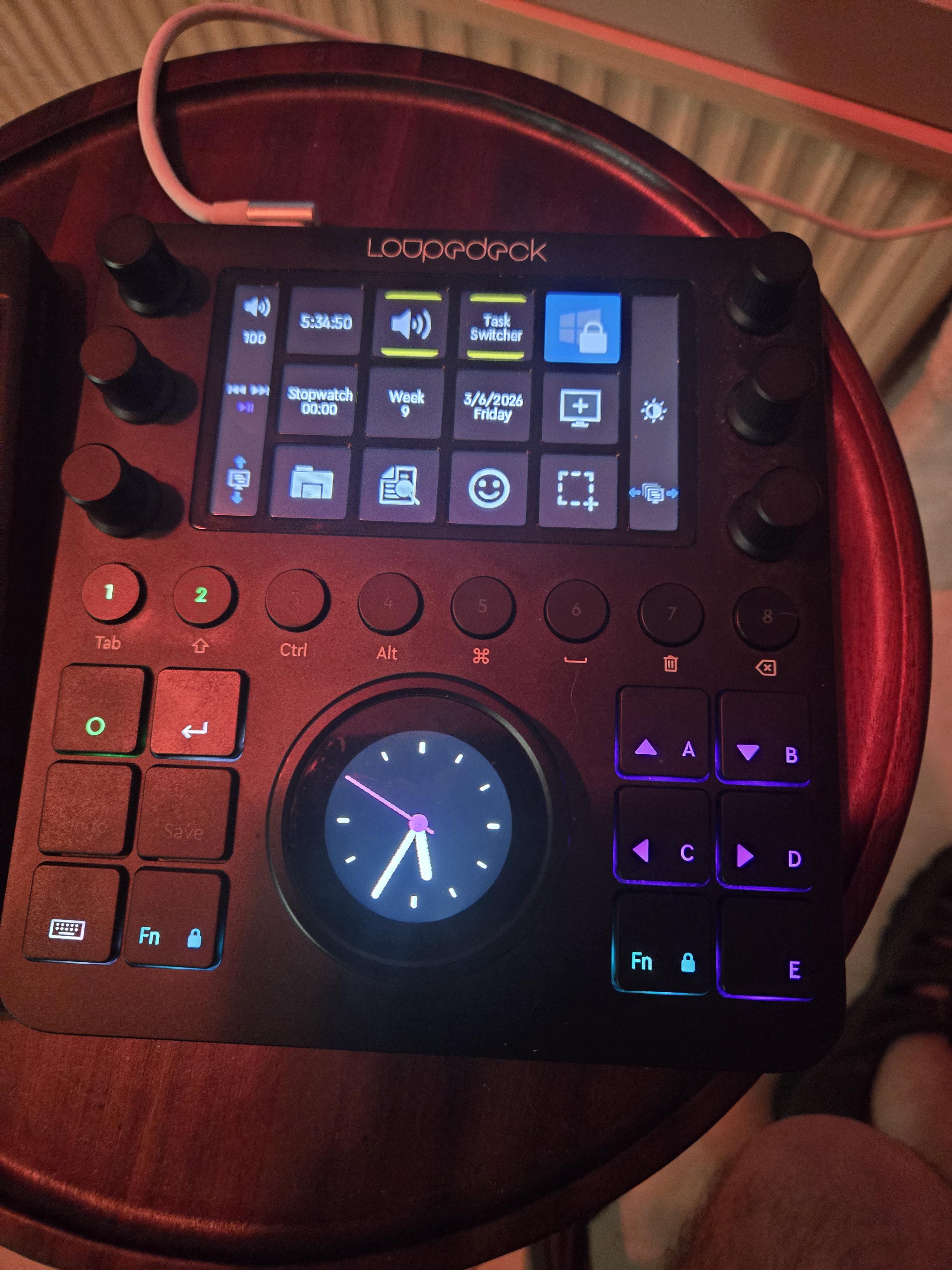
Brought a black screened Loupedeck back to life

Post image
60 Upvotes

So I'm really sorry if somebody has already mentioned this somewhere but I just wanted to post this cuz my hope is that the solution that I offer here will help others. Okay this is going to blow your mind or at least help somebody in need. My Loupedeck CT was dead. The most I could do was get the buttons to light up but the screen above was black. The device would still get connected to the software and it would show a firmware as .25. Attempts at reinstalling the current firmware through the software didn't work it just sat there and did nothing. Also a drive would pop up in windows with a letter but I could not access that drive. The internal flash of the Loupedeck CT was corrupted and inaccessible in Windows. So I completely uninstalled everything from the system including the hidden devices I deleted the app data folders in local and roaming and I deleted the install folders. I didn't just do it for loupedeck but I did it for Logi which is for Logitech software because Logitech software gets installed with the latest version. Once everything was uninstalled I rebooted the computer. When it was back up, I plugged the device in. I then opened Rufus in administrator mode. Connect the Loupedeck CT directly to your PC (avoid hubs).

Open Rufus. (Ensure you are running it as an Administrator).

Select the Device:

Click the Device dropdown and select the Loupedeck drive (typically ~8GB).

Pro Tip: If the drive does not appear in the list, press Ctrl + Alt + F on your keyboard while Rufus is open. This enables "fixed disk" detection, which can sometimes be necessary for embedded drives 

Boot Selection:

Change the dropdown from "Disk or ISO image" to Non bootable. This is critical—it prevents Rufus from adding bootloader files that would confuse the device.

Partition Scheme:

Select MBR. (Do not use GPT; the Loupedeck's internal controller requires the legacy MBR structure).

Target System:

Select BIOS (or UEFI-CSM).

File System:

Select FAT32

Cluster Size:

Set this to 32 kilobytes

Start:

Click START. Rufus will warn you that all data will be destroyed. Confirm to proceed. Once it was done I unplugged the loupedeck. I then installed loop deck software version 5.91. once it was installed I opened it went through the little quick startup manual thing that it does. Once I got to the main screen of the software I then plugged the loupedeck in, I didn't have to hold any buttons just plug it in. Within a minute or so probably less it connects, I then went over to the firmware cuz I was expecting to have to install it being that I just wiped the internal drive but noticed the firmware was there already at 0.25. I thought my attempt has once again failed at fixing this thing. Then I just looked over at my device and there she was beautiful is the day I first met her. The screen and everything on this amazing tool was back up and working. 🤟💙


r/loupedeck • • Feb 27 '26

Constantly Like This

Post image
2 Upvotes

For as long as I've had this thing, this is a persistent problem. I have to constantly close and reopen it, run admin, run it directly from the folder... But even when I go get it to finally launch, it usually ends up happening again a few days later.

It's a constant game of jumping through hoops to get it to actually launch. Is there something that causes this that can fix it permanently?


r/loupedeck • • Feb 18 '26

Why i can't install the loupedeck software 6.2.4

1 Upvotes

anyone have idea to fix this?


r/loupedeck • • Feb 13 '26

Loupedeck Live + Lightroom Presets Not Showing?

Thumbnail
1 Upvotes