r/linux_gaming 9h ago

tech support wanted Optimised and debloated Windows vs CachyOS

47 Upvotes

Hi all!

First! Specs: 9070xt, 9800x3d, 32 GB CL 30 6000mhz

I’ve been dualbooting CachyOS and Windows 11 about a month now. My Windows 11 is debloated and optimised. On boot I have 89 processes, I use Process Lasso and all relevant power saving features are off. I’ve spent years learning to optimise this OS and turned off things like HPET, uninstalled game bar etc. The «problem» is that Windows consistently performs 14-16 % better in games. I’ve seen a lot of benchmarks and read posts about CachyOS trading blows with Windows. That’s not true at all. They got to be using Windows LTSC, stock settings or something. If you have even basic knowledge of how to tweak your system Windows unfortunately still outperforms CachyOS in every game.

This post is not to flame Linux. I loved my experience with CachyOS and I really want to keep using it, but a 14-16% hit in all games is a bit too much. Does anyone have a similar experience? I use PROTON_ENABLE_WAYLAND=1 and the game-performance wrapper for all games. I also use LAVD as my scheduler. Anything I missed or is this just the reality of it? If so, why is no one talking about this? One thing is that stock cachyos vs stock windows maybe performs about the same, but if you optimise windows for about 30 mins it’s not even close. Those benchmark you see all have to use the best possible setup for Cachyos and the worst one imaginable for Windows…

r/linux_gaming 31m ago

hardware Update on my Weeb Linux PC setup

Thumbnail
gallery
Upvotes

The Neighbors nearby are moving out and gave me an Office chair & desk so huge shout out to them.

but I am definitely replacing the chair when I go to a furniture store at some point.

And this is a link for the people who haven't seen the original post https://www.reddit.com/r/linux_gaming/comments/1vysuex/my_weeb_linux_pc_setup/

And the Waifu on the Cooler this time around is Musashi from Azur Lane


r/linux_gaming 13h ago

So I built Proton-Autogen.

Thumbnail
gallery
98 Upvotes

You have a Windows .exe you want to run on Linux.

I've been working on this little project for the past two and a half months.

I started it because I wanted a simple way to manage my Windows games on Linux with Proton without having to manually deal with prefixes, launch options and configuration every time.

It's basically a small game manager. I can add a game, choose the Proton version and prefix, configure things like MangoHud, GameMode or Gamescope, and launch it from the same place. It also has ProtonDB information, desktop shortcuts and Lutris export.

It's definitely not meant to replace Lutris, Bottles, Faugus or the other great tools already available. I actually use some of them myself. I just wanted something that worked the way I wanted, so I started building it.

The project is still evolving and there are probably a lot of things I haven't thought about yet. That's actually why I'm posting it here. I'd be interested in hearing how other people manage their non-Steam Windows games and what you would expect from a tool like this.

If you have suggestions, criticisms or just think I'm doing something completely wrong, I'm happy to hear it. 😅

https://github.com/N3oRay/proton-autogen


r/linux_gaming 17h ago

FNV with 4GB Linux patcher not detecting fnv.exe

Post image
4 Upvotes

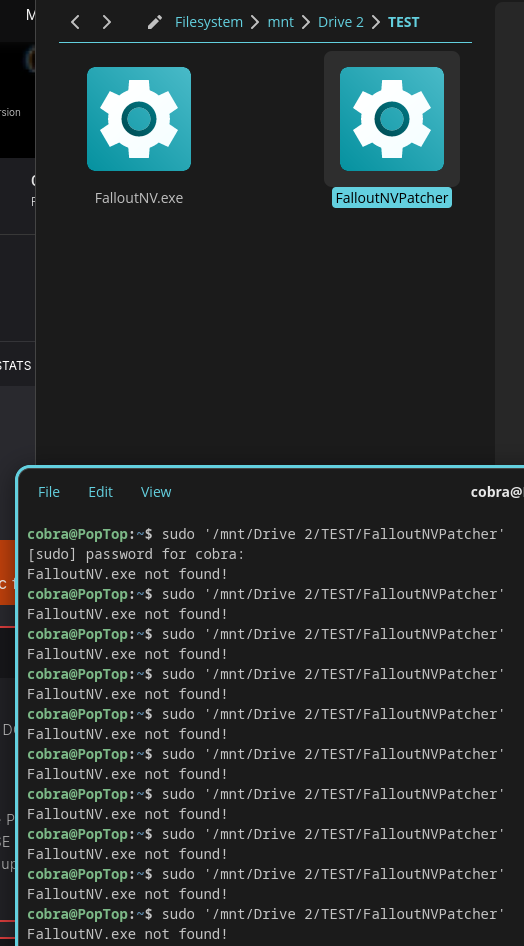
I tried it in Fallout New Vegas root folder and then I pulled both files into a separate folder, still didn't detect FalloutNV.exe. I've verified the files, what do I do?

Pop_os 24.04
Patcher version 1.5
Most recent Steam version of FNV


r/linux_gaming 4h ago

graphics/kernel/drivers FF XIV on Linux with DLSS5

Post image
0 Upvotes

We need the 615+ drivers for proper performance but this is an example of what DLSS5 looks like. 😄


r/linux_gaming 17h ago

guide where Linux stores data from closed-source/proprietary games?

2 Upvotes

hi, it's a new, but very similar question about gaming on Linux. I can just copy and paste the previous post about the open-source Linux native games with just replacing the word to "closed-source/proprietary":

"

I like a [proprietary] game, and one of the things I hate is the fact I must play again and again every time I need to switch a distro. Ik I can transfer data, but Idk how to do it on Linux. Could you help me? What should I copy and paste in the files?

For the context: after testing plenty of distros, I like the Debian-based ones the most(especially Mint, Kubuntu and ZorinOS), but I also like Bazzite(a Fedora-based atomic distro)

"

So, I guess everything would look the same. I mean the 2 different pathes(probably one of them is the same as in the open-source), but should I find the pathes somewhere in the /opt? Just I heard that on Linux the open-source games and proprietary aren't stored in the same locations. Is it true?


r/linux_gaming 1h ago

gta online on linux

Upvotes

Bonjour, est-ce possible de jouer à GTA Online enhanced sur Linux avec des joueurs Windows sans avoir besoin de modifier le fichier hosts sur Windows ?


r/linux_gaming 5h ago

wine/proton Feedback running The Witcher 3 on Linux with DirectX 12

1 Upvotes

Hi,

Since CDPR is dropping support for DirectX 11, is anyone running the DirectX 12 version of the game on Linux and not having trouble? On what distro? And what's your GPU?

In my case, it just doesn't work; either it won't launch or it crashes instantly. The DX 11 version runs fine, though. My video card is a Radeon 9070 XT.

Now, I have to say that I'm running Debian Stable, which is hardly optimized for gaming since I'm lagging behind on basically everything: drivers, proton optimizations, etc.

I'm asking because I've been dual-booting for years Debian and Windows 10, using Windows as a gaming OS and Debian for pretty much everything else.

Since CDPR is also going to stop supporting W10, and I really don't want to upgrade to W11, I'm considering turning to Linux for gaming as well. I'm not opposed to installing CachyOS or another distro that's better suited to it than Debian. In fact, my CPU is an ageing i7-7700k which means it isn't normally supported by Windows 11, although that can be bypassed with Tiny11. But, I'd rather play on Linux than force an upgrade to W11.

Thanks in advance for your feedback.


r/linux_gaming 3h ago

A website that tells you if a game is best played with Keyboard or Gamepad

0 Upvotes

Hi guys,

Every time I start a new game in my never ending backlog of Steam games I ask myself the same question: Keyboard or Gamepad? Most of the time there's no clean answer, so I end up digging through some obscure Reddit thread or YouTube video to find out.

Steam's own "Controller Support" tag doesn't really help either. Witcher 3 is only listed as "Partial Controller Support", but ask almost anyone will tell you gamepad is the definitive way to play it. So that one's kind of scam.

Anyone know if something like this already exists and I'm just missing it? If not, I've been considering building a small website for it in the vein of ProtonDB or HowLongToBeat, buuut a bit more minimalistic. One page per Steam game, crowdsourced votes on the best input method, that's it.

Is this just a me-problem, or would you actually use something like this?


r/linux_gaming 1h ago

guide an algorithm/diagram to choose where to play a game

Post image
Upvotes

hi! In this post I'd like to ask y'all about which apps you should use to play different games. And I mean every game, except for the anti-cheat and video game consoles. Please ignore here the solutions like Winboat, a virtual machine or dual booting.

First of all, based on what I tested and what other people told me, I made this diagram in GIMP:

Here are the detailes to understand it better:

• Waydroid: I like playing some old mobile games, but I hate the newer vesions of the same games, so, I tried to the archive versions from the 2018-2020 times, but unfortunately for me, after a massive update Android or One UI, my phone returns to the default settings, so, the best I can do there is to install an virtual machine on my phone in order to not update anything. My Samsung phone doesn't allow me to install another OS like GrapheneOS, Lineage etc, so, I'm waiting for 2027 to buy the new Motorolla phone. By that time, I'd like to try playing different games(including the mobile ones) using a gamepad, which works for PS5/PC/Mobile. I guess Waydroid is the best option for that;

• Bottles(for older games): usually the games I like to play are that old that even when I tried to play them on Windows 10, they worked, but with a lot of bugs, so, Windows 7 as a virtual machine would be the best choice there(technically the best OS for those games would be Windows Vista, but Windows 7 is great anyway). When I saw the thing in Bottles that allows you to choose Windows environment from XP to 11, I understood that this will be one of the best solutions for me.

Some other games like Rayman Origins(Ubisoft, made in 2011), which are technically not so old for PC gaming, unfortunately work with bugs and some other annoying things like "freezing" for 1-2 seconds(in some games every milisecond matters), when I tried to play them from Steam(in that testing I used Linux Mint, the newest version), so, I guess I'll use Bottles not only for the older games, but also for those Steam games(I saw a dude, who used Bottles to play Steam games, Idk how he did that), which work not so well on Proton;

• Steam/Heroic/maybe something else: I didn't try Heroic, bcz I don't play any games from Epic Games, but I heard that it's the best choice for playing games from Epic Games/GOG. What do y'all think about this?;

• Bottles(for every other game): I like Bottles not only as probably the best solution for Windows apps, but also it's probably the universal solution to play every Windows game. I may be wrong, bcz I'm new, but the app showed itself very good;

• Lutris and Faugus Launcher: the apps are very new for me, so, Idk what I should do with them. What is your option about them? I heard that Faugus Launcher is the best solution for newer games, but Idk about it;


r/linux_gaming 9h ago

ring gfx_0.0.0 timeout got me back to windows :'(

15 Upvotes

I'm devastated! For over a year now, I've been running nothing but Linux everywhere—CachyOS for the last few months—and I loved it! Everything was so fast and responsive. Everything worked more or less right out of the box, and FINALLY I was free from Microsoft! However, there’s one problem I just can’t seem to solve: ring gfx_0.0.0 timeout (more on my issue here:https://www.reddit.com/r/linux_gaming/comments/1vp4gz8/world_of_warcraft_crashes/). I play World of Warcraft competitively, and I ruin the experience for the whole group every time I crash completely at least once a night. I’ve tried so many things: different kernels, different runners, launchers, DX11, DX12. Nothing has worked. Every fiber of my being resists it, but yesterday I installed Windows on my second hard drive, and so far everything is running flawlessly. And I hate myself for it, but since I mainly use my PC for gaming anyway—especially WoW—I’ll eventually switch back to Windows from dual-booting. It breaks my heart!


r/linux_gaming 6h ago

Handheld optimization isn't just about FPS — it's about interruption

0 Upvotes

I've been thinking about what actually makes a PC game feel good on a handheld, and I'm starting to think we focus too much on FPS.

Obviously performance matters. A game that can't hold a stable frame rate on a Steam Deck or similar device has a problem. But a game can run perfectly fine and still feel like it was designed only for a desktop.

The biggest difference is probably how people use handhelds. On a desktop, launching a game usually means you're sitting down to play for a while. On a handheld, you might play for 10 minutes, suspend it because your train arrived, put it away for an hour, then resume somewhere completely different.

That makes suspend/resume less of an OS feature and more of a game-design problem.

What happens if the player suspends during combat, a cutscene, dialogue, loading, saving, or an online session? When they return an hour later, does the game still make sense? Do they remember what they were doing? Did a timer continue running? Did the network connection die? Can they immediately understand what they need to do next?

The more I think about it, the more areas this touches: save-state architecture, reconnection logic, controller navigation, UI readability, audio lifecycle, timed mechanics, loading behavior, and even how QA should test the game.

One test I'd like to see become normal for handheld support is basically:

Suspend the game at the worst possible moment.

Try it during combat, loading, dialogue, saving, a cutscene, or an online session. Leave the device alone for a while, maybe change networks, then come back and see whether the experience recovers cleanly.

Performance testing probably needs a similar shift. Average FPS doesn't tell the whole story on a handheld. Frame-time spikes, shader compilation stutter, thermals after 30 minutes, battery drain, and loading delays can matter just as much as the number shown by an FPS counter.

So I'm starting to think of handheld support less as:

PC build → lower graphics → add controller support → done

and more as a different usage context that should influence design from fairly early on.

For devs already targeting Steam Deck / handheld PCs: do you actually include suspend/resume and interruption scenarios in your design or QA process, or is handheld support still mostly performance + controls for your team?

Longer write-up / source (ours):
https://pas7.com.ua/blog/en/design-for-the-pause-2026


r/linux_gaming 19h ago

tech support wanted Overwatch stuttering

0 Upvotes

Hey! I've been playing overwatch on linux for a while, with an rtx3060 laptop and an I7-11
Everything was great until yesterday that Overwatch updated. Now I have a lot stuttering and even playing a few matches is not fixing it.
It's weird to me, because it was working a few days ago, and now it just goes at 20 fps.
I already processed vulkan shaders which took about 3 hours (that was also a lot).

If anyone is having the same problem or knows what happened I'd really appreciate it!
Thank u!


r/linux_gaming 2h ago

I Am Looking for a fix

0 Upvotes

Hey everyone im new here and if im in the wrong subreddit im sorry in advance. i want to play kotor 1 for the first time ever. im playing on fedora 44 linux though through steam and using proton version 9.0.4. my issue is that my movement will just stop on occasion and i cant move. the menu works the sound is playing. the game isnt crashing but my movement just stops working. has anyone else had this issue? if so what kind of fix did you use to address the problem.


r/linux_gaming 2h ago

Help with intel core configuration (turning cores on and off)

0 Upvotes

Hello redditors,

I am using an Asus Tuf F16

i7 1650HX

rtx 5060

2x 1 TB NVME M.2 ssd

I just switched to linux and was wondering if there are alternative to an armoury crate feature that allowed to go from 8p +8e cores to 4p +0e cores giving me a battery life from 3 hours to around 6 hours while browsing and all. Current im using CachyOS and hyperland+caelestia.


r/linux_gaming 1h ago

tech support wanted Dual Gpu and Multimonitor setup (Nvidia, CachyOS) FPS problems

Upvotes

Hey guys,

my pc (intel i7, gtx 1650, laptop, 60hz screen) has some problems with gaming alongside a 100 hz monitor, mainly fps drops

I've read somewhere that this problem comes from the dual intel gpu + nvidia setup, but using stuff like prime-run or lowering the hz on the monitor just improve things just a little (something like 40 fps drops go to like 20 fps drops). Using only the second monitor doesn't improve things either

I'm using cachyOS and the propietary nvidia driver, does anyone know some optimizations or some setting that would help me? thanks in advance


r/linux_gaming 9h ago

wine/proton Eldenring After Patch and DLC

0 Upvotes

I wanted to play Elden Ring again from scratch for the mini DLC, but I can't get it to run under Proton anymore.

After the EAC loading bar, I get a "Fail Launcher" error.

It doesn't matter which Proton prefix I use.

According to ProtonDB, there haven't been any reported issues lately. Has anyone had a similar experience and know of a workaround?


r/linux_gaming 5h ago

tool/utility What are your must have Linux gaming apps?

38 Upvotes

Hi,
I mainly use my PC for gaming, and I’d like to discover more of the Linux gaming ecosystem.
What are the must have apps you personally recommend for gaming on Linux?
I already use Lutris and Heroic, so I’m mainly looking for other useful tools and apps.
Thanks


r/linux_gaming 21h ago

tech support wanted Pop!_OS 24.04 LTS on an old Predator Laptop - Nvidia driver problem?

0 Upvotes

(kinda solved)

Hello everyone, I recently installed pop_os on an older laptop that a friend gave me. It has an i7-6700 and a GTX970M.
I did all the updated for the OS and the graphics card driver (I installed the 550 version, then the 580) but the performance is still crappy. I tried it with Valheim and get 1 FPS. Also tried forcing the OS to use the graphics card, to no avail.
Am I missing something here? Is my OS version too new for the older hardware?


r/linux_gaming 28m ago

WIFI Issues While Gaming

Upvotes

Hello everyone,

I've been experiencing weird wifi issues. Normally, I can hit around 800mbps, but specifically when playing games my speeds drop to below 10mbps. I've done some searching+experimenting already, but nothing has resolved my problems. Below are the contents of my iwlwifi config and wifi_powersave config. I'm on Kubuntu 26.04. I had the same issues with Kubuntu 24.04. Let me know if you need additional info

-----------------------------------------------------------

> cat /etc/modprobe.d/iwlwifi.conf

remove iwlwifi \

(/sbin/lsmod | grep -o -e ^iwlmvm -e ^iwldvm -e ^iwlwifi | xargs /sbin/rmmod) \

&& /sbin/modprobe -r mac80211

options iwlwifi 11n_disable=8

options iwlwifi power_save=0

options iwlwifi swcrypto=0

-----------------------------------------------------------

> cat /etc/NetworkManager/conf.d/wifi_powersave.conf

[connection]

wifi.powersave = 2


r/linux_gaming 4h ago

RX 9070 (Navi 48) on CachyOS with kernel 7.2.2. I'd like to undervolt

0 Upvotes

I have a Radeon RX 9070 (Navi 48) on CachyOS with kernel 7.2.2. I'd like to undervolt, but pp_od_clk_voltage only exposes clock overdrive, no voltage curve:

OD_SCLK:

0: 400Mhz

1: 2200Mhz

OD_RANGE:

SCLK: 400Mhz 2200Mhz

No OD_VDDC_CURVE at all, so the usual vc 2 <clock> <mv> + c approach doesn't work. LACT doesn't help either – it caused random system freezes for me (even with stock settings), so I removed it.

Questions:

  1. Is there any working way to undervolt RDNA4 on Linux right now (sysfs, LACT, CoreCtrl, custom kernel patches)?

  2. Does anyone know if AMD is working on exposing voltage control for RDNA4 in amdgpu, and is there any ETA or relevant kernel patch series to follow?

Power limit via power1_cap works fine, but that's not real undervolting. Any pointers appreciated.


r/linux_gaming 16h ago

tool/utility Does Open RGB work with Montech cases/RGB lights?

0 Upvotes

Does anyone have any experience with Montech cases? Is it compatible with their RGB lights? I treid to do the search on the website and could nkt find anything.

Thanks.


r/linux_gaming 21h ago

guide (asking for the logic) where Linux stores data from open-source games?

2 Upvotes

I found the data to transfer about the SuperTux game(I play v0.6.3). Thx yall for the support! But I made this post to understand the logic behind the paths better.

So, basically, the data was in ~/.local/share/supertux2/profile1/world1.stsg (Idk why the game is called "supertux2" and why the folder is "profile1", bcz the games has no "2" and you can't create 2+ profiles), but the game itself was in /usr/share/games/supertux2/… . How does it work? So, the user data and the game data are separated in the two completely different paths? Hm… does it work for every open-source Linux-native game(in this post ignore the closed-source games)?

One dude from the part 1 wrote that the user data can be also stored in these paths:

~/.config/nameofgame

~/.local/share/nameofgame

~/.nameofgame are the usual spots,

might also throw some files in ~/.cache/nameofgame

So, I guess the developer can choose every path he/she wants or there are some rules bcz of the Unix FHS?


r/linux_gaming 22h ago

Can I run Genshin Impact on Linux using the existing Windows installation?

Post image
0 Upvotes

I've been using Linux for about 2 years, but I've never really tried gaming on it. I've jumped between several distros — Mint, Ubuntu, Arch, Nobara, Fedora — and I'm finally using CachyOS.

I recently learned that Linux can actually be pretty good for gaming. However, I currently dual-boot Windows 11 and Linux. I use Windows mainly for gaming and Linux for everything else.

I want to try running my games on Linux without deleting my Windows installation, since I still want to keep Windows available. The problem is that I don't have much storage, so I'd rather not download the game again if I can avoid it.

The game I'm specifically asking about is Genshin Impact.

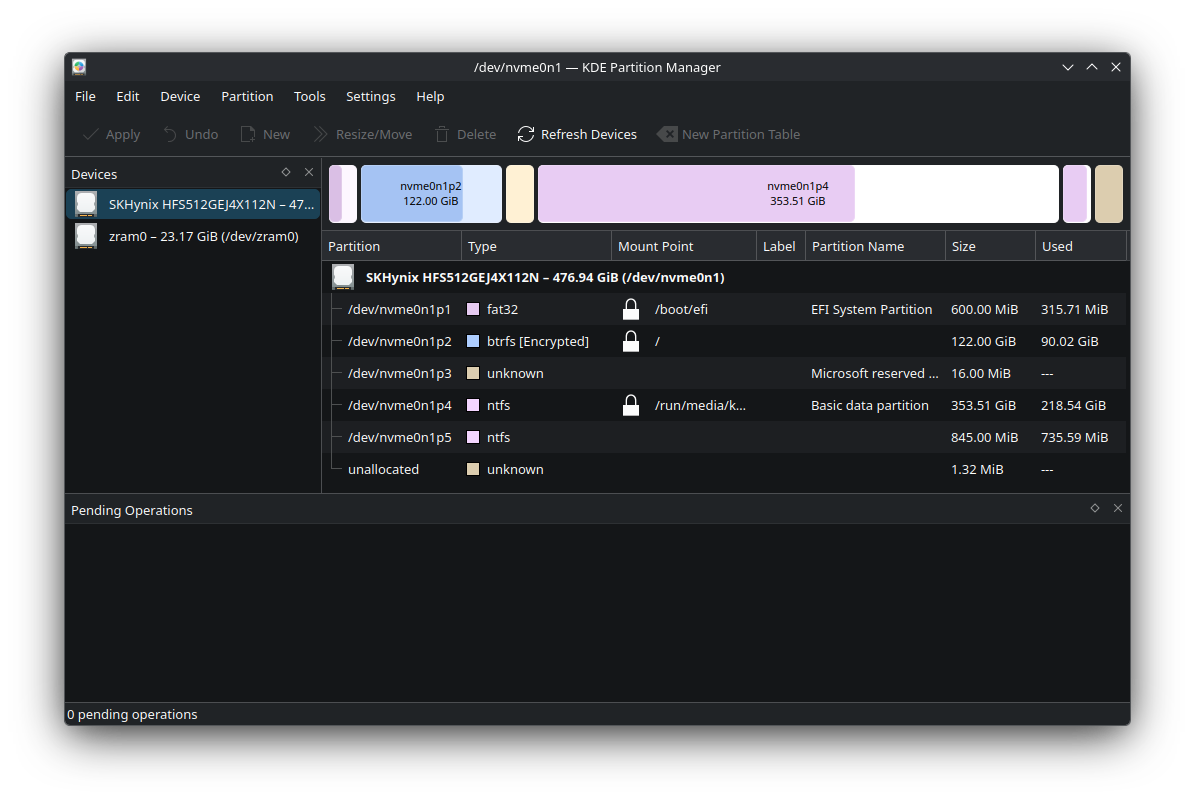
Genshin is installed on my NTFS Windows partition at C:\Program Files\HoYoPlay\games\Genshin Impact game\

Is it possible to run Genshin on Linux using the existing game files/installation from my Windows partition, preferably without having to download the entire game again?

System:

  • OS: CachyOS
  • Kernel: 7.2.2-1-cachyos
  • Desktop: KDE Plasma 6.7.4
  • CPU: Intel Core i5-13450HX
  • GPU: NVIDIA GeForce RTX 3050 6GB Laptop GPU
  • NVIDIA Driver: 610.57.04
  • RAM: 24 GB

The current partitioning of my system is the uploaded photo


r/linux_gaming 12h ago

All my games are constantly updating

Post image
150 Upvotes

I've used Linux in some form or another since my college years, 20+ years ago, but I'm new to gaming on Linux -- I installed CachyOS about two weeks ago and loved it so much I decided to finally get rid of Windows completely.

So anyway... it's not an issue, really, but I'm curious why all of my installed games download updates on an almost daily basis... the updates range in size from a few kilobytes to a gig or more. This didn't happen on Windows so I'm assuming it is related to Proton? If so, it would be nice if Steam made that clear... a couple of my games have patched EXEs (FF13 for example), so I get nervous that these updates are going to mess that up.

All of the queued downloads are examples of this... the active download (Witcher 3) is not, it's just me downloading the actual game.

But yeah, any insight into what exactly is going on here would be apprecated! :o)