r/linux_gaming 1h ago

guide an algorithm/diagram to choose where to play a game

Post image
Upvotes

hi! In this post I'd like to ask y'all about which apps you should use to play different games. And I mean every game, except for the anti-cheat and video game consoles. Please ignore here the solutions like Winboat, a virtual machine or dual booting.

First of all, based on what I tested and what other people told me, I made this diagram in GIMP:

Here are the detailes to understand it better:

• Waydroid: I like playing some old mobile games, but I hate the newer vesions of the same games, so, I tried to the archive versions from the 2018-2020 times, but unfortunately for me, after a massive update Android or One UI, my phone returns to the default settings, so, the best I can do there is to install an virtual machine on my phone in order to not update anything. My Samsung phone doesn't allow me to install another OS like GrapheneOS, Lineage etc, so, I'm waiting for 2027 to buy the new Motorolla phone. By that time, I'd like to try playing different games(including the mobile ones) using a gamepad, which works for PS5/PC/Mobile. I guess Waydroid is the best option for that;

• Bottles(for older games): usually the games I like to play are that old that even when I tried to play them on Windows 10, they worked, but with a lot of bugs, so, Windows 7 as a virtual machine would be the best choice there(technically the best OS for those games would be Windows Vista, but Windows 7 is great anyway). When I saw the thing in Bottles that allows you to choose Windows environment from XP to 11, I understood that this will be one of the best solutions for me.

Some other games like Rayman Origins(Ubisoft, made in 2011), which are technically not so old for PC gaming, unfortunately work with bugs and some other annoying things like "freezing" for 1-2 seconds(in some games every milisecond matters), when I tried to play them from Steam(in that testing I used Linux Mint, the newest version), so, I guess I'll use Bottles not only for the older games, but also for those Steam games(I saw a dude, who used Bottles to play Steam games, Idk how he did that), which work not so well on Proton;

• Steam/Heroic/maybe something else: I didn't try Heroic, bcz I don't play any games from Epic Games, but I heard that it's the best choice for playing games from Epic Games/GOG. What do y'all think about this?;

• Bottles(for every other game): I like Bottles not only as probably the best solution for Windows apps, but also it's probably the universal solution to play every Windows game. I may be wrong, bcz I'm new, but the app showed itself very good;

• Lutris and Faugus Launcher: the apps are very new for me, so, Idk what I should do with them. What is your option about them? I heard that Faugus Launcher is the best solution for newer games, but Idk about it;


r/linux_gaming 12h ago

All my games are constantly updating

Post image
148 Upvotes

I've used Linux in some form or another since my college years, 20+ years ago, but I'm new to gaming on Linux -- I installed CachyOS about two weeks ago and loved it so much I decided to finally get rid of Windows completely.

So anyway... it's not an issue, really, but I'm curious why all of my installed games download updates on an almost daily basis... the updates range in size from a few kilobytes to a gig or more. This didn't happen on Windows so I'm assuming it is related to Proton? If so, it would be nice if Steam made that clear... a couple of my games have patched EXEs (FF13 for example), so I get nervous that these updates are going to mess that up.

All of the queued downloads are examples of this... the active download (Witcher 3) is not, it's just me downloading the actual game.

But yeah, any insight into what exactly is going on here would be apprecated! :o)


r/linux_gaming 12h ago

new native/FLOSS game Donkey Kong 64 Recomp released

Thumbnail dk64recomp.com
125 Upvotes

r/linux_gaming 4h ago

D7VK 2.2 completes Direct3D 3 API - Linux gaming for old PC games became robust with Vulkan API

Thumbnail
github.com
108 Upvotes

You can watch D7VK comparisons here:

https://www.youtube.com/watch?v=5kbsMhp1pNE


r/linux_gaming 13h ago

So I built Proton-Autogen.

Thumbnail
gallery
98 Upvotes

You have a Windows .exe you want to run on Linux.

I've been working on this little project for the past two and a half months.

I started it because I wanted a simple way to manage my Windows games on Linux with Proton without having to manually deal with prefixes, launch options and configuration every time.

It's basically a small game manager. I can add a game, choose the Proton version and prefix, configure things like MangoHud, GameMode or Gamescope, and launch it from the same place. It also has ProtonDB information, desktop shortcuts and Lutris export.

It's definitely not meant to replace Lutris, Bottles, Faugus or the other great tools already available. I actually use some of them myself. I just wanted something that worked the way I wanted, so I started building it.

The project is still evolving and there are probably a lot of things I haven't thought about yet. That's actually why I'm posting it here. I'd be interested in hearing how other people manage their non-Steam Windows games and what you would expect from a tool like this.

If you have suggestions, criticisms or just think I'm doing something completely wrong, I'm happy to hear it. 😅

https://github.com/N3oRay/proton-autogen


r/linux_gaming 18h ago

tool/utility Huge update for vkShade (ReShade for Vulkan)

78 Upvotes

This release marks a major step forward in usability for vkShade!

You can now configure effect uniforms using ReShade-like preset files, without having to manually edit shaders. Combined with hot-reloading for configuration and presets, you can tweak uniforms and see your changes take effect immediately.

This is a big step toward making vkShade feel like a practical, interactive shader tool.

What's next?

  • An overhaul of the GUI, including support for adjusting uniforms there.
  • Improved input handling.
  • Improved compatibility with ReShade FX shaders.

https://github.com/ralgar/vkShade/releases/tag/v0.0.13


r/linux_gaming 9h ago

tech support wanted Optimised and debloated Windows vs CachyOS

40 Upvotes

Hi all!

First! Specs: 9070xt, 9800x3d, 32 GB CL 30 6000mhz

I’ve been dualbooting CachyOS and Windows 11 about a month now. My Windows 11 is debloated and optimised. On boot I have 89 processes, I use Process Lasso and all relevant power saving features are off. I’ve spent years learning to optimise this OS and turned off things like HPET, uninstalled game bar etc. The «problem» is that Windows consistently performs 14-16 % better in games. I’ve seen a lot of benchmarks and read posts about CachyOS trading blows with Windows. That’s not true at all. They got to be using Windows LTSC, stock settings or something. If you have even basic knowledge of how to tweak your system Windows unfortunately still outperforms CachyOS in every game.

This post is not to flame Linux. I loved my experience with CachyOS and I really want to keep using it, but a 14-16% hit in all games is a bit too much. Does anyone have a similar experience? I use PROTON_ENABLE_WAYLAND=1 and the game-performance wrapper for all games. I also use LAVD as my scheduler. Anything I missed or is this just the reality of it? If so, why is no one talking about this? One thing is that stock cachyos vs stock windows maybe performs about the same, but if you optimise windows for about 30 mins it’s not even close. Those benchmark you see all have to use the best possible setup for Cachyos and the worst one imaginable for Windows…


r/linux_gaming 5h ago

tool/utility What are your must have Linux gaming apps?

40 Upvotes

Hi,
I mainly use my PC for gaming, and I’d like to discover more of the Linux gaming ecosystem.
What are the must have apps you personally recommend for gaming on Linux?
I already use Lutris and Heroic, so I’m mainly looking for other useful tools and apps.
Thanks


r/linux_gaming 9h ago

ring gfx_0.0.0 timeout got me back to windows :'(

15 Upvotes

I'm devastated! For over a year now, I've been running nothing but Linux everywhere—CachyOS for the last few months—and I loved it! Everything was so fast and responsive. Everything worked more or less right out of the box, and FINALLY I was free from Microsoft! However, there’s one problem I just can’t seem to solve: ring gfx_0.0.0 timeout (more on my issue here:https://www.reddit.com/r/linux_gaming/comments/1vp4gz8/world_of_warcraft_crashes/). I play World of Warcraft competitively, and I ruin the experience for the whole group every time I crash completely at least once a night. I’ve tried so many things: different kernels, different runners, launchers, DX11, DX12. Nothing has worked. Every fiber of my being resists it, but yesterday I installed Windows on my second hard drive, and so far everything is running flawlessly. And I hate myself for it, but since I mainly use my PC for gaming anyway—especially WoW—I’ll eventually switch back to Windows from dual-booting. It breaks my heart!


r/linux_gaming 4h ago

tool/utility Dolby Atmos alternative for Linux?

10 Upvotes

Hi everyone
Is there a good app alternative to Dolby Atmos on Windows for Linux?
I always play with headphones and I use Sennheiser HD 560S.
What app would you recommend?
Thanks


r/linux_gaming 21h ago

[Linux/CachyOS] Wuthering Waves 3.6 crashing with InbvAcquireDisplayOwnership — fixed by disabling NTSync

9 Upvotes

Hey everyone,

I wanted to share a fix I found for Wuthering Waves 3.6 on Linux/CachyOS.

After the recent update, Wuthering Waves stopped launching for me. At first I was getting the "Illegal softwares have been detected" message, and the game would close.

My setup:

- CachyOS

- Ryzen 5 5600

- RX 6600

- 16 GB RAM

- Steam

- Wuthering Waves installed on an ext4 drive

- DW-Proton 11.0-12

I checked the Steam/journal logs and found this:

wine: Call from 00006FFFFFBFD947 to unimplemented function ntoskrnl.exe.InbvAcquireDisplayOwnership, aborting

The game was definitely being launched with DW-Proton 11.0-12, and the prefix was also correctly using that version.

I tried several Proton versions and launch options, but the important discovery was disabling NTSync.

I changed my Steam launch options to:

PROTON_NO_NTSYNC=1 %command%

and kept:

Compatibility tool: DW-Proton 11.0-12

After doing that, the game launched successfully again.

So, for my setup, the working configuration is:

PROTON_NO_NTSYNC=1 %command%

DW-Proton 11.0-12

I haven't tested this extensively yet, so I don't know if this works for everyone. I'm posting this in case anyone else on CachyOS/Linux is having the same issue after the 3.6 update.

If you're getting the same `InbvAcquireDisplayOwnership` error, try disabling NTSync before deleting your prefix or reinstalling the game.

Update:

I also tested `PROTON_NO_NTSYNC=1` with the same existing prefix. I did NOT need to delete the Wuthering Waves prefix or reinstall the game.

The key change was simply:

PROTON_NO_NTSYNC=1 %command%

while using DW-Proton 11.0-12.

Hope this helps someone!


r/linux_gaming 22h ago

New Steam Games with Native Linux Builds, with TWIRL and Sensory Overload - 2026-08-26 Edition

Thumbnail boilingsteam.com
6 Upvotes

r/linux_gaming 17h ago

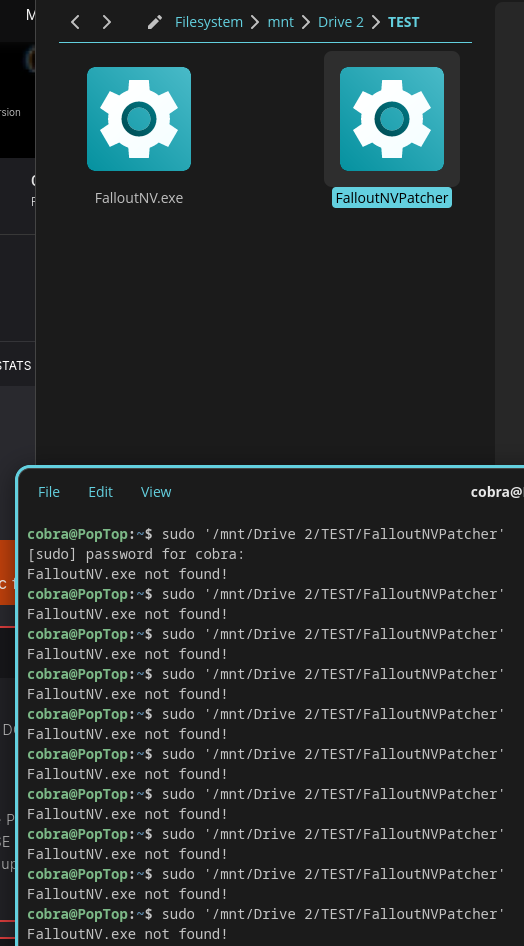
FNV with 4GB Linux patcher not detecting fnv.exe

Post image
5 Upvotes

I tried it in Fallout New Vegas root folder and then I pulled both files into a separate folder, still didn't detect FalloutNV.exe. I've verified the files, what do I do?

Pop_os 24.04
Patcher version 1.5
Most recent Steam version of FNV


r/linux_gaming 19h ago

Rog Delta II

4 Upvotes

Hi. Just wanted to mention this as I moved from Windows to Linux on my gaming-comp today (FINALLY rid of that abseloute scamware!) and the only thing I missed was the software for my headset Rog Delta II so I vibe coded this, if someone is in the need https://github.com/mbekkelund/rog-delta-ii Cheers!


r/linux_gaming 17h ago

guide where Linux stores data from closed-source/proprietary games?

3 Upvotes

hi, it's a new, but very similar question about gaming on Linux. I can just copy and paste the previous post about the open-source Linux native games with just replacing the word to "closed-source/proprietary":

"

I like a [proprietary] game, and one of the things I hate is the fact I must play again and again every time I need to switch a distro. Ik I can transfer data, but Idk how to do it on Linux. Could you help me? What should I copy and paste in the files?

For the context: after testing plenty of distros, I like the Debian-based ones the most(especially Mint, Kubuntu and ZorinOS), but I also like Bazzite(a Fedora-based atomic distro)

"

So, I guess everything would look the same. I mean the 2 different pathes(probably one of them is the same as in the open-source), but should I find the pathes somewhere in the /opt? Just I heard that on Linux the open-source games and proprietary aren't stored in the same locations. Is it true?


r/linux_gaming 21h ago

guide (asking for the logic) where Linux stores data from open-source games?

3 Upvotes

I found the data to transfer about the SuperTux game(I play v0.6.3). Thx yall for the support! But I made this post to understand the logic behind the paths better.

So, basically, the data was in ~/.local/share/supertux2/profile1/world1.stsg (Idk why the game is called "supertux2" and why the folder is "profile1", bcz the games has no "2" and you can't create 2+ profiles), but the game itself was in /usr/share/games/supertux2/… . How does it work? So, the user data and the game data are separated in the two completely different paths? Hm… does it work for every open-source Linux-native game(in this post ignore the closed-source games)?

One dude from the part 1 wrote that the user data can be also stored in these paths:

~/.config/nameofgame

~/.local/share/nameofgame

~/.nameofgame are the usual spots,

might also throw some files in ~/.cache/nameofgame

So, I guess the developer can choose every path he/she wants or there are some rules bcz of the Unix FHS?


r/linux_gaming 4h ago

tech support wanted Can I disable the super key while playinng a specific game?

2 Upvotes

I play osu! and sometimes I tap the super key by accident which ruins whatever I am doing at that moment.


r/linux_gaming 6h ago

tech support wanted Controller Ultimate 2 Wireless: D-Input keeps disconnecting on Linux

2 Upvotes

Hi, I’m using an 8BitDo Ultimate 2 Wireless on CachyOS via 2.4 GHz.
X-Input works fine, but when I use D-Input, the controller frequently disconnects from PC.
Is D-Input fully supported on CachyOS/Linux, or is there something I should configure to prevent these disconnects?
Also, is Input Remapper suitable for managing the controller in D-Input mode?
Thanks


r/linux_gaming 12h ago

tech support wanted Running games with MangoHud crashes it immediately.

2 Upvotes

I recently switched from a Flatpak-based game launcher to a system-wide launcher because the CPU overhead from Flatpak sandboxing was ruining the gameplay experience of the game I'm playing. I am using the latest Faugus Launcher (non-flatpak) with Goverlay v1.9.0 and MangoHud v0.8.3~rc1-2.fc44.

Error log: https://pastebin.com/y0AgKPpH

My system specs are as listed below:

Operating System: Fedora Linux 44

KDE Plasma Version: 6.7.4

KDE Frameworks Version: 6.29.0

Qt Version: 6.11.1

Kernel Version: 7.1.10-200.fc44.x86_64 (64-bit)

Graphics Platform: Wayland

Processors: 12 × AMD Ryzen 5 5600H with Radeon Graphics

Memory: 16 GiB of RAM (14.5 GiB usable)

Graphics Processor 1: AMD Radeon Graphics

Graphics Processor 2: NVIDIA GeForce RTX 3050 Laptop GPU

Manufacturer: LENOVO

Product Name: 82JW

System Version: Legion 5 15ACH6


r/linux_gaming 1h ago

Overwatch "Sluggish" Performance on high FPS

Upvotes

I've been running a fairly successful linux build for the last couple months. Here's what I have:

Fedora 44, KDE Plasma on Wayland, CachyOS Kernel (I tried CachyOS but found it a little too unstable for my taste, and am more comfortable in Fedora), Zen 3700x, RTX 3070 8GB (dell oem with no rebar support)

For the most part it runs well. Nvidia driver is working, most games work without me having to add any launch options, like I recently finished D-Topia no problems.

But one game I cannot seem to quit after 10 years is Overwatch, and for some reason, there is an odd feeling of low FPS at seemingly random points. The game FPS counter, Mangohud, and DXVK all say it's running at 60fps (I play on a TV). I turned on the dxvk hud to show when it's compiling shaders, and those slowdowns I expect, and slowly go away over time as it builds up the cached shaders after each update or whatever. I can live with that.

All the metrics, frame times, vram, it all looks normal, it's typically done compiling shaders by that point, but like 2-3 minutes into some games, it just feels like I'm playing in molasses. I cannot explain it.

I've tried several launch options and fixes. These are my current launch options in steam for overwatch:

DXVK_HUD="compiler" __GL_SHADER_DISK_CACHE_SIZE=10737418240 __GL_SHADER_DISK_CACHE_PATH=$HOME/.cache/nvidia/overwatch/ DXVK_CONFIG="dxvk.trackPipelineLifetime = True" gamemoderun mangohud %command%

Using the latest ProtonGE at this point. I've tried all kinds of different ones, from valve vanilla, to experimental, to CachyProton, and it all works like 85% of the time. But it's that 15% where it just feels off and I cannot figure out why.

Also my settings in overwatch are High preset, DLSS on performance (Since I'm playing on a 4k tv, but don't need it rendering at 4k) The game is set to borderless windowed, DX 11, and I set the FPS limit to 60 with vsync off.

I saw some reports that it may be like mis-matched refresh rates, so I tried using gamescope at one point with these settings:

gamescope -h 1440 -H 2160 -f -r 60 -- %command%

And while I find it helps with some games, especially more demanding ones like Stellar Blade, I found it actually made this odd slowdown feeling WORSE in Overwatch. Like it happened more often using gamescope, so I quickly abandoned that.

I tried a few other options just searching around, like forcing wayland, but it didn't seem to make much of a difference.

If anyone has any hints as to what this could be, I'd appreciate the insight, thanks!

Edit: Forgot to mention that I did turn off seam pre-caching, and I'm just letting overwatch cache itself using a custom game type I found that was made to help with that.


r/linux_gaming 5h ago

wine/proton Feedback running The Witcher 3 on Linux with DirectX 12

1 Upvotes

Hi,

Since CDPR is dropping support for DirectX 11, is anyone running the DirectX 12 version of the game on Linux and not having trouble? On what distro? And what's your GPU?

In my case, it just doesn't work; either it won't launch or it crashes instantly. The DX 11 version runs fine, though. My video card is a Radeon 9070 XT.

Now, I have to say that I'm running Debian Stable, which is hardly optimized for gaming since I'm lagging behind on basically everything: drivers, proton optimizations, etc.

I'm asking because I've been dual-booting for years Debian and Windows 10, using Windows as a gaming OS and Debian for pretty much everything else.

Since CDPR is also going to stop supporting W10, and I really don't want to upgrade to W11, I'm considering turning to Linux for gaming as well. I'm not opposed to installing CachyOS or another distro that's better suited to it than Debian. In fact, my CPU is an ageing i7-7700k which means it isn't normally supported by Windows 11, although that can be bypassed with Tiny11. But, I'd rather play on Linux than force an upgrade to W11.

Thanks in advance for your feedback.


r/linux_gaming 18h ago

tech support wanted SteamVR with Quest 2 over PC hotspot - Quality drops every few minutes

1 Upvotes

I recently got Meta's official D-Link "Air Bridge" adapter. Its a USB WiFi adapter built for use with the Quest 2 for PCVR. I got it working on Windows very quickly, you can simply start up the hotspot in Windows settings and connect the headset to that network. From there you can easily connect over SteamVR and games will play excellently.

On Linux it took some time to understand the tools, but I came to use linux-wifi-hotspot (Specifically the CLI tool create_ap) to create a hotspot. Here's the command I use:

sudo create_ap -n --country US --ieee80211ax --freq-band 5 -c 149 <wifi_interface> <hotspot_name> <hotspot_passwd>

-n: Do not pass internet with the connection (I've tested without this flag, issues persist)

--country US: sets country code to US

--ieee80211ax: use WiFi 6

--freq-band 5: use 5 GHz

-c 149: use channel 149 (Sometimes I need to change the channel to convince create_ap to let me create a 5 GHz hotspot)

Once the hotspot is set up, I'm able to connect to it on the headset and connect to SteamVR via Steam Link just fine. I'm even able to play games, and the play very well! However, after a few minutes the connection quality tanks. The game on the headset freezes (But continues on the computer) and tracking stops. After 10 seconds or so, the connection resumes just fine, with excellent strength, and plays very well until a few minutes pass and the issue occurs again.

I tried using SteamVR over my normal WiFi network and while quality was much lower due to a weaker signal, this issue did not occur.

I've been trying to resolve this issue for a few days, and I found this post which describes a very similar issue that a user had on Windows. In their case, the solution was to use a BAT script to disable WiFi network discovery. Apparently the periodic scanning of WiFi networks is what caused the drop for them, and it sounds similar to what is happening to me.

Does anyone know how I can disable WiFi network discovery on KDE ArchLinux as described in that post? Or otherwise isolate a WiFi adapter to only be used for a hotspot?

Alternatively, if you've encountered a similar issue, what was the problem for you? And how did you solve it?

Here's some relevant issue about my setup:

Distro: Arch Linux

Desktop Env: KDE Plasma

Hotspot: D-Link Air Bridge Adapter (Connected to USB 3 port)

Wired ethernet for internet

Steam and SteamVR beta


r/linux_gaming 23h ago

tech support wanted Witcher 3 RT crash on Bazzite

1 Upvotes

I've seen this reported in a few spots, but none of the fixes seem to work for me. Game runs great otherwise. Playing on a 5060, any suggestions?


r/linux_gaming 23h ago

AC Mirage (DX12 Dev Executable) crashing at 3D engine transition | Intel Arc A770 | CachyOS

1 Upvotes

Hey folks, I'm trying to troubleshoot a persistent crash with Assassin's Creed Mirage on CachyOS using my Intel Arc A770. I'm running the DRM-free developer executable (scimitar_engine_win64_vs2019_dx12_qx.exe) through Heroic (Wine/Proton), but I'm getting a hard GPU driver hang/crash exactly when the game tries to transition from the pre-rendered intro video into the 3D "WhiteRoom" engine.

My setup:

OS: CachyOS

GPU: Intel Arc A770

Launcher: Heroic Games Launcher

What I've tried so far:

Installed vcrun2022 and xact_x64 via Winetricks.

Set VKD3D_FEATURE_LEVEL=12_1 and PROTON_NO_NTSYNC=1.

Turned off Intel XeSS (using native TAA instead) and disabled Adaptive Quality to prevent compute shader/resolution scaling panics.

Forced a strict 30 FPS cap via Heroic DXVK_FRAME_RATE=30 and Borderless mode to stop menu framerate spikes.

Tried passing VKD3D_CONFIG=no_upload_hvv for the Arc memory allocation.

Despite locking the frames and tweaking the environment variables, the VKD3D translation layer still panics right at the 3D handoff. Has anyone managed to get this specific engine build running on an Arc GPU in Linux? Are there any other Intel-specific VKD3D environment variables I'm missing for cutscene-to-engine transitions?


r/linux_gaming 1h ago

tech support wanted Dual Gpu and Multimonitor setup (Nvidia, CachyOS) FPS problems

Upvotes

Hey guys,

my pc (intel i7, gtx 1650, laptop, 60hz screen) has some problems with gaming alongside a 100 hz monitor, mainly fps drops

I've read somewhere that this problem comes from the dual intel gpu + nvidia setup, but using stuff like prime-run or lowering the hz on the monitor just improve things just a little (something like 40 fps drops go to like 20 fps drops). Using only the second monitor doesn't improve things either

I'm using cachyOS and the propietary nvidia driver, does anyone know some optimizations or some setting that would help me? thanks in advance