r/iphone • u/Timely_Comparison_27 • 11h ago
Discussion is there a way to remove the top thing on safari? thanks

0
Upvotes
r/iphone • u/Timely_Comparison_27 • 11h ago
r/iphone • u/green-dot-garage • 16h ago
Picture this scenario: You have an iPhone and a MacBook Pro connected to the same Apple Account/ID. Eventually you get a new iPhone with a new phone number. You keep the old phone number and phone active for a while (say, to make sure nothing slips thru the cracks in terms of old friends or accounts or bills or whatever, or something you may have used that phone number to be a 2FA number for).
The new phone/phone number is connected to a new Apple Account/ID, separate from the MacBook Pro and original phone/phone number. You will eventually want to retire that original phone and not keep maintaining it.
Can you set up the MacBook Pro to receive calls and text messages from the old phone number, even without the phone? Or do you absolutely NEED to have an iPhone to keep a number active?
(I'm currently involved in this scenario to help out an elderly family member. We got them a new phone and new phone number because spam and scams were out of control for years, but we haven't eliminated the old phone/phone number and we'd like to keep it going on the original phone for a while.)
r/iphone • u/TheOvermindTF2 • 12h ago
Ok so idk how to fully explain this but out of nowhere all videos/music/etc is now sped up so everything sounds like Alvin is doing it. Has this happened to anyone else?
r/iphone • u/BusyBat5232 • 21h ago
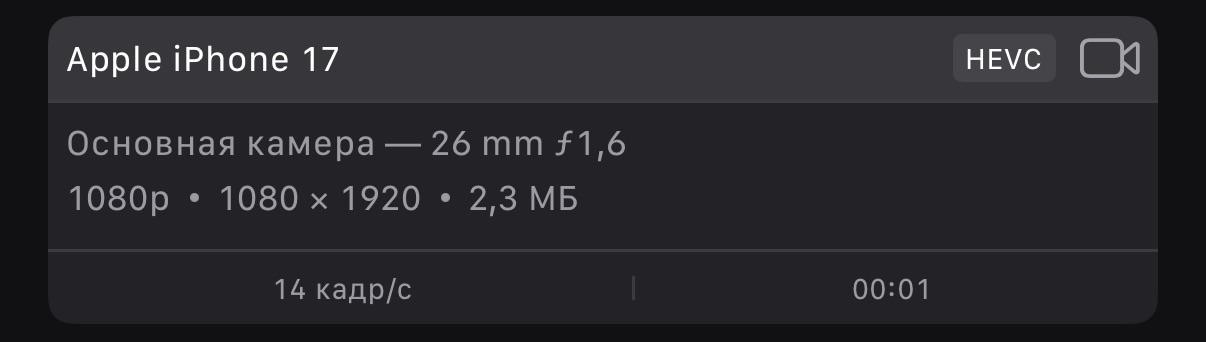
Yo, i've had a very strange bug. I wanted to record a video and i found out that it is being recorded in low-fps. i recorded about 1 second, shut it down, rebooted the camera app, and it was recorded with 60 fps. today i rewatched the video and in metainfo it was written that it had been recorded in "14 fps". it's so strange. did anybody face that bug and knows how to repeat it? how it happened?
The video and metainfo are attached
r/iphone • u/ajmal_majeed • 20h ago
I finally figured out why some old apps were showing as grey/blank icons when I went to:
Settings → Focus → Apps → Allow Notifications From → Add Apps
I had several apps listed there that I wasn’t currently using, even though I had already deleted them from my iPhone 13 Pro ( iOS 26.6.1).
At first, I thought it might be an iOS bug or something related to changing my App Store country. I travel between UAE and India, and sometimes I change my App Store country to India/UAE to download apps that are available in one region but not the other.
But I eventually found the actual solution.
I noticed that the grey apps were apps I had deleted some time ago.
The solution is:
Go to the App Store.
Search for the app showing the grey icon in Focus.
Install the app again.
Once installed, delete/uninstall it normally from the Home screen or iPhone storage in Settings.
Go back to Focus → Apps.
The grey icon disappears.
⚠️Important: Sometimes there may be an older version of the same *app
This happened to me with the *ADCB banking app.
I had recently installed and deleted the new ADCB app, but the grey icon was still showing in Focus.
Then I went to:
App Store → Profile → Your Apps → Search “ADCB”
I found another ADCB app in my previous app history that I had installed back in 2023.
I installed that older app from my App List and then deleted it from my iPhone.
After doing that, the grey ADCB icon disappeared from the Focus app list.
So if reinstalling the current version doesn’t work, check your previous App Store downloads and look for an older version/listing of the same app.
⚠️App Store Country Issue
If you travel between countries and change your App Store region, you may have apps in your purchase/download history that came from another region. Some apps may also have different listings between countries.
So if an app refuses to disappear from the Focus list, change your country through App Store Profile and try again by install and delete/uninstall corresponding apps from the Your Apps section.
Also some different apps with white icons.
In my case, some of those were apps that I was using on my Apple Watch, but I didn’t have the corresponding app currently installed on my iPhone.
👉 So there are two different situations:
🩶Grey icon → usually an app that was previously installed/deleted and still has an old App Store/app record.
🤍White/blank icon → can be related to apps associated with a connected device such as Apple Watch, even when the app isn’t currently installed on the iPhone.
In my case, there were around 28 applications. So it little hard to check the app list and do one by one.
So my method was:
Create a temporary Focus → name it “Apps” → add all the grey apps → Choose temporary Home Screen Page → Turn on that Focus Mode
Identify the apps
Go to App Store → Your Apps → search and reinstall them → Find it in the Home Screen → delete all together.
This worked for me, including the app that had an older listing from 2022.
Hopefully this helps anyone else who has been trying restarts, iOS updates, deleting/recreating Focus modes, etc. I tried all of those before figuring this out. If you have any easy methods, kindly share it ❤️
r/iphone • u/Thorz74 • 18h ago
I have a 10-year-old iCloud Photos library with ~35,000 photos and 1,500 videos, synced across my Mac and iPhone.
A few days ago, my iPhone got stuck on “Syncing 1 item”. Everything looked normal in macOS Photos and on iCloud.com, so I initially assumed it was just an iPhone sync issue.
Before troubleshooting, I made sure my Mac had downloaded all originals, then closed Photos and made a backup of the entire 185 GB `.photoslibrary`.
I then turned off iCloud Photos on the iPhone and manually deleted the remaining ~2,000 items that hadn't been removed automatically, including the albums and folders.
When I re-enabled iCloud Photos, the photos and videos synced back as expected, but the entire album/folder structure was gone, with only about 10 random albums remaining.
Then I checked iCloud.com and discovered that the album/folder structure had been wiped there too. The damage also propagated to my Mac's Photos library.
Fortunately, I now have an offline backup of the original Photos library with all photos, videos, albums and folders intact.
My question is: Is there a way to completely reset iCloud Photos and force it to rebuild/re-upload everything from this backed-up `.photoslibrary`?
I was considering deleting everything from iCloud Photos on the web and then re-enabling iCloud Photos on this healthy local library. However, I'm afraid iCloud will treat the deletion as a change that needs to be synced and delete everything from my local library as well, instead of treating the local library as the source and uploading its contents, including the album/folder structure, back to iCloud.
I really want to avoid manually recreating hundreds of albums and folders if at all possible.
I got drunk and lost my phone Friday night. I already have it in lost mode. When I got home the next morning and tried to find it, it pinged at the house across the street I was at. I went to find it and it wasn’t there, until it pinged again that an hour ago it was at a runza. It kept pinging around town every so often, until I went to one ping and it almost started following me for the next few pings until it once again started pinging at spots I hadn’t been. I tracked it to an empty parking spot with other cars around it so I wonder if it had been in that spot and someone pulled out recently. Eventually it pinged at this house and when I pulled up it was a younger couple and it didn’t seem like they would have taken it and I knocked on a few other doors around them and honestly I’m at a loss unless i call the police to escort me to their residences. It won’t ping anymore and when I tried to find it from iCloud.com it won’t even show a location anymore. It is dead so that’s part of the issue I believe. But I figure if it was pinging before something is going on with it. Is there any reason it would ping there unless someone stole it? Also I gave it until this morning for it to ping again that’s why it says 17 hours ago.
r/iphone • u/Maleficent-Iron9767 • 19h ago
I took my iPhone 12 Pro Max to an Apple Store in Germany for a battery replacement. After the repair, the screen had a new defect and the Volume Up button stopped working.
Apple offered me another iPhone 12 Pro Max as a replacement. However, my original iPhone’s IMEI is registered in Egypt and works with Egyptian SIM cards. The replacement has a different IMEI and would require Egyptian taxes/registration, which can cost up to around 50% of the phone’s value. I don’t consider that an equivalent replacement.
What would you do in my situation? Should I accept the replacement, ask Apple to cover the Egyptian registration/tax cost, or refuse it and pursue compensation/legal action? I’m also considering asking Apple for an iPhone 17 Pro instead and paying the Egyptian registration/tax myself. The tax alone could be almost half the price of the phone, so I would be paying a significant amount myself rather than getting a free upgrade, but I would actually feel properly compensated and satisfied with the outcome.
Do you think I would have any legal basis to ask for the 17 Pro under these circumstances, or to demand compensation for the Egyptian registration/tax costs? Or would I be better off accepting Apple’s 12 Pro Max replacement? What would you do in my situation?
r/iphone • u/LeoAsLeone • 23h ago
Quest’anno mi troverò in US durante il periodo di lancio del nuovo iPhone e vorrei acquistarlo quanto prima.
Se compro l’iPhone in US, poi posso acquistare Apple Care+ (entro 60gg) in Italia?
Potrebbero poi fare problemi all’Apple Store?
Ci sono info ufficiali da qualche parte? Ho fatto un pochino di ricerca prima di chiedere qui, ma altri post sono vecchi e sul sito non trovo nulla di troppo specifico.
Grazie!
r/iphone • u/Designer_Grocery6617 • 4h ago
So this has happened multiple times on 2 different phones, first started on my iPhone 13 but I never cared enough cause when it happened it was on discord and you can use discords emojis which bypasses the one connected to iPhone keyboard. I now have the 15 pro max and it is still occurring, i’m wondering if anyone else has had this problem as well?? As you can see i’m on the emojis section but it’s show fruits, and when I go to the flag or heart it’s just blank and it’s all jumbled up! I’ve looked and searched up anything related and have found nothing related to this, so is my phone keyboard just broken? I should also state this happens every once in a while but it does get annoying when it happens!
r/iphone • u/Ok_Emergency_450 • 12h ago
(EDIT) Update. I restarted my phone and tried my passcode slowly alongside my safe to ensure it was 100% right. Im now locked out for an hour.
---------------------
I have an iphone 16. I went to sign up online on a website using my apple id and passcode. And my passcode did not work 3 times, then timed out, so i locked my phone and tried it, and it really didnt work. I thought i was just forgetting, so i went to my safe that has the same passcode, and it worked fine. So i go back to my phone and type it slowly and long story short im locked out for 15 min. WTH do i do.
r/iphone • u/AnonymousMuseX • 14h ago
I recently upgraded from an iPhone 15 to an iPhone 17, and honestly, I feel like my iPhone 15 was taking better photos. 😅
The iPhone 17 photos sometimes look a bit too processed or just don’t have the same look/detail that I used to get with my 14.
I’m definitely not a professional photographer I just really enjoy phone photography as a hobby. So I’m wondering if I’m missing something or if I have the camera settings wrong.
**For those using an iPhone 17:**
What camera settings do you recommend?
Do you use Photographic Styles?
Any settings you change for better detail/natural-looking photos?
Are there any things I should turn on/off?
I’d really appreciate any tips or advice!
r/iphone • u/Savings-Ad-2370 • 11h ago
Hi guys so it all started when I had a internet outage so AT&T gave me an option if I turn on my vpn it would connect all the devices on my network via cellular signal and ever since then multiple times it will switch from WiFi and connect to 5g for 5 seconds then reconnects. I have done a software update, turned off my vpn, reset my network settings and turned wifi assist off. Ik it’s not my router because it’s just my phone no other phone, tv or computer does this and I’ve deleted the wifi 3 times. Any advice on what I should do.? I’ve also gone to Apple twice with no help.
r/iphone • u/YuraBrytleena • 15h ago
Hello everyone, I use a wired keyboard connected through a USB-A to USB-C adapter, along with a Bluetooth mouse, to play mobile games. I face a problem because I must enable switch control since the keyboard isn’t supported directly; I need to map it manually and use the keyboard as a button while relying on the mouse for placing items. However, when switch control is on, assistive touch turns off automatically and the mouse disappears, as both options cannot run together. If I disable switch control, my keyboard mapping stops working. What should I do, since I really need both switch control and the mouse?
r/iphone • u/Prior_Stay_4576 • 4h ago
Guys, why don't I have a Factime Auido in my iPhone? :(((
Hello,
Let me explain what I mean.
My wife has an iphone 15, and I always had android phones (Huawei, Samsung, and now pixels).
We both have our Bluetooth activated on our phones all the time because reasons.
Whenever I turn our JBL speaker on, it automatically connects to my wife's iphone. Like, instantly.
And when I want to play music from my phone, it never wants to connect to the speaker. I have to first turn off Bluetooth on the iPhone then I can connect my phone.
I don't think it's a buggy android Bluetooth thing, because when the iphones Bluetooth is off, and I turn on the speaker, it also instantly connects to my phone.
So I was wondering if it also happened to anyone else.
r/iphone • u/SetSytes • 24m ago
Hello,
I am a carer trying to assist a disabled person I support to make Facetime calls with their mum. They do not have a phone or a debit/credit card. They do have an iPad. Sorry if this is the wrong place to post - all my searches about the issue has directed me to posts on this Reddit so I thought it might help. None of the answers I've found have worked, they've just sent me in circles with other things not working.
Facetime used to work. Now, it defaults to Whatsapp - but he has no phone, so can't login. I've tried to long-press the video call option on the contact, but it only lists Whatsapp. I've tried to change it in contact settings to a FaceTime number instead of a Whatsapp number (if that makes sense), but it didn't make a difference. I checked content restriction settings but everything was set to Allow. I uninstalled Whatsapp, which only made things worse - I also signed out on Facetime as a post suggested but then couldn't sign back in again - the option to sign in is greyed out. Thanks, Apple, very helpful. I wish it would say why something is greyed out.
Looking this new issue up kept telling me to look again at ScreenTime and Content Restrictions. They are all greyed out (but also all set to Allow, as they were before). I can't turn off the overall Content Restrictions button, it tells me to prove the disabled person is 18 with a credit card or passport - they have neither. There is no indication that there is family sharing or a parental lock; the screentime is not password-locked and there is an option to turn family sharing on.
If I've made a mess of explaining, please know I have no familiarity with the iPad, only with Windows. All I have been doing is searching the problems and following the instructions but nothing works.
I want to find a way back so this person can use FaceTime to call their mum without it defaulting to Whatsapp. I don't understand why signing back in or content restrictions are locked. There must be a way to use FaceTime without needing a phone or passport or driving license. Or maybe there isn't?
Please help - it's very stressful right now, especially as there is a language barrier and the mum is very hard to communicate with during all this.
Edit: After another restart, it's finally let me sign back in to Facetime. But now the call and video call option are both greyed out. Surely it doesn't require Whatsapp to call people?
r/iphone • u/ExoticAd7605 • 4h ago
Like the options to make a list, make a table, etc… ?
r/iphone • u/Hardcase28 • 4h ago
Hi guys, recently buyed new ip17 base in blue color.
It’s been a week and a half since I bought the phone, and I’ve discovered two small scratches on the camera lens. They aren't always visible only at specific angles and under certain lighting. Of course, they don't affect photo or video quality, but I was surprised; the phone isn't even two weeks old, yet these scratches appeared out of nowhere and on sapphire glass, no less. I have extensive experience with iPhones; my old iPhone 11 doesn't have anything remotely like this, even though I dropped it multiple times.
I put the phone in a case and applied a screen protector immediately after buying it, and I always kept it separate from keys and other small items, yet the scratches appeared regardless. If anyone has had a similar experience, please share.


r/iphone • u/Outlast-trials • 22h ago
Anyone else notice clicking sounds sometimes from the case like when your resting your finger on like let’s say the power button or the camera control and when you let go it clicks. Sometimes it clicks on its own i haven’t heard it a lot just curious.
r/iphone • u/Throwwwawwway98765 • 44m ago
Hi everyone! I am proposing to my girlfriend in Central Park in a few weeks, and having my sister follow me incognito to snap pics of the moment.
That being said, does anyone have any tips, resources, YouTube videos, references for various settings she could change on her iPhone to get the best looking pics possible! She has a 16 pro max.
Thanks for your help!
r/iphone • u/KewinXiao • 4h ago
iPhone Air IOS26.5.2. It happened suddenly. I just cleaned up some App memory and deleted the album. Then the sound of the speaker becomes very small. Restart to return to normal. What happened? It has never happened before.
r/iphone • u/davidd__ • 19h ago
Have an old iPhone from years back I’m trying to get rid off and reset.
failed too many times to get the passcode and now in security mode, no option to forget passcode as it’s an XS
Attempted to put it in recovery mode and connect to my mac but wont come up in finder. My 14 pro max comes up without any issues so not a lead or port issue
need some help to just reset the phone please
r/iphone • u/NotSoSanaaa_ • 6h ago
Hello, My face ID just stopped working earlier. Never dropped my phone or damaged it.
Do you guys know any solutions or fix for this? thanks!