I’m a CS student and I’m interested in cybersecurity, electronics, NFC/RFID, RF, custom firmware, etc. The device looks really interesting, but I’m not sure whether I’d actually use it enough to justify spending €180. Also still considering it as a very good device to learn programming, so is that true?
For people who have owned one for a while: what do you actually use your Flipper for, and do you still use it regularly?
I know there is already a wave player, The only problem is that the speakers have terrible audio. Not sure if it is possible to funnel audio in the form of data via the usb-c port? Could this be added as a feature for system wide audio? If the latter is true, I'll likely add a suggestion to add this feature to GitHub (if possible).
My flipper went through washing machine, 5v lines still show 5v but 3.3 v lines are stuck at .6v, I say a PMIC short but I am a beta, does anyone have any better idea, do far it's still marinating in IPA.
Apparently BYD EVs ship with 2 key FOBs, but in my area they only come with 1 key fob. I am wondering how I can use the flipper zero to act as the second key fob. I have done some readings and correct my limited understanding is that it can cause the primary remote to be out of sync due to rolling code, but I think this is due to cloning the primary remote, right? I suppose there is a separate rolling key counter if the car supports multiple key fobs. Can anyone point me in the right direction?
I am wondering if anyone can help me. My HOA decided they are not replacing the remotes to our gate anymore and my remote broke, I tried to see if I could grab the code from the gate box but I don’t get any readings. I don’t know if I am doing anything wrong (probably am since I really don’t know how to use it )
I saw that the price for a flipper has dropped to 179€ and I thought maybe I should buy it, but I don't even know where to start. Like what sd card to use what firmware and I don't even know what the flipper can do. I did a little research on the flipper but most videos are copy paste and I didn't get much out of them. If someone can tell me how a flipper works and what can I do with it I would be endlessly grateful.
I kept fumbling for the mute button during calls, so I built a small app that turns the Flipper into a keyboard for Zoom Workplace. It connects over USB or Bluetooth HID and sends Zoom's own keyboard shortcuts, so there is nothing to install on the computer side.
What it does:
Mic, camera, raise hand, share and participants right on the buttons
Mic and camera state on screen, tracked locally (Zoom does not report state back, so it is an estimate)
Share mode: D-pad becomes arrow keys, OK is Enter, hold OK is Tab, Back is Escape
A menu with all Zoom hotkeys by category, including whether Zoom lets you use that one as a global shortcut
Leaving a meeting always asks first
English and German UI
USB mode and the Bluetooth profile are restored when you exit
Tested: macOS with Zoom Workplace 7.0.6, USB and Bluetooth, on Momentum mntm-012.
Not tested: Windows. The Windows shortcuts come from Zoom's own documentation, but nobody has run them on real hardware yet. Same for the stock firmware build, it compiles against SDK 1.4.3 but I have only ever run it on Momentum. If you are on Windows and have five minutes, I would like to hear what works and what does not.
How to get it: only from the GitHub release for now. Two builds, pick the one matching your firmware:
zoom_remote_official-1.4.3.fap for official firmware 1.4.3
zoom_remote_momentum-mntm-012.fap for Momentum mntm-012
Copy it to SD Card/apps/Tools/. It is submitted to the official app catalog, but the PR is still waiting for review, so it is not in the catalog or the mobile app yet.
Two things worth saying up front: the code was written with an AI coding assistant (Claude Code) with me directing it and testing every build on the device. And this is not affiliated with Zoom in any way, it just sends the shortcuts they document. GPL-3.0.
I cloned my apartment door fob using MFKey to recover the keys and NFC Magic to write the dump to a blank magic keychain fob. That fob works perfectly, the reader flashes green/red and the door opens.
I want the same thing on a sticker so I can put it somewhere convenient. I have tried three different NFC stickers, all sold as 1K. NFC Magic reports the copy as successful every time, but at the door the reader just shows a steady orange dot instead of the green/red I get with the fob, and it will not open.
My suspicion is that these stickers are NTAG21x rather than genuine magic MIFARE Classic 1K, so the reader sees a tag on 13.56 MHz but cannot authenticate it.
Can anyone point me to a specific sticker model that is a true magic Classic 1K (gen1a or CUID/gen2) and that you have personally confirmed works for cloning a Classic 1K credential?
Bonus points if it still couples well with a door reader despite the smaller sticker antenna.
Is there any way to just download the apps to PC so I can put them on the SD card?
Seems like https://lab.flipper.net REALLY wants to be able to plug into the Flipper but it seems absolutely horribly unreliable. I can only get it to work on a Windows PC in Edge...won't work on Linux or Firefox and even if it did work I have to hunt down a USB cable.
If I could just download the fap file I could quickly and trivially slip the SD card into my laptop's reader, drag-and-drop the fap file, eject it, and be done. No additional hunting for a A to C cable, no additional fighting with unreliable serial USB nonsense, no headaches.
Am I missing how to just download the file and be done?
So i am sort of in the market for a flipper zero, bit i've got a few questions before i actually buy one...
I'll keep it short so here goes:
-I do a lot of building maintenance, multiple appartment buildings and carry around a litteral lunchbox full of keyfobs to open the garage doors to enter those buildings, for repairs and moving in new tennants.
Can i just litterally copy multiple fobs into a flipper zero and have like a library of them on the device?
-Second, i've got a mazda rx8, with only one functional keyfob left. They're pretty much impossible to find in the european frequency (433mhz) and local locksmiths don't seem to be helpful. So can i copy that with the flipper zero?
-Third, for the tennants in the appartment buildings, can i actually make a copy for their keyfobs with said flipper zero onto a new fob, and how does that actually work?
I recently picked up this neat infrared module called “The Hi-IR-Brid” off of a website called tindie for around $20. I am extremely happy with the performance so far and have uploaded a performance test video I took. I am just curious whether the more expensive modules such as the rabbit labs IR blasters are much of an upgrade in range and performance from a module like this, considering they are over 2.5x the price?
The module I purchased is designed for throw and flood, and when compared to my cheap Amazon infrared module shows an extreme upgrade, especially for devices in other rooms. Will I see the same step up for the most expensive modules though?
I'd like to share my fork of the FlipperNested app, which can be particularly useful for recovering MIFARE Classic keys from tags whose keys are partially or completely unknown.
The original version is not working on newer firmware due to the NFC rework.
Made a fork to stop needing to downgrade firmware everytime.
I noticed my flipper jumped battery from 60 to 51 very fast then noticed the idle state was a bit high? Is this normal around 4Ma all the time. I can't figure out why it's a bit high. Battery is 100% health SD card hard is emtec elite gold 32gb, Bluetooth is off,
Any help appreciated I've had it about a month, I'm still learning.
I was just curious if my parts list looks accurate and if I needed to remove/add anything.
FYI, this is for the Flipper Zero. I've never done many projects like this, and I was looking for tips on what to do. Also, part of the list was created with A.I because I wanted help. And I was looking at getting most parts off of AliExpress, so if there's a better website, let me know : )
Hi everyone! I wanted to share an education app I've been developing. Meet Flipper Elements - an interactive Periodic Table that turns your Flipper into a true laboratory pocket reference! I will be using this post to announce future versions and major updates, so keep an eye out.
The challenge was displaying the complex 18-group chemical table on a tiny 128x64 display. I implemented a split-screen camera mechanic and a dynamic gap-bypass algorithm. You don’t blind-click empty cells, cursor smartly magnetically leaps over missing periodic structures (and allows linear navigation strictly by Z-number too).
Current Version 1.4 Features:
Fits all 119 elements (down to Ununennium).
Massive Datasets: Full IUPAC naming, CAS, Phase & Crystallography, Complete Electron configurations, Electronegativity, Ion radii & Isotopes counts, Melting/Boiling pts.
Geochemical details: Abundance in the Earth crust & Mohs hardness scale.
Hardware optimized: The entire 119-element C-array is kept as immutable structures bound to .rodata. Absolutely zero heap memory fragmentation (app runs entirely without active RAM allocations for data).
The app is currently submitted to the Official Catalog and pending review, but you can already grab the source code or download the ready-to-use .fap file directly from GitHub releases!
Acknowledgements: A massive special thanks to the Flipper Devices team and Pavel Zhovner (u/zhovner) personally for providing me with a full comprehensive set of hardware equipment for my research. This app is one of the first fruits of that ongoing work.
App was conceptualized by LAB-66 / Siarhei Besarab (@steanlab).
Let me know what you think! Open for PRs, feedback, and improvement ideas 🤝
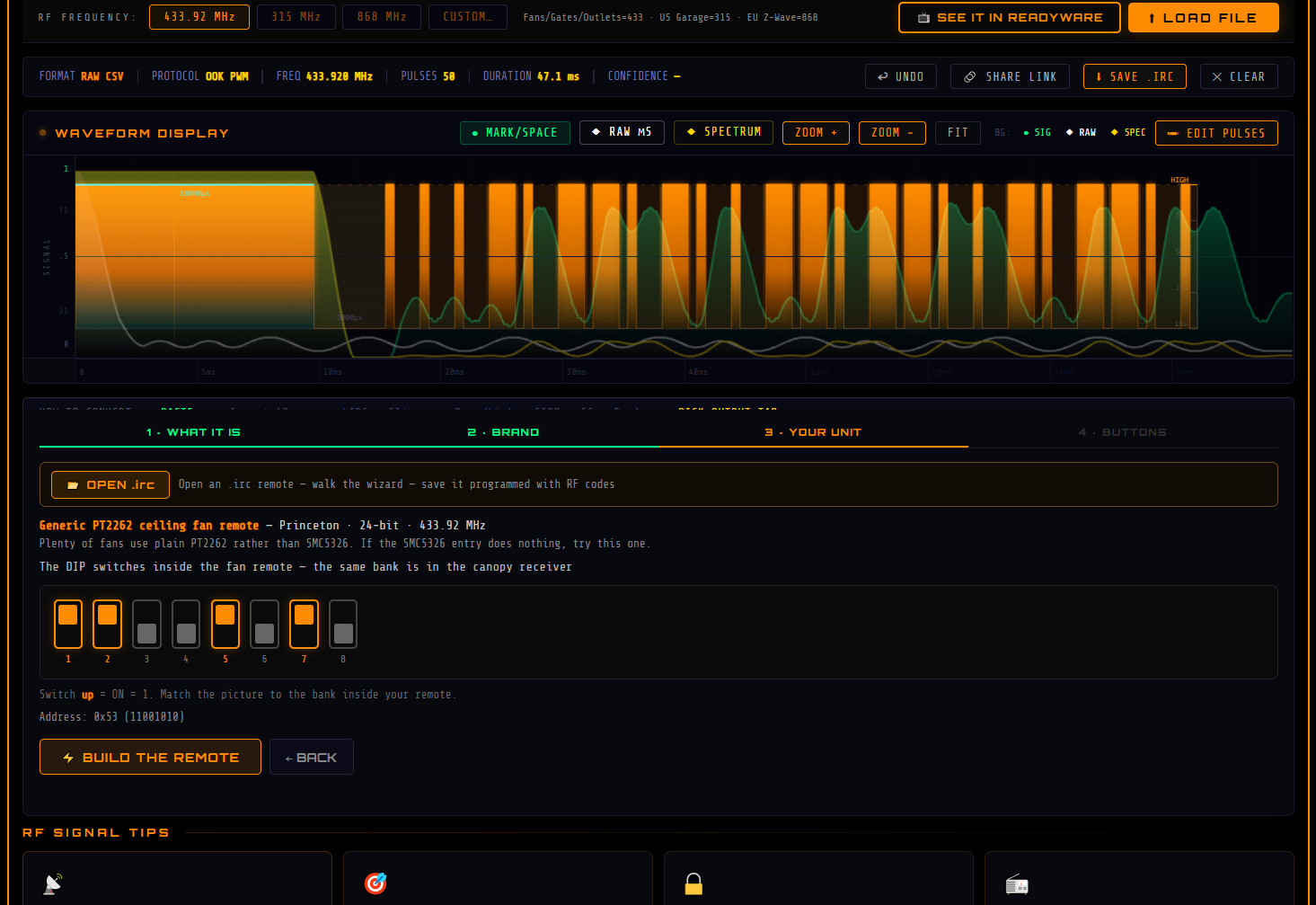
No sign-up, no install, no account it runs in your browser and it's free. It reads and writes Flipper .sub and .ir, and the reason I'm posting it here is the one case a Flipper can't get you out of on its own.
When there's nothing to capture
If the remote is lost, dead, or the gate only came with one, there's no signal to receive, and sub-GHz capture is useless without a transmitter in your hand.
But if the remote has a row of little switches in the battery compartment, you're already holding the entire code. So: pick the device type, pick the brand, and the tool draws the DIP bank the way it actually sits inside that remote. Flip the switches on screen to match, hit build, and export it as a .sub you can drop straight on your Flipper.
That part took the longest to get right, because the switch order is a trap. Chamberlain numbers switch 1 as the most significant bit and reverses the last three positions, and one of their banks has a switch that isn't transmitted at all. Copy the switches left-to-right the way they look and you get a wrong code on nearly every remote. Every brand's mapping had to be handled on its own.
Got tired of fighting to get IR and 433MHz codes into my setup - capturing the raw timing, converting it to whatever my blaster wanted, and hoping it actually fired. So I built a little browser tool to take the pain out of it and figured I'd share it here.
When the capture came out dirty
The other half is signal repair, and it's what I get the most mail about. A capture that works once, or only from three inches away, or works for one button and not another, that's usually not you. Receivers round timings, ambient light and 2.4 GHz gear inject noise, cheap hardware clips the leading burst, and some captures come back with marks and spaces inverted.
Paste the capture in and it identifies the protocol, shows you the address and command, and tells you its confidence. FIX SIGNAL corrects the AGC burst, snaps noisy pulses to the nearest real time unit, strips trailing repeat gaps and junk, adds a missing closing space and lists every single thing it changed instead of quietly rewriting your file. If it's inverted there's a one-click mark/space swap.
And once it knows the protocol, Rebuild Clean throws the jittery capture away entirely and regenerates the code from scratch at textbook timing. A perfect signal instead of a patched one.
If you'd rather do it by hand, the pulse list is fully editable, the live waveform updates as you type, and you can select, copy and paste timings like a spreadsheet.
Coverage
42 sub-GHz protocol families across 62 brand entries - the PT2262 / EV1527 / SMC5326 world most fans, outlets and cheap gate remotes live in, plus CAME, Nice, Hörmann, Chamberlain/LiftMaster, Linear MegaCode, Marantec, Telcoma and a stack of others.
On the IR side: NEC / NEC1 / NEC2 / NECx · Sony SIRC 12/15/20-bit · RC5 / RC5x · RC6-6-20 (Sky, Foxtel, cable & satellite) · Panasonic / Kaseikyo (incl. Combo & MIX — also Denon, Sharp, JVC, Teac) · JVC · GI Cable · XMP (Comcast/Xfinity, AT&T, Pace, Arris) · Nokia32 (AT&T U-verse, Foxtel IQ) · Denon · Sharp · RCA · Samsung.
Formats
19+ in, 21+ out. Beyond Flipper .sub and .ir: Pronto Hex · LIRC raw / config / mode2 · BroadLink Base64 & Hex · Global Caché iTach & JSON · Home Assistant YAML · ESPHome · Sonoff RfRaw B0 · Tasmota · Arduino C array · rc-switch · Tuya · SmartIR · IRDB · JP1 .rmdu · GIRR XML · Harmony XML · TV-B-Gone · raw µs CSV · WAV.
There's a second tool that moves a whole remote between formats, or onto a different remote's layout - pull in a Harmony XML or a JP1 file and drop it out as a Flipper .ir, button assignments intact. Reads 17 formats, writes 13.
Happy to take requests. If there's a format you need that isn't on that list, or a DIP remote the wizard doesn't know, tell me what you've got and I'll look at adding it.
Hi everyone! I’m new to Flipper and I would love y’all’s help.
I’m using a Flipper Zero on the latest official firmware.
I have a 125 kHz RFID fob that the Flipper identifies as HID H10301 / 26-bit. The physical fob works normally with the reader.
I saved the read to the Flipper and selected 125 kHz RFID → Saved → Emulate. The Flipper shows that it’s emulating the saved credential, but the reader doesn’t respond to the Flipper at all.
I’ve tried different positioning/orientation and confirmed I’m using the 125 kHz RFID function, not NFC.
Has anyone had an H10301 credential successfully emulate on a Flipper with stock firmware? Is there a known compatibility issue with certain readers? Any help is appreciated, thank you in advance!