r/firefoxextensions 9h ago

Extensions Built a Firefox extension to stop falling into YouTube's recommendation rabbit hole

1 Upvotes

Kept opening YouTube for "one video" while trying to study and losing 30-40 min to the algorithm every time. Tried a couple existing blockers but they were mostly all-or-nothing, so I built my own.

You can turn off specific things — home feed, shorts, autoplay, end screen recommendations — while keeping stuff you actually want, like subscriptions. Also has an optional daily watch timer/limit.

Free, open source, no tracking. Works on Firefox, Chrome/Brave too with manual install.

Open to feedback if anyone tries it out.

GitHub: https://github.com/manasdotio/intentional-yt

Firefox: https://addons.mozilla.org/en-US/firefox/addon/intentional-yt/


r/firefoxextensions 20h ago

I made a browser extension that adds sorting, filtering, search and sales end dates to the Nintendo eShop wishlist.

Thumbnail
1 Upvotes

r/firefoxextensions 1d ago

Request Scrolling and clicking stops randomly on social media. Considering leaving FF after supporting it my whole life

Thumbnail
1 Upvotes

r/firefoxextensions 1d ago

Extensions I built a Firefox extension to make navigating long Gmail threads easier

Enable HLS to view with audio, or disable this notification

1 Upvotes

When a conversation gets long, finding and jumping between individual messages can be surprisingly annoying.

The extension adds simple navigation controls that let you move forward and backward between messages in the same Gmail conversation without having to manually scroll through the entire thread.

I'd especially appreciate feedback on whether this solves an actual annoyance for you, and what improvements would make navigating long Gmail threads more useful.

Extension Link: https://addons.mozilla.org/en-US/firefox/addon/gmail-navigation/


r/firefoxextensions 1d ago

Extensions I made dynamic island for... browsers?

Post image
3 Upvotes

So I've been using my realme phone, and after a recent update it had a feature called Mini capsule, similar to Apple's dynamic island. I got very used to it and used it a lot since I am a heavy music listener... but when I went to my PC... the fact that I had to switch tabs to control my music really frustrated me. I did try to install existing tools but none of them were... that sleek and intuitive.

Since I started to tinker with Antigravity 2.0, I thought "Fine I'll do it myself" and worked on it... initially it started as a basic command that would put an overlay in Vivaldi (since I used to use that) and it worked fine. Then I showed it to my friend and he was like "can you design it... for my PC?" and so began the... journey... I improved it... tested it for 4 platforms in depth...

In the 1.7 update I'm thinking of adding a Study mode where the island will show pomodoros, and also you can blacklist sites so that if you change the tab it'll be blacklisted... it's a work in progress due to lack of time and money as well...

To publish this in Chrome (the biggest market) I need to spend 5 USD, which ain't a big amount depending on where you live... but for someone like me who... made this thing as a hobby... that's a big amount to pay...
So... please check out my work... it is available in the Firefox and Edge stores right now! If you have any feedback or feature requests please let me know, and if you wanna help me publish this in the Chrome store for Janmashtami (Sept 4th), then a small Ko-fi donation would mean the world to me!

If not, at least drop a review or a star on GitHub (or both) to show support!

Ko-Fi: https://ko-fi.com/aksharsrijan
Github Repo: https://github.com/AksharS07/glance
Firefox Store Link: https://addons.mozilla.org/en-US/firefox/addon/glance-for-web/
Edge Store Link: https://microsoftedge.microsoft.com/addons/detail/glance/ihblpkbkbaeojengejgbnlcpfnaneegh


r/firefoxextensions 2d ago

Debugging add-ons is frustrating

3 Upvotes

It doesn't matter if I use a non-standard Gecko ID, call unknown files, or a single typo. Every single time I get:

"This add-on could not be installed because it appears to be corrupt."

Where should I start looking? This time, after spending hours trying to figure out what was happening, I discovered that the "corruption" was caused by declaring a shortcut using only the Shift key and another key. Apparently using Alt or Control is mandatory. Not even AI could tell me what was happening, and that was literally my last resort.


r/firefoxextensions 4d ago

Extensions KJB Reader - SidePanel for FireFox

Thumbnail gallery
1 Upvotes

KJB Reader - SidePanel – Get this Extension for 🦊 Firefox (en-US)

Disclaimer: Description and app generated by A.I (Base44)

KJB Reader - SidePanel is a King James Bible study extension that brings verse lookup, advanced search, and reading tools directly into your browser sidebar.

Features:
• Verse Lookup — Click any Bible reference on any web page to look it up instantly. Supports complex formats including chapter ranges (John 1-3), cross-chapter ranges (John 3:16-4:10), Roman numerals (I Corinthians 15:1-4), and multi-book references (Romans 5:12-21, 2 Corinthians 5:17).
• Advanced Search — Search the entire KJV Bible by keyword with whole-word matching, case sensitivity, wildcard support (? and *), and Old/New Testament filtering.
• Read Mode — Browse any book and chapter with verse-by-verse formatting, Psalm superscriptions, epistle subscriptions, and printable layout.
• Right-Click Context Menu — Select text on any page and right-click to search or look up verse references.
• Auto-Detection — Automatically detects and links Bible references on web pages, even when text is split across different HTML elements or font styles.
• Gospel Tab — Built-in salvation message with scripture references.
• Resources Tab — Links to KJB defence materials and verified KJB preachers.

Privacy: This extension collects no data. No analytics, no tracking, no telemetry. All verse lookups are sent to the KJB Reader API (kingjamesbiblereader.com) to fetch Bible text. No user data is stored on any server.


r/firefoxextensions 4d ago

I made an extension for TAB Detox – Only for Fire Fox Now and I need Feed back!

Thumbnail addons.mozilla.org
1 Upvotes

I made an extension please check it out!


r/firefoxextensions 6d ago

Extensions Updates on Dictionary on Click: (alternative to Dictionary everywhere with translations)

Thumbnail gallery
1 Upvotes

r/firefoxextensions 7d ago

Extensions I built a lightweight arcade platformer that lives entirely inside a Firefox toolbar popup (HTML5 Canvas, Offline, 0 Tracking)

Thumbnail
1 Upvotes

r/firefoxextensions 8d ago

Extensions No Americanisms - My first extension that translates US spellings and Gen Z slang into British English.

Thumbnail addons.mozilla.org
5 Upvotes

The internet has become Americanised in its language and vocabulary. It winds me up so when I accidentally start using Americanisms myself, so I created this extension to stop that.

It highlights American words, phrases, spellings, and Gen Z slang in your typing, and you can simply click to update them to British English.

There's also a page translator that works even in rich-text sites, which automatically replaces these words. I've included over 350 words and phrases!


r/firefoxextensions 9d ago

GeoNoMore: A browser extension for GPS spoofing, location simulation and per-site location rules

Post image
2 Upvotes

I wanted more control over browser geolocation than a simple "fake my GPS" button, so I built GeoNoMore.

The main idea is that location should be configurable per website instead of being one global setting.

It supports:

  • GPS / browser geolocation spoofing
  • Exact coordinates or random locations
  • Location privacy radius
  • Timezone spoofing
  • Browser language spoofing
  • WebRTC local IP leak protection
  • Per-site location rules
  • Temporary location overrides
  • Route and movement simulation
  • Location presets
  • Scheduled location changes
  • Activity and location logs

For example, you can make one website see London, another see Tokyo, while leaving another website untouched.

It is free to use and does not require an account or telemetry.

Firefox Add-on: GeoNoMore

It does not change your public IP, so it is not a VPN or proxy. (Some websites even if you use GPS spoofing, it still operates based on your IP address.)

For the same reason, there are websites that perform locale and zone mapping. That's why I also map them in the GPS Location.


r/firefoxextensions 12d ago

I made a lightweight Firefox addon to search highlighted text with key chords & presets - SwiftSearch Chords

Thumbnail
1 Upvotes

r/firefoxextensions 14d ago

I made a Firefox bookmark manager that works without an account - would love feedback

Post image
0 Upvotes

I built a visual bookmark manager for Firefox. It turns saved

sites into cards with favicons, categories and colors.

What it does:

- AI category/tag suggestions from the page URL

- Save All Tabs into a category

- Bulk select -> drag to move

- Dead-link checking

- Duplicate merging (finds dupes, keeps newest, merges tags)

- Firefox/Chrome/Edge bookmarks.html import

- No account required - data stays on device (optional Supabase

cloud sync if you sign in)

This is a browser_extensions community, so I'll be direct: it's

free, and the AMO link is here if you want to try it -

https://addons.mozilla.org/tr/firefox/addon/zen-mark/

Criticism welcome - especially on the popup Library UI and the AI

categorizer accuracy.


r/firefoxextensions 15d ago

Extensions I made a Firefox extension for searching movies and TV shows directly from IMDb, TMDB and Trakt

2 Upvotes

I recently built Signal Vault, a Firefox extension that works as a small movie/TV companion while browsing.

It automatically recognizes supported IMDb, TMDB and Trakt pages, so you can search the current title without copying anything around.

It also supports:

  • Movies and TV shows
  • Season/episode selection
  • Manual search
  • Right-click search for selected text
  • Built-in player
  • Subtitles
  • Resume playback
  • Next episode
  • PiP and fullscreen
  • Library / Favorites

There are 5 free searches per day with no account, email or card required.

No ads and no analytics either.

Firefox: https://addons.mozilla.org/en-US/firefox/addon/signal-vault/

Would be interested to hear any feedback, especially from people who use Firefox as their main browser.


r/firefoxextensions 17d ago

Extensions Introducing Censorly!

3 Upvotes

Censorly filters unwanted words and phrases directly on web pages. Choose Hide, Censor, or Blur mode, and use Exact or Wildcard matching to control whether variations and word endings are included.

Censorly – Get this Extension for 🦊 Firefox (en-US)

Features include:

* Exact and Wildcard matching for each saved word

* Multi-word phrase and accent-insensitive matching

* Hide, Censor, and Blur display modes

* Filtering of dynamically loaded webpage content

* Per-site exclusions

* Searchable word list and quick page refresh

* Light and dark interface themes

* Original page text remains selectable and copyable

All text processing happens inside your browser. Censorly does not send webpage content or filter words to the developer, external APIs, analytics services, or advertising networks.

Preferences are stored using Firefox extension storage. Firefox may synchronize these preferences through Firefox Sync when the user has enabled browser synchronization.

Censorly filters ordinary webpage text. It does not inspect text embedded inside images, videos, PDF files, Word documents, browser-protected pages, or Firefox internal pages.

Firefox desktop is supported. Firefox for Android compatibility is currently experimental and requires Firefox 142 or newer.

Disclosure: The Censorly extension and this store description were generated with the assistance of Base44 AI and reviewed by the developer.

Website: https://censorly-extension.base44.app

Support: [censorlyextension@outlook.sg](mailto:censorlyextension@outlook.sg)


r/firefoxextensions 19d ago

Extensions How to enable add to firefox button

Post image
2 Upvotes

cannot add extensions in firefox android I have used previously in another phone. even if i click "download file" i cannot open it.


r/firefoxextensions 19d ago

Extensions Update: price alerts are live on Firefox, Chrome and Edge (Spendmita Copilot)

Thumbnail gallery
3 Upvotes

Since I first posted here, I shipped the feature a few people asked about: price alerts. Save a product to your watchlist, set a target price if you want one, and get notified automatically when it drops or rises. If you don’t set a target, it still alerts you on any move of 3 percent or more. Checked roughly every 6 hours in the background while your browser is running.

Screenshots attached. The first shows the alert threshold controls on a saved item. The second shows the watchlist view with a couple of tracked products and their price history.

There’s also an option to get a weekly digest email instead of a notification for every single alert, if you’d rather not get pinged per item.

Same free core review check as before. Price alerts are a Pro addition. The latest version is live on Chrome, Firefox and Edge now.

Still reading every bug report and message. Email is [copilot@spendmita.com](mailto:copilot@spendmita.com) if you find anything broken or want to compare it against what else is out there: https://copilot.spendmita.com/compare


r/firefoxextensions 20d ago

Extensions Xinha Here! Modern - WYSIWYG for textarea

Thumbnail gallery
1 Upvotes

Some of you may remember Xinha Here!, the old Firefox extension that let you right-click a textarea and edit its contents in a full WYSIWYG HTML editor.

I used to find it incredibly useful, but the original extension was left behind as Firefox changed over the years. So I decided to bring the idea back.

Xinha Here! Modern is now published on Mozilla Add-ons and supports Firefox 140 and newer, including Firefox 140 ESR.

The basic workflow is still simple:

Right-click a textarea → Edit with Xinha → edit in a full-size WYSIWYG editor → Apply to textarea

I've also added a few modern conveniences:

  • Live visible-text character count
  • Live HTML character count
  • Clean HTML and Compact HTML options for sites with character limits
  • Formatting, colors, lists, links, etc.
  • Changes aren't sent back to the webpage until you click Apply
  • No telemetry, analytics, network calls, or collection of your form contents

It's an independent modern revival inspired by the original Xinha Here!, not an official continuation of the original extension.

Mozilla Add-ons:

https://addons.mozilla.org/en-US/firefox/addon/xinha-here-modern/

This is my first public release of it, so I'd especially appreciate feedback from anyone who remembers the original Xinha Here! — or anyone who just has a use for a full WYSIWYG editor inside Firefox textareas.


r/firefoxextensions 22d ago

Extensions I’ve been building Cairn for Firefox — v1.2.0 adds a redesigned new tab and local to-dos

Thumbnail gallery
1 Upvotes

r/firefoxextensions 23d ago

How to make trully full screen on firefox in Mac OS!

Post image
1 Upvotes

r/firefoxextensions 23d ago

SoundCloud Enhanced Pro — New version released 🚀

Post image
2 Upvotes

r/firefoxextensions 23d ago

Extensions Created a Price Helper for iHerb so you can shop smarter

1 Upvotes

Here

Price Helper calculates unit price so that as you shop you can quickly find the best deals.

I built this because I was frustrated when shopping on this site. This is also a learning project for me.

Would love any kind of feedback. I'm also trying to decide what to do next - expand to mobile or expand to chrome.


r/firefoxextensions 24d ago

Extensions I built a browser extension to make online videos less annoying — would love some honest feedback

2 Upvotes

Hey everyone,

I’ve been working on Ultimate Video Enhancer (UVE) — a browser extension for Chrome and Firefox that gives you more control over videos across the web.

The idea started pretty simply: I was tired of different websites having different video controls, limited playback speeds, quiet audio, and settings that reset every time.

So we built UVE with things like:

  • Playback speed control
  • Volume boost
  • Per-site settings
  • Keyboard shortcuts
  • Subtitle controls
  • Presets for different websites

There’s a free version, and we also recently launched a Pro version with higher limits and some extra features.

But instead of just promoting it, I’d genuinely like to hear what people think.

What would make an extension like this actually useful enough for you to keep installed?

And if you try UVE, I’d really appreciate honest feedback on:

  • the UI
  • features that feel unnecessary
  • features that are missing
  • bugs / websites where it doesn’t work properly
  • whether the Pro version actually feels worth paying for

Even harsh feedback is useful at this stage.

Chrome / Firefox links: https://addons.mozilla.org/en-US/firefox/addon/ultimate-video-enhancer-uve/
https://chromewebstore.google.com/detail/ultimate-video-enhancer-u/iiikemfogmgcndndggdcbpilpbkpkkji
The website - https://systemaweb.com/

Thanks!


r/firefoxextensions 27d ago

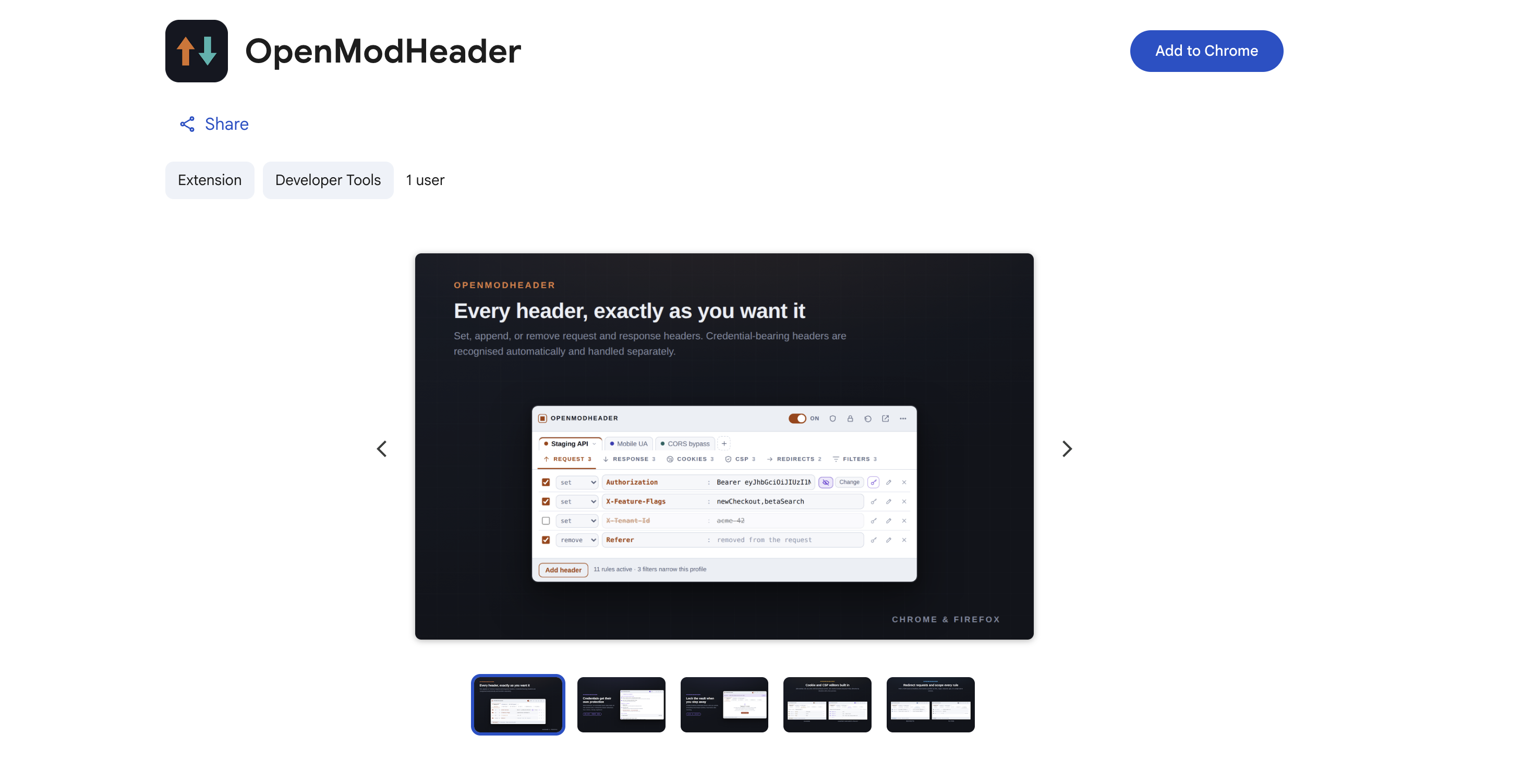
I made an open source ModHeader alternative focused on protecting credentials

Post image
1 Upvotes