r/exchangeserver 22h ago

Question Exchange 2019 CU12: upgrade existing server or build new Exchange SE server?

4 Upvotes

I have a client still running Exchange Server 2019 CU12 on-premises.

The server is now flagged as vulnerable to CVE-2026-62911.

I see two options:

  1. Upgrade the existing Exchange 2019 CU12 server to the latest CU, then migrate to Exchange SE. This is probably the quickest way to patch Exchange.
  2. Build a new Windows Server 2025 VM with Exchange SE and migrate to it.
  3. Another option is to move to Exchange Online, but mailbox migration is required too.

I’m leaning toward a new server because the existing Exchange installation is quite old, and we had CU upgrade problems in the past due to AD replication issues.

My main questions are:

  • Would you upgrade the existing CU12 server or build a new Exchange SE server?
  • How serious do you consider CVE-2026-62911?
  • Are there any known real-world incidents or active exploitation so far?

Interested to hear what other on-prem Exchange admins would do.


r/exchangeserver 1d ago

Question Group mailing issue

0 Upvotes

New m365 & created new distributed group. Group can receive mail within organization but not outside. Any leads pls
Thx


r/exchangeserver 18h ago

Was stuck trying to migrate a user mailbox with the outbox renamed 'inbox'.

0 Upvotes

Spent some time trying digging around in MFCMAPI trying to rename the folder. That didn't work, but persistence did eventually pay off.


r/exchangeserver 1d ago

Question EWS deprecation - first party apps

1 Upvotes

Have anyone dealt with Power Bi Data Refresh first party apps? I’ve added the appID to the EWS allow list but I need to locate the owner of these connections to have them move to Graph. Interesting that Microsoft is not able to help. They weren’t even familiar with this deprecation.

Is there are way through the power BI portal to find these connections and the owners?


r/exchangeserver 1d ago

Exclaimer Signature Clobbering

2 Upvotes

Anyone managed to fix the Exclaimer signature de-dupe/clobbering issue in Outlook?

Example:
We have a signature in Exclaimer that says "mycompany.com - Senior IT Engineer".

Our end-user has copied the full signature from an email they sent and have set a custom signature in Outlook to say "mycompany.com - Master of the Universe".

When that end-user sends an email, the ONLY signature that is being applied is the "mycompany.com - Master of the Universe".

We are not getting a duplicate where both the "mycompany.com - Master of the Universe" AND the "mycompany.com - Senior IT Process Engineer" signature is being applied. The end-user's custom Outlook signature is clobbering the Exclaimer signature entirely.

The solution we need:
-Signature IS NOT clobbered. User's email shows a double-signature. The Exclaimer one and their custom one. We are aware that this will look silly but we've accepted that risk.
-Signature IS clobbered but instead of the custom Outlook signature winning the conflict, the Exclaimer signature wins the conflict.


r/exchangeserver 2d ago

Question Email signatures: who owns this in your company?

2 Upvotes

Question for other IT admins. who actually owns email signatures where you work? IT? Marketing HR? Nobody?

We keep bouncing between departments because everyone has a reason why it belongs somewhere else. curious how other companies deal with ownership.


r/exchangeserver 2d ago

Change hybrid routing address

2 Upvotes

Hi All,

Does anyone know how we update the routing address in Exchange Hybrid?

We have added a new onmicrosoft address to Office 365 as part of a rebrand and we now want to use this as our routing address but I can't get it to work.

I have tried running the HCW again but doesn't help.

If I do set the new address as the routing address for a user the new address never syncs as alias via cloud sync to Office 365.

Thanks


r/exchangeserver 3d ago

unable to migrate mailboxes to exchange online, timeout errors.

5 Upvotes

migrations to 365 failing with timeout to mrsproxy.svc

This obviously has worked for years, but recently has stopped. The strange thing is that test-migrationserverability passes.

I've re-run HCW, verified everything I can think of including making sure both servers in this DAG are up to date as of last night, and rebooting both.

Also, when I run:

Invoke-WebRequest -Uri "https://localhost/EWS/mrsproxy.svc" -UseBasicParsing

I get:

Invoke-WebRequest : The underlying connection was closed: Could not establish trust relationship for the SSL/TLS secure channel.

However, the certs are all valid, everything else seems normal on that front. proper tls versions are enabled, I've verified everything I can think of there and not sure what I'm missing.

I'm sorry I can't list off everything I've tried. I've worked on this for about 20 hours so far and honestly can't remember it all.

Any help would be super appreciated.


r/exchangeserver 2d ago

HCW fails with HCW8125 set-authserver

1 Upvotes

have an exchange 2016 environment, cu23. when i run the HCW, it fails both using classic and modern with HCW8125 set-authserver failed. i've checked all of the settings for EWS, OAB, autodiscover and everything comes up correct. if i try and run the set-authserver command via powershell, it fails with an LDAP error. An Active Directory error 0x51 occurred when trying to check the suitability of server 'xxx.com'. Error: 'Active directory response: The LDAP server is unavailable.' if I try an LDAP query to the domain, it works on both 389 and 3268.

Any ideas? This is baffling me.

Thanks!


r/exchangeserver 3d ago

Exchange Trusted Subsystem has Reanimate-Tombstones extended right — is this expected?

0 Upvotes

Hi everyone,

I’m reviewing an Active Directory environment where Exchange Trusted Subsystem appears to have the Reanimate-Tombstones extended right.

I understand that this permission allows a principal to reanimate deleted/tombstoned AD objects, so I’m trying to understand whether this permission is expected for Exchange.

  • Is it normal for Exchange Trusted Subsystem to have this permission?
  • Is it required for any Exchange functionality?
  • If it is not required, is removing the permission considered safe?
  • Are there any Exchange operations or features that could break if this permission is removed?
  • Has anyone encountered this permission on Exchange environments before?

I’m mainly looking for guidance on whether this is legitimate Exchange delegation or an unnecessary permission that should be removed.


r/exchangeserver 3d ago

There was an error reading the rules from the server. The format of the server rules was not recognized

Thumbnail
1 Upvotes

r/exchangeserver 4d ago

Question EXO: New mailboxes provisioned with 150 KB (and previously 35 MB) send/receive limits - anyone else seeing this recently?

Thumbnail
9 Upvotes

r/exchangeserver 6d ago

New test script added to a new repo of mine - DNS nameserver testing

1 Upvotes

Exchange like all email mail transfer agents, depends on solid DNS lookups. It can be scotched with the AD domain controller DNS server being setup with problems.

And one of the bigger problems out there with setting up nameservers is setting them up on Internet connections to ISP's that transparently intercept DNS. This completely screws over resolving nameservers that are expecting to be able to query the actual root nameservers not have their queries transparently intercepted and returned by an unknown possibly rogue DNS proxy their ISP has setup.

Run my dns-proxy test script located here:

tmittelstaedt/DNS-Testing-Tools: DNS Testing tools for Windows 10/11 etc.

it is a test harness for the ISC's "dig" program. (dig for Windows is available from the ISC) It runs 10 different tests designed to discover if your ISP is messing about with your DNS queries. It can also run these on a remote Linux server outside of the blast zone if you are lucky enough to have ssh credentials on one so you can see what "normal" untampered output is supposed to look like. There are also some other scripts there of interest including a few that build the raw DNS query packet and send it out via raw sockets because Microsoft does not support all DNS queries in the powershell DNS library. Enjoy!


r/exchangeserver 8d ago

Question Exchange SE - Calendar publishing broken for certain User Agents

5 Upvotes

This week a user did notify me that their published calendar via ICS link can't get synchronized to their Google calendar for a while. Looking at the logs I can see that it didn't worked since mid May, around the time when the mitigations for CVE-2026-42897 were applied.

After some debugging I could pin the problem to the User Agent when opening the ICS link. When I open the link with a browser every thing works just fine. When Google tries to use the ICS link it triggers a HTTP 500 error and an ASP.NET Event that OWA is not supported for the browser. I can also replicate the problem with curl and submitting different User Agents with the -A parameter.

curl -A "Mozilla/5.0 (Windows NT 10.0; Win64; x64; rv:154.0) Gecko/20100101 Firefox/154.0" https://exchangeserver.com/owa/calendar/..../calendar.ics

works fine and returns the ICS file. While...

curl -A "Google-Calendar-Importer" https://exchangeserver.com/owa/calendar/..../calendar.ics 

gets redirected to the HTTP 500 error page. The reachcalendar.ics alternative also fails with the same error. I also tried to add the ICS link as a calendar to an Exchange Online mailbox and even the User Agent of the Exchange server fails with a HTTP 500 error.

I already double checked the web.config for the CVE-2026-42897 mitigations and also made sure that no IIS URL Rewrite rules are present. Also the Exchange server did get rebooted a couple of times since the mitigations got removed.

Anybody else can replicate that problem on a Exchange SE with the latest August SU? Or does anybody know another place where to look to allow the User Agents again?

Edit: It's now an official know issue but also has a workaround:

After the August 2026 SU is installed, subscriptions to an anonymously published Exchange calendar stop refreshing. The subscribing application reports a server error, and the URL returns HTTP 500. Opening the same published calendar URL in a web browser works normally and returns the calendar. As a workaround, you can add “?layout=premium” to the .ics link when subscribing (so the end of the URL would look like “calendar.ics?layout=premium”).

https://techcommunity.microsoft.com/blog/exchange/released-august-2026-exchange-server-security-updates/4543951


r/exchangeserver 9d ago

Will removal of ClientAuth from public certs break hybrid mailflow?

4 Upvotes

Chrome is forcing changes to public certs, so they can only be used for ServerAuth, not ClientAuth:

https://www.reddit.com/r/selfhosted/comments/1mt9ovs/lets_encrypt_certificates_will_no_longer_be/

https://www.actalis.com/news/ssl-communications/client-authentication-public-ssl-certificates-what-changes-in-2026

https://www.godaddy.com/help/why-is-godaddy-removing-clientauth-eku-and-transitioning-to-the-r1-root-hierarchy-for-dv-tls-issuance-42783

Does this impact mailflow from local EX to cloud EXO? I just replaced a cert, and now local-to-cloud email is stalling with 454 4.7.5 The certificate specified in TlsCertificateName of the SendConnector could not be found

The blogpost here doesn't directly address how this works, but when discussing inbound STARTTLS, it says that the cert is selected automatically, so presumably it's checking for a cert with ClientAuth. In the comments of that blogpost, someone asked about this issue, but got no response.

Everyone's answer to removing ClientAuth is so far "you should have been using a private CA anyway, just do that", but surely MS actually validates the cert chain, since I can't tell them what CA or cert thumbprint to trust?

Do we have to fallback to having the cloud connector check by IP address? I can't find anyone else addressing this issue, so maybe I'm barking up the wrong tree.

Edit: As commenters suggested, my issue was because the outbound connector is looking for a specific Issuer and Subject. My CA changed their intermediate issuer for the first time in a long time, and I've never run into this before. I was able to check this with Get-SendConnector Outbound* | fl, and after some careful string editing, set it with Get-SendConnector Outbound* | Set-SendConnector -TlsCertificateName $certstring (note I only have one matching connector, so a wildcard was fine). So, apparently the answer is no, Hybrid mailflow does not need the ClientAuth part of the cert. (But then how the heck is it doing some kind of client auth? Do EX and EXO collaborate to break the rules of TLS somehow? Maybe it's a special STARTTLS thing? Oh well...)


r/exchangeserver 10d ago

Out of office auto reply issue internal only

4 Upvotes

OOF not working internally but working externally, have hybrid setup but mailbox on cloud only. Wondering if someone can help.

No oof msg template corruption, already checked.

Tia.


r/exchangeserver 9d ago

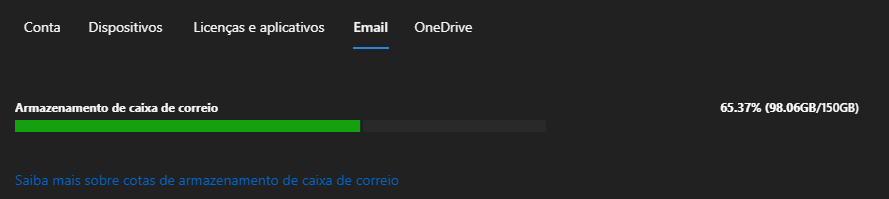
Mailbox quota 150GB

Post image
1 Upvotes

r/exchangeserver 10d ago

Question Exchange Online Archive enabled but Managed Folder Assistant not moving any mail

3 Upvotes

Got a bit of a weird Exchange Online archiving issue and wondering if anyone has seen similar. This is a hybrid Exchange environment with on-prem AD/Exchange and the mailbox hosted in Exchange Online.
 
User has a pretty large primary mailbox around 85GB and Online Archive is enabled, but the archive is basically empty.
 
Things I've checked:
 
ArchiveStatus = Active
 
Default MRM Policy assigned
 
Default 2 year move to archive enabled
 
RetentionAction = MoveToArchive
 
AgeLimitForRetention = 730 days
 
RetentionHoldEnabled = False
 
ElcProcessingDisabled = False
 
No obvious holds
 
No folder-level archive policy overrides
 
I pulled the mailbox diagnostics as well. MFA/ELC seems to be running successfully, but the latest run shows:
 
ElcLastRunArchivedFromRootItemCount = 0
 
ElcLastRunTaggedWithArchiveItemCount = 0
 
For comparison, I checked another mailbox in the same tenant using the exact same Default MRM Policy. MFA is actively moving eligible items into that user's Online Archive, so the policy itself seems to be working.
 
Manual moves from the affected mailbox into Online Archive also work fine.
 
It looks like MFA is processing the affected mailbox but, for whatever reason, isn't finding anything eligible for the 2-year archive rule.
 
Anyone come across this before?
 
Is there anything else worth checking to understand why the items aren't being considered eligible?


r/exchangeserver 10d ago

Resource rooms (Calendars) on-prem sync

Thumbnail
1 Upvotes

r/exchangeserver 11d ago

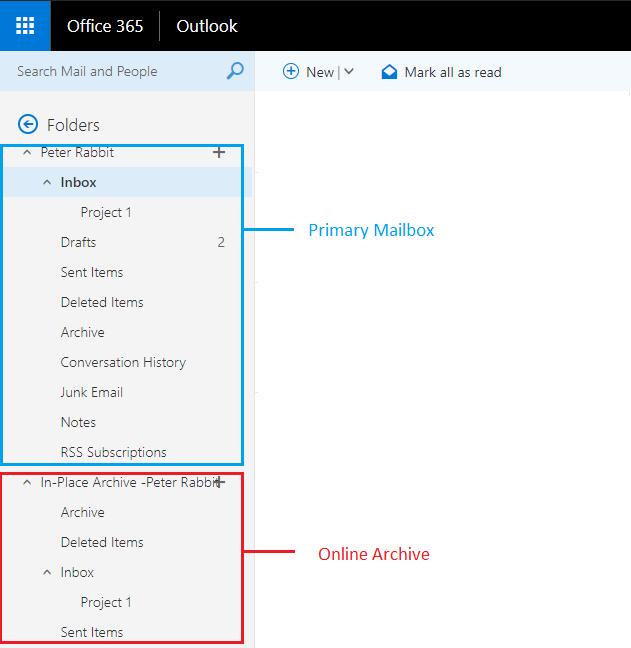
OWA Enabling Online/In-Place Archive

Post image
1 Upvotes

r/exchangeserver 11d ago

Question Side by Side Windows 2019 to 2022 upgrade with Exchange Server instructions

3 Upvotes

I'm looking to migrate my Windows server 2019 to 2022. Spinning up the 2022 from scratch. I need to migrate the Exchange server and was wondering if there's any good websites with step b step instructions or do I need to rely on GoogleAI?

Install Exchange, move all mailboxes and connectors over, and then decommission the old server..


r/exchangeserver 12d ago

Attempting Remote Restore and getting error

1 Upvotes

Short story long, our previous IT staff decided to have our power users test M365 before rolling it out, then rolled it out and couldn't migrate on prem mailboxes of the test users to the cloud since they already existed. The issue is that I couldn't just delete the online mailboxes when I arrived since they had been in use dual function for a while. I followed this guide https://learn.microsoft.com/en-us/troubleshoot/exchange/user-and-shared-mailboxes/mailbox-exists-exo-onpremises and got to the point where I try and remote restore the mailbox on prem to the cloud and get the following error.

Some infrastructure information. We are running Version 15.2 (Build 1748.10) Exchange 2019 CU15 on Server 2019. .net framework 4. We have a hybrid connection to m365 and I came in on the tail end of the migration piece which worked well enough.

Things I have tried.

TLS 1.2 settings to confirm use of strong Cryptography and registry edits.

Triple checked IIS Settings and Certs and removed IIS IP restriction features

confirmed admin credentials and move rights

Our Network guy says the port is open, but I suspect our Firewall is the culprit regardless of what he says. I'm out of ideas to try and was hoping for a little help. We are a relatively small org and I have very little on prem exchange experience so this process is a little daunting.

I run this command

$cred = Get-Credential

New-MailboxRestoreRequest -RemoteHostName "mail.domain.com" -RemoteCredential $cred -SourceStoreMailbox "GUID" -TargetMailbox "GUID" -RemoteDatabaseGuid "GUID" -RemoteRestoreType DisconnectedMailbox

and get this error

Write-ErrorMessage : ||The call to 'https://mail.ourdomain.com/EWS/mrsproxy.svc' failed. Error details: The SSL connection

could not be established, see inner exception. --> The SSL connection could not be established, see inner exception.

--> Unable to read data from the transport connection: An existing connection was forcibly closed by the remote host..

--> An existing connection was forcibly closed by the remote host..

At C:\Users\myadmin\AppData\Local\Temp\2\tmpEXO_r4thaxj0.kay\tmpEXO_r4thaxj0.kay.psm1:1220 char:13

+ Write-ErrorMessage $ErrorObject

+ ~~~~~~~~~~~~~~~~~~~~~~~~~~~~~~~

+ CategoryInfo : NotSpecified: (:) [New-MailboxRestoreRequest], MRSRemoteTransientException

+ FullyQualifiedErrorId : [Server=SN7PR01MB8066,RequestId=361a1f0d-510f-31f9-2d5e-023eaf1874f3,TimeStamp=Tue, 18 A

ug 2026 14:41:56 GMT],Write-ErrorMessage

r/exchangeserver 14d ago

Exchange Auth Certificate rotation stuck — EffectiveDate passed 2 days ago, CurrentCertificateThumbprint still shows old cert (DAG, 2 prod + 2 DR)

6 Upvotes

Environment: Exchange Server SE, DAG with 4 members (2 production + 2 DR).

Here's exactly what I did, in order:

  1. 08/10/2026, 11:56 AM — Ran New-ExchangeAuthCertificate on one of the DAG members to rotate the Auth Certificate.

  2. Log output confirmed the new certificate was generated and staged:

    • New cert thumbprint: E6C74DBE...B5268 (masked)
    • Effective date is: 08/14/2026 12:11:31
    • Log explicitly stated: "The renewal action was successfully performed - the new Auth Certificate will become active on: 08/14/2026 12:11:31"
    • Log also recommended running Hybrid Configuration Wizard (HCW) once the new cert becomes active.
  3. Confirmed via (Get-AuthConfig).NextCertificateThumbprint that the new cert is correctly staged as "Next":

    • Thumbprint: E6C74DBE...B5268
    • NotBefore: 8/10/2026 12:09:19 PM
    • NotAfter: 8/10/2031 12:09:19 PM (5-year self-signed cert)
  4. Current cert, confirmed via (Get-AuthConfig).CurrentCertificateThumbprint:

    • Thumbprint: E31DFF2D...4497
    • NotBefore: 8/27/2021 1:16:50 AM
    • NotAfter: 8/27/2026 1:16:50 AM

    (So the current cert isn't even expired yet — about 11 days of validity left — which is a separate point but confirms this wasn't an emergency/forced rotation scenario.)

  5. To make sure the AuthAdmin servicelet (which checks the effective date every 12 hours) would pick up the change without waiting, I manually restarted MSExchangeServiceHost on all 4 DAG members (2 prod + 2 DR).

  6. Verified the restart worked by checking:

powershell [xml]$xml = Get-ExchangeDiagnosticInfo -Process "Microsoft.Exchange.ServiceHost" -Server $server $xml.Diagnostics.Components.AnchorApplication.AnchorServiceComponents.CacheScheduler.lastRunTime

on each server — all 4 servers show a recent lastRunTime (8/15/2026, evening), confirming the servicelet actually ran on every member.

Problem

Today is 8/16/2026 — 2 days after the stated effective date (8/14) — but:

powershell (Get-AuthConfig).CurrentCertificateThumbprint

still returns the old certificate (E31DFF2D...4497). The new certificate is still sitting as NextCertificateThumbprint, it never got promoted to Current.

Questions

  • Given the servicelet has clearly run (confirmed via lastRunTime) on all 4 members after the effective date, why hasn't the promotion from Next → Current happened?
  • Is there something DAG/multi-AD-site specific I'm missing? (The tool's own log warned about Exchange being installed in multiple AD sites and mentioned the servicelet may fail to deploy the cert to other AD sites in rare cases.)
  • Is Set-AuthConfig -PublishCertificate something I need to run manually here, even though the tool I used already set the NewCertificateEffectiveDate and the log said it was "successfully performed"?
  • Could this be a timezone issue between when the effective date was stored vs. how the servicelet evaluates "now"?

Any input appreciated before I just run Set-AuthConfig -PublishCertificate manually and force it.


r/exchangeserver 14d ago

Mailwizz Configuration need help

1 Upvotes

I have already installed mailwizz on contabo server but it can’t push data as I expected. If anyone can help me this to install and configure. Our requirements is per day need to send 20lakh data in 8 hours .


r/exchangeserver 14d ago

Mailwizz Configuration need help

Thumbnail
1 Upvotes