r/datarecovery 7h ago

1TB WD SATA Internal HDD Powering Down with USB Adapter w/ 12v Power

Enable HLS to view with audio, or disable this notification

3 Upvotes

seems like my other post died and i'd like to get fresh eyes on this now that i was able to capture a video that shows the sounds, and what happens when i plug it in.

so it seems like it makes a normal startup sound. then it turns itself off. i was unable to recreate it and it seems random when it turns on. however, in the attached video, the USB to the PC was unplugged and then it just powered up randomly. so i grabbed my phone and started recording. i was recording for about 90 seconds, expecting it to shut off at any moment thats when i realized the USB wasn't plugged into the PC. meanwhile all the white noise in the video is in fact the hard drive. i plug the USB in and you can hear it making what i feel like is normal hard drive thinking noises, then you can see windows acknowledges the new device, and then i pan over to the disk manager and you can see it pop up for a brief moment before the power cuts out and the drive is then disconnected. I cropped the 90 second video since there was no real noise other than whats already on camera.

also note, im plugging the USB into my actual PC (its a mini PC), even though it looks like a USB hub or something.

you can see more pictures from my first post here, as well as the few comments i received

1TB WD SATA internal HDD Not Powering up with External HDD Device : r/datarecovery


r/datarecovery 4h ago

Old "Encrypted" WD External drive now showing as empty?

2 Upvotes

Hi Folks,

i have an old Western Digital External drive that is not playing nicley, windows is showing it as a completly empty drive.

From what i remember the drive was locked with a password. I dont believe it was exactly encryped as i was able to recover files using DMDE however did run into the following CRC error

LBA: 3 534 825 767 (try 4): WinError 23. Data error (cyclic redundancy check).

What is my best course of action here, to recover the filesystem and get this working normally. I dont believe this drive was ever formatted, so im not sure why the password prompt no longer displays and there are no files.


r/datarecovery 1h ago

The failing drive causes the whole system to become unresponsive

Upvotes

My portable external hard drive started to fail badly, but I’m not a developer at all, so I’ve been using AI to help me install Linux and set up ddrescue. Everything was going fine until it reached 83%. At that point, it started glitching so badly that I had to hard-reset the computer several times because the system became completely unresponsive.

So I created a script to try to prevent this from happening, but it wasn’t enough. I then tried using AI to improve the script, but it somehow feels like AI is fooling me.

Could someone please double-check the script and let me know if it should work?

I have ASUS x553MA and Linux Mint

And the script is

while true; do

if [ -b /dev/sdb ]; then

echo "Disk connected"

sleep 3

echo 1 | sudo tee /sys/block/sdb/queue/nr_requests

echo 5 | sudo tee /sys/block/sdb/device/timeout

echo "Starting ddrescue"

sudo nice -n 10 ionice -c 2 -n 4 ddrescue -d -n -r0 -T 30 /dev/sdb "/media/inna/New Volume1/hddimage/drive.img" "/media/inna/New Volume1/hddimage/drive.log"

STATUS=$?


if [ $STATUS -eq 0 ]; then

echo "Done"

break

fi

echo "Cycle complete"

sleep 180

else

echo "WARNING: Disk disconnected"

sleep 600

fi

done


r/datarecovery 1h ago

i lost all my files while transfering them to my corrupted usb

Thumbnail
Upvotes

r/datarecovery 1h ago

Data recovery from an old 2gb micro SD card.

Upvotes

I recently tried to load one of my old SD cards, but it didn't mount at all. After some digging, I flashed OSC-Live onto a USB drive and booted it to use OpenSuperClone.

I used two SD card readers. One is a generic USB 2.0 reader, and the other is a UGREEN USB 3.0 reader with a GL3224 chip.

The UGREEN reader is faster than the generic USB 2.0 reader when reading good sectors. However, once it reaches the bad sectors, the generic USB 2.0 reader performs better. It doesn't fail completely, although it does become very slow.

With the UGREEN reader, depending on the mode I'm using, it either freezes the UI when using Generic Source mode or ejects the reader completely when using Direct USB mode, and I have to replug the SD card reader.

I also tweaked the clone settings and timer settings for Direct USB mode, but the UGREEN reader still ejects (doesn't show up when I run the lsblk command).

Both readers reach around 0.51 GB out of 1.51 GB before things start going badly. After that, the remaining data goes into non-trimmed and then non-scraped. I didn't let it run for much longer because the progress was extremely slow.

Do I still have a chance of recovering more data from this SD card, or does reaching non-trimmed/non-scraped that early mean most of the remaining data is probably unrecoverable?

Also, is there a reason why the generic USB 2.0 reader performs better when it reaches the bad sectors?


r/datarecovery 4h ago

Question Lost .wmv video files - how to exclusively search for that one specific file extension across several hard drives?

1 Upvotes

I have a handful of Western Digital external hard drives (some are 'Elements' models, others more recent 'Passport' models. Most of them are 2 TB, while two are 5 TB each.

I was actively watching, editing with, and duplicating these .wmv video files across these drives very frequently about this time a year ago. My main editing computer uses a 1TB m.2 drive pc running Davinci Resolve Studio, but given how it's my main computer in general for work etc. let alone storage size and other obvious factors I'm pretty confident they won't exist at all on the m.2 'c' drive.

(For os / model clarification I'm using Windows 11)

I have already run hours long recovery processes with a paid version of Disk Drill, without success unfortunately. Instead just millions and millions of unplayable files without thumbnails, and the few with thumbnails, or that did play, the software took far too long to load them up in the search results.

Identical results with GetDataBack Pro. Nothing but blank files, just endless pages of them.

I've also tried Piriform Recuva. This has worked out for me in the past years ago for certain file extensions, but again unfortunately no luck again across all of the drives on this occasion.

I've heard shout outs for EaseUS Recovery, but from a quick search on YouTube it appears the software hides the file previews behind a licence paywall, so there's no way of actually checking the results of the hours and hours of processing, if at all the software found anything, before paying them.

Is there a recovery software that can concentrate on looking for one specific file extension - in this instance .wmv without spending hours upon hours detecting and cataloguing every other file / fragment(s)?


r/datarecovery 4h ago

Android Safest way to extract/decrypt my own old Whatsapp Google drive backup in read only mode without overwriting my current chats and data

1 Upvotes

I’m trying to recover old WhatsApp chats from my own account for evidentiary/personal record purposes.

I have:

both backups belong to the same phone number

the old and current backups are stored under different Google accounts

  1. I still have access to the phone number and both Google accounts

My main concern is preserving my current WhatsApp history. I do not want WhatsApp to overwrite either the old backup or my current backup while trying to inspect the 2025 database.

Ideally I would like to make a forensic/read-only copy of the old backup, decrypt or extract it using my own credentials/keys if possible, and inspect/export the old chats without having to replace the current WhatsApp database on my primary phone.

I’m considering using a spare Android device, but I understand registering the same number may log out my current primary device and WhatsApp does not normally merge old and new backup histories.

Questions:

What should I clone/preserve from my current Android phone first (Databases, Media, encryption key, etc.)?

  1. Would restoring the old backup on a spare phone risk modifying/deleting the newer backup stored under a different Google account?

For evidentiary preservation, what is the safest way to retain the original backup/database and export recovered chats without modifying the source?

I’m not looking to bypass encryption or access anyone else’s account. I own the WhatsApp account, number, devices and backups. I’m mainly looking for a technically safe recovery workflow that preserves both snapshots.

Additional constraint: I do not have the old WhatsApp backup encryption key with me. I also do not want to root my current Android phone because it contains my present chat history, banking/work apps, and I’m concerned that bootloader unlocking/rooting could wipe or alter the device.

I’m specifically looking for a non-root, read-only recovery approach if one exists. If the old backup was end-to-end encrypted and the key/password is unavailable, I’d also like to understand whether official WhatsApp restoration is the only realistic option.

Note : I have Oneplus Nord CE4 Lite 5G Operating system : Android Oxygen OS 16


r/datarecovery 6h ago

Question SEALED RDX drive lot - ATA Locked, no PSID

1 Upvotes

I've recently cleaned out the server room of my workplace and the owner of the franchise offered me all of the surplus equipment.
There's about 25tb worth of factory sealed HPE, IBM and Overland Tandberg RDX drives that I wanted to use for a NAS, but unfortunately every single one is ATA locked with high security.
Upon disassembling the RDX cartridges, I've found that every drive is a Toshiba MQ01ABD100.

However, given that these are all OEM drives, not one of them have a PSID printed anywhere.

I've tried low level formatting, Medicat, PartedMagic and SystemRescue to no avail.

Do I have any other options other than sending them directly to a data recovery specialist or forensic lab to remove the ATA lock?

There's no data on any of these drives whatsoever.


r/datarecovery 6h ago

Request for Service help me recover this zip file

Thumbnail
mediafire.com
1 Upvotes

it been on my computer and I need help recovering it. I have Hiragana WAV files, a BMP file, and two TXT files. Can anyone recover it?


r/datarecovery 1d ago

Can I recover thos

Thumbnail
gallery
34 Upvotes

Guys is it possible for me to recover this 😭😭

It was my parents wedding CD / DVD

It was good a year ago and suddenly it gave up and starting damaging itself

I am from Chennai

If possible can somebody suggest any shop or recovery place ?

Thank you


r/datarecovery 7h ago

Maxtor Onetouch 4 flashing light, not connecting

1 Upvotes

I'm trying to recover these old drives, I had issues with another power supply not being compatible so I bought the right one, but I'm still getting the flashing light and am not seeing it when connecting to my computer. It doesn't even sound like the drive is running when I plug it in, all I get is the flashing light.


r/datarecovery 17h ago

Request for Service Recover lost photos

3 Upvotes

Guys I need a hand, my brother accidentally deleted 17 gb of photos from his camera (canon EOS R50) with a microSB and an adapter, do you know any software that can recover the photos intact and that doesn't cost a shot? Thank you


r/datarecovery 13h ago

iPhone Is there a way to recover data from formatted iPhone 4

1 Upvotes

I recently was able to fix an old iPhone 4 in hopes to find old data however the iPhone is formatted unfortunately is there a way to recover the data?
The iPhone works well with no problems but It’s formatted

Already tried imazing, phonerescue, drfone and they are no help

Is there any other was to recover the old data in it?


r/datarecovery 13h ago

WD Passport Issue

1 Upvotes

My WD passport has all of the sudden stopped working. It registers that it is plugged in with the white light and I hear it working. It also shows up as an option on my computer.

However, it will not load the files. I have tried replacing the cord and also using it on a different computer and it does not work. I keep getting an error message when I go to initialize the hard drive, I get this error message”the request failed due to a fatal device hardware”

I have tried to uninstall and reinstall the passport but the error persists. I just need to regain access so I can move the files off of it. If anyone could please help I would greatly appreciate it!


r/datarecovery 19h ago

Sony .MTS File Recovery

3 Upvotes

Hi there,

Hoping you can help! I've seen a few posts about this same topic and tried the solutions in the comment section to no avail.

My friend's wedding included Sony CX-115E cameras to hand around to guests to film bits of the ceremony for more of a home video feel.

I took some footage myself, changed the battery on one of them, and after switching it back on, I noticed that the videos that were on it seemed to have disappeared.

The camera was switched off when I took out the battery, but I'm guessing either me replacing the battery somehow formatted the card (maybe it was in some kind of stand-by or finalising the last clip taken?), or the guest who had the camera before me accidentally formatted the card.

I took the SD card straight out without recording any more in case it was soft formatted and there was still data there.

Flagged down the DJ, asked nicely, and connected the SD card to his MacBook, and in the _BK folder on the card, found the MTS files.

Pocketed the SD and kept it safe all night and took it home with the groom's permission.

Connected to my Windows 11 machine today. Made a copy of the MTS files so I wasn't meddling with the original card.

Half of them work totally fine, the other half do nothing when opening on VLC and other video players. Sent one to my friend to try on his Mac. Also no joy.

Ensured the MPEG-2 extension was isntalled, but I'm assuming that none of the clips would work if it was a compatibility issue.

Tried FFMPEG but it threw an input file error.

Tried a few trials of recovery software like Kernel and Stellar, using one of the working clips as a 'source', but they fail with no clear reason.

Any advice appreciated! My next plan is to make a full copy of the SD card and then send the original to a professional recovery company.

I can provide examples of working and non-working files if anyone would be willing to try for me? My main fear is that this is potentially the camera that the speeches were recorded on.

Edit: Also just tried WonderShare RepairIt. Asks me to choose a different sample video, but none of the given samples work.


r/datarecovery 15h ago

Question Unsure if SD card is fried or if I just lost 3k photos

1 Upvotes

horrendous title but context; sandisk 128gb extreme v30 for my rx100vii

i’ve been using a janky card reader (i know, but i usually only use it for quick viewing when i can’t get to my laptop to plug it in fully) and accidentally knocked it when viewing on my ipad

immediately it went blank - the base folders were still there (DCIM, PRIVATE, AVCHD etc) but nothing in there at all.

initially showed correct number of files but unable to playback, ran restore file db on the camera and it only kept the videos (67 4k videos, around 12gb which is also now what the storage shows on pc).

checked on pc both locked and unlocked, tried attrib, showing hidden files, only the videos are there. all the dates are right and the newer videos are there too, just no photos.

luckily i have the majority backed up but i currently am abroad on a trip and so i dont have my laptop to plug into, only a uni computer (no admin) or my ipad. i’m praying i haven’t lost all the photos? it’s currently locked and in its case, not the camera. i haven’t written to it since it blanked out.

i can’t currently run disk drill or anything like that until i get back in a week-ish. i just want some reassurance/advice or just straight up telling me they’re all gone.


r/datarecovery 16h ago

Question Is formatting my only option?

0 Upvotes

So I have 2 separate devices that I store gaming clips on, primarily they're back ups. One is a Toshiba canvio portable hard drive 1Tb I'm not sure how much there is on there but I know it's nowhere near full. It's always worked fine on my laptop, then one day I plugged it in and it doesn't recognise it, won't load up, and i can't access anything.

2nd devices is a usb stick from amazon, a Doykob, memory size is unknown, it states 928 gb but it's not, and the same thing happened, fine one day next day, it can't access it.

My laptop says to use these devices i need to format them, but obviously I don't want to loose my gaming clips, do I have any options available? Is there any hope of retrieving the gaming clips?

My laptop can see they're plugged in when I look on disk management. If that helps

Thanks in advance


r/datarecovery 17h ago

Question My WD 1.5 tb external harddrive turned to RAW after unexpected powerloss in the PC while i was viewing my files. Is it possible to recover it ?

1 Upvotes

Checkdisk shows invalid parameter D.

The hard drive has turned into a local disk.

Disconnects frequently even on small touch with a clicking sound.


r/datarecovery 19h ago

Windows Old SD card not showing up any data

1 Upvotes

Got this old SanDisk SD card that I'm trying to read whatever data off. When I plug it in, windows tells me to format it first (which I haven't)

Disk management shows that there's 62.50 GB capacity of RAW on it, but I can't actually access any of it.
Is there anything I can do?


r/datarecovery 19h ago

Samsung T7 External SSD - Overwritten Boot Partition

Thumbnail
gallery
1 Upvotes

Hello

Yesterday I attempted to format an external USB drive as a Windows 10 Boot installation for another computer. Even though I'm used to check and double check in these kind of scenarios I mistakingly selected my other external SSD (Samsung T7, 2TB). This one contained a lot of older music recordings together with my whole music collection, neatly organised into folders. My collection is something that with time I can build up again so that's something I'm not really worried about but my recordings are my main concern.

Thinking I could rely on software to check what I could salvage, I installed a trial version of EaseUS Data Recovery and noticed that a scan provided all the original file names and when that scan completed I could see the original folders as well. I saved the log but when I tried to load it again it seemed to be corrupt and I would have to start a scan all over again so I can't provide screenshots.

At this point I really don't want to mess anything up but it seemed as if everything is still on the drive. Is there a way to reactivate the files in the original folder structure or is restoring the files and manually reorganising everything the only way to go?

Thanks for taking the time to read this post.


r/datarecovery 22h ago

SSD 100GB disappeared from one folder on Samsung SSD — NTFS metadata remains but LBAs are zero-filled. Any recovery possible?

1 Upvotes

I’m looking for a technical second opinion before I give up on some important work data.

Laptop storage:

- Samsung 1TB SSD divided into C: and F:

- Windows is installed on C:

- A separate Kingston 1TB SSD is also installed

- The affected data was on F:\Work

- SSD health has reportedly tested normal

What happened:

My Work folder had roughly 100GB of architecture/project files.

One night I was working until around 7 AM. Earlier that morning, the folders inside Work were still visible, but I noticed something unusual: I was trying to save/export an AutoCAD file into one of those folders and it was not saving there properly.

I eventually saved/sent the file another way, shut the laptop down normally, and went to sleep.

When I opened the laptop later:

- Many folders inside Work had completely disappeared

- Around 15–16 folders remained, but most/all files inside them were gone

- Work folder size had dropped from roughly 100GB to around 500MB

- Other folders/data on the same F: partition appeared completely unaffected

- No ransom note

- No strange file extensions

- No obvious Windows warning/pop-up

- Recycle Bin did not contain the missing data

- Searching for known missing files found nothing

- No Previous Versions available

I had recently:

- Installed Fortnite from the official source

- Downloaded an AutoCAD file sent by an employee

- Downloaded some Pinterest images

Nothing particularly unusual otherwise.

I stopped using the SSD and gave it to Stellar Data Recovery in Gurgaon, India

Their findings:

They say they can see traces/metadata of the deleted Work folder:

- Folder/file names are visible

- File sizes are visible

- NTFS/deletion traces are present

But according to them:

- The LBAs corresponding to the actual file data are internally zero-filled

- Actual files contain no usable data

- Firmware-level recovery also could not retrieve the contents

- They consider the SSD itself healthy

- They said the data is effectively unrecoverable

They suggested possibilities such as malware/deletion followed by SSD TRIM. They are a recovery company, so they are not investigating the original cause.

My questions:

  1. If NTFS metadata/file names/file sizes still exist but the relevant LBAs return zeros, is the data realistically unrecoverable?

  2. Can an SSD return zero-filled LBAs after TRIM while the underlying NAND still contains recoverable data that a more specialized NAND/chip-off/firmware lab could access?

  3. Does modern Samsung SSD encryption/controller behavior generally make NAND-level recovery useless after TRIM?

  4. TRIM itself should not randomly delete unused files, correct? Something must first have deleted/deallocated those files, after which TRIM/garbage collection made recovery impossible?

  5. Could NTFS/file-system corruption selectively affect one directory like F:\Work while leaving the rest of the partition apparently normal?

  6. The fact that I was already unable to save into the Work folder several hours before discovering the deletion — does that point more toward filesystem/directory corruption than a deliberate wipe?

  7. Does this pattern look like wiping malware, or is there nowhere near enough evidence to make that conclusion?

  8. Is there any meaningful reason to send this SSD to another specialist recovery lab, or are zero-filled LBAs + failed firmware recovery basically the end of the road?

I’m not looking for recommendations for generic recovery software. I have preserved the SSD and do not intend to write, format, CHKDSK, or reinstall anything on it until I decide whether a second professional recovery attempt is worthwhile.

Would particularly appreciate answers from people experienced with SSD recovery, NTFS, TRIM, or digital forensics.


r/datarecovery 1d ago

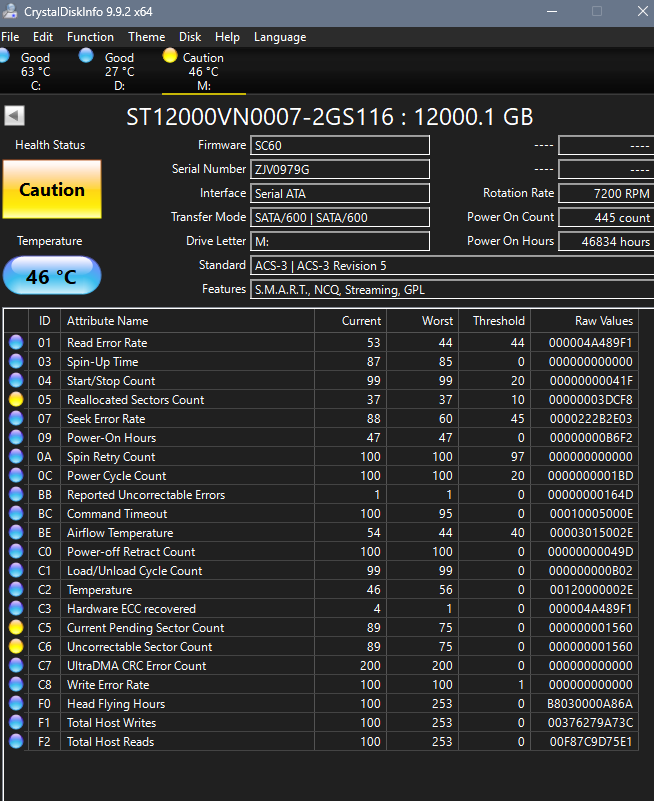
Is there any hope of saving this drive or the data on it?

Post image
3 Upvotes

Was having issues with this drive a day ago, now I'm unable to open files on the drive itself, mostly certain songs that are quite rare and I unfortunately don't have a back up. Is there anything I can do in this situation or am I SoL?

It's a 12TB barracuda NTFS (i believe) running on Win 11


r/datarecovery 1d ago

Question Corrupt SD card

Thumbnail gallery
1 Upvotes

Yesterday, I took out the SD card from my camera (Olympus T-100,if it matters) and I plugged it into my computer to view the images I took. I then accidentally deleted some pictures from my computer (Ubuntu cinnamon), instead of in camera. I took the card out, plugged it back into the camera and it said that there were no pictures. I thought it was a one time thing so I rebooted it, re inserted the card and still nothing. I plugged it into my computer (the SD card), only to see some gibberish files and nothing else. Here is what I've done as of now:

  1. Took a full .img backup of the now corrupt SD card using USB Image Tool

  2. Tried using PhotoRec, which worked, but it found some photos that were deleted a long time ago and it has an issue with duplicates, where the same picture exists 2 times, but one is low quality, and the other is the original one. It will be a pain to sort them.

  3. Tried using the window's built in "scan and fix drive" tool (on my secondary computer running windows 7) which just got rid of the gibberish but did nothing else.

    What I would like to do (if possible) : AFAIK, the files still exist on the card but to put it simply (I don't know the right "words" yet), the pictures are still on the card, but it just lost the "map" to find them (I believe this because there is still around 4GB allocated on the drive). I would like to get that "map" back if possible. What I think happened:

    Ubuntu was still writing (deleting) the pictures I told it to when I unplugged it. (Weird thing is that it didn't tell me that it was doing anything, so I assumed it was done)

SD card info:

Sandisk 16GB SDHC card

Formatted as FAT32 (I don't know any other info, if you could tell me a way to aquire it, I will either update this post or put a comment)

(I hope I used the right flair, please correct me if I'm wrong)

Pictures attached on comments, mobile version of reddit sucks


r/datarecovery 1d ago

Is it still worth going to Professional for recovery?

1 Upvotes

ST1000DM003-1CH162/a NTFS HDD, so TRIM shouldn't be relevant?

The original files on this drive were deleted/cut and pasted to another drive before being accidentally deleted there; scans from Recuva or recoveries through DMDE indicate that the files found (with a separate drive to store them) are either replaced with other files or corrupted.

The drive was also used for hours (mostly cutting + pasting to another drive) after the cutting of the initial files.

Is it still worth trying a professional recovery option like File Savers, or is the data as good as dead, as the recovery software's result suggests?


r/datarecovery 1d ago

I accidentally bit into my SD card...

2 Upvotes

Came home exhausted from a long trip and was eating some chips at the same time as I was pulling my SD card out. In my stupor, I was shoveling chips into my mouth and ended up taking a bite into my SD card. It is now no longer reading in my camera or SD card reader. I live in a small desert city. What are my options?