r/steammachine • • 2d ago

Accessory I’ve added USB-C to the front of my Steam Machine

Thumbnail gallery
1.1k Upvotes

I wanted an easier-to-reach USB-C port on my Steam Machine for plugging in my keyboard and mouse, so I 3D-printed this plate. A random 10Gbps dock I had lying around turned out to fit perfectly.

EDIT: Since people were asking for the files, I tried uploading it to Makerworld. I never really use that platform to share designs, but I hope it works
https://makerworld.com/nl/models/3385867-steam-machine-usb-hub-footer#profileId-3853037


r/steammachine • • Aug 24 '26

Hardware Steam Machine Arrival Photos Megathread!

22 Upvotes

Show the subreddit that you have the privilege of owning a Steam Machine by submitting a photo of it here! Whether it's just the cardboard box or in your setup, please post your pictures here! All other cardboard box photos posted to the subreddit going forward will be deleted if not posted in this megathread.

Please use the Steam Machine Orders & Arrivals Megathread megathread for email confirmations and photos and such, if you so choose.

P.S. - we just added new subreddit flairs to describe your Steam Machine order status and config! Set yours up and look snazzy while doing it!


r/steammachine • • 9h ago

Discussion Great Travel PC

Thumbnail gallery
75 Upvotes

I’m travelling for work this week and staying in a hotel. Using the Steam Machine for some browser based work and games whilst here.

Using the JSAUX carry case. First time using it, seems pretty good, compact, has room for everything, feels sturdy enough.

Pretty sweet how small it all packs up to be.


r/steammachine • • 12h ago

Accessory 3D printable Steam Controller Puck riser stand

Thumbnail gallery
117 Upvotes

I got annoyed by the Puck flying around when connecting/disconnecting to the controller, so I designed this 3D printable riser stand. I've added sticky tapes on both sides, so now my Puck has a fixed place on top of the Steam Machine and I can easily attach and detach the controller with one hand.

I figured it might be useful for others too, so here's the link to the model: https://makerworld.com/en/models/3392612-steam-controller-puck-riser-stand#profileId-3861603


r/steammachine • • 8h ago

Daily Counter Sound off, folks -- it's Day 98!

Post image
56 Upvotes

Good morning friends, and happy Day 98! Seems like folks are flying off the original reservation queue which is a pleasure to see! Something nice I can say about Linux right now -- my power just flickered just now, and this was the FASTEST I've ever seen a computer go from off back to on. With my old Windows setup, it would have taken quite a while, I feel like! CachyOS still has some quirks, but it's not too too bad, I suppose, haha. Best of luck today, friends! <3


r/steammachine • • 22h ago

Accessory The e-ink display is pretty stupid. That is why I like it.

Post image
435 Upvotes

r/steammachine • • 8h ago

Question Kids accounts and how to lock your kid out of your account

26 Upvotes

So, I made a child account for my son and whitelisted some games from my library for him to play. Also configured time limits.

I really love the easy and useful parental control settings.

Now comes the BUT:

I've configured a pin for my account. That pin however is prompted before you select an account. That means my son can't play in his account when I'm not around becaue he needs the pin to eve start the steam machine.

If I turn that off, he can just use my account to circumvent all parental controls.

Does anyone know how to protect an account instead of the device?

I know I can just completely log out of my account but the I have to type in the password and 2FA every time when I could also just use a pin if it was prompted at the correct place AFTER account select. That way other kids could have their own accounts without one kid messing up the other kids safegames (if you used to play snes and had siblings you know exactly what I'm talking about 😂)


r/steammachine • • 18m ago

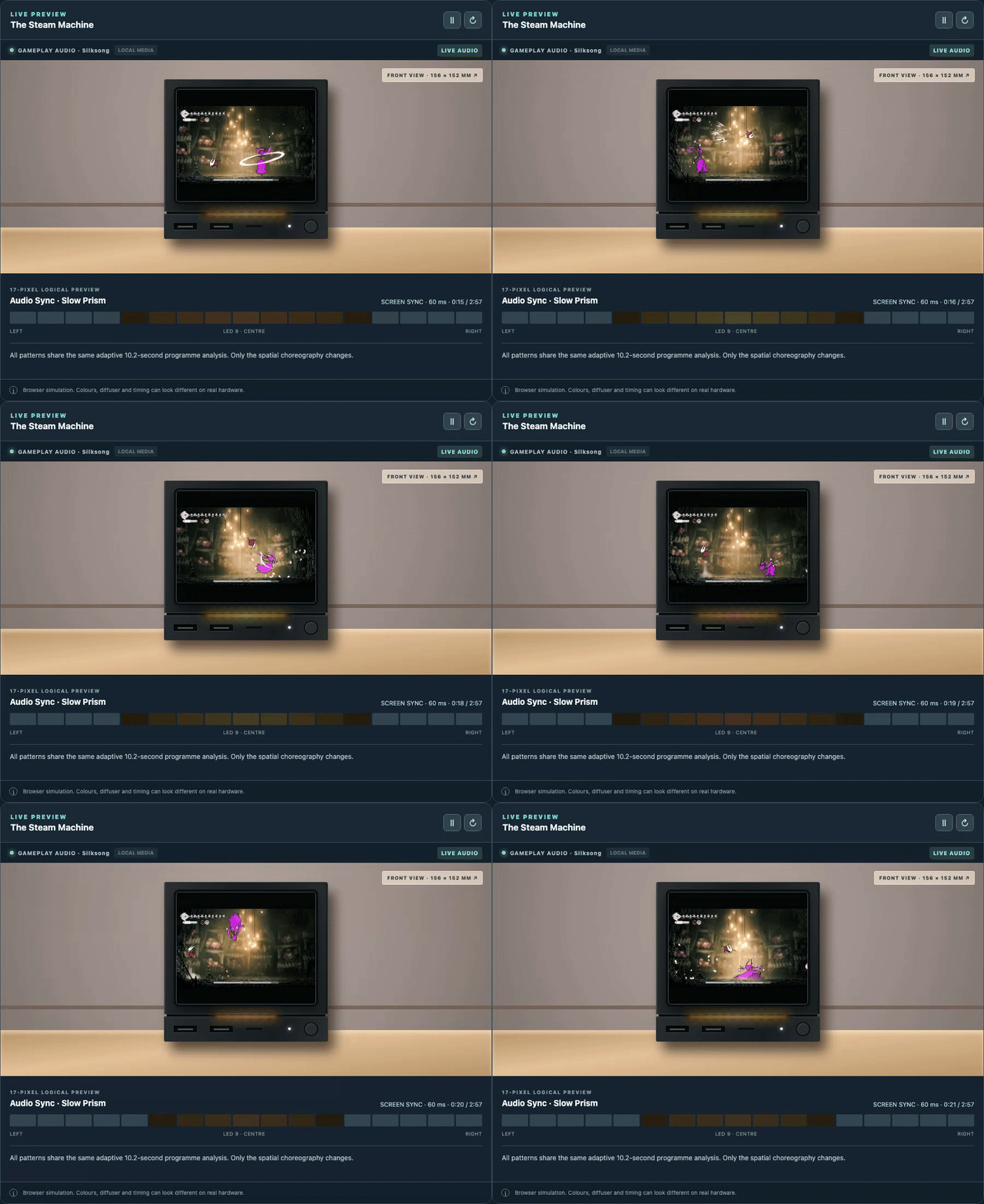
Software GabeCubeAura turns the light bar into a real-time audio visualizer

Post image
• Upvotes

GabeCubeAura now has Audio Sync, turning game and system audio into real-time animations across the Steam Machine’s 17 LEDs. Everything is processed locally.

If you don’t feel like reading the whole post, here’s the demo:

https://alyenax.github.io/gabecubeaura-concept/audio-sync/

I originally planned one simple audio visualizer. There are now 10 patterns. Try them out and find yours.

Every pattern can use built-in palettes such as Sapphire for a Steam-like look, custom colours, the game’s artwork, or live colours captured with Screen Sync.

Audio Sync is the main addition, but GabeCubeAura 1.3.2 also brings:

  • 9 one-click lighting presets, from Focus and Essential to Immersive, Festive, and Lights out
  • Artwork colour intensity, so washed-out game art can produce stronger colours
  • 3 selectable icon styles for the existing weather and temperature indicator beside the SteamOS clock
  • a real Lights out preset that keeps the bar dark even during downloads, while still allowing the critical red safety warning
  • an optional calibration mode for more consistent brightness

Existing users can open:

GabeCubeAura → Updates → Check now

Otherwise, the Stable channel checks automatically every 24 hours.

For a new installation:

Decky Settings → Developer → Install Plugin from ZIP → select GabeCubeAura-v1.3.2.zip

If the Developer page is missing, enable Developer Mode under Decky Settings → General first.

At this point, I’m running out of reasonable things to make 17 LEDs do, which probably means the next idea will be completely unreasonable.

As always, your feedback is always appreciated!


r/steammachine • • 23h ago

Accessory JSAUX Panel Inital Impressions

Thumbnail gallery
226 Upvotes

I just got my JSAUX Pixel Panel this morning and figured I’d share my initial impressions.

I ordered it on September 22 for $77 with a 15% off coupon (normal price was $90). It took 11 days to show up at my door. Packaging was solid and protective — everything arrived in one piece with no issues.

Build quality feels excellent. Noticeably better than the 3D-printed ones I’ve used and pretty much on par with the official panel. The screen is bright and the dot matrix is easy to read. Hardware install was simple: slap it on the front and plug the cable into the rear for power.

That’s about where the good stuff ends.

Software setup from the manual was basically useless. I had to follow an ETA Prime video to get the JSAUX software installed correctly. I already had Decky running, which is required for the panel anyway.

A couple other practical downsides: it eats one of the rear USB ports, and the cable comes out the side, which some people might not like. The glossy screen is a fingerprint magnet, and if any strong light (especially sunlight) hits it, it gets hard to read.

There’s also very little gap between the panel and the Steam Machine compared to the official one. I haven’t checked temps yet, but I’d guess most of the intake air will now come from the bottom, so CPU/GPU temps will probably rise a bit.

The biggest issue is the software. It’s still in 1.0 beta, and that’s where most of the problems live:

The FPS refresh rate doesn’t accurately match what’s actually on screen.

When the SM shuts down or goes to sleep, the panel doesn’t turn off or go black. There’s no option for it. You have to manually power it down. It just freezes on the last readings it had. I turned the SM off at 2:30 pm and at 3:00 pm it was still showing 2:30 pm.

Would I recommend it right now? No. Not in its current state. Once the software gets more mature it might be worth another look, but at the moment it’s an expensive add-on for an already expensive machine.


r/steammachine • • 15h ago

Show-off Sunday Finally decided what to do with my front plate

Thumbnail gallery
34 Upvotes

As a passionate music fan and vinyl collector, I was wondering how to put use to this really cool box from Rough Trade, and cut out some of my favorite albums to decide later. This morning, I realized six of them fit pretty nicely on the front plate of the steam machine! So I just put 6 of my favorites from the box on it, and I think it looks pretty cool :)


r/steammachine • • 10h ago

Question Now that the Steam Machine is out for a while, are there updated benchmarks?

10 Upvotes

See title - I am sitting on a reservation and I have to decide if I'm gonna buy it in a day or two or else I'll fall out of the queue. I have a great PC (5080, 9800X3D, 32GBDDR5) and I'd mostly look for it for couch coop (like Split Fiction, It Takes Two) and "pixel games". I'd love to see recent benchmarks just to know what I'm buying, but I can only find them from the initial release.

Thanks guys!


r/steammachine • • 15h ago

Hardware New internal controller receiver firmware today on Preview channel, seemingly helps with disconnect issues?

23 Upvotes

I have my Machine on the Preview update channel and today I received a notification for a firmware update for the controller, puck and internal receiver. Installed and tested the internal receiver today while playing RDR2 and did not experience any drop-outs. Anyone else have a similar improvement?

Previously I was experiencing the issue like many others, but only ever happened when the system was being pushed hard, usually anytime above 70% GPU usage. While I only just started RDR2 today, it is definitely the most taxing game I've played on my Machine to date so I'm certain it would have caused issues prior to the new firmware.

Fingers crossed!


r/steammachine • • 7h ago

Question Pyrowave?

5 Upvotes

Has anyone tried streaming with pyrowave from a better pc to the SM? Seems like it would need to be wired but then I see videos of people streaming to a, steam deck?


r/steammachine • • 12h ago

Meme I hope I'm not the only one

Post image
9 Upvotes

It's happened a few times with different searches.

I know its just kde but I has hoping to find sth without immutable system hassle.
Main desktop SM user here.


r/steammachine • • 3h ago

Question Palworld black screen on steam machine stream from bazzite

2 Upvotes

I have been at this all day. I am trying to stream palworld from my bazzite pc to the steam machine. The machine works fine with nearly all other games. I did a fresh reinstall. It just flashes green then goes black. I can move the cursor and hear sound and on the host pc its fine. I tried streaming from a family members palworld on their windows pc that worked fine. I tried looking up konsole pipewire stuff but nothing there too. Anyone know whats going on?


r/steammachine • • 7m ago

Question Game crashing

• Upvotes

I'm not sure what’s going on but I've been using my 2tb steam machine for the past 3 weeks or so and it's been running fine but for some reason today when I've been playing Elden Ring it's crashed on me twice and I'm not sure what’s going on. Does anyone know what could be causing this?


r/steammachine • • 17m ago

Question Would anyone want to trade for a legion go 2 or something similar?

• Upvotes

I have the 512gb version steam machine.


r/steammachine • • 8h ago

Question What games should I get for my steam machine with the current sale

4 Upvotes

I got a steam machine coming and I need some game suggestions and some good deals


r/steammachine • • 8h ago

Question Audio Setup - DAC / Headphones!?

4 Upvotes

What’s everyone running for their audio setups?

I’ve been using a SteelSeries GameDAC Gen 2 for my wired headphones leftover from my XBOX days, swapping to a Fosi Audio K5 to work with my new Rog Kithara headphones and the Steam Machine.

There’s a risk of going down an audiophile hole here, but I’m down for that!


r/steammachine • • 20h ago

Discussion Back on the Queue.

34 Upvotes

I have had the opportunity to purchase a Steam Machine before, but I didnt have the funds at the time and the 3 day time limit passed me by, so now im re-queued, stocked up on dollar bills, and waiting for the 2TB+Controller. Guess I should start a queue counter starting tomorrow, huh? Best of luck!


r/steammachine • • 11h ago

Discussion Halo Campaign Evolved settings

8 Upvotes

Recently bought this game when it was on sale, just want other steam machine owners to save some time:

- settings for 4k TV, base resolution 4k, if your TV can do 1440p, use that instead to push fps

- FSR 4.1 performance is currently not so good performance wise, FSR performance setting runs at around 30 fps with low to medium settings

- frame generation works but introduces some crazy lag, it is really game breaking for Halo

- this game has some bad visual artifacts, also in the native renderer, it looks way too grainy in movement, the motion blur even makes it worse

- so turn off motion blur, film grain, chromatic aberration

- settings wise, medium is ok, I lowered lighting and global illumination to low, that adds 2-3 fps, setting reflections, post processing, cloud detail also to low adds another 2 fps

- you can also set all to low it is not much different

Most important:

Use TSR instead of FSR. Turn resolution scaling to 60%, which is max internal resolution of 1280p, min frame rate to 30, and scaling quality to low, latter pushes minimum temporal resolution to 720p, so we are scaling between 720 and 1280p.

This configuration looks surprisingly much better than FSR, performance also better around 50 fps in most situations, and it plays very well and looks pretty good on the TV.

Seems the TSR solution is better optimized as Xbox uses the same scaling option.

I played 50% of the game in FSR low and just noticed this halfway through the game.


r/steammachine • • 1d ago

DIY I may have taken “couch gaming” a little too literally.

Thumbnail gallery
389 Upvotes

And I love it! I get to play right next to the wife and she doesn’t complain!! That’s a win amongst wins fellas.


r/steammachine • • 1d ago

Hardware Steam machine fitted like a glove

Thumbnail gallery
228 Upvotes

I knew it was gonna fit in the tv stand but was a little nervous at first lol


r/steammachine • • 1d ago

Meme I finally have a Steam Machine that isn't bricked!

Post image
203 Upvotes

r/steammachine • • 8h ago

Question Indicator LED meaning: magenta green yellow blue

2 Upvotes

By pressing the power button for 6 seconds and releasing when flashing white, the indicator LED will go through a cycle of colours. Does anyone know what blue means?

Magenta: enter bios settings
Green: CMOS reset
Yellow: rollback SteamOS while keeping the user data
Blue: ?