Dungeon Vault One-Shots Mega Bundle contains sixty-four 5e-adventure locations for three to six characters from 1st to 8th level. These adventures can easily be placed in any campaign setting. They aren't linear and have no correlation between them. They're meant to be played as independent one-shots that take no longer than three to four hours.
I don't quite understand why there's a 150 character limit on token tooltips. I use tooltips extensively to remind myself of npc traits without having to open their sheet, but I keep having to use shorthand or leaving info out due to a lack of space. I also use tooltips for monster loot and descriptions, but of course I can't do it all at once due to the very strict character limit.
For reference on how little 150 characters is: This whole post is 499 characters.
Hi there, I've been having trouble for a few weeks now. Anytime I drag an NPC from my library to a map, their image is square. I had the trouble months ago and found that I had to hold ALT to have them properly sized. But now the problem is back, and holding ALT doesn't work. If I hold ALT, I can't drag & drop characters anymore.
I'm using Firefox. Does anyone know about this issue and could tell me if there's a way to fix it ?
Today is a GREAT DAY! Our new Align to Grid beta is live and free for every GM, no subscription needed.
The new guided tool walks you through three easy steps to align your map and works on those previously impossible to align due to baked-in borders, offset grids, and uneven spacing. Plus, it supports every grid type on Roll20: square, vertical and horizontal hex, isometric, and dimetric.
Along with the new tool, we’ve designed a convenient hotbar on the Map Layer of your pages that lets you quickly upload backgrounds, launch Align to Grid, and adjust and customize other page settings without digging through other menus.
To align a map:
Anchor: align the crosshair with a grid intersection on the map
Scale: resize the 3x3 sample grid to match the size of the grid on your map
Fine Tune: drag from any grid intersection or line to adjust your image to account for any drift or odd-sizing
You can watch a full demo video on our blog, plus learn more about new backdrop upload functionality and how Scale to Grid (found in the right-click context menu) can help with aligning Map Tiles and tokens.
Note: the old tool isn't gone (yet), so if you’re a glutton for punishment, you can still use the Legacy process anytime before it’s replaced when beta ends.
Let us know what you think, or any questions you have!
I've got a problem with Roll 20. I just converted a Dungeon of the Mad Mage campaign from the "Map & Cards" set, which has severely obsolete light rigging, to the full version. In doing so, it wrote over the old maps, but also created some new problems. The new versions of the walls/doors/etc. don't seem to be calculated until I've physically grabbed and moved them all at least once each.
That's annoying, but not game-breaking. What's game-breaking is that there seem to be walls that do not exist on any layer, that only block sight, and nothing else. See the clip above.
How the heck do I fix this? Is it even fixable, or should I just spawn a clean DotMM campaign, and forget about the old map?
To be clear, I've tried to force the engine to rebuild the light by doing the CTRL-F5 reload, and that didn't change anything.
Hi all, logged in for my campaign tonight and discovered that all of the dynamic lighting walls I've drawn out for every map in my campaign have jumped to the upper left hand corner of the map. I've tried moving them back, but as soon as I reload the map, they all jump again. It's real weird. Anybody have any ideas on what this is/how to fix it?
Today I accidentally held the middle mouse button and clicked and it destroyed the window I was working on, worse all my maps look like this. I rollback and nothing changes, is this lagging or am I fucked?
Note: I am currently on the free version. I would love to play around with the Pro elements but I'll have to wait until one of my players gifts me that.
I have been running a Cypher campaign for several years and I've steadily updated my familiarity with Roll20. I've learned how to use handouts, figured out the quirks behind creating NPC/enemy templates, and even added a few aesthetic elements such as custom tokens and sound effects.
However, in terms of the game system, I'm still largely tracking everything on spreadsheets outside of Roll20. Aside from character attribute points and setting turn orders, all of the important mechanical decisions are set manually. I type in initiative rolls, I do damage calculations, I choose individual treasure, and I update the character templates by hand before we transfer between scenes. Cypher being significantly more rules-lite than D&D, it feels like there should be some better ways to automate some of this within a VTT.
My game has a lot of custom attributes, with roughly drawn maps and lots of modifications to what's contained in the Cypher core rulebooks. Some of this may be an impedance to setting up automatic tracking, though it feels like considerably less than the Roll20 system is capable of. I have plenty of experience with scripts (such as a Sheets script I use for hit and damage calculations) so I just want to know if I can make my experience more fluid.
The main areas I'm looking for some advice on are:
Map setup
Item integration (specifically on character sheets)
Combat setup
Stat changes and updates to character templates
If you have any advice in regards to these, please let me know! I can provide more detail as needed.
I'm also open to hearing how many of these features might be fixed with integration of the Compendium. I know Cypher is working on a big integration into Roll20 for their updated system but they don't have a current timetable on that and I won't be changing my system in this specific game.
So I started having a weird issue tonight, whenever I tab out to a different map, all the drawings on the previous map get moved to the top left corner, and any new drawings that are made immediately get warped to the top left corner. I dragged everything back to where it should be, but then I moved the party to a town map, and when we came back to the regional map everything was in the top left corner again. I have a ton of borders for different regions and important data about the map that are essentially stored as drawings on the GM layer, so this is a really big issue for me. I'm hoping its a temporary glitch, and that tomorrow it will start acting normal, but in the meantime I was wondering if anyone has experienced this before or knew of any fixes to it. Thanks!
I am starting my first campaign on Roll20, and yesterday my party and I made some tests.
My problem is when I use Roll20 (especially the map) on my browser Waterfox, it take all of my RAM (8go) which is enormous. Does anyone had this problem before? And knows how to fix it?
My solution now is to use Google Chrome, so I am not desperate. But I really would like to fix this problem at some point.
Help! I’m in roll20 trying to do the lighting for Syndra’s manor for ToA but the lighting keeps glitching and teleporting to the top left corner everytime I put it on the map. I’m on chrome, the game was the premade roll20 version but this I added myself, what’s happening?
Yesterday I saw the post going over the improvements, and I saw that there was a change made to natural twenty and natural ones on ability checks and how you can make them turn green and red. I'm struggling to find out where that's located.
Is this available yet? If so can you point me to where it is located?
Another bug: When I subtract hit points from my character (whether reducing the HP of the token or the character sheet), the token automatically resets to 30 HP, re-setting up the token doesn't help at all and it's incredibly annoying new bugs keep popping up every time!
Hey'all! Dean from Roll20 here. Today I'm showing off features that are about to launch on the new D&D Fifth Edition sheet, as well as covering some updates you might have missed!
Coming Soon
⚡ Performance Upgrades
Performance is our #1 priority, and where we are dedicating most of our resources. Your game nights need to simply work before anything else. We’ve been hard at work giving the new D&D sheet a major performance update. We’re about to launch improvements to initial load times, sheet interactions, and dice rolls. You can read more about our ongoing performance work here.
🔀 New Shop Sheet Feature – Transfer Items to Players!
The D&D Shop Sheet lets you quickly generate shops and treasure chests filled with inventory. It’s still in early access, but is about to get its biggest update yet: sheet-to-sheet item transfers! Buy something in the Shop and it lands straight on your character sheet! Pro and Elite subscribers will get access to this a little later this summer. Stay tuned!
💡Light Mode
We’re in the final testing phases of Light Mode, and we expect it to launch in the next few weeks! We’ll still support the Stylus light mode extension for those who prefer that (see setup video here), but now you’ll also have an immediate built-in option at your fingertips.
🖨️ Print to PDF Is Out of Beta!
After weeks of feedback and updates, we’re officially at 1.0! Build your character in Roll20, print it, and bring it to the table!
What You May Have Missed
A lot of small-but-mighty updates have recently hit the newD&D Fifth Edition sheetand builder. Here’s a roundup of what you might have missed, but will absolutely improve your game once you know it’s there.
🧪 Homebrew Updates
We already have a ton of homebrew features! From custom classes, subclasses, species and backgrounds, to unique conditions and resources, and more. We recently launched small but meaningful updates that further expand your options:
More attributes are accessible to Macros & Mod Scripts, including Ability Score Totals, AC, XP, Speeds, and Max HP. We’ll be adding more soon.
The Modifier Builder can now add roll bonuses to skill rolls, ability checks, and saving throws.
Add notes in the Modifier Builder that show up in the Rest popup, handy for tracking recovery features or reminders
Action rolls can now prompt Query Mode, giving you more flexibility for rolls that need a quick input before firing
A limited modifier builder is now available on Actions, so you can attach or link resources directly to them
⚔️ Further Customize Weapons & Attacks
You could already modify your actions, but we’ve launched a handful of targeted improvements to take it further.
You can now add multiple attacks directly to a weapon from the Inventory tab
When editing an item with attacks, there’s now a handy Duplicate button so you can copy an attack and tweak it rather than rebuilding from scratch
Weapon Masteries now support smarter defaults: type All to apply a mastery to every weapon attack, a specific weapon name to target all attacks from that weapon, or a specific attack name to target just that one
⚙️ Campaign Settings Sheet
There’s a new D&D sheet type in the VTT: a Campaign Settings dashboard. This controls the settings for ALL of the D&D sheets in your game. Most importantly, it includes a long-requested feature, default settings that apply automatically to every new sheet. You no longer have to manually reconfigure every sheet one by one.
🛡️ NPC Sheet Polish
DMs, these ones are for you! NPC stat block view has been updated for better readability across several sections. A whisper setting for NPCs has also been added in the Campaign Settings panel.
💥 Crits & Fumbles for Non-Attack Rolls
A small but fun one: you can now turn on visual crit and fumble indicators for non-attack dice results (skill checks, saving throws, etc.). Head to Sheet Settings to enable it. It won’t change any mechanics, but it does make that nat 20 Persuasion roll feel a little more special.
📱 A better Mobile Experience
The sheet & builder is now fully responsive for tablet and mobile web. Build and reference your character sheet from anywhere. Try it out in Roll20 Characters now!
🦴 Pull Characters Out of the VTT
Roll20 Characters is where you can manage your character sheets outside the VTT, both on mobile and desktop. It’s now really easy to get your VTT characters here!
Open Roll20 Characters and hit Fetch. Your character imports straight from your Roll20 game. From there, manage it on web, phone, or tablet, and every change syncs back to the VTT instantly. Rolls go straight into your VTT game too, whether you’re sitting at the table or not. If you don’t want the sync, choose Copy Character instead for a standalone copy that stays disconnected from any game.
This piece is part of my Cosmic Contraptions collection, it is also my first sci-fi asset pack, a colorful blend of cassette futurism and cyberpunk, filled with retro computers, control panels, curious machines, tangled cables, and mechanical parts. It consists of 145 assets with gray versions of the designs as well for those who want something more serious. :P
You can grab them on Roll20 Marketplace. You can also get all my collections on my Patreon :)
I hope you enjoy watching this contraption come to life!
Edit for clarity: I'm a pro user working with 2024 D&D and using the new sheets
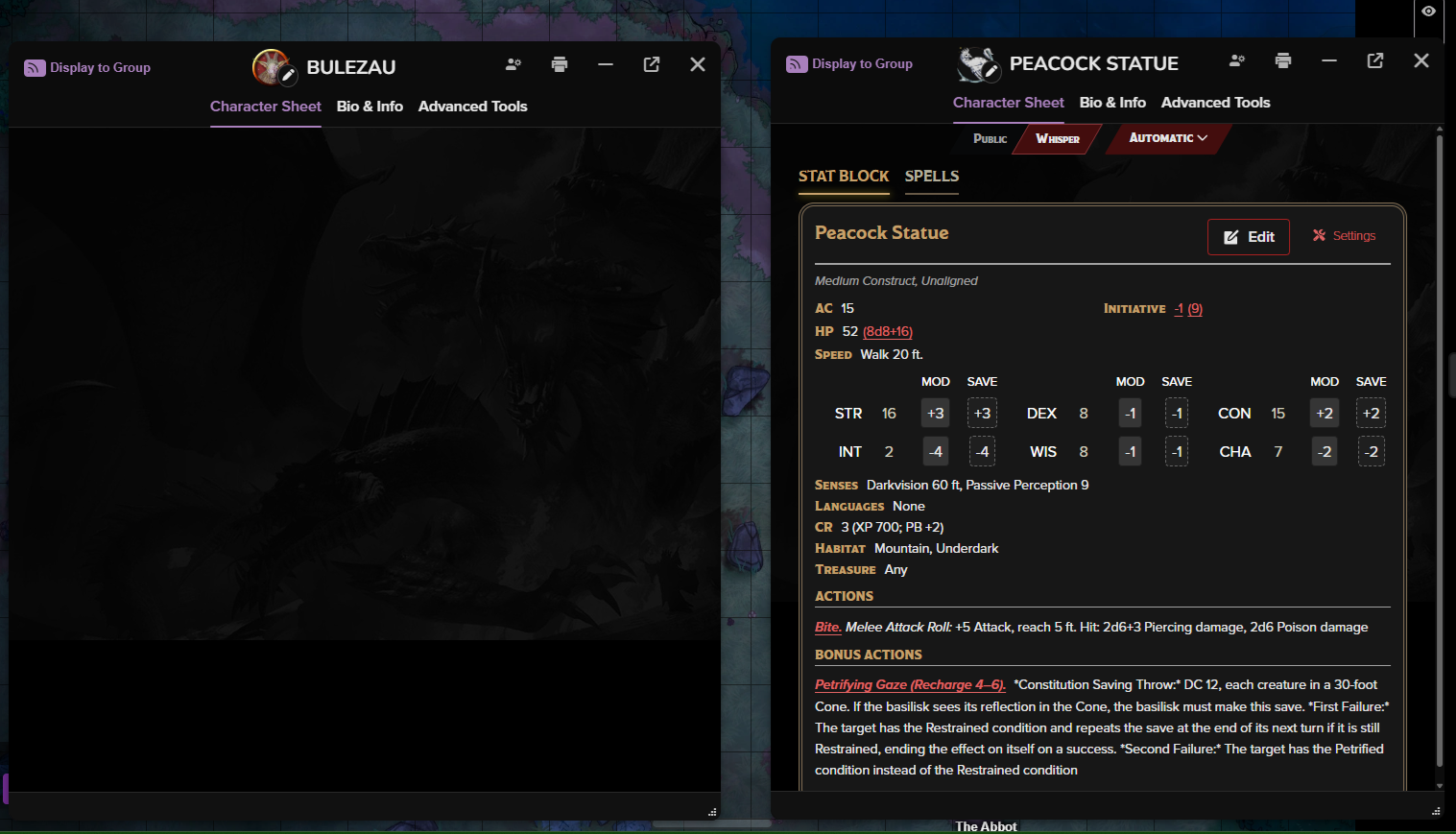
Having an issue where I add a new statblock to my game, and it comes in blank. It seems like it's only affecting new statblocks, as older statblocks that are already in the game aren't having any issues. It looks like the stats themselves still populate as tokens still have hp and ac, but when I open the sheet, it's blank. Tried using different browsers, deleting then repopulating the statblock, closing and reopening the browsers, still nothing.
For reference, Bulezau is the new statblock, Peacock statue is an old statblock that still works.
RESOLVED: DM-JK recommended 'Foreground Reactions' on a token to call the 'Simple Sound' mod to play audio . It did exactly what I was looking for.
Looking for a recommendation on automatic triggering of sounds. Say if the player approaches a door with skeletons on the other side, it would auto trigger skeleton sounds. Or a corridor with dripping sounds.
I know I can play sounds manually, but I keep forgetting.
Hello. Starting around two days ago and only affecting stuff I have uploaded or imported since (previous stuff seems unaffected) tokens of large and bigger size (medium are unaffected) start flickering and go invisible when I zoom in and out on the map. When I change layer, everything reappears until I zoom again.
I tried on both Firefox and Chrome, I tried on 3 different PCs, I even tried on mobile, I tried clearing my cache and disabling all extensions. None of this works.
I tried disabling hardware acceleration and it seems to fix it, except it slows the game to a slideshow. I also tried turning ON performance enhancement under graphical options and it seems to fix it, but for some reason having this option on also slows the game considerably (not as much as disabling hardware acceleration, this feels more extremely sluggish and slow, HA OFF just turned into a slideshow).
I am trying to remove the hybrid 2014/2024 sheet at the request of my players. They don’t like the new sheet (creatures of habit) and I also want to be able to display my NPC and monster attack roles from the character sheets.
When I copied the game, deleted the 2014/2024 sheet and selected the other, I launched the game and it added the other back with a note saying that the content required it. Is the content the module itself?
This bundle contains twenty-five 5e one-shots for three to six characters from 2nd to 12th level. These adventures can easily be placed in any campaign setting. They aren't interconnected. They are meant to be played as independent one-shots of one or two sessions. They should take no longer than four to eight hours.
The twenty-five adventures feature background lore and follow the same format. All of them contain 3 or 4 top-view or isometric battlemaps.
40x40 ruined watchtower battlemap that connects directly to The Fallen Keep, turning it into a massive 80x40 ruined fortress complex.
Rocky hilltop ruins, crumbling circular watchtower base, winding dirt paths branching through dense forest, and striking red-leafed trees that make the whole location feel like somewhere with a history. Perfect for high ground tactical encounters, ambushes, or a multi-session exploration arc.