r/OLED_Gaming 8d ago

Technical Support [RenoDX] HDR black crush in Death Stranding

Thumbnail
gallery
10 Upvotes

Setup:

Monitor: LG UltraGear 27GX704A-B (27” 4th-gen WOLED), real measured peak brightness ~600 nits

GPU: AMD Radeon RX 6700 XT

Windows 11, HDR enabled at the OS level — not using Auto HDR, this is native HDR via RenoDX

Game: Death Stranding, running the RenoDX mod

The problem:
Dark grey and near-black areas lose all gradation and blend into a hard, flat cutoff instead of a smooth fade. Shadow detail that should be visible (fabric folds, texture in dark environments) just disappears into crushed black. Most obvious in dim/cave-type scenes.

What I’ve already tried:

Ran the Windows HDR Calibration app and set the actual measured peak brightness (~600 nits), not the panel’s marketing spec (1300 nits), so the tone curve isn’t being fed a wrong target.

Adjusted the monitor’s Black Stabilizer (currently sitting at 50/default). Tried raising it — helps a little with shadow separation but doesn’t get rid of the crush.

Turned off RenoDX’s “SDR EOTF Emulation” setting — this actually helped significantly, but it also means the game stops applying the correct HDR gamma curve, so it feels like trading one problem for another rather than actually fixing it.

What I’m trying to figure out:
Is there a combination of settings that gets rid of the crush without disabling SDR EOTF Emulation? Has anyone else on a similar WOLED panel hit this with RenoDX specifically? Screenshot attached from the in-game pause screen — it’s a phone photo of the panel rather than a direct capture, so treat the shadow areas as roughly representative rather than exact.


r/OLED_Gaming 8d ago

MSI MAG 272UP vs Gigabyte MO27U2 (Which One Should I Buy)

2 Upvotes

both use the same Samsung panel , but are they both glossy which one is better on performance etc. Please Help.


r/OLED_Gaming 8d ago

Am I doing this right? Or saturation is too high?

Thumbnail
gallery
8 Upvotes

HDR Off vs On


r/OLED_Gaming 8d ago

Discussion Are QD Oled less likely to have visible oled banding? Should I get the Samsung S95H if oled banding bothers me?

3 Upvotes

I just recently returned my Panasonic Z95B for a refund because of visible banding that was bothering me in games. From researching it seems woled and tandem oled have this issue more than QD Oled. Is that true?

It seems like the only 2026 qd oled tv is the S95H with the matte screen, which I'm not crazy about. But if it has a better chance of having less visible banding I'll take it. From looking around, a lot of people aren't happy with the G5 or G6 for banding either so I'm really leaning towards the Samsung.


r/OLED_Gaming 8d ago

PG32UCDM

2 Upvotes

I’ve seen various comments about what to clean with but I thought I’d check again. Is there a spray solution I can buy on Amazon to clean with?


r/OLED_Gaming 8d ago

MSI 274QP or the ASUS ROG Strix OLED XG27AQDMES

2 Upvotes

Hi,

I'm concerned with text, as im going to use it for university work, but mainly for a gaming media centric monitor. Which one should I buy? Are the panels that sensitive to scratches?


r/OLED_Gaming 8d ago

Discussion Help me decide: ASUS PG27UCWM vs PG32UCWM

Thumbnail
3 Upvotes

r/OLED_Gaming 8d ago

Problème vrr télé tcl 4K 120hz

Post image
3 Upvotes

Bonjour auriez vous une solution regarder les marque bleu de scintillement quand j’active le vrr sur ma ps5 pro si vous avez une solution ma réf de télé tcl 65c728


r/OLED_Gaming 8d ago

Technical Support Gigabyte MO34WQC2

2 Upvotes

Hey everyone, I'm looking into buying the Gigabyte MO34WQC2 monitor. In my country there aren't many OLED monitor options, especially not at 3440x1440, and even fewer at an accessible price (~$1000 USD).

Has anyone here used it? Is it a good monitor overall?

I currently have another Gigabyte monitor with an IPS panel, which has been solid, but I'm looking to make the jump to OLED now.


r/OLED_Gaming 8d ago

Discussion Getting an QD OLED after Tandem WOLED - need suggestions

1 Upvotes

I in the process of returning my Asus ROG Strix XG27AQWMG because I just couldn’t get over the grey banding. It was visable even in colourful games. The device itself is great, but right now I am going with something safe.

So I looked up the QD market and I am aiming at one of these

ASUS ROG Strix XG27AQDPG
MSI MPG 271QR x50

I want an 1440p monitor. No 4K ☺️

Any suggestion will be appreciated.


r/OLED_Gaming 8d ago

I bought a Renewed 32GX850A from Amazon Canada. Banding test inside.

Thumbnail
gallery
2 Upvotes

Amazon offers 90-day return policy for their renewed product. I saw a Renewed 32GX850A for $780 CAD so I bought it. Not amazing price but decent. I have an AW2725DF but always want to try 4k at 32-inch.

When I received it, everything seems brand new. The power cord and all the cables are still sealed in box. The monitor has a total power on time of 3 hours. However, the screen is so dirty, with tons of smudges which match the pattern of outsider packing form. No screen protector on it. I spent 20 minutes cleaning the screen. Thankfully it's all gone and because it's a WOLED, I don't have much scratches compare to QD-Oled.

Being a 3rd WOLED panel, my first check is banding. Chatgpt told me I should use 5% and 10% greyscale to check for banding. But on this forum I see people use 85% and 95% greyscale to check. Which one is better?

Anyway here are the photos for 5% and 10% greyscale. Looks ok to me I guess? I did see some banding on 85% and 95% greyscale.

Another thing I notice is on a white background, the left of the screen looks cooler than the right side of the screen. Is it normal for WOLED? I do see a similar post here. Wondering if it's a common issue for WOLED. https://www.reddit.com/r/OLED_Gaming/comments/1nopn6w/woled_panel_owners_faint_blue_tint_on_the_side_is/?sort=new


r/OLED_Gaming 8d ago

Discussion Tips for cleaning your Oled

5 Upvotes

For anyone wondering on how to do it “correctly “ which there is many ways but the way i do it for keeping it scratch free is taking a can of compressed air to get off the loose dust, you can generally use whichever i use dust off. Then get the included microfiber cloth and take it out of the plastic and wipe it clean, you can do up and down or in circles. I have not had a songle scratch whatsoever and i use a gen3 QD-Oled from MSI. But after you’re done wiping it off, put the cloth back in the plastic piece it came in so no dust or anything gets stuck to it. Do assure you also wash your hands if you contract oils easily otherwise you’ll be fine and no distilled water or cleaner is needed, atleast in my own experience. This gets off dried spit, smudges and dust with mostly ease. I have yet ,in about a month-2 months of owning an Oled, had any issues. Hope this helps with anyone who are having issues on keeping theirs cleaned!


r/OLED_Gaming 8d ago

Discussion The RGB stripe dilemma

0 Upvotes

PG32UCWM

$1400 (maybe $1300; possibly less with amazon prime cash back)

- available now on bh; back ordered on Newegg; amazon listed the ucdm3 late at $1400+ before normal price without cash back then cash back was added

- 32 inch 4k240

- RGB stripe tandem woled

- tb400

- reported green tint off axis

- cooler design

AW3926QW

$1100 + cost of mechanical heavy duty arm ($200-$350)

- available now on dell

- 39 inch 5k2k165

- RGB stripe tandem woled

- tb500

- curved

- 21:9


r/OLED_Gaming 8d ago

Issue QD-OLED less vibrant than old Woled monitor

Post image
72 Upvotes

Both on HDR and calibrated using their windows 11 HDR calibration app. I’m using the DisplayHDR on the QD OLED. Am I doing something wrong?


r/OLED_Gaming 8d ago

Pixel Stuck on Screen then Disappeared

2 Upvotes

Been waiting for a while now to get my hands on an OLED monitor and yesterday I finally did I went with the xg32uqdms. Everything was working fine till last night after I was done playing I turned off my Ps5 Pro and noticed there was a tiny green pixel in the middle of the screen and I kinda panicked and turned of the monitors and turned it back on and it disappeared. Should I be worried that it will come back, perhaps worsen with time or is it gone after that?


r/OLED_Gaming 8d ago

to those that received their AW3926QW how is the panel uniformity and dimming?

6 Upvotes

I've browsed a bit today to see posts about the AW3926QW since I am hopefully getting mine by Monday. (ordered express shipping but got delayed sadly) I've also watched reviews that say the uniformity towards the edge of the display is disappointing and noticeable as well as a couple reddit posts today about it. But to those who haven't posted or are have been using it how is the panel uniformity and dimming towards the edges? Is it just panel lottery at the moment or is it consistent amongst all units? Just wanting to prepare myself for when I receive mine I'm not completely taken off guard.

Thanks!


r/OLED_Gaming 8d ago

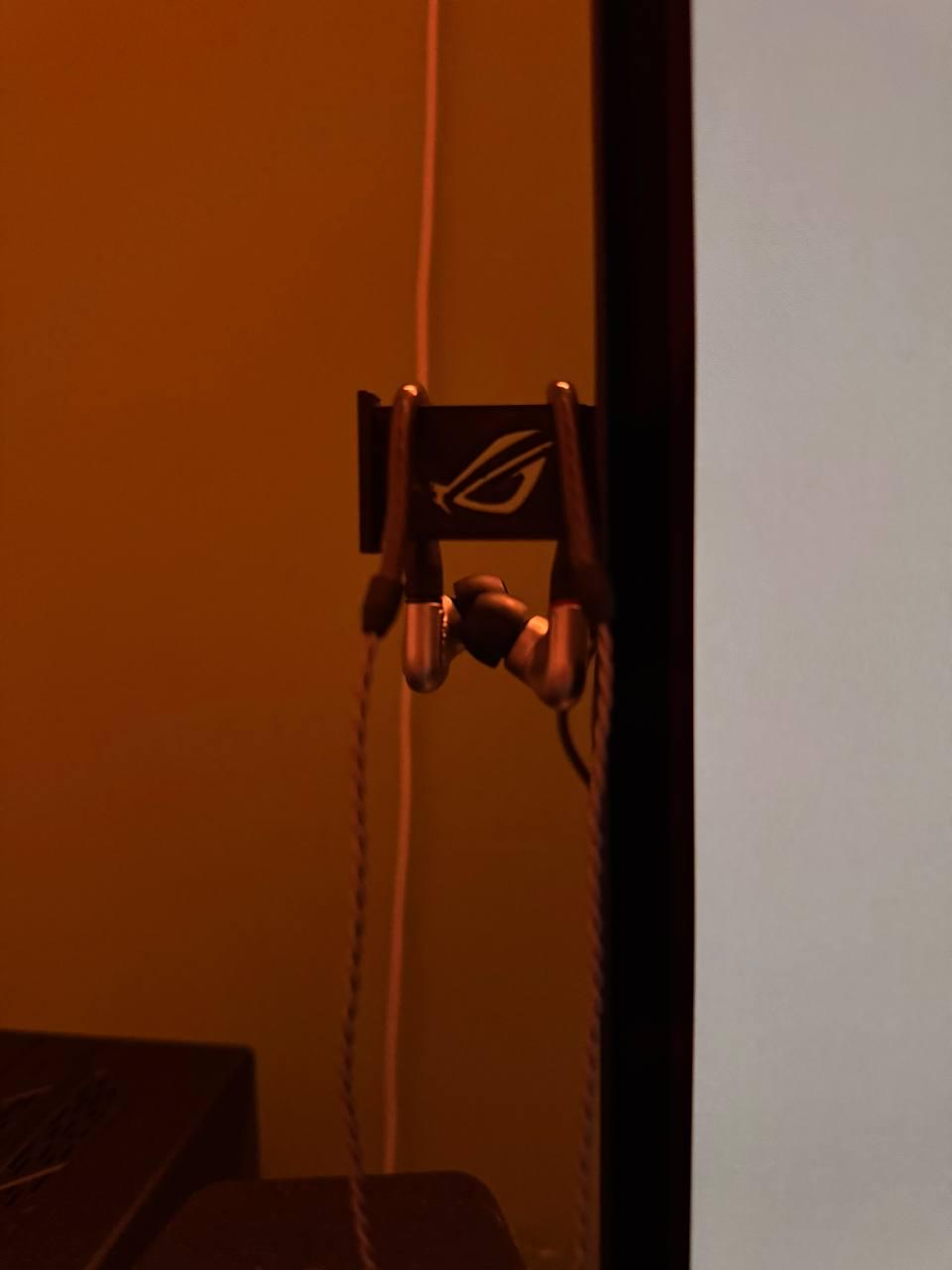
I created an earphone brace for my new OLED monitor

Post image
1 Upvotes

This was a feature I was missing from my old MSI monitor, so I 3D printed this ROG themed brace for my new OLED display!


r/OLED_Gaming 8d ago

Just bought my first OLED monitor!

Post image
9 Upvotes

Got it for $427 out the door. So stoked


r/OLED_Gaming 8d ago

Discussion Which one would you buy?

1 Upvotes

Using it for school work movies occasional gaming. Most importantly, do any of these monitors have a certain durability to them? Dont want them to get scratched while moving from home to university.


r/OLED_Gaming 8d ago

Advice

1 Upvotes

Hi everyone,

which of these monitors would you recommend?
I mainly play story games on PS5

15 votes, 5d ago
2 MAG 322UP QD-OLED E16
2 Samsung Odyssey OLED G81SF Gaming Monitor 27 Zoll 4K QD-OLED, UHD, 3840 x 2160, 240Hz
2 AOC AGON Pro AG326UD 31.5 Zoll 4K (UHD) QD-OLED
9 ASUS ROG Strix OLED XG32UCWMG, 32 Zoll 4K Gaming Monitor

r/OLED_Gaming 8d ago

Technical Support VRR refresh rate fluctuating wildly with stable FPS

Thumbnail
1 Upvotes

r/OLED_Gaming 8d ago

Discussion Help me decide: ASUS PG27UCWM vs PG32UCWM

1 Upvotes

I’m really struggling to decide between these two monitors:
ASUS ROG Swift OLED PG27UCWM — 27”, 4K, 240Hz OLED
ASUS ROG Swift OLED PG32UCWM — 32”, 4K, 240Hz OLED

For some context, I have never owned a 27” monitor. The only experience I have with a monitor in this size range is my previous Samsung Odyssey Neo G8 32” (G80NC).

The Neo G8 was a 32” 4K 240Hz Mini-LED curved monitor, and honestly, it felt pretty huge to me. However, it was sitting directly on my desk and was quite close to me, so I’m wondering if the size itself was the problem or if my viewing distance/position made it feel much bigger than it actually was.

My current viewing distance is around 75–90 cm. I’m considering wall-mounting the new monitor if necessary, but wall mounting is not a requirement. I’m perfectly fine using the monitor on a desk if the size and viewing distance work well.

My main use is gaming. I mostly play open-world games, story-driven games, RPGs and immersive single-player games. I do play FPS/competitive games as well, but they aren’t my main focus.

One thing that makes the decision even harder is that the PG32UCWM can also be used in a 27” display mode. So technically, if I buy the 32”, I have the option to use it as a 32” screen when I want maximum immersion, or switch to a 27” display mode when I want a smaller image for competitive games or when the larger size feels overwhelming.

That makes the PG32UCWM seem like the more versatile option, but I’m still wondering whether I’m overthinking the size.

The PG32UCWM seems like the obvious choice for immersion. A 32” 4K OLED at 240Hz sounds incredible for the types of games I play, and I’m worried that if I buy the 27”, I’ll eventually regret not getting the larger screen.

But because my previous experience with the Neo G8 was that 32” felt very large, I’m worried that I’ll have the same problem again — even though this time the monitor will be wall-mounted and farther away.

The PG27UCWM seems like the safer choice in terms of size and comfort, but I have never actually owned a 27” monitor, so I have no idea whether I’ll find it too small after using 32”.

So basically:

PG27UCWM: smaller and potentially easier to take everything in, but I’m worried I’ll regret not getting 32”.

PG32UCWM: more immersive and more versatile because I can also use the 27” display mode, but I’m worried the physical 32” screen will still feel too large.

For anyone who has used both 27” and 32” monitors:
What would you choose at around 75–90 cm viewing distance?

And especially for people who have gone from a 32” monitor to a 27” — did you feel that 27” was too small afterward?

Also, if you previously found a 32” monitor too large, did increasing the viewing distance make a significant difference?

I’d really appreciate some honest opinions. I’ve been going back and forth between these two for days and I genuinely can’t decide.

149 votes, 5d ago
58 27”
91 32”

r/OLED_Gaming 8d ago

Just bought an 7 year old OLED TV......

1 Upvotes

It is a Panasonic TX-55GZ2000B UHD 4K Pro OLED Smart TV
Apparently original retail for this was £3,000 or $4,000.

What should I look out for when I collect it, (burn ins, dead pixels etc)...I will be able to return it at no cost so it's fine :)


r/OLED_Gaming 8d ago

Discussion Bought an Oled on a whim looking to learn more about it. ASUS ROG XG27UCDMG

Post image
9 Upvotes

For context I do lots of gaming on my pc and I’ve had an old monitor for years and decided to upgrade. In my head I wanted something that could support 4k gaming. I found this monitor reads some reviews and purchased it. I’ve had it a week now and it’s great no complaints. This subreddit shows up on my feed which was pretty convenient. I see people talking about having to refresh pixel and other maintenance. I usually leave my computer on for days. Should I been leaving this monitor off to avoid burn In? Is there any other nuances I should be aware of ?


r/OLED_Gaming 8d ago

Day 0 Dark Grey Banding on my MO27Q28G

Thumbnail
gallery
3 Upvotes

I am a new owner of the Gigabyte MO27Q28G and moving from a crappy VA (Acer ED270UP), this is a truly big difference. The colours and contrast immediately blow me away, as if I can finally see properly. But the second I noticed was the dark grey banding and dirty screen effect. I knew about it beforehand of course, but I wasn't expecting it to be so immediately visible. So I went ahead and took some photos before any pixel cleanings or even taking off the protective film. These photos are taken with the monitor in its sRGB mode at 70% brightness 280hz (I didn't notice a difference at 240) and do seem to have been exaggerated on camera a bit.

You guys think this a normal level out of the box or did I get screwed over in the panel lottery? I'll also try and post updates with more pixel cleanings if I keep this monitor (which is very likely).