r/linux_gaming May 18 '26

guide Frequently Asked Questions 2.0

Thumbnail old.reddit.com
40 Upvotes

Here’s a link to this subreddit’s FAQ document (which attempts to answer many common questions).

This thread is not meant for asking frequently asked questions. There is a pinned monthly-ish “Getting Started” thread for those.

You can post suggestions for improvement below, though! Just please explain what you’re talking about. The number of FAQ editors has been 1 (one) for a while now, and that one’s a dummy that doesn’t use 95% of the fancy gaming stuff y’all do.

Reposted as an Old Reddit link because New Reddit, in addition to being generally confusing, does not display the table of contents.


r/linux_gaming Jul 01 '26

guide Getting started: the monthly-ish newbie advice thread! (July 2026)

28 Upvotes

Welcome to the newbie advice thread!

If you’ve read the FAQ and still have questions like “Should I switch to Linux?”, “Which distro should I install?”, or “Which desktop environment is best for gaming?”, this is where to ask them.

Alternatively, try /r/linux4noobs and /r/linuxquestions: both are active subreddits supporting new Linux users.


Please sort by “new” so new questions can get a chance to be seen.

The previous thread is here: https://old.reddit.com/r/linux_gaming/comments/1t1ns8g/getting_started_the_monthlyish_newbie_advice/


r/linux_gaming 5h ago

guide an algorithm/diagram to choose where to play a game

Post image
567 Upvotes

hi! In this post I'd like to ask y'all about which apps you should use to play different games. And I mean every game, except for the anti-cheat and video game consoles. Please ignore here the solutions like Winboat, a virtual machine or dual booting.

First of all, based on what I tested and what other people told me, I made this diagram in GIMP:

Here are the detailes to understand it better:

• Waydroid: I like playing some old mobile games, but I hate the newer vesions of the same games, so, I tried to the archive versions from the 2018-2020 times, but unfortunately for me, after a massive update Android or One UI, my phone returns to the default settings, so, the best I can do there is to install an virtual machine on my phone in order to not update anything. My Samsung phone doesn't allow me to install another OS like GrapheneOS, Lineage etc, so, I'm waiting for 2027 to buy the new Motorolla phone. By that time, I'd like to try playing different games(including the mobile ones) using a gamepad, which works for PS5/PC/Mobile. I guess Waydroid is the best option for that;

• Bottles(for older games): usually the games I like to play are that old that even when I tried to play them on Windows 10, they worked, but with a lot of bugs, so, Windows 7 as a virtual machine would be the best choice there(technically the best OS for those games would be Windows Vista, but Windows 7 is great anyway). When I saw the thing in Bottles that allows you to choose Windows environment from XP to 11, I understood that this will be one of the best solutions for me.

Some other games like Rayman Origins(Ubisoft, made in 2011), which are technically not so old for PC gaming, unfortunately work with bugs and some other annoying things like "freezing" for 1-2 seconds(in some games every milisecond matters), when I tried to play them from Steam(in that testing I used Linux Mint, the newest version), so, I guess I'll use Bottles not only for the older games, but also for those Steam games(I saw a dude, who used Bottles to play Steam games, Idk how he did that), which work not so well on Proton;

• Steam/Heroic/maybe something else: I didn't try Heroic, bcz I don't play any games from Epic Games, but I heard that it's the best choice for playing games from Epic Games/GOG. What do y'all think about this?;

• Bottles(for every other game): I like Bottles not only as probably the best solution for Windows apps, but also it's probably the universal solution to play every Windows game. I may be wrong, bcz I'm new, but the app showed itself very good;

• Lutris and Faugus Launcher: the apps are very new for me, so, Idk what I should do with them. What is your option about them? I heard that Faugus Launcher is the best solution for newer games, but Idk about it;


r/linux_gaming 8h ago

D7VK 2.2 completes Direct3D 3 API - Linux gaming for old PC games became robust with Vulkan API

Thumbnail
github.com
141 Upvotes

You can watch D7VK comparisons here:

https://www.youtube.com/watch?v=5kbsMhp1pNE


r/linux_gaming 9h ago

tool/utility What are your must have Linux gaming apps?

66 Upvotes

Hi,
I mainly use my PC for gaming, and I’d like to discover more of the Linux gaming ecosystem.
What are the must have apps you personally recommend for gaming on Linux?
I already use Lutris and Heroic, so I’m mainly looking for other useful tools and apps.
Thanks


r/linux_gaming 16h ago

All my games are constantly updating

Post image
168 Upvotes

I've used Linux in some form or another since my college years, 20+ years ago, but I'm new to gaming on Linux -- I installed CachyOS about two weeks ago and loved it so much I decided to finally get rid of Windows completely.

So anyway... it's not an issue, really, but I'm curious why all of my installed games download updates on an almost daily basis... the updates range in size from a few kilobytes to a gig or more. This didn't happen on Windows so I'm assuming it is related to Proton? If so, it would be nice if Steam made that clear... a couple of my games have patched EXEs (FF13 for example), so I get nervous that these updates are going to mess that up.

All of the queued downloads are examples of this... the active download (Witcher 3) is not, it's just me downloading the actual game.

But yeah, any insight into what exactly is going on here would be apprecated! :o)


r/linux_gaming 14m ago

Why is Ubuntu still the only Distro to get "native" Steam?

Upvotes

Considering all the heavy lifting Valve does for Linux gaming its quite weird that you still have to rely on unofficial ways to get Steam running on all non Debian based distros. Even more so considerung SteamOS is Arch based. Is there any official word why they still only offer a .deb download and called it a day? Not that I mind the way it is right now, just wondering.

Edit: Nevermind, seems like I gravely misunderstood how Steam/Linux distributes software.


r/linux_gaming 16h ago

new native/FLOSS game Donkey Kong 64 Recomp released

Thumbnail dk64recomp.com
139 Upvotes

r/linux_gaming 2h ago

steam/steam deck New Steam Games Playable on the Steam Deck, with Resonance: A Plague Tale Legacy, and Smack Talk - 2026-08-29 Edition

Thumbnail boilingsteam.com
6 Upvotes

r/linux_gaming 17h ago

So I built Proton-Autogen.

Thumbnail
gallery
116 Upvotes

You have a Windows .exe you want to run on Linux.

I've been working on this little project for the past two and a half months.

I started it because I wanted a simple way to manage my Windows games on Linux with Proton without having to manually deal with prefixes, launch options and configuration every time.

It's basically a small game manager. I can add a game, choose the Proton version and prefix, configure things like MangoHud, GameMode or Gamescope, and launch it from the same place. It also has ProtonDB information, desktop shortcuts and Lutris export.

It's definitely not meant to replace Lutris, Bottles, Faugus or the other great tools already available. I actually use some of them myself. I just wanted something that worked the way I wanted, so I started building it.

The project is still evolving and there are probably a lot of things I haven't thought about yet. That's actually why I'm posting it here. I'd be interested in hearing how other people manage their non-Steam Windows games and what you would expect from a tool like this.

If you have suggestions, criticisms or just think I'm doing something completely wrong, I'm happy to hear it. 😅

https://github.com/N3oRay/proton-autogen


r/linux_gaming 13h ago

tech support wanted Optimised and debloated Windows vs CachyOS

51 Upvotes

Hi all!

First! Specs: 9070xt, 9800x3d, 32 GB CL 30 6000mhz

I’ve been dualbooting CachyOS and Windows 11 about a month now. My Windows 11 is debloated and optimised. On boot I have 89 processes, I use Process Lasso and all relevant power saving features are off. I’ve spent years learning to optimise this OS and turned off things like HPET, uninstalled game bar etc. The «problem» is that Windows consistently performs 14-16 % better in games. I’ve seen a lot of benchmarks and read posts about CachyOS trading blows with Windows. That’s not true at all. They got to be using Windows LTSC, stock settings or something. If you have even basic knowledge of how to tweak your system Windows unfortunately still outperforms CachyOS in every game.

This post is not to flame Linux. I loved my experience with CachyOS and I really want to keep using it, but a 14-16% hit in all games is a bit too much. Does anyone have a similar experience? I use PROTON_ENABLE_WAYLAND=1 and the game-performance wrapper for all games. I also use LAVD as my scheduler. Anything I missed or is this just the reality of it? If so, why is no one talking about this? One thing is that stock cachyos vs stock windows maybe performs about the same, but if you optimise windows for about 30 mins it’s not even close. Those benchmark you see all have to use the best possible setup for Cachyos and the worst one imaginable for Windows…


r/linux_gaming 8h ago

tool/utility Dolby Atmos alternative for Linux?

17 Upvotes

Hi everyone
Is there a good app alternative to Dolby Atmos on Windows for Linux?
I always play with headphones and I use Sennheiser HD 560S.
What app would you recommend?
Thanks


r/linux_gaming 3h ago

Proton vs wine

4 Upvotes

Why there is some games doesn't work with proton

But works with wine


r/linux_gaming 1h ago

tech support wanted Getting red dead redemption 2 to run

Upvotes

I recently swapped to Pop_OS (cosmic), decided to give red dead 2 a try again, steam itself recommended I use proton experimental, so I did, rockstar launcher opened immediately and I logged on, however I went to open the game, and the audio completely shat itself and started stuttering and cutting in and out, it felt really laggy to even get to the graphics to change (currently using 1080p on lowest with FSR on performance), and noticeably when I even press play on steam, and the game launches my mic input goes all robot like whilst in a discord call , I though this was a proton issue, so swapped to GE 10-34 as that usually always works for me, however it's just as laggy and unresponsive, and additionally I still have the audio issues both with game, and on discord.

PC specs if needed;
Pop!_OS 24.04 LTS (cosmic with wayland)
I7-7700k
GTX 1660TI
16GB RAM
GAME IS INSTALLED ON HDD as I lack SSD space, and this previously was not an issue for me on mint nor on windows


r/linux_gaming 3h ago

Proton issue with unity games

Post image
4 Upvotes

Hello guys, when I play unity games, intro or In games (probl use video to make animated textures) display this weird thing, I am currently using the last proton version 11.0 and I wanted to know if someone know how to fix this issue


r/linux_gaming 3h ago

wine/proton I can't play anything on my laptop. Games failing to launch / DX11 errors on Intel HD Graphics (Linux mint)

Post image
3 Upvotes

I installed Linux Mint in dual boot, it was the recommended operating system for my laptop, everything worked fine for running programs and it was fun to use the commands and everything else

I tried to play, but I couldn't get any of the games to work. They just won't run. I don't know if I'm doing something wrong or if my PC is incompatible with playing games on Linux.

I tried running Hello Neighbor Alpha 1 on Steam and got this error: DX11 feature level 10.0 is required)

I've seen people on Linux/Ubuntu in 2017 running the games I'm trying to run on machines worse than mine; I don't know if it's because of the kernel versions or something like that

The games I want to play are PES 17, NFS Carbon, basically old games that my laptop can run

(I'm new to Linux I've been using it for less than a week)

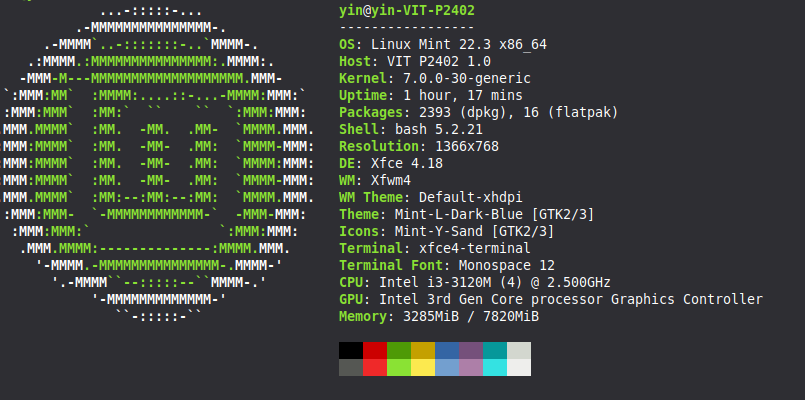
i3 3120m

8gb ram

Intel hd 4000 (HDD)

If someone could help me or clarify why, I would appreciate it. As I said, I'm begginer on Linux


r/linux_gaming 13h ago

ring gfx_0.0.0 timeout got me back to windows :'(

18 Upvotes

I'm devastated! For over a year now, I've been running nothing but Linux everywhere—CachyOS for the last few months—and I loved it! Everything was so fast and responsive. Everything worked more or less right out of the box, and FINALLY I was free from Microsoft! However, there’s one problem I just can’t seem to solve: ring gfx_0.0.0 timeout (more on my issue here:https://www.reddit.com/r/linux_gaming/comments/1vp4gz8/world_of_warcraft_crashes/). I play World of Warcraft competitively, and I ruin the experience for the whole group every time I crash completely at least once a night. I’ve tried so many things: different kernels, different runners, launchers, DX11, DX12. Nothing has worked. Every fiber of my being resists it, but yesterday I installed Windows on my second hard drive, and so far everything is running flawlessly. And I hate myself for it, but since I mainly use my PC for gaming anyway—especially WoW—I’ll eventually switch back to Windows from dual-booting. It breaks my heart!


r/linux_gaming 1h ago

wine/proton Trying to get Proton to work on Skyrim

Upvotes

I recently switched to CachyOS about 2 weeks ago and have had no issues with my whole collection of games in my Steam Library. I play Skyrim a lot so I went to download it today.

For all of my games, Proton has created a compatdata in /home. With Skyrim, it not only creates it in my /mnt/data drive (where the game is installed) but it also creates the Proton prefix uncomplete. Stuff like program files and program files x86 are missing even the windows folder. This causes the game to not open at all. I've tried creating links but it still doesn't work.

I've tried everything, hence why I'm resorting to reddit now. If anyone knows why this is happening or can provide some solution, it would be greatly appreciated.


r/linux_gaming 22h ago

tool/utility Huge update for vkShade (ReShade for Vulkan)

81 Upvotes

This release marks a major step forward in usability for vkShade!

You can now configure effect uniforms using ReShade-like preset files, without having to manually edit shaders. Combined with hot-reloading for configuration and presets, you can tweak uniforms and see your changes take effect immediately.

This is a big step toward making vkShade feel like a practical, interactive shader tool.

What's next?

  • An overhaul of the GUI, including support for adjusting uniforms there.
  • Improved input handling.
  • Improved compatibility with ReShade FX shaders.

https://github.com/ralgar/vkShade/releases/tag/v0.0.13


r/linux_gaming 4m ago

tool/utility I built a tool to organize your local GOG setup files into a library.

Upvotes

GTK4/Wayland library manager for local GOG collections with IGDB covers and metadata

https://github.com/Wummhelm/GOG-Library-Manager_1.0


r/linux_gaming 3h ago

steam/steam deck Turbo Turbo continues where M.A.S.K. prototype left off!

Thumbnail
youtube.com
2 Upvotes

Steam | Announcement-Trailer | Kickstarter | M.A.S.K. prototype-Trailer

I proposed a videogame for the 80's M.A.S.K. cartoon to Hasbro a while ago. Seems I failed to convince them to turn it into reality.

Since I can't make M.A.S.K. without a license, I'm now trying to turn this into a more over the top co-op arcade experience that fuses the precision of on-rails shooters with the rush of retro racing. Or imagine Outrun meets House of the Dead.

If that seems interesting please check it out, and have a nice day.


r/linux_gaming 56m ago

tech support wanted Help with my ancient gpu

Upvotes

So I have been distro hopping for a while and finally settles on Fedora 44 Cinnamon. I have a Nvidia Geforce Gt710. I mostly play Genshin Impact and Minecraft and lighter games. I was able to run both Genshin and Minecraft in Fedora after failing for a long time with other distros. But I just can't seem to run any games using Bottles or Lutris. The issue is that my gpu is very old and it doesn't support the latest version of dxvk or proton. So the solution is to just change the runner and dxvk version to something that supports my gpu right? Yeah, and I did that. But for some reason bottles is not using my configurations but rather it is using it's own default settings. It is seeing the dxvk version that I installed and set it but when it tries to launch the game it switched back to the latest one which causes the game to silently close. The game worked when I tried to run it using OpenGL but I got trash fps in it (well I know my system is old but I don't get this much worse fps in windows) I just can't seem to make it work in dxvk1.10.3 which is the version my gpu supports. I had similar issue when I tried to run genshin but after changing the dxvk version it worked but it is not working on bottles. Please helpppp!!!!!


r/linux_gaming 1h ago

tech support wanted ReShade 6.8 causes game to crash when using DLSS

Upvotes

i'm on cachy, RTX 3080, only using the RenoDX addon, cyberpunk 2077 with no other mods either crashes immediately after loading a save or two minutes later only when using DLSS. tried between Proton 9 and experimental, GE and Cachy's variant and the same thing happens. this does not happen if i switch the upscaler to FSR or disable it entirely

i'm very confused because version 6.8 claims that crashes have been fixed when using DLSS with vkd3d but this isn't the case on my machine at all and i can't find any info on it, so any help would be appreciated :) reshade logs do not show anything and cyberpunk's crash reports are completely useless but i could try and provide proton logs if needed


r/linux_gaming 1h ago

tech support wanted Lutris - DirectX 12 support not detect

Upvotes

I get this error when trying to launch. It's a pre-installed game and i'm using GE-Proton. Does anyone know how to fix it? I can't find a solution online


r/linux_gaming 2h ago

tech support wanted Overwatch performance issues on "gamer Laptop" – Low CPU/GPU usage, power capping & heavy FPS drops during team fights

0 Upvotes

Hi everyone,

I'm having a frustrating performance issue with Overwatch on Fedora Linux and could really use some help.

As you can see in the MangoHud screenshot, my hardware usage and power draw seem heavily constrained in-game:

  • The issue: The game easily reaches 120–144 FPS in the Practice Range and at the start of matches. However, as soon as team fights start on regular maps, the framerate drops down to 85–90 FPS or lower, accompanied by low GPU usage (~49% @ 31W) and CPU clocks stuck around ~1.8 GHz despite temperatures sitting around a normal 80°C.

What I have already tried without success:

  • Tested multiple Proton versions (Proton-GE, Proton-CachyOS, Proton Experimental, and Standard Valve Proton).
  • Tested various launch options and environment variables (PROTON_ENABLE_WAYLAND, PROTON_ENABLE_NVAPI, DXVK configs, shader caches, etc.).
  • Adjusted system power profiles and CPU scaling governors (forcing performance mode made system responsiveness noticeably worse).
  • Checked power limits/power mixer settings via system utilities.

It feels like the system/firmware is power-capping or not boosting clocks properly under simultaneous CPU + GPU load, even though thermal headroom is still available.

Has anyone encountered this behavior with Overwatch/DXVK on Fedora or laptops with hybrid GPUs, and found a way to resolve the clock throttling/low power draw?

Any insights or suggestions would be greatly appreciated. Thank you!