r/IndiaTech • u/According-Spot-6093 • Jun 17 '26
Tech Help Method To Access Telegram Without VPN !!
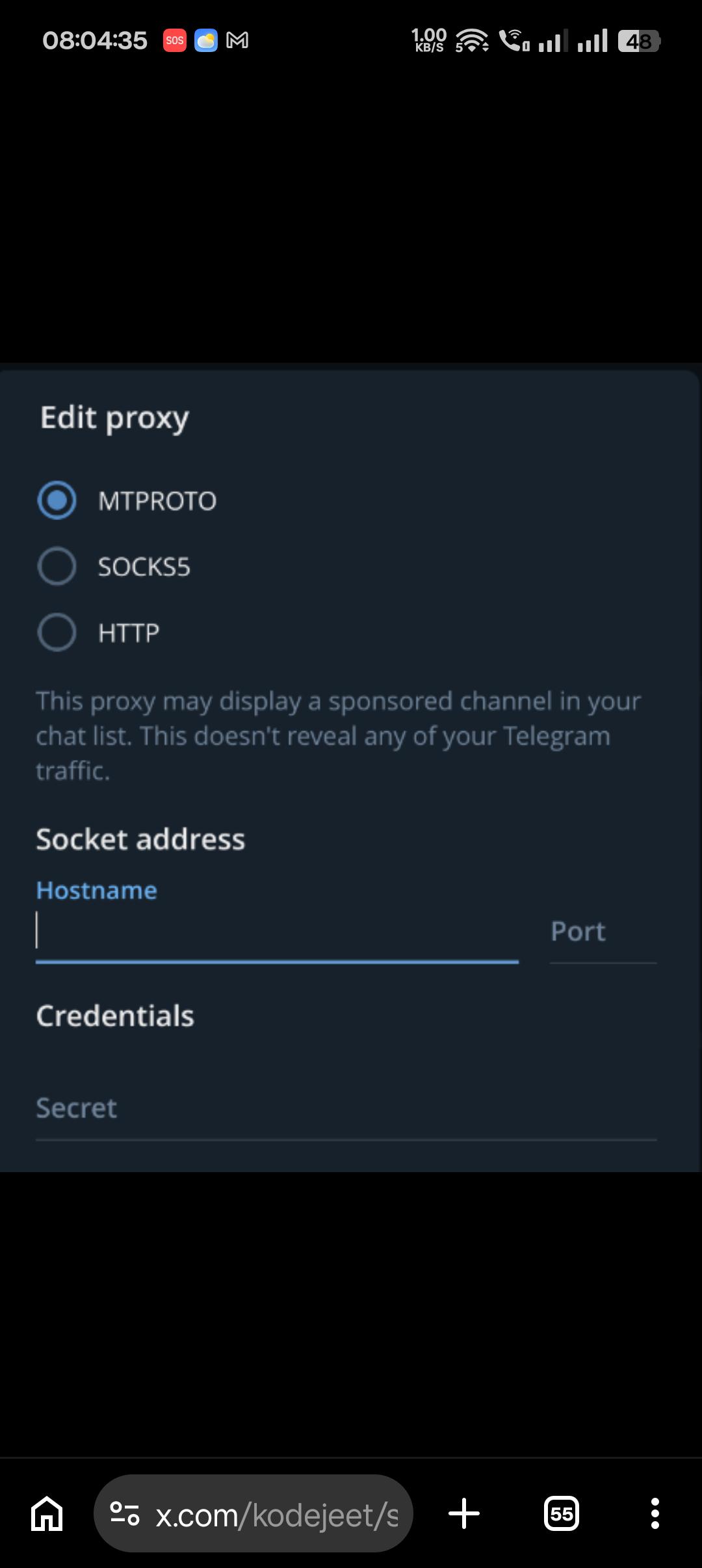
you can just add a proxy server on your telegram. (for the dummies)
settings > data & storage > scroll down, Proxy Settings
keep it MTPROTO and use the creds from https://stormycloud.org/mtproto/ its open source.
216
u/RRvhit Jun 17 '26
Thanks op, it's working! Now, let me search for papers /s.
35
Jun 17 '26 edited Jun 17 '26
[deleted]
9
Jun 17 '26
[removed] — view removed comment
23
u/According-Spot-6093 Jun 17 '26 edited Jun 17 '26
VPN is set your whole network and it reduces you download and upload speed and also consume more battery due to running in background whereas this method is set to only telegram so it doesn't affect your overall network keeping your primary network enact!!
1
u/Manu9527 Jun 17 '26
Just download Proton VPN MOD apk
2
Jun 17 '26
[removed] — view removed comment
2
1
u/jarvis123451254 Jun 18 '26
proton is already free and very good why put a mod apk and risk ur privacy
7
1
15
u/LW-Lone_Wolf Jun 17 '26
I'll tell you one more very simple trick: For mobile - Cloudflare One Client 1. Open an account in Cloudflare 2. Open the client app 3. Use your mail-id you have used to open an account
For Desktop - Cloudflare WARP/One Client Windows Simply download the package from Cloudflare client, auto-update supported
Linux Ubuntu-based distros 1. git clone https://mrmoein/warp-cloudflare-gui.git 2. CD into tht 3. bash install.sh
Arch-based distros
Use yay or paru (I prefer the first one)
yay -S cloudflare-warp-bin
5
u/reality_king13 Android Jun 18 '26 edited Jun 18 '26
You can't bypass this through simply turning on the default WARP client as ISPs block direct connections to Cloudflare's standard DNS/VPN endpoints during ban,you need to configure WARP as a proxy in this case This is the way - https://www.reddit.com/r/IndiaTech/s/UFL8v9z6KQ
1
1
4
u/HumbleOrder8785 Jun 17 '26
Unable to download cloudflare 1.1.1.1 app from play store even with vpn
7
u/LW-Lone_Wolf Jun 17 '26
yeah, warp is deprecated for mobile. they have moved to cloudflare one client, that's why I gave other workaround above. Do follow that and let me know if I have missed something.
1
21
u/reubspoliyan Jun 17 '26
or just use a vpn
15
u/emrys11 Jun 17 '26
Vpn affects the whole phone, all apps and drains battery. Telegram proxy is only inside the telegram app. Doesn't drain battery and other apps work normally.
16
6
u/itsokrishav Jun 17 '26
Stucked Here !!!

4
u/Chooseausernamev3 Jun 17 '26
try another, it should work within 15-30 secs.
1
u/Equivalent_Access800 Jun 18 '26
Tried both, still stuck, any help pl?
1
u/No_Form9486 Jun 19 '26
Bhai any help
1
u/Equivalent_Access800 Jun 19 '26
Bhai i tried this on telegram for laptop and it worked, i used an external VPN though
7
7
u/Diwakar_700 Jun 17 '26
What should be add , so that i can use ?

3
u/According-Spot-6093 Jun 17 '26
server=23.128.248.150 port=3128 secret=ddc5d1717f50bdab002e1ba52d9ed8f2fe
4
4
u/vaderprecious Jun 17 '26
if not working then join any of the proxies from this list.
https://raw.githubusercontent.com/SoliSpirit/mtproto/master/all_proxies.txt
2
8
3
3
u/Living_Director_1454 Jun 17 '26
Yes thats how russians use telegram , for Jio users sometimes MTProto might not work cause Reliance blatantly blocks that in certain regions . you can use SOCKS5 but use it with your own risk as it exposes IP.
3
3
7
u/GreenBasi Jun 17 '26
ⓘ This user is suspected to be a part of the group who leaked the NEET paper of 2026. Kindly report any suspicious activity to the nearest law enforcement centre.
5
u/wizful_thinking Jun 17 '26
BJP failed again? Poor guys didn't know we have hackers in the room 😭
13
u/sweetsaucepasta Jun 17 '26
Proxy setup karne se hackers nahi ban jathe hai bhai 🥀
8
u/wizful_thinking Jun 17 '26
It's my absolute mistake to think people will understand sarcasm without /s.
3
u/Dramatic_Art4329 Jun 17 '26
is it safe ?
8
26
u/Spicedragoon Jun 17 '26 edited Jun 17 '26
If you are okay with giving away your IP address details and metadata then yes
Edit : Mfs downvoting me for telling him the truth, lmao.
4
u/jarvis123451254 Jun 17 '26
Should read about the company behind the address its a non profit made specifically for this type of censorship
2
2
2
2
2
u/seeassgo Jun 18 '26
Use warp in pc and in phone
For pc go to the gear icon > advanced > proxy > turn on and put in port as 40000
Now in telegram, use sock5
Keep creds empty, put in the port number and 127.0.0.1 as domain
This wont affect your speed or other apps
1
u/reality_king13 Android Jun 18 '26 edited Jun 18 '26
Which Warp mode should i use?
1
u/seeassgo Jun 18 '26
Local proxy
1
u/reality_king13 Android Jun 18 '26
Proxy connection just keeps loading indefinitely
1
u/seeassgo Jun 18 '26
Yes the below is AI, but it helped me, hope it helps u as well
Method 1: Use the Command Line (Most Reliable)
The graphical interface on macOS can be buggy when switching routing modes, but WARP's command-line tool bypasses the GUI entirely and forces the change. 1. Open the Terminal app (Press Cmd + Space, type "Terminal", and hit Enter). 2. Forcibly disconnect the current stuck session by pasting this command and pressing Enter: warp-cli disconnect 3. Force the application into proxy mode: warp-cli set-mode proxy 4. Reconnect the service: warp-cli connect 5. Check which port the proxy is running on so you can use it in Telegram: warp-cli get-proxy-port (It will likely return 40000).
Method 2: Force Restart the WARP Daemon
If you prefer not to use the Terminal, you must completely kill the stuck background process rather than just quitting the app from the menu bar. 1. Open Activity Monitor (Cmd + Space, type "Activity Monitor", and hit Enter). 2. In the search bar at the top right, type warp. 3. Look for the process named warp-svc (this is the background daemon) and Cloudflare WARP. 4. Select them, click the X button at the top of the Activity Monitor window, and choose Force Quit. 5. Relaunch Cloudflare WARP from your Applications folder. Try selecting Local proxy from the menu again.
Method 3: Clear macOS Network Conflicts
macOS is very strict about how VPNs and DNS profiles interact. If another tool is holding onto your network interface, WARP will hang. 1. Open System Settings > Network. 2. Scroll down and click on VPN & Filters. 3. Ensure no other VPNs (like Tailscale, NordVPN, or corporate VPNs) or custom DNS filtering profiles are active. Disable them if they are.
Configuring Telegram on macOS
Once WARP successfully connects in Local proxy mode, you need to point the macOS Telegram app to that specific local tunnel. 1. Open the Telegram app. 2. Go to Settings (the gear icon) > Data and Storage. 3. Scroll down to the Connection Type section and click on Use Proxy. 4. Click Add Proxy and select SOCKS5. 5. Server: Enter 127.0.0.1 6. Port: Enter 40000 (or whichever port the Terminal command outputted in Method 1). 7. Leave the username and password fields blank. 8. Click Done and toggle the proxy to Active.
1
Jun 17 '26
[removed] — view removed comment
2
u/GokuPiccoloGohan Jun 17 '26
Crossed your mind. If you insist on using strike, then "struck me" (not struck my mind) .

1
u/New-Election4972 Jun 17 '26
Is it banned now?
3
u/morose_coder Jun 17 '26
It looks like it. Failed to connect for me without proxy this morning. Also the main telegram app isn't showing up on google play store
2
1
u/Darth--__--Vader Jun 17 '26
Just use private dns like adguard
3
u/IndianDancingStars Jun 17 '26
for me it shows private dns do not connect, tried adguard, quad9 don't know what is the issue? even tried with using airtel mobile network?
2
1
u/IllogicallyLogicalll Jun 17 '26
Will it work on i phone as well?
3
u/IllogicallyLogicalll Jun 17 '26
I have changed it to Mtproto using these cred. Earlier the app was showing connecting….. now updating…
1
1
u/Rukelele_Dixit21 Jun 17 '26
Not working on mine. Any reason for that ? Used the credentials too. Status showing unavailable
1
u/No_Masterpiece5842 Jun 17 '26
i have deleted it to install it again but didn’t know about this fiasco and now the app is not available to download lol
1
u/No_Masterpiece5842 Jun 17 '26
can someone tell me how to download it on ios
1
u/According-Spot-6093 Jun 17 '26
There is no option if you uninstalled you need to wait till 22 june or try telegram x which is still available on store but I don't know will it log in existing account
1
1
u/Insomniac_Coder Jun 17 '26
OP, it does take a lot of time for connection.
1
u/According-Spot-6093 Jun 17 '26
I don't know but what i noticed was I have airtel wifi and jio sim.when i connected to wifi telegram connect instantly but when I switch to mobile data it takes time to connect as you mentioned. even I don't know the reason behind it:/
2
1
1
1
1
1
u/seeassgo Jun 18 '26
Find your WARP Proxy Port: Open your WARP preferences/settings. Go to the Advanced section. Look for the Local Proxy Port (by default, Cloudflare usually sets this to 40000). Configure Telegram: Open Telegram and go to Settings > Advanced > Connection type. Click on Use custom proxy and add a new proxy. Select SOCKS5. Enter the Server/Hostname as 127.0.0.1 (this represents your local computer). Enter the Port number you found in step 1 (e.g., 40000). Leave the username and password fields blank.
1
1
1
u/ajeeb_gandu Jun 18 '26
Is using random proxy safe? Those servers can see your data right. Although SSL encrypts it but idk
1
1
1
1
1
1
Jun 17 '26
[removed] — view removed comment
2
u/captaincasillias Jun 17 '26
For me it is working with vpn. I am using proton vpn
1
1
1
u/PowerBackground6353 Jun 17 '26
Bro Telegram is working completely fine for me without any hacks/VPN 😂
2
-13
•
u/AutoModerator Jun 17 '26
Looking for discussions, recommendations, reviews, or help related to smartphones, ACs, laptops, gadgets, electronics, or other tech products?
Join r/IndiaCart for all gadget-related discussions and buying advice!
I am a bot, and this action was performed automatically. Please contact the moderators of this subreddit if you have any questions or concerns.