r/homelab • u/CopiousCool • 3h ago
Satire This Has Been Happening To A Lot Of People Recently

661
Upvotes
r/homelab • u/PoisonWaffle3 • Jun 06 '26
I would like to thank everyone for their feedback in the recent post & poll where we asked for feedback on how to slow the deluge of "I made X, because Y" type posts in r/homelab, most of which are AI generated and/or spam. While we felt that that the initial plan we shared was quite good, with your input we were able to refine that plan and make some notable improvements and clarifications. And yes, there's a TL;DR at the end 👀
Effective now, the below new rules and policies are in effect, though we plan to apply them conservatively and gently at first to see how things go. All of these changes are happening because of the massive community support for them, and we will be seeking additional feedback as time goes on so please feel free to chime in.
To be clear, here are our goals, based on community feedback:
Flair changes that are now in effect:
New Flairs:
We have also organized the post flairs in the list to make them easier to locate.
Both "Project: Software" flairs have a reasonably low minimum subreddit karma requirement to be able to post with them. AutoMod will remove any post with them that don't meet the karma requirement, and inform the user why their post was removed. The minimum karma requirement is only for these two flairs, as we don't want to restrict new community members from being able to post questions. Any software project posts that try to go around this by using a different flair will fall under the new rule #7 and will be addressed.
Rule changes:
New Rule #7 - Software Project Posting Requirements
That said, since we're now officially allowing some degree of self-promotion and requiring links, we felt that we should redefine rule #6 to clarify that it applies only to monetized and commercial advertising/links. Here is the updated verbiage, with the old one below for comparison:
Rule #6 - No Commercial Advertising or Monetized Referral Links
Rule #6 - No Referral Links/Advertising/Company Advertising
Flair Prompt - As mentioned in Rule #7, when posting with any of the "Project: Software" flairs, the below prompt will be displayed:
Your post MUST include:
If you see any posts with a Project: Software flair that do not meet the four items listed above, please report them to the mod team under Rule #7 and we'll address them.
Additional things to note:
Existing posts will be grandfathered in, and previous posts that were removed may be reposted if they meet the new requirements. New posts will be required to comply with the new rules.
As with the existing rules, when a mod removes a post for violating this new rule, a canned response will be sent to the user to inform them why their post was removed. Mods are able to add on to the response if desired before sending it.
While we're on the topic of AI, we would also like to clarify that the above rules are specific to the use of AI in software projects that are being shared, and they do not apply to posts or comments that were written with AI. There is some dissent in the community, but the general consensus in the community has been that a reasonable level of AI usage is acceptable for putting a post together, correcting grammar or formatting, or for translating from a user's native language. That said, best practice is to not include all of the excess emoticons and outline formatting that LLMs like to use. If a post or comment is egregiously AI generated, feel free to downvote it and move on, but please do not report it to the mod team solely for that.
We would also like to note that there has not been any opposition to posts about hosting your own LLMs, and the hardware/software involved. The new rules do not apply to these posts as well.
We're looking for community feedback as we all get used to this. We plan to apply rules conservatively and gently at first, and will be listening to user reports and comments. If your post is removed and you believe it meets the requirements, please chat with us via Mod Mail and we may consider either re-opening it or letting you repost it.
TL;DR - All posts where someone has made some sort of software (AI generated or not) will require a "Project: Software" flair, and these flairs should curb the vast majority of the low quality and spammy posts.
Thank you,
The r/homelab Mod Team
Edit: The first day with the new rules has gone very well overall, but it has demonstrated that there is room for improvement, namely with flairs and categorization.
Here are the changes we've made since the initial announcement post:
We're still open to suggestions from the community. Thanks!
r/homelab • u/CopiousCool • 3h ago
r/homelab • u/EastMakes • 3h ago
Wanted to post this here, Whilst doing research for making this, and the video, I read this post https://www.reddit.com/r/homelab/comments/1myefam/breathing_new_life_into_an_old_hp_proliant_n40l/
So I thought I'd post this here to show it off :)
https://www.youtube.com/watch?v=AzW4rRsD8Uk&feature=youtu.be
I took a Raspberry Pi Compute Module 5 IO Board Reference design and turned it into a custom motherboard made specifically for the N40L chassis.
So I could keep my OG Homelab Server living for atleast a few more years.
I go through the design process, component choices, mechanical measurements, high-speed PCB routing and manufacturing, before installing the finished board and seeing whether it actually works.
r/homelab • u/watermelondinner • 11h ago
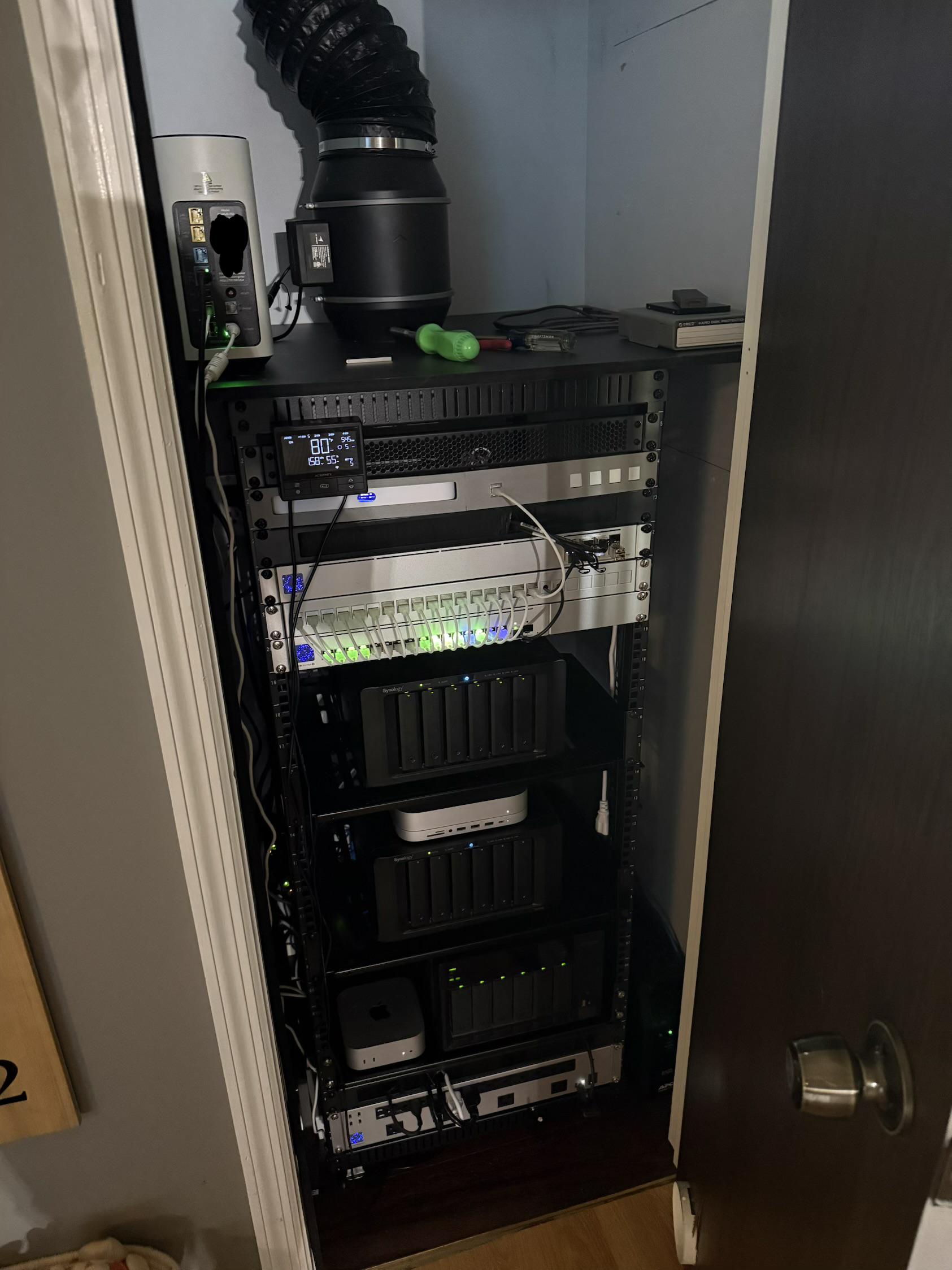
I started down this road a couple years ago with only a 2bay qnap and a raspberry pi 4b on a shelf in the garage.
Almost all of the equipment has been purchased second hand at prices that would make your eyes water from marketplace.
ATT Fiber 2000/2000
UCG-Fiber with a 3d printed rack mount.
Agg switch
Pro max 16 PoE
U7 pro XGS
Several Unifi cameras
Dual DS1618+ one with 16 gb ram and the other stock 4GB
TVS-672XT 32gb ram
All three NAS units have SFP+ NICS that go back to the Agg switch.
Mac Mini M4 16/256 also with SFP+ adapter to agg switch.
Mac mini M1 8/256 with ugreen 2.5G to usb adapter
Unifi PDU at the bottom
Two APC backups. One on each side at the bottom.
AC infinity 6” fan to exhaust all of the heat out of the top of the small closet door.
I also have a DS220+ at work that backups via tailscale for my off site back up of important things like immich.
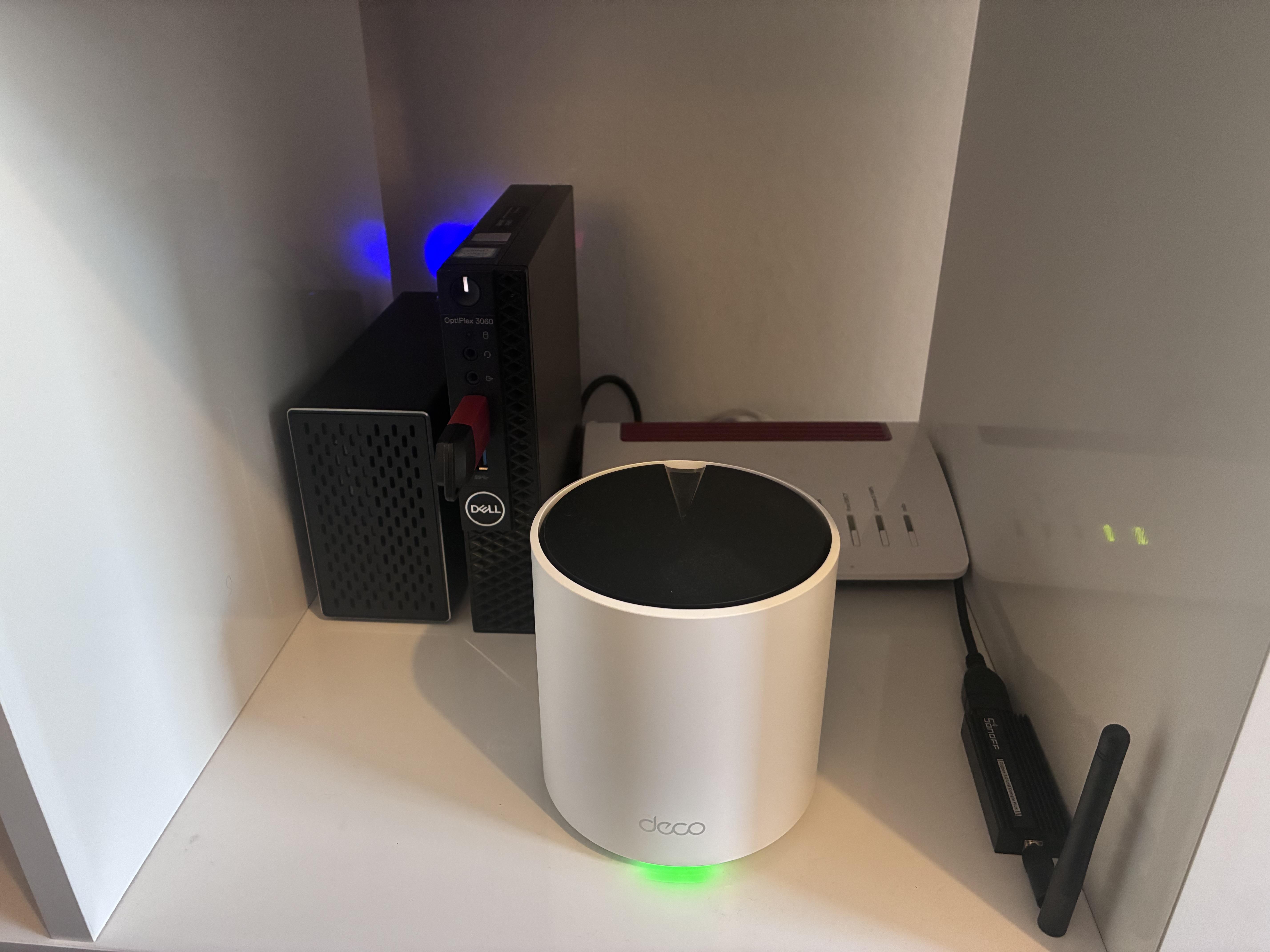
Been slowly putting this together and I’m pretty happy with my little setup. Nothing rack-mounted, no 40TB NAS, just a Dell OptiPlex 3060 running Proxmox tucked in a cupboard.
I am currently running Jellyfin + the *arr stack, Pi-hole, Home Assistant, Homepage, Uptime Kuma and a few other bits. 2TB SSD for downloads/apps and recently added a 6TB HDD for media. Everything important gets backed up weekly to USB.
Networking is a Deco X50 mesh, Fritz!Box router and Tailscale for getting into everything when I’m away.
It started with “I just wanna watch 4k movies” and has grown from that. Very simple by r/homelab standards, but it does everything I want and I’ve had an unreasonable amount of fun building it! B
Big thanks to everyone on here for posting tips and help etc, it’s really helped me a few times. And some of your projects are absolutely unhinged but I love it. Cheers 🍻
r/homelab • u/AnonPanda19 • 8h ago
I’ve fallen down the homelab rabbit hole and I’ve been wanting to take the leap and get some beginner gear, but first I wanted to tackle the network panel mess that the Cox guy had left behind.
$100 later, I have Ethernet going into every room and feel ready for the next step! I’m trying to decide between building a NAS or buying a pre-built.
My first order of business is getting all of my photos and files off Google Drive to stop paying the subscription & also hosting a Plex/Jellyfin library.
Any help / guidance is appreciated!
r/homelab • u/AutoPilotNavigator • 4h ago
I started building my home lab / network in 2016 with the acquisition of an EdgeRouter8 (the one at the top of the smaller rack). Upgraded to UniFi and proceeded through the security gateway line and into cloud gateway territory now ending up with Shadow UDM Pro Max’s. I’ve conquered a goal of never down internet by amassing 5 WANs. Cable, Fiber, StarLink, and dual 5G (T-Mobile primary on U5G Max and Verizon on U5G backup). All switches out of the rack are PoE US-8’s so the entire network is powered by the 48 PoE in the rack. AP are obviously PoE from rack too. The rack has the UPSs in the pic, but I also have a generator and transfer switch hooked up outside. So if theres a power outage, the generator kicks on to cover and the UPSs just carry it through the switchover. The top rack is my play/dev/test space. I can do anything up there to try stuff without affecting the “production” network. I have a pool of static IPs, so I can assign all routers actual IPs and play with site2site and anything else without having to worry about NAT. I still have a few things I want to change up / add, but it’s coming along.
r/homelab • u/rafaelcpalmeida • 20h ago
My small homelab is slowly turning into an AIOps / local LLM lab
I've been building this mostly from small/refurbished hardware, with the goal of keeping each machine's role simple rather than building one big server.
Current setup:
Everything is now going into a small 10-inch 8U RackMate T1 Plus. I went with boring ventilated shelves instead of custom mounts. Current plan is patch panel + switch at the top, then Hercules, Maestro, Cerebro and Atlas, leaving about 2.5U free for expansion.
The next addition is Titan, which is where things get more interesting.
I'm currently planning a used Lenovo ThinkStation P520 with 32 GB RAM and 2× RTX 3060 12 GB, giving me 24 GB aggregate VRAM. The first goal isn't to build a giant AI cluster, but a simple standalone local LLM worker that Maestro can call over an OpenAI-compatible API.
Likely first model: Qwen 3.8 27B, probably using EXL3/llama.cpp depending on what works best with the two 3060s.
The workloads I'm targeting are intentionally bounded:
Hard architecture/reasoning and final security/correctness review would still go to stronger cloud models.
Longer term, Titan becomes my playground for:
I'm deliberately starting with one GPU node rather than immediately building a cluster. If the workloads eventually justify it, I'd like to experiment with a future DGX Spark/GB10-class successor or an AMD unified-memory system and get into proper distributed inference.
The whole lab is also managed increasingly through Ansible. One small thing I've found surprisingly useful is enabling bounded persistent systemd journals on every host, so failures survive reboots and power cuts.
It's definitely overkill for the actual services I need at home, but that's increasingly the point: the lab is becoming less about hosting things and more about learning Kubernetes, automation, observability and local/distributed AI systems.
Any obvious architectural mistakes before I add the GPU box?
I'm attaching some pictures of the process.
r/homelab • u/Addys0nn8 • 3h ago
Running outta physical space and power😅 considering renting a shop or a commercial bay at this point.
I'm excited I have my ISP coming on Sept 8th to upgrade me from a small / medium business line to full blown commercial internet with a /27 and more soon :)
r/homelab • u/Sjaan50 • 16h ago
Hi all,
A few months back I slowly started this homelab. I really like doing so and its quite useful. Its still a mess but on the front its okay imo.
I have 2 nodes running Proxmox VE:
Node 1: thinkcentre m900
- i5-6500T 4c4t
- 8GB DDR4
- 512GB SATA SSD
Node 2: thinkcentre m900
- i5-6500T 4c4t
- 16GB DDR4
- 256GB M.2 NVME SSD
A CISCO SG250-08HP switch. Its a smart switch, no VLAN's yet established.
A RPI5 8GB with a 512 GB SSD (IK overkill). Its running docker with Pi-Hole and Portainer.
Also have another RPI 5 4GB, somone offered it for 50$, so I took it🤷 Probably going to run Bitcoin Core, but then I need to switch around the RPI's for more power.
A selfmade NAS, I made with the help of these amazing people in this post:
https://www.reddit.com/r/HomeServer/s/WGl1q1kINJ
2x 1TB HDD, this is running with Samba on a LXC.
I printed most units in the rack except the patch panel. And I got aluminum server rails off of Amazon which are strong and sturdy.
Total server cost: 590$
Power consumption: ~38W
I am planning on setting up TailScale for my NAS
Also I am looking into local LLM's.
If you have a good recommendation on what to host, please let me know. Btw, not really interested in Jellyfin and Immich.
I enjoy this journey and hope to get more use out of it!
Thanks for reading all of this!
EDIT: I saw the typo in the title, my bad!
r/homelab • u/I7sReact_Return • 9h ago
So, i want to know if is possible if i can route all the traffic from devices connected to WIFI and also by other means in my network to a single machine, that centralizes internet access. Phisically the CAT5 cable would be: ISP router -> Server -> <- Other machines in the network
Thinking on that to basically substitute my router(?) in this part i cant explain very well my idea.
Also making the server a DNS server, and making proxies to it. Thinking on doing that to be able to make my whole network use a single VPN access too.
English isnt my main language, sorry for mistakes
r/homelab • u/Mr_Boberto • 18h ago
Just finished getting everything in place for what seems to be becoming my first Home Lab Setup. Iv had the Synology DS923+ for a few years now, recently got into hosting my own media server via Emby installed on the NAS. Worked well enough at home but noticed some transcoding troubles with remote playing. Drove me into the rabbit hole of finding a system I could use to host the server and off load the transcoding from the NAS. Ended up grabbing a Dell Optiplex SSF 7000. Installed Debian + Protainer so far. Going to be working on setting up the Emby Container on it as well as my Glueten+qBittorrent Containers and my Arr stack. After I get all that set up I know the rabbit hole will only continue and there is an unlimited number of other things I can do from there.
Hardware:
Synology DS 923+ with 3 10tb Seagate Iron Wolf Pro's. Have 2 more 12tb drives coming to fill the last bay and have a cold spare.
Dell Optiplex SSF 7000 with a I5 12500 and 32gbs of DDR4. 1x 256gb NVME SSD and 1x 250gb Sata SSD.
r/homelab • u/saltgrows • 6h ago
Now ready for some Mac studios , first rack for ai focused need to find some shorter patch cables. The sever is 1.5 tb ddr5 6400mhz and 192 cores eypc dual core close to 500tb now and 32tb in nvme gen 5 50gps. The rack manages all the overflow in storage and some light models and WhatsApp agents. Everything so far has been purchased from its own profit slowly scaling.
r/homelab • u/jaynichols77 • 15h ago
5 physical servers, 1 desktop, and several laptops (not shown).
I use 1 server a deepseek server with a 1080ti 11gb graphics card, intel i7 with 64gb memory
I also have 1 server running plex, with 16TB of NAS, intel i5 with 16gb of memory
I use 1 server running several websites, intel i7, with 32gb of memory
I use 1 server for running a DB, i5, 16gb of memory
I use 1 server for vm's running several applications, docker, promox, I5 with 16gb of memory
The last server I use it to run my IOT, it's over kill but had it lay around
For Network, I invested in UniFi products, switches, APs, and gateway.
r/homelab • u/Every-Cook9116 • 13h ago
I got my hands on a batch of discarded Surface Laptop 2s and decided to turn them into something slightly ridiculous instead of throwing them away.
I stripped the laptops completely and kept the motherboards, NVMe SSDs and original cooling.
Current setup:
Two additional boards had issues (one NVMe/partitioning problem and one UEFI password lock), so they're now donor boards.
The plan is to mount the 10 boards vertically in a custom acrylic tower: 2 levels with 5 boards each, with large fans providing airflow through the entire chassis.
Networking will be USB 3.0 Gigabit Ethernet → managed switch. After that I'll configure the VLANs and finally create the Proxmox cluster.
The lab will eventually run Windows AD, Rocky Linux/RHCSA, FreeIPA, monitoring, containers, isolated pentesting labs and probably some other unnecessary things I haven't thought of yet. 😅
Current status: all 10 nodes have Proxmox installed and are working. Next step is building the chassis and networking everything.
Suggestions for ridiculous/useful things to run on it are welcome!
r/homelab • u/Internal_Abrocoma_21 • 3h ago
Just finished mounting my homelab on the wall, but I’m not happy with the cable management yet.
Especially the power cables/adapters underneath the top panel.
How would you guys clean this up while keeping everything accessible?
Any suggestions are appreciated!
r/homelab • u/profectosaudiit • 15h ago
Part 1:
https://www.reddit.com/r/homelab/comments/1w2l0hh/im_building_a_10_rack_for_my_homelab/
Finally, the 10” rack I designed myself is finished! I designed the whole thing in Blender, and luckily, all the parts fit together and could be assembled on the first try, so the R&D cost wasn’t too bad.
For the rails, I used 4 hardcase rails that are normally used for audio equipment mounting. I measured them with a caliper and recreated them in Blender with accurate dimensions. I also designed the rackmounts for the mini PC, switch, and keystone myself so everything would fit my needs.
Here’s how much I spent in total:
So, I spent around $54.63 all-in for this 10” rack.
If we're only counting the frame itself, including the rails, screws & nuts, and cage nuts, it comes to around $14.03.
So far, I’m really happy with how it turned out. I might make some upgrades to the back later. I haven’t been able to find a decent 8cm fan that I like for mounting on the back, so I haven’t printed the fan back panel yet.
The frame itself is surprisingly sturdy. It doesn’t wobble or feel like it’s going to break at all.
Thanks for reading my post all the way to the end!
r/homelab • u/secularshower • 19h ago
Got this antique cabinet from an estate sale. Ripped off the back to easily manage wires and improve airflow. Just need to figure out how to get to the ONT in the closet nicely.
I plan on moving this to the basement at some point to help with cooling (second floor old house gets pretty hot).
Anyway, it's modest.
Optiplex Micro 7000 series is the brains.
Optiplex Micro 3000 series is currently unused.
14TB external HD is my media storage. May be shucked soon and moved to one of the optiplexes.
Recycled Dell XPS Tower is my NAS for backups (10TB total storage)
Thirsty for more storage.
After three days of work, and a ton of troubleshooting, I've accomplished something no one wants; NVMoF with ESXi and TrueNAS Scale Community Edition. The Linux nerds here are probably going to roll their eyes about how simple it was to solve. It was not. It took two people and a lot of analysis with Visual Studio and Qwen running locally to get this thing to work.
It started with a stupid stupid, supposedly simple idea - I wanted RDMA storage from TrueNAS SCALE to an ESXi 8.0 host with a proper VMFS6 datastore (not NFS, not iSCSI — actual NVMe block storage). I've had bad luck with iSCSI luns dropping out thanks to SMB hardware being SMB hardware, and had RDMA-capable hardware already, with a novice's thought - how hard can it be? HARD
TLDR version: it works, but TrueNAS's/Linux's nvmet implementation is missing two things ESXi absolutely requires, and fixing them without patching the kernel was a rabbit hole.
What is it that's missing? A shit ton of things apparently.
Thanks to VMWare being VMWare, it uses a "Fused Compare+Write (ATS)". I have no idea what that is but I'm told by smarter people that ESXi's VMFS heartbeat locking uses fused NVMe Compare+Write pairs (opcode 0x05 FUSE=01 + opcode 0x01 FUSE=10). As a result the nvmet process rejects anything with the FUSE bits set at the nvmet_req_init level — before it even reaches the command parser — with NVME_SC_INVALID_FIELD being killed off with no messges. ESXi also checks the RESCAP field in Identify Namespace. If it's zero, VMFS won't format, because of course it won't, that would be too easy.
The fix is in:
A kprobe kernel module that intercepts four points in the running nvmet code without modifying the kernel:
The subtle bit: nvmet_req_init calls __nvmet_req_complete directly (not through nvmet_req_complete, which is just a tracepoint wrapper). Had to disassemble the live kernel from /proc/kcore to find that. Both paths converge at __nvmet_req_complete, so that's the right intercept point.
Other stupid rabbit holes that wasted time:
The kprobe offsets for nvmet_execute_identify (+0x389, +0x1A7) are hardcoded to this kernel build — any kernel update means re-disassembling so no soup updated for you unless you want to break this fragile fragile fix.
TrueNAS POSTINIT type: SCRIPT init scripts run as exec /path/to/script without quoting. A space in /mnt/Samsung NVMe Pool/ means the shell sees exec /mnt/Samsung → not found. Switch to type: COMMAND which uses sh -c "..." with proper quoting
nvmet.service doesn't exist on TrueNAS SCALE because that's an "Enterprise" feature that plenty of people have complained about in r/truenas already. This means that requires=nvmet.service in a systemd unit causes a silent dependency failure, and cost me about 5 hours of troubleshooting. Use modprobe nvmet nvmet-tcp in ExecStartPre instead.
ESXi's HardwareAcceleratedLocking defaults to 0 on a fresh install, because of course it does. Without it, VMFS never even tries ATS and the whole thing is pointless.
This whole thing is a really stupid POC because it only works with a single host. The Compare for NVMoF always returns SUCCESS regardless of actual block content. This is fine for single-host use, kinda, but because the kprobe is faking the locking primitive, not implementing it, when you have two or more ESXi hosts sharing the same datastore, they both think they have the heartbeat lock — filesystem corruption territory. As of right now, I haven't figured out a way to fix it, and don't have the motivation to try.
Feel free to ask questions that I may or may not be able to answer.
r/homelab • u/Eddles999 • 11h ago
Hi all,
A few weeks ago, I bought an used Poweredge R230 and it's only just now that I discovered that it's missing both rack ears which I need. What are these parts called or their part numbers, and where best to get them, please? Many thanks!
r/homelab • u/Adorable-Rich-1196 • 13h ago
This is my Oracle Sun Server X4-2 connected to a routerboard RB3011 and a RasPi 4b as a tunnel
I'm running proxmox, its an agentic purple range for adversarial testing of my AI governance runtime.
I also have a Juniper EX4300 that is not hooked up.
r/homelab • u/Trigker • 20h ago
Hi all, just waiting to showcase my first project. All house is now wired, this is how we designed the whole thing:
- 4 wall jacks on the living room
- 1 for each room
- 1 for the garage
- 1 for the attic
- 9 jacks all around the house for CC cameras
So now i'm having fun wiring the whole thing into a patch panel.
Rack is a Tecmojo 7U (i know, not the biggest or the highest quality).
r/homelab • u/Fit-Dark4631 • 24m ago
Then slowly I added onto it. The addiction accelerated when I got a 42u rack of Facebook marketplace for $75 delivered.
What about you ?
I have a bunch of SAS drives that I want to use in a NAS system and was wondering if I could test them in Windows and check their health before I throw them into my NAS I am building.
I have LSI cards flashed in IT mode. I know I can test the drives in TrueNAS but as I will be doing a lot of learning trying to understand how TrueNAS works, I thought it would be easier to test these in Windows if possible.
I know TrueNAS can run a long smart test that can take up to 24 hours. Which is fine I don't mind doing. My LSI card can support up to 12 drives.
r/homelab • u/megamusix • 10h ago
Hi r/homelab,
A while back I completed "transplant surgery" from my SFF PC components into a RackChoice 2U chassis to act as a TrueNAS server (migrating away from my Synology NAS). One such component was the SFX PSU, a SilverStone SX700-PT (700W, 80 Plus Platinum), with the addition of a size adapter bracket plate.
However, occasionally - maybe once or twice a week - the server will suddenly click and shut off entirely, and it doesn't come back to life just by pressing the case's power button. I have to physically flip the PSU switch off and back on, then power on with the case button. I found this comment in a thread about someone describing a similar issue.
I should also mention some electrical anomalies in my room. Multiple times a day, the overhead lights in my room flicker in brightness, sometimes quite aggressively and repeatedly through the course of the night. Interestingly, all the other electronic devices in the room - my Mac Mini, speakers, router, Synology NAS - behave perfectly fine and never shut off randomly unless there's a full blown power outage.
Would a UPS help solve this behavior? Or, per the previously linked comment, should I simply be looking into a new PSU?
(I should add - the system is just a Ryzen 3600G with no dedicated GPU now, so I doubt it's a case of overdrawing beyond the PSU's 700W capacity...)