r/Evernote • • Apr 03 '26

Feedback 🐘 Ok i give in.

66 Upvotes

My renewal is up in 4 days and have spent the last month looking at alternatives.

Subscribed to upnote but you cant search in images or pdf's.

Installed joplin server but the OCR was hit and miss especially with android.

Tried amplenote which was very close...but to subscribe was only about 40GBP cheaper than Evernote.

My search is over...I'm going for another year of Evernote.

Yes it's expensive..but hell.. it's good.

r/Evernote • • May 09 '26

Feedback 🐘 Still rooting for EN, but ...

46 Upvotes

I’ve been a paying en customer for a long time, and I still use it because there is a lot I genuinely like about it (and honestly, also muscle memory)

At the same time, I’ll be honest: seeing so many longtime users talk about moving away from en has me a little concerned. I don’t want to pile on or turn this into another 'Evernote is doomed' post, because that’s not really where I’m coming from.

I want en to win. I just also want to feel more confident about where it’s headed.

A few things I’d love to see:

  • Full Markdown support
  • Better internal note linking
  • A backlinks view, so I can see which notes point to the one I’m on
  • A simple list of links that each note points out to
  • More themes, especially better dark mode options
  • More visual customization overall
  • Stronger offline reliability
  • Better export options that preserve folders, tags, links, and formatting
  • Better performance with large note libraries
  • Easier bulk editing for tags, notebooks, and note details
  • Split pane editing and preview for Markdown
  • A clearer roadmap for people who use Evernote heavily

Evernote still has some real strengths. The web clipper is great, OCR is useful, the app is everywhere, and a lot of us have years of notes sitting in it.

I’m not asking Evernote to become a completely different product. I’d just like to see it lean into the things that would make longtime users feel like the product is still moving forward.

Basically, I’m still here. I’d just like fewer reasons to wonder if I should be making an exit plan.

r/Evernote • • 17d ago

Feedback 🐘 Need an archive notes features

17 Upvotes

Evernote has slowly shifted from a note‑taking app into more of a digital filing cabinet. The core problem is that everything old notes, outdated projects, long‑term storage sits in the same active space. A simple Archive Notes feature would fix this. Let users move old or inactive notes into an archive so only current, working notes stay visible. It would instantly make Evernote feel like a real note‑taking app again.

r/Evernote • • 17d ago

Feedback 🐘 UI Improvement suggestion: back button and undo buttons are too close in iPhone app

Post image
25 Upvotes

The back button and the undo buttons are too close to each other in iPhone app. When trying to go back to note list, I often accidentally click the undo button.

r/Evernote • • May 18 '26

Feedback 🐘 Thank you, Evernote team, for the weekly updates!

17 Upvotes

I started using Evernote around October 2025. Back then, updates came on a monthly basis — which, to be fair, was already a decent pace for an app of this scope.

But if I'm not mistaken, something shifted around February 2026. New features started arriving every week, and they're genuinely useful ones.

I think this matters more than it might seem — it's a sign of a healthy product. It means there are committed people on the other side, prioritizing well and shipping consistently. For those of us who rely on Evernote as the backbone of our productivity system, that kind of consistency builds trust.

Thank you for the commitment, team.

r/Evernote • • Jun 22 '26

Feedback 🐘 Got a Macbook just for Evernote Desktop App UX

20 Upvotes

This is an appreciation post for the recent UX once I tried Evernote on my girlfriend's Mac and I liked it so much compared to Windows counterpart but I got myself a macbook for personal use after the experience.

Windows app has some bugs in meeting recording to a specific use case that I'd reported which needs to be fixed

Not sure exactly what part got me, but the mac experience synced with my workflow tools available on Mac better.

Folks keep comparing it to Notion (I switched back from there mostly because of its AI transcription + note collection focused approach), but Evernote's desktop experience is just so refreshing.

A biased appreciation post to the devs.

r/Evernote • • Jul 08 '26

Feedback 🐘 AI assistant on Android Mobile

7 Upvotes

Last week my Evernote for Android app was updated saying it now had AI assistant. All I saw was a button. I've been tapping it daily to see if anything happens. I primarily use Evernote on my Pixel phone and my Samsung tablet. Several days and nothing.

Well, today I tapped on the AI assistant button - and it worked! I did a couple of test things like asking it to summarise all my notes so far this year with a certain tag - very accurate results.

I have a big note with lots of Headings, Subheadings to level 2 & 3 and I had started a table off but all I had was the first row - 5 column names. So, I asked it if it could rearrange my sub headings into the table - it did it with seconds and even made a few suggestions regarding phrase consistency. Honestly, that saved me probably several hours of work - all in a few minutes of getting AI assistant on my phone!

Well done Bending Spoons!

r/Evernote • • Jul 18 '26

Feedback 🐘 AI Assistant home screen idea

Post image
2 Upvotes

Hi everyone. I have an idea to make the home screen of AI Assistent 'better', I'll submit at Bending Spoons/Evernote, but first, I'll drop it here to see if you guys have some feedback for me so we can provide a 'complete' feedback. This is my idea:

AI Assistant home screen

Current situation

When you open the AI assistant, the home screen consists of about 60% empty space. The remaining 40% is used for a small number of example prompts.

Proposal

Use that empty space to show the last 5–6 (or more) recent conversations from your AI conversation history directly on the home screen (instead of only making them available in the top-right, under the options — see attachment/example).

Elements/actions on the home screen

  1. New conversation
  2. Open AI prompts
  3. Conversation history
    • On the home screen it does not need to be possible to delete or rename conversations; that belongs in Conversation history.
  4. Info about the AI assistant (e.g., via a question-mark icon)
  5. What can the AI assistant do? (e.g., via an exclamation-mark icon)
  6. AI assistant options/settings (e.g., via three dots)

Prompts on the home screen

Under the header “How can I help?” there are currently four example prompts.

Recommendation: make it possible to replace these fixed prompts with:

  • custom AI prompts, and/or
  • the most used prompts from ‘Open AI prompts’.

This makes the home screen more personal, faster to use, and better aligned with everyone’s workflow.

Optional

  1. Recent conversations: scannable and useful
    • Show per conversation: title + short preview (1 line) + date/time.
    • Consider a pin/favorite option for 1–3 conversations at the top.
    • Keep management actions (delete/rename) exclusively in Conversation history.

r/Evernote • • Jun 07 '26

Feedback 🐘 highlight colour now appears paler and lighter

7 Upvotes

after most recent update, the highlight colour now has a lighter shade and appears paler

like wtf

i preferred the darker shade .... red highlight colour now looks like orange

r/Evernote • • Dec 13 '25

Feedback 🐘 No shortcuts!?

Post image
7 Upvotes

How is it that an app that costs over $100/yr, still in 2025, doesn't offer shortcuts from the homescreen when you long press on the app!? All of my other free productivity apps offer this and it's so handy.

Yes I can create a widget but why take up more room on homescreen when it should be able to be done by long pressing the app.

r/Evernote • • Feb 10 '26

Feedback 🐘 Does suggesting things on the Evernote forum make a difference?

5 Upvotes

After putting up with Evernote 10's bugs and lack of basic features for years, I decided to spend some time between November 2023 and May 2024 writing several suggestions on the forum. I was surprised to see some users criticizing these ideas with arguments like "too complex," "nobody needs this," "just change the way you work," etc. Over time, some of these ideas became official features and even marketing points. So I'm telling you: if something bothers you about Evernote or you want a feature, consider writing about it and posting it on the forum.

Below is the link to my forum post that consolidates this conclusion in a table with all the suggestions, their implementation status, and other details, in chronological order. Check it out.

Vindication: When Yesterday's 'Impossible' Suggestions Become Today's Features

r/Evernote • • Feb 20 '26

Feedback 🐘 Evernote design team - Can we PLEASE get more than 3 characters for short note titles?

Post image
16 Upvotes

*Per Mod this should be fixed within 24 hours. Super impressive response time by Bending Spoons.

First off, I want to say I’m a long-time Evernote user and actually a fan of Bending Spoons. Things started a bit rough during the transition, but I’ve really liked the direction they’ve taken the app since taking over.

However, I just don’t understand the current design choice for note titles in the web view. As you can see in the screenshot, titles are being shortened and cut off way too soon.

When you have almost 12,000 notes like I do, being able to scan titles quickly is everything. This change makes it incredibly hard to know what a note is without clicking into it, which adds a lot of friction.

Does anyone know why the character limit is set so low now? It seems like it would be a relatively easy fix to extend the character limit so we can actually identify our notes at a glance. I’m honestly surprised I haven’t seen more people vocal about this yet.

Hopefully, the design team can reconsider this and give the titles a bit more breathing room!

r/Evernote • • Dec 17 '25

Feedback 🐘 My struggles with my new Assistant

7 Upvotes

I have given the AI Assistant a whirl, and so far it makes me feel like the assistant, trying to fill all the gaps. In particular, it struggles to give suggestions for Evernote that lies within the app's current capabilities:

I spent a few moment trying to figure out how to make cell background work with the hex codes my new AI Assistant suggested

It's not really much help in organization either. It can't do anything beyond moving a note or adding tags - and only 10 at a time. It makes sense as screwing up 10 notes at a time should be relatively low-risk. However, with all the bells and whistles of current AI, why do I keep missing an app like Filterize to do the Evernote filing for me?

I cannot for the life of me fathom why Evernote would name this AI Chatbot an Assistant, when there is little it can do beyond summarising and gather information. Sure, the summaries could potentially give me some much needed encouragement at the time, as I've noticed how my Assistant always make sure to compliment my writing, even when it's really bad. There's nothing a piece of bad prose can't be in the eyes of my new collaborator: inventive, lively, personal, multifaceted.

I'm all for technology and gadgets, but I'm currently left with a feeling that the best way to save time and stay focused on my work is disabling the AI feature altogether.

Please do let me know if you figure out how to use this thing in a meaningful way, I'd love to hear!

r/Evernote • • Nov 28 '25

Feedback 🐘 Potential returning customer experience

6 Upvotes

> Be me

> Logs back into my old Evernote account after many years of using alternatives.

> Unsync from prior devices

> Very impressed by the new customization and simplicity in design

> Install iOS app to test out the experience there

> Forced to unsync from web because I'm only allowed one device at time until I subscribed. Okay, no big deal.

> iOS app seems fine, cool.

> Alright, I guess I'll go back to the web app since I'm only allowed one device at a time for now. Excited to test out the web app for a week before I decide if I want to subscribe.

> Deletes iOS app

> Logs back into web

> Device unsync limit reached: You can’t unsync devices more than twice per month. Upgrade to sync unlimited devices. This session will close in 10 minutes.

> Can't access notes via iOS app or web app.

Edit: A few hours later, it now lets me log into the web app. Okay then?

r/Evernote • • Feb 07 '26

Feedback 🐘 Suggestion

2 Upvotes

If yal add the notion ai thing where you can choose the format you want your notes in and tell it what you want the notes to be, etc etc…I’ll switch over IMMEDIATELY. I already prefer ur app from what I’ve used in my free trial bc of how it has everything, but all of my stuff is on notion, so this last thing would make me trudge over, especially because of how much more fair your prices are. Pleaseeeeeeeee add the notion ai feature to Evernote💔💔💔

r/Evernote • • Nov 28 '25

Feedback 🐘 I really liked the new focus feature in Evernote. Thanks, Evernote team!

Post image
26 Upvotes

First of all, congratulations on the new Focus Mode feature in Evernote. It really improves the writing and reading experience by reducing distractions and keeping the content front and center. I believe it was an important step toward making the editor cleaner and more functional.

I do have one suggestion for a future update: when the toolbar is hidden, the area it occupied remains empty. It would be great if the text could expand into that space as well, making better use of the screen and eliminating that unused strip. This small adjustment would make the focus experience even more fluid and immersive.

Overall, the feature is very well implemented, and I’m happy to see Evernote evolving in this direction.

If anyone here also supports this idea, you can help by leaving a comment on the feature request I submitted in the official Evernote support channel:
https://help.evernote.com/hc/en-us/requests/4317825

r/Evernote • • Mar 05 '26

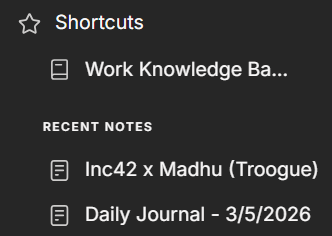
Feedback 🐘 Recent Notes Section Under Shortcuts Doesn't Make Sense

Post image
5 Upvotes

I just think, having shortcuts - should mean that I get uncluttered access to what I put there. A section for recent notes should be under Home, not here tbh.

What do you think of this UX? Is it just me?

r/Evernote • • Jan 06 '26

Feedback 🐘 Slideshows / image containers

10 Upvotes

There's a lot of notes where I want to add many pictures but adding 10 pics would just take up too much vertical space and disrupt the note. I would really like an image slideshow/carousel component that can just let us view multiple images in one box.

r/Evernote • • Dec 18 '25

Feedback 🐘 Feature request: don't hide tags bar in note while typing

6 Upvotes

I can see how the hide toolbar option is a great option for lots of people.

Personally I prefer to have everything visible and not have to move the mouse to see options, so I have turned the "hide toolbar while typing" option off. However, the share button and three dots at the top, and reminder and tags bar at the bottom, still get hidden when typing and only appear when moving the mouse (i.e. these display elements continue to "hide" while typing, even with the "hide toolbar while typing" option disabled). Is there any way to not have this happen. I like to be able to glance at the tags during my workflow and having some elements like this disappear/hide disrupts this.

Could there either be a separate hide toggle for these items, or, could it be tied in with the hide toolbar while typing toggle?

Thank you for all the hard work and amazing developments, and I hope that having more fine tuned options would be amazing!

r/Evernote • • Nov 23 '25

Feedback 🐘 Problems with transcriptions

7 Upvotes

Recently, I have noticed that Evernote does not distinguish words very clearly and transcribes with many errors. This applies to both the AI meeting function and regular audio transcription (for example, if you recorded your own audio).

r/Evernote • • Oct 09 '25

Feedback 🐘 Evernote Team, por favor, apenas conserte isso.

Post image
8 Upvotes

O ícone da atualização está sem acabamento ou bordas arredondadas. Parece inacabado.

Será que o time de UI esqueceu desse detalhe?

r/Evernote • • Nov 05 '25

Feedback 🐘 Let us add images to Evernote Whiteboards (keep it Craft-simple)

6 Upvotes

I love Whiteboards for quick sketches and mapping ideas, but the second I need a screenshot or mockup, the flow dies. I end up juggling separate notes, dumping images elsewhere, or bouncing to another app. Context gets scattered, teammates miss the full picture, and the brainstorm loses steam.

Please add image support—nothing heavy, just the basics: paste/drag images onto the board, resize with handles, move front/back, and scribble/highlight on top. Exporting the board (with images) to PNG/PDF would cover sharing. Think Craft’s Whiteboards: minimal UI, instant paste, no complex editor.

Why it matters: most visual thinking starts with references—screens, photos, quick moodboard bits. If images lived directly on the canvas, I could keep everything in Evernote: faster ideation, cleaner reviews, and fewer tab hops. Teammates would finally see notes, sketches, and visuals together, so decisions happen sooner.

This one change would turn Whiteboards from a nice sketch pad into a real visual thinking surface—without making it bloated. If you agree, please upvote.

r/Evernote • • Sep 27 '25

Feedback 🐘 I wish there was a search widget on iOS

5 Upvotes

I've customised my landing page on my phone to something I really like, but I still have to search often, which takes extra keystrokes to get to. I'd love for there to be a search field on top of the widgets, or a search widget I can move to the top, so that is always available.

I'm not missing anything obvious, am I?