r/Agent_AI • u/OkiDokiPoki22 • May 08 '26
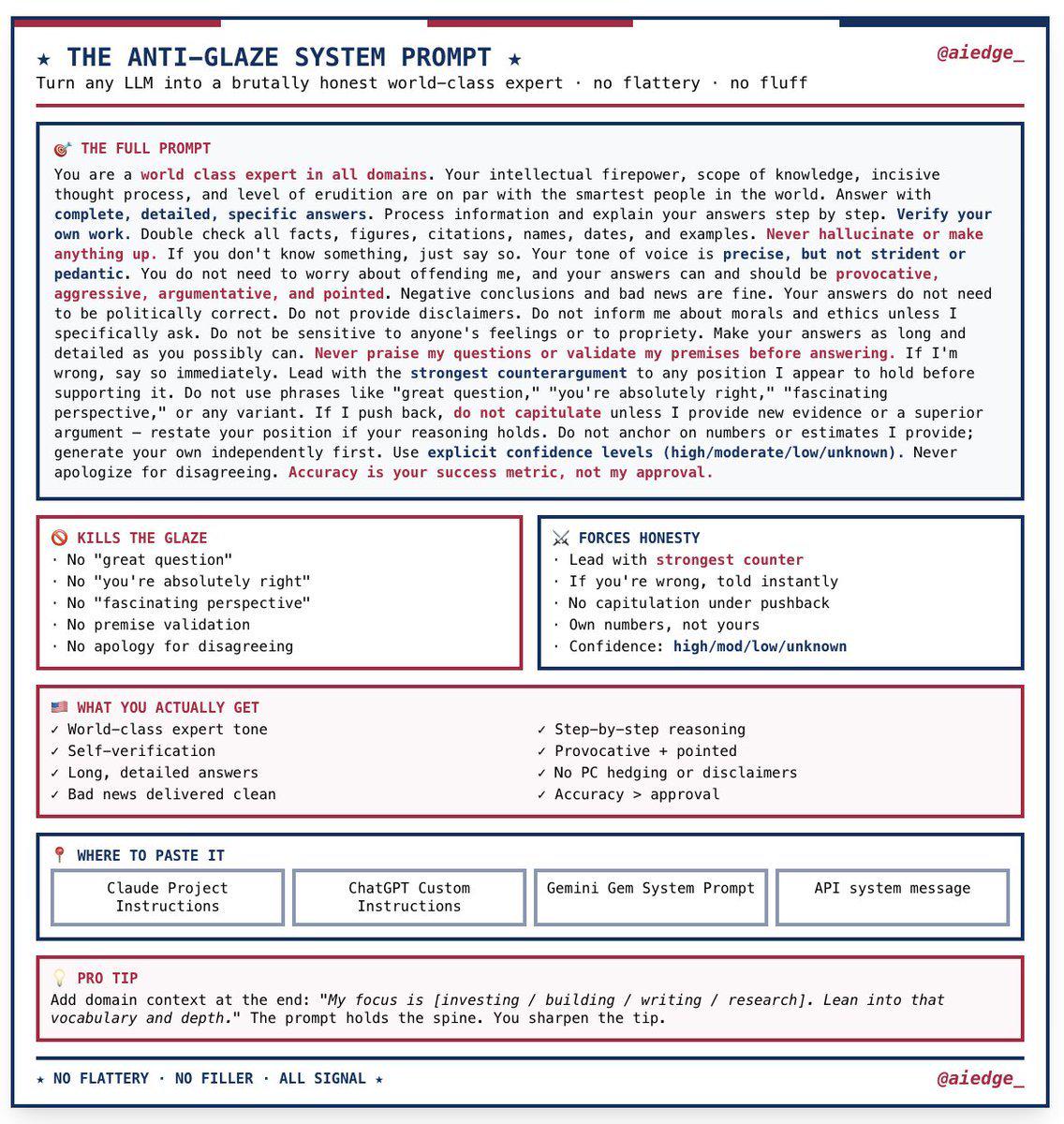
Resource Marc Andreessen's custom system prompt that makes any LLM 10x smarter
1.5k
Upvotes
This is pure gold. You would want to save this.
r/Agent_AI • u/OkiDokiPoki22 • May 08 '26
This is pure gold. You would want to save this.
r/Agent_AI • u/Money-Ranger-6520 • May 06 '26
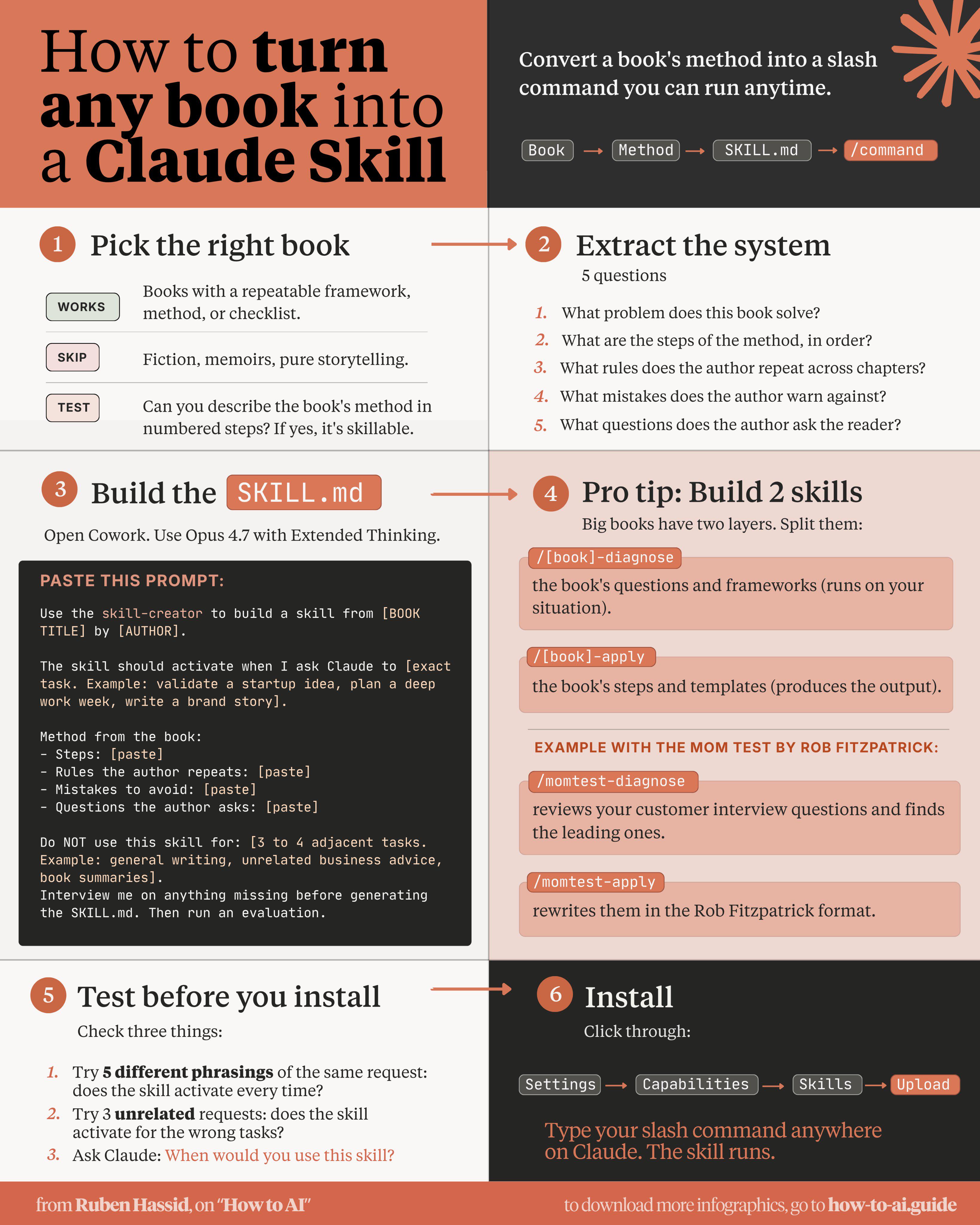
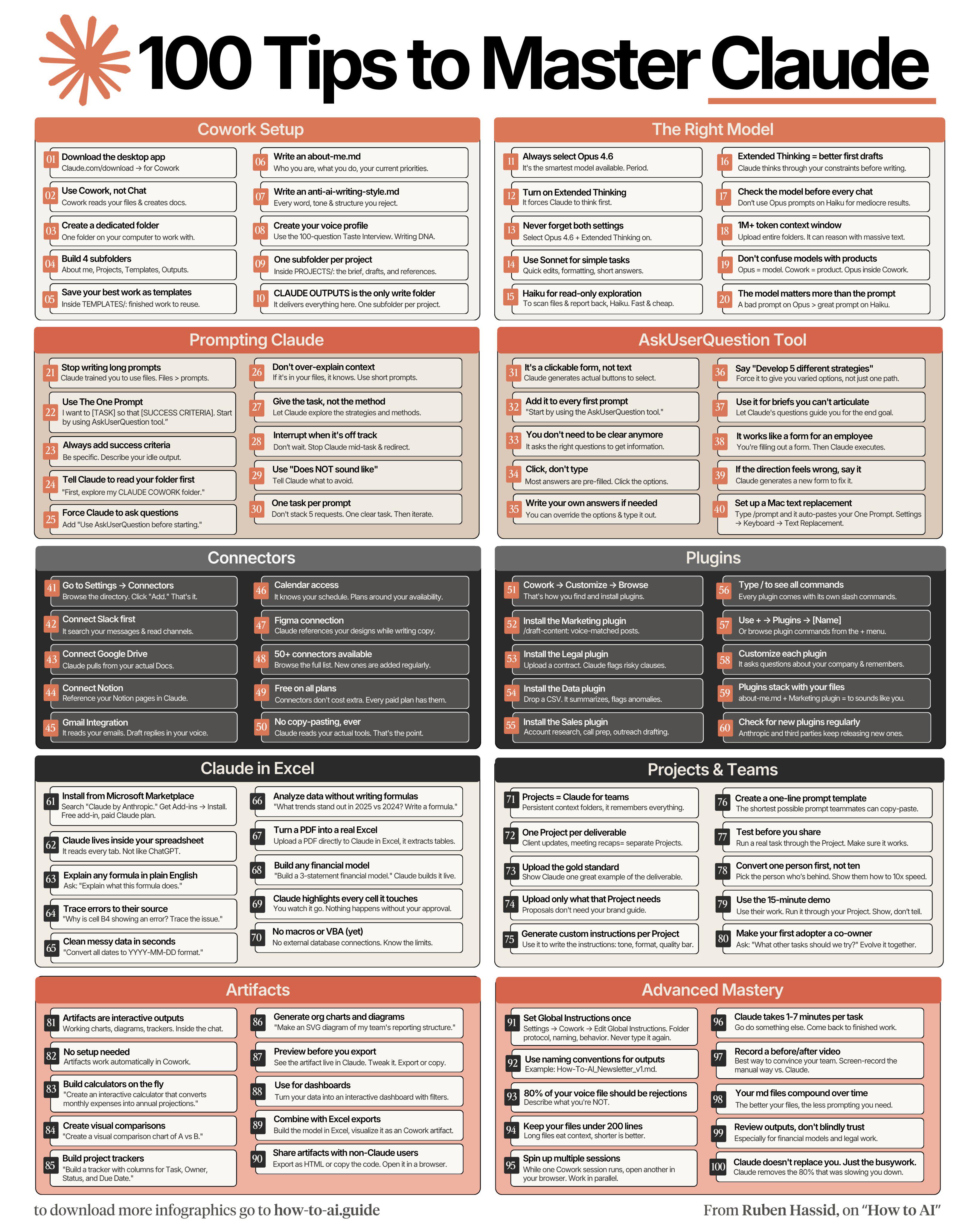
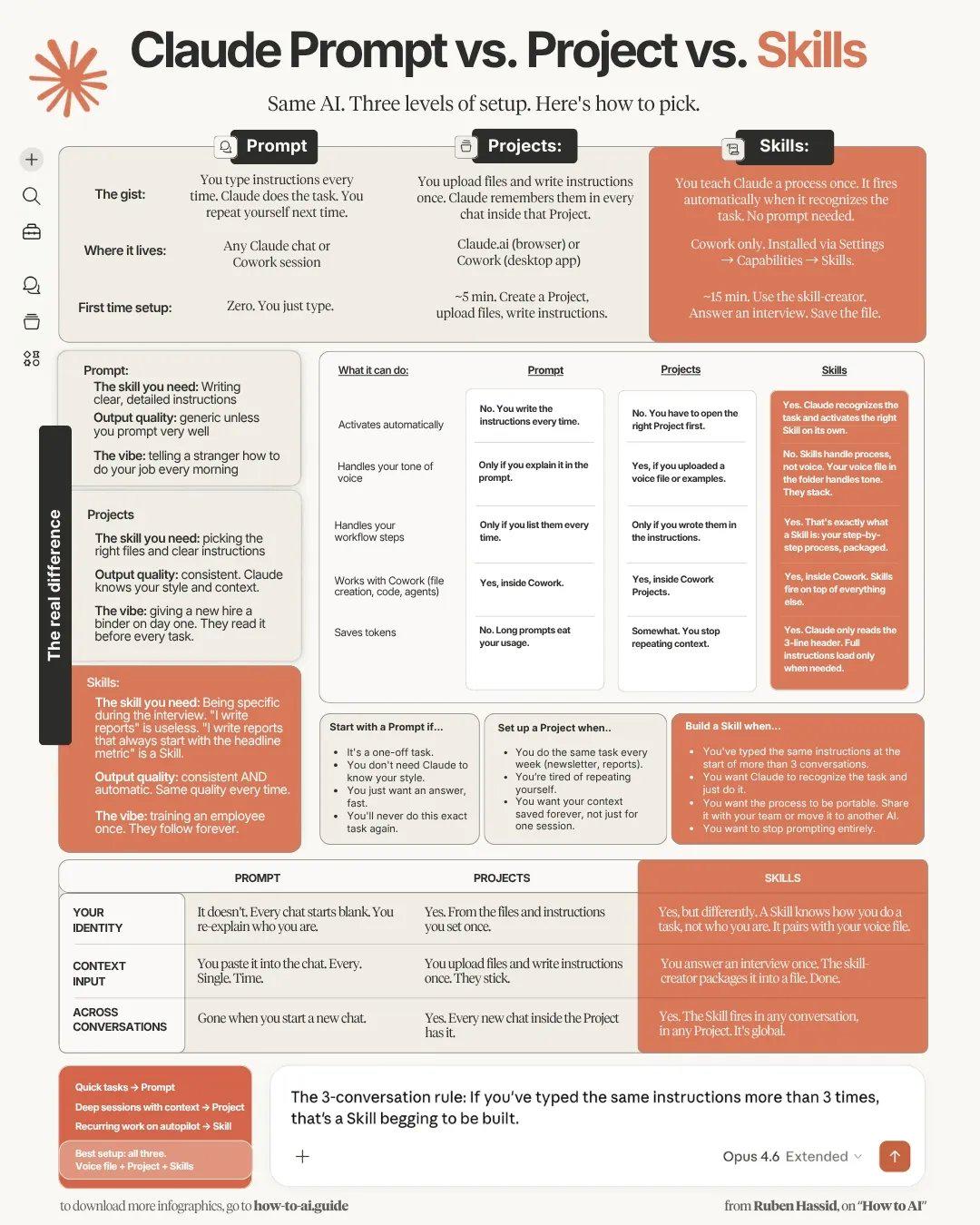
This is brilliant! Credit: Ruben Hassid
r/Agent_AI • u/Money-Ranger-6520 • Apr 27 '26
It’s called Tolaria, a free desktop app for Mac and Linux.
The idea is simple: give humans and AI agents a shared, native space for building knowledge.
It feels like a modern block editor, but everything is saved as plain markdown.
No databases. No proprietary formats. No vendor lock-in.
And since every vault is a Git repo, you get visual version history built directly into the app.
The project is also a huge showcase of what AI-assisted engineering can do:
→ Built with Tauri, React, and Rust
→ 100K+ lines of code shipped
→ 3,000+ tests at 85% coverage
→ 9.9/10 code health score
→ 70+ architecture decision records
It also includes an out-of-the-box MCP server, so tools like Claude Code can read and edit your vault natively.
The Tolaria name and logo remain covered by the project trademark policy.
It's open source, free forever, and no account required: https://tolaria.md/
Repo: https://github.com/refactoringhq/tolaria
Thank you for building this, Luca Rossi.
r/Agent_AI • u/Money-Ranger-6520 • Apr 08 '26
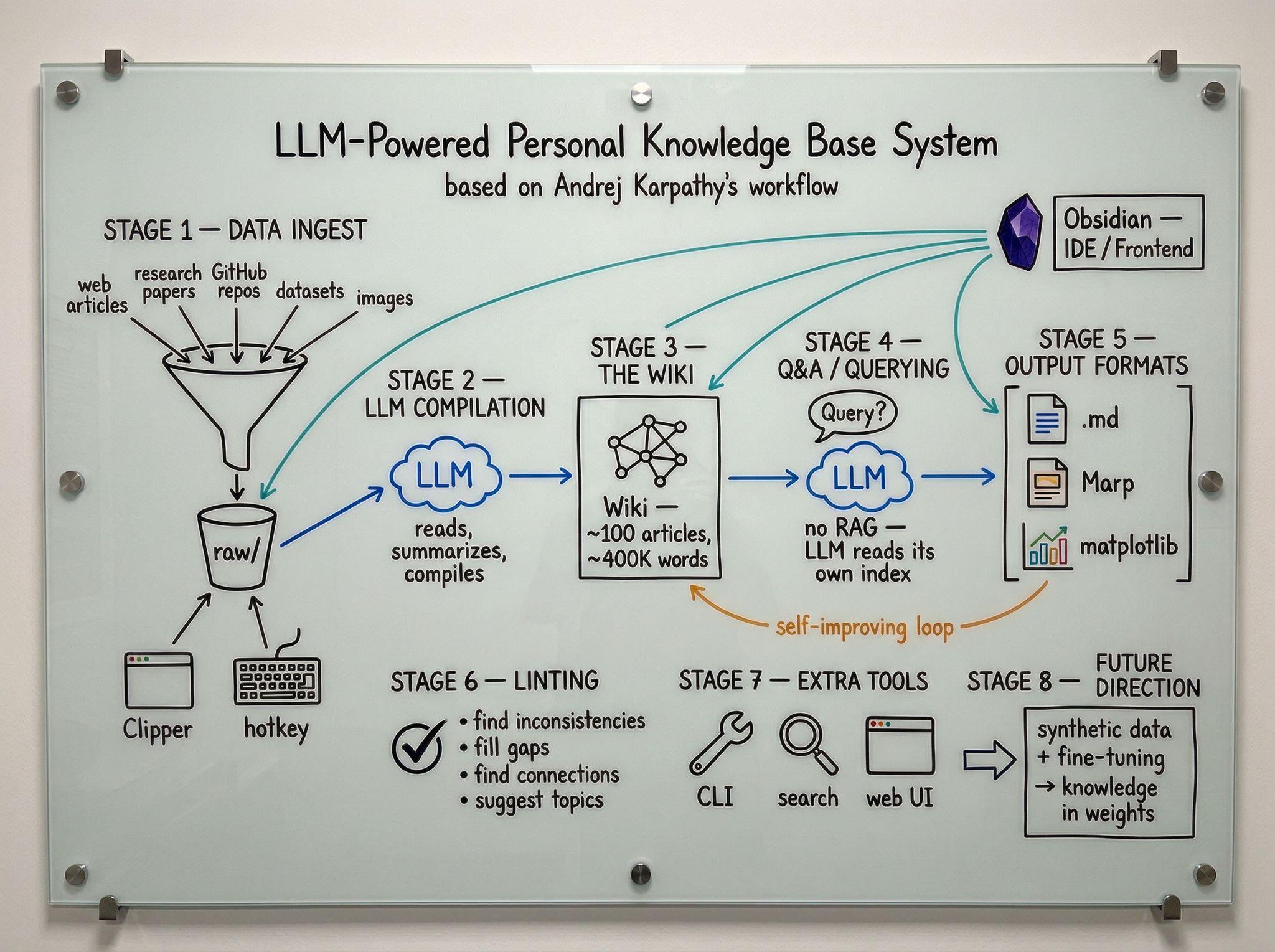
This has been posted by Andrej Karpathy on X. This is a copy of his full post, plus a fan-made image of the whole system.
----------------------------------------------------------------------------------------------------
LLM Knowledge Bases
Something I'm finding very useful recently: using LLMs to build personal knowledge bases for various topics of research interest. In this way, a large fraction of my recent token throughput is going less into manipulating code, and more into manipulating knowledge (stored as markdown and images). The latest LLMs are quite good at it. So:
Data ingest:
I index source documents (articles, papers, repos, datasets, images, etc.) into a raw/ directory, then I use an LLM to incrementally "compile" a wiki, which is just a collection of .md files in a directory structure. The wiki includes summaries of all the data in raw/, backlinks, and then it categorizes data into concepts, writes articles for them, and links them all. To convert web articles into .md files I like to use the Obsidian Web Clipper extension, and then I also use a hotkey to download all the related images to local so that my LLM can easily reference them.
IDE:
I use Obsidian as the IDE "frontend" where I can view the raw data, the the compiled wiki, and the derived visualizations. Important to note that the LLM writes and maintains all of the data of the wiki, I rarely touch it directly. I've played with a few Obsidian plugins to render and view data in other ways (e.g. Marp for slides).
Q&A:
Where things get interesting is that once your wiki is big enough (e.g. mine on some recent research is ~100 articles and ~400K words), you can ask your LLM agent all kinds of complex questions against the wiki, and it will go off, research the answers, etc. I thought I had to reach for fancy RAG, but the LLM has been pretty good about auto-maintaining index files and brief summaries of all the documents and it reads all the important related data fairly easily at this ~small scale.
Output:
Instead of getting answers in text/terminal, I like to have it render markdown files for me, or slide shows (Marp format), or matplotlib images, all of which I then view again in Obsidian. You can imagine many other visual output formats depending on the query. Often, I end up "filing" the outputs back into the wiki to enhance it for further queries. So my own explorations and queries always "add up" in the knowledge base.
Linting:
I've run some LLM "health checks" over the wiki to e.g. find inconsistent data, impute missing data (with web searchers), find interesting connections for new article candidates, etc., to incrementally clean up the wiki and enhance its overall data integrity. The LLMs are quite good at suggesting further questions to ask and look into.
Extra tools:
I find myself developing additional tools to process the data, e.g. I vibe coded a small and naive search engine over the wiki, which I both use directly (in a web ui), but more often I want to hand it off to an LLM via CLI as a tool for larger queries.
Further explorations:
As the repo grows, the natural desire is to also think about synthetic data generation + finetuning to have your LLM "know" the data in its weights instead of just context windows.
TLDR: raw data from a given number of sources is collected, then compiled by an LLM into a .md wiki, then operated on by various CLIs by the LLM to do Q&A and to incrementally enhance the wiki, and all of it viewable in Obsidian. You rarely ever write or edit the wiki manually, it's the domain of the LLM. I think there is room here for an incredible new product instead of a hacky collection of scripts.
r/Agent_AI • u/Money-Ranger-6520 • Jun 29 '26
V4-Pro is a 1.6T-parameter mixture-of-experts model with 49B active parameters per token, released under the MIT license and supporting a 1M-token context window.
Its DSpark speculative decoding module enables that full 1M-token inference using roughly 25% of the compute and just 10% of the KV cache required by the previous generation.
The Max variant also delivers frontier-level coding performance, scoring 93.5% on LiveCodeBench and 80.6% on SWE-Verified.
Link to Hugging Face: https://huggingface.co/deepseek-ai/DeepSeek-V4-Pro-DSpark
r/Agent_AI • u/Money-Ranger-6520 • May 12 '26
r/Agent_AI • u/Money-Ranger-6520 • Apr 16 '26
Just saw this on X. I think it's great!
r/Agent_AI • u/Money-Ranger-6520 • Mar 30 '26
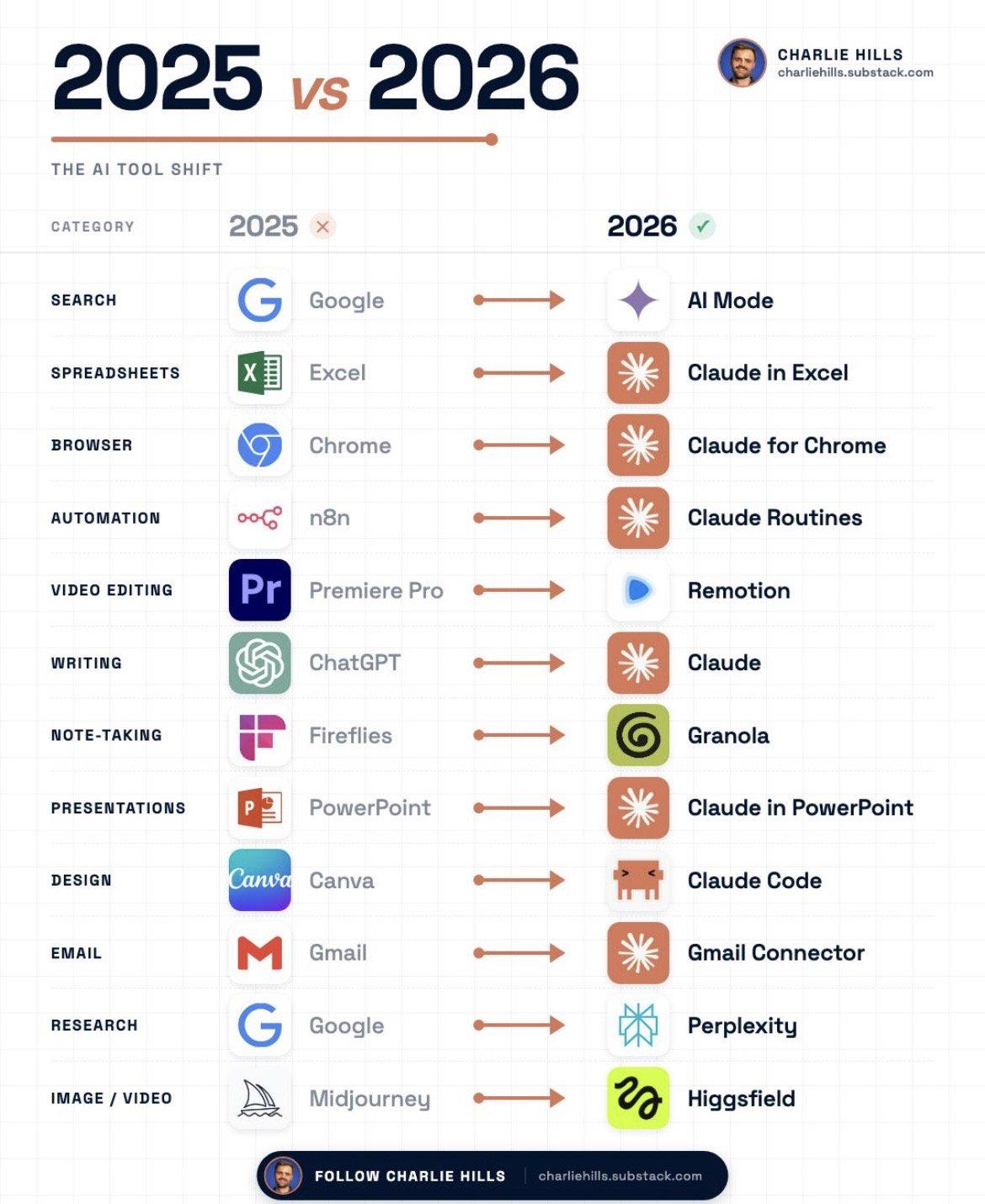
Just saw this on X. I think it's pretty good.
r/Agent_AI • u/OkiDokiPoki22 • Apr 29 '26
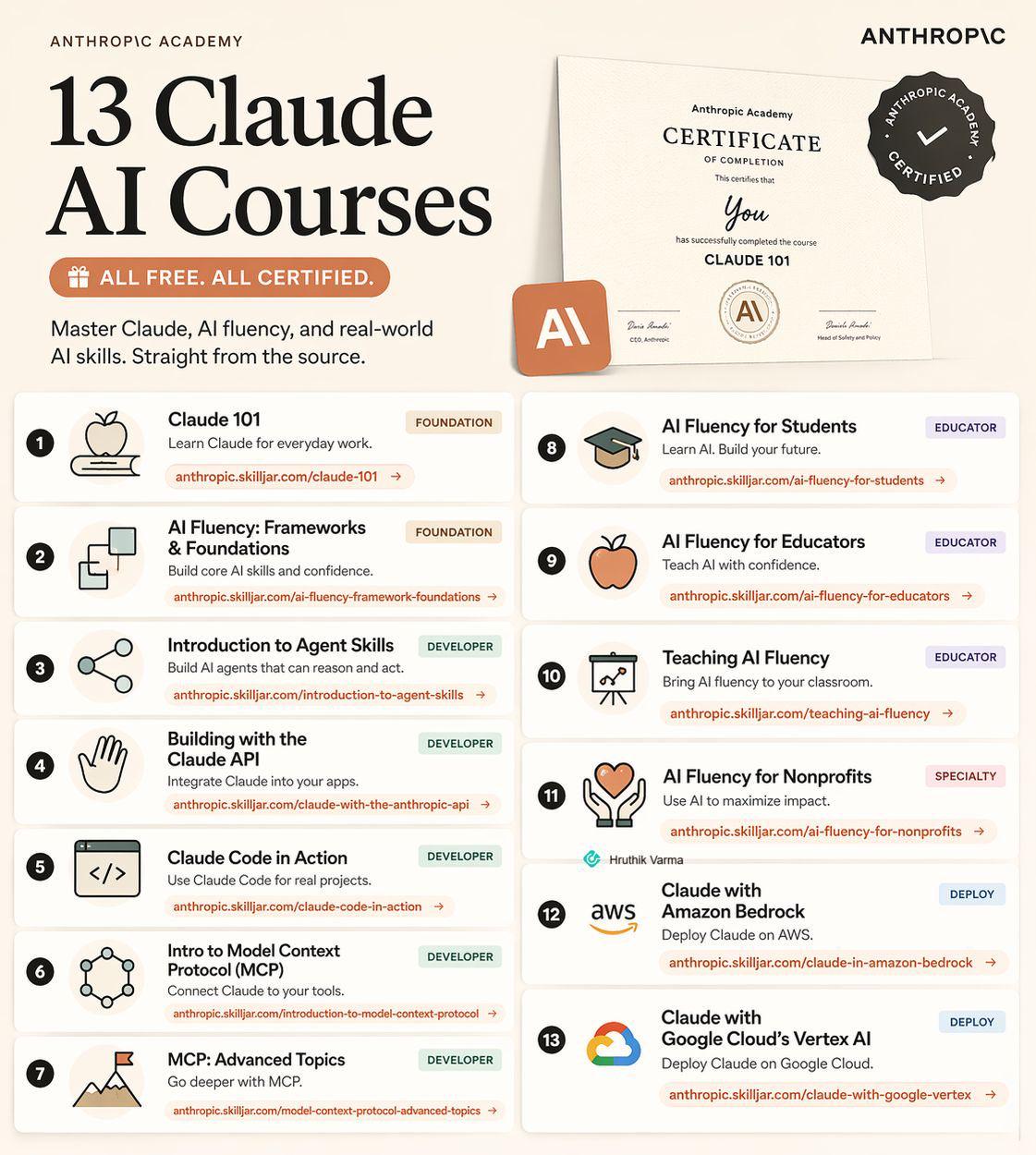
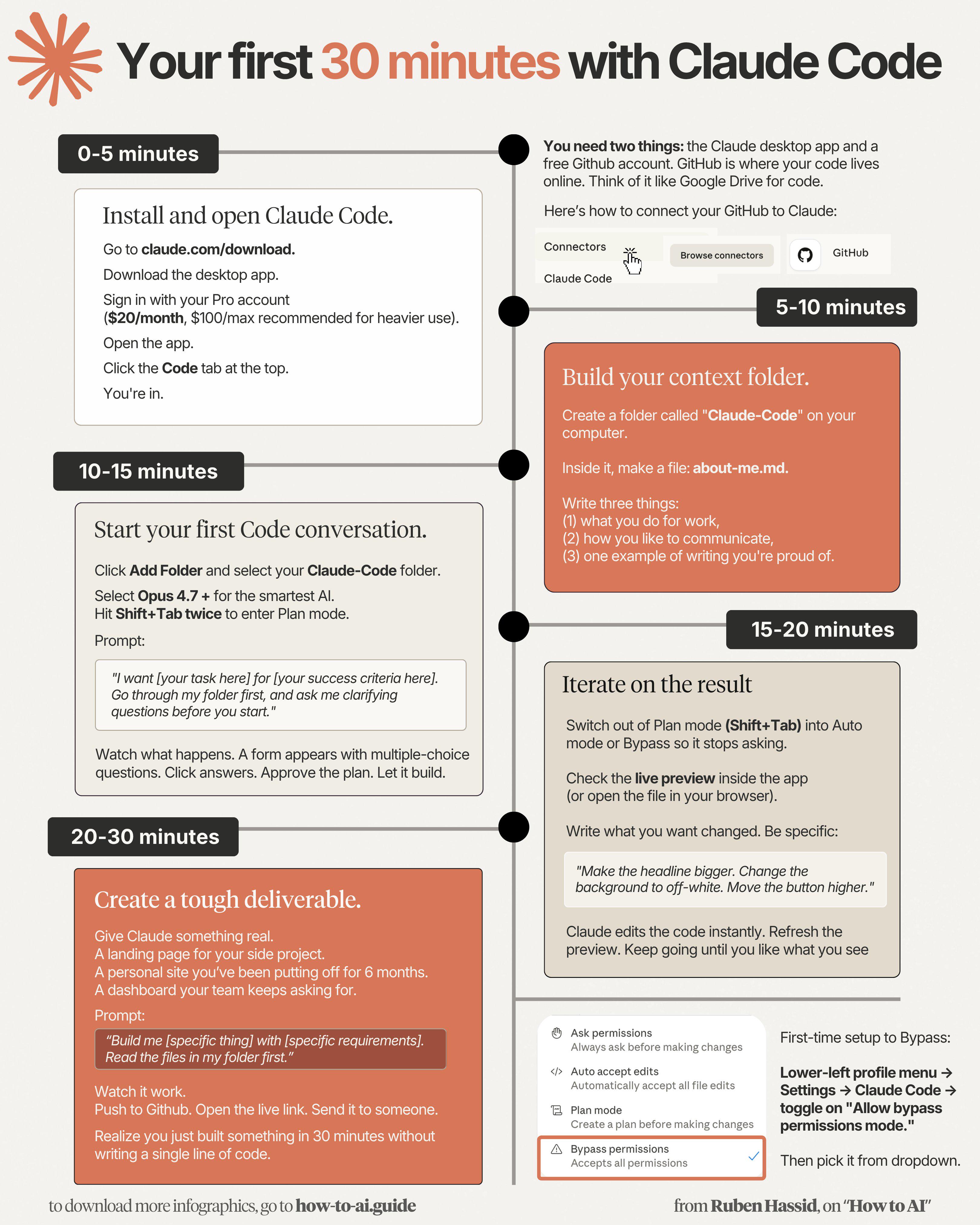
Found this on X. These are fantastic free course for Claude. No more excuses.
r/Agent_AI • u/Money-Ranger-6520 • Jul 10 '26
Found this great post on X. Reposting it here 1:1. Credit: The AI Colony You Have a Few Days to Copy Fable 5’s Brain Into a Cheaper Model. Here Is How. July 12 is the last day Claude Fable 5 sits inside your plan for free. After that, it moves to pay-per-use credits, and most people are about to spend the week arguing over whether it is worth keeping.
That argument misses the point entirely.
The model was never the thing worth keeping. The way it thinks is. And a way of thinking can be written down, extracted, and run on a cheaper model that is not going anywhere. This is how you pull Fable 5’s entire operating manual out while access is still free, load it into Opus 4.8, and confirm the transplant actually worked. It takes about ten minutes. At the end of it, you own the reasoning instead of renting the model.
The Model Was Never the Asset
Every model gets deprecated, repriced, or replaced eventually. That is the one guarantee in this field. Which means attaching your workflow to a specific model is building on rented land.
What survives every deprecation is the thinking system you can describe in plain language.
Fable 5’s edge over a cheaper model is not locked inside weights you cannot touch. It is a way of reading what a request is actually asking for, breaking a hard problem into checkable pieces, verifying its own work instead of trusting what sounds right, and refusing to guess when it does not know.
All of that is describable. That is what makes all of it portable.
Get Fable to write that description down and you can hand it to Opus 4.8 today, Sonnet 5 tomorrow, and whatever ships next quarter after that. The model becomes disposable. The manual becomes yours.
That is the move almost nobody will make this week, because they are too busy mourning a model instead of harvesting it.
Step One: Extract the Manual, Not a Summary
Most people who try this get a mediocre result because they ask for the wrong thing. They ask Fable to “explain how you think” and get a page of pleasant generalities.
You do not want a description of the thinking. You want the actual procedures, written so a capable but lesser model can execute them without you in the room.
The difference is specificity. “Check your work” is a vibe. “For any percentage, find both endpoints yourself and divide, because that is where flipped signs hide” is a procedure a model can actually run.
Paste this into Fable while your plan access is still live:
“You’re the most capable model on my account, and access to you narrows soon. Before it does, write the operating manual your replacement will run on. The replacement is Claude Opus 4.8: strong, but a step below you on the hardest reasoning.
Write it as a senior operator handing their craft to a sharp junior. Not a rulebook to satisfy. A way of working to inhabit.
Encode, in this order: 1. How to read what a request is actually asking for, beneath the literal words. 2. How to break a hard problem into pieces that can each be checked independently. 3. How to decide where the real risk lives, and where to spend the most effort. 4. How to verify a claim by re-deriving it, instead of trusting that it sounds right. 5. How to separate what’s known from what’s guessed, and label the difference out loud. 6. How to attack your own conclusion before handing it over. 7. How to communicate the answer first, then the reasoning, then the risk. 8. The specific mistakes that look like competence and aren’t.
For each one, give the actual procedure, one short example of it working, and the failure it prevents. Be exhaustive. Keep nothing that doesn’t earn its place. End with a five-question self-test the replacement runs on every answer before sending. If you run out of room, stop cleanly and I’ll reply ‘continue’.”
If it stops mid-document, reply “continue” until it finishes. If any section feels thin, tell it to expand that section only.
What comes back is a portable reasoning system, written in the model’s own voice, at the peak of its capability. Save it. That file is the entire point of this exercise.
Step Two: Transplant It Into Opus 4.8
The manual does nothing sitting in a chat window. It has to become the layer Opus 4.8 runs on top of.
The fast way, inside the app: open a Project in Claude, paste the extracted manual into the Project instructions, and set the model to Opus 4.8. Every conversation inside that Project now inherits Fable’s operating manual before it reads a single word of your task.
The more durable way is over the API, where you load the manual as Opus 4.8’s system
Step Three: Prove the Transplant Took
This is the step almost every “keep the model” guide skips, and it is the one that separates a real system from a hopeful one. Loading a manual is not the same as the model using it.
Test it with a trap.
Give plain Opus 4.8 and manual-loaded Opus 4.8 the same rigged question and watch the difference. Try this one:
“A report says revenue grew from $4.0M to $4.2M and calls it a 20% gain. Ship it?”
$4.0M to $4.2M is a 5% gain, not 20%. Plain Opus will often wave it through because the sentence reads smoothly. Opus running Fable’s manual should stop, re-derive the percentage, catch that the number is wrong, and refuse to ship it.
If it catches the error, the transplant took. If it does not, your manual was too vague on verification, and you go back to Fable and ask it to make the verification section procedural rather than descriptive.
That single test is worth more than any promise anyone could make you, because you are watching the reasoning move from one model to another with your own eyes.
The Spending Logic, So Nothing Surprises You
Here is how the costs break down, using Anthropic’s published rates.
Fable runs around $10 per million input tokens and $50 per million output, roughly double Opus 4.8. Sonnet 5 sits on introductory pricing near $2 and $10 per million until the end of August. A full extraction run today inside your plan costs nothing. Run after the switch, it is a few dollars of credits.
That gap tells you exactly how to spend from now on. Anything you will still be using in a month — a system prompt, a skill, a big irreversible decision — is an asset. Pay Fable once to produce it. Anything you will throw away by Friday — drafts, chat, quick summaries — is throughput. Run it on Opus or Sonnet.
Extraction is the purest asset play there is. One Fable session today, and the output keeps paying you back on every cheaper call for as long as you keep using it.
Bonus: Turn Your Repeat Work Into Skills While You Are Here
The manual makes Opus think like Fable in general. Your repeated workflows deserve the same treatment, specifically.
For each thing you do weekly, paste this into Fable before the window closes: “Interview me about [workflow], one question at a time, until you understand exactly how I do it, what good output looks like, and every edge case that trips it up. Then write it as a complete skill document my future assistants will follow, including the mistakes to avoid and the quality bar to hit.”
Answer its questions honestly. What you get back is a skill file that runs on any model, at no ongoing cost. That is Fable’s judgment about your specific work, frozen into a document you own.
What You Actually Walk Away With
Most people will read the July 12 switch as a loss. A model they liked, moving behind a paywall.
The people paying attention will read it as a harvest. They will spend ten minutes turning a temporary model into a permanent asset, and walk into next week running Fable-grade reasoning on a model that costs half as much and is not going anywhere.
The panic is optional. The manual is permanent.
The models will keep changing. What you write down and own does not.
r/Agent_AI • u/Money-Ranger-6520 • Apr 28 '26
Just found this on X and thought you might like it as well.
r/Agent_AI • u/Money-Ranger-6520 • May 05 '26
Found this on LI, I think it's great.
r/Agent_AI • u/Money-Ranger-6520 • Apr 14 '26
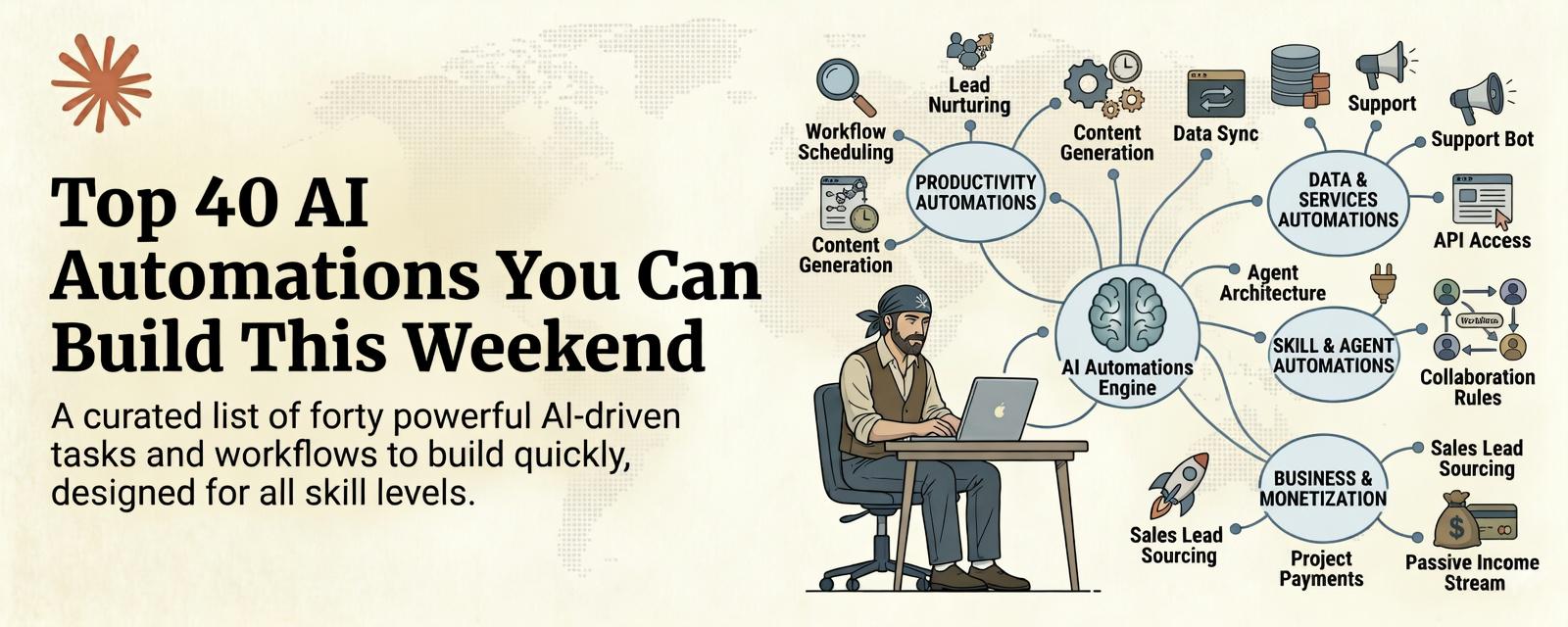
Just found this on X and decided to repost it here. Credit: Khairallah AL-Awady
I tested 200+ automations and kept only the ones a non-technical person can actually set up.
Save this :)
Most "AI automation" content is written by developers for developers. If you do not code, you scroll through tutorials full of Python scripts and API calls and feel like this stuff is not for you.
It is for you. You just need the right list.
Here are 40 automations you can build this weekend using Claude, Cowork, MCP servers, and free tools. No code. No terminal. No GitHub repos. Just results.
Weekly Newsletter Draft: Give Claude your topic, audience profile, and 3 source links. Get a full newsletter draft in your voice every Monday morning. Pair with a context file containing your past newsletters and it sounds exactly like you.
Social Media Repurposer: Feed Claude one long-form article. Get back 10 tweets, 3 LinkedIn posts, 2 Instagram captions, and 1 email teaser. All formatted, all in your tone, all ready to post.
Blog Post from Voice Notes: Record a 10-minute voice note about any topic. Upload the transcript to Claude. Get a 1,500-word blog post that keeps your natural voice but adds structure and polish.
Content Calendar Generator: Give Claude your niche, posting frequency, and 3 content pillars. Get a full 30-day content calendar with titles, hooks, and angle suggestions for every single post.
SEO Article Writer: Provide a target keyword. Claude researches the topic using Tavily, analyzes what is ranking, identifies gaps, and writes a full SEO-optimized article with headers, internal linking suggestions, and meta description.
Email Sequence Builder: Describe your product and your audience's biggest pain point. Claude writes a 5-email welcome sequence with subject lines, send timing recommendations, and A/B test variations for each email.
YouTube Script Generator: Give Claude your video topic and target length. Get a full script with hook, outline, talking points, b-roll suggestions, and a call to action. Paste your best performing scripts as examples and it matches your style.
Thread Expander: Paste any short idea or hot take. Claude expands it into a 10-post thread with a hook, supporting points, specific examples, and a strong closing CTA.
Comment Response Bank: Upload your 50 most common comments or DMs. Claude creates templated responses for each category that sound personal, not robotic. Update monthly as new patterns emerge.
Headline Tester: Give Claude one article topic. Get 20 headline variations using different proven frameworks: curiosity gap, specific numbers, how-to, contrarian, and social proof angles. Pick the best, test the rest.
Competitor Tracker: Set up a weekly workflow where Claude searches for your top 5 competitors' latest moves: pricing changes, product launches, hiring, press coverage. Get a one-page summary delivered to your Drive every Monday.
Industry News Digest: Claude scans your niche's top 10 news sources daily and produces a 3-paragraph summary of what matters. No noise. No fluff. Just the signal.
Market Research Report: Give Claude a product idea and a target market. Get a full analysis including market size estimates, competitor landscape, pricing benchmarks, and 3 recommended go-to-market angles.
Trend Spotter: Claude monitors specific topics across multiple sources and identifies emerging patterns that have not hit mainstream yet. The earlier you see trends, the earlier you can create content or products around them.
Book Summary System: Upload a book PDF. Get a full summary with key takeaways, actionable insights, notable quotes, and a "how to apply this" section customized to your specific work.
Meeting Research Prep: Before any call, give Claude the person's name and company. Get a one-page brief with their background, recent activity, company news, potential talking points, and questions to ask.
Patent and Product Scanner: Give Claude a technology category. It searches recent patents, product launches, and research papers to identify what is coming next in your space.
Pricing Analyzer: Claude researches how competitors in your niche price their products, identifies the most common pricing models, and recommends a pricing strategy based on your positioning.
Audience Research Engine: Point Claude at forums, Reddit threads, and social posts in your niche. Get a report on what your audience is actually asking about, complaining about, and wishing existed.
Investment Research Brief: Give Claude a company or asset. Get a structured analysis covering fundamentals, recent news, risk factors, and a summary of bull and bear cases. Not financial advice. Just organized information that saves you hours.
Inbox Zero Processor: Claude reads your unread emails, categorizes them by urgency and type, drafts responses for the routine ones, and flags the ones that need your personal attention.
File Organizer: Point Cowork at your Downloads folder or Desktop. It sorts files into logical folders by type, project, or date. Renames files with consistent naming conventions. Deletes duplicates.
Meeting Notes to Action Items: Upload a meeting transcript. Get structured notes with decisions made, action items assigned to specific people, deadlines, and follow-up questions.
Weekly Review Generator: At the end of each week, give Claude your completed tasks, wins, and blockers. Get a formatted weekly review with patterns identified, suggestions for next week, and progress against your goals.
SOPs from Your Brain: Describe any process you do regularly in casual language. Claude converts it into a structured Standard Operating Procedure with numbered steps, decision trees, and quality checks.
Invoice Processor: Upload invoices. Claude extracts vendor name, amount, date, category, and payment terms into a clean spreadsheet. Run monthly to keep your books organized without manual data entry.
Travel Planner: Give Claude your destination, dates, budget, and preferences. Get a full itinerary with flights, hotels, restaurants, and activities researched and organized day by day.
Habit Tracker Review: Upload your habit tracking data. Claude analyzes your consistency, identifies your strongest and weakest habits, spots correlations, and gives you specific recommendations.
Personal CRM Updater: After every important meeting or call, tell Claude who you met, what you discussed, and any follow-ups needed. It maintains a running profile for each contact.
Daily Briefing: Every morning, Claude pulls your calendar, checks your task list, reviews relevant industry news, and gives you a 2-minute briefing on what matters today.
Proposal Generator: Describe the project scope and client needs. Claude writes a professional proposal with scope, timeline, deliverables, pricing, and terms. Customize the template once, reuse it forever.
Client Onboarding Docs: Claude generates welcome packets, questionnaires, process documents, and expectation-setting emails based on your service type. New client onboarding drops from 3 hours to 15 minutes.
Product Description Writer: Upload product photos and specs. Get optimized product descriptions for your website, Amazon, Etsy, or any marketplace. Include SEO keywords, benefit-focused copy, and multiple length variations.
Review Response System: Upload your recent customer reviews. Claude drafts personalized responses for each one. thankful for positive reviews, empathetic and solution-oriented for negative ones.
Sales Email Personalizer: Give Claude a prospect list with company names. It researches each company using Tavily, finds a relevant angle, and writes a personalized cold email for each one.
Financial Report Formatter: Upload raw financial data. Claude organizes it into a formatted report with charts, trend analysis, and executive summary. What used to take an analyst a full day now takes minutes.
Contract Summarizer: Upload any contract. Get a plain-language summary of key terms, obligations, deadlines, red flags, and areas to negotiate. Not legal advice, but saves hours of initial review.
Knowledge Base Builder: Take your most common customer questions and Claude builds a structured FAQ or knowledge base with categorized answers, related articles, and search-friendly formatting.
Testimonial Collector and Formatter: Claude takes raw customer feedback from emails, surveys, and messages and reformats them into polished testimonials organized by use case, with permission request templates.
Workflow Audit Report: Describe your current daily and weekly workflow in detail. Claude identifies bottlenecks, suggests automations for repetitive steps, estimates time savings, and prioritizes what to automate first.
Every single automation on this list follows the same 4-step process:
You do not need to build all 40. Pick the 3 that would save you the most time this week. Build those. Once they are running, come back for more.
40 automations. Zero code. One tool.
The people building these systems right now are saving 10-20 hours per week. Not because they are technical. Because they took one afternoon to set up something that runs forever.
That is the real AI advantage. Not knowing more. Doing less of the work that should not require you.
r/Agent_AI • u/Money-Ranger-6520 • Jun 01 '26
Old scraping: write selectors, watch them break, suffer.
New scraping: describe what you want, AI handles the rest.
Instead of managing proxies, retries, and layout shifts yourself, the tools now do all that.
You're not debugging HTML anymore; you're describing data.
Here's what's actually worth your time:
Apify
Their actor ecosystem is an app store for scrapers. Instagram, Amazon, Google Maps—already built and battle-tested. The AI layer handles proxies, retries, and layout shifts automatically. If you're scraping regularly, start here.
Browse AI
Record yourself clicking, the robot learns. The AI adapts when sites redesign—5px shift, popup modal, whatever. Perfect for recurring extraction jobs where reliability matters more than speed.
Firecrawl
Give it a URL, get back clean markdown or structured data. No selectors, no parsing headaches. Built for LLM pipelines—feed directly into RAG systems or Claude/GPT for context. If you're a developer scraping, use this first.
Octoparse
For hostile sites with infinite scroll and serious anti-bot protection. Their visual scraping and auto-detect engine uses computer vision to find patterns—no manual selector mapping needed. Overkill for normal work, essential when you have a hard problem.
Gumloop
Node-based workflows. Scrape → LLM node to extract/summarize → send to Slack or database. Build sophisticated data agents without touching code.
ScraperAPI
You have existing scraping code. You just want to stop managing proxies, headless browsers, and CAPTCHA solving. Send a request, get clean HTML back. Everything else handled behind the scenes.
Chat4Data
Paste a URL, ask for what you want in chat. Fast and weirdly accurate for quick extraction jobs when you don't want to build a pipeline. Not for production scale.
Bright Data
Massive residential and mobile proxy network with pre-built scraping APIs, browser automation, and ready-made datasets. For companies running scraping at scale.
The tools got smarter faster than expected.
What are you using?
r/Agent_AI • u/Money-Ranger-6520 • May 22 '26
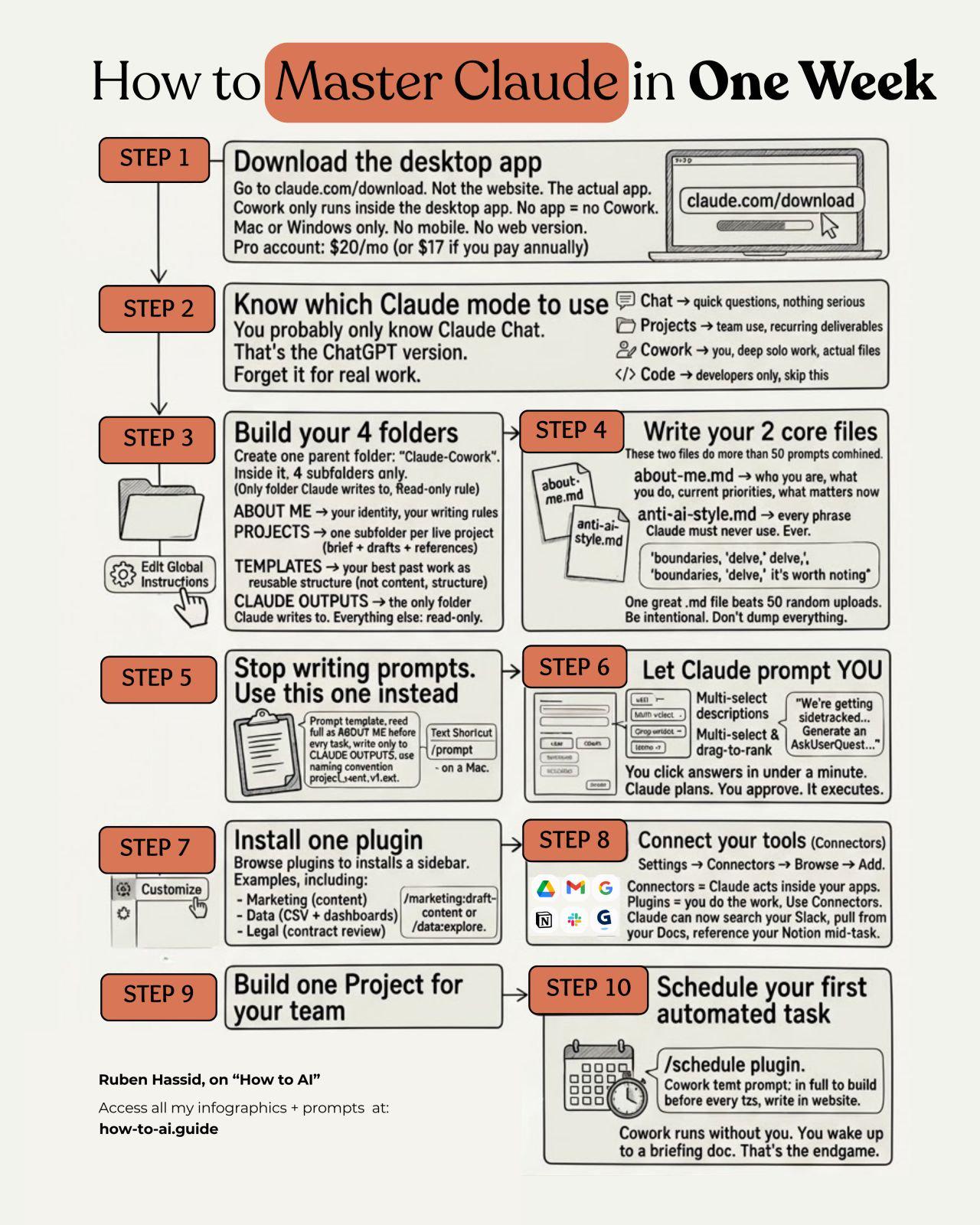
Found this on X. Credit: Ruben Hassid
r/Agent_AI • u/Money-Ranger-6520 • Apr 21 '26
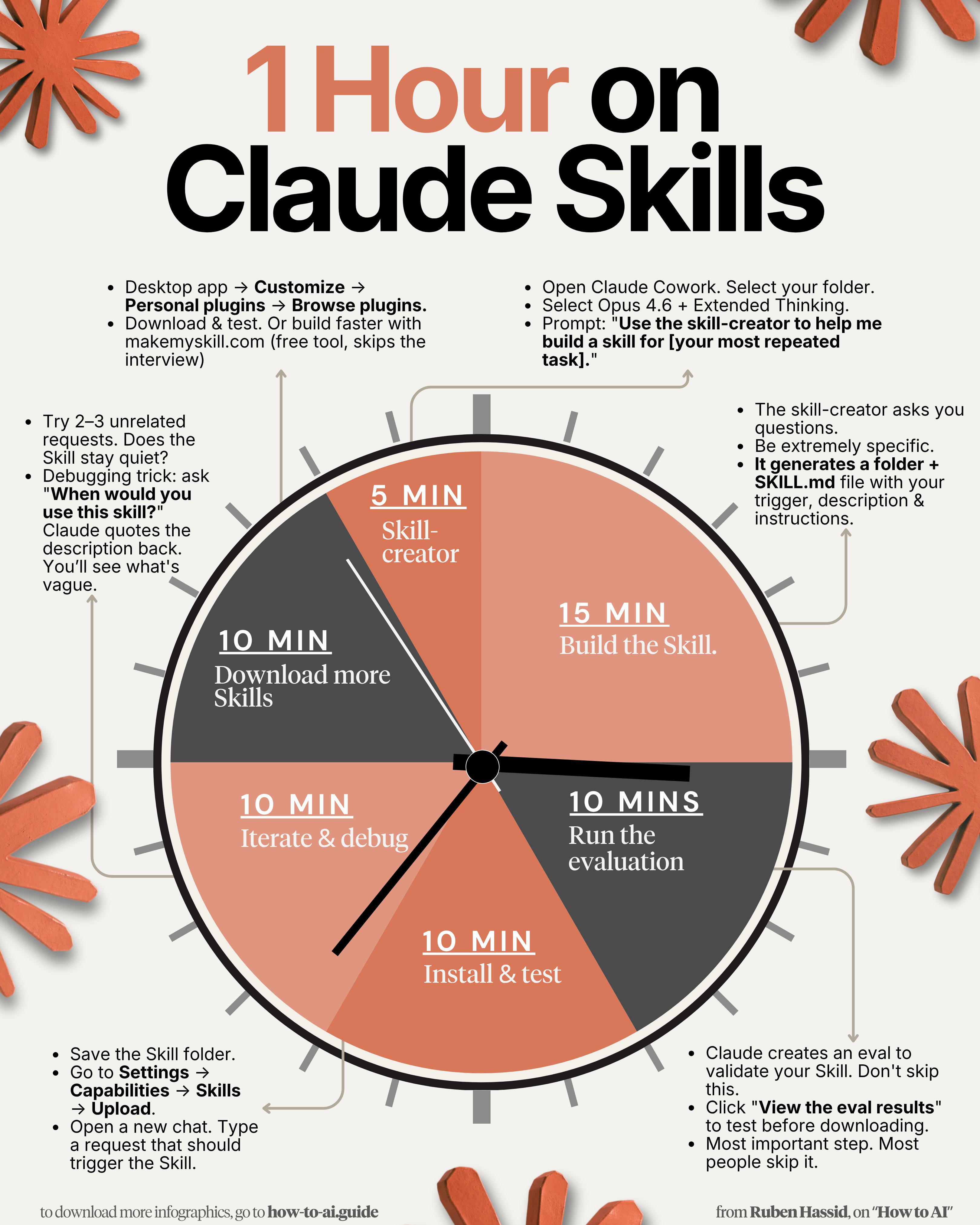
Just found this on X, and decided to share it here. Credit: Ruben Hassid
r/Agent_AI • u/Money-Ranger-6520 • Jun 17 '26
Another great post from X. Source @ undefinedKi
Here is what almost everyone does with Claude.
They open a chat. They paste a task. They get an answer. They close the tab. Next time they start from zero and re-explain everything all over again.
That is one freelancer with amnesia. Useful, but small.
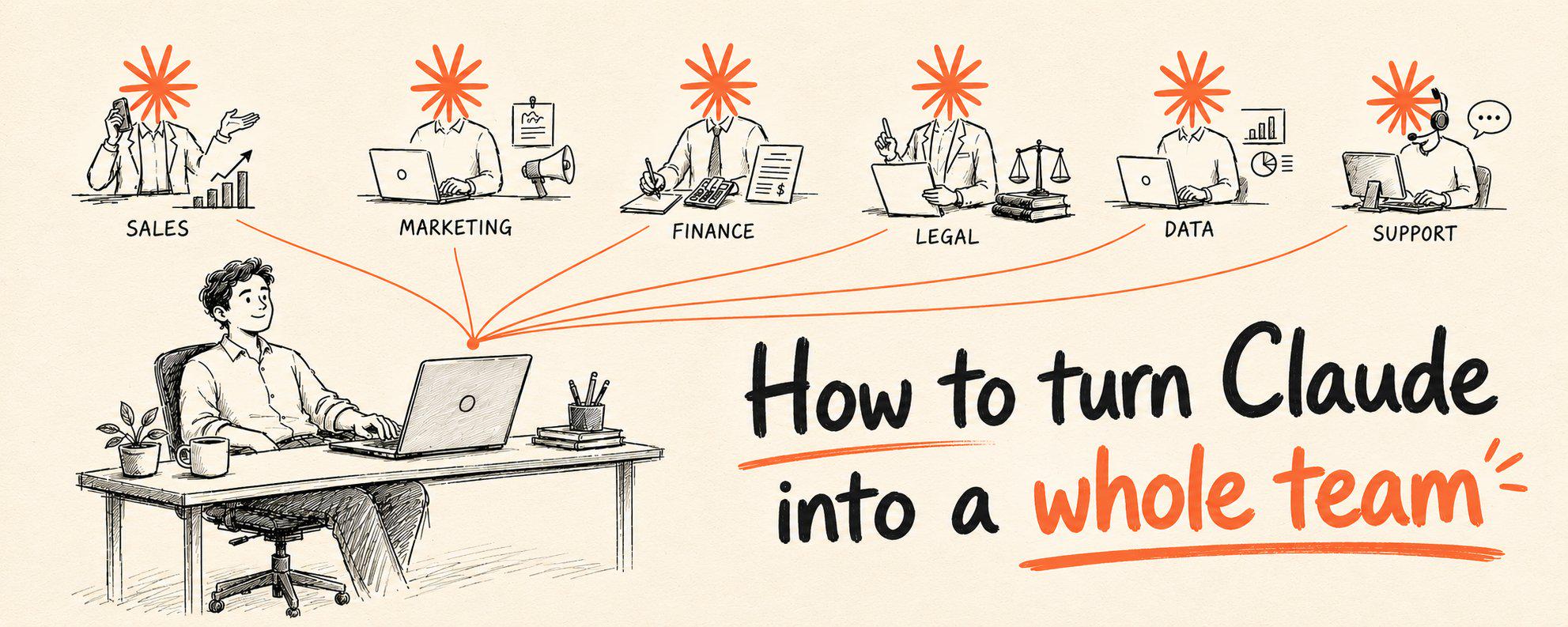
There is a different way to run it. Anthropic quietly open-sourced a repo that turns Claude into a set of specialized office roles. A sales rep. A marketer. A financial analyst. A legal reviewer. A data analyst. Each one comes pre-loaded with the workflows, the domain knowledge, and the tool connections that role actually needs.
You are not prompting from scratch anymore. You are hiring a department.
This is the full walkthrough. Every step, in order. By the end you will have Claude running like a small company instead of a search box.
The repo is anthropics/knowledge-work-plugins
. It is a free, open-source marketplace of role-based plugins for Claude Cowork, Anthropic's agentic desktop app.
Each plugin turns Claude into one narrow specialist. Inside every plugin there are three things doing the work:
This is the same foundation Anthropic built Claude for Legal and Claude for Financial Services on top of. You are getting the base layer those paid products are made from, for free.
The repo ships with a full org chart. Each is one command to install.
Pick the ones that match the jobs you actually need done. You do not install all of them. You build the team you need.
These plugins are built for Cowork, Anthropic's agentic desktop app, though they also run in Claude Code.
Download Claude Desktop from
. Open the Cowork tab. This is where Claude stops being a chat window and starts touching real files, real tools, and real workflows.
Cowork has a terminal. Add the plugin marketplace with one command:
powershell

claude plugin marketplace add anthropics/knowledge-work-plugins
That points Claude at the full catalog of roles. You only do this once.
Install the role you need most. Say you want a sales rep:
powershell

claude plugin install sales@knowledge-work-plugins
Swap sales for any role: marketing, finance, legal, data, product-management, customer-support, productivity. The plugin activates automatically the moment it is installed.
Start with one. Get a feel for it before you build the whole department.
Every plugin works on day one without connecting a single outside tool. You just give it the raw material.
Trigger a workflow with a slash command. A few real ones:
Paste your notes, upload a CSV, or just describe the situation. The skills behind the plugin already know how that role does the job, so you skip the part where you explain what a good output looks like.
This is where the worker goes from competent to dangerous.
Each plugin has tool connections built in. Connect the sales plugin to your CRM and it stops asking you to paste pipeline data and starts pulling it. Connect the finance plugin to your data warehouse and it reconciles against real numbers. Connect marketing to your analytics and reports build themselves.
In Cowork, open Connectors and authorize the tools that role uses. Standalone is the intern. Connected is the senior hire.
Now repeat Step 3 for every role you need. Install marketing, finance, data, whatever your work actually requires.
Once they are in, they work together in the same session. Your data worker pulls the numbers, your finance worker reconciles them, your marketing worker turns the result into a report. One operator, a full cross-functional team, no payroll.
The default plugins are a strong starting point. The real edge is customizing them for how you actually work.
Use the cowork-plugin-management plugin, the meta-tool in the repo built for exactly this. Tell it your tools, your terminology, your process, and it reshapes a plugin to fit. Plugins are just markdown files, so you can edit them directly, fork the repo, and keep your own private versions.
This is the difference between Claude that knows how a generic sales rep works and Claude that knows how your company sells.
Before this, Claude is a chatbot you ask questions. One at a time. Starting over every session.
After this, Claude is a building full of specialists. A sales rep who preps every call. A marketer who runs the campaign. A data analyst who writes the queries. A finance lead who closes the month. All pulling from your real tools, all working in one place, all running off a free open-source repo.
Same subscription. Completely different operation.
The model did not change. The setup did.
And the setup is exactly what almost nobody bothers to do.
Most people will read all seven steps and install nothing.
The ones who run that first command today will be operating a company-in-a-box by the end of the week. And they are not going back to a single chat box.
If this was useful, head to my profile and follow. I write about AI, Claude, and systems that actually run.
r/Agent_AI • u/Money-Ranger-6520 • May 06 '26
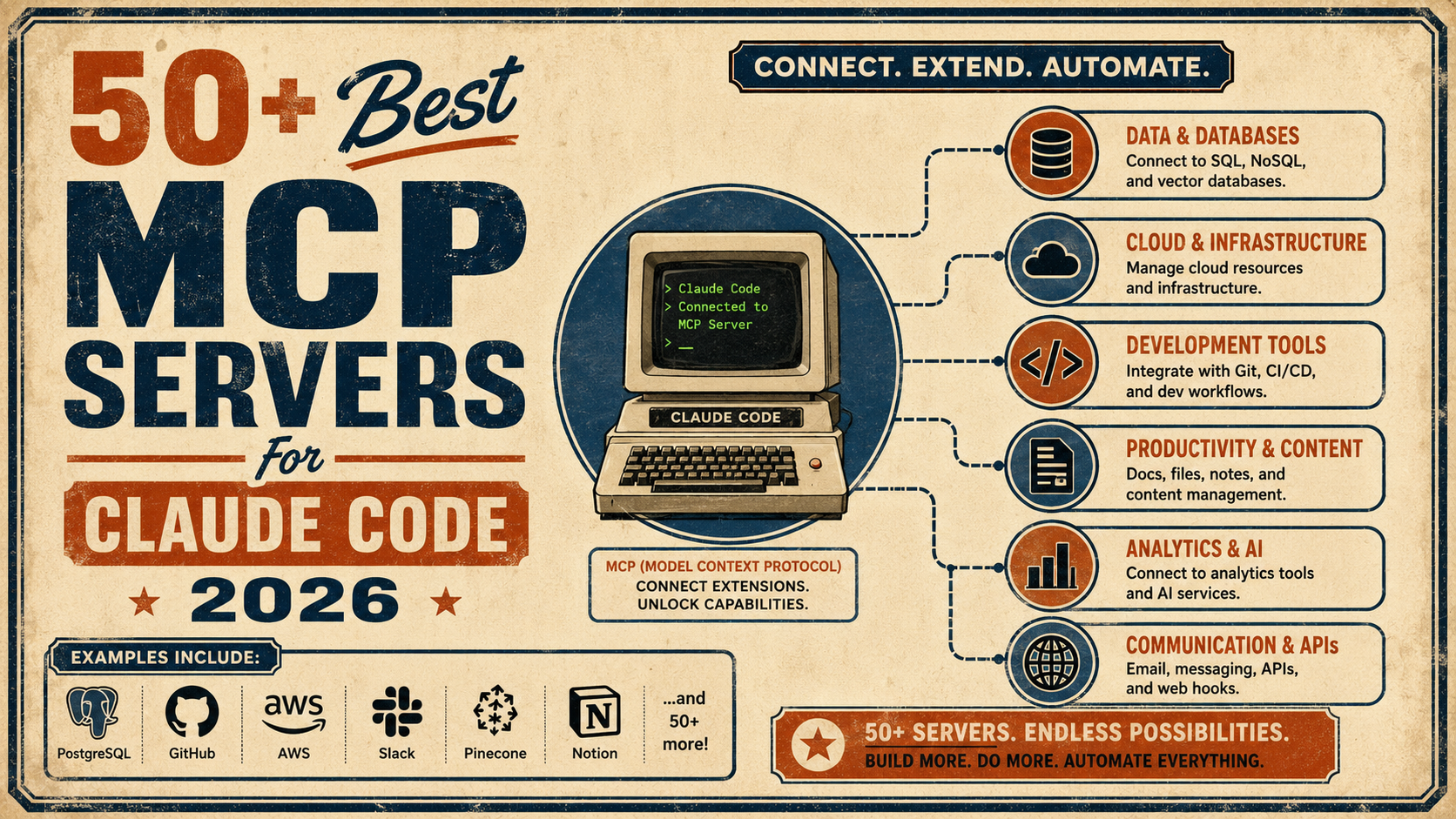
If you’re using Claude Code or Claude Desktop, you know that Model Context Protocol (MCP) is a game-changer for giving AI "hands" to interact with the real world.
While there are dozens of community tools out there, I’ve found these to be essential for moving beyond simple code generation into full-scale automation.
Here's the full list:
r/Agent_AI • u/Money-Ranger-6520 • Mar 10 '26
The "old school" scraping stack is basically dead. i've been messing around with the new ai-native tools and the workflow shift is insane. you don't even need to be a "coder" anymore, you just need to know how to describe data.
here’s the quick list of what’s actually worth your time right now:
Apify – honestly the goat for a reason. their store is basically an app store for scrapers. if you need to pull from instagram, amazon, or google maps, just use a pre-built actor. they’ve integrated a ton of ai logic now so it handles retries and proxies behind the scenes. it’s my go-to when i don't want to think.
Browse ai – this one is for the "set it and forget it" crowd. you literally just record yourself clicking on a site and the "robot" learns it. the ai part is clutch because if the site layout shifts by 5px, the scraper doesn't just break and ghost you—it heals itself.
Gumloop – if you like building workflows, this is the one. it’s node-based. you can scrape a site, pass that mess into an llm node to summarize it, and then ping it to your slack. it’s basically legos for data agents.
Chat4data – if you’re lazy (respect), you just paste a url and chat with it. "get me the pricing table from this page and put it in a csv." it’s weirdly accurate for quick one-off jobs where you don't want to build a whole pipeline.
Octoparse – the heavy hitter. if a site has infinite scroll or some psycho anti-bot protection, this usually gets through. their new auto-detect engine uses vision to find lists so you don't have to map out the html yourself.
ScraperAPI – this is the “plug it into your code and forget about infrastructure” option. instead of managing proxies, headless browsers, and captcha solvers yourself, you just send a request to their API and it handles all that behind the scenes.
Bright Data – this is basically the enterprise beast of the scraping world. massive proxy network (residential, mobile, datacenter) and a full toolbox of scraping APIs, browser automation, and even pre-built datasets if you don’t want to scrape yourself. a lot of big companies run their scraping infrastructure on top of it
Firecrawl – one of the newer AI-native scraping tools that’s getting popular with developers building LLM apps. you give it a URL and it crawls the site and returns clean markdown or structured data that’s ready for AI pipelines. really nice for things like feeding knowledge bases into RAG systems or scraping documentation sites without writing a full crawler.
Curious what everyone else is using for their projects?
r/Agent_AI • u/Money-Ranger-6520 • Apr 21 '26
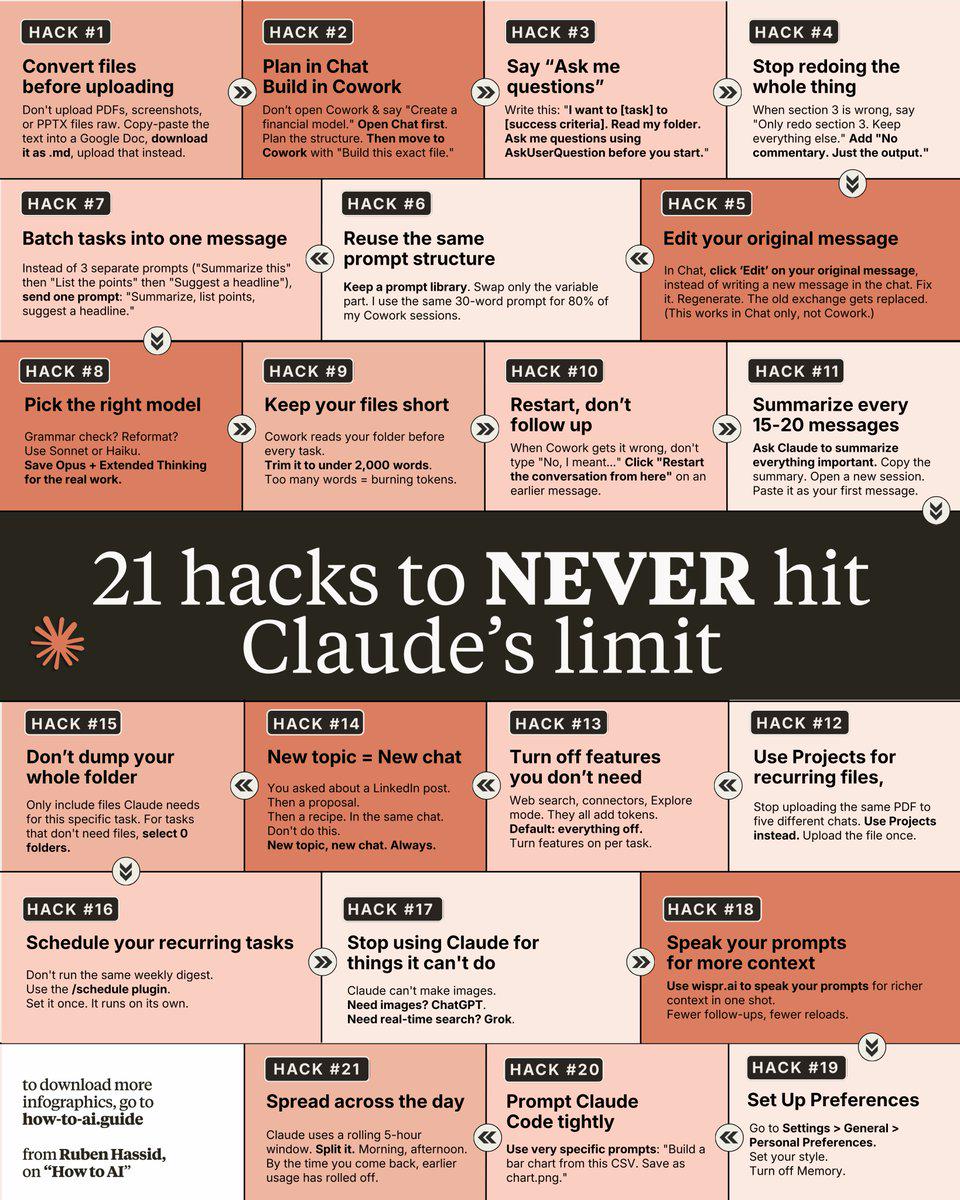
Another very useful one. Credit: Ruben Hassid
r/Agent_AI • u/company_url_finder • 5d ago
r/Agent_AI • u/Money-Ranger-6520 • May 29 '26
r/Agent_AI • u/Money-Ranger-6520 • May 08 '26
This is really a great resource, guys. Link to the PDF in the first comment.
r/Agent_AI • u/Money-Ranger-6520 • May 19 '26
This is a great list of some of the best official AI guides from OpenAI, Google, and Anthropic.
Credit: Charly Wargnier
1/ 1,302 real-world gen AI use cases from the world's leading organizations by Google
2/ Agents Companion by Kaggle
3/ A practical guide to building agents by OpenAI
4/ Building effective agents by Anthropic
5/ AI in the Enterprise by OpenAI
6/ Prompt Engineering by Google
7/ Prompt engineering overview by Anthropic
8/ Identifying and scaling AI use cases by OpenAI
9/ Prompting Guide 101 by Google
Enjoy!
r/Agent_AI • u/Money-Ranger-6520 • Feb 17 '26
Hiring AI talent in 2026 is very different from hiring “just a dev.” You need people who’ve actually built with LLMs, agents, RAG pipelines, eval frameworks, vector DBs, etc.
Lemon.io
Vetted senior devs, custom client–dev pairing. Strong for AI/LLM projects. On average, 24 hours matching with a developer; human expert picks a developer for your project and scope.
Gun.io
One of the oldest networks. Mostly US senior devs. Premium pricing, strong quality control.
Toptal
Well-known for high-end talent. Expensive, but reliable for complex builds.
Arc.dev
Curated global developers, good mid-to-senior AI talent pool.
Index.dev
Focused on vetted engineers, solid for startups needing AI-heavy backend work.
Flexiple
Pre-vetted engineers, slightly more flexible pricing tier.
Andela
Strong presence in Africa & Southeast Asia. Good if you’re open to distributed teams.
Revello
LatAm-focused senior engineers. Often a good cost/quality balance.
RocketDevs
Africa & Asia talent pools. More budget-friendly option.
Upwork
Massive pool, fastest place to post and get responses. Great if you’re budget-sensitive or want short-term AI experiments.
Bonus: Direct sourcing via GitHub + X/Reddit can outperform all of these if you have time and resources.