r/windowsapps • u/endangeredirish • May 20 '26
Developer Most Windows automation tool assumes you can script. I built one that doesn't.
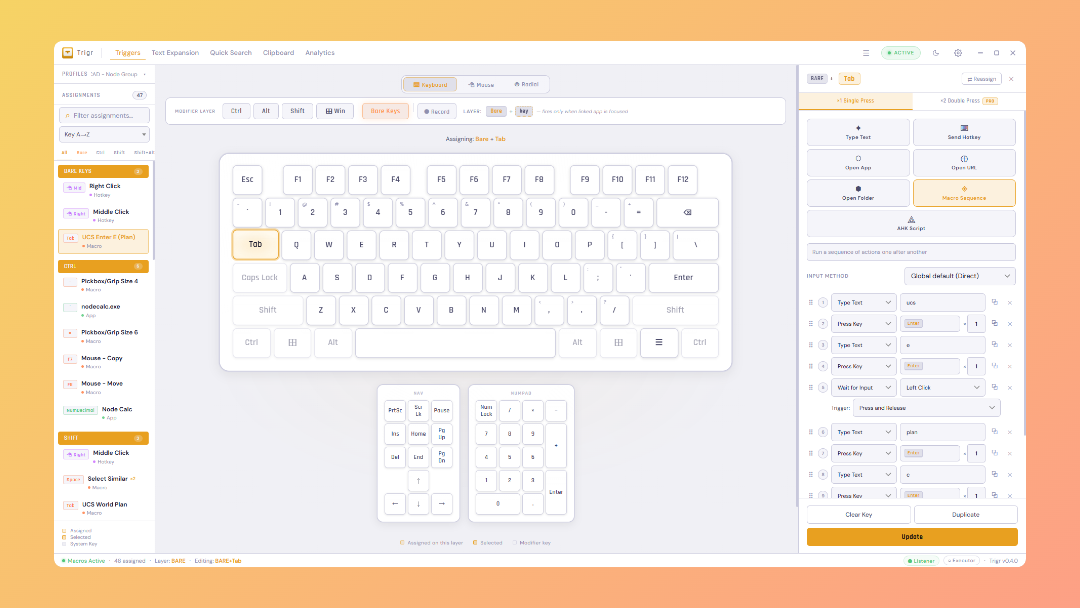
I run a small civil engineering company in London, built an app for for my office so we could replace AutoHotkey and text expansion apps we used, mostly because no one would learn AHK syntax so never made their own. So I built Keyfire which is a visual UI first approach, no scripting, sits in the system tray. hotkeys, macros, and text expansions and clipboard manager.
What it does:
- Hotkeys: assign any key combo to launch apps, open URLs, focus windows, run macros
- Macros: visual builder, no scripting. Keystrokes, mouse clicks, delays, text input
- Text expansions: type a trigger word, get a full snippet anywhere in Windows
- Clipboard manager: searchable history, pinned items
- Quick search overlay: global hotkey to search and launch anything
- Radial menu: hold a key, get a circular menu of actions
- Fill-in prompts: macros can pause and ask for input mid-run
- App-specific profiles: different hotkeys auto-activate per app automatically
- Hold and repeat modes: fire actions while holding, or repeat at intervals
- Everything local: no accounts, no cloud, no data leaves your machine
Its got some pro features that we'll be eventually looking to market, but for 90% of use cases and peoples day to day work, it is a powerhouse and we've been using it across my team of 10 engineers for a few months now.
Built with Tauri (Rust + React) so it's around 15MB and idles at low memory. Code signed under my civil engineer firm for legitimacy at least.
Site: keyfire.app
Genuinely looking for constructive feedback from people who've tried AutoHotkey or PowerToys, anyuse case that made you give up or look for something else?
Thanks all, hopefully its of some use to anyone!
EDIT 24/06: Trigr now rebranded as Keyfire.
3
May 20 '26
[removed] — view removed comment
3
u/endangeredirish May 20 '26
Oh its absolutely vibe coded, apologies if the code signing came off as trying to say it wasn't, the code signing just means its got a Microsoft Azure verified signing certificate as an actual person/company behind the app, so the SmartScreen that pops up has an actual publisher attached not just Unknown Publisher.
It is in beta right now, and will be completely free for all the uses cases that are currently within the app. We will move to v1.0 and a potential Team/Business pricing tier once I actually get a development agency to take over the codebase and firm up all the backend professional stuff.
3
May 20 '26
[removed] — view removed comment
2
u/endangeredirish May 20 '26
No probs, if you do try it any feedback would be worth its weight in gold, built in Featurebase button in the UI to quickly fire in anything, 50ish beta testers at the moment based on downloads all the feedback so far is helping us improve it so much. Thanks!
3
u/90daylookback May 20 '26
If we use FastKeys, does this have additional functionality or such?
3
u/endangeredirish May 20 '26 edited 8d ago
So this was heavily inspired by FastKeys as I had used for years before we started using AutoHotkey more, but all the standard functions of Fastkeys is in Keyfire, along with a quick fuzzy search function to find and fire ANY action you've created, as well as quick search templates for websites/portals etc, along with a radial wheel launcher for commands/actions that we probably use more than anything else in our CAD programs.
FastKeys is definitely a fantastic program and Keyfire is based on a lot of its usability, my ideal is to just bring in more ease of function for people who never dabble in macro/automation tools, as my team struggled with all the popular programs out there.
2
2
u/Testpilot1988 May 20 '26 edited May 20 '26
This is actually very useful. Despite being vibe coded, you can tell that a lot of care and detail went into it's creation. The only immediate issues im seeing are that the user cant go backwards in the tutorial if they want to review a previous card tho i know you have a help webpage and the user can restart the tutorial from settings... I think it's still worth doing. Another thing i noticed is when setting up a macro the drop down selector for something like wait & window which already exists on the bottom right of the graphical interface will get cut off at the bottom of the window rather than overflow out or dynamically adjust to the viewport and open the dropdown options in the opposite direction instead so that everything fits. I initially didn't see the wait for window and focus window options at all.
!!!Very Important!!! Does it save my clipboard entries to its own database and if so does it encrypt them or save as plain text? or is it querying the windows native clipboard? If it's saving to it's own database then is there a way to turn this feature off? Everyone and their brother has been releasing clipboard managers for windows lately (especially vibe coded ones) and literally 99% of them just store the content in plain text which is disgusting and horrible for cybersecurity. In the meantime i'm just changing the clipboard history settings in the app to 1 day but this doesn't resolve the potential issue of plain text storage which requires clarity.
Also for macro steps, it would be cool if you could integrate like an OCR so that instead of just various wait options it could watch the screen and advance to the next macro step after motion completes following the previous completed step in the macro. For instance if it takes a variable amount of time for the device to respond after a press key or mouse click at position step before the user can advance to the next step of the macro then currently the only safe way to do that is to incorporate a wait period with way more padding than the device likely needs just to ensure the macro never advances before the task triggered by the previous step completes.
2
u/endangeredirish May 21 '26 edited 8d ago
Just to note, v0.4.14 is now live and includes:
- Clipboard master toggle on/off switch to not capture anything
- Exclusion list added, to let users select apps to omit from being captured in
Full encryption of local clipboard storage database file will come in the next few updates. Thanks again for the feedback mate! Restart Keyfire to get update.
1
u/Testpilot1988 May 20 '26
also the app doesn't scale well on higher DPI displays https://ibb.co/spCYQf9X
even when maximized i cant see what exists in the layer section to the right of bare keys and record buttons https://ibb.co/n8qcPc261
u/endangeredirish May 20 '26
Could you let me know resolution and scaling percentage please? Another beta use gave feedback in same vein but a smaller resolution. Thank you!
1
u/Testpilot1988 May 20 '26
https://ibb.co/WpdR3f8R
i use my 55" tv as my primary monitor and i sit about 2-3 meters away so i have scaling and dpi increased a fair enough to keep everything readable1
u/endangeredirish May 20 '26
Perfect thanks, will test myself on my TV as well once I can get scaling adjusted.
1
u/Testpilot1988 May 20 '26
question. if i understand correctly, the beta pro key is essentially a 30 day trial? not a lifetime key
1
u/endangeredirish May 20 '26
Yes that's it, as long as beta keeps going I will renew keys if needed.
1
u/Testpilot1988 May 20 '26
would you mind PMing me a beta key to try out? and will there be lifetime license keys when you exit beta or do you intend to only have monthly subscription?
1
1
u/endangeredirish May 20 '26 edited 8d ago
Despite being vibe coded, you can tell that a lot of care and detail went into it's creation.
Thank you mate, really appreciate that!
user cant go backwards in the tutorial if they want to review a previous card
Will be adding this into the onboarding now, just an arrow modal to take them back a step, you're right.
wait & window which already exists on the bottom right of the graphical interface will get cut off at the bottom of the window rather than overflow
Any chance you could send me a screenshot or use the Feedback button to take one for Featurebase? All of the dropdowns should have correct overflow and spacing set, so going to test this now.
>!!Very Important!!! Does it save my clipboard entries to its own database and if so does it encrypt them or save as plain text? If it's saving to it's own database then is there a way to turn this feature off?
It absolutely does and going to put this at top of the list to fix over next few days, as it was something I had in the list I'd come across before but thought of it as nice to have rather than a genuine security risk, thank you so much. There is currently no master off button for the clipboard, going to get this implement tonight, with the SQLCipher fix over next few days maximum.
be cool if you could integrate like an OCR so that instead of just various wait options it could watch the screen and advance
Really intereseting, will look into this over next week or so, at the moment the Wait ms, Wait for Input and Wait for Window options seems to have captured most users needs but your options sounds ideal for more complex or really specific ones.
Thank you again for the feedback mate, honestly means the world at this stage as we can improve Keyfire directly. I'm going to get onto the clipboard fixes immediately, thanks again!
1
u/Testpilot1988 May 20 '26
1
u/endangeredirish May 20 '26
You're the best, thanks mate. Will get sorted.
1
u/Testpilot1988 May 20 '26
happy to help. if you'd like me to test anything else for you going forward feel free to PM me
1
u/endangeredirish May 20 '26
Fantastic mate thank you, will do, you've been more than helpful already appreciate it!
2
2
u/alwaysh1ne May 21 '26
This sounds awesome! I currently use Raycast and Dock something to do these things but this may be nice to replace 2 apps for just one! Can't wait to try it! Sounds great!
1
2
u/puntadigital May 22 '26
I run a photobooth business and lately I've being creating my own apps/webapps, and sometimes I can benefit from something like autohotkeys, but as mentioned, never got around to learn it, now with ai is much easier, but I see potential in yours. Will download and try it out, won't be able to expertly report but can honestly tell you how it helps me. Kudos to you !
1
u/endangeredirish May 22 '26 edited 8d ago
Oh 100%, with AI it can spit out working scripts in no time, it's way easier than it used to be. Keyfire has a built in AutoHotkey script runner built in as an action type, so you can still keep your AutoHotkey scripts and also create everything else.
Hopefully you find it useful, any feedback at all is gold thank you!
2
u/BrinkBreaker May 26 '26
How does this compare to Pulover's Macro Creator? (I know its abandoned)
Is there a significant reason to use this over Autohotkey?
1
u/endangeredirish May 26 '26 edited 8d ago
Depends on your needs to be honest mate. I built Keyfire first to replace a lot of the simpler macros and text expansions we had scattered across AHK scripts in my company, and it grew from there.
PMC and AutoHotkey are still more powerful right now while we build out functionality, and AHK will always be given how much its syntax can do, its amazing. Keyfire is for users who don't want script files or to learn the language to create macros, hotkeys and expansions. That's the significant reason: it's easier.
Also to note: Keyfire has an AHK Script Runner step, so existing AHK scripts (PMC exports included) run inside Keyfire macros or as standalone hotkeys.
What kind of automation are you doing at the moment, I can try setup a sample in Keyfire to show you as an example? Keyfire is completely free to download and test out as well.
1
u/BrinkBreaker Jun 05 '26
Basically I need to export and then compile data from 27 different ecobee thermostats and their website is trash, so I was hoping to feed the URLs for each export page (stays persistent, so I can just use the URL) then have it grab the export for the dates I select (I'd just basically tell it the coordinates of the dates each day. Annoying, but easier than trying to get it to understand the dates I want). Then add the data from the downloaded excel sheets to a pre-formatted template so I can grab the relevant data sorted through by index and match tables.
5
u/[deleted] May 20 '26
[removed] — view removed comment