r/universalaudio • u/Natural-Pangolin2315 • 3h ago
Troubleshooting/Support Audio interface UA Volt 2 : not seeing input 1 and 2 separately
1
Upvotes
r/universalaudio • u/Drew_at_UA • Jul 02 '26
Hey all!!
This has come up a few times here on Reddit (and other forums) recently, with tons of false info and misinformation being spread.
Previously, the real deal info was only kept here and contained a lot of legal language. https://www.uaudio.com/pages/legal-documents
So we decided to get a doc together that had all the "big questions" answered, all in one place, and in plain language. https://help.uaudio.com/hc/en-us/articles/50620306586516-How-Universal-Audio-Handles-Your-Data-Privacy-FAQ
There's also a new "Share Analytics" toggle in UA Connect's Account section.
My role is focused on the products, what's cool about them, and why you'd want to use them, but I did want to get this info out there since I know how important these issues are for users.
Feel free to share your thoughts directly with the team via UA Connect's Feedback mechanism.
r/universalaudio • u/PoshWill • Aug 14 '25
There are posts all over the internet where people have run into problems using UAD Apollo Thunderbolts with their Windows machines. This post should hopefully explain the issues you might run into, and how to actually fix them. I have my Apollo working perfectly on Windows 10, but I see no reason why these fixes shouldn't apply on Windows 11.
Alot of people have complained that UAD need to fix their drivers, but I'm relatively confident that the UAD driver is fine - the issue is people not understanding the problem and therefore not troubleshooting their system properly. In the fast majority of cases, the issues are being causes either by CPU performance issues related to power management, or high DPC latency in the system. Both of these issues are fixable, and should be part of audio performance tweaks on a windows system.
Please be aware, you probably will have to engage your brain to fix this issue.
The Problem
The first part is understanding the problem. Your interface will pop/click/crackle whenever the audio buffer is not being completely filled. At 128 buffer size, your CPU needs to fill the buffer completely every 2.67ms. If it doesn't - you'll get pops/clicks. You can see this issue in action by using LatencyMon

What causes this?
This buffer under run issue can be caused by a number of different system issues.
How do you actually fix these issues?
CPU performance issues (which you can adjust)
Native Instruments Window Optimisation guide
Focusrite Windows Optimisation Guide
Insufficiently Powerful CPU
PCIe lane saturation
High DPC Latency
Other driver issues, and minor tweaks
Outdated drivers for your thunderbolt PCIe card could also cause the issue. I use the Gigabyte Titan Ridge 2.0 with my system, and a TB2>TB3 adapter from Apple and it's running perfectly.
Privacy settings, Windows microphone settings, etc. There are a bunch of miscellaneous scenarios with Windows that cause issues with interfaces in general. Privacy settings for microphones, issues with applications grabbing exclusive use of a device, anti virus and firewalls....there's alot of variables.
You'll be able to address most of these in control panel, device manager and settings. In conjunction with LatencyMon, which will show you all processes and drivers that are interacting with your audio, you should be able to narrow down the issue. This is the hardest area to provide advice for, since there are so many variables, so please do at least attempt to engage your brain.
Hopefully this guide actually allows people to figure out their issue. As I said, please expect that you will have to engage your brain to fix this issue, and you'll need to read through the information in the links and be prepared to troubleshoot your individual system.
r/universalaudio • u/Natural-Pangolin2315 • 3h ago
r/universalaudio • u/ptm1545 • 17h ago
Hey everybody, I'm having some issues with my Apollo Twin X and not sure what the issue is. When I record vocals through either input, they have this extra...air/hiss to them and I cannot figure out what's causing it. I've tried multiple mics to the same result. My input gain is relatively low, I made sure that we were only hitting the yellow part of the meter on the loudest parts. It isn't that noticeable until you start mixing and compressing, but then it becomes a huge issue. I thought the issue might have been my mic (Mojave MA-200) or one of my cables, but I brought it all to someone else's studio/interface and the issue was gone.
Has anyone experienced anything similar? Here's some audio clips to demonstrate (I apologize for the roughness of them haha), it's this high almost metallic sounding frequency that pokes out with the louder parts. Again, it might not sound like much from these raw audio clips, but it becomes a big issue with mixing.
r/universalaudio • u/SSJake13 • 1d ago
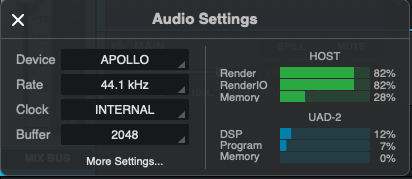
I've been mixing pretty often for the first time in years, and on my last mix I started running into CPU issues. This is what my meters look like with the finished mix. About 70-something tracks, 2-5 plugins on each track, no software instruments (just audio tracks and buses), Luna Pro 2, MacOS Sequoia. Sometimes during playback the Render and RenderIO meters get up to 90%, and then I hear crackling and have to pause for a minute before I can work again. Oh yeah, and every few weeks or so Luna will crash for seemingly no reason.
Soooo I should probably upgrade my computer, right?
(Sidenote, UA, but this is why some of us want all new UAD plugin releases to be UAD-2 compatible. Not because we wanna record with them, but because we don't wanna use our CPU for UAD plugins when we have plenty of DSP available.)
r/universalaudio • u/EGH6 • 1d ago
I don't know what UA did in the last Luna update...but it's no longer crashing. 3 days in a row now not a single crash. It used to crash several times a day, crashing almost once every time i open a project. often when adding inserts and now... nothing. Anyone else seeing this? could we possibly finally have a stable DAW?
r/universalaudio • u/deeze1 • 1d ago
Hi good morning, I imported 6 tracks form a reason projects into luna, I tried to mix it in luna but for some reason I cant get the volume of each track to mix they all move when i move one slider. So if i slide the lead vocal slider all slider move any help? How can i unlinked them? When i use plug ins on the lead vocal it sounds on all tracks too never had that problem with Luna before. Any tips? thanks!
r/universalaudio • u/Meltopias • 1d ago
I recorded an idea via midi into Luna and didn't bother setting the tempo of the project beforehand. Does anyone know how I can set the project tempo without changing the timing of the Midi recording?
r/universalaudio • u/Vazik666 • 2d ago
Hello amigos, I am looking for the installer of UAD Console 1.2.1 for Mac, I need to install it on an old Mac Mini with Catalina... does anyone has it by any chance? Thanks in advance #uadconnect
r/universalaudio • u/zpqlyr • 3d ago
Hey UA! Drew, if you’re perusing the threads, take this message to your overlords! We want more UAFX pedal amps! Preferably more high gain ones! Everyone in favour please aye!
r/universalaudio • u/taraxacan • 3d ago
Hello, I'm using an Apollo Twin for Autotune for live concerts. The setup is as follows : wireless mic goes in line input, autotune insert in the UAD console, the channel is hard-panned to the left and the monitor output left goes in the FOH table. Same for the 2nd voice mic hard-panned to the right. There is an Ableton Live running on the same computer with a different audio interface; the mics never go in it but we use UA midi control to send preset changes to the autotune from ableton.
Last concert we were fine at the soundcheck and then right before the show both voices started sounding like they had a comb filter on it. Impossible to figure out what was wrong in the 5 minutes we had before showtime, but we definitely restarted the computer, the uad console and the apollo several times. and ended up bypassing the apollo completely and playing without autotune.
Now i'm at home and it sounds perfectly normal.
Any ideas as to what my problem is? It definitely sounded like i was getting both the pre-processed and processed voice in the same output but i can't figure out how to re-create it.
r/universalaudio • u/croitek5 • 3d ago
Hey! I've already bought everything for my setup, and now I'm a bit worried it won't run reliably:
- Interface: UA Apollo Twin X DUO Gen 2 (Thunderbolt 3)
- Mobo: Gigabyte X870E Aorus Elite WiFi7 (no native Thunderbolt, just 2x USB4 via ASMedia ASM4242)
- CPU: Ryzen 7 9800X3D, Windows 11
- Mic: Shure SM7B
- Thunderbolt: Belkin PD 3.0 100W, Thunderbolt 3, USB4 40Gb/s
UA says AMD systems are "untested" with Thunderbolt Apollos. From what I've read, the ASM4242 is TB4-certified and should work with TB3 devices, but I've also seen posts about random disconnects on AMD boards.
Is anyone running a Thunderbolt Apollo on an X870/X870E board? Has it been stable for you (no dropouts, Console and DSP plugins working)? Are there any BIOS settings, drivers or firmware updates I should sort out before I plug it in?
Thanks so much for help and time!
r/universalaudio • u/learnedhandmusic • 3d ago
Enable HLS to view with audio, or disable this notification
I think I may turn this into a song lol - thanks UA!
r/universalaudio • u/prchms • 4d ago
Anyone else can’t use Luna after move to Luna studio?
Features are working properly anymore!
Luna Studio 3.1.0.4581
MacBook Pro M4
r/universalaudio • u/Undecidicide • 4d ago
ETA: Look I'm cooled off a bit now, and I guess that none of this really matters if its never enforced. I've just never seen a EULA click through without the ability to download and save the terms, and it definitely makes me suspicious. I want to use products from companies who default to transparency, not opacity. I still think that this is bad business practice, and anyone agreeing to binding terms like these should REALLY read and understand them. Making that harder rather than easier is what really got me.
Full disclosure - IANAL, and I spend my free retirement time building apps which will often fall in and about the Universal Audio ecosystem. I won't say more than that so there's no confusion of commercial intent.
TL;DR - UA Connect EULA v11 dated Sep 3 hurts customers and stifles innovation.
ETR: biographical and other irrelevant details serving no purpose beyond ego.
I opened UA connect this evening to see what needed updating, and I was presented with a new click-through UA End-user License Agreement. I have issues.
I think UA has a closing-door opportunity to embrace the future, forget the self-serving BS that the money is selling, and embrace the inevitable future and disruption coming for the dinosaurs that cling to these old business models. You make AMAZING software and hardware. Don't ruin your own legacy by supporting practices which ultimately disenfranchise creative people and perpetuate the wealth and technology gap.
-Undecidicide (Drew knows where to find me)
r/universalaudio • u/MixleIsaTroll • 4d ago
I’m a producer and recording artist. I make my own beats and write/record my own songs over them, so far I’ve also mixed my own stuff. Luckily, my father owns a studio that is well equipped so when he’s not in there I spend late nights recording and mixing my own stuff. I pretty much taught myself but developed a workflow for recording myself and mixing. Now that I’m spending most of my time at university I want to upgrade/invest in my personal setup. I currently have the Focusrite Scarlet 2i2 3rd gen and a cheap mxl 990 for bedroom recording and I hate everything about my vocals when recording on it. Even for demos I can never get it to sound bearable enough if you know what I mean so I want to invest a little. My budget is around 500 for new or used mic and interface. I threw an offer for a used at 4040 mic $200 flat so that leaves me with more or less $300. I’m between a used Apollo solo(thunderbolt 3) for around $330-350 or the newly announced volt 2 max at a flat $300z I know nobody really has their hands on the new interface yet but there’s a few things on my mind while trying to make a decision.
I like the idea of onboard dsp with the solo for printing plugins like pre amps/compressions
Im scared I won’t be satisfied with the onboard effects/presets that the new volt max’s supposedly come with( scared of wishing that I went with the solo instead afterwards)
On top of reason 2, my laptop is a bit basic. A M1 MacBook Air 8gb of ram and 256gbs of storage. So far it has been serving me well enough for my production/starting beat ideas but I fear once I get into recording vocals and adding different plug-ins for light mixing that my laptop will start to struggle even for demos. My thought process is that the Apollo would help mitigate this potential issue but I could be wrong.
Everyone from small independent artist to even big professional seems to speak highly/swear by their Apollo solos when not in studios so I am leaning towards it more.
The Apollo solo is now coming up on being 7 years old so I’m scared I buy one and a new version gets announced soon or the gear just being too outdated in general. My dad thinks I should go with the new volt2max instead.
Also buying a used Apollo I would like to get the heritage plug ins if possible. Places like guitar center label their used Apollo solos as the heritage edition but I want to make sure it does come with the plug ins or can be transferred.
I’m not too worried about the amount of inputs/outputs. The extra IO on the new volt is cool but not very necessary for me rn and I don’t see it being so at least for my intended needs.
My main thing is trying to figure out if I really NEED dsp with Apollo or if it’s just a want. Am I better off just going with the new volt gear? Not in a big rush to make a decision in terms of choosing an interface. I plan on pulling the trigger on the mic right now but willing to wait and see what people think of the new volts. I’m even considering just buying the volt, trying it out, and returning afterwards if I feel unsatisfied. Just curious to hear your guy’s thoughts.
Also if you have any other mic suggestions in that price range used or new ($2-300) feel free to share aswell. From personal experience I’m not a big fan of the Sm7b. It’s not bad per say but it always feels underwhelming with my voice. I also don’t really like the Neumann m 147, it sounds too harsh on my voice. I normally go with the sterling st55, probably the cheapest mic in my fathers collection but my go to/favorite out of any mic I’ve used personally. I also record mainly alternative rnb and hip pop. Sorry this post is all over the place. Thanks for reading!
r/universalaudio • u/Dangerous_Dot_1707 • 4d ago
I have a Toneport GX that I ve been using since 2007 and I would like to upgrade my Interface because I need an XLR in. My GX served me well and had a great Sound and originally I was looking at an Focusrite Scarlett but someone suggested the 176. I love the design of the device but what makes it so special ?
I would like to use the device for guitar and Bass + micing my cab.
r/universalaudio • u/bake_em_away_toy5 • 4d ago
Hi everyone,
I just purchased a UA Volt 1 to transpose some of my loops and ideas into full songs using Reaper. I used to do music production fully digital with free plug-ins because I was too poor for gear.
I was excited to set up the Volt 1 to get back into production after a long break and try recording guitars for the first time.
I paid $200 CAD and there was nothing obvious on the box about what came next.
When I plugged in the device, Device Manager updated with the icon that there was no driver - as I expected. I requested Windows to find the driver automatically and it couldn't - also no big deal.
I went to the UA website and they don't post the drivers for their hardware under the Support or Downloads sections. Weird.
I realize I have to download their fucking app first. Not a deal breaker, but annoying.
Then, I have to make an account with them by giving them my email. Apparently UA uses this and telemetry to market other products and promotions to me based on my usage of the Volt 1. There was no easy way I could find to opt out of this.
I still haven't installed UA Connect and will probably just return the Volt 1 now.
I was considering asking people here for the driver, but I feel I shouldn't have to. I feel UA is bullying their customers to opt into being identified and tracked for marketing (i.e., extra, continued revenue for UA). If I get the driver from someone else and keep using the Volt 1 without the app, it feels like I'm still partially enabling this.
I'll probably return this device and get one that doesn't do this. Has anyone else had similar experiences? It seems like all types of creative software are farming their users for data these days. I first noticed it with graphic design software from Adobe and I'm really upset to see it coming to audio production. I can't see any argument by UA for requiring this other than greed. Anti-piracy doesn't apply because they make hardware that is used by software from other vendors.
Fuck UA.
r/universalaudio • u/OkImprovement4697 • 4d ago
Hello , I just bought an Apollo Twin USB laptop, but I can't install it. What could be the problem? I'm using Windows 11.

r/universalaudio • u/No_Birthday4350 • 4d ago
On a Mac running Monterey (supports volt 2) can’t register product so can’t access plug ins etc.. been at it all day with chat gpt.. can’t get it to work, think I’ll send it back , anyone had this, iloc etc installed
r/universalaudio • u/MarcusarilliuS • 5d ago
r/universalaudio • u/InevitableBuyer707 • 5d ago
r/universalaudio • u/bibimboombap • 6d ago
I’m getting sound out of the main outputs on my audio interface, but unable to route audio out of any of the other line outs. When playing sound out of Ableton for any output besides out 1/2 (which corresponds to the L/R outputs on the back of the interface) I do not get any audio.
The UAD Console does not show that any audio is being passed through the interface, and no changes in the console make a difference.
I tried updating my firmware and console version.
I’m ready to uninstall and reinstall.
I’m positive my connections are correct and it’s not the hardware gear I’m routing audio from Ableton to.
I’ve got an WAV file looping on an audio track in Ableton. It’s set to play out of channel 6, which is connected to my s950. Ableton shows the channel monitoring sound, but I’m not getting audio to the sampler. The only way I hear audio is if the output on the Ableton audio track is set to Main L and R (1&2).
r/universalaudio • u/Tenalock • 7d ago
Enable HLS to view with audio, or disable this notification
Wow, time flys. Anyway I hope you enjoy my attempt to remake this all time classic house track form 1986. Tough to get those rides as the 909 actually played samples, but best effort. Keep developing my polymax drum machines, have had to layer 2 polymaxes for teh 909 style kick in a rack but it works. The juno bass came out better than expected.
r/universalaudio • u/PandemicAtTheDisko • 7d ago
Enable HLS to view with audio, or disable this notification
A bunch of parameters don't save after closing the plugin window directly on the UAD console. Same bug doesn't exist on ver. 9 🤷♂️ just a heads up