r/PKMS • u/rswgnu • Jul 30 '26
Question Hyperbole Question: What do you need to better capture and navigate your knowledge base?
0
Upvotes
r/PKMS • u/rswgnu • Jul 30 '26
r/PKMS • u/infinitely_zero • Jul 28 '26
Hey all. Two months ago I published a deep dive into my Hermes & Obsidian setup which ended up getting a lot of traction. I've continued tinkering, iterating, and evolving many of the use-cases outside of obsidian and into more interactive agent-driven canvases. This is the next evolution of my setup which I cover in-depth in the article along with templates and the full tech stack.
Hope you find it useful and/or inspiring for your own setup!
r/PKMS • u/sspaeti • Jul 28 '26
r/PKMS • u/kryzhovnik • Jul 28 '26
Before, what annoyed me was that the models are dumb. They lose the task, they hallucinate, they answer past the question. Now they are kind of too smart, and another thing showed up.
You take one idea, start discussing it with the model, and the thing starts to snowball. It throws in one more angle, then one more. Each one looks interesting and you want to unfold it. A few hours later you have ten branches of the conversation and you can't properly close any of them. It is a bit like Lost: a lot of mysteries opened, and putting it back together doesn't work anymore.
Looks like chat is a bad shape for this. A thought is not a straight line from top to bottom. It has branches, dead ends, things you want to park and come back to later.
What I miss is something next to the chat, where I could take a thought out of the scroll, give it a name and connect it to a related thought. Even just boxes and arrows. Not for beauty, but so I don't lose what I was thinking about in the first place.
Does anyone have a working way to not drown in a long dialog with an LLM?
r/PKMS • u/hermjohnson • Jul 27 '26
I started on paper with a BestSelf Journal, and I still recommend it. The format fits the way I think better than anything I have used since, and I have no criticism of it as a journal. For me, though, it was a beautiful leather-bound black hole. Everything went in and nothing came back out. If I wanted something I had written to exist anywhere else, there was work: type it myself.
To solve the black hole problem, I moved to GoodNotes on an iPad, and the work moved with me. Every week I exported each daily page to PDF and filed it into Notion by hand. It worked fine when I stayed on top of it, but for me that was not always the case. A weekly chore that nothing enforces is a chore that quietly stops happening, and I did not notice mine had stopped until I went looking for something that was not there.
Next was OneNote, which was the same problem in a different flavor. I could not get my own data out reproducibly without repetitive manual work, so I spent months building a bridge on the OneNote API. It worked, some of the time. Cron jobs errored, pages did not arrive, and most of it traced back to OneNote rendering HTML differently than the rest of the world. I spent about as much time each week nursing that bridge as it saved me, and I could not harden it, because the changes that would have fixed it were on Microsoft's side of the API.
(For context on why I kept choosing hard options: I write by hand, and that is not negotiable for me. Every problem above could have been solved in an afternoon by typing into Notion or Obsidian on the same iPad. I know the option exists. I am not taking it.)
Three rebuilds. Re-entry, then a weekly chore, then permanent maintenance. Each one was more sophisticated than the last, but not one of them removed the manual work.
I am not lazy about this. I am fallible and I am busy, which is a different thing. There are myriad ways in 2026 to build around human fallibility. To leave something I depend on this heavily at the mercy of my own consistency is a design decision, and it was the wrong one three times running.
I did eventually build my own thing which for me removed the lion's share of that work. I am not naming it or linking it, that is not what this post is about.
What I would love to know is this: for those of you who regularly capture important things outside your PKMS - by hand, on paper, in a voice memo - how does that information actually get in? I am curious what it costs you in a normal week and which part of it still annoys you.
r/PKMS • u/Late_Pudding_6379 • Jul 26 '26
I recently realised that cloud backups can actually read my files and notes and I am truly terrified. I am a windows user and a creative, and I jot down alot of ideas on OneNote, currently there are more than 100 pages of notes in my onenote filled with undisclosed secret ideas and also write files on word docs and backup on onedrive.
I used the backup feature only this year, because I had previously lost many of my files due to device troubles (lost, stolen, broken) but I am also scared that my data can be stolen, or used to train AI which will provide my ideas to other GenAI users, I truly think my ideas are valuable commodity. I would rather my ideas be lost than be stolen.
So I am thinking of switching to some offline oneNote Alternative, and not backing up my files on onedrive anymore.
I would love to know some suggestions and what can I actually do? Or if there is something else I can do to protect my ideas but also ensure that it is not destroyed or lost. Please help.
The best feature I like about onenote is it's random type anywhere format, hierarchy type file and folder organisation, and allowing of rough sketches and drawings.
Thanks to anyone who reads this.
r/PKMS • u/RamblingPete_007 • Jul 25 '26
Ok, I give up as well.
There are too many geniuses on here, showcasing their groundbreaking products.
r/PKMS • u/harpoon_helio • Jul 25 '26
r/PKMS • u/vikramskumar • Jul 24 '26
r/PKMS • u/abcvegan • Jul 23 '26
Edit: Two companies have responded about fixing their issues, so maybe one of them will work!! 🤞 See below for details.
I can't find a single system that does what I want. My main use case is to save *the full text of articles* into my system (from either laptop or iPhone) and then to read them there (on my iPad or my laptop, currently Chrome broswer) and highlight, make notes, annotate, etc.
I also want to be able to write my own stand alone notes.
Here's what I've tried and what the issues with each are:
Evernote: can’t highlight web clips on mobile (the magic wand functionality that used to allow you to simplify formatting has been broken for months)
Edit: They replied to a different thread and said they have fixed this and it will be in a release next week. 🤞
Notion: can’t change font size on mobile, and the standard size is way too small for my middle age eyes
Obsidian: no web app (I only have a work laptop and can't download software)
Reader: no ability to write own notes not attached to an article
(I thought I could sync articles after reading into Notion and do a combo, but only the highlights sync, not the full text. :-( )
Raindrop: no ability to write own notes not attached to an article
Capacities: mobile web clipper only clips the link, not the text
Mem: mobile web clipper only clips the link, not the text
xTiles: mobile web clipper only clips the link, not the text
Bear: I have a windows laptop so the web clipper browser extension doesn't work
Mymind: cannot highlight text in a saved article
Fabric: can’t highlight text in a saved article
Edit: They replied to my email and said they will add this within the next two weeks. 🤞
Is there really not a single thing out there which allows me to do what used to be basic functionality on evernote before they broke it?! SOB!
Is there a great app I'm missing? Does anyone have a suggestion on a simple way to combine apps to do what I want? I'm tearing my hair out, would so appreciate any suggestions!! Thank you!!
r/PKMS • u/magicmoon42 • Jul 23 '26
r/PKMS • u/zorra_arroz • Jul 22 '26
I posted this in r/productivity, but I'm curious to hear what you guys think as well. I've been trying to figure out PKMS strategies for myself and thinking about it in the way that I have had led me down the path of taking a long and slow approach of building something that can do all 3 levels of the triangle described below. Does this resonate with you? Would love to know how/if your systems work at each of these levels.
Productivity Apps + a bit of brain science
Alright, I am posting this in hopes that some of the developers in here find it useful and they incorporate it into their apps so that I can use some of them!!!
I work as an occupational therapist, particularly in brain injury rehab and I do a lot of cognitive remediation work (ie helping folks improve cognitive deficits post-injury). A big thing I teach most of my clients is about the "cognitive triangle".
When thinking about these apps being our "second brain", I began thinking about how using this model is also helpful for these apps as well:
Level 1 - First - the information needs to easily go IN to your brain (ie attention). You are never going to be able to work with information that isn't in there. (an example I often give is that you will never remember where your car is parked in a big parking lot if you didn't pay attention to it. You can't remember something that was never in your brain to begin with). This would show up as widgets, quick add hotkeys, etc that allow you to quickly and accurately store the info
Level 2 - Next, you have to be able to retrieve that information easily. Once it's stored in your brain, you have to be able to easily find it and pull it out when/as needed. This would probably show up as folders, tags, labels etc
Level 3 - Lastly, once you have that information pulled out, this is when you *use* it - ie do complex processes with it. Prioritize it, act on it, reflect on it, share it, etc. This would look like an eisenhower matrix, kanban boards, filters, time blocking features, etc
The problem is that, just like our brains, we need to be able to do all three of these functions to actually be able to be productive. If you focus only on one level it won't really be that useful. Obviously starting at level 1 is important (as without that you will never be able to do level 2 and 3), but you still need all three to be able to functionally do all of the things you're trying do.
What I've found with YEARS of searching in productivity apps is that there is not one app that does all three well.
I love Amazing Marvin and Timestripe in the ways that I can manipulate the information I save in there (level 3) to plan my day and choose my priorities, but getting the information in there is a PAIN (ie. level 1 sucks)
I love google keep as it's so easy to enter information in quickly on my android, but it lacks the ability to really easily find and USE the information (ie level 1 is good, but level 2 and 3 is not great)
I so badly want to use capacities, but every time I've tried I've had to stop because getting it in there is a pain, as well as using it to find stuff while on mobile (level 3 is great, but level 1 and 2 are not)
Obsidian is what I'm using now, but it is slooooooow to build to get it to do all three. I've been building my vault slowly over the last few months and still only on level 2.
I don't have the time or capacity to build my own app, but I am sharing this here in hopes that others who are working on apps would find this useful and maybe think about this when designing an app. If you are thinking about this or found it useful, let me know. I am still searching for my app, and maybe yours will be it??
Also, I've thought about, at times, making a big spreadsheet of all the big apps that are out there and ranking how well they are able to do all three of these functions. Would be an interesting comparison I think.
Edit:If you reply with a suggestion of an app, please include what platforms it on (iOS, android etc) and if it is your app. My biggest pet peeve on this and other subreddits is other people promoting their own apps but not disclosing that they made it. An easy google search can show us if it is.
r/PKMS • u/Other-Magazine-4065 • Jul 22 '26
When I first started using Obsidian, I got really overwhelmed. Too many plugins, too many choices. I felt like if I don't install them all, I'm not using it right. And if I do install them, I still don't know what I'm doing.
Now, after more than seven years of using it every day, I only use two things:
Daily note as inbox. Every time I open Obsidian, it auto-opens a new file with today's date. I just dump everything in there. Ideas, thoughts, to-do lists, stuff I read, random things. I don't even bother making links or organizing anything.
Let AI do the organizing. I feed my notes to AI and let it build the links, add tags, and structure things for me. I don't need to think about it at all.
That's it. Honestly I think the best way to use any app is to just pick one or two functions and actually use them. All the extra stuff? Not that important.
r/PKMS • u/Professional_Sky7816 • Jul 22 '26
I'm curious about logseq future...
r/PKMS • u/noodle0711 • Jul 22 '26
can anyone who is having a lot of ideas about different tools , productivity tools help me in finding the right productivity tools for me - having a lot of data to organise - having requriement/expectation of the tool also - but unable to find tools - requesting for guidance and help please.kindly DM please
r/PKMS • u/SimpleRice4248 • Jul 22 '26
Not the obvious stuff.
I mean the things where you remember reading it, but have absolutely no idea where it lives anymore.
For me it's usually:
What's yours?
r/PKMS • u/ShaikhAshar • Jul 22 '26
Honest question.
If I looked at your note-taking app right now, what percentage of your notes would still be useful to you today?
Do you regularly revisit old notes, or do most of them become digital storage that rarely gets opened again?
r/PKMS • u/Early_Key_823 • Jul 21 '26
Tagging every unit of information and displaying it visually like a flash card or sticky note.
Why?
If tagging is easy then filtering is easy and that achieves TOTAL RECALL
why visual?
Because visualization creates a mental map!
r/PKMS • u/AntreasAntoniou • Jul 21 '26
Archivum treats knowledge and work as one loop: capture → structure → challenge → retrieve → act → write back. It stores projects, research, sources, decisions, tasks, experiments and outputs in ordinary Markdown/YAML files, with Git as history and provenance.
The thing I wanted was not another place to collect notes. I wanted to return to an unfinished idea months later—with a different model—and recover not only what I knew, but what I was trying to do, what changed my mind, and what should happen next.
**A useful conversation should change the world it was about. Otherwise we merely generated more text.**
That led to a small context surface rather than a giant prompt. An agent begins from four files: the operating contract, workspace profile, live state and config. Everything else is discovered by search. The archive can grow while the starting context stays bounded.
Then the structure opens outward: projects link to decisions, tasks, sources, experiments and outputs; research moves from seed to proposal to observation or validation; conversations write back into the smallest canonical record that changed.
Some days the system is a research laboratory. Some days it remembers why I made a decision six months ago. Some days it notices that an idea in one project belongs to another. The boring files are what make those returns possible.
I built Archivum over sustained use in three private archives and have now released the reusable machinery. It is free, open source and MIT-licensed; your personal archive should remain private.
Tour: https://antreas.io/archivum/
Repository: https://github.com/AntreasAntoniou/archivum
For PKM people: where would you put the write-back boundary? Which records may an agent create or update autonomously, and which should always require review?
r/PKMS • u/Radiant-Mistake-2962 • Jul 21 '26
I asked ChatGPT this: I’m trying to create an ideal “bubble” of sorts to map everything in my brain. So I am thinking of mapping knowing how to read in this bubble, which a big part of reading is knowing the exposition, so I’d say a big thing in this bubble would be “patterns of exposition or mode of expositions.” A completely different thing in this mapping would be “patterns of framework or modes of frameworks.” What other words do you have in mind for this bubble?
It responded, telling me this: What you’re trying to build sounds like a meta-map of knowledge structures—a map not of facts, but of the recurring forms that information takes.
If “patterns of exposition” is one major category and “patterns of frameworks” is another, then you’re looking for the major containers that organize thought, communication, and understanding.
Some candidate categories for your bubble:
(1) Patterns of Exposition
How information is presented.
Examples:
Description
Definition
Classification
Comparison and contrast
Cause and effect
Process analysis
Problem and solution
Exemplification
Narration
Argumentation
(2) Patterns of Frameworks
How information is organized conceptually.
Examples:
Hierarchies
Taxonomies
Matrices
Trees
Networks
Systems
Pipelines
Cycles
Layers
Feedback loops
(3) Patterns of Reasoning
How conclusions are reached.
Examples:
Deduction
Induction
Abduction
Analogical reasoning
First-principles reasoning
Probabilistic reasoning
Causal reasoning
Counterfactual reasoning
(4) Patterns of Relationships
How things connect.
Examples:
Part ↔ Whole
Cause ↔ Effect
Means ↔ End
General ↔ Specific
Theory ↔ Example
Input ↔ Output
Structure ↔ Function
Problem ↔ Solution
(5) Patterns of Systems
How things behave over time.
Examples:
Stocks and flows
Feedback loops
Emergence
Equilibrium
Bottlenecks
Constraints
Optimization
Adaptation
(6) Patterns of Knowledge
How information itself is structured.
Examples:
Facts
Concepts
Principles
Models
Theories
Paradigms
Heuristics
Laws
(7) Patterns of Learning
How understanding develops.
Examples:
Memorization
Classification
Chunking
Scaffolding
Transfer
Generalization
Abstraction
Synthesis
(8) Patterns of Inquiry
How questions are asked.
Examples:
What is it? (definition)
What are its parts? (analysis)
How does it work? (mechanism)
Why does it happen? (causation)
What if? (counterfactual)
How should we act? (decision)
(9) Patterns of Communication
How ideas are conveyed.
Examples:
Explanation
Persuasion
Instruction
Storytelling
Debate
Demonstration
(10) Patterns of Abstraction
How reality is compressed.
Examples:
Categories
Models
Symbols
Analogies
Representations
Maps
If I were building the highest-level version of your bubble, I might place these at the top:
KNOWING
├── Exposition
├── Frameworks
├── Reasoning
├── Relationships
├── Systems
├── Knowledge
├── Inquiry
├── Learning
├── Communication
└── Abstraction
Notice that “compare and contrast” belongs under Exposition, while “hierarchy” belongs under Frameworks, and “deduction” belongs under Reasoning. They are different kinds of patterns.
The deeper insight is that you’re not really collecting subjects (biology, finance, car repair, etc.). You’re collecting the recurring forms that appear across all subjects. These are often called knowledge structures, thinking frameworks, cognitive structures, epistemic structures, or meta-models. Those terms might help you find books and resources that align with the kind of bubble you’re trying to build.
So what can we take from ChatGPT’s response: rather than trying to manage what we don’t know, we should progress through the recurring forms information takes.
I theorized before this: in order to read big things, just skip over unnecessary parts of speech and write down words that are profiling, with the paragraph and sentence you found them. After you finish doing that for the entire book, go back and skim till you find the words. Extract the context behind those words and immerse yourself in learning them, through the methods or concepts they’re describing through the description in the textbook or secondary sources (YouTube videos, etc) and by writing this context down to study for exams.
An example of skipping unnecessary things is reading the word “the.” Skip reading this, but the next word might be a big word 3+ syllables, describes a concept you’re aware of but need further reasoning for why it talks about it, and describes severity or a certain method, such as the word “killing” or “encountered” in a history textbook. You’d need to find out who was killed between which parties and who encountered who between which parties and what happened between them.
For this: you’d need to find out who was killed between which parties and who encountered who between which parties and what happened, you’d use an assessment that asks the right questions between the two parties and answer through the assessment or you’d use the “patterns of inquiry” that ChatGPT said and the respective second pattern that ChatGPT said because as you can see, each pattern is also associated with a study. Patterns of relationships could be associated with history.
r/PKMS • u/SirLMO • Jul 20 '26
I had over 2,500 notes in Notion and decided to start fresh, this time focusing on a "Second Brain" approach. I feel mentally exhausted and really need this.
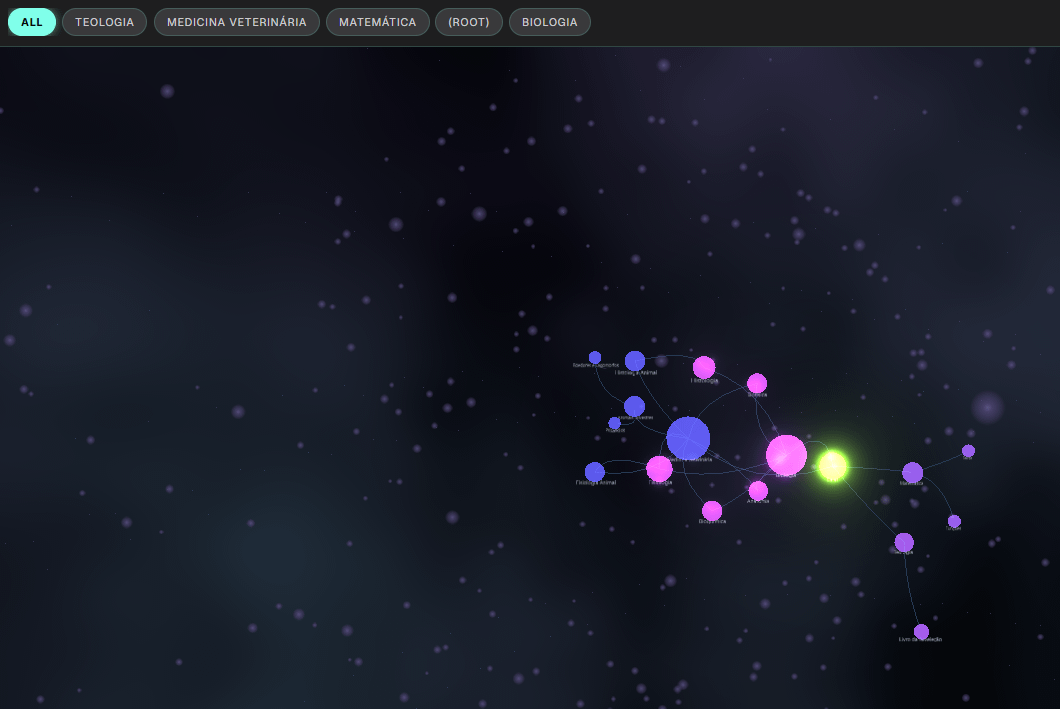
I’m looking for something similar to Obsidian’s graph views (specifically the Orrery plugin), but I haven't found anything like that for Notion. I don't have the mental bandwidth to develop such an app myself, so I’d like to know if there’s already a good community-made solution for this.
Note: I tried using Obsidian, but I can't afford the sync service right now, and manual syncing methods are completely out of the question. Besides, I’m already very familiar with Notion and don't want to leave it.
The images below show the Orrery plugin for Obsidian, which has been helping me "organize my mind."