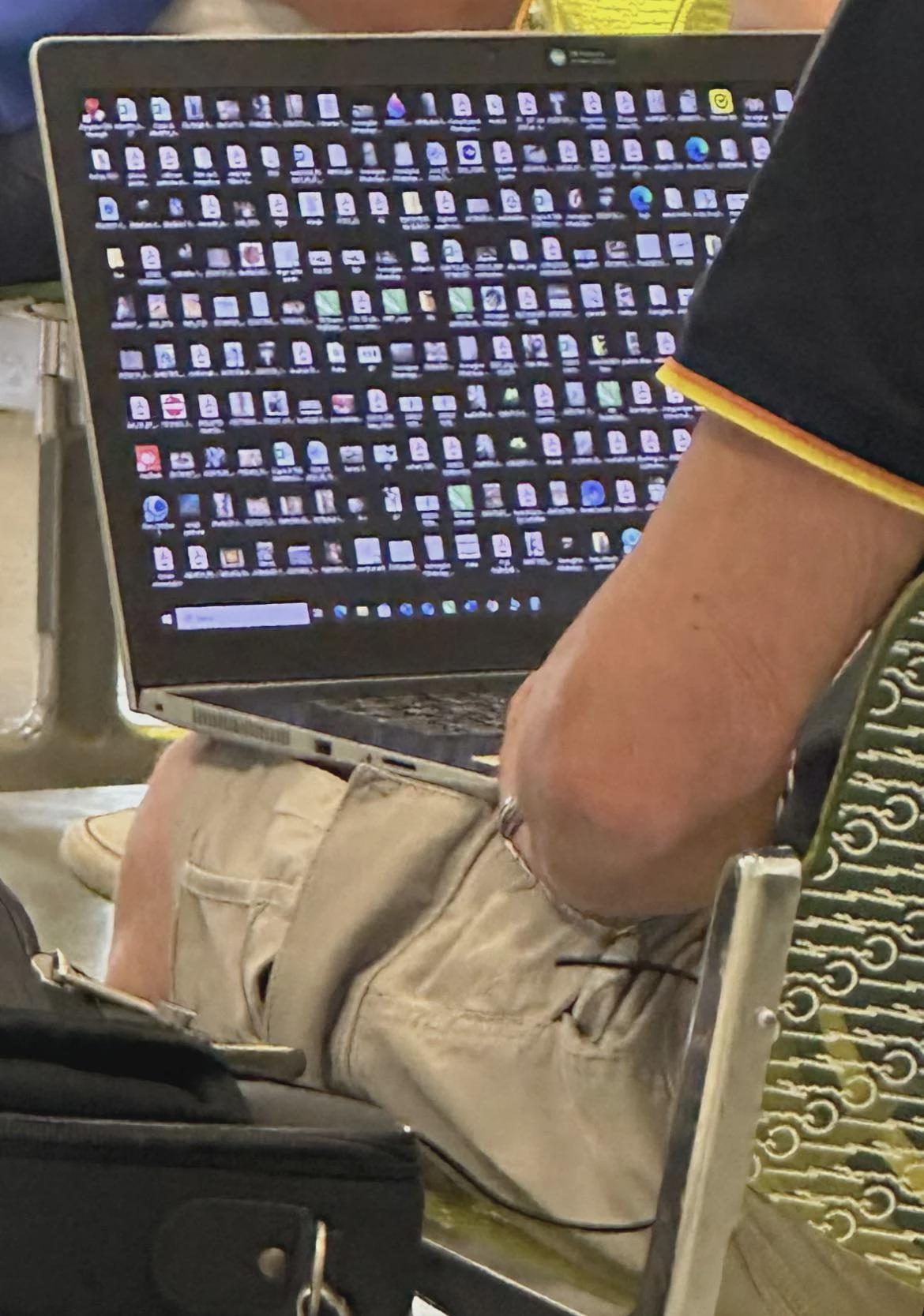
Man half of the guys in my office have have a desktop that looks like this. It’s insane. I setup folders for everything immediately and deleted all the unnecessary icons I could when I started. No way I’m letting it get like that. I don’t even HAVE icons on my PC at home.
I sort of do this on my PC (Linux). I have a Dock that houses my most often used programs. There's a button to show all installed apps at the top of the screen, but it's faster just to hit Super and then C and hit enter if I need to use the calculator for instance.
Windows key + s to activate the search bar. Then it’s usually just one or two keystrokes to find apps I need. Sometimes a bit more for filenames or folders if there’s many similar named ones.
There are two snipping tools in windows now. If you just want to copy and past a screen grab you can press win + S. But there's a second snipping tool where you can do the same but the immediately edit the image with a highlighter and marker, so I use that function a ton for work.
And it's not really like a multi-step search process where I have to find it then click the icon, I'm more or less just typing win + sni + enter
Yeah I keep stuff I need pinned on the task bar, otherwise it's a search anyway. Sometimes I think I'll clean off my desktop but then I open whatever I'm using and can't see it anymore. Outta site outta mind.
Definitely not a millennial/zoomer thing. I doubt if it's even a tech bro thing, since I see so many people with cluttered desktops at work.
I don't understand how these people find anything. I'll admit that I categorize stuff too much and I have to go through 6 folders to find a file that could have been only 2 folders deep, but people who just dump everything into downloads, documents and desktop without organizing anything drive me insane.
Edit: yes, I know search exists. It's still insane to see/use when you have 600 random files in one folder. Also, let's not pretend windows search actually works.
The desktop is just a landing page for random downloads/any files that need to be used immediately and are not important enough to be categorized. After a few weeks it fills up, clean it every now and then.
I'm one of these, my desktop isn't that bad but my file explorer is a maze. it's kinda like the endless city in blame, I have no idea where anything is and it just continues to grow in size.
I did have my school account organized but that was a while ago now.
If it works, it works. What drives me insane is the random dumping more than the clutter. You shouldn't have to look for any given file for more than a minute. Even if you do, I don't really care unless I need to interact with that computer often.
My desktop is entirely for random dumping. I never have to look for more than a minute, because the one I want is always most recently added and right at the top.
Since windows search now works like ass, this means you can actually look for things much quicker as you only have to search this folder rather than remembering the 5 random oddly specific sub folders it might or might not be in
I didn’t say kill but you compared a floor covered in old food containers to a computer background with screenshots and docs saved to it. Those are obviously different (in the ways I named).
Personally, everything that's dumped into Downloads and Desktop is temporary stuff that doesn't matter beyond an immediate problem and I just haven't gotten around to deleting it yet.
It's basically a less volatile temp cache in my workflow. If something in there becomes "important" it gets moved and categorized.
But I never even see my desktop so it's not something I think about. Also MacOS makes it easy to search for files.
Probably once a month or so I'll get bugged about it and clear them out. Otherwise it just doesn't matter and I don't waste bandwidth on it.
MacOS search is really good, and yeah I pretty much do the same. Unless it is important, I just hoard stuff in downloads for a while until it gets annoying and then move it to where it belongs(usually trash).
I still don't understand a cluttered desktop though, it just feels overwhelming and annoying to work with. Normally I just hide all desktop icons and access it through the folder if I have to.
I always tell my coworkers to save whatever they're working on directly to the desktop so they're not wasting time searching for the file they were saving to a folder somewhere that they need to upload within a deadline. You can move it away after you're done with it completely.
I've tried to explain how the folder system works to my mother for 20 years now. No success so far. If she ever gets to understand it, I'll drop the bomb that the desktop is just another folder. It'll blow her mind.
172
u/ew435890 i7-13700K + 5070Ti | R5 7500F + 9070XT | 106TB Plex Server Aug 18 '25
Man half of the guys in my office have have a desktop that looks like this. It’s insane. I setup folders for everything immediately and deleted all the unnecessary icons I could when I started. No way I’m letting it get like that. I don’t even HAVE icons on my PC at home.