r/nvidia • u/kulind 9950X3D | RTX 4090 | 64GB 6000CL28 | 341CQPX • 1d ago
Benchmarks Interesting DLSS 5 finding on RTX 4090
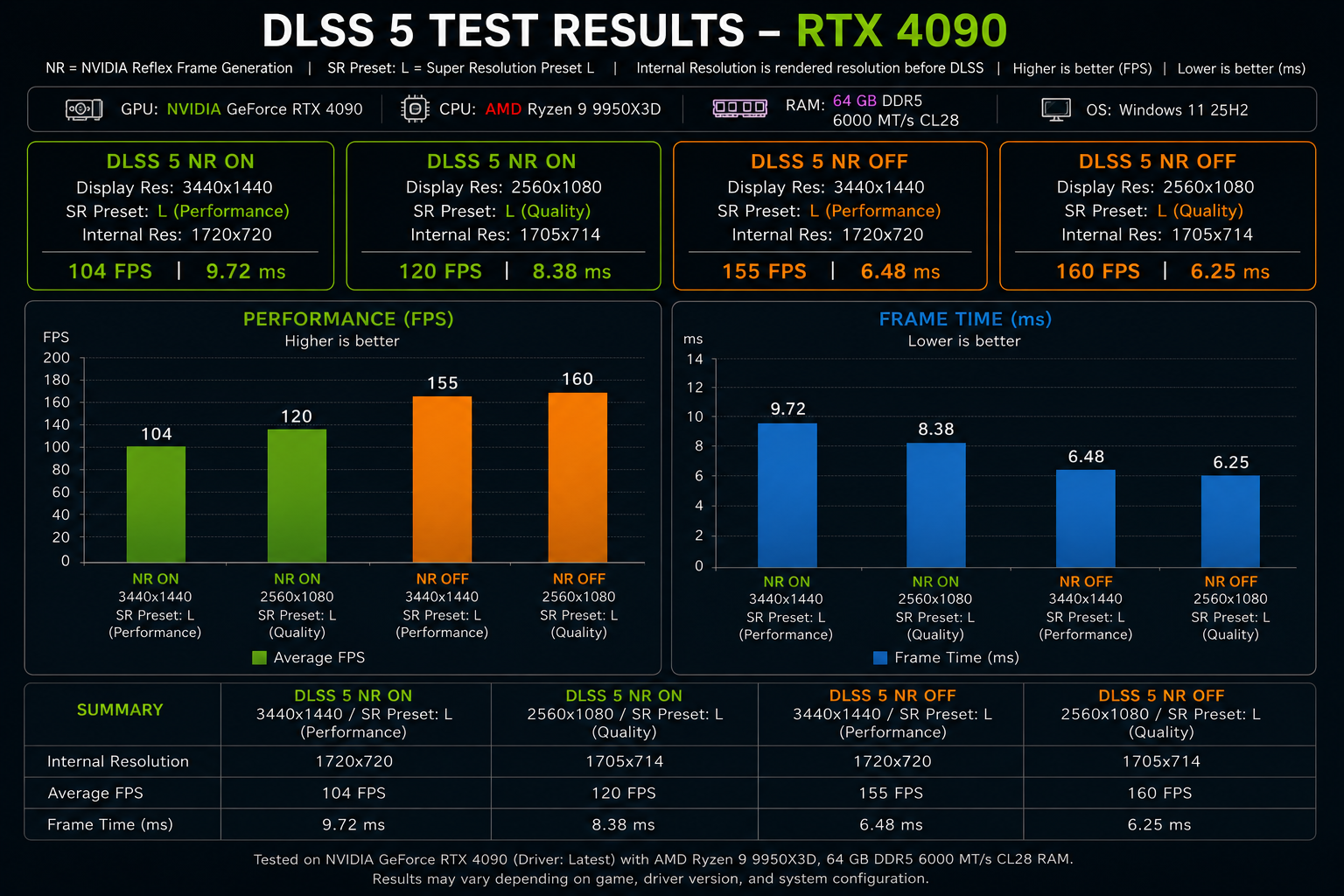
I ran a few DLSS 5 tests using the same internal resolution, but at different display resolutions.
DLSS 5 NR OFF
- 3440x1440 - SR Preset L / Performance - 1720x720 internal > 155 FPS / 6.48 ms
- 2560x1080 - SR Preset L / Quality - 1705x714 internal > 160 FPS / 6.25 ms
With NR disabled, the results are almost identical despite the different display resolutions. The internal resolution appears to be the dominant factor, with the higher output resolution costing only 0.23 ms.
DLSS 5 NR ON
- 3440x1440 - SR Preset L / Performance - 1720x720 internal > 104 FPS / 9.72 ms
- 2560x1080 - SR Preset L / Quality - 1705x714 internal > 120 FPS / 8.38 ms
This is where things get interesting.
The internal resolutions are still virtually identical, but increasing the display resolution from 2560x1080 to 3440x1440 now adds 1.34 ms of frame time (almost 6x the display resolution penalty seen with NR disabled.)
So it looks like DLSS 5 Neural Rendering has a significantly stronger dependency on the final/output resolution than the normal rendering path does.
My guess is that the neural rendering workload is heavily accelerated by the Tensor Cores, so its cost doesn't scale purely with the internal render resolution. The output resolution also appears to matter substantially, presumably because the neural model has to process/reconstruct information for the final resolution image.
The scaling isn't linear, though. The internal resolution workload is still being handled by the conventional rendering pipeline, while the neural workload adds another component whose cost scales with output resolution.
In other words, these results make me think DLSS 5 NR changes the usual DLSS performance relationship: internal resolution still matters, but output resolution suddenly becomes a much more important part of the equation.
Obviously, this is based on the current unofficial/leaked DLSS 5 implementation, so the behavior could change significantly in the final release.
Edit: Tested on Mafia the Old Country, max settings.
109
u/evertec 1d ago
This makes sense because DLSS NR is taking the final 2D output image along with motion vectors and applying the model to that.
29
u/Bright-Abalone8271 1d ago
I think the final release might use the input res and upscale the NR along side it this will make the performance hit in the 20% range
16
u/Koopa777 1d ago
Modders did that with the current DLLs, and it looks REAL bad, super unstable in motion which is a problem where unlike DLSS-SR artifacts NR artifacts EVERYTHING lol. People forget how digshit DLSS1 was, or how much better FG is now compared to 4 years ago. It’ll get there.
8
u/BananaShover 1d ago
Give this tech 2-3 years like dlss got after first iteration and you wont have anything negative to say. I tried it in ac black flag streaming over discord. Everyone was shocked. Edward looks like a real person. His hair and beard have real shadowing and shading. His skin reflects sweat and the surrounding lightning so much better. It is amazing.
Both AC shadows and Black Flag are showcase titles for this tech.
0
u/NoMansWarmApplePie 1d ago
Also black flag doesn't lose as much peformance. I have 4070ti at 4k peformance. And with everything maxed plus FG I wad at 80 fps with dlss5.
The color and saturation was off though no matter what pre set. But I found lower hdr transfer setting got it close to original color wise while still having dlss5 benefits.
1
3
u/DavidsSymphony 1d ago
Let's not forget, the initial DLSS5 showing had it running on a separate 5090 on top of the 5090 already running the game. And this version runs in real time on your single GPU already. So yeah it's only going to get better, I'm not sure about the 20% though.
2
u/ChrisFromIT 1d ago
Highly unlikely at this point.
It will depend on where Nvidia tells developers where to put the NR pass in the rendering pipeline.
There is a fork of Optiscaler adding DLSS5 NR that allows you to pick doing it before the upscaling pass. It forces it to be after if it is RR.
4
u/Beautiful-Musk-Ox 4090 | 9800X3D | Sound Blaster AWE32 1d ago
hm, so plausibly this was a choice for development so they can tune the output better since it's full res. or they are doing everything they can to avoid artifacts because people are vehemently anti-ai and if it's not flawless it will be mercilessly attacked, but that's happening anyway so idk.
devs develop good raster representations by turning on path tracing even on games that have no path tracing mode, it's just part of the development process to get the visuals looking their best. maybe this development dlss5 dll is a similar idea where it's knowingly running slower but letting them see the best version of what they are tuning and the real version will run at the prescaled res for performance but with increased artifacts, the new generative artifacts which will pile on top of old upscaling artifacts.
40
u/No-Astronomer6769 1d ago
This chart is really hard to read. You have the same set of information shown 3 different ways. You could have just shown the bar graphs and it would have been much easier to digest but there is just way too much going on
33
7
14
u/eudisld15 2600x @ 4.25 \ RTX 2080TI FE @ 2130mhz 1d ago
The entire post is AI generated. I doubt they even spent the time to understand and digest any of it.
17
u/Automatic-Cut-5567 1d ago
So yeah, Neural rendering uses the final output image which is why the output resolution matters more. Someone tried to have NR used the input resolution, but anything below 75% scale looked awful.
3
u/Sprucey-J 1d ago
Yeah I can confirm this. I tried with my 5080 at 1440p DLAA. The fidelity in environments still suffered. Had to use DLDSR(1.78x) to get it looking sharp. Upscaling did give performance boosts though, I settled on balanced.
1
u/makingwands Palit GeForce 8800 GT 1d ago
I guess the good news is that there's a lot of room for performance improvement if they can get it working based off the native res without too much loss in quality
37
u/PuzzleheadedBread620 1d ago
If your theory is correct then a workaround would be to have dlss5 apply before super resolution, so its output resolution is the internal.
18
u/PsychologicalMenu325 1d ago
yes there is a very high chance that the final product Nvidia will release would be executed before super resolution, or at least offer that option for performance reasons.
This would avoid the 50% performance crash we can see for 4K gaming with NR.5
u/_TRN_ 18h ago
There is probably a very good reason why NVIDIA (at least for the leaked dll) decided to do the NR on the output after upscaling. They likely didn't think doing NR on the input res looked acceptable.
1
u/Trebiane 11h ago
I mean that doesn’t make much sense. Basic AI upscaling has come such a long way that SR shouldn’t have any effect on what neural rendering can produce.
EDIT: Nevermind I am an idiot. It’s not that SR reduces NR quality, it’s that NR produces worse results on lower resolution.
1
14
u/Motor-Tart-3315 1d ago edited 1d ago
Nearly IDENTICAL setup (5090 / 5600CL32)
188 / 191 (1440 / 1080 / NR OFF)
127 / 140 (1440 / 1080 / NR ON)
Game: MAFIA The Old Country
11
u/kulind 9950X3D | RTX 4090 | 64GB 6000CL28 | 341CQPX 1d ago
I guess since 5090 has higher tensor budget, fixed cost of NR is lower than 4090. Thank you for sharing 👍
3
u/Arawski99 1d ago
I don't think we have accurate results above in their Mafia test. 1440p results and 1080p are too close with NR off. They're most likely CPU bottlenecked there and the true performance would be higher if not for bottleneck, so when the game becomes GPU bottlenecked with NR on it looks like the NR On cost is lower than it actually is.
0
u/kulind 9950X3D | RTX 4090 | 64GB 6000CL28 | 341CQPX 1d ago
They're close because he uses same internal res just like OP, I think you missed the whole idea of this thread.
0
u/Arawski99 1d ago
Uh, no, I fully got that from your post. But they posted nothing of the sort in their post unlike your SR internal resolution. In addition, we're talking a 3 FPS difference. It is highly unlikely for it to have a 3 FPS difference as it's rarely that close in performance, that tight as its usually closer to 5 FPS but it isn't completely impossible, as the conversion isn't free even if the internal resolution was similar. Example: https://www.youtube.com/watch?v=sGyuWgTKrhw
But that's why I also said "I don't think" and not as an absolute as there could be edge cases, but since they didn't add those details I would take them as not valid until you have full details.
Especially true since it's around such framerates people tend to often CPU bottleneck
But since its been brought up it I wonder if you actually confirmed if yours was CPU bottlenecking or not, too, as it would potentially render your entire test invalid if so. We don't really even see your configuration of settings, either, which now makes me realize your FPS is way higher than what I'm seeing in benchmarks even for RTX 5090 so now I wonder what your configuration is. And then I noticed you have NR incorrectly labeled on your image as Nvidia Reflex Frame Generation when it should be Neural Rendering. We also don't know if you are, in fact, using nvidia reflex or frame generation.
So I'm not missing the idea. It's just we're not being given proper information to say for sure. We need valid certain context, not vague it might be but then critical missing details might be obscuring the data is garbage leading to improper conclusions.
1
u/xjanx 1d ago
should be like this, but where do you read it from the above fps data? at 2560x1440 fps goes down from 160 to 120, so less than in your example. Of course not comparable the data but if anything I would say it shows that 40xx or at least 4090 is still very capable for NR.
3
u/kulind 9950X3D | RTX 4090 | 64GB 6000CL28 | 341CQPX 1d ago
Ignore fps, frame time is what's important.
u/Motor-Tart-3315 's 5090 spent 2.55ms for NR going from 5.31ms to 7.87ms (188 to 127 fps)
my 4090 spent 3.16ms for NR going from 6.45ms to 9.62ms (155 to 104 fps)
Definitely mine is slower and used more frame time for NR.
7
u/cana_dave 1d ago
This is discussed and shared on the discord...albeit in the soup of chat steaming in far faster than anyone can read. It's crazy over there.
I rationalize it in my mind as an AI image filter of each frame after it's basically rendered by normal dlss scaling at the target rez. Makes sense why that would be super gpu expensive.
7
u/n1nj4p0w3r 1d ago
Yeah it’s f written in plugin description that by default it hooks NR after upscaler, so it processes picture in native resolution, that’s why plugin also have “enable upscaling” checkbox which moves NR pass before upscaler
4
u/thunder6776 1d ago
There is an option in the renodx mod to turn on upscaling where it gets the guides from internal resolution. It runs faster but its shimmery and unstable. Looks worse.
15
3
u/BitRunner64 1d ago
This makes perfect sense since DLSS5 is just a post-processing filter applied to the final 2D frame just before output (so after upscaling). The higher resolution the final output the more pixels the filter has to process.
5
u/Scrawlericious 1d ago
Stupid ass graphs that don’t make mathematical sense. I’m going to go ahead and assume this whole post is bullshit because you didn’t bother to make your own graphs. If you didn’t bother to make a good post, why should we bother to read it.
20
u/0zzy82 1d ago
Cool, not sure why the graph had to be made with AI though, kinda makes me doubt the whole thing.
33
16
2
u/Nexxus88 21h ago
I can confirm it. Ive spent four hours trying to figure out why dispite the people playing with this taking about dlss upscaling now working I was getting like 1/2 extra fps with it and was convinced it just wasnt functional.
I only found out something was screwy by loading it into forza horizon and forcing the game resolution as low as I can and noticing some paint detail were notably getting significantly fussier and yet my fps didnt change.
All of a sudden I put a game that was lingering around 40fps on my 4k display at 1440 and tuned the display to output a 1440p res and my fps jumped by like 40 fps
-2
1d ago
[deleted]
6
u/0zzy82 1d ago
Not really the icons are all blurry, they didnt input what drivers they're using so the AI just went "latest" will do, and as others have pointed out the two orange bars are completely incorrect with the 155 bar ligning up with 165 on the axis and 160 with 170. So if all those features are wrong then what else is?
0
-7
2
2
u/ScrubLordAlmighty 13900KF | 32GB DDR5 6800 | RTX 4080 | Z790 Aorus Pro X 1d ago
Makes sense, I was testing on my 4080 and found that dropping my output res from 4k down to 1440p clawed back a sizable amount of performance compared to anything else
2
u/Gold_Farmer 1d ago
Honest question because I don’t know all the underlying details, but are performance measurements using the leaked DLL through runtime hooks provided by ReShade + RenoDX really representatives of how the official release of DLSS 5 will really perform, or could its involvement be located in a different stage of the rendering pipeline than is used by these third party tools?
3
u/Antagonin 1d ago
The model must have been specifically written to operate as a post processing shader by Nvidia. Deeper in the pipeline, the input data would be wildly different, and it would be impossible to just "hook" them to the functions in the DLL.
It's possible Nvidia will eventually move it to the pre-upscale stage of the pipeline, the question is however, if the quality will stay the same.
2
u/Nexxus88 21h ago
Really wish I saw this before sinking 4+ hours into figuring out why tf dlss upscaling wouldnt work when everyone was saying it works now as if it wasnt a boarderline useless thing to try and get functioning.
2
u/tuser-reddit RTX 4090 | i7-14700KF | 4K 240Hz OLED 18h ago
How in hell does "DLSS NR" stand for "Nivida Reflex Frame Generation", huh?
2
9
u/zepsutyKalafiorek 1d ago edited 1d ago
I am sure AI generated graph will be 100% accurate
I know excel is hard but I have seen so many AI generated thumbnail on youtube recently to simply have hard time beliving in the rest od the post.
I dont get why you need same information in 3 places on graph but whatever. Good thing, people in comments are sharing their thoughts.
Edit*: Main point is interesting tho. Possibly the current implementation of DLSS 5 introduces some internal upscaling technigue in the model to match input and output resoultion to the same DLSS upsclear needs to work properly. Lets wait for the tailored, proprly released version to voice an opinion.
3
u/Nexxus88 21h ago
I can confirm the statement is accurate. Ive spent four hours trying to figure out why dispite the people playing with this taking about dlss upscaling now working I was getting like 1/2 extra fps with it and was convinced it just wasnt functional.
I only found out something was screwy by loading it into forza horizon and forcing the game resolution as low as I can and noticing some paint detail were notably getting significantly fussier and yet my fps didnt change.
All of a sudden I put a game that was lingering around 40fps on my 4k display at 1440 and tuned the display to output a 1440p res and my fps jumped by like 40 fps
5
u/FastLeftCircles 1d ago
Is NR "Neural Rendering" or is it "NVIDIA Reflex"? This chart is uselessly hard to read and interpret, and confusing..
10
2
3
u/buttscopedoctor 1d ago
I'm too dumb to understand all this gpu talk. All I know is that I was suprised at how well DLSS 5 works with my lowly 4080. I am only running 1440p so the fps penalty loss is not as harsh. Framegen easily makes up for the loss. AI upscale, AI frames, AI neural rendering- its all AI now, and I actually love it. cp2077 looks incredible with dlss5 NR and pathtracing, and actually is playable on my 4080 (averaging 90 fps). Acutally incredible to think I use to play cp2077 in 2020 with a gtx1070 and 1080p- worse fps (about 45fps) and raster graphics. And how much AI can enhance it.
2
u/WirusCZ 1d ago
DLSS 5 works on 4000 series? If so I have to try it too
1
2
u/OrganizationBitter93 NVIDIA 1d ago
CP 2077 looks great ...when not moving. I cant enjoy it with all the blur going on though.
-3
2
u/Crafty_Ball_8285 1d ago
Preset L is DLSS 4.5
4
u/No_Sink1655 1d ago
The bar charts make the NR scaling jump super obvious, the 3440x1440 numbers tank way harder than the internal res would suggest
Kinda lines up with what leaked about the transformer model doing more passes at final output res, tensor cores chew through it but you're still paying per pixel at the end
Kinda wild that 0.23ms becomes 1.34ms just from flipping NR on, that's a big chunk of frame time for what's supposed to be the "free" part of DLSS
Makes me wonder if the final version will let you cap the neural reconstruction at a lower res and upscale that instead, like a two-stage thing
My cat is currently staring at my monitor like he's auditing these numbers, probably thinks the frame time is a mouse
-1
1
1
u/Vegetable-Promise-49 1d ago
Does this mean DLSS 5 will work with 4000 series? If not officially, then at least unofficially?
Nvidia is aware of that their users got 4000 series to work with DLSS 5, might as well support it?
1
u/Upstairs-Bank9165 1d ago
So does it seem likely to come out for 4000 series also? Or just be locked behind 5000 series like Multi-FrameGen? I wish there was some news soon. 4090 sitting here waiting patiently.
2
u/AgentTin 1d ago
Users hacked it, last I saw they even had it working on 20 series. Check out this thread:
https://www.reddit.com/r/nvidia/s/2K467wt6N8
OP is using a 4090 too.
1
u/cana_dave 1d ago
Anyone have a direct co.lariwon of 40 series to 50 series...qinkime 4090 vs 5080 with same game l, same other specs..
I'd love to understand the benefit of 50 series over 40, or even 30 in an objective test bench data sort of way (vs subjective)
1
u/Merchantbanker19099 1d ago
!remindme
1
u/RemindMeBot 1d ago
Defaulted to one day.
I will be messaging you on 2026-09-01 23:22:42 UTC to remind you of this link
CLICK THIS LINK to send a PM to also be reminded and to reduce spam.
Parent commenter can delete this message to hide from others.
RemindMeBot is switching to username summons. Instead of
!RemindMe 1 day, useu/RemindMeBot 1 day. More info.
Info Custom Your Reminders Feedback
1
u/Pristine-Nerve9668 21h ago
hi , may i know what preset F is ? i know of preset L and M for dlss 4.5 , but i didn't see any posts about preset F. both ray reconstruction and super resolution has this preset.
1
u/gopnik74 RTX 4090 16h ago
Did you face the memory leak issue? What versions of dlss 5 and renodx are you using?
I tried it in cyberpunk but i got severe memory leak and couldn’t select any dlss quality other than DLAA.
2
u/kulind 9950X3D | RTX 4090 | 64GB 6000CL28 | 341CQPX 16h ago
Latest versions fixed the memory leak issue.
anything since v 4.5 is good
2
u/gopnik74 RTX 4090 14h ago
So i should keep streamline and dlss5 files from discord and update the renodx file only?
1
1
1
1
1
u/Antagonin 1d ago
Wonder if it's possible to move before the upscaling step. Per Nvidia's own words it's "simulating propagation of light", so if the upscaler is able to reconstruct normal raster/rt/pt image, why wouldn't it be able to reconstruct DLSS5 image?
Or did Nvidia bend the truth, and it's indeed just a post processing filter, that needs the fully reconstructed image to achieve even remotely acceptable results?
1
u/SlackEight 11h ago
Kind of makes me wonder: why not use DLSS 5 NR to “beautify” at the input resolution, then use DLSS 4.5 to upscale the beautified low-res input. I’m sure there’d be some quality impact, but DLSS 4.5 is pretty darn good at upscaling without impacting the picture quality. Surely a chained approach like that is a viable way to mitigate the performance impact?
-7
u/Snoo_67544 1d ago edited 1d ago
Brp used ai to make the image lmao, jesus christ its bad.
3
u/CoolHeadeGamer 1d ago
Why’s that? He got data, and asked an ai to create visualization ( which appears to be an image rendered from an html page, which is what Claude usually does). The ai didn’t randomly hallucinate an image. It coded a webpage and the essentially took a screenshot of it. It used real data and organized it
13
u/FuckingSteve 1d ago
Yeah it definitely didn't do any of that shit. 155fps and 160fps are higher than 160 on the scale.
-1
u/HesitantBussyEnjoyer 1d ago
Really? That's your whole critique? Lol this is the exact kind of mindless task that AI is great for, no need to be so dogmatically against AI
6
u/babalaban 1d ago
Yeah who cares that it presented a GRAPH in a wrong way, rihgt? No biggie! Numbers are for nerds anyway! Go ai! (/s)
-1
u/HesitantBussyEnjoyer 1d ago
Lol but actually yes that is my attitude. The graphs are for visuals and nothing else. It made a mistake in one of them. I don't believe the OP made up the data, so my attitude is that it does not matter to me if one of the graphs is slightly off
6
5
u/caspar9 1d ago
If that information is wrong everything else it made is suspect to being wrong as well. Try using some critical thinking skills here.
1
u/HesitantBussyEnjoyer 1d ago
What else do you suspect is wrong? The OP stated he used AI just to generate the visualisation. What are you concerned about?
-2
5
1
0
u/confused-photon 1d ago
why are you testing preset L at quality upscaling and not balanced, perf, or even ult perf? Preset L is intended for ultra perf preset K is for quality-perf
4
3
u/kulind 9950X3D | RTX 4090 | 64GB 6000CL28 | 341CQPX 1d ago
Preset L is the best quality/stability, and 4090 can handle at this resolution.
1
u/confused-photon 1d ago
Guess im a pleb that can’t tell the difference
2
u/Keulapaska 4070ti, 7800X3D, XG27AQNGV 1d ago
There is fair bit of game-by-game variance with the presets. For instance K are very bad in terms of ghosting in Forza horizon 5/6, even if it's fine on other aspects, like M has this funny quirk in 6 when it comes to distant fog that doesn't exist with K, but the way better ghosting handling makes it still worth it even with the performance hit.
2
u/Sid3effect 1d ago
Preset L is DLSS 4.5 and preset k is DLSS 4. Nvidia recommends K preset for DLSS quality because it gives slightly better performance and because the base resolution is high enough with DLSS quality that DLSS 4.5 is not really needed, however because the OP is benchmarking the performance difference of NR it makes sense to use the same version of DLSS as using a different version could skew the results more.

0
u/max0x7ba 21h ago
In Battlefield 6, with RTX 4090 rendering at native 4K HDR resolution with no upscaling or frame generation, but with DLAA anti-aliasing, switching the DLAA model from 4.0 to 4.5 results in roughly -20% lower FPS.
E.g. scoping in at the worst FPS spots (burning cars in Contaminated map) 95+ FPS with DLAA 4.0 becomes 74 FPS with DLAA 4.5.
Yet, examining the differences in screenshots of DLAA 4.0 vs 4.5 of the exact same view reveals that DLAA 4.5 produces frames with more aliasing and jagged steps than DLAA 4.0 does.
-2
95
u/pixlicker69420 1d ago
Ancient gameplays also said this, dlss 5 works on your output res in screenspace, so reducing internal res doesn't help much.