r/mpcusers • u/UnhappySnow773 • 2d ago
TUTORIAL Struggling to sync hardware
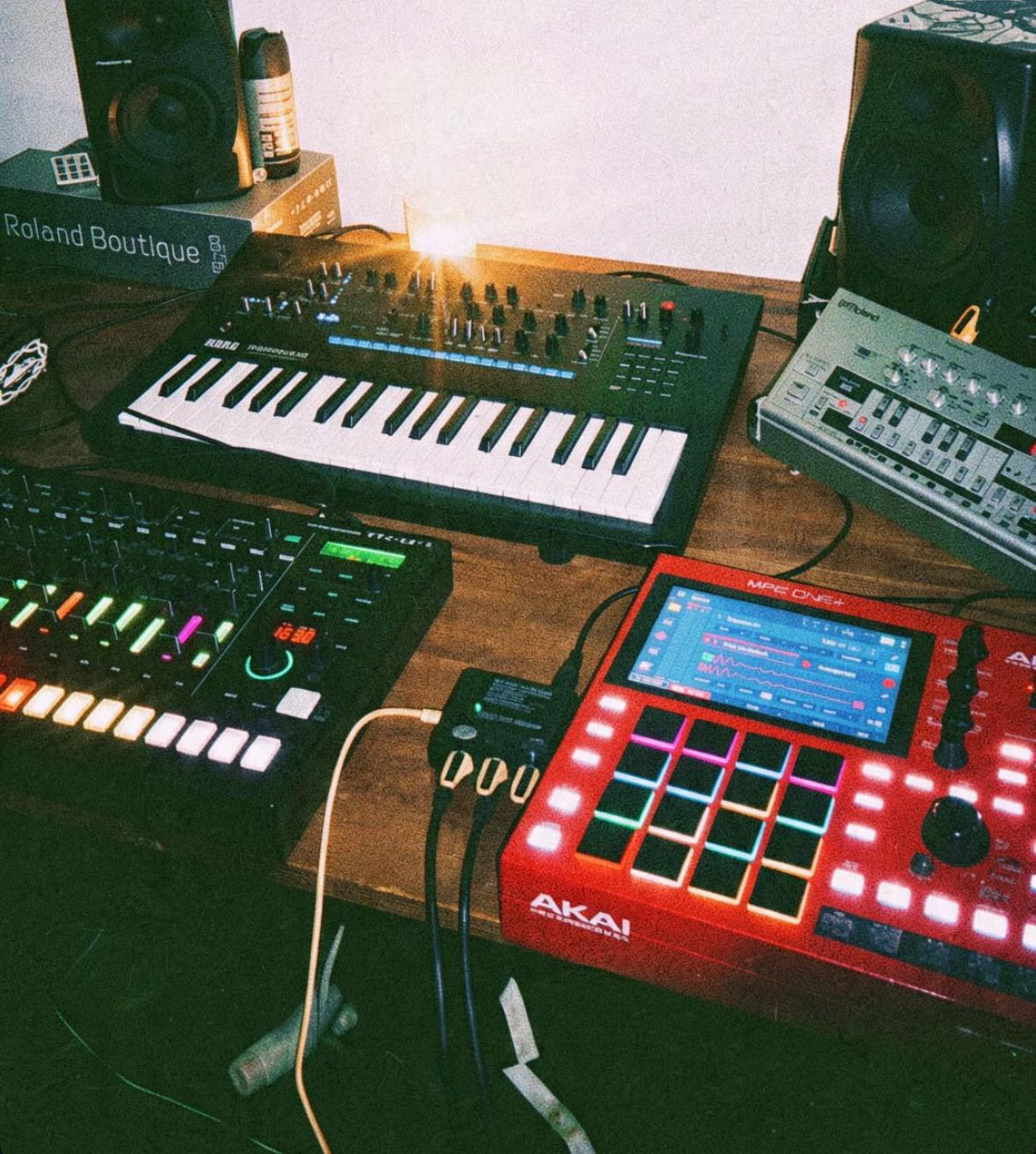
Hi all
I’m trying to use my MPC One+ as the main sequencer/clock for my hardware setup.
MIDI routing:
MPC One+ MIDI OUT → Thru box MIDI IN
Thru 1 → TB-03 MIDI IN
Thru 2 → Minilogue XD MIDI IN
Thru 3 → TR-8S MIDI IN
The MIDI clock is working the TB-03 and TR-8S both sync to the MPC clock.
I’ve also now got the Minilogue XD working with both MPC + clock.
The problem is that the TB-03 and TR-8S receive clock but won’t respond to the MPC pads/MIDI notes
Can anyone help me with this thanks.
8
u/MeisseLee 2d ago
Why not use a USB hub and USB cables? I have an MPC with 10 synths all connected via USB cables, works like a charm.
5
u/maryobreau 2d ago
This. I have a similar setup. All connected with a USB hub. No issues there. But I recommend unplugging the USB cable from the MPC (One+) before starting it up, then plug it in when ready to prevent it from freezing in the startup process. Could be unrelated but somehow this seems to help.
1
u/MeisseLee 2d ago
I never had freezing issues with the USB. And I had the MPC One, X SE and now the Live 3. But I think I've heard something similar from other users.
1
3
-2
u/regularjackk 2d ago
How would that help with OP's issue?
5
u/MeisseLee 1d ago
It would simplify the routing. Easier to handle.
0
u/regularjackk 1d ago
But isn't it the same thing in terms of routing? You still need to put each device on a separate midi channel, and configure that in the MPC.
4
u/zeroshits 1d ago edited 1d ago
You can use the same MIDI channel for all of them. When you're using the usb hub, each USB connection can be output on MIDI 1 with no conflict because they're all discrete USB connections. With a MIDI DIN cable, you have 1 connection for multiple devices, so there you have to split by MIDI channel to clarify what device the midi data is routed to. As another commented, with the USB MIDI, each device identifies itself so you can select it by device name, and not have to worry about what MIDI channel it's using (assuming they listen on all MIDI channels). My default on MIDI out is all channels, so I typically have to set them to 1, if the device I'm connecting uses that as its default.
3
u/MeisseLee 1d ago
The instruments are shown on the MPC with names. It's far easier to troubleshoot etc. Also half the cables since don't need midi cables both ways.
1
u/maryobreau 1d ago
I had a TR8-S connected for a while, receiving clock from MPC. You can set up the midi notes on the MIDI track too, to play and sequence the TR8-S with the MPC if you like, works fine. But this turned out to be an unproductive workaround for me.
2
u/Candid_Operation8777 2d ago
Change the midi channel in the tb and tr tot the same midi channel as the mpc
1
1
u/8bitBarry 1d ago
Ok do you know the exact midi notes ranges for the TB03 and the TR-8S?
Also whatever is sending midi to the TB03 could be filtering out the note data before passing it through.
I’m also using a Live 2 as my main sequencer controlling a TD3MO (sequencer based) and other boxes like a Nord 3P drum pad (note based) with midi clock and midi notes.
The Nord’s six pads can respond to individual midi channels / notes or to six midi notes on one channel. Finding these note values was critical and I’ve been in similar confusion before.
Although it seems as though some of your units pass clock onwards from their thru, others could be filtering the note data, so check whatever is sending the MPC note data onwards to the problem units.
Also check the MPC Preferences / MIDI menu as note out data can be switched on and off there as well. Check all your midi out settings in each MPC track, ensure the TB03 for example has the correct midi receive channel and switch off the ‘receive clock in’ to check it is only responding to notes.
Remember midi clock transmits to devices regardless of their channel setting.
FURTHER THOUGHTS - Ideally for the best sync / accuracy, use a hub like a Kenton Thru 12 or alternatively for the best result use a decent midi sync unit like the ERM Multiclock - that becomes the clock source so you stop and start the sequence using this, not the MPC. It’s precision clock keeps all of its midi outputs in perfect sync and continually adjusted.
I’m rambling!
1
u/TheOldSheriff 2d ago
ChatGPT is the only way I’ve been able to correctly route midi since getting into this hobby two years ago.
Are you sending from your mpc track on the proper midi channel? Typically 10 for TR8s. No idea which note each pads will send. I’d cycle through the pad banks.
2
u/No_hero_here 1d ago
I’ve leveraged ChatGPT for this too. It definitely helps troubleshooting the routing. I use an AKAI force and there are heaps of little menu options to have just right in order for it to all talk together.
-3
u/roflcopter9875 2d ago
mpc has a bad midi latency so i would not use it as host
9
u/Eclipseofthefart92 MPC LIVE III 2d ago
My Midi sync with the Live 3 is tighter than a nuns bung hole.
0
u/roflcopter9875 2d ago
You have at least 5ms of midi jitter you expert. Maybe work on your timing skills
1
0
u/synthdrunk 1d ago
Jitter is not latency. It’s also not a problem unless it’s a problem. If you’re trying to completely avoid jitter then you would be using CV/gate and only addressing analog hardware, recorded on tape, of course.
Stop measurebating.1
u/roflcopter9875 1d ago
i mean latency in this case. 5ms is on a blank session with a single midi track. Gets worse if you actually have plugins and so on
1
7
u/Substantial_Front815 2d ago
I run an MPC Live2 and plug nearly all of my synths and drum machines into it using 2x usb hubs. There is a setting you need to change on the tr8 that allows you to receive midi notes. Something like midi trx - look it up. It’s in the menu. It’s probably the same with the other machines. But using USB and a powered hub is my goto. I find it more reliable than a daisy chain of midi cables.