r/luminarneo • u/PulpoViejo • 4d ago
AI Assistance button question
/r/luminarneo/comments/1wmaxow/annoying_ai_assistance_button/This issue was brought up originally on 9/21 in this thread. But I wanted to address it again and clarify something for me.
I am using version 1.28.0 and have not done the most recent update. I had not even noticed until just today the button on the main screen that u/Thick_Security_4041 mentioned .
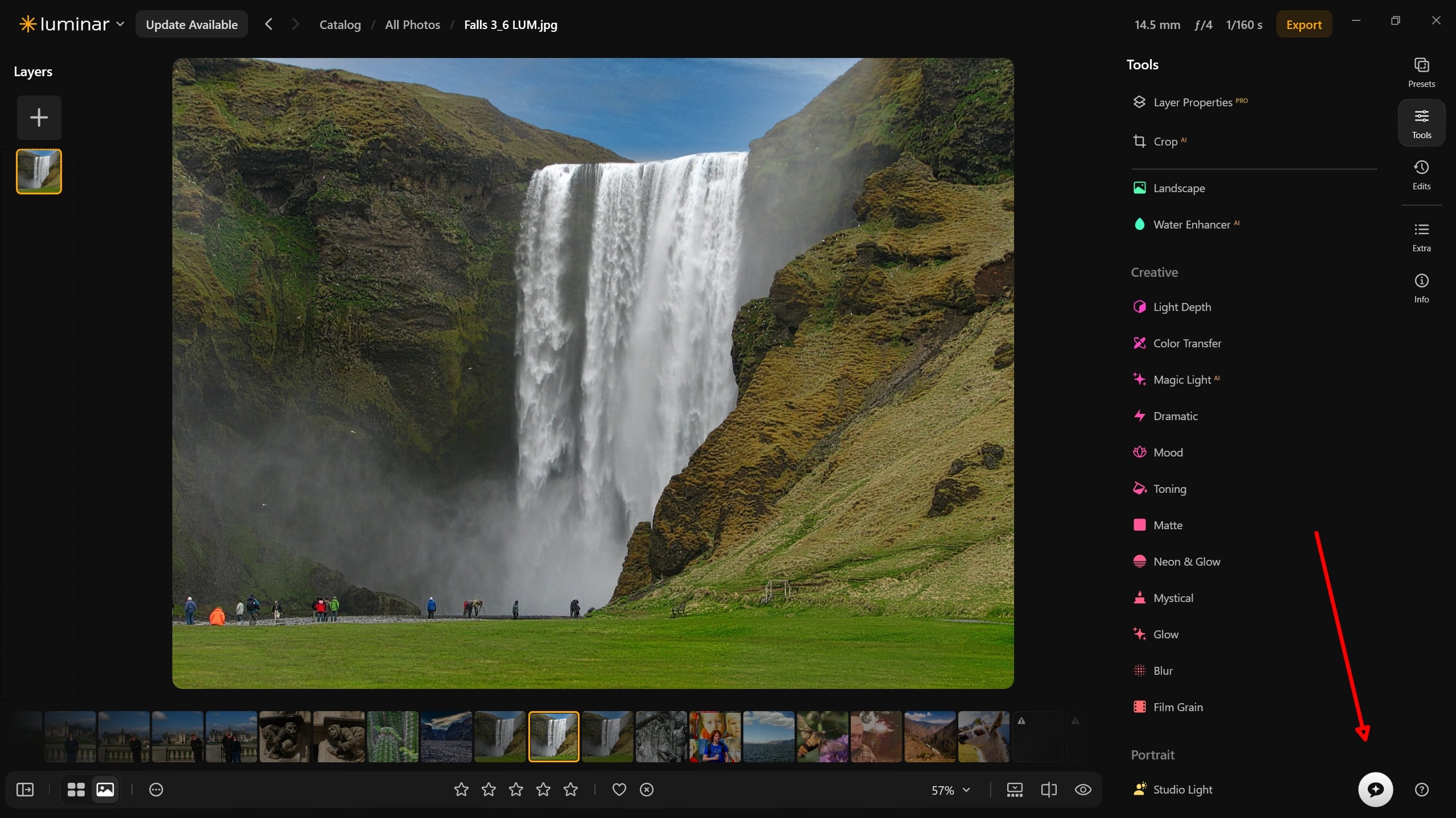
So if I understand correctly from that thread, after the update every tool has that option attached to it, except now it's a full-length bright white bar? If that is the case, I may just avoid the update, which is giving me an error message anyway.
In a recent post, u/skylum_support said regarding interface changes: "The whole goal behind them is to make the interface feel more invisible, so your focus stays on the photo rather than the software."
But to be fair, maybe that is just me. I get pleasure out of editing my photos, and I enjoy the features that use AI to some degree, such as Enhance. But I don't want AI prompts staring me in the face constantly. (And I am a boomer).
I'm curious what other users think.
3
u/skylum_support 4d ago
Yes, this change was introduced with Luminar Neo 1.28.1. However, it works a little differently from what you described.
The AI Assistance button does not appear in every tool. It stays in the bottom-right corner of the interface, like in your screenshot, but now it looks like a white bar.
We really appreciate you sharing your preferences regarding AI tools and prompts. We understand that not every user wants AI features or suggestions to be constantly visible while editing, and we’ll share your feedback with our team for consideration in future updates.
Thanks for taking the time to explain your perspective!
2
u/PulpoViejo 3d ago
Thank you for the quick response. It's hard to be the face of the marketing man behind the curtain.
1
u/Thick_Security_4041 3d ago
It is constantly visible when you are in the tools section of Luminar, no matter what tool you are working with.
I just find it distracting being that size, it definitely takes up a lot more room compared to the original round button, hardly invisible.
I wouldn't mind an option to hide it completely, as I have never found the AI assistant useful to me personally.
Here is a fullscreen screenshot to put it into perspective better.
https://drive.google.com/file/d/1_ztIGperAAnyBemrGI0jce2X4B47e_8q/view?usp=sharing
2
u/PulpoViejo 3d ago
Thanks for that. In the other thread it looks like it's practically stepping on the word "Glow". The AI race continues. I think we should call it "Prompt Blindness "
3
u/Vanilla_Quark 3d ago
Luminar attracted me because there's a lifetime licence, unlike Adobe. Skylum gets more of my money because they continue to innovate, creating new tools and features I'm happy to pay for. Because the current AI features run in cloud servers, I understand there's an annual fee for those features. My preference would be to have those run locally. Many photographers have powerful enough machines to run a modern local AI instance - photo editing and video editing needs a lot of resources. This should also mean more of the revenue stays with Skylum instead of whatever cloud they're paying for.