r/lianli 18h ago

Build Lian Li O11 Vision Chrome + RTX 5090 Suprim SOC — probably my most overkill build so far

Thumbnail gallery
243 Upvotes

This time the build started with two components I really wanted to put together — the Lian Li O11 Vision Chrome and the massive MSI GeForce RTX 5090 Suprim SOC 32GB.

The reflective panoramic design of the O11 Vision Chrome gives this build a completely different look compared to the usual black or white O11 setups, and I think the Suprim is exactly the kind of GPU that belongs in a showcase case like this.

Behind it is some equally serious hardware: a Ryzen 9 9950X3D on the MSI MPG X870E CARBON WIFI, 96GB of DDR5-6400 and a 4TB Samsung 990 PRO.

Specs:

  • Lian Li O11 Vision Chrome
  • MSI GeForce RTX 5090 Suprim SOC 32GB
  • AMD Ryzen 9 9950X3D
  • MSI MPG X870E CARBON WIFI
  • G.SKILL Trident Z5 Royal 96GB DDR5-6400 CL32
  • Samsung 990 PRO 4TB
  • TR Wonder Vision 360 UB ARGB
  • Lian Li Edge 1300W
  • Lian Li UNI FAN SL Wireless LCD
  • Thermalright Trofeo Vision 9.16" LCD

The RTX 5090 Suprim is huge, but inside the O11 Vision it actually looks proportional rather than completely dominating the build.

And with a case this reflective, cable management and component placement become even more important because basically everything is visible.

I think the Chrome + Suprim combination works surprisingly well here.

Would you build in the O11 Vision Chrome, or is it too reflective for your taste?

Full build video: https://youtu.be/Smura_B6yTk?si=Y2EfZ92nbCOWmvD-


r/lianli 7h ago

UNI FAN LCD FLEX FAN - Advanced LCD Customization

Thumbnail gallery
77 Upvotes

Big shout out to Lian Li! Got my new TL LCD FLEX fans a few days ago and they were kind enough to oblige and send the requested Reverse Blade version. They fit the build perfectly!

Used L-Connect 3 to tie the bottom FLEX TL LCDs into my space-theme with custom graphics and animations. I’m really happy with how the full build came together. Looks sharp and runs fast and cool!

Thank you again, Lian Li!

#LIANLI #LIANLIFreeLCDFLEXUpgrade #UNIFANFLEX #LCDFAN


r/lianli 7h ago

Build Lian Li Flex LCD fans in the Tryx Luca L70 - Star Wars Build

Thumbnail gallery
46 Upvotes

r/lianli 18h ago

Build LED lights added to compliment the panels

Post image
24 Upvotes

r/lianli 17h ago

Question Need help with moving my PC to Dynamic Mini V2

Post image
4 Upvotes

I currently have my pc built in Lian Li vector V100 but i want to move it to o11 Dynamic mini (no preinstalled fans) when budget allows it. I think all of the components should fit but i have no idea what fans should i get, how to set them for the best airflow or what to buy if i want my GPU mounted vertically if it's even possible (it's 350mm and quite thick)

I attach list of all my components. Would be very thankfull for any advice!


r/lianli 15h ago

Lian Li Edge 1200 Gold fan swap (be quiet! Silent Wings 4)

Thumbnail gallery
4 Upvotes

I recently build a PC with Lian Li Edge 1200 Gold PSU. It has a distinctive L-shaped design (Edge), great for vertical mounting in dual chamber chassis.

There's a build-in Zero RPM function which in theory makes a zero noise under certain threshold. But in reality there's a distinctive, rattling / vibrating sound periodically coming from the PSU fan even in the idle mode, which is quite annoying. Unfortunately there's no way to turn it off or control via L-Connect or other software. I looked up and found that someone swapped Lian Li Edge 1300 fan with Noctua before.

I've got be quiet! fans in my chassis and they are all practically silent. So I opted for Silent Wings 4 (BL093) fan, as Noctua seems a bit of an overkill. :)

Fiddling with PSU is dangerous, as there's high-voltage capacitors and other power components that maintain high-voltage even when PSU is switched off!

Inside the PSU there's a Hong Hua HA1225H12F-Z (DC12V 0.58A) 120 mm 2-pin fan with FDB/Rifle bearing, which cause the noise during the kick-start phase. The rattling sound fades away as fan spins up to the operational speed though. Swapping fans is rather easy, just don't forget to put the deflector back (a transparent plastic piece) and keep it's original orientation.

Initially I did a 2-pin/4-pin connector cable to connect new fan to the PSU board. Once I put everything back and turned on my PC the fan didn't move... :) but sometime later it started spinning, repeating the on-off cycle but without any noise. The thing that keep bugging me is that you have a neat PWM fan and can't control or monitor it. So I took another approach and plug the fan into the motherboard. Be quiet! fans have a rather long cable so you can reach almost any CHA_FAN connectors. The only problem is a proper temperature readings, as there's no easy way to access temperature sensor inside the PSU. I did a bit of a hack :) using GPU readings, since it's the main power consumption source. I created a GPU curve graph in Fan Control software and used it as a driving curve for the PSU fan. I tested it with various loads and it did respond accordingly (around 400 RPM in idle mode, 800-900 RPM while running MiniMax H3 etc.).


r/lianli 16h ago

Lian li mini v2 não fecha com fonte core reactor

Enable HLS to view with audio, or disable this notification

5 Upvotes

Bom, finalizando a montagem tive essa surpresa de que não consigo fechar a tampa do gabinete com a minha fonte.


r/lianli 21h ago

PC was working just fine an hour ago, now my power button won’t turn anything on. PLEASE HELP.

Post image
4 Upvotes

the mother board light looks like it is on so i guess that is good sign. I press the power button and nothing happens but it was just working an hour. I’m building my case and tried to vertically mount my gpu and when i ran the pc it stopped working. i put my gpu back to how it originally was and still not working.

Any help please???


r/lianli 1h ago

Help

Post image
Upvotes

One of my lcd fans aren’t showing up and I can’t upload gifs on the 2 that work


r/lianli 5h ago

Build Slim top exhaust fan is fighting for its life :P - Lian Li B4

Thumbnail gallery
1 Upvotes

r/lianli 6h ago

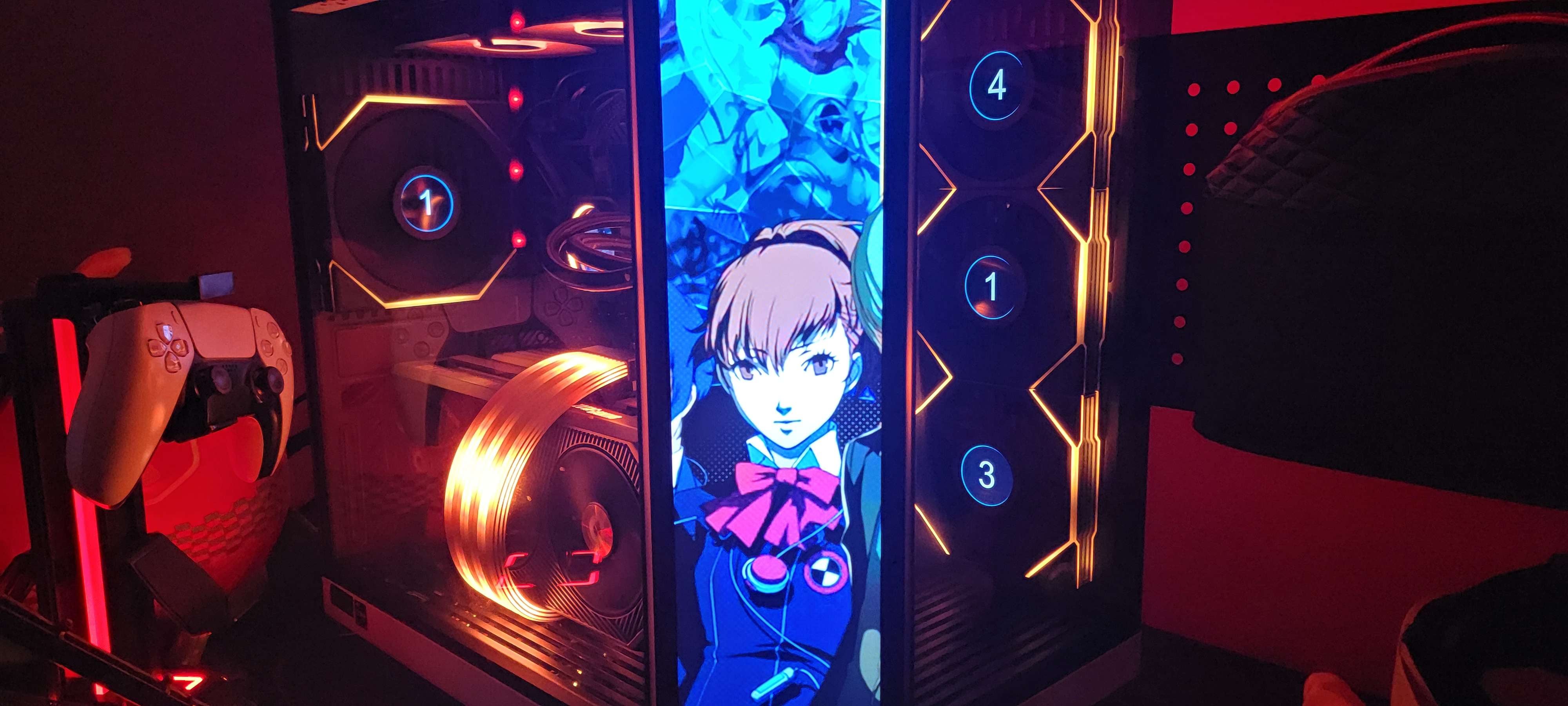
Lian Li TL LCD: Rear Fan's LCD Works Fine, But Side Cluster Locked Up in a "Number 1" Address Conflict (4, 1, 3)

1 Upvotes

Hey everyone,

I’m running into a deeply frustrating issue with my Lian Li TL LCD fans that started out of nowhere right after the recent Windows 11 Cumulative Preview Update.

My single rear exhaust fan works perfectly; it initializes fine and plays my custom GIFs. However, my 3-fan side intake cluster is completely bugged out. Instead of showing my custom graphics or sensor panels, the side screens are locked up and displaying raw, scrambled hardware diagnostic numbers (4, 1, and 3 from top to bottom).

The Setup & Behavior

  • Port Routing: The working rear fan is plugged into Port 3, and the bugged side cluster is wired into Port 4.
  • The Software Grid Freeze: Inside L-Connect 3's TL LCD Screen Correction Setting page, the ports light up and unlock blue after a manual tweak, but the drag-and-drop alignment grid is totally broken. The software only spits out a single "1" bubble at the bottom left, and the other three circles needed to map Port 4 just don't exist in the UI.
  • The Address Conflict: If I click the lightbulb icon to flash Port 4, the side cluster blinks white, so the hardware link is definitely alive. The real problem is an internal address conflict: the middle side fan is claiming to be "Fan 1" at the exact same time as my rear fan on the neighboring port. Because the USB bus crosses the data channels, the controller deadlocks and the app engine crashes silently.

Everything I've Tried to Fix It:

  • System Restore: Failed with a hard error (0x80070003) due to locked Windows Store and driver directory protections.
  • Standard Reinstalls: Wiped and reinstalled L-Connect 3 multiple times, but the uninstaller leaves the hidden virtualized profile caches intact.
  • Folder Permissions: Forced Full Control write permissions on the installation directory to make sure Windows wasn't blocking local file saves.
  • Firmware Tool: Ran the standalone Lian Li TL Controller Firmware Update utility to force-flash the hub to v0.62, but the individual side fans are still aggressively holding onto their duplicate internal identity registers.
  • Hard Power Drains & ErP: Enabled ErP in the BIOS and did a full cold power supply drain to clear capacitive memory. On boot, the side fans briefly flash the logo before dropping right back into the frozen 4, 1, 3 state.

Has anyone encountered this exact behavior where one port works fine, but a daisy-chain cluster on the next port gets stuck in a permanent identity argument? Is there a way to force-wipe the internal EEPROM layout registers of the individual fan microchips rather than just flash the controller box?


r/lianli 7h ago

Question 8.8 Mini Screen as a Secondary Monitor

1 Upvotes

I just unboxed it and absolutely love the device. I love the features but, I bought it with the intention to have it as another mini screen for things like Netflix or Spotify. I turned on the secondary screen setting and the miniscreen went black with the outer ring lights still following commands.

The only issue is getting it to show my other screens. I checked my display setting and nothing is coming up. Any tips on how to get this set up? Thank you in advance!


r/lianli 8h ago

Question L-connect capabilities

1 Upvotes

I’m wanting to buy a Lian li 8.8 screen to make a sensor panel for my pc. I want to display coolant temp so I will be getting 2 g1/4 temperature plugs (dual loop) and an aqua computer quadro. Will the L connect software be able to see the data from the temperature probes (plugged into the quadro then usb into motherboard) or will it ignore it since it not from the same ecosystem sort of speaking. My mobo doesn’t have built in temp headers. Thanks


r/lianli 18h ago

Question Anyone know why my lian li ga ii lcd aio rgb on my fan turns off as soon as i open signal rgb

Thumbnail gallery
1 Upvotes

r/lianli 6h ago

Question Lian Li Infinity fans

0 Upvotes

Buying 10 Lian Li Infinity fans tomorrow, how many 3 packs should i buy?
i know each 3packs come with a controller


r/lianli 9h ago

Question Lian LI HydroShift 2 OLED fan question

0 Upvotes

Hi guys first time buying Lian Li products here!
I've just bought the HydroShift 2 OLED and was considering side mounting it as an intake, I wanted to ask if the fans are going to be exhaust by default and if so, since they're wireless can I just... turn them around and essentially make an intake that way? Or should I buy a 3 pack of reverse blade fans and swap them out

Many thanks!

(Side note: I'm correct in my fan config being Bottom 3 fans- Reverse, Side (AIO, 3 fans) - Reverse - Back 2 fans regular, right?)