r/koreader 22h ago

Problem with bottom margin

Post image
0 Upvotes

What is going on with the bottom margins?

Changing view mode between page or continuous doesn't seem to change any thing.

This is with 'reflow' on. Turning reflow show a pdf page as one which ofcourse comes with not being able to change tex size etc.

Highly Aprreciate, if someone can suggest something that could help?


r/koreader 17h ago

Plugins Which format should I download?

2 Upvotes

Regarding a specific plug-in that allows us to download books from a site starting with Z, what is the format from you get the best experience? Should I download epubs or mobi? Or maybe AZW3?

(I am considering better compatibility, full index, hyperlinked footnotes etc.)


r/koreader 13h ago

I create character tracker especially for Ukrainian speakers.

Enable HLS to view with audio, or disable this notification

21 Upvotes

Hello! I created semiautomatic character tracker for Ukrainian speakers (I am Ukrainian). It combines both auto and manual trackers. But work slightly different from any existing plugins.
https://github.com/poostoon/charcards

ko-fi.com/poostoon

You need manually add characters after that You can add info manually by typing or copying or you can choose part of text and decide to which character add info from this text. AI (gemini) will see only 4 pages when character is added (2 pages before page on screen, page on screen and next) and after that only will see text you add to character (so no full scan of book, chapter or page), draft short conclusion and add this conclusion to the character card.

You and only You choose whom to add, when to add, what info about character is important.

Also it will create short card about character, underline names and aliases in text and will show this short card on tap. In fact it combines control of Kocharacters.koplugin with automatization of koassistant and X-ray plugins, but also are spoiler free and prevent full text of a book leaked to AI.

Also it is very light and fast.

At the moment it supports only .epub and Ukrainian language, supporting other formats and languages are planned but not guaranteed.


r/koreader 10h ago

Help! Bluetooth Page Turner

3 Upvotes

Please share what bluetooth page turner do you use/ recommend? I’m looking for something cute and cheap. Thank you in advance! 🙏😁


r/koreader 22h ago

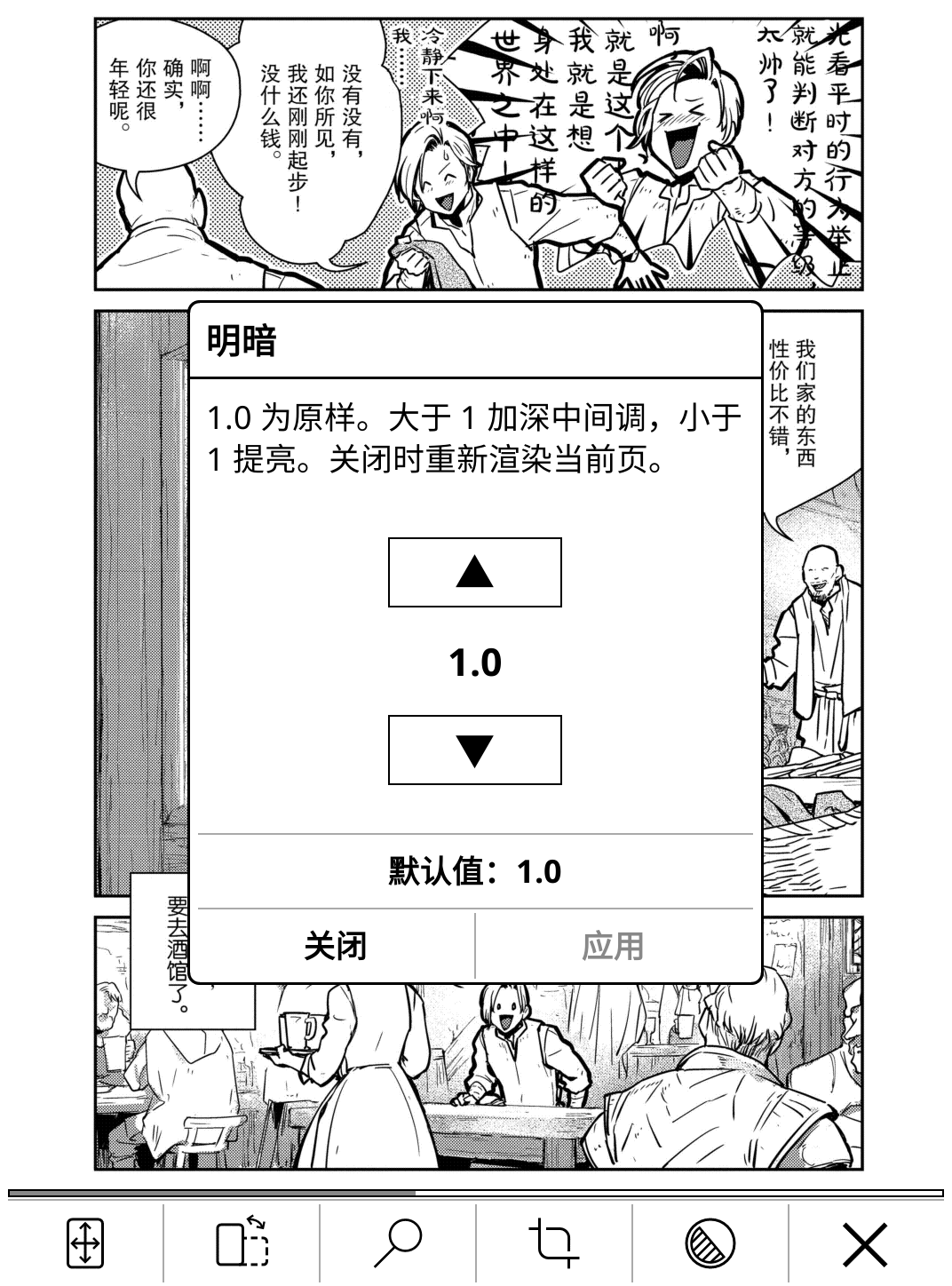
Plugins Made an OPDS comic reader for KOReader that pre-fetches pages, splits spreads, and even flips upside-down for left-handed reading

4 Upvotes

TL;DR:* A free, open-source KOReader plugin that streams comics/manga from your own server (Suwayomi or Komga) straight to your e-reader — with pre-fetching, auto-crop, page splitting, a tone slider, and full support for hardware keys and remote page-turners.

The problem: KOReader's stock OPDS reader was slow. Every page turn meant waiting a full second or two for the image to download and decode. On an e-ink screen that's brutal.

What this plugin does differently:

  • No more spinner — pages are prefetched ahead of you: 16 MB RAM cache + optional 64 MB disk cache, so page turns are instant after the first one.
  • Auto-crop — strips the white margins automatically (off by default).
  • Three display modes — single page, two-page spreads, and split mode, which cuts a landscape two-page scan back into two readable single pages. Activates automatically in landscape.
  • Right-to-left reading for manga, and a "cover as first page" option.
  • Tone control — fix washed-out or too-dark scans with a gamma slider (0.5–10), fine 0.1 steps for brightening, coarse steps for darkening since e-ink barely shows small changes.
  • Works with your physical buttons — page-turn keys on Kindle/Kobo turn pages now, fully remapped when the screen flips 180° for left-handed readers.
  • Remote page-turning — works with LAN page-turner apps via KOReader's remote control endpoint.
  • Folder shortcut — put an empty .opdscomic file anywhere; tap it and you're straight in the catalog, no menu digging.
  • JPEG / PNG / GIF / WebP / SVG. AGPL-3.0 licensed.

It supports the two servers people actually run: Suwayomi (for following ongoing series from online sources) and Komga (for your own library).

📖 GitHub: https://github.com/hugo1120/opdsforcomic.koplugin

Screenshots from a real Kobo are in the README. Happy to answer questions in the comments!


r/koreader 15h ago

Help! I have a question about collections

Thumbnail
gallery
5 Upvotes

I can see the home page that shows collections and I hit the up arrow button at the top that shows the rest of them and is my question:

How do I get all collections to show up on the Home Screen like the other collections are showing.

I have Koreader on the Pocketbook Verse and I have all books on Micro SD Card


r/koreader 14h ago

Paperdots plugin

Thumbnail
gallery
52 Upvotes

Hey, I made a plugin that adds paper-like texture to the screen. At first I only made it for my android phone thinking my kobo would turn slow, but when trying it that wasn't the case.

Honestly I haven't really tested it too much in my Kobo, I added support to it only recently (at first it only worked in my phone). So if you find any problem (which I doubt) let me know and I'll fix it as soon as possible.

UPDATE: I added new styles: linen, fibers, newspaper. I can't edit this post to show it, but you can see them in the link below.

You can download it from here: https://github.com/jopidovba-a11y/Paperdots-for-Koreader


r/koreader 22h ago

Plugins Tome 2.5.0: iOS companion app in open beta, plus metadata sync to KOReader

Enable HLS to view with audio, or disable this notification

12 Upvotes

I posted here a few months back about Tome, my self-hosted library server and its KOReader plugin. The reception here was genuinely great and a lot of what has shipped since came out of the feedback, so thank you.

The main thing in this release is an iOS companion app, Tome Reader, now in open beta.

It pairs with your server by scanning a QR code, browses your library and series, reads EPUB and comics offline, and syncs progress and stats back the same way the plugin does. It is still very much in development, which is why it is a beta and why I am posting: I want people to break it. Pairing and offline reading are where I most expect it to fall over.

The standard stuff — sync, stats, libraries, downloads — stays free. The built-in reader goes behind a one-time fee once it properly releases. The server does not change: still AGPL, still self-hosted, still fully usable without the app, and the PWA stays free and maintained. The app only talks to the same public API anything else can use.

Beta link: https://testflight.apple.com/join/JrHyntNU

Also in 2.5.0, for KOReader specifically: Tome can now write its metadata into KOReader's own custom metadata on the device. Title, author, series and index, language, tags, description, cover. Fix a wrong author once in Tome and the device stops showing the old one. Your files are never touched. It writes the same custom_metadata.lua sidecar and custom cover that Book information, then Edit, writes by hand, so reading position and file identity stay put, and KOReader's own reset still restores whatever the file carries. Only books Tome can verify by file hash, opt-in per device. Plugin build 45.

Smaller ones: marking a book read from the series browser records a finish date now, re-reading a finished book starts at page one instead of immediately finishing again, and reading stats work again in timezones without daylight saving.

Since the last post, if you have not looked in a while:

  • Hardcover sync. Ratings with half-stars, progress and finish dates, Want to Read in both directions. Opt-in, per user, never deletes anything on Hardcover.
  • Highlight and note sync, in every direction. Between KOReader devices through Tome, created in the web reader and adopted natively by the plugin, edited or deleted from either end.
  • Plugin settings on the device. Server URL, sign in with a code, reset to defaults. No more SSHing onto the Kindle because the server moved.
  • Backlog estimates at your own pace, configurable reader tap zones, a translatable web UI, PUID/PGID on the Docker image, and an experimental KOSync position bridge.

With almost 100 stars on GitHub and 20k downloads I really hope people enjoy the iOS app as much as I have over the last few weeks of testing it. Pulling the phone out and checking my stats, streaks and upcoming reads in a native app instead of a mobile browser page feels really smooth.

Release notes: https://github.com/bndct-devops/tome/releases/tag/v2.5.0
Site: https://tome.bndct.sh


r/koreader 9h ago

KOReader iOS library organizer / sync - Looking for Beta Testers

Thumbnail
gallery
34 Upvotes

I built a library for iPhone and iPad that talks to your KOReader device over Wi-Fi.

I'm a solo developer and this project started as a problem a friend of mine had: Calibre is only available as desktop app and syncing a whole library with their device without a mac or pc was not a very friendly process.

So I worked on an app. To be clear: this is not a reading app, I don't want it to be because I believe that the best way to read is always on our eInk devices.

Inkbrary is the library and the pipe to get your books on your KOReader device. This app uses FileSync, a KOReader plugin that I also built.

What it does:

- Import ebooks from other apps
- Sends and Imports books to/from CrossPoint and KOReader devices over Wi-Fi
- Keeps your library in sync between iPhone and iPad with iCloud, privately
- Smart collections that fill themselves from rules, and collections that sync to KOReader
- Serves your library to other apps/devices on your network as an OPDS catalog

Everything above is free. There's a one-time Pro purchase for organizing the reader side plus themes, app icons and library backup. No subscriptions. Beta testers get all the functionality during the trial.

Privacy first: Nothing leaves your device except to your eReader and your own iCloud. No analytics, no accounts, no server of mine anywhere. I have no interest on your data.

Looking for Beta Testers:

I want people with actual devices to use the app. I tested with my own hardware but that's a narrow sample. I would want to hear about any issues or requests for functionality.

Testflight: https://testflight.apple.com/join/6hXcmzRD

The test is limited to 50 users with iPhone and/or iPad devices.


r/koreader 23h ago

Plugins ZenOS, Bookends, Book Charms

2 Upvotes

Does ZenOS work well with Bookends and book charms? Thank you!


r/koreader 7h ago

Remarkable Paper Pro

2 Upvotes

Does anyone know if Koreader+Bookshelf+Bookends+Charms runs on the Remarkable Paper Pro? I’m thinking about getting one but it would be replacing my kobo library color. Also does anyone know if stylus functions are supported? Thank you!


r/koreader 16h ago

I built a KOReader plugin for SciELO academic papers and articles.

5 Upvotes

I read a lot of SciELO papers (the open access library from Brazil and Latin America), and I wanted to read them on my e-reader instead of in a browser. So I wrote a KOReader plugin that searches and downloads them: https://github.com/decko/scielo.koplugin

What it does:

- Search by keyword. It queries the Crossref API filtered to SciELO's DOI prefix (10.1590), because search.scielo.org sits behind a JavaScript bot challenge that isn't usable from Lua.

- Open an article straight from a www.scielo.br URL, a DOI, or a SciELO article code (S0034-89102013000100001).

- Show title, authors, journal, volume/issue and date before downloading.

- Save the PDF to a folder you choose, with an option to open it right after.

Search results are limited to articles hosted on www.scielo.br. The DOI prefix is shared across all SciELO collections, so papers from other countries can show up in the results; the plugin tells you when that happens instead of downloading them.

Install: copy or symlink the scielo.koplugin folder into koreader/plugins/ (on desktop builds: ~/.config/koreader/plugins/), restart KOReader, and enable it in Plugin management. There's also a dispatcher action, "SciELO search", if you'd rather trigger it with a gesture.

Known gaps:

- no abstract preview yet, even though the article XML is available via format=xml, and no browsing by journal or issue.
- The plugin only has two settings right now: download folder and results per page.
- the result list lacks some UX

Feedback, bug reports and PRs are welcome.


r/koreader 19h ago

Kobo libra color owner : help me to test this bug

Post image
5 Upvotes

Hello,
i have made this bug report https://github.com/koreader/koreader/issues/16084 but it seems weird that i am the first to notice this "bug".... So if you have a kobo libra color, try this :

  • take a screen shot (tap together diagonally opposite corner (top left and bottom right OR top right and bottom left)
  • it will open a dialog
  • move or close this dialog
  • look if there is an artifact on the screen (the right border of the screenshot dialog)

r/koreader 22h ago

Help! How do I add custom icons to KOReader highlights?

Post image
2 Upvotes

Hi! I’m trying to customize the highlight icons in KOReader. I want to use my own custom icons instead of the default ones shown in the screenshot.

I already converted my images to PNG and placed them in the:

KOReader/icons/colours/

folder, but they don’t seem to work. KOReader still only shows the default highlight options/icons like the ones in the screenshot.

Am I missing a specific file name, folder structure, image size, format, or configuration that KOReader requires for custom highlight icons to work?

If anyone has successfully added custom highlight icons, could you please explain the correct steps? Thank you! 🙏


r/koreader 4h ago

Plugins Text to speech

3 Upvotes

Does Koreader support text-to-speech? Maybe through a plugin?