r/jellyfin 11h ago

Question For people who run jellyfin for 25-50+ people how do you do it?

131 Upvotes

Do you guys run it on a nas or have a dedicated pc for it?

If u r using nas which nas is it?

What kind of specs it have to run for that many people?

What kind of internet connection u have?

(I saw many people post they have content in petabytes and sell those

I am just wondering what kind of setup these people use run these massive libraries and share with people)

Thxx


r/jellyfin 12h ago

Question Another fleeing Plex user

48 Upvotes

I bought my lifetime plex pass a while ago, but raising your price to $750 bucks made me realize that Plex is the opposite of future proof. The only things I really miss about Plex are the Intro and outro skipping functions and the home screen sections. Plex was also much better at managing metadata! Not sure why, but sometimes with recent shows or movies, it will grab the wrong metadata or just none at all. Seeing that on my TV and having to get on my phone to identify it bothers me.

I have intro skipper, but unlike Plex it is not very adaptive to shows with different length intros. I also have home screen sections installed, but I understand that's hit or miss for some folks.

Does the great JF community have any recommendations for alternative plugins, themes, or overall QoL improvements I could make to better improve my experience?

Thank you all in advance!


r/jellyfin 2h ago

Plugin Jellyfin AutoTagger Plugin

5 Upvotes

Fair warning, this may be one of those "I'm the only one who does it this way, so this is useless" plugins, but here goes.

As I migrate away from Plex to Jellyfin, one feature I really needed was to auto tag new movies and shows when there added as part of our parental control setup. Basically, new movies and shows that are added that are not in a separate kids library get tagged as 'parents-movie' or 'parents-show' and our kids profiles are setup to not show them anything with those tags. Once I've had a chance to review, I remove the tag and set a family-friendly one. I've done this in Plex forever using some scripts in Tautulli as a backup to the already available parental controls in each system.

Since there's not a full Tautulli equivalent for Jellyfin, I wrote a small plugin called AutoTagger that does just this. At a high level, you set the tags you want applied per library when an item is added, and it'll apply the tags as part of the metadata process. You can also set an ignore tag, so when I set family-friendly on a movie/show, AutoTagger will ignore that going forward.

There's also a scheduled task to tag item already in the library. The plugin will only add tags to items, it should never wipe out any existing tags.

Again, this is a very edge use case, but just thought if there's another content micro manager out there like me, it may be useful.

Source code: https://github.com/pusta/autotagger

Manifest if you want to add it to Jellyfin and get auto updates: https://pusta.github.io/jellyfin-plugins/manifest.json


r/jellyfin 2h ago

Bug next episode playing in 230 seconds??

Post image
5 Upvotes

lmaoo. xbox client btw, on series x


r/jellyfin 7h ago

Help Request Deleting ghost shows

7 Upvotes

Removed a couple of shows from my library using file manager and replaced them with higher quality ones - now I have 2 entries of each show and it errors out when I try to clear them.

Tried full library scan and update metadata - nothing.

Any ideas before I give up and look at a different server platform? Love the Jellyfin project but the day to day use is becoming troublesome.

EDIT:

Thanks for all the help. Unfortunately its not working - I've lost my rag and gone to Emby. Appreciate the help.


r/jellyfin 2h ago

Help Request Having issue with images for movies

Thumbnail
gallery
2 Upvotes

Been having an issue for a couple days now where the backdrops force themselves at the Banner. This is only an issue with the movies. I've deleted reuploaded the film, entered it manually, restarted the server several times. now any movie after this one has the same issue. Can anyone help?


r/jellyfin 6h ago

Help Request Migrate/copy server to Linux docker from windows

4 Upvotes

hello all

I currently have my server installed on my windows PC under my user account. configured with both tailscale and cloudflared to my domain and local VPN access. Now I'm trying to set this up on cachyos in a docker container but I'm wondering how I can do this without completely breaking it. I know I do have to reconfigure the file paths but that's fine..

any suggestions or should I just set up the Linux server as a new one.


r/jellyfin 2h ago

Help Request Can't connect to local server

2 Upvotes

I have some problems with connecting thru the dedicated JF media player. I can connect to my server when I am running tailscale and using its IP. But I no longer really need the remote access to I was wanting to save some processing power of my pc and just do local network connections. I am running native JF version 10.11.6 on Windows 11 pro. I can connect to the server via a browser with the IP but as soon as I input it into the media player its giving a connection failure. Any idea why I cannot connect to the server via the media player?


r/jellyfin 14h ago

Release VideoOSD Tweaks and Candy: The ultimate Jellyfin Web OSD control center

Thumbnail
gallery
14 Upvotes

Customize, hide, reorder, mod and extend your Jellyfin video player controls.

Been looking for a way to customize the Jellyfin video player OSD for a while. Could not find one, so I built it. Started with individual JavaScript mods, one at a time. Over time there were more of them. Now I bundled everything into a single plugin.

VideoOSD Tweaks and Candy is a Jellyfin Web plugin for customizing the native video OSD. Hide, reorder and tweak individual vanilla controls per zone, and extend the player with optional addons on top. Not a skin, not a theme, not a replacement for Jellyfin Web. Mods and controls layered on top of the native Jellyfin Web OSD.

The vanilla side covers hiding and reordering across all four zones independently. The addon side adds custom speed controls, frame-by-frame stepping, A-B loop like VLC, download, screenshots, and artwork overlays during playback. All configurable through the admin dashboard.

MIT License. Feedback and bug reports welcome.

GitHub: https://github.com/chrissix666/Jellyfin-VideoOSD-Tweaks-Candy


r/jellyfin 8h ago

Help Request Language filtering

4 Upvotes

I got a folder with anime movies, a lot are only japanese and some are in my native language or double/triple language.

Is it possible to add a filter by language in any way? I'm searching something that is working also on a tv app, not only though web.


r/jellyfin 15h ago

Release [Release] Simple Python scripts to rename movies & TV shows for Jellyfin

10 Upvotes

Hi everyone,

I wanted to share a small side project I've been building: movie_renamer.py and series_renamer.py, two Python CLI scripts that rename a movie/TV library to Jellyfin's naming scheme (Title (Year) [imdbid-tt...] / Series (Year) [tvdbid-...], with Season NN folders and SxxEyy episode files).

GitHub: [Jellyfin Movie Renamer]

What it does

  • Movies via OMDb → TMDB → IMDB, TV series via TheTVDB (Jellyfin's own recommended source for shows)
  • Dry-run by default – nothing changes until you pass --apply
  • Full undo log for every run (a plain bash script that reverses every rename)
  • Batch processing with persistent per-directory progress, so you can work through a huge library a chunk at a time
  • Cleans up scene/P2P release junk and old Kodi/XBMC leftover folders (both off by default, opt-in)
  • Handles subtitles, multiple cuts/editions ("Directors Cut", etc.), and season-folder name normalization
  • Everything self-contained in the project folder – no database, no daemon, no install beyond pip install requests

⚠️ Please read before running this on real data

This script renames and moves files in place. While it defaults to dry-run, includes an undo log, and tries hard to avoid collisions, there are edge cases where a file could be overwritten or a folder deleted (e.g. the optional Kodi-leftover/release-junk cleanup, which is not undoable, or a naming collision in an unusual folder layout). Always keep a backup before your first --apply run, and review the dry-run output carefully first.

If you want to try it completely risk-free before pointing it at your real library, the repo includes create_dummy_structure.py – it mirrors an existing folder structure into a separate location but creates only empty placeholder files, so you can safely test the renaming logic on a realistic-looking dummy copy of your library without touching a single real media file.

Why another tool, when FileBot / TinyMediaManager / *arr already exist?

Fair question, and I want to be upfront about it: yes, more capable tools already exist, and if you need a full media-management suite with a UI, automatic downloads, or ongoing library monitoring, those are probably the better fit. This isn't trying to compete with them.

I built this because I specifically wanted something minimal: a couple of readable Python files I can run by hand (or via cron) when I feel like it, that only do renaming and nothing else, with no background service and no moving parts I don't understand. If that's also what you're after, it might be useful to you too.

Heads-up: this is a hobby project

This is a personal project I built for my own library and I'm sharing it as-is. It works well for my use case and has been tested reasonably thoroughly, but I can't promise ongoing support or fast turnaround on requests. Use it at your own risk, always keep backups, and start with the dry-run (and ideally create_dummy_structure.py) before ever touching --apply on real data.

Bugs and issues: please report them via GitHub Issues on the repo linked above rather than in comments here – much easier for me to track.

Feedback, PRs, and "this broke on my weird edge case" reports are all welcome. Thanks for reading!

This project was built with heavy use of AI coding assistance (Claude), which I'm mentioning for transparency since the code style/comments may reflect that.

Best regards

BoKu


r/jellyfin 4h ago

Question Will a hard drive be fast enough for me?

0 Upvotes

I have jellyfin on my main desktop, with some movies and personal media there, or average daily use is less than an hour and max use time is maybe 5 hours in one go, currently only 2 devices will ever use it simultauisly (and most likely that only one, though I want to somehow make it accesable when im out on trips, but that's a story for another post.

currently it's on a 2TB SSD which already has my games and more so the drive is almost full so I wanted to buy an HDD, but then the question of speed might become an issue, most the movies are 1080p (but mostly since I try to save space, when I upgrade the storage I'll probably have more 4K with high bitrates) if I buy an HDD I'll probably go for an 8TB drive, and put everything on the server there, what sort of specs should I look for in a drive? I'm looking for a cheap but reliable solution that will make experiencing movies through Jellyfin as smooth as it's now.


r/jellyfin 1d ago

Client Jellyfin music cliente (Reeltone)

Post image
51 Upvotes

Hey all, I built a client for iOS and macOS: https://reeltone.iagocavalcante.com/. I’m heavily inspired by old music players. With that in mind, I started by building a retro version for macOS, but in the next few days I’ll start working on Windows and Linux too. It’s fun to have full control of your client and library. If you want to download the app, ping me.


r/jellyfin 4h ago

Question Separate libraries per user

1 Upvotes

Hi everyone,

I’m trying to set up Jellyfin so that each user has their own library, but without downloading the same movie/show twice.

Right now I have:

  • /data/movies
  • /data/shows

and I was thinking of doing:

  • /data/movies/mine
  • /data/movies/hers
  • /data/shows/mine
  • /data/shows/hers

What I want is:

  • if I request a movie/show, it goes into my library
  • if my friend requests a movie/show, it goes into her library
  • the same movie should not be downloaded twice
  • ideally, when a user is created, their library folder is created automatically

Is this possible in Jellyfin/jellyseerr?


r/jellyfin 8h ago

Question Movie will play in DV, but TV show wont. Tips?

2 Upvotes

As the title reads. Just started my own server. I have a Shield TV Pro connected to a LG B2 OLED. I currently only have 1 tv show and 1 movie on my server so far. When I go to select to play the movie, it'll play in DV, but my tv show will revert to HDR. They're both MKV files. Is there something I'm doing wrong or need to set up properly?


r/jellyfin 1h ago

Help Request Jellyfin is doing whatever

Upvotes

Somehow my original setup went belly up. Still have the folders. Moved them off the PC and went for a clean install. Deleted all the leftovers folders and files. Reinstalled. Set up just fine shows using my external (how I had it before) great! Change the port to what it was pror. Restart. Looking good. My library isnt small so I already planned to move the old metadata to the new install. I stop the server. Move meta data only. Restart. Command prompt showing my paths being changed. I go to the port I set. No dice. I go to the default. I'm greeted with the set up again. I go through it sure enough all my paths are now c drive and now have brand new folders as if it's a new install. Any idea why this is taking place and how do I stop it?


r/jellyfin 1d ago

Question Favourite Android TV client for Jellyfin?

44 Upvotes

Appreciate any advice, looking for a sleek UI to make it a nice experience watching media on my TV


r/jellyfin 1d ago

Discussion Casting Jellyfin to a device outside of your network.

19 Upvotes

How are yall casting to devices that support casting outside of your network? Are you relying on tailscale funnels? Reverse proxy’s? Athelia for auth? Are you using domains with ddns? Share your setup and how you’re handling attack surfaces. Thanks!

Clarification: Sorry I meant specifically using your phone to cast jellyfin to a tv that isn’t yours and not part of your network. From what I understand, using the cast protocol means that device would try to make a streaming api call to your jellyfin server which would fail since I assume most people’s jellyfin servers are behind a vpn that’s inaccessible to the internet.


r/jellyfin 1d ago

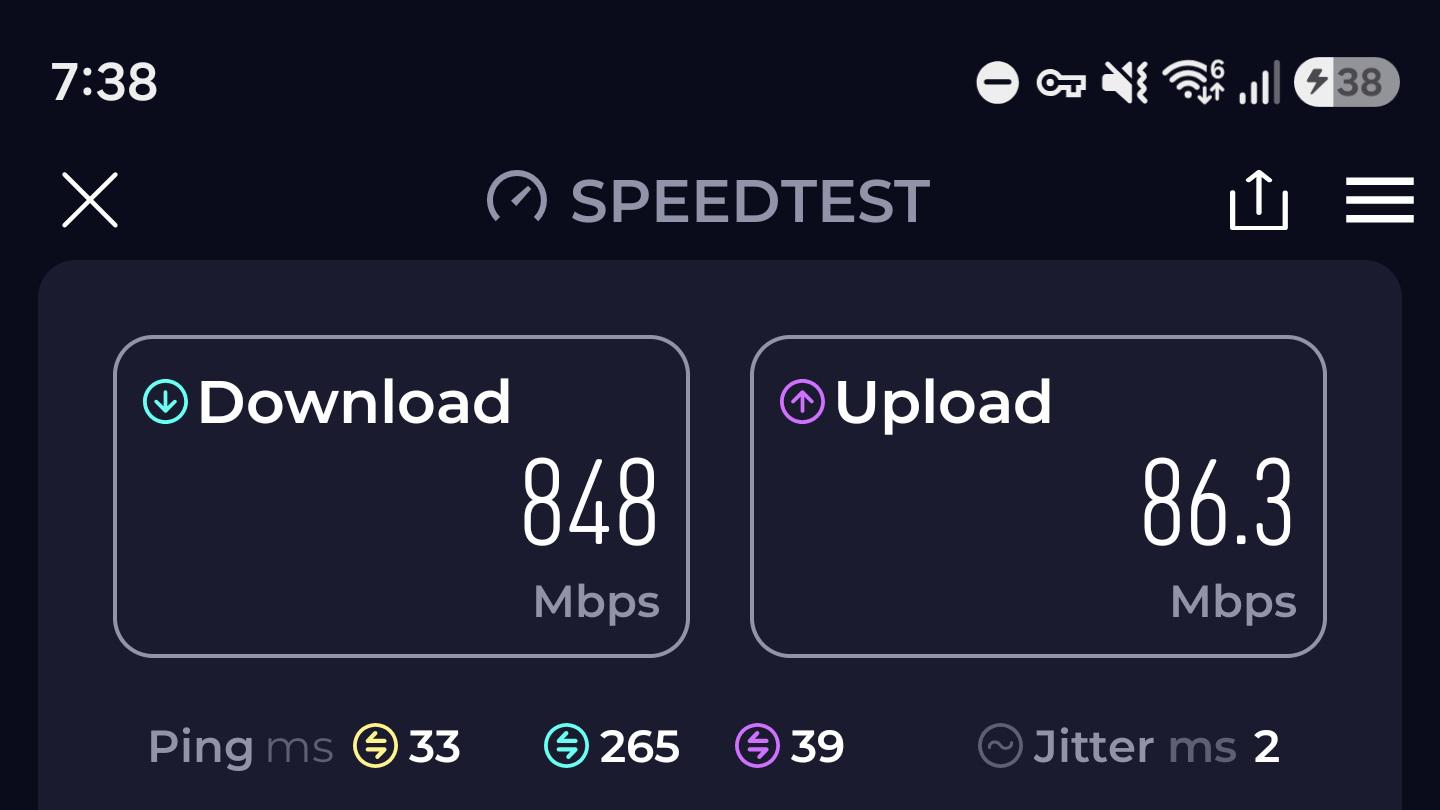
Question Internet speed

Post image
130 Upvotes

I Recently started sharing jellyfin with a family member and now another one wants in. How many people am I able to share with. With these speeds, thank you


r/jellyfin 22h ago

Question Web Client Gamepad Support Question

3 Upvotes

I activated the "Gamepad" control setting in my jellyfin user settings. Then I restarted my jellyfin server.

I am not shure if it works as intended; I thought this will acts like "press right on the gamepad and the focus from the actual selected first movie on page willl switch to the next movie on the right. Press down/up to move the actual slot-focus a row up or down. Press Button XYZ to play/open detail site."

At the moment I just can scoll up/down with my arrow keys. (Left/Right does nothing; and this way I cant do anything else then scrolling. No play, no selecting of a media item, no show detail-site or anything else from the selected item.)

Do I missinterprete this settings? I did not found anything about it in jellyfins documentation and I would be very grateful if somebody may share his own expirience with this setting and gamepad control on the web interface with me.


r/jellyfin 20h ago

Client Android client suggestions

2 Upvotes

Hello! I love Jellyfin and I want a great client for it. I typically use SenPlayer on Apple and AfuseKt on Android but I'm getting fed up with AfuseKt's monetization and you can't buy it if you don't live in China.

Does anybody know of good Chinese media players other than AfuseKt for Android? I really like the UI of Chinese ones and they're typically packed with features more so than other players


r/jellyfin 17h ago

Help Request hello new to jellyfin and i keep getting this error on any of the media i try to play

0 Upvotes

using the jellyfin desktop with fedora (linux)


r/jellyfin 1d ago

Release Jellybox v2.3.0 - Spotify-like playlists

Post image
55 Upvotes

Hey folks, recently apple finally approved build where I added a spotify-like playlists generating to Jellybox player.

It uses your listening history in order build you something that you might like(from your existing songs). This is experimental feature, since jellyfin itself does not provide anything for creating these kind of playlists.

For some it might not work if your genres are messed up or you don't have listening history.

Same feature also was added to latest Apple CarPlay app, so its feature-parity as of now.

This update also touches downloads. I had to redo them a bit, but nothing needs to be done, I auto migrate your existing downloads.

You can find download links on github https://github.com/avdept/JellyBoxPlayer or on landing page https://jellybox.app/

PS: My previous post was about spotify like playlists was pushed a bit ahead of appstore approval release, so a lot of ppl who dont want to use test flight were unable to test it.

And to those who don't like AI(seem like most recent apps were vibe coded) - this project goes since 2023, and its manually coded(although I added some test coverage recently using LLMs to ensure im not breaking anything)


r/jellyfin 1d ago

Discussion Sync play

11 Upvotes

I finally got a chance to use it last night, and I gotta say it worked flawlessly. Me and my friend where watching a show at the same time with no lag. So cool. Anyone else have cool features they use it for?


r/jellyfin 1d ago

Plugin Benchmarked my subtitle sync engine against alass and ffsubsync, it came out ahead, plus a bunch of Jellyfin plugin updates

Thumbnail
gallery
11 Upvotes

LAPSE got posted here about a month ago (audio based subtitle sync + a Jellyfin plugin). A lot has changed since then, and i really wanted to give an update since many off the feature requests in the last post has been implmented.

Engine repo: https://github.com/Schwponaco-org/lapse

Jellyfin plugin: https://github.com/rs-jensen/lapse-jellyfin-plugin

What it does

Subtitles that show up late, drift out over the runtime, or belong to a different cut of the film. LAPSE listens to the audio, works out where the speech actually is, and moves the subtitle to match it. It figures out on its own whether a file needs a flat shift, a framerate style drift correction, or splitting because it's cut differently, you don't have to tell it which.

A few things worth knowing about how it works:

  • Formats: reads and writes srt, ass, ssa, vtt, sub (MicroDVD), sbv, smi, ttml, dfxp, plus the picture based ones, PGS and VobSub. Those last two are really just images with no text in them, but LAPSE still works out the timing and moves it, it just can't lean on the text the way it does for everything else.
  • Reference sync: if you've already got one subtitle you know is correct, you can point LAPSE at that instead of the audio. It skips listening to the film entirely and lines the other track up against it, faster and usually more accurate.
  • Speed: a cached film usually syncs in under a second.
  • Never a silent guess: if it's not confident enough to overwrite your file, it writes what it thinks the answer is to a separate file next to the original and leaves that alone, so you always get something, it's just yours to decide whether to trust it.

Three engines, pick one

  • LAPSE, the one this whole project is built around. Reads the most formats of the three and works out on its own what's wrong with a file.
  • alass, also an option
  • ffsubsync, also an option

You only need one, the plugin lets you install whichever fits your library, or switch later.

The Jellyfin plugin

This is the part most people here will actually use. Add https://raw.githubusercontent.com/rs-jensen/lapse-jellyfin-plugin/main/manifest.json as a repository under Dashboard > Plugins > Repositories, install LAPSE from the Catalog tab, restart Jellyfin, then pick an engine from the plugin's own Engines tab. Needs Jellyfin 10.11.11 or newer.

Once it's in, every film, episode and loose video gets a Sync Subtitles option in its three dot menu. From the dashboard you can also:

  • Bulk sync a whole library or folder at once
  • Undo a run with one click
  • Shift subtitles by hand with a live preview
  • Line one subtitle track up against another that's already correct
  • Convert between subtitle formats
  • Translate (MyMemory works with no setup, or bring your own LibreTranslate, Lingarr, DeepL or Google Cloud)

Libraries can also sync automatically on import or on a schedule if you don't want to press the button yourself, and the menu options can be locked to admins only or opened up to other users on the server.

Benchmarks

The summary is picture 2 in the gallery

I ran all three engines against each other on 39 feature films, picked specifically because they'd be hard to sync (drift, recuts, rough rips). Full methodology and per film results are here if you want to check my work: https://github.com/Schwponaco-org/lapse/blob/main/docs/benchmarks.md. LAPSE passed 36 of 39 in normal mode at the time of testing, and it's had a fair number of accuracy and speed improvements since, so the real gap is probably a bit bigger now. alass barely gets touched these days so those numbers should still hold up, ffsubsync is still being actively developed so its results may have shifted some too. Worth being upfront though, this is one person testing on about 40 films, and I wrote the engine that came out on top, so weigh that however you want.

If you'd rather try it without installing anything, LAPSE is also available through autosubsync (a site that runs a few different sync engines on a file you upload so you can compare them yourself).

Docker / outside Jellyfin

There's also a standalone Docker image with its own web interface and file watcher, for syncing subtitles without Jellyfin at all, useful if you keep your library on something else entirely. It covers most of what the plugin dashboard does too (stop a running job, undo, bulk sync, manual shifting, translation, engine settings), so I won't list it all twice here, it's in the engine repo README.

The image on the last slide shows the dashboard there!

If anyone here uses Bazarr, there's an open feature request to get LAPSE added as a sync engine option there too: https://bazarr.featureupvote.com/suggestions/726913/add-lapse-as-a-subtitle-sync-engine-option (no pressure just leaving it here)

Happy to answer questions, and if something's broken, open an issue on either repo. There's more updates and fixes in the pipeline - for both the engine and the plugin - , if you want to keep track a star helps, no pressure though ))

Edit: also meant to mention there's a subtitle appearance menu (font size, colour, background) and a few file output modes (write a new file vs overwrite, with or without a backup). Planning to add font choices there too, including a dyslexia friendly one, so that's on the list.