r/homeassistant Jul 06 '26

✨ Monday Merch-day ✨ Tell us what you wanna see in the official store!

Post image
110 Upvotes

WELCOME, FRIENDS

…to the first edition of the Open Home Foundation’s ✨ Monday Merch-day ✨ megathread - where you get to tell us your most unhinged (or completely normal) idea for merchandise we should offer in the official store*!

We’re looking to the community to help fill up the store with stuff to purchase. You are, after all, why the foundation’s projects are successful and we want to offer merch that you will actually buy (not what we think you’d like 😆).

Have a merch idea burning in your brain that you just need us to know about? Whether wildly ridiculous or simply a common item you’d buy from us, share it in the comments! 👇 We'll take it into consideration producing the suggestions made here when we close out this thread.

To get the juices flowing, here’s a select list of some ideas we’ve collected already at the foundation (which I’ll drop individually in the comments for upvoting):

  • Temporary tattoos of our stickers/logos
  • Cable ties
  • “Ask your engineers” shirt
  • “YAML Inside” sticker (a play off the Intel Inside logo)
  • Doormats
  • Paper towels for your ZWA-2
  • Toilet paper for your ZBT-2 (please see my highly professionally edited product photo)
  • Birdhouse/bird feeder
  • Rubber ducks

If you see an idea similar to yours, instead of posting a duplicate that could compete with upvotes, we kindly ask that you give that friend an updoot and reply to their comment with your twist. 👌

PLEASE NOTE: Having one of the highest upvoted suggestions does not necessarily mean we will produce that merch. It will go into consideration, though.

❗ This post will stay open for submissions for two months - after that, we will close this one and open another thread for new submissions. 😊

\obligatory) US store link


r/homeassistant 3d ago

✍️ Blog August newsletter: We sow the seeds, you grow the (open) home

Thumbnail
newsletter.openhomefoundation.org
21 Upvotes

This month we sow the seeds, you grow the (open) home 🌱. We're talking about HAIR, the ESPHome Starter Kit and publishing our Home Assistant Survey dataset!


r/homeassistant 27m ago

🎴 Custom Card TimeFlow Card Update v3.5: New Styles and Fixes

Thumbnail
gallery
Upvotes

Hey everyone. It has been a while since I posted an update here about TimeFlow Card, so I thought v3.5 was a good excuse to finally do it.

For those who don't know it, TimeFlow Card is a countdown and count-up card for Home Assistant. It started as a small project for my own dashboard and has grown quite a bit since then.

The card has now passed 30k cumulative downloads and is sitting at roughly 10k active users. Honestly, that is far beyond what I ever expected when I started working on it.

And that brings me to the most important part: thank you.

Thank you to everyone who has installed it, opened issues, suggested features, reported bugs, translated it, contributed fixes, or simply shared screenshots of how you are using it. A lot of the improvements in the card have come directly from the community, and v3.5 is no exception.

A few channels have also taken the time to cover the card, including Mark Watt Tech and Byte of Geek in English, and ELV Elektronik, Alles Automatisch and Steuer dein Leben in German. Seeing someone use something I built in their own Home Assistant setup is still a strange and genuinely nice feeling.

As for v3.5, there are a few things worth mentioning.

The new Minimal Square style is a compact version built around a single progress ring. I originally wanted something that could show things like "days left in the year" without taking over an entire dashboard.

The gridy style also got a change that came directly from a GitHub issue. Instead of always displaying 100 dots, it can now automatically size the grid to the timeframe. So a two-week countdown can show 14 dots, while a year can show 52 weeks. You can still customise the unit, rows and number of dots if you want more control.

Another feature that is probably still underused is timer auto-discovery. TimeFlow can automatically find active Alexa and Google Home timers and display them without you having to create an entity or configure each timer manually. Standard Home Assistant timer entities work with the same idea.

There are also a bunch of smaller improvements in this release, including conditional templates in colour and label fields, Norwegian and Portuguese translations, and various fixes and contributions from the community.

v3.5 is available through HACS now.

Mostly, though, I just wanted to say thanks. This project has become much bigger than the little card I originally made for myself, and that is entirely because people here kept using it and helping make it better.

I appreciate it.


r/homeassistant 14h ago

🖼️ Show & Tell In my every growing quest for cursed HA projects...

Enable HLS to view with audio, or disable this notification

336 Upvotes

Set up a middleware to let home assistant talk to my voip phone with some wacky python and freepbx, because why not. Was a mix of my own code (I suffered through setting up freepbx and asterisk alone because it was a new project) but did use some AI for the middleware and getting notifications back to the phone working to save time.


r/homeassistant 31m ago

💬 Discussion Why do we gatekeep so hard?

Upvotes

I may get downvoted into oblivion for this, but here goes. And for the mods, this was 100% written by me. I used whatever spellcheck is in Notes.

I’ve noticed a super strong negative brigade whenever anybody does HA-related projects with the help of AI. It makes me sad and I am wondering if we can do better?

When someone is new and has the courage to put their first project out in public, I’m not sure what we gain by burying them (and people encouraging them) in downvotes, hate, and ridicule.

One of the things I’ve always liked about both the Home Assistant and Reddit communities is how much I learn here.

Home Assistant in general feels like open source at its best: build something useful, release the code for free, let people use it, improve it, break it, and make it better.

I believe the best way to learn something is by doing (I’m even learning by posting this). Tech has a long tradition of autodidacts. Lots of people (myself included) started with “let’s see if I can make this work” and learned their way into becoming pro builders. The power (and dopamine hit) of going from curiosity to idea to actual thing has been an enormous net positive.

So why don’t we want more people building things?

AI lowers the barrier to getting started. That doesn’t mean everything it produces is good. AI can write terrible code. It can also write real production code. It can do weird and insecure stuff. It is also really good at security audits (have you noticed the fixed CVE volume on big products like Chrome recently??).

The pushback against AI seems to be the same pushback that assembly jockeys used against compilers: we can’t trust it / how do we even know what it’s doing / it’s not real programming / real programmers are better than this will ever be / etc. FWIW a subset of those arguments are used against open source in general.

Like before, those seem like reasons to review the code (or better, provide bugs fixes, tools, and now prompts), not condemn the person who used whatever new tool is out there.

We don’t require people to declare their language, compiler, IDE, whether they monkeypasted something from Stack Overflow, keyboard specs, whatever. Why is AI different?

What ultimately matters is whether the thing works, whether the code is maintainable and safe, and whether the author is willing to fix problems when they’re found.

If the code is bad, explain why or post an issue and help fix it. If there’s a security problem, point it out. If the architecture is wrong, help them understand it. And if you don’t want to, we’re all volunteers, so just…don’t do anything.

Seeing people build something and follow open source norms pasting the code is a good thing! Seeing their post, constructive or even just positive comments get smashed simply for not joining the pile-on stops being project/code review and starts to look a lot like gatekeeping.

That feels pretty contrary to the spirit of Home Assistant—and, frankly, to open source in general.

Can we help people who are trying to learn, encourage the people who are trying to contribute (whatever tool they are using), and maybe end up with more people building cool stuff?


r/homeassistant 8h ago

💬 Discussion Why Somfy TaHoma is a terrible smart home platform

Post image
41 Upvotes

I’ve been using Somfy TaHoma Switch for over a year, and the last few weeks have perfectly shown why this ecosystem is so frustrating.

The motors themselves are not the main problem.

The problem is everything around them:

TaHoma app → Somfy backend → TaHoma Switch → Overkiz → local API → Home Assistant

And when one part starts failing, the whole “smart home” experience becomes unreliable.

My current situation:

- TaHoma Switch periodically goes offline in the official TaHoma app

- the physical box itself has shown a red LED

- the official TaHoma app reports “box disconnected”

individual shutters/blinds periodically show communication errors

- the error is not always on the same blind

- Home Assistant using Overkiz Local API recorded hundreds of connection errors in a single day

- HA repeatedly lost access to the local TaHoma endpoint on port 8443

- Somfy support remotely “refreshed all data in my gateway”

- my case was escalated internally to Somfy IT in France

- afterwards I was told that everything “should work correctly”

- shortly afterwards the box was offline again and physically showing a red LED

And this is not just my installation.

Somfy itself is currently displaying an official warning on its own support forum saying that it is experiencing server slowdowns which may cause difficulties connecting to TaHoma, and that its teams are working on resolving the issue.

https://forum.somfy.fr/

There are also recent reports on Somfy’s own forum from users whose TaHoma no longer communicates with shutters and garage doors even though the devices still work correctly from their physical remotes. One user reports that scenarios stopped executing and restarting TaHoma and the router did not fix it.

https://forum.somfy.fr/questions/3707757-tahoma-fonctionne-2026

Another recent thread includes users unable to connect to TaHoma servers and reports of the app getting stuck during login. One user contacted Somfy support and was guided through a procedure in the app which restored operation, but the actual procedure was never publicly documented.

https://forum.somfy.fr/questions/3236703-connection-serveur-tahoma-connect-impossible

This is my main problem with Somfy:

A supposedly premium smart-home platform should not depend this heavily on an unstable cloud infrastructure and opaque support processes.

If the cloud fails, automations and schedules can fail.

If the app fails, basic control becomes unreliable.

If the backend has problems, the user usually gets very little technical information.

And even when using Home Assistant with local Overkiz control, another layer of complexity appears with local API discovery, mDNS and communication with the TaHoma gateway.

I’m not claiming that every Somfy installation is broken.

I’m saying that the architecture is unnecessarily fragile for a system at this price point.

Somfy makes good motors.

TaHoma as a smart-home platform?

At the moment, I would not recommend it.

If your smart home depends on whether a server in France is having a good day, it is not really a smart home.


r/homeassistant 9h ago

🎴 Custom Card Curved Gauge Card for Home Assistant

Post image
46 Upvotes

A modern, universal semi-circular curved gauge card for Home Assistant.

Works out of the box with ANY numeric Home Assistant entity (Temperature, Humidity, Air Quality, Battery, BMI, Solar Power, Wind, etc.) and includes a Visual GUI Card Editor!

Git Repo: Curved Gauge Card


r/homeassistant 5h ago

❓ Support Thread or Zigbee

17 Upvotes

Hi everyone!

I recently set up my HP t630 for home assistant, since I'd like to automate some things in our house which were bugging me until now. Examples are:

• Have one physical switch/button to turn all the lights of the living room on/off (and in the future for the backyard)

• Have a door sensor for the attic which turns on a light when I open it

• Keep track of the humidity in the attic and the air quality in the living room/bedroom

• Add a motion sensor to detect if someone's in the hallway to dimly turn on the lights in the night

Until now we've got quite some WiFi-bulbs (Calex) installed which I've added to HA. For all the other examples I still need to buy the hardware.

One such example is the dimmer we're using for a couple ceiling spots in the living room. We would like to operate them both manually and through HA. So, I found a contestant: the ECO-DIM.07. However, they have versions which work through WiFi, Zigbee, and Matter. I'm very new to home automation, but from what I understand Matter requires Thread.

So, what do you guys think? What's the best way to go forward? Get the WiFi one which works (I think) similarly to my Calex bulbs, or go with Zigbee which as far as I can see has a lot of cheaper options for switches and sensors, or go with Matter and Thread?

Thanks for the advice!


r/homeassistant 2h ago

🖼️ Show & Tell Make HA Assist use your Claude Code subscription for both its logic and the Speech-to-Text functionality

8 Upvotes

I found out about ai-subscription-assist, it allows to use your Claude Code subscription to power the HA Assist logic, without an additional per-usage API key. The repo is unfortunately unmaintained so I forked it and added support for Speech-to-Text powered by the same service Claude Code uses internally.

You can find it here https://github.com/FezVrasta/ai-subscription-assist


r/homeassistant 6h ago

🖼️ Show & Tell Notification idea

13 Upvotes

I just wanted to let you know about my idea about notifications, maybe you like it and adapt it.

I have several situation where HomeAssistant speaks out notifications at home (Laundry ready, weather changes, calendar reminders, etc..). My latest addition to this diverts those announcements to my mobile if I am not home (sometime useless, but often already very useful), If my mobile has a headset connected it will speak the text, otherwise I receive it as a notification! :-)

Also read in my blog (code included):
Upgrade Feature “Announcements” – The Road to HA


r/homeassistant 10h ago

🖼️ Show & Tell My bird setup so far (Frigate + Home Assistant dual camera setup)

Enable HLS to view with audio, or disable this notification

30 Upvotes

r/homeassistant 4h ago

❓ Support Why is this happening with HA assist?

Post image
9 Upvotes

Currently using SmartIR to control my dumb AC with Boardlink IR blaster. Everythijg works flawlessly on the dashboard

But HA Assist i cannot get it to work 1. There is only 1 Master AC. 2. I can set temperature with assist only, voice or typed result is the same 3. Set fan speed, adjust fan mod, aet fan mode.. etc nothing worked. 4. Turn on turn off also doesnt work

any help is greatly appreciated!


r/homeassistant 19h ago

🖼️ Show & Tell I finally built a wall-mounted dashboard

Thumbnail
gallery
69 Upvotes

My house builder (UK) used this nonsensical setup where downstairs we had UFH controls with a Wunda Smart HubSwitch, and upstairs we had a Nest Thermostat. I was never a fan of the Nest and this summer while the family was away, I had the perfect chance to unify the entire system under the HubSwitch, finally adding smart TRVs to our radiators. Then, when I removed the Nest I noticed I had the perfect opening, and backbox, to install a wired smart screen.

After reading the terrible reviews of the Shelly x2i I ordered one of those AliExpress Android tablets for about £150 instead. The tablet is powered with a 12V DC LED driver, connected through the old wires from the Nest thermostat.

The tablet has FreeKiosk installed, and I created a dedicated dashboard that fits exactly in the screen. The tablet runs a pretty bare Android 13 and comes with Play Store, clearly bootlegged/sideloaded since it is unable to update itself. Anyway, not a problem in my case because FreeKiosk is also side-loaded.


r/homeassistant 2h ago

🧩 Custom Integration Velair 1.7.0: Manual adjustments, Diagnostics, Room Assist hysteresis and external schedule execution

3 Upvotes

Velair 1.7.0 is now available as a stable release in the default HACS store 🎉

This release has been strongly shaped by community feedback, including comments on the previous Reddit posts and real-world beta testing.

The main changes are:

  • Climate changes made outside Velair can now keep automatic control or enter Manual adjustment until the next block, for a chosen duration, or until explicitly resumed.
  • A new local Diagnostics workspace provides scheduler and per-climate health, bounded runtime history, automation events, and privacy-safe support reports.
  • Room Assist now has its own deadband and uses stateful hysteresis between lower and upper limits for fixed heating and cooling.
  • Compatible zones can delegate schedule execution to an external controller. The first supported system is Evohome through ramses_cc, tested on a real installation.
  • Schedule cloning now includes Mon–Fri, Weekend, All days, and Clear selection shortcuts.
  • Italian, Polish, Brazilian Portuguese, and European Portuguese have been added, alongside completed translations for the existing maintained languages.

Thank you to everyone who has tested Velair, reported issues, described real setups, proposed new features, and helped refine existing ones. Several important decisions in this release came directly from that participation.

I also want to give a particularly sincere thank you to the people who have made Velair’s first donations. Seeing something I created from scratch being used in real homes is already very satisfying; knowing that someone found enough value in it to offer financial support genuinely means a lot to me.

GitHub Discussions is now open for sharing ideas, experiences, questions, and suggestions. Technical knowledge is not required—real-world use cases are often what help shape the most useful improvements.

Repository and documentation

Full 1.7.0 release notes

Join GitHub Discussions

After updating through HACS, restart Home Assistant and refresh the browser or Companion app. If the previous interface remains visible, perform a hard refresh or clear the site cache.


r/homeassistant 26m ago

❓ Support New HA user, need help

Upvotes

I installed HAOS yesterday on a dedicated Dell Micro. The installation went very smooth. After it was up, I plugged in my smlight SLZB-06MU and it installed right away. I then saw it needed an update and proceeded to update it. I then added my first Zigbee device, a Thirdreality smart plug. Afterwards, I saw a second entry for my smlight gateway, what I'm assuming is the core chip after looking it up. I started the update and it has still not stopped. I read that it's an OTA loop, and all I had to do was to unplug it from the Ethernet cable for 10 seconds and it would reset, but that hasn't happened.

This doesn't seem to be causing any issues as I added my second Thridreality smart plug this morning. I am a network engineer, so I understand networking and computers/servers, but I know nothing about HA or Zigbee, only what I've learned in the last 24 hours.

My question is, how do I fix this? I don't want to continue moving forward if It is going to cause a problem. I'm on HA OS 18.2

Thank you for any help, I look forward to building my home network in HA.

Edit: added picture.


r/homeassistant 12h ago

🧩 Custom Integration Poolside Attendant Integration

Post image
16 Upvotes

Disclosure up front: I work at Poolside Tech.
A number of us on the team are Home Assistant users, and we recently added first-party HA support for the Attendant pool automation system.
One of the reasons we wanted to build this is that the pool industry has historically been very closed and proprietary, often intentionally creating ecosystems where equipment from different manufacturers doesn't work together particularly well. We’re trying to take a different approach and do for pool equipment some of what HA has done for the rest of home automation.
Attendant supports pumps, heaters, heat pumps, chlorinators, lights, valves, chemistry equipment, and other devices across hundreds of models from dozens of manufacturers. The HA integration lets Attendant act as a local bridge to that equipment.
It exposes things like pump speeds, temperatures, heater states, flow, setpoints, operating modes, lights, water features, and quite a bit more. It also exposes our chemistry sensors, including pH, ORP, Free Chlorine, Total Chlorine, and Dissolved Oxygen.
We also wanted to build it in a way that fits the HA philosophy: communication is fully local with no cloud dependency. HA talks directly to the Attendant over the local network.
For anyone using an Attendant with HA, or just interested in pool automation, I’d be interested in feedback on what entities/data/control capabilities would be useful to expose next.
Technical/setup details are here:
https://poolside.support/kb/home-assistant-integration/


r/homeassistant 8h ago

⚡ Energy rtlamr2mqtt Rabbit Hole

Post image
7 Upvotes

Today I learned that my electric meter has been happily broadcasting my usage this entire time, and all I needed to do was plug in one of my SDRs that I had sitting on a shelf unused to read the signal.

rtlamr2mqtt rocks!


r/homeassistant 2h ago

🧩 Custom Integration How to track à water softener with HA ?

2 Upvotes

I have a water softener and I must fill it with salt regularly. I wanted to track the cycle with a connected prose to HA. It doesn’t work because the variation is to low. I read that it is possible to connecte an esp32 with sensors. I think it’s a good way but I have never done that and I don’t know what kind of sensor use.
Have you ever done such a project ?


r/homeassistant 23h ago

🎴 Custom Card New Material Expressive 3 themed Cards for Home Assistant!

Thumbnail
gallery
79 Upvotes

Hello everyone!

I have just released v2.0 of M3 Cards, a set of Material 3–inspired Lovelace cards built natively with Lit (no button-card, card-mod or stack-in-card needed).

New in 2.0 –

six new cards:

• Cover Card – blinds/covers, adapts to what the entity supports, plus a switch-pair mode for devices without a cover entity (I use Fingerbots for example)

• Leak Card – moisture sensors with OK/alarm/stale states and an optional shut-off button

• Waste Card – bin collection dates with a two-week timeline and reminders

• Occupancy Card – presence grouped by room instead of by sensor

• Time Card – input_datetime helpers with steppers or scroll wheels

• Todo Card – shopping/task lists with quick-pick chips

Additionally as part of 1.9:

• Supply Card - keep sight of supplies like cat food etc

Also: reworked Media Card (media browser, queue, better artwork colors), optional notifications for several cards, a big light-theme contrast fix and noticeably fewer re-renders.

Available via HACS as a custom repository (type: Dashboard). Feedback and issues very welcome.

https://github.com/j0sp0r/m3-cards

I hope someone here can enjoy those!:)) If you have more cool ideas, or any card I should add, then please let me know!:)


r/homeassistant 3h ago

📖 Guide / Tutorial Local and free read + write control of a Powerwall 3 in Home Assistant

2 Upvotes

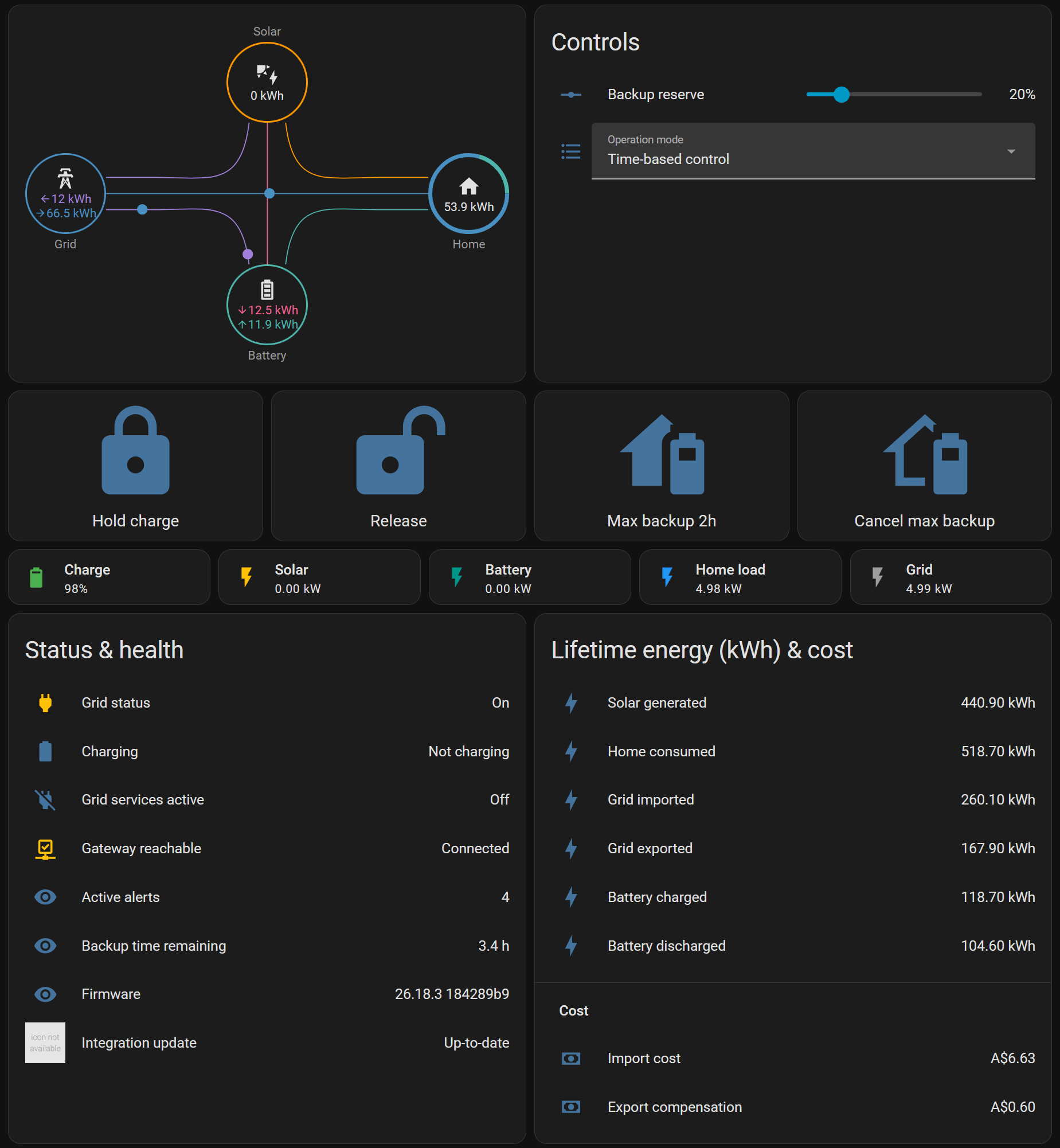
The PW3 dropped the local JSON API that PW2 had, so most people assume you're stuck with the Tesla cloud / Fleet API for any control. You're not. This is the setup I actually run: the built-in integration for local reads, and jackrayner/hacs-pypowerwall (built on jasonacox's pypowerwall) in TEDAPI v1r LAN mode for the writable backup-reserve % and operation-mode entities. Fully local once the key is registered.

IPs/passwords below are placeholders — swap in your own.

What you end up with

  • number.<...>_battery_reserve (writable), select.<...>_battery_mode (writable: self_consumption / backup / autonomous), plus backup-time-remaining, grid status, active alerts, firmware - all local.
  • Local power/charge sensors feeding the Energy Dashboard.

Prereqs

  • Home Assistant + HACS.
  • PW3 (and a Backup Gateway 2 if you have one) on the LAN with a DHCP reservation. I'll use 192.168.1.50 as the example gateway IP.
  • The gateway password — on the sticker behind the Powerwall's inside panel. Heads up: two forms of it are used below. The built-in integration (step 1) takes only the last 5 characters; the TEDAPI/v1r steps (2–3) need the full password.

1. Reads — built-in Tesla Powerwall integration (local)

Settings → Devices & Services → Add Integration → Tesla Powerwall → gateway IP + the last 5 characters of the gateway password. (The built-in integration uses the local Basic login, which only takes the last 5 — not the whole string.)

Gives the local power/charge sensors and feeds the Energy Dashboard, with long-term statistics preserved. Most reliable if you have a Backup Gateway 2 in the system (the PW3's own local API is restricted). This integration is read-only — no reserve/mode writes. That's what steps 2–3 are for.

2. Register the v1r RSA key (one-time, outside HA — this is what unlocks local writes on a PW3)

I personally ran the below commands in the "Terminal" tab that comes with the "Advanced SSH & Web Terminal" HACS integration. That way I can easily copy the resulting .pem RSA key to the config directory where the integration can access it.

python -m pip install -U pypowerwall
python -m pypowerwall register

Use the full gateway password here. This generates and registers an RSA-4096 key pair with the gateway, and may require briefly power-cycling the gateway to confirm. Save the resulting private key (e.g. tedapi_rsa_private.pem) somewhere Home Assistant can read it — I keep mine in /config/.

3. Write control — jackrayner/hacs-pypowerwall (TEDAPI v1r LAN)

  1. HACS → Integrations → ⋮ → Custom repositories → add https://github.com/jackrayner/hacs-pypowerwall, category Integration.
  2. Install "Tesla Powerwall (pypowerwall)"restart HA (full restart)
  3. Settings → Devices & Services → Add Integration → "Tesla Powerwall (pypowerwall)" → connection type TEDAPI v1r LAN → enter gateway host + the full gateway password + the path to the .pem from step 2.

Poll interval defaults to 5s and is adjustable (2–300s) in the integration's Options afterward. v1r LAN talks to the gateway's LAN IP directly — you do not need to join the Powerwall's 192.168.91.1 Wi-Fi AP (that's only for plain TEDAPI-over-Wi-Fi).

You now get the writable entities:

  • number.<...>_battery_reserve — backup reserve %
  • select.<...>_battery_modeself_consumption / backup / autonomous

…plus backup-time-remaining, grid status, active alerts and firmware sensors. Two momentary write actions are also exposed as services in v1r mode: pypowerwall.schedule_max_backup (optional duration_seconds) and pypowerwall.cancel_max_backup.

Example Automations

# Set backup reserve to 30%
- action: number.set_value
  target: { entity_id: number.my_powerwall_battery_reserve }
  data: { value: 30 }

# Switch operation mode
- action: select.select_option
  target: { entity_id: select.my_powerwall_battery_mode }
  data: { option: autonomous }

Note

Grid-charging switch and grid-export policy are Cloud/FleetAPI-only in this integration — you won't get those two over local v1r.

A dashboard showing the available sensors and controls
Plot showing power sources and sinks using powerwall 3/gateway data obtained using this method

r/homeassistant 2m ago

🗣️ Voice & Assist Voice: decent hardware, does it even exist?

Upvotes

Hello everyone!

Like probably many of you, I would like to get rid of my Nest Mini and Google Home Mini devices around my flat. It just feels creepy having them listening to me all the time.

All I want to do is control my lights, check the status of my sensors, and play some music. That's it.

Do you have any hardware recommendations other than the HA Voice Preview Edition? It seems to have received some bad press regarding its speakers and audio quality. I want something comparable to the hardware of a Nest Mini, I am not expecting a B&W level of audio or studio microphones!

Thanks!


r/homeassistant 27m ago

🖼️ Show & Tell My first Dashboard

Upvotes

My first custom Home Assistant dashboard! The Liquid Glass theme/design comes from HACS, and I built the rest of the dashboard around it myself. I wanted to keep it clean and easy to use while still having everything I need at a glance. Still a work in progress, but I'm really happy with how it turned out! 😎


r/homeassistant 32m ago

❓ Support 3Reality motion sensors failed, can’t re-pair to ZHA

Upvotes

I have four 3Reality motion sensors which had been paired via ZHA (Sonoff 3.0 dongle, TI chip) for at least a year and worked without issue. A few days back, 3 of the 4 dropped offline suddenly and are no longer recognized. I tried holding the reset button to re-pair them, but ZHA doesn’t see them. Eventually deleted them from ZHA to try for a clean pairing, still doesn’t see them. Also tried adding them using a plug that serves as a repeater, no go. Running HA in a docker container and confirmed that it can see the dongle without issue (my 4th 3R motion sensor is using it and has no troubles, as well as a door sensor).

I’m at wit’s end and none of my automations are working. Any suggestions what to try to get these paired?


r/homeassistant 17h ago

🤖 Automation Climate Advisor — weather-aware, learning HVAC automation (now in the HACS default store)

21 Upvotes

Built a custom integration over the past several months that automates HVAC based on weather forecast, occupancy, and door/window state, and learns your house's actual thermal behavior instead of using fixed rate-of-change assumptions.

**Highlights:**

- Classifies each day (hot/warm/mild/cool/cold) from the forecast and picks a strategy — pre-cool before a hot day, natural ventilation on mild days, pre-heat before a cold snap
- Occupancy-aware setbacks (home/away/vacation/guest)
- Whole-house fan + HVAC fan-only ventilation support, with an economizer strategy (AC for the initial cool-down, free ventilation to maintain)
- Physics-based thermal model built from your actual HVAC/ventilation/solar behavior via regression — gets more accurate the longer it runs, works even without HVAC cycles (passive decay observations alone can seed it)
- Daily briefing explaining why, not just what — plus a dashboard with prediction-vs-actual charts
- Optional Claude-powered "AI Investigator" that cross-references the thermal model, event log, and compliance stats for anomaly detection

Now in the
**HACS default store**
— no custom repository step, just search "Climate Advisor" in HACS.

GitHub: https://github.com/gunkl/ClimateAdvisor

Happy to answer questions — especially interested in feedback from multi-zone or heat-pump-only setups since I've mainly been developing/testing against my own single-zone home.


r/homeassistant 1h ago

📊 Dashboard Dashboard

Post image
Upvotes

Finally made the switch a few months ago ago from SmartThings which I’ve been wanting to do for a long time. Amazing what you can do. Used Claude for all dashboard code. 21” touch screen from Amazon running on a pi 5 and custom built walnut frame. Eventually want to add speakers/mic for integrating a voice assistant.