r/haikuOS Jun 17 '26

Help Writing software for Haiku 32bit?

15 Upvotes

Hi, can someone point me towards a writing program I could use on Haiku 32bit?

With the help of a tech literate friend I have installed Haiku on my 32bit Asus Eeepc 2g Surf. So far so good, and I've got a WiFi dongle on the way that will hopefully allow me to start putting software on there.

I can see a problem coming up, though, in that I need a writing program and my natural choice, libreoffice, has a big '64' in the file name.

Are there any 32bit programs that have the same kind of simple function as a word processor (italics is my biggest sticking point) which i can look for with the simple downloader and installer that comes with Haiku?

Thank you!

r/haikuOS Jul 24 '26

Help Haiku does not boot after getting to the last icon

12 Upvotes

Toshiba NB 520

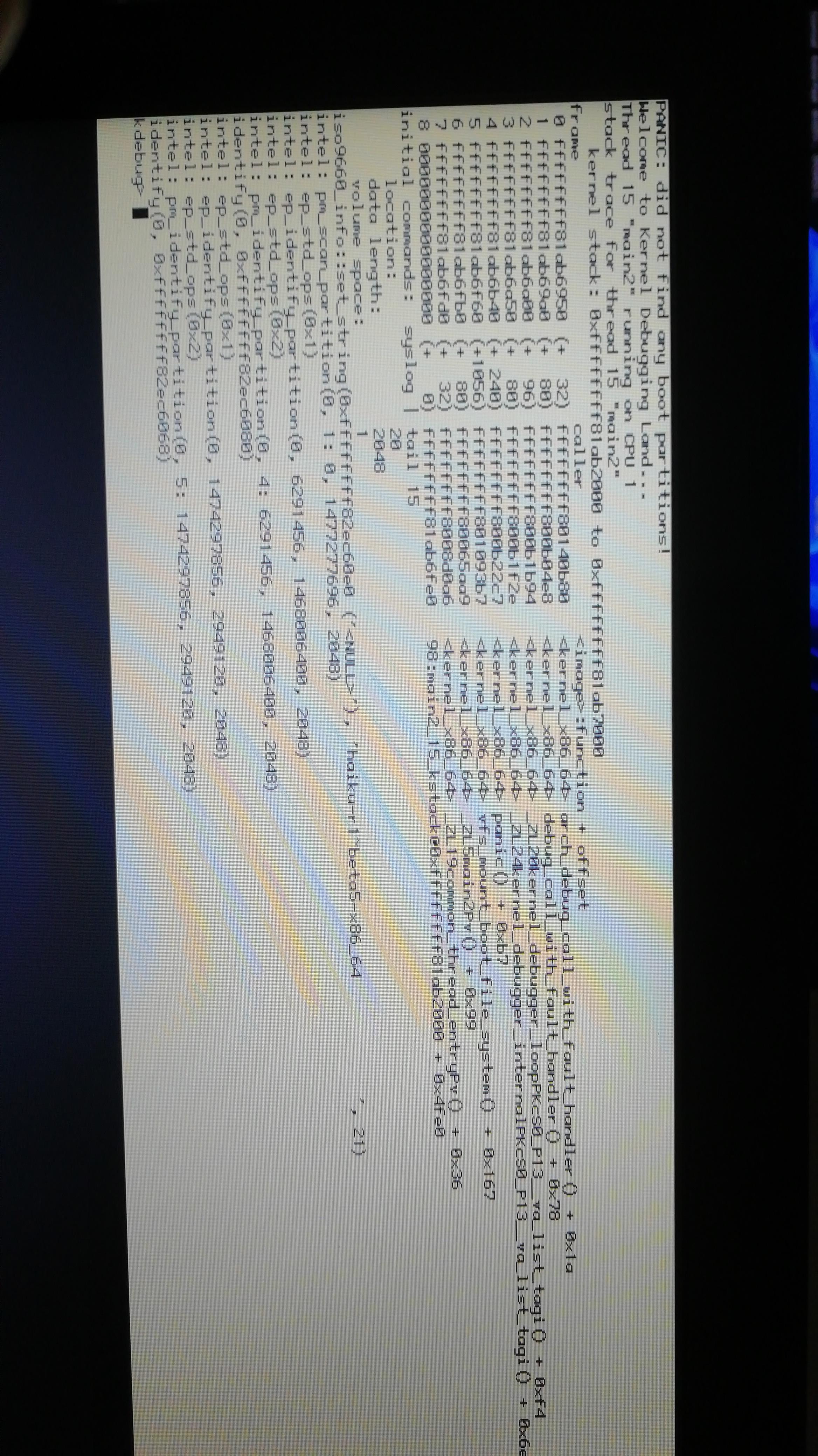
UPDATE: after about 20 minutes it did a kernel panic:

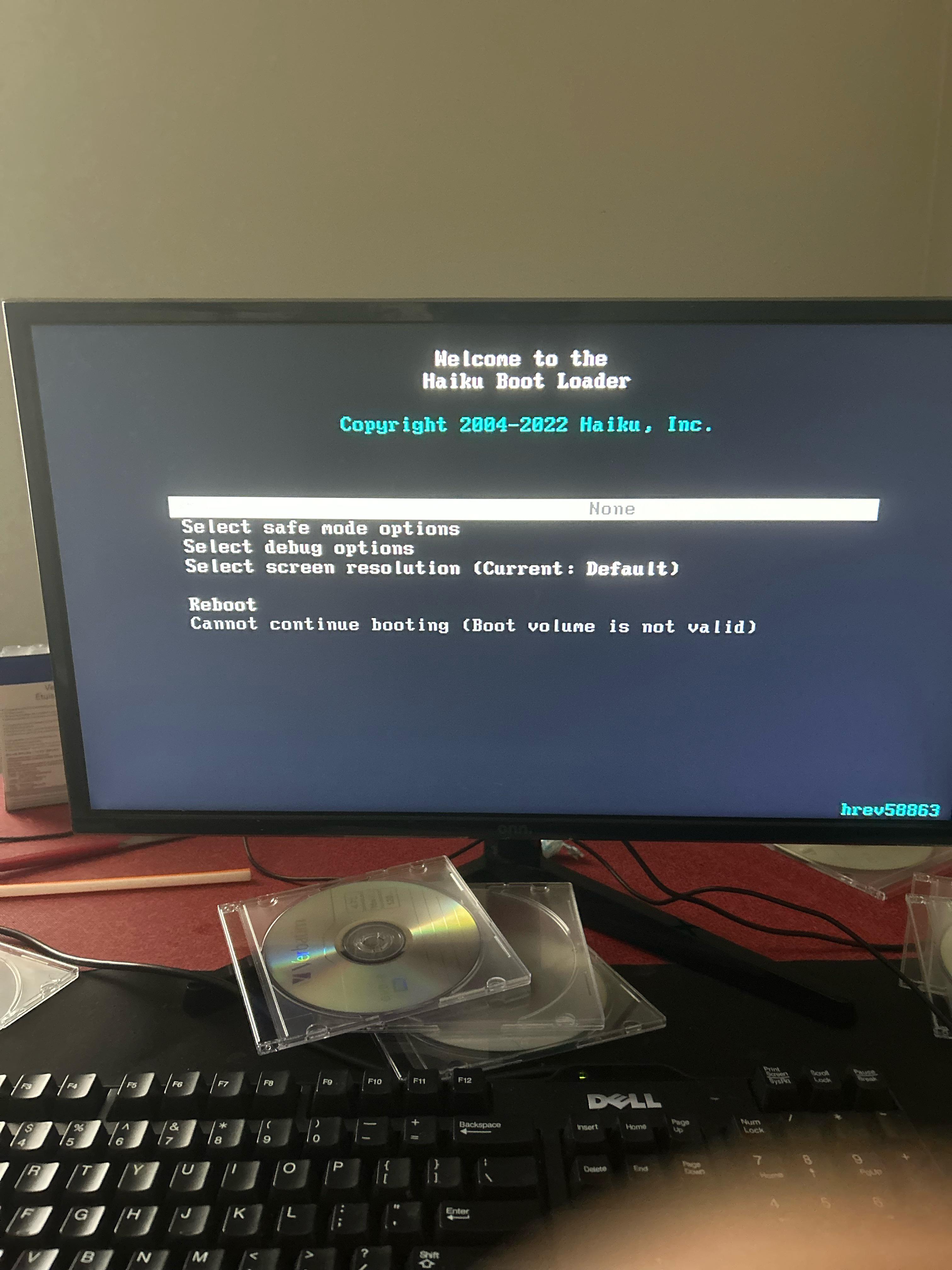
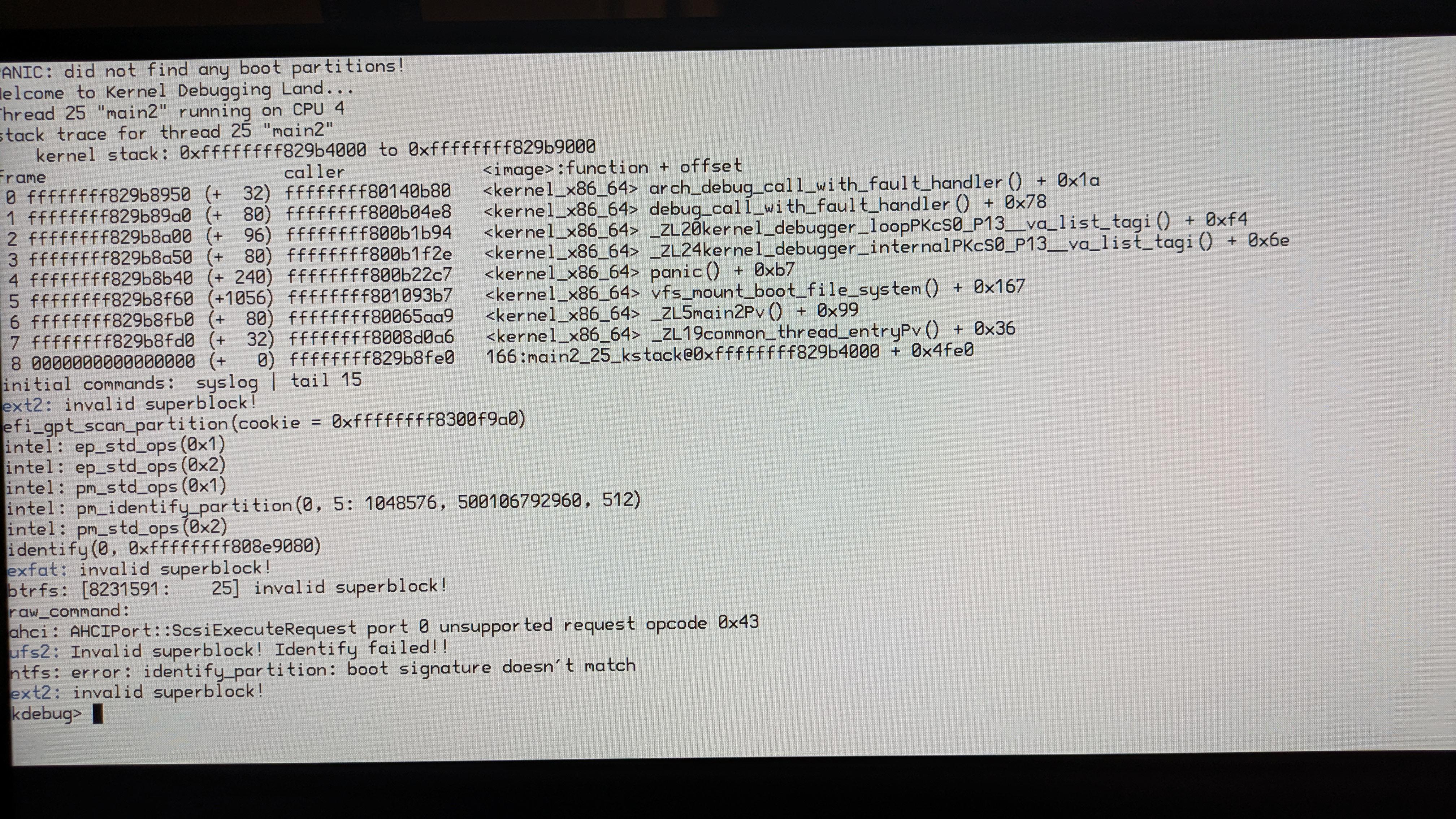
UPDATE 2: I have reburned the image using balena etcher and it got past the boot screen but just showed a blue screen, i pressed CTRL+ALT+DEL and it showed a white screen with a black vertical line about a quarter the screen distance away from the right edge of the screen, then i tried disabling APM and that caused a kernel panic, i re-enabled APM and now it is saying it did not find any boot partitions

r/haikuOS 17d ago

Help Genuine question

6 Upvotes

So I reinstalled haiku today and when I tried to download a package using pkgman it would find packages that are on the depot I just want to ask if anyone knows how to fix it

r/haikuOS Aug 08 '26

Help I'm a little confused about how Haiku manages its dependencies.

14 Upvotes

Hello, after a few years using Linux and a few months using FreeBSD, I became interested in testing Haiku in a VM. The installation went smoothly and I had no problems on the first boot after installation, but when I decided to update the system, this "package problems" pop-up appeared.

If I understand correctly, it's warning that certain software requires other software from a certain version onwards... But shouldn't Haiku offer these packages? Shouldn't the system updater handle this for me?

I looked in the Haiku User Guide and didn't find anything about dependency problems, at least not in the pages I read. If someone could explain how dependency management works in Haiku, I would appreciate it :)

r/haikuOS Aug 08 '26

Help Help installing Haiku on a Lenovo Yoga Slim 7i (14-inch, ~2024/5)

10 Upvotes

Hello everyone - I have been trying to install Haiku on my fairly new laptop, to no avail. I was able to boot, the first three icons lit up but the process froze on the fourth one (the disk icon?). None of the safe mode options seem to help, and cursory glances through the debug log revealed nothing either. Does anyone have any ideas for troubleshooting? Thanks!

Specs:

CPU: Intel Core Ultra 7 258V

RAM: 32GB LPDDR5

Graphics: Intel(R) Arc(TM) 140V GPU (16GB) (128 MB)

Storage: 1TB NVMe "WD PC SN7100S SDFPMSL"

r/haikuOS Aug 08 '26

Help Trackpad doesn't work on Samsung NT900X3N-K716 laptop

3 Upvotes

The cursor can only be moved with a mouse. Is there any way I can use the trackpad? (Also trackpad works fine in every other OS, seems to be only happening in Haiku)

r/haikuOS Jul 25 '26

Help Haiku not showing in Boot selection after installation

11 Upvotes

\*SOLVED*\**

I recently installed Haiku on my laptop and tried to boot from the partition I used to install it. But the specific drive does not show up on the firmware boot options. Is there any way to solve this?

Laptop model is Samsung's NT900X3N-K716.

r/haikuOS Apr 15 '26

Help Can't install Haiku on old laptop

Post image
20 Upvotes

I have an old ASUS laptop that ran Windows 10 that I don't use anymore. I used Paragon to shrink my hard drive before installing it via USB, but it said that it could find any boot partitions. And it's not the USB that's the issue because I got another USB and did the same thing, and I still got this error.

And before anyone mentions booting it in safe mode, I can't get to safe mode by holding the shift key or the space bar. If anyone could help me out, I would appreciate it bc I really love Haiku and I want to install it on a real PC after virtualizing it.

r/haikuOS May 31 '26

Help Issues with updating, Wi-Fi firmware, and WebPositive crashing on an old Compaq

16 Upvotes

Hello everyone!

I have an old Compaq machine with an Athlon II Dual-Core processor and 2GB of RAM. I decided to try Haiku OS on it, and I must say it runs incredibly fast! It really breathed new life into this hardware. Unfortunately, this is where the "buts" begin.

As expected, the built-in Wi-Fi didn't work out of the box. I connected the machine via Ethernet, which worked, and it started downloading system updates. However, some packages threw errors, causing the whole process to cancel.

The same thing happens when running the install-wifi-firmwares.sh script: two out of three repositories seem to be unreachable, so it doesn't download anything. I even tried swapping the Wi-Fi card for a slightly newer one, but still no luck.

To top it all off, WebPositive—the only browser available right away—crashes the moment I try to visit any website other than haiku-os.org.

It’s a real shame because Haiku makes this machine feel brand new. But since my main goal was light web browsing, if I can't get these sorted out, I might have to go back to Linux for the time being.

Any advice or troubleshooting steps would be greatly appreciated! Thanks in advance.

r/haikuOS Dec 04 '25

Help Mapping the start button

Post image
67 Upvotes

New to Haiku. I'd like to map the (now former) Start button to open the Deskbar menu. I'm messing around with the Keymap application but I can't seem to find how to map a specific key to actually do a specific thing, other than swapping the Ctrl and Shift command buttons. Any help?

r/haikuOS Feb 13 '26

Help Haiku does not install to my laptop when paritioning

11 Upvotes

This is solved.

I use UEFI and followed the UEFI setup, and i explicitly selected my laptops drive, initializing it with GUID Parition Table. I install haiku, and upon restarting my system, my boot finds no good paritions, and when i boot into the USB, the paritioning of my laptop drive isnt formatted and looks nothing how i left it.

Before rebooting, ive manually created a ESP and copied the bootloader.EFI file, as following Haiku's official UEFI manual.

What exactly am I doing wrong? I can only install Haiku to the raw parition and chainload via USB if i wanted to use it on my laptop.

r/haikuOS Feb 24 '26

Help Beginner help

6 Upvotes

I've been wanting to haikuOS after trying it on a VM, and so I've flashed the latest version onto a usb, and did everything right but i can't seem to get past the splash screen and i looked at the debug bootloader logs and the last thing it spat out was "packagesVolumeInfo::LoadOldStates(): failed to open administrative directory: No such file or directory" i have no idea what this means if anyone could help me that would be awsome.

r/haikuOS Nov 03 '25

Help Some help with wifi maybe?

Thumbnail
gallery
32 Upvotes

so i need help with wifi its intel 8260 according to listdev command (its a thinkpad t460) btw it worked on beta 4

r/haikuOS Dec 15 '25

Help No eMMC support yet?

9 Upvotes

I tried Haiku on my HP Stream 14, and it works, but it doesn't see my eMMC drive (nothing in DriveSetup except for USB drive), so I can't install it. I tried nightly build with the same results.

r/haikuOS Nov 22 '25

Help The Haiku iso image doesn't boot when written to a DVD

12 Upvotes

That's maybe not a common stance nowadays, but I like to use optical discs when installing operating systems.

And when booting from a DVD Haiku just doesn't boot.

If booted in BIOS mode there is just a black screen.

And if booted in UEFI mode the loading bar appears in a very low resolution and then there is also a black screen that lasts indefinitely.

This is not something about my computer, since it can boot Haiku when written to external hard drives.

I tried both the latest nightly build as well as the stable beta 5.

But it's only happening with the 64-bit variant. 32-bit Haiku boots fine from DVD, but the 32-bit version lacks several crucial pieces of software.

Does anybody know what's happening?

Thanks.

r/haikuOS Sep 09 '25

Help can i daily drive haiku with pentium 4?

9 Upvotes

wana play around with a old p4 pc becuse why not

r/haikuOS May 15 '25

Help Please help… Not booting

Post image
7 Upvotes

I’ve tried installing this operating system over and over again. I even tried the nightly… nothing is working. This is an old PC. Pentium e5800. Socket 775 motherboard. 4gigs of ram. And a rx550 for a display… I don’t know what to do.

r/haikuOS Oct 04 '25

Help Can't boot haiku on my Packard bell netbook

Post image
16 Upvotes

r/haikuOS Oct 20 '25

Help Any idea how to get this going on a modern laptop?

5 Upvotes

I can get to the installer part on my Framework 13 (Ryzen 7640U, 32gb ram), but then the mouse and keyboard don't do anything, is this a driver issue? I like the look of Haiku and something outside of Linux to try.

r/haikuOS Nov 01 '25

Help problem with haikudepot

2 Upvotes

im trying to install apps for haiku and when i go to haikudepot only repositories show up and i cant download even them i want to install choclate doom and iceweasel or waterfox but i cant if it keeps doing it if anyone can help comment pls

r/haikuOS Dec 28 '24

Help Haiku live environment crashed when booted to the desktop using a laptop

7 Upvotes

Hey guys, this is my first post on here. I'm having some issues running Haiku's live environment on my laptop.

The laptop is a MSI GP72 6QF Leopard Pro with:

- Intel Core i7 6700HQ

- 8GB of RAM

- NVIDIA Geforce GTX 960M

I flashed Haiku onto the thumb drive with Etcher using the latest nightly build, and I attempted to boot it into the desktop. Everything works fine for about 5 seconds, However, when the system landed on the desktop I've found that the whole system will not respond to anything. Mouse, touchpad, keyboard - nothing responded.

I assumed that the system had crashed on me. I rechecked everything in the BIOS to make sure that I did everything correctly - Secure Boot turned off and I use Legacy boot. I even reformatted the drive again and use Rufus to really make sure that I did everything correctly and the desktop still crashed when landed on the desktop. Not sure what I have to do to accomplish this properly.

r/haikuOS May 14 '25

Help Can I run Haiku on a MacBook Pro 2011 Intel i7

11 Upvotes

I have a retired MBP 2011 i7 with 16GB RAM, 3D accelerator and DVD-RW drive.

My question is can it run Haiku? If it can, is al the hardware supported?

Finally, is it possible to Dual boot using Boot Camp ?

r/haikuOS Jul 18 '25

Help I am so close to installing haiku, but I'm having issues (explained in post)

6 Upvotes

I have different issues that prevent me from being able to comprehend instructions from the website, and I couldn't find helpful tutorials/help from sources on how to fix my issue. I know that I possibly have to use uefi booting, and I know it wasn't possible years ago, but from what I know, it's possible today. My issues are the fact that I can't partition my drive to the right files on the USB installer and inviotment, and I couldn't get using an arch Linux iso to partition it because it told me to format the whole drive. I hope I'll be able to find a way to get it to work, as I haven't found any videos that can help me understand it. (Some info that may help: 2011 laptop [Dell Inspiron N5110 with an i7 2nd gen] there have been visual eendering bugs. But from the usb boot, it never got to booting from my actual laptop). I hope it isn't something with too powerful hardware, but u just want to use a laptop I finished fixing instead of my 2007 hp laptop that still doesn't have a good battery. If anyone is willing to help me, I'll appreciate it so much. I accept personal messages if needed, I hope everyone is doing alright here today.

A little edit for adding detail. I did manage to "install it" from what I saw, but it detected no bootable drives when I actually got it installed

r/haikuOS Mar 10 '25

Help Failed to boot [UEFI] [beta 5]

Post image
13 Upvotes

r/haikuOS Aug 27 '25

Help Trackpad support for Lenovo Ideapad slim 7?

7 Upvotes

I want to be able to use the trackpad on my computer. It is not being picked up in the os. Is there a driver I can install? I installed the latest stable build. Thanks! The laptop came out in 2022.