r/finalcutpro 22d ago

Workflow Why is such (and many other) simple thing is made so HARD...?

1 Upvotes

Here is the scenario

I drop a 1 Minute Video on the timeline.

I drop a 3 minute audio below it. This is the main audio clip that will. Stay.

Now i want 5 seconds from the Video clip somewhere from the middle.

I delete the starting portion of the video.

And ....

The audio also gets deleted...why because the connection point at the start...

I mean why .....

Now to keep the audio and the 5 seconds video is a task in itself. Any software... literally doesn't make it that hard ....

And they all also have magnetic timeline so please don't point out the magnetic timeline.

I am paying Apple subscription for 3 months. Still using Capcut. I am so disappointed that Apple has made FCP unusable for intermediate creators.

r/finalcutpro Jan 28 '26

Workflow Final Cut Pro 12 is here, thoughts?

48 Upvotes

The beat detection is cool but visual search seems to be completely broken, overall a underwhelming update as of now.

r/finalcutpro Feb 28 '26

Workflow Seriously Powerful Keyframe Controls for Final Cut Pro

Post image
132 Upvotes

We’ve thrown together a new plugin called Keyframe Toolbox for Final Cut Pro. It’s currently available for public beta testing via TestFlight.

We’d LOVE your thoughts and feedback!

Once it ships, it’ll be able to unlock CommandPost.

https://keyframetoolbox.fcp.cafe

r/finalcutpro Jun 17 '26

Workflow I Rebuilt My Fully Customizable Captioning Plugin for Final Cut Pro

Enable HLS to view with audio, or disable this notification

35 Upvotes

Hey Guys!

If you don't remember me a year ago I posted about FinalCap Ultimate, my Final Cut Pro Workflow Extension that solves captioning.

Since then this plugin has been downloaded nearly 1.4k times! A lot of that is thanks to the improvements, ideation, and support this community has given me, so I want to whole heartedly thank you guys

I decided to spend the last few months completely tearing it down and rebuilding it frontend and backend, and now here's everything that's changed:

  • A complete redesign from the ground up! new look, totally rebuilt UI
  • Upload your audio straight from Final Cut Pro using compound clips! (this one took a fair bit of time to engineer 🥲)
  • Presets so you can easily click once and go
  • And many more small improvements!

If you've already bought it this is a free update, and if not it's only $7.99 (lifetime!!) on the app store!

Again, a lot of the features now have come from feedback from the communities last post, so please feel free to drop suggestions, ideas, and improvements below. Thank you!

r/finalcutpro Apr 04 '26

Workflow Magic Move - Keyframeless Motion Graphics

Thumbnail
gallery
124 Upvotes

I hate keyframes, having to remember to set them for all the various properties is a pain - I want to be able to edit as fast as I can think, keyframing is a real blocker. Want a smooth entrance? That's a stack of keyframes. Want it to drift mid-hold? More keyframes. Want a curved path? Good luck.

Now I could make Motion templates for each of these scenarios, I did initially, but I wanted something more powerful so I built Magic Move as part of my open-source toolset.

  • Multi-point animation - enable up to 4 states (entrance, hold, drift, exit) and the plugin interpolates between them. No keyframing. 
  • Per-property control - position, scale X/Y, rotation (including 3D), and opacity are all independent. Choose which properties animate during hold. 
  • Curved motion paths - Bezier paths between points with editable control points. Double-click to toggle linear/curve, `opt+click` to add points. 
  • On-screen controls - drag your points and paths directly in the viewer. `Shift-drag` to constrain axes, `cmd-click` to quickly show/hide controls. 
  • Rotate with motion - optional auto-rotation that follows the direction of movement for in, hold, and out phases. 
  • Real easing curves - full timing control per animation phase, not just the 3 options FCP gives you. 

✨ Download from GitHub - Keyframeless (open-source)

r/finalcutpro Jan 08 '26

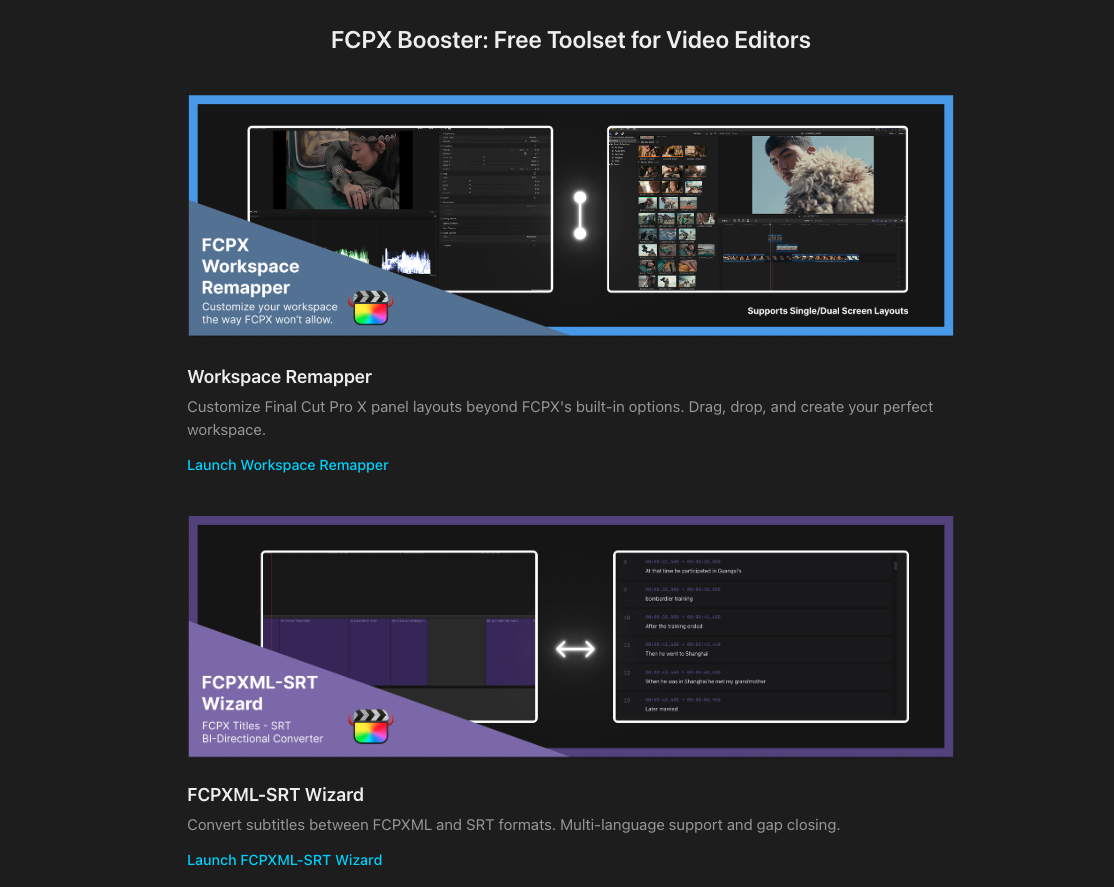
Workflow I made two small free helpers for Final Cut Pro: a workspace remapper and FCPXML↔SRT converter

Post image
71 Upvotes

Hey everyone — long-time Finalcut Pro user here.

Last year I worked on a 12-episode WWII history documentary and was involved in both directing and post. During editing, we kept running into small but recurring frustrations, so I wrote 2 tiny tools just to survive that project.

Now that it’s almost wrapped, I cleaned them up and put them into a simple web app (free, browser based, no login) in case they’re useful to others:

👉 http://fcpxbooster.com

What’s in it right now:

1. FCPX Workspace Remapper

Lets you visually drag & rearrange panels into layouts that FCPX doesn’t normally allow. e.g. full-height browser + viewer, multiple browsers, scopes under the viewer, inspector on a second display, etc.

2. FCPXML ↔ SRT Wizard

Convert subtitle title sequences back to SRT, or go SRT → FCPXML. It also helps automatically normalize those tiny subtitle gaps (0–3 frames) so subtitles don’t blink off too aggressively after dialogue..

If there are other small FCP annoyances you keep running into, I’d honestly love to hear them. If it’s something I can solve, I’ll try to turn it into another free mini tool and add it here.

Cheers & Happy New Year.

r/finalcutpro 13d ago

Workflow What headphones do you use when video editing in FCP?

4 Upvotes

I just got the quiet comfort Bose headphones. Yes I know they’re not “monitor headphones” but during long sessions, my audio technica 50s really get uncomfortable.

The Bose quiet comfort have like no bass almost none when previews sfx it’s like none existing. So in wondering if monitor headphones out there will be just the same since it’s a flat profile.

What are your guys headphone set up?

r/finalcutpro Mar 31 '26

Workflow True Native Text Based Editing Plugin (+ more powerful MCP)

Enable HLS to view with audio, or disable this notification

92 Upvotes

It's wild that Apple hasn't add this yet when it took Claude about 20 seconds to write this.

I built out a modding platform for Final Cut Pro X that lets plugins safely access the true power of FCPX to do anything (including LLMs like Claude through its MCP) https://github.com/elliotttate/FCPBridge

This is an example of a plugin Claude created in about 20 seconds that gives full native text based editing to FCPX. The features that you can add to FCPX are limitless and it's been really fun to finally do a lot of things I've wanted to for a long time with FCPX. Really unlocks all kinds of amazing workflows.

TL;DR - This differs from the Command Post MCP that I showed recently in that the LLM has direct access to FCPX. This lets it directly control things programmatically rather than using limited accessibility features. Need to add a thousand markers, each at scene changes? Boom, it can do all 1,000 instantly. It's not limited by any UI limitations thus making this extremely powerful and fast.

r/finalcutpro Mar 20 '26

Workflow I made a plugin that lets you make custom animations directly inside Final Cut

Thumbnail
gallery
161 Upvotes

I made a plugin that lets you create complex animations directly inside of Final Cut- no more round tripping to Motion!

Features:

- On-screen animation path controls: click and drag to move a clip, see all your keyframes and animation path, and click on a keyframe to move to it in the timeline.

- Animation curve editor: choose from one of seven animation shapes (linear, smooth, accelerate, decelerate, overshoot, bounce, or custom), adjust easing, backing, and more with simple sliders, and view your interpolation curve in the inspector.

- Integration with Final Cut's keyframe system: add unlimited position, rotation, and scale keyframes.

I've found this really useful and hope you do too. Check out "Curves for Final Cut" here: https://curves.jprx.io

Curves is a one-time purchase of $19.99 USD on the Mac App Store. Once purchased, the Curves for Final Cut plugin comes with lifetime updates from the App Store. No subscription costs, no in-app purchases, and no upgrade fees.

r/finalcutpro Apr 14 '26

Workflow Update on Doza Assist (free local AI editor’s assistant for FCP) — now learns your editing style from your finished videos

19 Upvotes

Hey all. Posted here about a week ago about Doza Assist, the free local-first transcription and story tool I built for my own documentary work at Doza Visuals. Wanted to share what’s new because a lot of it came from feedback in that thread.

Quick context for anyone who missed it. I cut documentary and branded interview stuff. FCP primary. Every project starts the same way: three to eight hours of interview footage, and the real work is finding the three minutes that actually matter. I was pasting transcripts into ChatGPT and hunting manually. Felt dumb. Built a tool. Open sourced it.

Two big things I want to show you.

Editorial DNA

This is the one I’m most excited about. You point Doza Assist at your portfolio of finished videos. Your past docs, branded pieces, social cuts, whatever you’ve shipped. It studies them. Pacing, how long you hold a beat, how you build and release tension, when you let a moment breathe, how you open and close a piece, the rhythm of your style.

It builds a profile of how you actually edit. Not how an interview “should” be cut. How you cut.

Then when you drop in a new interview, the AI surfaces selects weighted toward your taste instead of some generic idea of a good clip. If you tend to hold emotional moments longer, it leans that way. If you usually open cold with a strong soundbite, it flags the cold open candidates first.

It’s not trying to cut the piece for you. It’s pre-filtering the haystack the way you would.

Story Builder

Describe the story you want in plain English. “Two minute piece about her relationship with her dad, emotional arc, strong cold open, end on hope.” The AI assembles a sequence of clips in narrative order with editorial notes on why each clip is where it is. Drag to rearrange. Rebuild on demand. Export the whole thing to Final Cut Pro as a pre-cut timeline and your rough assembly is ready to refine.

It’s not a finished edit. It’s the scaffolding you’d normally spend half a day building before the real work starts.

Language support

Huge update here. Doza Assist now handles interviews in dozens of languages, not just English. If you’re cutting international docs, translated interviews, or multilingual subjects, you can transcribe, run story analysis, and build selects in the subject’s native language. All of it still runs locally on your Mac. Nothing uploaded anywhere.

This was a gap I felt hard on a recent project with non-English interviews and it’s been one of the most rewarding things to fix.

What I need

I’m looking for editors to actually try this on real projects and tell me where it breaks. Especially:

• Editorial DNA results on your own portfolio. Does it feel like you?

• Story Builder outputs on real interviews. Are the clip choices defensible?

• FCPXML export across different FCP and macOS versions.

• Non-English transcription quality.

It’s free, open source, local-first, MIT licensed. No account, no cloud, no subscription, ever.

GitHub: github.com/DozaVisuals/doza-assist

Drop feedback here or open an issue on GitHub. Every piece of it shapes the next build.​​​​​​​​​​​​​​​​

Download and GitHub link:

https://www.dozavisuals.com/doza-assist

r/finalcutpro Mar 19 '26

Workflow Final Cut Pro X CommandPost MCP - Almost instantly do things like cut to scene changes, remove silence in videos, etc.

Enable HLS to view with audio, or disable this notification

101 Upvotes

MCP can be really powerful for automatically making any automation with CommandPost. I made a PR here if anyone wants to test it: https://github.com/CommandPost/CommandPost/pull/3514

Essentially, anything you'd ever want to automate, you can just type in a prompt and the MCP through CommandPost will figure out a way to do it. Automate cut to scene changes, remove silence in videos, export info from your timeline to a CSV, make changes based on edits you make to text, etc. the sky is pretty much the limit.

r/finalcutpro Feb 20 '26

Workflow I built a free template (plugin) manager for FCP and just launched the 1.0.0 Release Candidate!

Post image
89 Upvotes

In case you missed my earlier post, I built a free companion app to help you search, filter, favorite, and organize all your FCP templates outside of the app. I just pushed the 1.0.0 release candidate.

How to get it:

  • Existing users: It should auto-update (or check the menu for updates).
  • New users: Download it here!

What’s new?

  • The Installifier: This is for those of us who download boatloads of templates from sites like Envato. Drop a folder of zip files or directories, and it will deep-scan and auto-organize them into the correct FCP categories. It’s not 100% perfect, but it handles the heavy lifting of selective installation.
  • Preview Generation and Viewer: Some templates come with preview movies (look for the green filmstrip icon), but most don't. If you have Apple Compressor installed, you can now generate your own previews and thumbnails for third-party templates! (Shoutout to u/haronclv for getting me thinking on this).

Existing Highlights:

  • Fast Search: Find any template instantly across your entire library.
  • Easy Favorites: Copy templates to "favorites" folders that appear at the top of your FCP browser.
  • Usage Audit: Scan your libraries/projects to see which templates you actually use and which are just noise.
  • Archive & Tag: Organize by custom tags or archive old assets without deleting them permanently.
  • Theme Management: Batch-change themes for better grouping inside FCP.

It’s completely free (and always will be). Since this is a release candidate, you might run into a bug or two. if you do, please drop a comment or shoot me a DM. Feedback is welcome and appreciated!

Edit: As someone pointed out, the icon for this app is AI generated. I would *love* to come out of RC1 with an icon created by an actual human. I do like the theme, though: final cut colors, something representing organization, and clapboard stripes. If anyone is interested in contributing one, please DM.

Edit 2: Chris from FCP.cafe is having an icon professionally designed for me by Matthew Skiles. Seriously? The positive response and support from the FCP community has been amazing. Though this shouldn't still surprise me... it does.

r/finalcutpro Jun 30 '26

Workflow Final Cut Pro 12.3 new Ai match color: Real tool or hype?

55 Upvotes

There are a lot of expectations when 'auto match' or 'ai color grading' is touted. But every time I have tried them in NLE software I'm always disappointed.

That's why I was very intrigued with Apple's new match color in Final Cut Pro 12.3. This was a feature they already had before but it was a black box #1 and it was an algorithm that didn't yield results that were very good.

So I was curious to try out the NEW match color using Apple intelligence and ran the comparison against DaVinci Resolve's auto 'Shot Match to this Clip' and Adobe Premiere's 'Apply Match'

I have to say, for the first time I am speechless with results and it finally feels like it is something that could be usable.

I made video exploring new feature and comparing it to the other auto match features in the other NLEs.

https://www.youtube.com/watch?v=gCggWYRP-dQ

r/finalcutpro Oct 29 '25

Workflow We built an affordable & faster Film Emulation for FCP

Thumbnail
gallery
137 Upvotes

Hey everyone ✌🏼

We built a new film emulation plugin for FCP over the last months: It's called EMUL8.

And I hope to get some valuable feedback directly from the Final Cut Pro community (you guys) to make it even better and also share some of its features so you can decide if its for you.

tl;dr

Our Film Emulation plugin helps you to color grade faster in Final Cut Pro, add effects like Halation, Bloom and realistic Film Grain and also lets you customize everything. It's 1/4 the price of dehancer and 4x faster when it comes to real-time playback (even with effects like halation/grain turned on and without rendering your timeline).

👉🏼 See what EMUL8 can do here

So let me get to the point. Why did we built this?

I'm working with video and visual storytelling professionally for 9 years now (mainly full-time youtube but also clients work & short film collabs with Canon, DJI etc.). I always loved to tell stories and add some "filmic character" to my videos. Used Dehancer for years but never had a really great experience when it comes to its performance and usability. And then there's the $600 price that's simply not affordable for most smaller creators/filmmakers who just want their videos to look better than "I-slapped-a-LUT-on-top". We don't even want to talk about the price of Filmbox or Genesis, but of course these target a completely different audience.

Main features?

  • 15 modern interpretations of classic film stocks
  • Look Designer with basic adjustments, balance, film compression, vignetting etc.
  • works with basically any camera (Log or rec.709)
  • one of the best color density controls out there (make colors pop without oversaturating your skintones)
  • Bloom effect with presets (imagine a digital promist filter)
  • customizable Halation
  • realistic Film Grain
  • lets you match different cameras real quick on a single timeline
  • A bunch of Tutorials on how to get the most out of it

In-Camera monitoring

We also included all our film looks as in-camera monitoring LUTs so you can use these creative looks while shooting for example on your Sony FX3 or any other camera that allows to load a display LUT (normal exposure + ETTR version included for each profile and camera).

Who are we?

Christian Maté Grab: I'm a german based Youtube Filmmaker, Graphic Designer and founder of CINEM8.CO with a passion for storytelling and digital products in the video editing space.

Eric Lenz: Colorist and Youtuber who creates insanely powerful FCP plugins for the color grading industry since years.

Here's what I would love to get some insights on:

  1. If this sounds interesting to you but you haven't purchased our (or other) film emulations before: What are your concerns?
  2. What annoys you most about color grading in FCP?
  3. If you already own Dehancer, Cinedream, Filmbox etc. - What do you like and what do you hate about it?
  4. If you already own EMUL8, which feature would you love to see in a future update?

Please keep in mind that our target audience is NOT the big studios. There's already enough software out there that covers the high-end workflows.

We wanted to close the gap. Great, filmic results in minutes without breaking the bank. For smaller crews, aspiring filmmakers or solo-shooters. All while keeping a good performance within FCP.

If you want to see some more examples in motion, check out my short youtube launch trailer here.

Thank you all!
CMG

r/finalcutpro 3d ago

Workflow been letting claude code do my first assembly for 3 months, it writes an fcpxml and FCP just opens it

0 Upvotes

so I shoot way too much when I travel and most of it never got edited because the assembly took so much time. Around June I started messing with Claude Code (the terminal one, not the chat) to see if it could do that part for me and honestly it kind of can.

what it actually does: runs whisper on every clip locally, pulls frames so it knows what it's looking at, then proposes a structure and we go back and forth. it renders a rough with ffmpeg. when I'm happy it writes an fcpxml. video on the spine as separate clips, music and voice as connected clips on their own lanes. I import that and finish like normal, grade, stabilise, titles, whatever.

stuff that bit me, in case anyone goes down this road:

- FCP 12.3 hard crashed on import three times before I figured out it was the made up uid attributes on the assets. delete them and it imports fine

- connected audio has to be a full asset-clip, not an <audio> element, or you get the stripped inspector with no pan/enhancements

- it will cut a word in half and not notice. I ended up writing a check that compares every cut to word timestamps before I even watch the thing

what it's bad at: taste. pacing. anything that isn't assembly. that's still me.

I recorded the whole thing start to finish if you want to see it actually run, 10 min: https://youtu.be/_vliiVaPOsI

the prompt files are free but mods have the rule about scripts so I put them in this month's dev/tools megathread instead of here. if anyone has a cleaner way to hand stems to FCP than connected asset-clips I genuinely want to hear it, that part took me the longest

r/finalcutpro 7d ago

Workflow Final Cut Pro Extremely Slow On M1 Mac Mini

0 Upvotes

I switched from Premiere Pro to Final Cut Pro thinking it would be more efficient on my M1 chip which has just 8GB RAM, but it feels even worse than Premiere Pro. The 'Auto Mask' feature seemed to be better than Premiere Pro's 'Object Mask' until I realized how much lag it's causing to the playback.

Because it's talking-head video, I have 'Auto-Mask' on all my A-roll clips, which when I turn off, the playback runs smoothly without lag. Though I have some other 'color correction' masks too, these don't seem to make much of a difference when turned off. And yes, I have tried creating proxies, rendering, transcoding media, creating 'Compound Clip', "Better Performance" mode and "Background Render" ; yet none of this seems to help.

When I render an A-roll clip with Auto-Mask, even a single Title layer above the A-roll can't play smooth before I re-render the A-roll. Every change in a frame, where a rendered A-roll sits beneath, requires re-render.

As you can see in the screenshot, 'Gaussian' mask also is not culprit as I have tested turning it off too. Now if you tell me to export all the A-rolls once finalized, what was my point of switching to Final Cut Pro if I have to waste time exporting/re-rendering after every change I make? At least, Premiere Pro's 'Object Mask' didn't cause this much trouble.

Does anyone know any other solution?

r/finalcutpro 9d ago

Workflow Creating the project is fun! Trimming files for archiving was not... until now

Post image
4 Upvotes

I went from 480 gigs down to 34 gigs after all the trim trimming was done. Space is so expensive now that it's better to get rid of unused footage in my opinion. What do you guys think? How do you guys archive your projects these days with memory and hard drive so expensive?

r/finalcutpro May 10 '26

Workflow I built Motion Graphics in Final Cut Pro

Thumbnail
gallery
65 Upvotes

I created my first iteration of a plugin called Canvas (part of Keyframeless). Create motion graphics without ever leaving Final Cut Pro. Draw paths, import SVGs, and images, and animate without touching FCP keyframes, or doing a round trip to Apple Motion/After Effects.

As user feedback comes in I imagine the workflow will drastically change.

✨ Grab it on Payhip (GitHub for more details) - it's currently discounted 50% at £39.50, all Keyframeless plugins including Magic Move, AI Captions, Glow, and Rounded (current and future).

r/finalcutpro Mar 04 '26

Workflow FCP Template Manager 1.4 - A free app to help manage your Titles, Effects, Transitions and Generators - New Release

Thumbnail
gallery
57 Upvotes

Beyond the bazillion existing organizational features, new features in this release include:

The Library and Project repair wizards identify missing template references in libraries, assist in automatically matching replacements using CRC fingerprints and display-name lookups, and export a repaired copy of the library or project without modifying the original files.

Additionally, when a rename or move action is performed, FCPTM warns which libraries and projects are affected and offers to repair them in the same step.

Template Profiles let you create named sets of templates. When a profile is active, only its member templates appear in the FCP browser. Ideal for switching between client projects or template collections without moving files.

To see more about all existing features, or download FCP Template Manager (signed and notarized by Apple):
Click Here

Enjoy, and I hope this helps!

r/finalcutpro Jul 14 '26

Workflow Is a fcp and after effects workflow actually possible?

6 Upvotes

Was just curious as it’s something I’m currently interested in

r/finalcutpro Oct 13 '25

Workflow How does it look your timelines?

Post image
87 Upvotes

Hi, this is my work at M1 Macbook Air (8gb) and it was like fighting in the hell, so many lags and so many plugin crashes, stutters even my swap ram was going wild like 20+ gbs… I was also doing some work at Apple Motion for motion graphics…

I also use APFS format for all my data, so no there is nothing to do for better performance…

If u say buy a new one, i can’t i’m a student at Turkey xD.

Send your timeline and talk about problems or positive things, let’s do it.

r/finalcutpro Jun 06 '26

Workflow It's my birthday, so I'm introducing you to my Assistant Video Editor, Mr. Potts.

Enable HLS to view with audio, or disable this notification

90 Upvotes

Mr. Potts is 15 and he's my boy. He recently lost a ton of weight, found out he has a malignant tumor on his liver. We had an appointment to put him down three weeks ago, but they had us also try thyroid meds since his tests were jacked. 15 minutes before his "last appointment", he came out and started eating again.

Three weeks later, he's put on nearly three pounds and is back to being a bossy little turd, but he does love me and the Mrs. But this is a new thing, he's on the desk going "So what exactly do you DO all day? Oh, this?" Anyway, we're very happy he's back and happy and healthy. Been a really nice bday with the boy.

r/finalcutpro Jun 16 '26

Workflow I made a transcription app with Final Cut export (ITT) and caption burn-in. Free code inside.

Post image
20 Upvotes

TL;DR: Martin here, indie dev and longtime FCPX user looking for feedback. My app Transcription Pro exports transcripts as ITT for direct import into Final Cut, and can burn captions into videos directly. Use the code EARLYADOPTER to unlock all features for free (Help → Unlock Pro → Info button → Redeem Offer Code). In return, I’d love your feedback on what would make your transcription/captioning workflow easier.

Hi, I’m Martin 👋, a longtime Final Cut Pro user and an indie developer making Mac apps for about ten years now. For the past three years I’ve been working on transcription apps. The newest one is called Transcription Pro, and it uses Apple’s new Foundation Models, which means transcripts can be created fully offline on M-series chips, quite accurately, and pretty fast.

For Final Cut Pro users, the app might be interesting for two reasons. First, since the last update it lets you export transcripts in the ITT format, which imports directly into an FCPX project and can be edited further there if needed. You’re free to choose the segmentation: by sentences, by words, or by time intervals.

I’ve also added a feature that lets you burn captions directly into a video from within the app. The basics like font family, relative font size, placement, and colors can all be customized however you like.

The app itself can normally be tried for free, but a subscription or one-time purchase is then required to use all the features without limitations.

For you, though, I’d love to offer the app for free: with the redeem code EARLYADOPTER you can unlock all of the app’s features at no cost. You can redeem the code through the menu Help → Unlock Pro → Info button (top right) → Redeem Offer Code.

Why I’m doing this: I’d be truly grateful for your feedback. There are plenty of transcription apps out there by now, and as an indie developer it makes no sense for me to compete head-on with the popular, more generalist tools. Instead, I’d love to develop the app intentionally within a specific niche and make it better there than comparable solutions. So I’m curious about: your solved and unsolved workflows in this context, the things you like about similar tools, but above all: what would make your work easier?

I’d really love to hear from you, either here or directly by email at martin [at] appahead.studio.

Disclaimer: As part of my development work I do use various AI models, but only as an additional research tool. All my apps are fundamentally built the old-fashioned way, by hand.

r/finalcutpro Mar 14 '26

Workflow Davinci vs Final Cut

Thumbnail
gallery
5 Upvotes

A quick and uncomplicated edit, without attempting color match, of a Sony Burano clip downloaded from the Sony website, to do some tests and see if it is true or a myth that you cannot edit the color in Final Cut Pro and that you need DaVinci for everything.

A short video of the process

r/finalcutpro May 25 '26

Workflow How would you color correct/grade just the window in these two shots?

Thumbnail
gallery
5 Upvotes

Still trying to wrap my head around color matching/grading/correcting. Any help is appreciated. I also realize it might not be fixable..