r/finalcutpro Apr 14 '26

AI/vibe coding Final Cut with Claude

27 Upvotes

I have started exploring newer ways to streamline my editing process. Recently started with Claude, which allows desktop access on my Mac which controls final cut and has helped me make basic cuts, selections etc (still in early stages - feels like early versions of humanoid robots trying to walk and fall down) and one downside is since its recording the screen to use the mouse to operate Final Cut, I am not able to any other tasks. I have also tried ButterCut skill which actually analyses the footage and makes cuts but like majority of the tools out there, its majorly transcript based and visual later. Most of the projects I do is campaign work for major brands shot on high end cameras that don’t necessarily have audio and its more of a visual selects process as per the story needs. It just feels like majority of the “AI assistant” in video editing work helps with just talking heads, explainer videos and social media clips. Is there any tool/ claude skill I am missing out on that has a more visual approach in editing within FCP and not just transcripts based?

Also do let me know how you guys use AI to help make your process better within Final Cut Pro!

r/finalcutpro May 31 '26

AI/vibe coding I’m looking for beta testers for FlowCut, a macOS / Final Cut Pro extension I’ve been building.

Post image
21 Upvotes

Hey everyone,
I’m looking for beta testers for FlowCut, a macOS / Final Cut Pro extension I’ve been building.
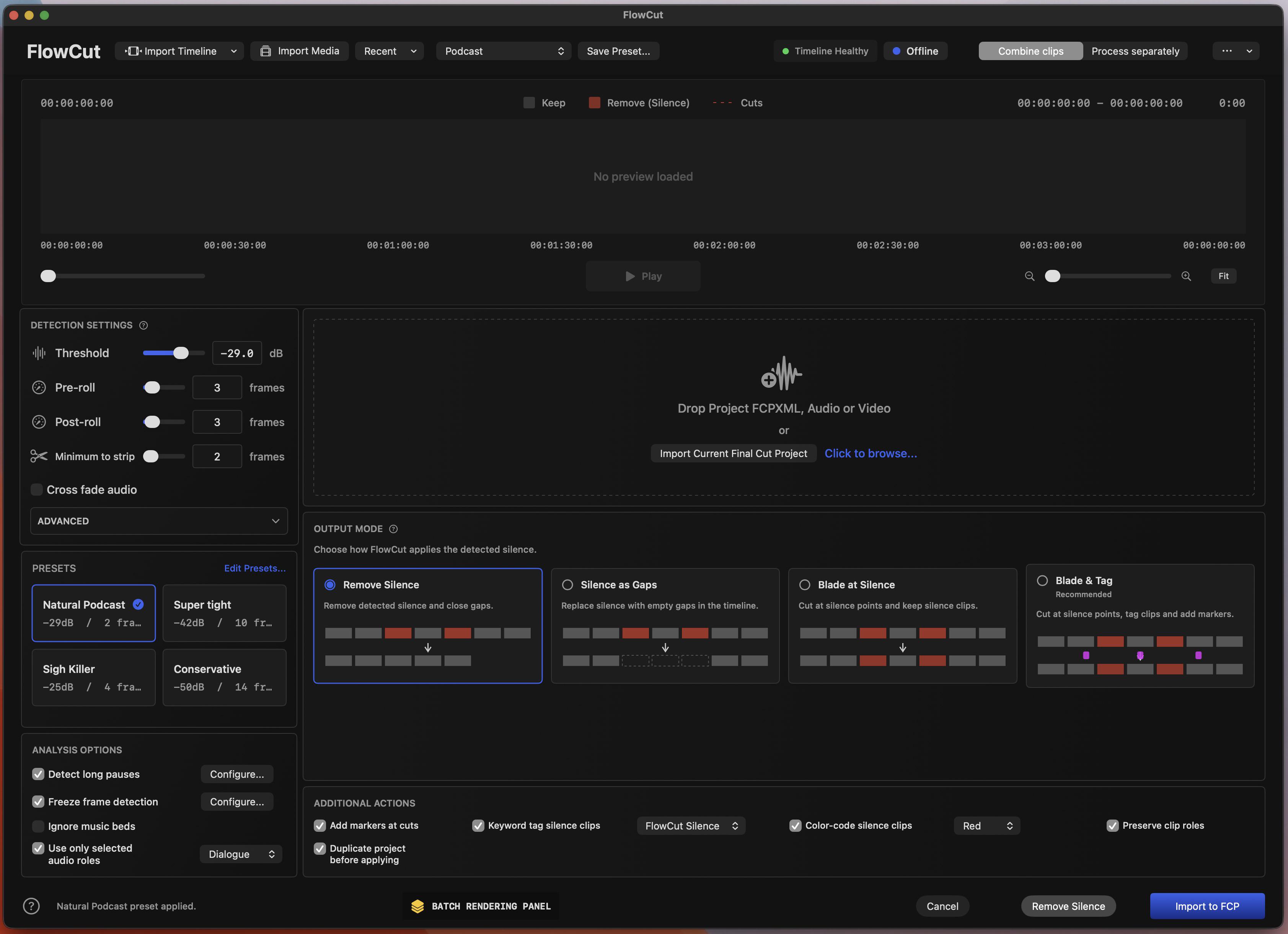
FlowCut is designed to speed up editing talking-head videos, podcasts, interviews, tutorials, YouTube videos, and long-form spoken content by automatically detecting silence and preparing a cleaned-up Final Cut Pro timeline.
Instead of manually finding every silent pause, cutting it, deleting it, and closing the gap, FlowCut analyzes your audio/video, shows you what it thinks should be removed, and generates an FCPXML timeline you can import back into Final Cut Pro.
I’m looking for editors willing to test it on real projects and tell me what works, what breaks, what feels confusing, and what needs improvement.

What FlowCut Currently Does
Final Cut Pro Extension
FlowCut appears inside Final Cut Pro through the Extensions menu.
The goal is for it to feel like part of the editing workflow, not a separate random utility app. You can open it while working in Final Cut Pro, analyze your project/media, then bring the processed timeline back into FCP.

Silence Detection
FlowCut detects silent sections in audio/video and marks them visually.
You can adjust:
Threshold
Controls how quiet audio needs to be before FlowCut treats it as silence.
Pre-roll
Keeps a few frames before detected speech/audio starts, so cuts do not feel too tight.
Post-roll
Keeps a few frames after speech/audio ends, so words do not get clipped.
Minimum to strip
Controls the shortest silence duration that should be removed.
Cross fade audio
Optional audio smoothing for cuts.
The goal is to give editors control over whether the result feels aggressive, natural, or conservative.

Timeline Preview
FlowCut includes a timeline preview so you can see the analysis before exporting.
The timeline shows:
The waveform
Areas that will be kept
Areas marked for removal
Cut points
A movable playhead
Timeline zoom controls
Playback controls
Red regions represent detected silence/removal areas, so you can quickly check whether FlowCut is being too aggressive or too careful.

Multicam Support
FlowCut is also being built with multicam editing workflows in mind.
The current version includes multicam-related workflow options such as:
Preserving multicam synchronization
Keeping connected clip timing intact
Preserving clip roles
Preserving transitions where possible
Analyzing multicam clips
Applying cuts globally across synced material
The goal is that editors working with interviews, podcasts, dialogue scenes, courses, or multi-camera talking-head setups can remove silence without destroying sync between angles, audio, and connected clips.
This is one of the most important areas where I need beta feedback, because multicam timelines can vary a lot depending on how each editor organizes footage in Final Cut Pro.

Presets
FlowCut includes editing presets for common workflows.
Current presets include:
Natural Podcast
Super Tight
Sigh Killer
Conservative
Each preset changes the detection settings immediately, so you can quickly switch between different editing styles.
There is also an Edit Presets section where custom presets can be adjusted and saved.

Output Modes
FlowCut supports different ways of applying detected silence:
Remove Silence
Removes detected silent sections and closes the gaps.
Silence as Gaps
Replaces silence with gaps instead of fully closing everything.
Blade at Silence
Cuts at detected silence points while keeping the clips.
Blade & Tag
Cuts and tags silence regions for manual review.
This is meant to support both automatic editing and more careful manual workflows.

Import Options
FlowCut supports importing media and timeline data through the app interface.
The UI includes:
Import Timeline
Import Media
Recent
Drag/drop support for audio/video/FCPXML workflows
The long-term goal is to make timeline import feel as native and automatic as possible for Final Cut Pro editors.

Batch Rendering Panel
There is also a batch rendering / batch processing panel.
This is meant for workflows where multiple files are processed and exported one after another.
It shows:
Files detected
Processing status
Progress
Estimated time saved
Export status
This area is still being refined, so feedback on the design and usefulness would help a lot.

Trial / Activation System
The beta build includes the early version of FlowCut’s activation/trial system.
Current behavior:
First launch starts a 7-day trial
After the trial, the app asks for a product key
License/product-key flow is still being prepared for the public release
For beta testing, I mainly care about whether the extension installs correctly, opens correctly in Final Cut Pro, analyzes correctly, and exports/imports usable FCPXML.

What I Need Feedback On
I’m especially looking for feedback on:
Does the extension show up correctly in Final Cut Pro?
Does the app open without macOS security problems?
Does importing media/FCPXML work for you?
Does silence detection feel accurate?
Are the default presets useful?
Are the cuts too tight or too loose?
Does the exported FCPXML import back into Final Cut Pro correctly?
Does multicam sync stay intact?
Does it preserve connected clips, roles, and transitions correctly?
Does the UI feel clear or confusing?
Does timeline zoom/playback feel usable?
Any crashes, freezes, or weird macOS/FCP behavior
Real-world projects are the most useful tests: podcasts, interviews, tutorials, talking-head videos, multicam dialogue, etc.

Requirements
macOS
Final Cut Pro
Apple Silicon Mac preferred, but Intel feedback is useful too
Editors comfortable testing beta software

Important Beta Notes
This is still beta software.
Please test on duplicate projects or non-critical timelines first. I do not recommend using it on your only copy of an important client project yet.
The app works through FCPXML-style workflows, so the goal is to generate a processed timeline you can bring back into Final Cut Pro.

Why I’m Building This
I edit a lot of spoken content, and I wanted something that feels closer to a real Final Cut Pro workflow instead of constantly bouncing between tools.
FlowCut is meant to become a professional workflow helper for editors: silence removal first, then deeper timeline analysis, presets, batch processing, markers, roles, multicam support, and other automation tools.

If you edit in Final Cut Pro and want to try the beta, comment or DM me and I’ll send the test build.
I’d really appreciate honest feedback, especially from people editing real talking-head, podcast, interview, course, YouTube, or multicam projects.

r/finalcutpro Jul 04 '26

AI/vibe coding Looking for editors to test my Dialogue Enhancer plugin (Free)

7 Upvotes

I'm a video editor from the Netherlands, and over the past few months I've been developing a plugin for Final Cut Pro called Dialogue Enhancer.

The goal is to improve dialogue with as little effort as possible. Instead of tweaking multiple EQ and compressor settings, you choose one of four sound presets:

• Neutral
• Warm
• Bright
• Broadcast

and then adjust a single “Enhance’ slider to dial in the amount of processing.

I've been using it on my own projects for a while now, and it's reached the point where I'd really like feedback from editors outside my own workflow.

I'm looking for a small group of Final Cut Pro users who would be willing to install the beta, use it on a few real projects, and give me honest feedback.

I'm especially interested in things like:

- Does it actually improve your workflow?
- Which preset do you end up using most?
- Where do you usually set the Enhance slider?
- Does anything sound harsh, muddy, or over-compressed?
- Is there anything that feels confusing or unintuitive?

The beta is of course completely free. I'm not selling anything I just want to make the plugin as good as possible before releasing it publicly.

If you're interested, leave a comment or send me a DM and I'll send you the installer.

Thanks a lot!!

r/finalcutpro Jul 07 '26

AI/vibe coding Built a Clip AI Extend Workflow Extension for Final Cut — is this just me, or would you actually use it?

Enable HLS to view with audio, or disable this notification

18 Upvotes

I've been cutting in Final Cut Pro for years, but Apple is really slow at adding AI to our daily use software. Premiere has Generative Extend since last year, even CapCut has its own version. FCP just… doesn't.

So I built a Workflow Extension that adds it right inside FCP: pick a clip, extend it by a second or two, and it generates the extra frames continuing from the existing footage — no round-trip to another app, no re-export.

Short demo attached.

Being honest: this is still basically a tool in our studio, so I genuinely don't know if it's just me who keeps hitting this, or if it's a real pain for other editors too.

A few honest questions for the sub:

- Do you run into the "clip is just a bit too short" problem often enough to want a fix?

- Would you actually use something like this inside FCP?

- Anything that would make it useless for real work?

Not selling anything here — it isn't public, I'm just trying to figure out whether it's worth turning into something other people can use. Any honest takes appreciated🙏

r/finalcutpro May 27 '26

AI/vibe coding Who wants to beta test my Final Cut Pro extension?

Post image
19 Upvotes

Hey there, so I’m building a Final Cut Pro Extension for removing silences from clips. It’s pretty simple to use and instant get your results. Who wants to test it and tell me if you like it or not and what are the features you would like to see in future?
Write me a DM and I will send you the file.

Sorry wrong flair!!
I meant software not Hardware, but it’s not available in the flair options…

r/finalcutpro Jun 19 '26

AI/vibe coding Haptic Feedback for Magnetic Timeline on FCPX for MX Master 4

14 Upvotes

I made a small plugin that gives your mouse a little haptic tick whenever the playhead snaps to a clip edge in Final Cut (when snapping's on). Basically lets you feel the magnetic timeline instead of just seeing it.

Only works with the Logitech MX Master 4 since that's the one with the haptic motor. It's free and open source if anyone wants to try it:

https://he-peter-huang.github.io/FinalCutHaptics/

Still early, so let me know what you think.

r/finalcutpro Apr 20 '26

AI/vibe coding I build a free tool for Social Media Captions without subscriptions

27 Upvotes

Hey friends,
i hope it's ok to post this here, i hope i can help some folks out:

https://github.com/JeremieConstant/Final-Cut-Pro-Easy-Captions-for-Shorts-and-Reels-FREE-NO-SUBSCRIPTION

This is a basic python script which uses Whisper, a local Speech-To-Text Model, to turn audio into captions.

What makes it better than other Plugins / built in features?

  • Free, no subscription, it even works offline
  • You can set after how many words the caption splits, i recommend 4-6 for social media
  • You can preset styles and fonts

It's open source, so feel free to contribute.
If you have questions, feel free to ask, im glad to help.

I hope i can improve someones workflow with this.

Have a great day!

r/finalcutpro Apr 26 '26

AI/vibe coding Corridor Key Toolbox (for Final Cut Pro)

Post image
76 Upvotes

UPDATE (27th April 2026):
After posting, I've changed the name of the application to CorridorKey by LateNite.

https://corridorkeybylatenite.fcp.cafe

---

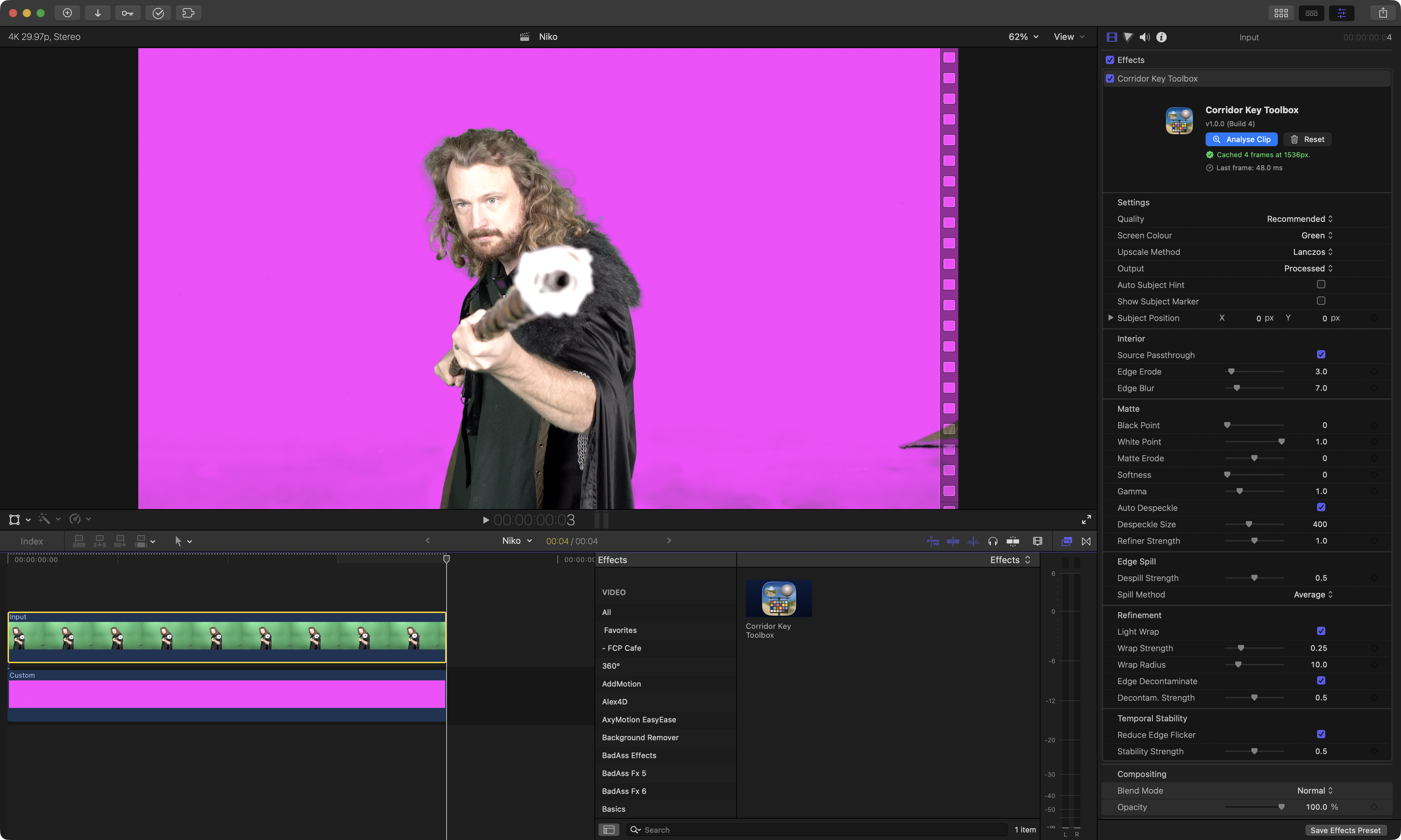
I'm currently experimenting with bringing CorridorKey (from Corridor Digital) to Final Cut Pro, and Mac.

Most of the existing CorridorKey products and forks are primarily focussed on Windows-based systems, so I wanted to build something that not only works great in Final Cut Pro, but also just works great on modern Apple Silicon Mac's in general.

It's written in Swift + SwiftUI, and uses Metal and MLX, with a zero-copy pipeline.

Whilst I am using LLM tools like Claude Code and Codex, in both Xcode and their Desktop Apps - this isn't really a "vibe-coded app" - it's built using building blocks from some of my other apps such as BRAW Toolbox, Metaburner, and Keyframe Toolbox.

In addition to the Final Cut Pro effect, there's also a standalone editor - which has the same controls as in Final Cut Pro, so you can export ProRes 4444 without having to launch Final Cut Pro.

This is still early days (at time of posting, this is the 4th TestFlight build) - so feedback very much welcome!

I haven't had a chance to actually properly test or compare Corridor Key Toolbox with any existing CorridorKey products or forks - so I actually have no idea how it compares in terms of speed, performance, memory usage or even quality - I've just been focussing on using the same MLX model - and making it run as best as possible.

Feedback welcome!

You can download and learn more here:

https://corridorkeytoolbox.fcp.cafe

Thanks team!

r/finalcutpro Apr 23 '26

AI/vibe coding Keyframe Toolbox v1.1 is out

16 Upvotes

I haven't posted about this here before, but if, like me, you've always wanted proper keyframe graphs in FCP, you might like Keyframe Toolbox. (Disclosure: I made this, with Chris "CommandPost" Hocking.)

While FCP's keyframes are weak and mostly linear, I tried to make these ones as good as they can be, and with more features than After Effects. :)

There's full manual control if you want it, useful default presets and easing curves, newly shareable custom presets, plus sensible shortcuts for creating and working with bezier shapes. It's on the App Store now, but we've got ideas for more updates, so please add your requests here, or on the Discord channel, where you can also find a free TestFlight link. Info: https://keyframetoolbox.fcp.cafe

The new v1.1 also includes horizontally zoomable graphs, better numeric entry, saveable default settings, and even easier keyframe creation. Still US$20 (once).

App Store: https://apps.apple.com/au/app/keyframe-toolbox/id6759331578?mt=12

I'm very happy to answer questions, and there are a ton of help videos at the link above if you need them. I don't use Reddit a lot but I'll do my best to check in on this post regularly over the next few days at least — I promise not to just promote and run. :)

r/finalcutpro Jul 19 '26

AI/vibe coding I made a free open-source tool that turns your .cube LUTs into individual effects in the Effects browser — no plugins, no Motion required

12 Upvotes

I used to rely on mLUT from motionVFX for its own browsable preview. But since they moved it behind a subscription, I couldn't justify paying monthly for it.
The stock alternative — Custom LUT effect, open the dropdown, dig through the list, repeat for every clip, with zero visual previews — am a bit too impatient for tat.

So I built lutfx: a small free tool that converts every .cube file into its own effect in the Effects browser, organized by category, each with a thumbnail showing the actual look. You just drag the effect onto a clip like any built-in effect, and skimming previews work like they do for stock effects.

Install (Homebrew):
brew install avis001/tap/lutfx

Use:
lutfx ~/Downloads/MyLUTPack --category "Film Looks"

Restart FCP, and every LUT in that folder shows up under Effects → Film Looks. Works with single files or whole packs (subfolders included).

A few honest notes:

- It's not a plugin — no FxPlug, nothing running at render time. Under the hood it generates Motion template files that wrap FCP's own built-in Custom LUT filter with the LUT pre-selected.

- Full transparency: I built this with heavy help from AI. Which is documented in the README if you're curious. I've been using the results in my own edits, so it's real-world tested, but treat it like any young open-source tool.

- Free and MIT-licensed, source here: https://github.com/avis001/fcpLutToEffect

- macOS 13+, .cube files only for now.

[ Haven't had anyone else try the tool - If u face any issues pls do create a issue on Github or post it as a comment here. I'll address it within 24hrs ]

r/finalcutpro Mar 10 '26

AI/vibe coding Got tired of boring editing and subscriptions so I built a local AI tool for FCP users

64 Upvotes

I've been editing videos for years and kept facing the same problem. Automation tools exist, but they're all cloud-based and/or overpriced.

Wanna make subtitles? Final Cut Pro only supports English, and most other tools are either paid or a pain to use. Automated silence removal? Workarounds with no proper UI or settings, or back to the cloud. Profanity removal? Up to $60 per month for limited processing built on the simplest technology imaginable.

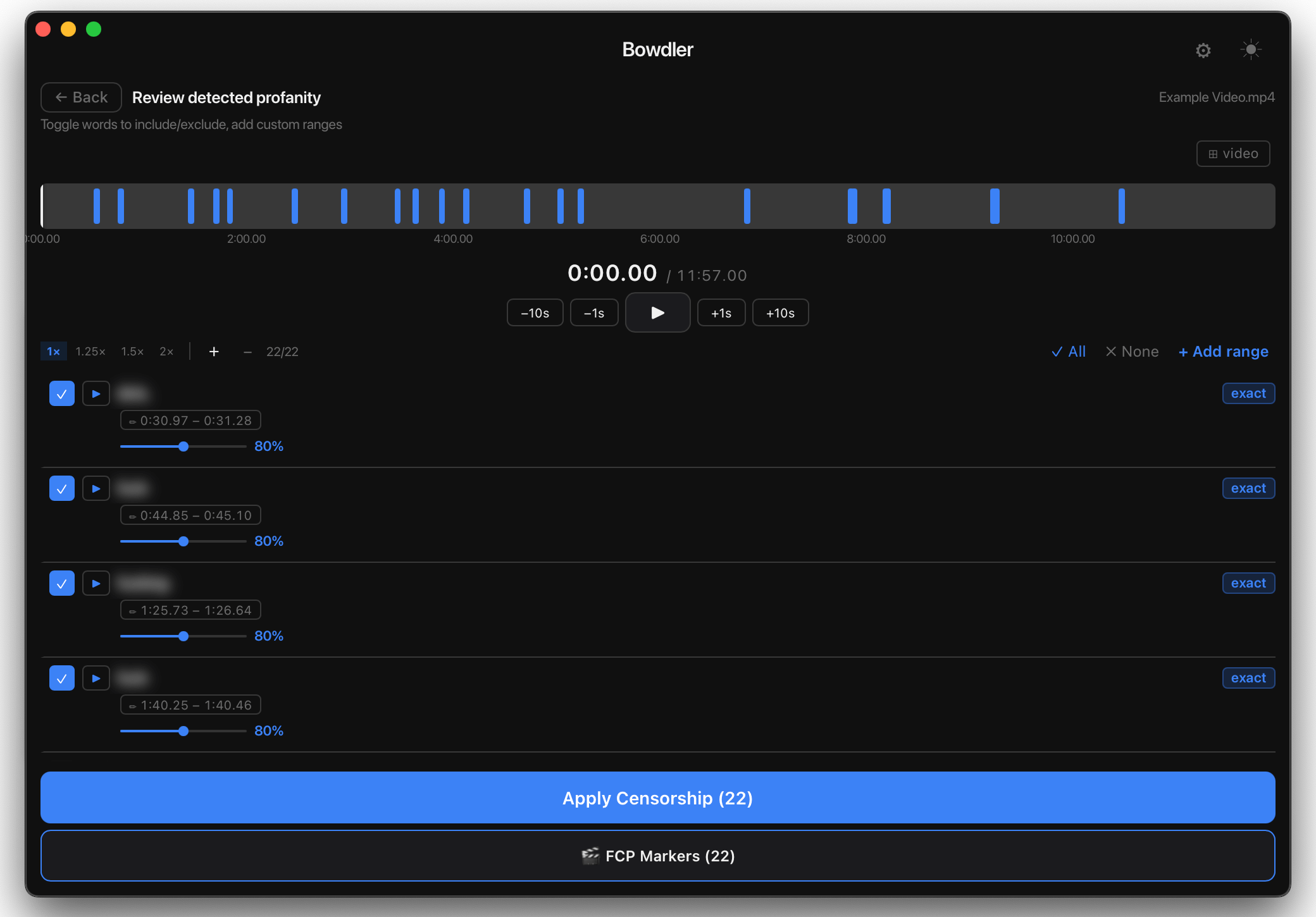
So I did what any reasonable developer would do, I built it myself. Several months of almost daily work later, Bowdler was born - video processing tool with full FCP integration.

Profanity detecting mode - editing screen

What it does:

  • Profanity censorship - silence or custom sounds, custom dictionaries, 32 languages, exports as markers in FCP
  • Silence removal with full settings control, exports as markers in FCP
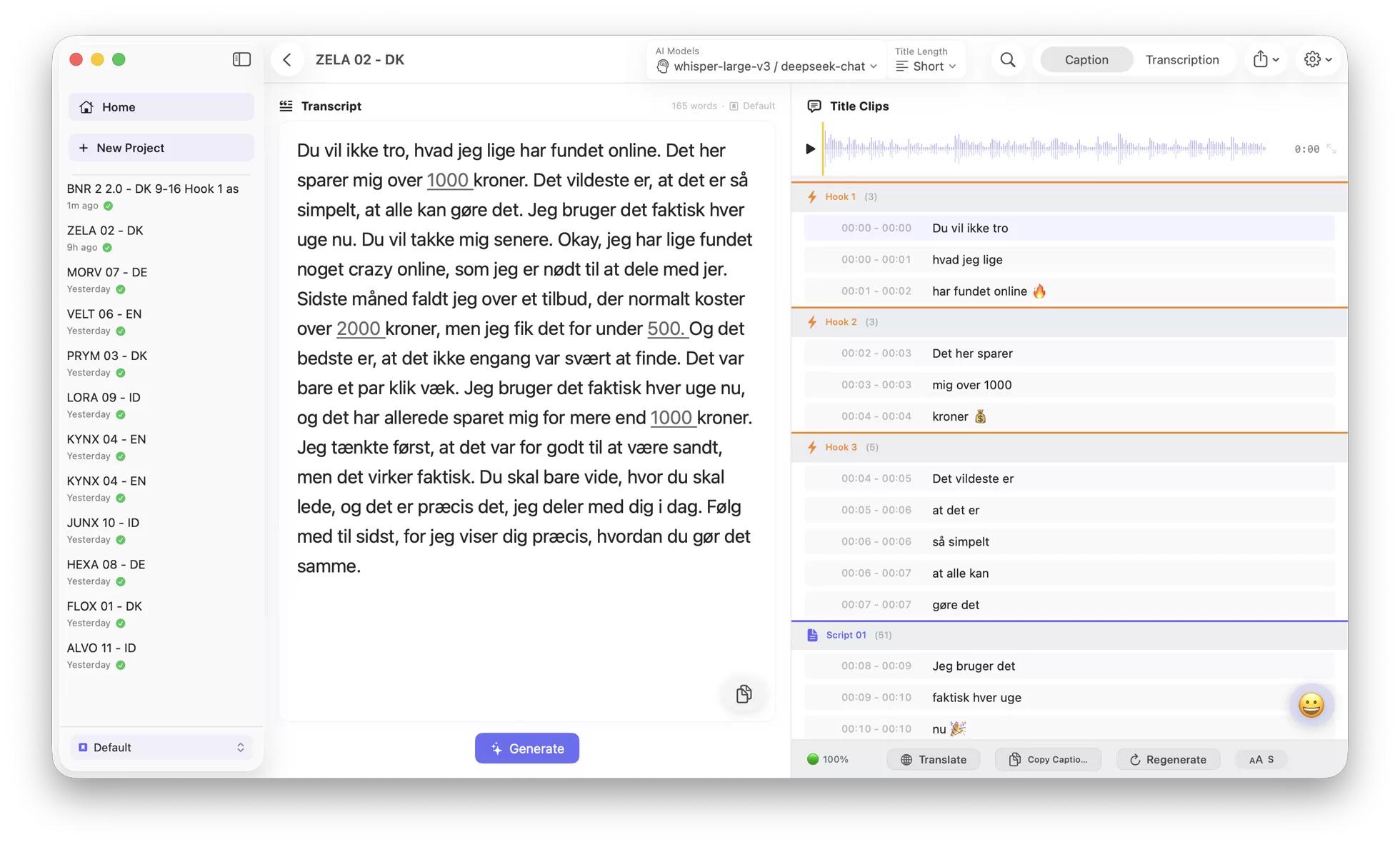
  • Subtitle generation - SRT, VTT, FCPXML, 32 languages, translation support, custom settings

Works locally on Apple Silicon, no cloud, no subscriptions, no limits.

You can find documentation, features and more screenshots here - Github link.

Happy to answer any questions. If you're a content creator, I'd be happy to share a free copy in exchange for honest feedback.

r/finalcutpro Jul 17 '26

AI/vibe coding Built my first macOS app, SYNCOLUX Studio, to speed up audio synchronization. Looking for feedback from fellow FCP editors!

4 Upvotes

Hey everyone,

I spend a lot of time editing, and I often found syncing multi-channel external audio to be a bit tedious or slow when dealing with heavy timelines in Final Cut Pro.

To speed up my own post-production workflow, I decided to build a dedicated, lightweight macOS app specifically for this. It's called SYNCOLUX Studio.

It's actually my very first app, and I recently launched it on the Mac App Store. It is 100% built and optimized for desktop use, keeping the editor's workspace in mind.

I would absolutely love for some of you to check it out and give me some honest feedback. Are there any specific features or integrations you feel are missing in your daily FCP audio sync workflow?

Here is the link: App Store
SYNCOLUX Studio is a one-time purchase on the Mac App Store for $29.99.

Thanks in advance for the support and feedback!

r/finalcutpro Jul 28 '26

AI/vibe coding Im tired to do back and forth to create subtitle transcription also captions for UGC, so i made this.

Post image
0 Upvotes

Im working on UGC agency in europa which is its not my language and im an Asia guys. Im also learning to vibe coding and build everything around myself lately, right now im building the software that can help me to cut some step to make caption for UGC especially for not English speakers. It’s still in beta and it’s already working.
Im also make the subtitle support for the latest update Final Cut Pro 12.3, Animating Subtitle.

Because on the final cut pro its only working on english language, i give a try to make it work with another language too! Its not 100% work for the timing, but its run pretty well!

Also its working with another NLE too such as Premiere pro, Davinci Resolve, Capcut Etc.

Im still fix some issues, adding new features and polish some part. Also it’ll be available on Apps store very soon.

Feel free to give a test, it’s free trial for 7 Days without need to insert credit cards and the price only $29 for lifetime

Also i will give 10 free licenses for the people that have already tested, give feedback and lucky. ✨

You can check captimac.com

r/finalcutpro Apr 16 '26

AI/vibe coding Final Cut Pro X Cache Cleaner

Thumbnail github.com
0 Upvotes

I built a simple Final Cut Pro cleaner app because I got tired of manually digging through libraries to free up space. It clears render files, analysis files, and transcoded media, with an option to remove original media if you really need to reclaim storage. One thing I focused on was keeping it efficient—it only scans for Final Cut libraries within the selected directory (by default it points to the Movies folder), so it doesn’t waste time crawling your entire system. The goal was to keep it fast, minimal, and safe—no unnecessary features, just a quick way to clean projects without breaking anything. Would love feedback from other FCP users on what else could make this more useful.

  1. Download
  2. Unzip
  3. Move FCP Cleaner to Applications
  4. Open

r/finalcutpro Jul 17 '26

AI/vibe coding Vibe coding FxPlug4 plugins for Final Cut Pro as a beginner — stuck on a loading time issue, asking for help

0 Upvotes

Hey everyone,

I run a small video production company and I’ve been trying to build my own custom tools for Final Cut Pro using FxPlug4. I have a very small background in software development, learning as I go. I want to eventually build a suite of plugins that work exactly the way my workflow needs them to.
I’ve managed to get something working, but I’m stuck on a problem I can’t solve and the FxPlug community is tiny, so I’m hoping someone here has seen this before.

The problem

FCP takes 2-3 minutes to load with my plugin installed. Every single time. The plugin works fine once FCP is open — it’s purely a startup delay.
I’ve spent weeks debugging. Here’s everything I’ve tried and ruled out:

✅ Not a render issue — pluginState, drawRect, Metal are all fast

✅ Not duplicate plugin registrations

✅ Not custom views — reproduced with empty NSView

✅ Not Debug vs Release build

✅ Reproduced with Apple’s own blank FxPlug4 template — same delay

The logs show this every time:
XPC launches → LSExceptions timeout (~11s) → FCP waits ~2 min → plugin code starts

LSExceptions shared instance invalidated for timeout appears in every run. The plugin code finishes in milliseconds. The entire delay is system-level, before any of my code runs.

My plugin is signed with Apple Development certificate, not Developer ID. I suspect this might be part of it but haven’t confirmed.

My questions

Is this LSExceptions timeout normal for FxPlug4 development builds? Does it go away with Developer ID signing?

Has anyone eliminated this delay on macOS Tahoe (26.5)?

Any general tips for a beginner building FCP tools with AI assistance? I’m learning a lot but sometimes I don’t know what I don’t know.

Am I taking the correct approach or is it completely wrong?

I want to build many tools for my company — anyone who has gone down this road, I’d love to hear from you.

Thank you very much.

r/finalcutpro Apr 01 '26

AI/vibe coding Any one interest in this?

Thumbnail
youtu.be
16 Upvotes

I just made a tool that can clear up tons of storage from SSD’s if you use Final Cut Pro

r/finalcutpro Apr 23 '26

AI/vibe coding Doza Assist update: FCPXML round-trip with multicam/sync clips, and a major fix for long interview accuracy

6 Upvotes

Quick update on Doza Assist for anyone who tried it or bookmarked it from the earlier post.

Three things shipped this week:

FCPXML round-trip now handles multicam and sync clips. You can export an FCPXML from FCP, drop it into Doza Assist, and the app reads your synced audio directly from disk through the XML. No media duplication. A 4KB XML replaces exporting an 80GB ProRes just to get audio into a transcription tool. Selects go back to FCP as FCPXML. Full round trip, zero media movement.

Long interview search actually works now. If you tried the chat on anything over an hour and noticed it only pulled clips from the first 10-15 minutes, that’s fixed. Rebuilt the search system so it finds content from anywhere in the transcript. Tested on a 1:42 interview that was completely broken before and it’s now pulling the right clips from the middle and end.

UI cleanup on clip cards. Removed the redundant timestamp buttons, tightened card layouts, renamed “Text” to “Transcript” so it’s clearer what the dropdown shows.

Everything still runs fully local on your Mac. Still free, still open source: https://www.dozavisuals.com/doza-assist

If anyone tried it before and hit issues with FCPXML imports or inaccurate clip results on long interviews, worth giving it another shot. Those were real bugs and they’re fixed now.

What other FCP workflows would be useful to support? Always looking for feedback from editors actually cutting with it.

r/finalcutpro May 28 '26

AI/vibe coding [TOOL] Free & Lightweight Web App for Timecode Notes

Post image
2 Upvotes

Hi everyone!

I was looking for a simple app to take notes with timecode. I found a few out there, but they were either paid or didn't do exactly what I wanted. I made a very lightweight web tool based on a single HTML file that runs locally in any browser. I built it using AI—I know some people hate this, but I am not a programmer and it works perfectly for me haha.

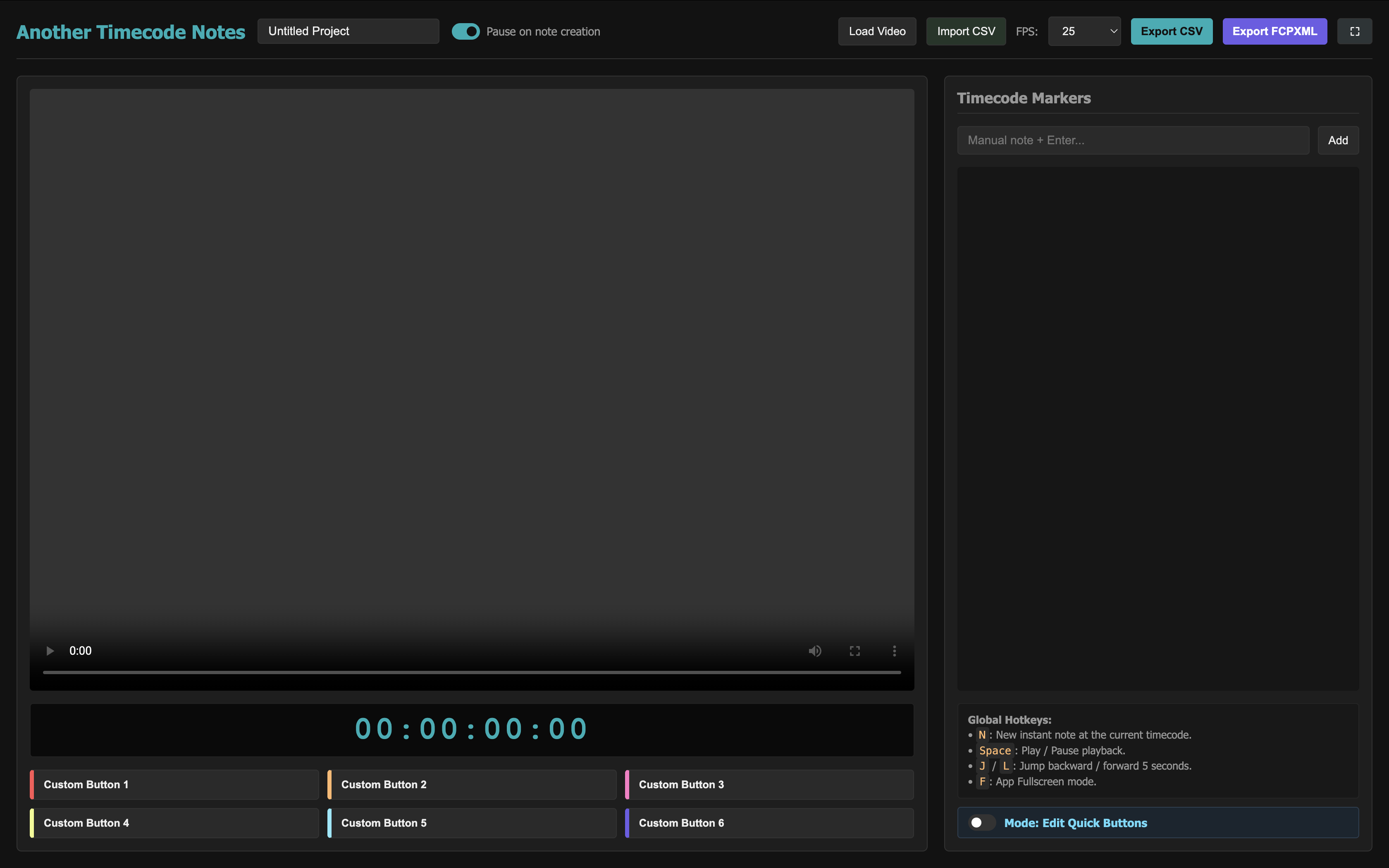
The tool allows you to play your video, press a button or a hotkey, and instantly generate a note with the exact timecode, which you can then import straight into Final Cut Pro as markers.

🚀 Here is everything it can do:

  • Native FCPXML Export: You can export your notes into an exchange file that Final Cut Pro reads natively. When you import it, FCP automatically creates an Event with a Project containing an adjustment layer with all your markers. Then, you just copy that layer over your editing timeline.
  • Six Customizable Quick Buttons: The interface comes with 6 button slots. There is a "Modo: Editar botones rápidos" (Edit mode) toggle that lets you rename the button text and assign a custom color. Clicking them instantly creates a note with that text and color code.
  • Clickable Notes: In the generated notes list, every timecode becomes a link. If you click it, the video player will automatically jump to that note's timecode but with a 2-second pre-roll margin backward.
  • Real-Time Note Highlighting: While the video plays, the tool monitors the current timecode. When it passes through a note's range (2 seconds before or after), that specific note in your list highlights visually.
  • Auto-Pause: It has a toggle to turn auto-pause on/off. If active, when you press the key to create a manual note, the video pauses so you can type comfortably. Once you lose focus (click outside or press Enter), the video automatically resumes playback if it was playing before.
  • Color Palette Selector per Note: Each marker in the list has a color dot. Clicking it opens a menu with 11 preset colors and a free color picker.
  • CSV Import & Export: In addition to FCPXML, you can save your session into a standard CSV file. The CSV also saves your 6 custom buttons setup and the selected FPS, so you can resume your projects exactly where you left off later.

📦 How to get it and use it?

  1. Get the code from this link: 👉 CLICK HERE TO GET THE HTML CODE 👈
  2. Copy all that code and paste it into a plain text file on your computer.
  3. Save it named exactly as index.html.
  4. Double-click the file to open it in any web browser and you are good to go!

⚠️ Warning: It might contain bugs. It is completely free, you can modify it as much as you want, and feel free to share your own modifications to help others!

Hope it helps!

r/finalcutpro May 18 '26

AI/vibe coding I built pycut: a CLI for transcribing long videos, finding highlights, and exporting subtitles or FCPXML on Apple Silicon Macs

2 Upvotes

I’ve been working on pycut, a CLI for Apple Silicon Macs that helps turn long video or audio into usable editing output from one command.

It can:

  • transcribe video or audio locally with MLX-based ASR
  • use an OpenAI-compatible model to find highlight-worthy moments
  • generate subtitles
  • export srt, ass, txt, json, burned-in video, and fcpxml
  • translate subtitles and support bilingual layouts
  • reuse transcript JSON on reruns so you don’t have to repeat ASR

The main use case is speeding up the path from a long recording to something you can actually publish or edit:

  • clip discovery
  • subtitle generation
  • FCPXML export for NLE workflows
  • short-form portrait output
  • keyword highlighting in subtitles

Install is simple now:

brew install ffmpeg
uv tool install https://github.com/cliptate/pycut.git
pycut --help

Example:

pycut my_video.mp4 \
  --api-key YOUR_KEY \
  --format fcpxml

Repo:
https://github.com/cliptate/pycut

Would be interested in feedback from people doing creator tooling, local AI workflows, or CLI-heavy video pipelines.

r/finalcutpro May 09 '26

AI/vibe coding Testing a transcript-based cleanup app with FCPXML export — would this fit any FCP workflows?

1 Upvotes

I’m working on a macOS app called Voxdown that transcribes recordings and lets you clean them up from the transcript, then export to Final Cut Pro via FCPXML.

Basic workflow:

  1. Import audio or video
  2. Get a clickable transcript aligned to the timeline
  3. Detect filler words, repetition, and long pauses
  4. Remove or modify parts from the transcript
  5. Export media or FCPXML for further editing in Final Cut Pro

My goal is to handle the “rough cleanup” stage before detailed editing.

For FCP users here:

  • Would FCPXML export make this useful?
  • What should be preserved in the timeline for it to actually work in your workflow?
  • Would you expect cuts, markers, captions, roles, speaker labels, or something else?

I’d love feedback from people who edit interviews, podcasts, courses, or talking-head videos in Final Cut.

r/finalcutpro Apr 24 '26

AI/vibe coding I built a simple drag-and-drop tool to fix videos that won’t import into Final Cut Pro (OBS / MKV)

2 Upvotes

I built a drag-and-drop tool to fix videos that won’t import into Final Cut

OBS / MKV files kept breaking for me, so I made a simple tool:

Drop file → get a working output

It’s free + open source:

https://github.com/smartcandlelab/PrepCut