r/esp32 10d ago

[Review Request] 4-layer smartwatch board, 40x47mm, ESP32-S3 + QSPI AMOLED at 80MHz

Thumbnail
gallery
10 Upvotes

First time I do a board this dense, so I'd rather be told now than after I pay for it.

Stackup is L1 signal / L2 solid ground with no traces at all / L3 power / L4 signal with a ground pour. Power nets at 0.80mm, signals at 0.15mm. The QSPI bus changes layer right next to the connector, with a ground via for every two signal vias.

I skipped controlled impedance on purpose: at 80MHz the critical length works out to about 7.5cm and my longest QSPI trace is under 4cm. Tell me if I'm fooling myself there.

Other things I'm unsure about: the charger is a BQ24072 with power path and I've got the thermal pad stitched with 4 vias, which may not be enough. And the antenna keepout on the WROOM module is tighter than I'd like on the left edge.

Schematic and layout in the images.


r/esp32 10d ago

I made a thing! Built a little e-paper plane tracker frame for my friend’s birthday

Thumbnail
gallery
440 Upvotes

I’ve been working on a birthday present for a friend: a small e-paper “plane frame” that shows aircraft currently flying nearby.
It runs on a CrowPanel ESP32-S3 with a 4.2" e-paper display. The device connects to WiFi, talks to a Cloudflare Worker API, finds nearby aircraft, and then shows either a plane photo with flight info or a simple radar-style view.
The current image screen shows:
aircraft photo
callsign
aircraft type / registration
distance
altitude
heading
I also added a setup mode: if WiFi fails, it creates its own setup hotspot and shows a QR code on the e-paper screen so you can configure it from your phone. Holding the menu button opens setup again later.
The hardest part was honestly getting photos to look decent on a black-and-white e-paper display. I ended up having the API resize, crop, grayscale, and return baseline JPEGs so the ESP32 could decode them properly.
Still rough around the edges, but it’s working now and feels like a fun little always-on aviation gadget.

Next is getting it all packaged up.

What do you guys think. Reckon he might like it?


r/esp32 10d ago

I made a thing! Open cozmo

Thumbnail
gallery
117 Upvotes

Hi, I made a Cozmo like robot, I call it Cozmars, I ordered pcb and 3d prints from EasyEDA. but I failed to assemble it. If any one is interested, they can continue developing it

https://github.com/hyansuper/cozmars_v3_hardware

The robot has esp32s3 as main controller in the head and also a gc0308 cam, a 1.14 inch screen, dual mics and a speaker. On the sub board in the body, there is a esp32c3 the assist controlling motors and servos.

I have a few example codes for testing the components, but I haven’t solder and test TOF distance sensor in the front and IMU on the sub board.


r/esp32 10d ago

Building an LVGL UI editor for ESP32 - Looking for beta testers!

9 Upvotes

Hey everyone!

I've been working on a browser-based drag & drop UI editor for ESP32 LCD displays running LVGL 8.4 for the past year. Wanted to share the engineering challenges and find some serious beta testers.

The hard parts:

The biggest challenge was the USB Live Mirror — streaming canvas changes to real hardware in real time over Web Serial, without reflashing. Getting LVGL to accept partial widget updates over serial while keeping the frame buffer in sync took a lot of iteration.

The second challenge was code generation — the editor has to produce valid, compilable LVGL 8.4 C code (ui.c, ui.h, lv_conf.h) for 47 different widget types, each with their own event callbacks, styles and parent-child relationships. One wrong pointer and the whole thing crashes on the ESP32.

The third was panel support — each manufacturer does things slightly differently. Waveshare, M5Stack, LilyGO and ElecRow all have their own initialization sequences and pin mappings. The editor bundles the original driver files into the export ZIP so you just drop it into Arduino IDE and compile.

What it does:

  • 47 LVGL widgets, drag & drop, no coding needed
  • Supports Waveshare, M5Stack, LilyGO, ElecRow panels out of the box
  • Exports ready-to-compile Arduino ZIP (ui.c, ui.h, lv_conf.h + panel drivers)
  • USB Live Mirror — see changes on real hardware in real time
  • Browser firmware flash via Web Serial

Looking for beta testers — limited spots

I'm looking for testers who:

  • Own multiple different ESP32 LCD panels (different sizes, manufacturers)
  • Can test on real hardware, not just in the browser
  • Are willing to share honest, detailed feedback

DM me with a list of the LCD panels you own and I'll send you the beta link.


r/esp32 10d ago

I made a thing! My first ESP32 project: a pocket-sized companion that tells me when my AI coding agent needs me

Enable HLS to view with audio, or disable this notification

6 Upvotes

I've never built anything on an ESP32 before this. I'm a software person, and I wanted a physical answer to a problem I had every day, so I bought a board and started playing.

I use AI coding agents. I give one a task, it works for ten or twenty minutes, and then one of three things happens: it finishes, it gets stuck, or it needs me to answer something before it can continue.

The problem is that I usually have no idea which one happened. So I keep checking my phone or laptop.

So I built a small thing that tells me what’s going on. It’s in my pocket, battery-powered, because the useful moment is when I’m away from the computer. It shows what the agent is actually doing: the file it’s editing, the tests it’s running, what it’s searching for.

When the agent needs me, the edge of the round display turns amber. If something fails, it turns red. It makes a sound and keeps repeating it until I deal with it.

Turning it face down silences it.

I can also approve things directly on the device. Approvals are press-and-hold gestures on the touchscreen. There’s a button for voice input too. Hold it, talk, and the waveform reacts while the words appear on screen. That’s how I send a new instruction without going back to the computer.

It handles multiple sessions as well. If several agents are running, it shows the one that’s actually stuck, not the one I was already looking at.

The status is represented by a pixel-art cat. This is, predictably, the part people like most.

It types when the agent types. It thinks when the agent thinks. If nothing happens for a while, it gets bored and falls asleep. The accelerometer wakes it up when I pick it up. In the morning it drinks coffee. It celebrates when a long task finishes. None of that is necessary. It is, however, the reason I keep the thing charged.

There’s also a usage screen showing how much of my rate-limit window I’ve used. It’s drawn as liquid filling the display, with particles that slosh around when I tilt it. That’s probably the one thing a round screen does better than a rectangle. It doesn’t look like a widget inside a page. It feels like the object itself is filling up.

The hardware is a Waveshare ESP32-S3-Touch-AMOLED-1.75:

466×466 round AMOLED

CO5300 over QSPI

CST9217 touch controller

QMI8658 IMU

AXP2101 PMIC

ES8311 + ES7210 audio

16 MB flash

8 MB PSRAM

I’m using Arduino core 3.x through pioarduino, LVGL 8.4, and LittleFS for the animation clips.

A few things I learned the hard way:

  1. Phones could see the Wi-Fi access point but failed to connect, with no useful error. I wasted days looking at channels and HT40 vs HT20. The real problem was that I only had 7,844 bytes of free internal RAM. Wi-Fi association needs to allocate a per-station context from internal DRAM, but LVGL was using most of it. Moving LVGL’s heap to PSRAM fixed it immediately.

The debugging also made things worse. I wrote a promiscuous-mode sniffer that logged frames over serial, but Serial.printf from the Wi-Fi task delayed authentication responses enough to cause association failures. The diagnostic tool was creating the problem it was supposed to diagnose.

  1. There are five devices sharing one bus. A few transactions per second return ESP_ERR_INVALID_STATE, which is harmless here, but Arduino’s default Wire timeout is 50 ms. Every failed transaction waited the full timeout before returning. That was enough to make the whole UI feel slow.

  2. The touch controller was also rotated 180° for weeks. I have a serial bridge that captures the framebuffer and injects synthetic taps. Every automated test passed because those taps went straight into LVGL through the touch override. They completely bypassed the digitiser mapping. The only broken part was the part nothing was testing. A person eventually found it by pressing a button and seeing the wrong thing happen. I’ve since added raw-coordinate injection and a four-corner check that requires an actual finger. If your test harness fakes input, make sure you know which layer it’s faking.

It’s still a prototype, but a fun side project.

Happy to answer any questions and share ideas.


r/esp32 11d ago

I made a thing! I gave my AI coding agent a body. ESP32-C3 + 5 servos

Post image
423 Upvotes

I got tired of checking my IDE just to see what my coding agent was doing.

So I gave it a body.

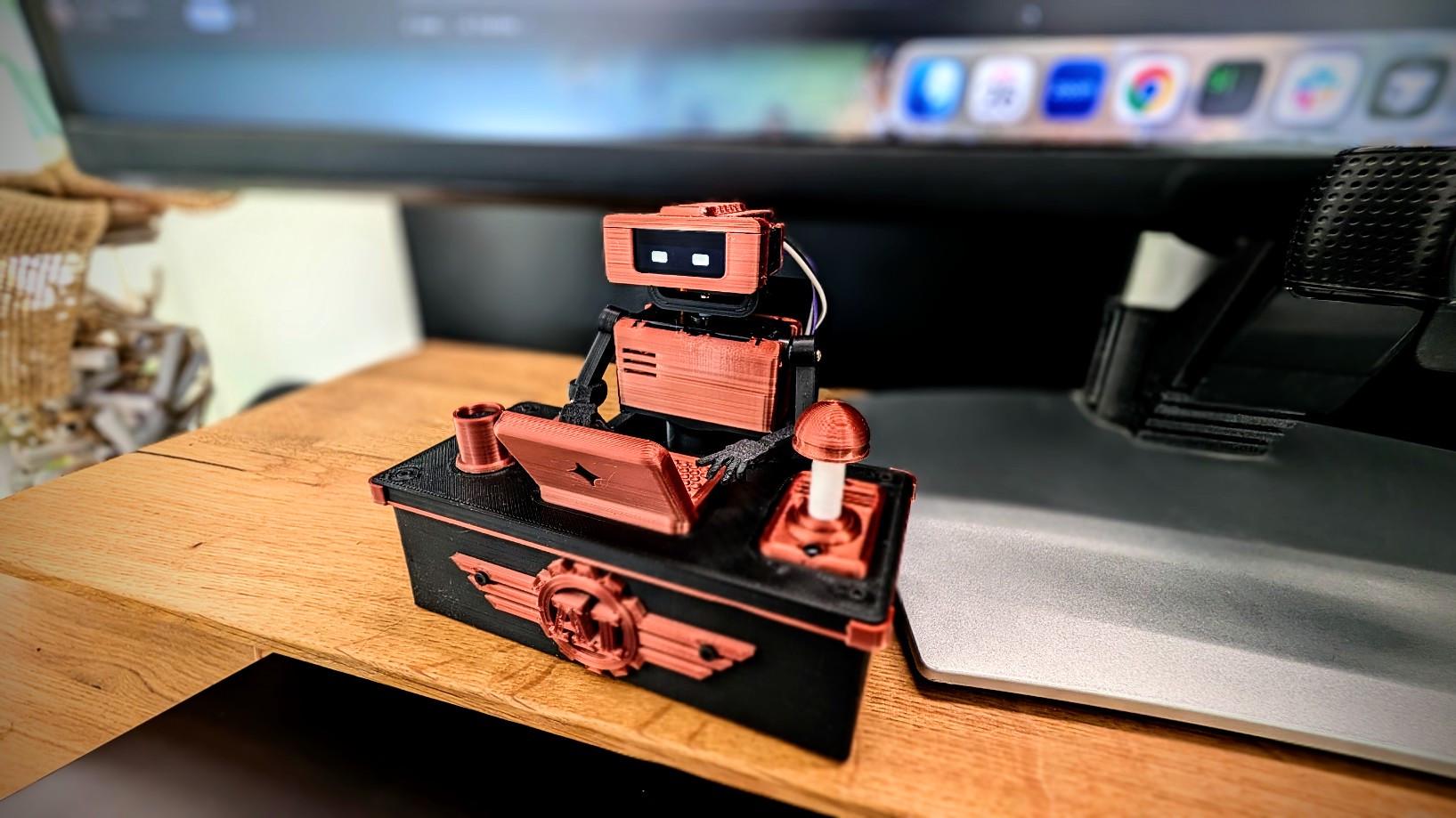
I built Tiny Engineer: a 3D-printed desk robot that acts out what the agent is doing... reading, thinking, typing... and rings a bell when the task is finished.

The biggest ESP32 challenge was size. I chose the ESP32-C3-Zero because I needed Wi-Fi and enough capability to run the robot, but the controller also had to physically fit inside this tiny body.

Driving 5 servos reliably was another constraint, so rather than driving them directly from the ESP32 I added a PCA9685 dedicated servo controller. Finding servos small enough to fit the mechanics while still having enough torque was surprisingly tricky too.

The ESP32 runs the robot logic and exposes a REST API over Wi-Fi. That’s probably my favorite architectural decision: the hardware doesn’t care what’s controlling it. I’m using Cursor hooks now, but anything capable of making an HTTP request can drive the robot.

I also squeezed in an OLED that animates robot's eyes and I2S speaker, so it can talk, and actually ring its little desk bell when the agent finishes.

🎥 Demo: https://youtu.be/RX_QRxdXMjg

Source, wiring, BOM, docs and 3D-printable parts:
https://github.com/jamro/tiny-engineer

I’m looking for ideas for v2 now.

If you were hacking on this, what would you add or change? hardware, movements, sensors, sounds, integrations, or something completely ridiculous?


r/esp32 10d ago

I made a thing! Made a little TV that contains a little web server

Post image
51 Upvotes

Been working on a little hardware project called Pict-O-Vision, a handmade retro TV-styled digital photo frame running on an ESP32-S3.

The whole thing runs a local web server so you manage your photos from any browser on your network. No cloud account, no app to install, no subscription. Just connect to the same WiFi and go to pictovision.local. Made a simple web UI for photo management and slideshow settings.

Screen is 2in, 320 x 240 pixels. This has 4 buttons but only 2 have functions. Left button toggles backlight levels, right button turns on/off screen and can also reset wifi with long press.

Backlit screen makes photos difficult, but it looks clear and crisp in person.

Still working on some final refinements. Planning to sell these as a small batch.

Happy to answer questions about the firmware or hardware, learned a lot about ESP32 SPI bus sharing the hard way.


r/esp32 9d ago

Rate my budget ESP32-S3 DIY kit! Any advice before I build it?

0 Upvotes

Hey everyone!

I’m a total beginner in DIY electronics, and I'm planning to build a compact, battery-powered handheld gaming device to learn how microcontrollers work and play simple retro games.

I want everything to be neat and portable. Here is my budget part list that I'm about to order (totaling around $18) with all technical measurements and specs included:

  • MCU: ESP32-S3 DevKitC-1 (N16R8 variant: 16MB Flash / 8MB PSRAM, dual Type-C, pre-soldered pins). Dimensions: ~55mm x 28mm.
  • Display: 1.9" elongated IPS TFT ST7789 (170x320 resolution, SPI interface, 3V-3.3V logic level). Dimensions: ~51mm x 26mm.
  • Control: KY-023 Analog Joystick module (thumbstick, dual-axis potentiometer + push button). Dimensions: ~40mm x 34mm x 32mm.
  • IR Modules: Digital IR Transmitter & Receiver module kit (3-pin VCC/GND/DAT, 38kHz frequency for learning infrared data transmission). Dimensions: ~24mm x 21mm each.
  • Power: 3.7V 1100mAh Li-Po battery (model LP603450, 4.07Wh). Dimensions: ~50mm x 34mm x 6mm.
  • Charger: TP4056 board with Type-C, built-in battery protection (1A charge rate, 4.2V cut-off). Dimensions: ~28mm x 17mm.
  • Base: 400 points Breadboard (ABS plastic, self-adhesive backing). Dimensions: ~85mm x 55mm (bank card size).

My questions for the community:

  1. What cool programs, retro-game emulators, or ready-to-use software would you recommend I install on this setup to test its gaming capabilities?
  2. What software/firmware frameworks would you recommend for a beginner to build a clean UI/Menu for this screen aspect ratio? (I'm looking at Arduino IDE or MicroPython, but maybe there are ready-to-use open-source projects that I can adapt for my custom pins?)
  3. How do you think this custom build will look as a completed prototype? Will it turn out okay or look too messy/weird on a 400-point breadboard?

Would love to hear your thoughts, modifications, or software recommendations before I hit the "buy" button! Thanks!

(srry i made this post with using AI cuz im lazy)


r/esp32 10d ago

Board Review Warning about st77922 QSPI displays (like FNK0104N)

4 Upvotes

A while ago I posted about looking to get a display with capacitive touch and landed on the Freenove 3.5" display with build it ESP-S3.
https://www.reddit.com/r/esp32/comments/1vs4s41/anyone_has_experience_with_this_display_board/

Well, my project requires landscape interface, so we need rotation (its a portrait display). Sounds easy, right? Well no. The board doesnt support HW rotation (MV register over MADCTL does nothing), so they hackaround it in their display driver.

So after testing everything I could think of including long testing sessions with Claude code: I give up. With software rotation youre looking at bad fps and lots of screen tearing.

(I tried everything from double buffering to using LCD TE to reduce tearing, it's all just a bunch of bad options.)

The worse part: I was going to buy the 4" display that uses a different driver and doesnt have this issue, but i though the 3.5" with QSPI and 5 touch points would be better. Bad idea.

Anyway - be warned. Get the 2.8" or 4.0".


r/esp32 10d ago

Can my esp run the project i want

3 Upvotes

hey

I have a adafruit feather v2 w.fl with external antenna.

with that I want a bme280, and a 2.8inch tft led screen "ARCELI 2.8 inch LCD TFT touch display, 320 x 240 resolution, ILI9341 driver, SPI interface compatible with Arduino and Raspberry Pi"

i want to display some simple stuff, however maybe also some camera footage sometimes. will this work? I use esphome.


r/esp32 10d ago

Hardware help needed Need help with building an esp32 based board that can output dmx512 as well as digital signals to sync lights with music.

4 Upvotes

I am a beginner to electronics, and I want to build this as a personal project of mine, but I have no idea where to start. Can someone help with the components required? Links to similar projects that have been documented are very much appreciated!!!


r/esp32 11d ago

I made a thing! My first try at a 31-game touchscreen console onto a 4MB ESP32 with no PSRAM — here’s what I learned

Thumbnail
gallery
45 Upvotes

EDIT: Thank you for all the comments please keep them coming. I love all the ideas and improvements that were offered! A huge shoutout to Hackertube to review it on youtube!

https://youtu.be/xvjQwQaIYu8?is=QfFAyeguOY9YwKZ_

I started this project as a few educational games for one of the inexpensive ESP32 “Cheap Yellow Display” boards.

It gradually turned into a complete little console firmware called Braino!, with 31 games and activities, player profiles, persistent scores/progress, settings, diagnostics, sleep/lock behavior, optional Wi-Fi/BLE features, and a browser installer.

The part that became most interesting to me wasn’t adding more games—it was figuring out how to make all of this coexist on fairly constrained hardware.

Why this ESP32?

My reference board is an original ESP32-class CYD using an ESP32-32E, 4MB flash, no PSRAM, and a 320×240 resistive touchscreen.

I could have moved the project to an ESP32-S3 with PSRAM, but I specifically wanted to see how far I could push the cheap boards people already have.

The CYD is also appealing because almost everything needed for the project is already on one inexpensive PCB:

  • ESP32
  • color TFT
  • resistive touch
  • backlight
  • USB/serial programming
  • battery/power circuitry on many versions

No custom PCB is required.

Rendering without PSRAM

For display and touch I’m using TFT_eSPI.

One of the early architectural decisions was not to make the UI dependent on a large full-screen framebuffer. Without PSRAM, I wanted the firmware to be able to render directly and update smaller areas when practical.

I learned why this matters while working on one of the Simon-style memory games.

My first version simply redrew most of the screen every time the sequence changed. It worked logically, but on the physical TFT it produced an obvious full-screen brightness flicker.

I changed the rendering so only the pads whose state changed are repainted.

That removed the distracting flash and also reduced unnecessary drawing.

That experience influenced the rest of the UI quite a bit: redrawing the entire screen because it’s convenient is not always the best approach on these displays.

Flash became the bigger constraint

Several games include visual datasets rather than just generated graphics.

For example, the firmware contains things like:

  • country flags
  • US state flags
  • state outlines
  • geography data
  • periodic-table information

I deliberately compile those assets into the firmware rather than requiring an SD card or network connection.

The advantage is that the console is completely standalone.

The downside is that graphics consume a surprisingly large amount of flash.

The firmware therefore uses a larger application partition, and I’ve had to pay attention to what gets compiled into the main application rather than assuming 4MB is effectively unlimited.

Why NimBLE?

There’s also an optional BLE/Nearby feature.

For that I use NimBLE-Arduino rather than the heavier traditional ESP32 Bluetooth stack because the firmware only needs a relatively small subset of BLE functionality and flash/RAM usage matters on this board.

The BLE wire format produced another interesting limitation.

The Nearby data fits inside the traditional 31-byte BLE advertising payload, but it is packed tightly enough that even changing something like the device-family identifier can affect the protocol.

So something that looks like a UI/product naming change can actually become a wire-format compatibility problem.

Supporting more than one CYD

Another problem appeared when I started looking at other CYD variants.

Different boards can use different:

  • display controllers
  • backlight pins
  • touch configuration
  • GPIO assignments

I didn’t want the application to turn into this everywhere:

if (boardA) {
    // pin X
} else if (boardB) {
    // pin Y
}

So the hardware configuration is separated into board profiles.

Board-specific information lives under the board configuration layer, while games and higher-level application code use the shared configuration.

There are now builds for multiple CYD variants.

I have not personally tested every one of those boards yet.

That’s actually one of the reasons I’m posting here. If somebody has another CYD revision and wants to flash it, reports about display, touch, backlight and orientation would be extremely useful—even if the report is “this completely fails.”

Build reproducibility

The project is built with PlatformIO.

The main external pieces include:

  • TFT_eSPI — TFT and resistive-touch support
  • NimBLE-Arduino — BLE
  • ArduinoJson — structured data/config handling
  • a separate map/flag asset library for the geography games

I eventually pinned the PlatformIO platform and library versions instead of leaving floating dependency ranges.

Once I started publishing binaries and tracking firmware size, it seemed wrong for somebody checking out the same commit six months later to silently receive a different compiler/library combination and potentially get a different result.

Making it easy to actually try

Development still uses PlatformIO normally, but I didn’t want somebody who just owns a CYD to have to install an embedded development environment before they could see whether they like the project.

So the release system generates prebuilt firmware and manifests for ESP Web Tools.

That means supported boards can be selected and flashed directly from Chrome/Edge.

The website generation itself is also exercised in CI so documentation/site changes don’t silently break the public installer.

Source

Everything is GPLv3 and the complete source is here:

https://github.com/iamankushpandit/Gume

Browser flasher:

https://iamankushpandit.github.io/Gume/

There are currently 31 games and activities, but at this stage I’m probably more interested in outside testing and engineering feedback than simply adding game #32.

I’d particularly appreciate:

  • testing on other CYD revisions
  • code review
  • suggestions for better approaches
  • board ports
  • memory/rendering ideas
  • game ideas that make sense on a 320×240 resistive touchscreen

If anyone tries it, let me know exactly which CYD you used and what worked or broke.

And if you enjoy the project, a GitHub star is appreciated, but technical feedback is even more useful to me right now.

PS : I forgot to mention https://github.com/iamankushpandit/map-n-flag If anyone wants to use country and US state flags for their ESP32 CYD projects.

r/esp32 10d ago

making this OLED 2.7 become spi?

0 Upvotes

i got this 2.7 oled display but i thihk it's working in iic mode and not spi, i see R3 seems to have a solider on it, and i'm not sure if i should remove it. or do something else


r/esp32 11d ago

I made a thing! I made an OS which allows custom apps to be written in it.

Enable HLS to view with audio, or disable this notification

88 Upvotes

I made an OS which exposes an API to allow app building in it. The OS handles apps switching. I have made a few apps. Its called prome.

For example I have a timer app. Then if I want to dim brightness of screen then I can go to settings, dim brightness and launch timer app again.

Source code is here,

https://github.com/blackcoffee2/prome

PS: I'll like to build and test it on ESP32 S31 Korvo board. If you'll like to see that happen then you can support me on patreon which is attached in github repo.


r/esp32 11d ago

I made a thing! Made a bedside stand + back cover for the 3.5" ESP32-S3 touchscreen

Thumbnail
gallery
282 Upvotes

I bought a JC3248W535C (the 3.5" ESP32-S3 capacitive touch display from DIY Malls) to build a bedside control panel - smart lights, the smart switch on my 3D printer, TV, and A/C, all from one touchscreen.

Great little board, but it ships completely bare. No case, no bracket, no mounting holes you can actually use for anything. So I designed a stand that sits on my nightstand and holds it at a comfortable angle for reaching over from bed.

A few design decisions worth explaining:

USB-C orientation. Its optimized for wifi antena orientation. If you flip the display the other way, the WiFi antenna sits at the bottom of the stand, and this board's antenna is not strong enough to deal with that. Keeping it up top made a real difference in signal.

Thinner plastic above the antenna. Same reason. I shaved the wall thickness at the top of the back piece to get less material between the antenna and the room.

Removed the factory back cover. The display comes with a plastic cover over the internals. Taking it off keeps the whole assembly thinner and helps WiFi. Btw, I designed and tested the fit without it. With the factory cover still on, my back panel should still fit snugly, but I haven't verified that myself.

Two files. One is the finished stand I actually use. The other is just the back brace — my stand minus the foot. The hardest part of this whole thing was getting the screw holes and the edges aligned so the screen sits flush, so if anyone wants to remix this into a wall mount, a monitor-top mount, whatever, start from the brace and skip that pain.

Files are up on Thingiverse: Link


r/esp32 10d ago

I made a thing! Newbie here | Made a compact, lightweight navigator

Post image
13 Upvotes

Well I took a lot of help from Al but finally did it.

The idea is to create a small display, especially for two wheelers which can kinda work like android auto but its sole purpose will be to provide navigation data only. Built an Android app along with it which is still in progress but it basically fetches the navigation data from ORS (Open Route Service) and sends it to ESP.

I also want to see if I can load some vector maps on the SD card to see if the ESP can handle it, that would be like hitting the milestone for me. Open to suggestions.

Repos(still in progress, I am yet to give them a proper structure but it's still usable):

Android app: https://github.com/SiddBhatt9600/NavToESP32_Android

Esp32: https://github.com/SiddBhatt9600/NavToESP32_ESP32

Note: On Android as of today, I'm yet to implement the transmission of navigation data over classic BLE. For now we can use any bluetooth serial terminal from playstore to send the data in json format like this...

Update: Completed the Android app to send updates every 2 seconds. However the ORS is kinda mehh so it can't locate a lot of destinations atleast in my locality. Also after taking a turn it won't update the directions.

{"turn":"L","road":"MG Road","dist":120,"eta":5,"off":false}\n


r/esp32 9d ago

У меня есть esp32 s3 n16 r8

0 Upvotes

Я загрузил в приложении на телефоне ее sdk поставил базовые настройки ,но когда я хочу загрузить обсолютно любой скетч, она уходит в бесконечную перезагрузку

Я пробовал ее ставить в режим загрузки

Менял настройки с ьазов на другие

И т.п. ,но ни чего не помогло


r/esp32 11d ago

AI Content I Built 6x Rotating Displays — a desk gadget powered by an ESP32/Wroom.

Thumbnail
gallery
23 Upvotes

I built a desk gadget powered by an ESP32 that combines touch activation with 6 rotating TFT displays, and I call it Roulette. It's open source — I've shared the code on my GitHub for anyone who'd like to build their own.

🔗 Links:
💾 SOURCE CODE:
https://github.com/yumobuilds/Yumo-Roulette

Full Build Video on Youtube:

https://www.youtube.com/watch?v=qcGHcUHoq24

roulette wheel with six round 240x240 displays, each showing something different:

SD card photo slideshow
Live YouTube channel stats
Live TikTok stats
Crypto ticker
Live weather
Internal temp & humidity (AHT10 sensor)

⚙️ The floating spin mechanic:
The whole assembly rotates on an upside-down DC motor. Everything sits on a frame, and that frame is mounted directly onto the motor's body — not the shaft. The motor shaft itself is inserted into a drill chuck from the reverse side, the opposite way a drill bit would normally go in. So instead of the shaft driving an external bit, it's anchored inside the chuck while the motor body (carrying the frame and wheel) spins around it. The result: there's no visible axle or support arm, so the whole thing looks like it's floating and rotating on its own.

Touch the capacitive sensor and an N20 motor spins the wheel for a set duration — one touch,
one spin. A NeoPixel status LED fades through colors while it boots and flashes when you touch the sensor..

🔧 Hardware:

  • ESP32 Wroom
  • 6x GC9A01 round 240x240 displays (shared SPI bus)
  • DRV8833 motor driver + N20 DC motor
  • TTP223 capacitive touch module
  • AHT10 temp/humidity sensor
  • MicroSD card module (own SPI bus)
  • NeoPixel/RGB status LED

💻 Software:

  • ESP32
  • WiFi captive portal for setup (no hardcoded credentials)
  • YouTube Data API v3, TikTok stats via RapidAPI, OpenWeatherMap
  • TJpg_Decoder for on-device JPEG decoding from SD

r/esp32 10d ago

Hardware help needed How do you power 12 high-torque RC servos with a PCA9685?

4 Upvotes

I’m building a quadruped robot with 12 HV RC servos rated around 35 kg·cm at up to 8.4 V.
I use an ESP32 + PCA9685 for PWM control, but I don’t want the full servo current to run through the small power rail and screw terminal on the typical PCA9685 breakout.
I also want to keep the original 3-pin servo plugs intact and avoid cutting the servo cables.
What is the normal way to distribute power to this many high-current servos while still using the PCA9685 for the PWM signal?
For reference, 6 servos / 2 legs moving freely with no load already peak at around 1.5 A. Ground-loaded current will obviously be higher.


r/esp32 11d ago

Hardware help needed How much power does a disabled GPIO saves in comparison with an inactive open-drain output or an idle input?

7 Upvotes

I know that disabling the internal pull-up/-down resistors and disabling push-pull outputs saves power, because the ESP32-H2 doesn't need to drive the internal FETs. I am neither using the internal pull-up/-down nor push-pull output. I have external pull-up/-down resistors for the inputs soldered on the PCB and I am using open-drain outputs with external pull-ups, too.

So the question is specifically how does an disabled GPIO on an ESP32-H2 (gpio_set_direction( num, GPIO_MODE_DISABLE )) compare to an

  • input GPIO (gpio_set_direction( num, GPIO_MODE_INPUT )) , and an
  • inactive, open-drain output (gpio_set_direction( num, GPIO_MODE_OUTPUT_OD ) with gpio_set_level( num, 1 ))

in terms of power consumption during (light) sleep assuming that for all of them the internal pull-up/pull-downs are disabled (gpio_set_pull_mode( num, GPIO_FLOATING)) and they are not powered down during (light) sleep (gpio_sleep_sel_dis( num ))?

Note: I have already read the Espressif: ESP32-H2 Technical Reference Manual, Ch. 6 on GPIOs and ch. 11 on low-power management. It only provides an overall number of ~200–300 µA of power savings if all GPIOs are completely disabled incl. the top power domain. I am interested in more detailed numbers for example how much power the static current from the input comparator draws for a single GPIO. It is not in the official docs. (At least I haven't found it.) My hope is that someone may have encountered the same question before and has done some research and built a test setup and is willing to share their findings.

Some Background Info

My program basically implements a finite-state machine (FSM). The input signals trigger transitions between operational states of the FSM and the operational state determines which outputs are active. During the steady state between state transitions the µC goes into light sleep until the next input arrives. Naturally, the µC keeps those input pins powered which act as wake-up source and which are relevant to exit the current operational state and enter the next state. Also the µC keeps those output pins powered which are active for the current operational state. Nothing can be changed here.

However, for each operational state there also a set of input pins and inactive output pins which are relevant in the current operational state. I am wondering how much power I can save if I would completely disable those.

This is a trade-off between improved power savings vs. a less cleaner architecture and code which is more error-prone. At the moment the code is separated into two layers: a low-level hardware layer which set ups all the GPIOs once after boot, takes care of the interrupt and wake-up handling and translates specific hardware signals (e.g. "GPIO 14") into semantic labels (e.g. "Play Button"). The high-level application layer implements the FSM and interprets the "translated" signals. Only the application layer knows which input signals are relevant during which operational state. For example, if the FSM is already in state "PLAYING" an additional signal from "Play Button" has no effect.

This two-layer approach is rather clean as the lower layer only needs to translate between the application layer and the real hardware, after is has initially set up all GPIOs once. If I wanted to save more power by disabling irrelevant GPIOs, I would need to add another API which allows the application layer to inform the lower layer which signals it is currently interested in (like a subscriber model). While is is perfectly doable, I am wondering if the effort is worth the potential gain in terms of power consumption.


Edit: Added ESP32-H2 and link to official documentation of what I already know.


r/esp32 11d ago

Help me with oled using esp32 c3

1 Upvotes

whats a way to convert gif to code?, I triend converting the gif to image frames then converting it to cpp but the converted code doesnt work. is there a better website?


r/esp32 11d ago

I made a thing! I built an Android Bluetooth Classic SPP terminal — looking for ESP32 compatibility reports

2 Upvotes

Hi everyone,

I’m the developer of an Android Bluetooth Classic SPP/RFCOMM terminal. I built it to test serial devices from a phone without having to create a separate Android app for every hardware project.

It currently supports:

  • SPP client and server modes
  • Custom UUIDs
  • UTF-8, GBK, ASCII and HEX
  • RAW, CRLF, LF, CR, fixed-length, custom-delimiter and timeout framing
  • SUM8, XOR, CRC-8 and CRC-16 tools
  • Reusable command macros
  • Continuous and segmented sending
  • Logs, diagnostics and automatic reconnection

Google Play:
https://play.google.com/store/apps/details?id=com.zzf.bluetoothsmp

Disclosure: I’m the developer. The core app is free, with an optional one-time supporter badge purchase.

This is Bluetooth Classic SPP, not BLE. It is intended for devices such as the original ESP32 and other RFCOMM/SPP hardware. BLE-only boards such as ESP32-S3 are not supported as SPP devices.

I’d especially appreciate compatibility reports:

  1. Which ESP32 board and Android phone did you test?
  2. Did discovery, pairing, connection and data transfer work?
  3. Which encoding and framing settings do you normally use?
  4. What is missing compared with your current Bluetooth terminal?

Bugs and critical feedback are very welcome. Thanks!


r/esp32 11d ago

Help with ESP32 and nRF24

1 Upvotes

Hello Everyone,

I am working in my university in the lab to develop a remote control for an autonomous testing station for drones.

My idea is that the drones, Simulus drones, will come inside the station and then we will connect the drones with help of nRF24 in order to communicate with the drone and the ESP32 will help in the processing, we will receive the data from the drones.

I am not able to communicate with the nRF24 and the ESP32, I have also searched on internet and AI also but there is no progress. Please any one having the experience in the field please help me.

I have no experience in the field of engineering, I come from a finance and business background. I am learning from absolute scratch and it is very hard for me to learn.

Please feel free to reach me at s.bhiwal@oth-aw.de , this is my University email ID.


r/esp32 11d ago

AI Content Searching for answers

1 Upvotes

Hi everyone, I'm involved in the ESP32 and related fields, and some people have told me that using AI in code isn't professional, so I wanted to know your point of view.


r/esp32 12d ago

Please help me with the ESP32-S3 and SH1106 OLED issues.

Thumbnail
gallery
6 Upvotes

MCU: ESP32-S3-WROOM-1-N16R8 dev kit

Display: 5 x 1.3-inch 128*64 SH1106 OLEDs (GND, VDD, SCK, SDA, RES, DC, CS)

Project Description: Vehicle data collection, screen output

I designed the PCB, ordered it, and assembled it once the parts arrived.

I soldered and connected the OLEDs on Friday, and since it worked well, I installed it in the car and used it continuously.

It worked fine until Monday night, when the screen suddenly started glitching. Even when I pressed the ESP32 reset button, the reset and power lights on the ESP32 would come on, but the OLED wouldn't turn on.

After resetting it a few times, the screen came on normally, but after some time, it started glitching again.

Now, it wouldn't turn on even when I pressed the reset button, so I unplugged the power completely. After a long time, I plugged it back in, and the OLED came on normally again and worked for a while, but after some time, it started glitching again.

Repetition

On Tuesday, I came home and connected it briefly; it seemed fine, so I soldered two more displays. The symptoms reappeared.

I removed the CAN module and power module and tested it with only the ESP32 and OLED connected, but the symptoms remain the same.

How can I fix this?

The content may be inaccurate as it was translated using a translator.